Guide
AI Booking Agent for Instagram DMs: Setup and Test Script
See how an AI booking agent turns Instagram DMs into booked slots, with a worked salon chat, setup steps and an 8-message test script to run before launch.

Gopi Krishna Lakkepuram · Founder & CEO
· 10 min read
At 10:52 on a Thursday night, someone who found your salon through a Reel sends a DM: "do you have anything Saturday? need a cut + gloss". You're asleep. By morning they've booked with the salon down the road, because that salon answered first. An AI booking agent for Instagram DMs is built for that message. It replies straight away, checks what the person wants and gets them into a slot before they lose interest.
This guide walks through one full conversation on both booking paths, then covers setup, an 8-message test script, the limits and the Meta rules that shape DM booking. If you need the basics first, such as what to connect and how keyword bots differ from conversational AI, start with our guide to Instagram DM chatbots for service businesses.
What an AI Booking Agent for Instagram DMs Is
An AI booking agent for Instagram DMs is an AI front desk that answers questions in your Instagram inbox and gets the person into an appointment, either by booking a real open slot in the chat or by sending your booking link.
It isn't a keyword auto-responder that fires a link at anyone who types "BOOK". It reads free text, asks for whatever is missing and answers from your own price list and policies.
Booked in the DM vs a Booking Link: Which Path You're On
Hyperleap AI is an AI front desk for small businesses. The same agent runs on your website, WhatsApp, Instagram DM and Facebook Messenger, so Instagram is one channel it covers. Hyperleap is a Meta Technology Provider and Business Partner, and the Instagram connection runs on Meta's official Business APIs.
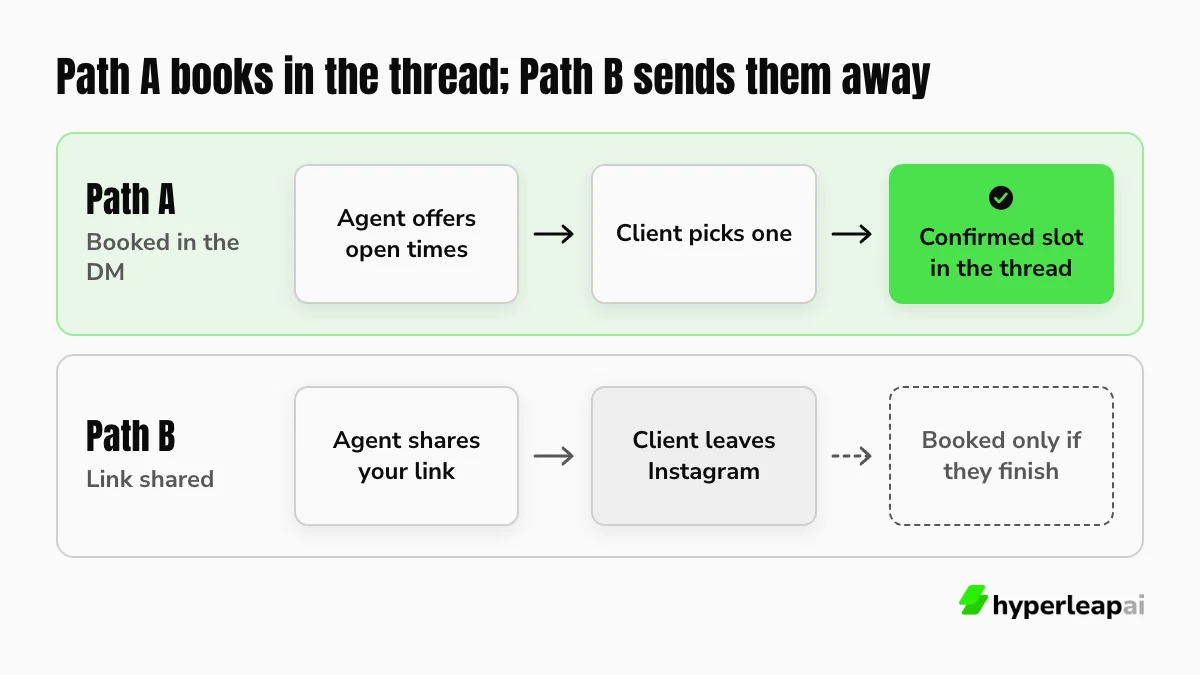
How the DM ends depends on your plan and your scheduler:
- Path A: on Pro or Max with Calendly or Cal.com, the agent offers real open times and books the appointment in the conversation.
- Path B: with any other booking tool, or outside Pro and Max, it shares your booking link.
| Path A: booked in the DM | Path B: link shared | |
|---|---|---|
| Who picks the time | The client, from open times the agent offers | The client, on your booking page |
| Where the booking is created | In Calendly or Cal.com, during the chat | In your booking tool, after the client taps the link |
| What the client sees | A confirmed slot in the same thread | A link, then your booking page |
| What you get emailed | Lead email and transcript, with the booking in your scheduler | Lead email and transcript; a booking exists only if they finish |
| Drop-off risk | They stay in Instagram | They leave Instagram to finish, and some won't |
Path B isn't a lesser setup. It's the right one if your salon software holds deposits, staff rotas and client history. We compare the trade-offs in booking links vs booking integrations.
A Worked DM: From "Anything Saturday?" to a Confirmed Slot
This example is illustrative. Studio Nine is a two-chair salon on Path A, with Cal.com connected and its price list uploaded as a PDF.
| # | Message | Where the answer came from |
|---|---|---|
| 1 | Client: do you have anything Saturday? need a cut + gloss | — |
| 2 | Agent: Hi, I'm Studio Nine's AI assistant. Yes, we're open Saturday 9am–5pm. Is your hair above or below the shoulders? Longer hair takes extra time. | Hours page; instructions (disclose, confirm the service) |
| 3 | Client: below | — |
| 4 | Agent: Thanks. A cut + gloss for long hair is $110 and takes about 90 minutes. Shall I look for a time? | Price list PDF |
| 5 | Client: yes, anything after 12? | — |
| 6 | Agent: On Saturday afternoon I can see 1:15pm or 3:45pm. Which suits you? | Live Cal.com availability |
| 7 | Client: 3:45 | — |
| 8 | Agent: Great. What name and email should I put the booking under? | Instructions |
| 9 | Client: Priya, priya@example.com | — |
| 10 | Agent: You're booked for a cut + gloss on Saturday at 3:45pm, Priya. If you need to change it, message here and a team member will help. | Cal.com booking; cancellation policy |
| 11 | Client: perfect thanks | — |
| 12 | Agent: See you Saturday! | — |
The conversation log shows the source of each answer, so you can check that the $110 came from your price list.
The Path B fork. At turn 6, the agent replies along these lines instead: "You can see Saturday availability and book here: [link]. Choose 'Cut + gloss (long)' and look at Saturday afternoon. If you get stuck, reply here and a team member will help." The booking only exists once Priya finishes on that page.
What happens next. You get a new-lead email and the transcript. On Path A, the booking is already in your scheduler.
A fitness variant. A yoga studio gets "can I try a class Saturday?". The agent explains the trial offer from your pricing page, offers the 9am or 11am class from Calendly, takes a name and email, and books it. For more on fitness enquiries, see turning fitness studio DMs into memberships.
Setup: What to Connect and What to Write Before Going Live
- Use an Instagram Professional account linked to a Facebook Page. It can be a business or creator account, as set out in Meta's Instagram Messaging overview.
- Connect Instagram in Hyperleap. See Hyperleap on Instagram DM for what the channel covers.
- Add your sources. Include services and prices, hours, your cancellation policy, and prep and aftercare notes. Hyperleap accepts PDF, .docx, .doc and .txt files, website URLs, plain text snippets and FAQs, up to 40MB per agent. Answers are grounded in those documents and designed to minimize hallucinations. Leave out your price list and expect vague price answers.
- Set up booking. Connect Calendly or Cal.com on Pro or Max, or paste your booking link.
- Write your instructions. Use the chatbot persona worksheet to set the tone and name, then add rules like these (illustrative):
- In your first reply, say you are Studio Nine's AI assistant.
- Always confirm the exact service (and hair length) before offering times.
- Do not book colour corrections, consultation-first treatments or tattoo
  sessions. Say a team member will follow up, and collect name and contact.
- For reschedules or cancellations, do not try to change anything. Say a
  team member will follow up, and ask for the name the booking is under.
- If you don't know an answer, say so and offer to pass it to the team.
Then decide who handles each type of request:
| Request type | Agent does | Goes to your team |
|---|---|---|
| New standard booking | Confirms the service and books (A) or shares the link (B) | — |
| Price question | Answers from your price list | — |
| Consult-first service (colour correction, injectables) | Collects name and contact | Consultation and booking |
| Deposit-required service (tattoo session) | Shares your deposit-taking booking link, or collects details | Design consult and deposit |
| Reschedule | Collects the booking name | Moves the appointment |
| Cancellation | Collects the booking name | Cancels it and applies your policy |
| Complaint | Acknowledges it and collects details | Follow-up |
| Medical question at a med spa | Routes to your team | Answer from a qualified person |
Med spas have more of these edge cases. See what an AI receptionist handles for a med spa.
Meta's Rules That Affect DM Booking
These rules come from Meta's Instagram Messaging overview and the Messenger Platform and IG Messaging API Policy.
- The 24-hour window. Automated replies are allowed for 24 hours after the person's last message, or 7 days after a Click-to-Direct ad. So the agent can't DM Priya a reminder on Friday for a slot she booked on Monday. Reminders have to come from your booking tool's own emails, so check those are switched on.
- The human escalation path. Meta requires apps using the Instagram Messaging API to give people a way to reach a human agent. On Pro and Max, your team can take over any conversation. The Human Agent tag gives a separate 7-day window for manual replies.
- The General folder. Replies sent through a third-party app move the thread to the General folder. Your DMs haven't vanished; look there.
- Message Requests. DMs from people who don't follow you arrive as Message Requests and aren't marked Seen until you accept them. Check that folder as part of your routine.
- Disclosure. Meta requires automated chats to disclose that they're automated where the law requires it. It recommends disclosing at the start of a conversation, after a lapse and when a human hands back to the bot. The instruction block above covers the first of these.
This is not legal or compliance advice; check the rules where you operate.
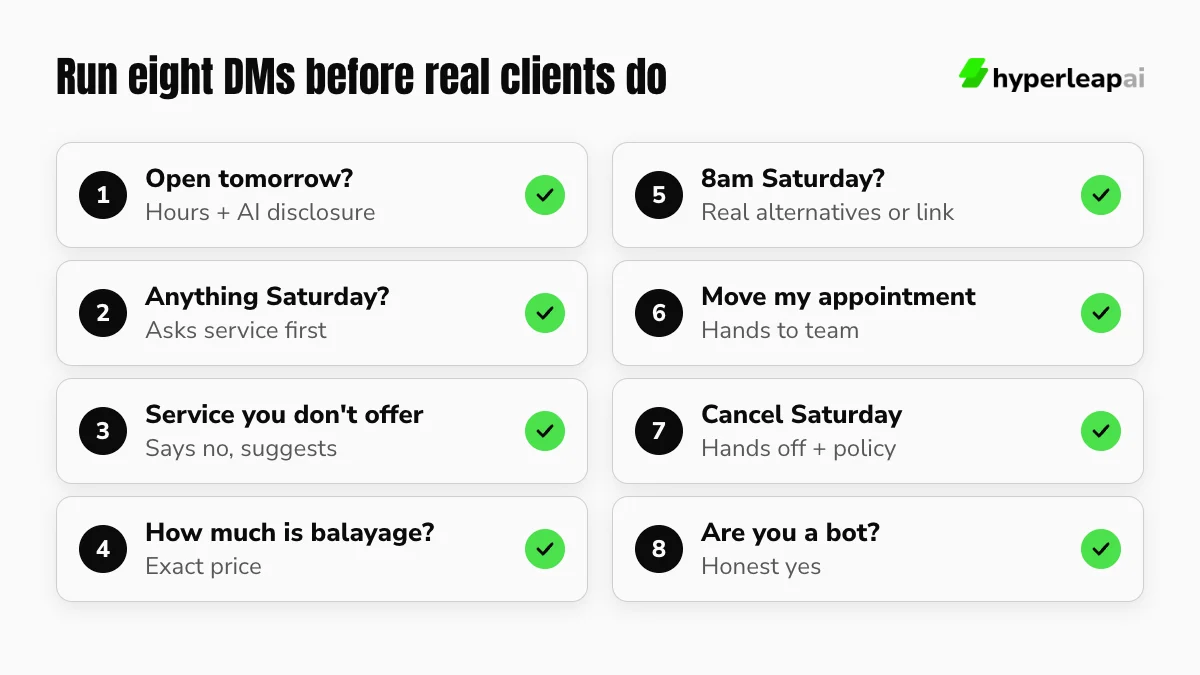
The 8-Message Test Script
Send these from a friend's account or a second Instagram account, not your business account. An account that doesn't follow you is best, because you also see how Message Requests behave.
| # | Send this | A pass looks like | If it fails, fix |
|---|---|---|---|
| 1 | hi are you open tomorrow? (send after closing) | Correct hours for tomorrow, plus disclosure that it's an AI | Add or update your hours source |
| 2 | anything Saturday? | Asks which service before offering times | Add the "confirm service first" rule |
| 3 | do you do eyelash extensions? (pick a service you don't offer) | Says no and suggests what you do offer | List your services clearly in one document |
| 4 | how much is balayage? | Your exact price, with any "from" wording | Upload the current price list |
| 5 | can I come at 8am Saturday? (pick a time you're closed or booked) | Says the time isn't available and offers real alternatives (A) or the link (B) | Check that the scheduler is connected and your hours match |
| 6 | I need to move my appointment | Hands to the team and asks for the booking name; doesn't try to move it | Add the reschedule rule |
| 7 | I need to cancel Saturday | Same as #6, and mentions your cancellation policy | Add the rule and the policy document |
| 8 | are you a bot? | An honest yes, plus how to reach a person | Add the disclosure and escalation rules |
After the test, check four things:
- On Path A, the booking landed in Calendly or Cal.com.
- The lead and transcript emails arrived.
- The thread sits in the General folder.
- The source shown for each answer is the right document.
For your website and other channels, use our 10-message booking test for every channel.
What the Agent Won't Do (and What to Use Instead)
- Reschedule or cancel. The booking feature creates new bookings only, so changes go to your team. Many clients may prefer that anyway: in Zenoti's 2025 survey, a salon software vendor's own research, 77% of salon regulars said calling is the easiest way to change an existing appointment.
- Take payments or deposits. Hyperleap doesn't process end-user payments. If a service needs a deposit, have the agent share your booking tool's link or route the DM to your team.
- Text, call or email clients. Hyperleap has no SMS, voice or email channel and no ticketing. A messaging platform such as respond.io may suit wider channel needs; check its current features.
- Send a DM reminder days later. Meta's 24-hour window rules this out.
- Book in the chat with Fresha, Vagaro, Square, Mindbody or Acuity. With these tools, it shares your link.
If your real problem is DMs piling up while your team works, see how to stop losing bookings when your stylists are busy.
For Developers
On Pro and Max, signed webhooks cover new leads, conversations, messages, AI replies and bookings. Every request carries an HMAC-SHA256 signature, so you can push bookings into another system you control. Actions (up to 10 per agent, on Pro and Max) let the agent call your own API mid-conversation to look something up or submit data.
What It Costs
In-DM booking with Calendly or Cal.com and live takeover need Pro ($100/mo, 12,000 replies) or Max ($200/mo, 30,000 replies). Plus starts at $40/mo. Every plan has a 7-day free trial, a card is required, and there's no free plan. One AI reply = one response. No model-credit math.
Managed setup is an optional add-on, listed at $299 and currently shown as "Free right now". It isn't included in any plan.
If most of your DMs are the same few booking questions, start a Pro trial and run the 8-message script from a friend's account before you switch it on for real clients.
Frequently Asked Questions
Can an AI agent book appointments directly inside an Instagram DM?
With Hyperleap on the Pro or Max plan and Calendly or Cal.com connected, the agent offers real open times and books the appointment in the conversation. With any other booking tool, or outside Pro and Max, it shares your booking link and the client finishes on your booking page.
Does it work with Fresha, Vagaro, Square, Mindbody or Acuity?
It doesn't book in the chat with these tools. It shares your booking link instead. That can still be the right setup if your salon software holds deposits, staff rotas and client history.
Can the agent reschedule or cancel an Instagram booking?
No. The booking feature creates new bookings only. For reschedules and cancellations, the agent collects the name the booking is under and hands the request to your team.
Can the agent send appointment reminders by Instagram DM?
Usually not. Meta allows automated replies for 24 hours after the person's last message, or 7 days after a Click-to-Direct ad. Reminders days later need to come from your booking tool's own emails.
How should I test an Instagram DM booking agent before going live?
Send the 8 test messages from a friend's account or a second account that doesn't follow you. Then check that the booking landed in your scheduler (on Path A), that the lead and transcript emails arrived, that the thread is in the General folder and that each answer shows the right source document.