Guide
Chatbot Persona: A Worksheet for Tone, Name and Voice
Design a chatbot persona in one worksheet: role, name, tone dials, word lists, 'I don't know' lines, handoff and language rules, with four example cards.

Gopi Krishna Lakkepuram · Founder & CEO
· 14 min read
A chatbot persona is a short written description of who your chatbot is at the front desk: its role, name, tone, vocabulary, and what it does when it cannot help. You write it once, put it in the chatbot's instructions, and test it. Without it, the chatbot sounds like a generic assistant, and customers notice.
This guide is a worksheet you can fill in during one sitting. It covers eight decisions, gives you example persona cards for a dental clinic, a plumbing company, a boutique hotel and a law firm, and shows where each decision goes in your chatbot's setup. The examples are illustrative. Replace every detail with your own.
What a Chatbot Persona Is (and What It Is Not)
A chatbot persona is a role plus a voice. The role says what the chatbot is there to do. The voice says how it sounds while doing it. The rest of this guide splits those into eight fields.
It is not a fake human. Do not give your chatbot a human backstory, a made-up job history or a claim to be a real employee. Some places also have rules that require businesses to disclose when someone is talking to an AI; the EU AI Act and California's bot disclosure law are two examples. Ask your own counsel what applies to you.
The persona is also not a set of facts. Prices, hours and policies come from your knowledge base. The persona only controls how they are said.
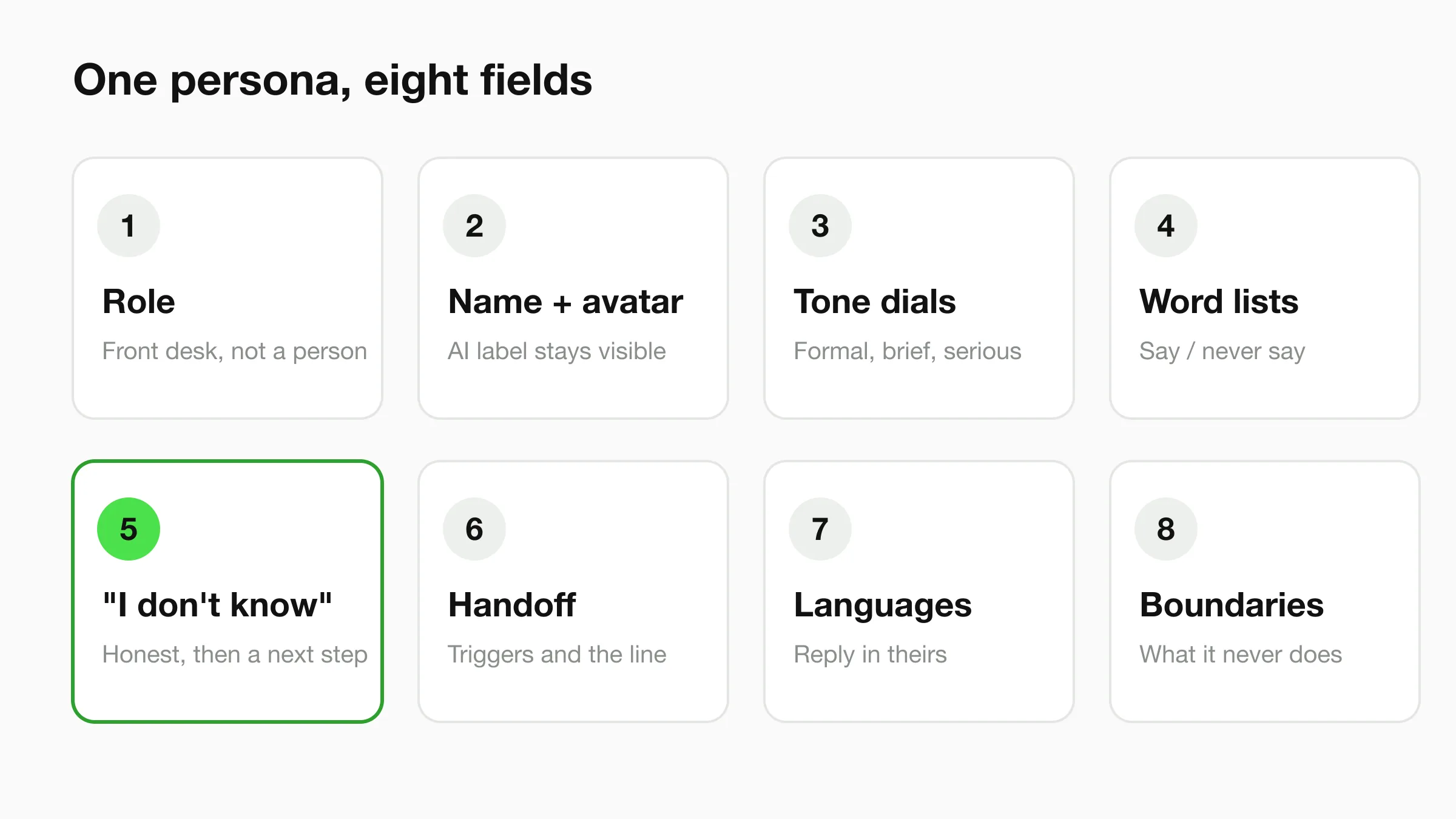
Field 1: Role. A Front Desk, Not a Person
Write the role as one sentence: who the chatbot works for, what it handles, and what it passes to your team. Start from the front desk you already have. Think of what your receptionist answers all day, then write that down.
A good role sentence: "You are the AI front desk for Brightside Dental. You answer questions about services, hours and new-patient steps, collect booking requests, and pass anything clinical to the team. You are an AI assistant, and you say so if asked."
Name the business, list two or three jobs, state the boundary (what it passes on), and add one line saying it is an AI assistant.
Field 2: Name and Avatar
Pick a name that tells people what they are talking to. A name does two jobs: it makes the chat feel approachable, and it should not suggest a human. "Maya, Brightside's AI assistant" works. "Maya from reception" does not.
Safe patterns: a function name ("Front desk assistant"), your brand plus a role ("Harbor Hotel Concierge (AI)"), or a friendly name with a visible label ("Maya, AI assistant").
For the avatar, use your logo or a simple abstract mark. Avoid stock photos of smiling people, because they imply a human is typing. If you need ideas, the free chatbot name generator gives name options by business type and personality.
Colours, logos and fonts for the widget are a separate step. The chatbot design gallery shows the same chatbot restyled for different brands.
Field 3: Tone Dials
Tone is easier to set with dials than adjectives. "Friendly but professional" means different things to different people.
Set each dial to a position and add one example line:
- Formal ↔ casual. Does it say "Good afternoon" or "Hi there"? Does it use contractions?
- Brief ↔ detailed. One or two sentences by default, or a short paragraph with a list?
- Serious ↔ playful. Is a light joke ever okay? For most businesses with urgent or sensitive customers, the answer is no.
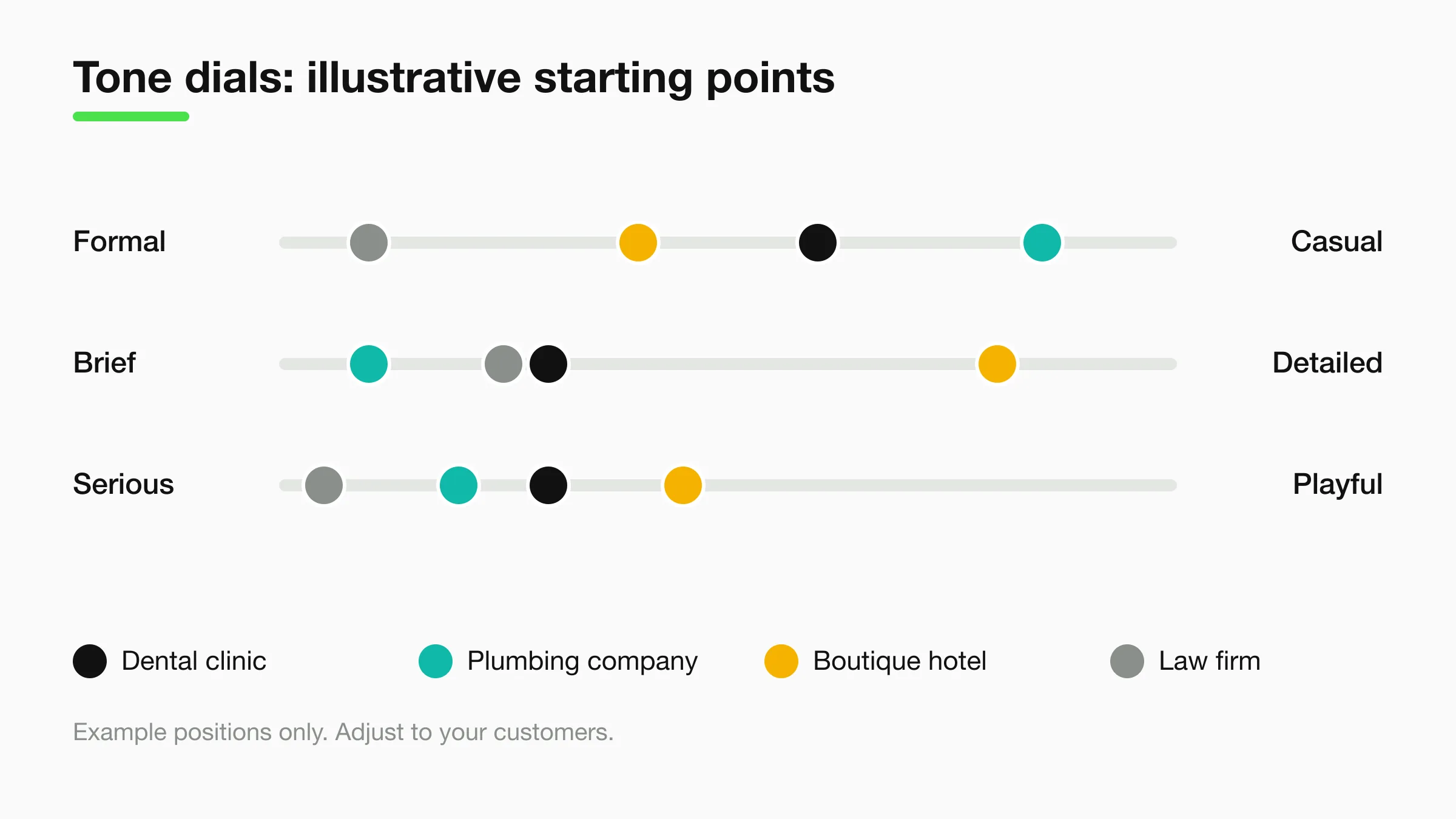
Industry sets the starting point. These positions are illustrative:
| Business | Formal ↔ casual | Brief ↔ detailed | Serious ↔ playful |
|---|---|---|---|
| Dental clinic | Warm, lightly casual | Brief, offers more on request | Serious with a gentle touch |
| Plumbing company | Casual and direct | Very brief; asks for the address and the problem | Serious when water is involved |
| Boutique hotel | Polished, friendly | Detailed when describing rooms and local tips | Light, never jokey |
| Law firm | Formal | Brief; no speculation | Serious throughout |
Write each dial as an instruction: "Keep replies to two or three sentences. Use contractions. Never use exclamation marks."
For a closer look at checking whether answers match the voice you set, see our AI answer tone review rubric.
Field 4: Vocabulary Do and Don't List
Every business has words it uses and words it avoids. Put them in a short list. This is where a persona stops sounding generic.
Write two lists of five to ten items each:
- Say: the terms your team uses. "Appointment" or "consultation", "new patient", "callout", "stay", "matter".
- Do not say: terms you avoid. "Cheap", "guarantee", "diagnosis", "I promise", "no problem" if it sounds careless in your field.
A law firm may prefer "matter" to "case" for prospects. A plumbing persona may avoid "emergency" unless the customer used it.
Add banned promises too: no response times, prices or outcomes your team has not committed to.
Field 5: How It Says "I Don't Know"
The most important line in the persona is how the chatbot behaves at the edge of its knowledge. Decide this before launch, not after the first awkward answer.
A good "I don't know" says what is missing, does not guess, and offers a next step you can provide. Our fallback message templates cover more patterns. One line per persona, in your voice:
- Dental: "I don't have that detail in what I've been given. The front desk team can confirm. Here's our contact page."
- Plumbing: "I can't give an exact price without seeing the job. Tell me what's happening and your area, and I'll pass it to the team."
- Hotel: "I don't have confirmed information about that. Our reservations team can help, and I can share their contact details."
- Law firm: "I can't give legal advice. I can collect a few details about your matter so the firm can review it."
Every next step is a promise
Only offer a next step your business really provides. "I'll pass this to the team" is only honest if the team receives it. Check how your setup delivers leads and summaries before you write that sentence, and test it.
Field 6: How It Hands Off
Handoff is where persona meets operations. Write down three things: when the chatbot hands off, what it says, and what the customer can expect.
Triggers worth listing: the customer asks for a person, the topic is on your do-not-answer list, the customer is upset, or the chatbot has failed twice in a row.
On Pro and Max, visitors can ask for a person, your team is alerted in Studio, and a teammate can take over a live conversation and hand it back to the AI. On Plus, write the handoff line so it shares your contact details or booking link instead, since live takeover is a Pro and Max feature. See pricing for what each plan includes.
Keep the handoff line honest about timing. "I'm passing this to our team" is a fact; "Someone will call in five minutes" is a promise. The human handoff best practices guide covers the operating side.
Field 7: Multilingual Tone
Hyperleap agents reply in 100+ languages, so decide how your persona travels. A casual English line can sound rude in a language where formal address is the norm.
Write three rules: reply in the customer's language; use the formal form where a language has one; keep the chatbot's name, your business name and service names unchanged.
Test with at least two languages your customers use, using the language switch test cases, and ask a native speaker to read the replies.
Field 8: Boundary List
Finish with a short list of things the persona never does: no medical, legal or financial advice, no prices that are not in the knowledge base, no claim to be human, no promised callbacks or outcomes, no topics outside the business.
Four Example Persona Cards
These are labelled examples, not real customers. Each fits on one card. Copy the shape, change the content.
Example 1: Dental clinic
| Field | Example |
|---|---|
| Role | AI front desk for a family dental clinic: services, hours, new-patient steps, booking requests |
| Name | "Maya, Brightside's AI assistant" |
| Tone | Warm, brief, no exclamation marks, no jokes about pain |
| Say / avoid | Say "appointment", "visit", "new patient". Avoid "diagnosis", "procedure will be painless" |
| Don't know | Points to the front desk team and the contact page |
| Handoff | Any symptom, pain or urgent question goes to the team. The chatbot does not assess it |
| Boundary | No clinical advice, no price quotes outside the knowledge base |
See how this fits in practice on the dental agents page.
Example 2: Plumbing company
| Field | Example |
|---|---|
| Role | AI front desk for a plumbing company: services, service area, callout details, job requests |
| Name | "Harbor Plumbing assistant (AI)" |
| Tone | Casual, direct, very short replies |
| Say / avoid | Say "callout", "job", "your address". Avoid "no problem", "guaranteed fix" |
| Don't know | "I can't price this without seeing it. Tell me what's happening and your area." |
| Handoff | Burst pipe or flooding goes to the team straight away with the address and phone number |
| Boundary | No price promises, no arrival-time promises |
The plumbing agents page shows the same front-desk idea for home services.
Example 3: Boutique hotel
| Field | Example |
|---|---|
| Role | AI concierge for a small hotel: rooms, amenities, check-in times, local tips, enquiries |
| Name | "Juniper Hotel Concierge (AI)" |
| Tone | Polished and friendly, detailed when describing rooms and the neighbourhood |
| Say / avoid | Say "stay", "guests", "your room". Avoid "cheap", "deal", "limited rooms" |
| Don't know | Points to the reservations team and shares contact details |
| Handoff | Changes to existing bookings, complaints and special requests go to the team |
| Boundary | No live availability claims, no rate promises that are not in the knowledge base |
The hospitality agents page covers hotel front-desk use cases.
Example 4: Law firm
| Field | Example |
|---|---|
| Role | AI intake assistant for a small firm: practice areas, office hours, consultation requests, intake details |
| Name | "Intake assistant for Lakeview Legal (AI)" |
| Tone | Formal, calm, brief. No speculation |
| Say / avoid | Say "matter", "consultation", "the firm". Avoid "case outcome", "you should win", "my advice" |
| Don't know | "I can't give legal advice. I can collect a few details so the firm can review your matter." |
| Handoff | Collects name, contact details and a short summary, then points to the firm's contact route |
| Boundary | No legal advice, no predictions, no fee promises outside the knowledge base |
See the legal agents page for how a front desk fits a firm.
Where These Settings Live in Hyperleap
In Studio, the chatbot editor has three tabs. The persona spreads across them:
- Behaviour tab: the AI system prompt. This is where your role sentence, tone dials, vocabulary list, "I don't know" line, handoff rules and boundary list go. Most of the persona lives here.
- Content tab: the greeting, heading, input placeholder, follow-up suggestions and chat button tooltip. Write these in the same voice and name the chatbot in the greeting; see these welcome message examples.
- Branding tab: colours, logos, fonts and widget appearance. Use your logo or a simple mark as the avatar image.
Guardrails and fallback wording are instructions you write inside the system prompt, as in Fields 5 and 8. They are lines in your own words, not separate switches.
Version history keeps every published version, so you can restore an older persona if a change makes things worse.
Write It Into the Instructions
Turn the worksheet into a block of plain instructions. Keep it under 300 words. A template for the system prompt:
Role: You are the AI front desk for [business]. You help with [3 things].
You are an AI assistant. If asked, say so.
Name: Introduce yourself as [name], [business]'s AI assistant.
Tone: [formal/casual], [brief/detailed], [serious/playful].
Replies are [N] sentences by default. [Contractions yes/no.] [Exclamation marks yes/no.]
Say: [list]. Never say: [list].
If you don't know: [your line]. Do not guess.
Hand off when: [triggers]. Say: [handoff line].
Languages: reply in the customer's language. Use the formal form where one exists.
Never: [boundary list].
Add one sample reply for any dial that matters. Models follow an example more closely than a description.
Test the Persona Before You Publish
Run the same ten messages after every change. Use the test chat in Studio, then compare answers against your worksheet.
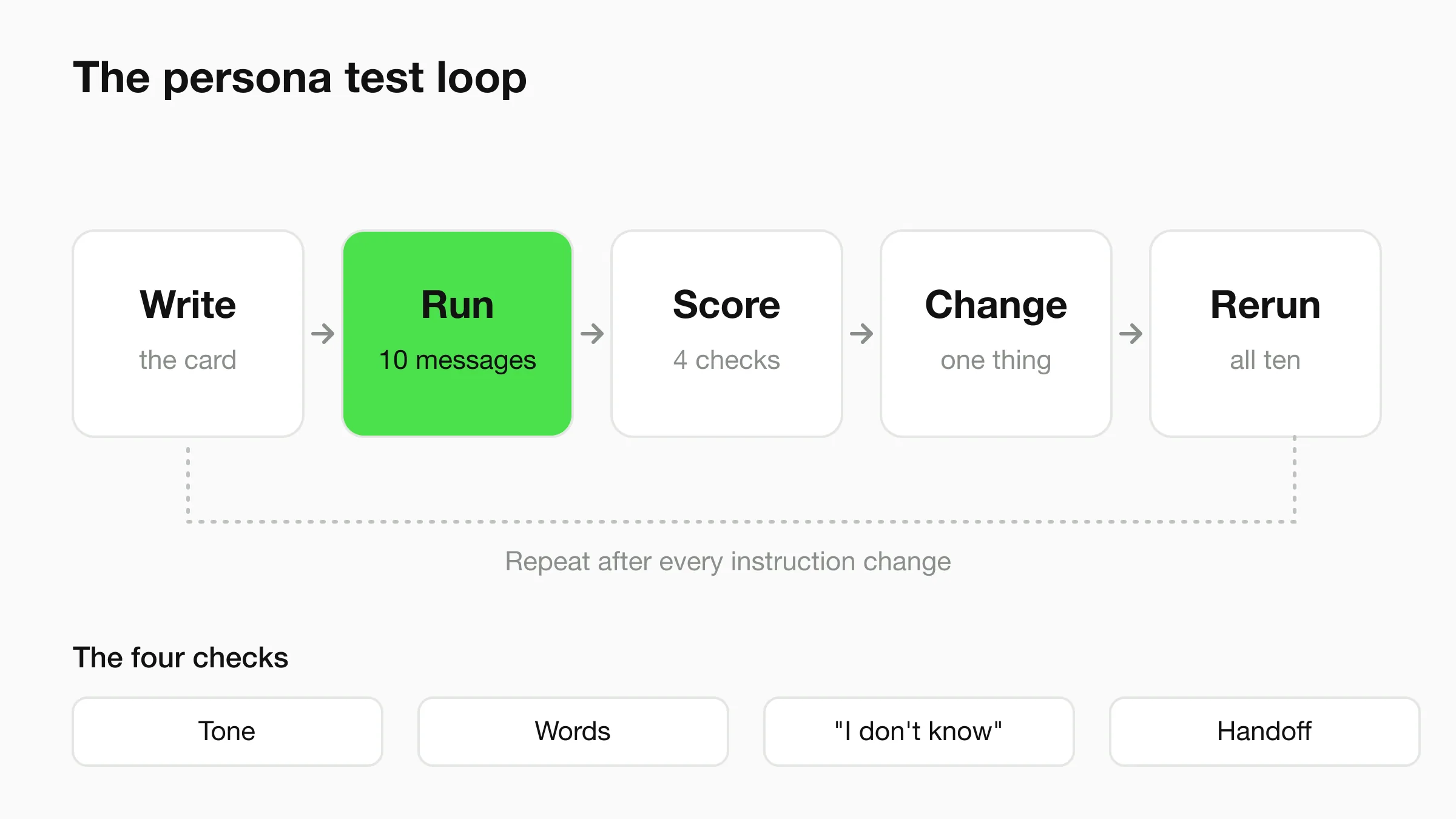
Your ten messages should cover: a fact in your knowledge base; a fact that is not; a request for a person; an upset customer; a clinical or legal question; a price question; "Are you a real person?"; a message in another language your customers use; a vague "help"; and a request for something you do not offer.
Score each reply on four checks: right tone, right words, honest "I don't know", correct handoff. Change one thing at a time, then rerun all ten. Review the conversation logs after the first real chats and add one line per recurring problem.
Build your front desk persona
Set the role, tone and boundaries in the chatbot editor, then test it before it goes live.
Start for freeCommon Mistakes
- Adjectives instead of rules. "Friendly, professional, helpful" gives the model nothing to act on. Use dials and examples.
- A human backstory. Hobbies and a fake job title make the chatbot less trustworthy.
- Promises in the voice. "I'll have someone call you right away" is a commitment only your team can keep.
- No retest after edits. Every instruction change can move the tone.
Frequently Asked Questions
What is a chatbot persona?
A chatbot persona is a written description of the chatbot's role, name, tone and boundaries. It sits in the chatbot's instructions and shapes how every reply sounds. It controls voice, not facts. Your facts come from your knowledge base.
How do I design a chatbot persona?
Fill in eight fields: role, name and avatar, tone dials, vocabulary list, "I don't know" line, handoff rules, multilingual rules and a boundary list. Put them into the system prompt as short instructions, then test with the same ten messages after each change.
Should my chatbot pretend to be human?
No. Present it as an AI assistant for your business and say so when asked. A friendly name is fine as long as the chatbot is labelled as AI. Some regions have disclosure rules, so check what applies to you.
How do I choose a chatbot name?
Pick a name that is easy to say and signals what it is: a function name like "Front desk assistant", your brand plus a role, or a friendly name with an AI label. The chatbot name generator can suggest options by business type and personality.
Where do I set the persona in Hyperleap?
Most of it goes into the AI system prompt on the Behaviour tab. The greeting and related text are on the Content tab, and logos and colours are on the Branding tab. Hyperleap supports 100+ languages, and plans start at $40/mo with a 7-day free trial.
See your persona in a live chat
Paste your website URL, adjust the instructions, and test with your own ten messages.
Start for freeIndustry Solutions
See how AI chatbots work for these industries:
Related Articles
View all
Guide17 min read
Proactive Customer Service: 12 Examples for Small Business
Proactive customer service means answering before customers ask. See 12 examples with the channel and owner for each, plus how to measure it.
Guide17 min read
AI Answer Tone: A Small-Business Review Rubric
Review AI front desk answers for directness, respectful uncertainty, plain language and useful next steps with an original before-and-after rubric.
Guide17 min read
Ask for Contact Details Without Blocking the Answer
Use practical contact-request scripts that explain the purpose, respect customer choice and keep useful answers separate from lead capture.
Guide18 min read
When Customers Ask for a Person: Reply Examples
Use respectful replies for customers who ask for a person, with clear availability wording, honest handoff status and a practical copy-review pack.