Guide
Proactive Customer Service: 12 Examples for Small Business
Proactive customer service means answering before customers ask. See 12 examples with the channel and owner for each, plus how to measure it.

Gopi Krishna Lakkepuram · Founder & CEO
· 17 min read
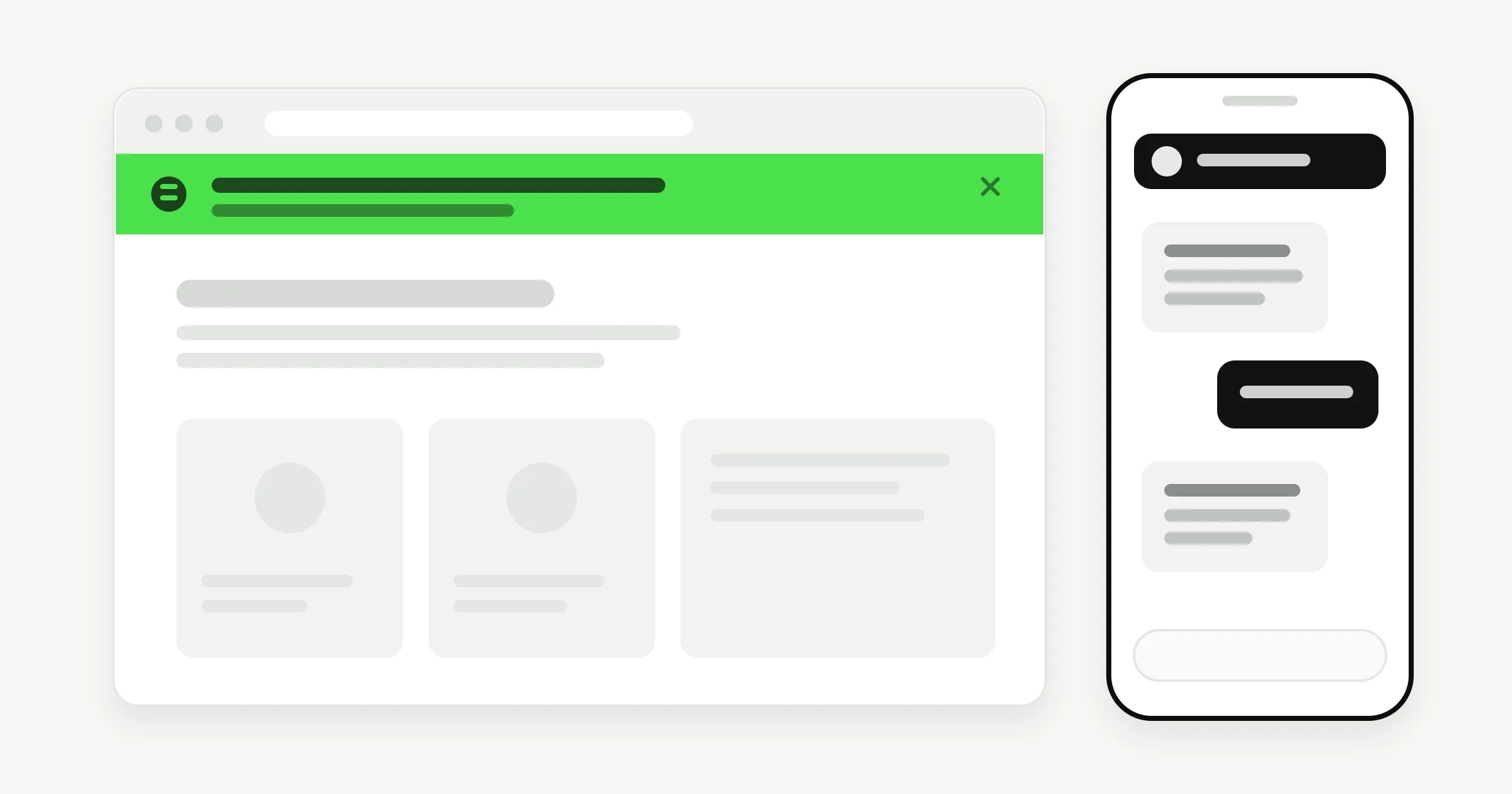
Proactive customer service means giving customers the information they need before they have to ask for it. A plumber texts that the technician is running 40 minutes late. A clinic's confirmation tells patients what to bring. A shop puts the shipping delay on the product page the morning it starts.
Most small businesses already do a little of this by accident. This guide makes it deliberate. It gives you a plain definition, a table of proactive versus reactive customer service, 12 proactive customer service examples with the channel and the owner for each, a way to find which topics deserve your effort, and a short list of numbers to track.
What Is Proactive Customer Service?
Proactive customer service is any step a business takes to answer a question, warn about a problem or confirm a next step before the customer has asked. The customer does not have to notice something is wrong, find your contact details and wait for a reply. The answer is already where they are looking.
It takes three forms:
- Publish. Put the answer where people look: a page, a banner, a greeting, a confirmation message.
- Notify. Tell the people affected, at the moment something changes: a delay, a closure, a new price.
- Follow up. Check in after a purchase or visit, and tell people who reported a problem that it is fixed.
Proactive does not mean more messages. It means fewer, better-timed ones that remove a reason to contact you. A notice that makes people write back with three new questions has failed, and the research below shows that is a common failure.
Proactive vs Reactive Customer Service
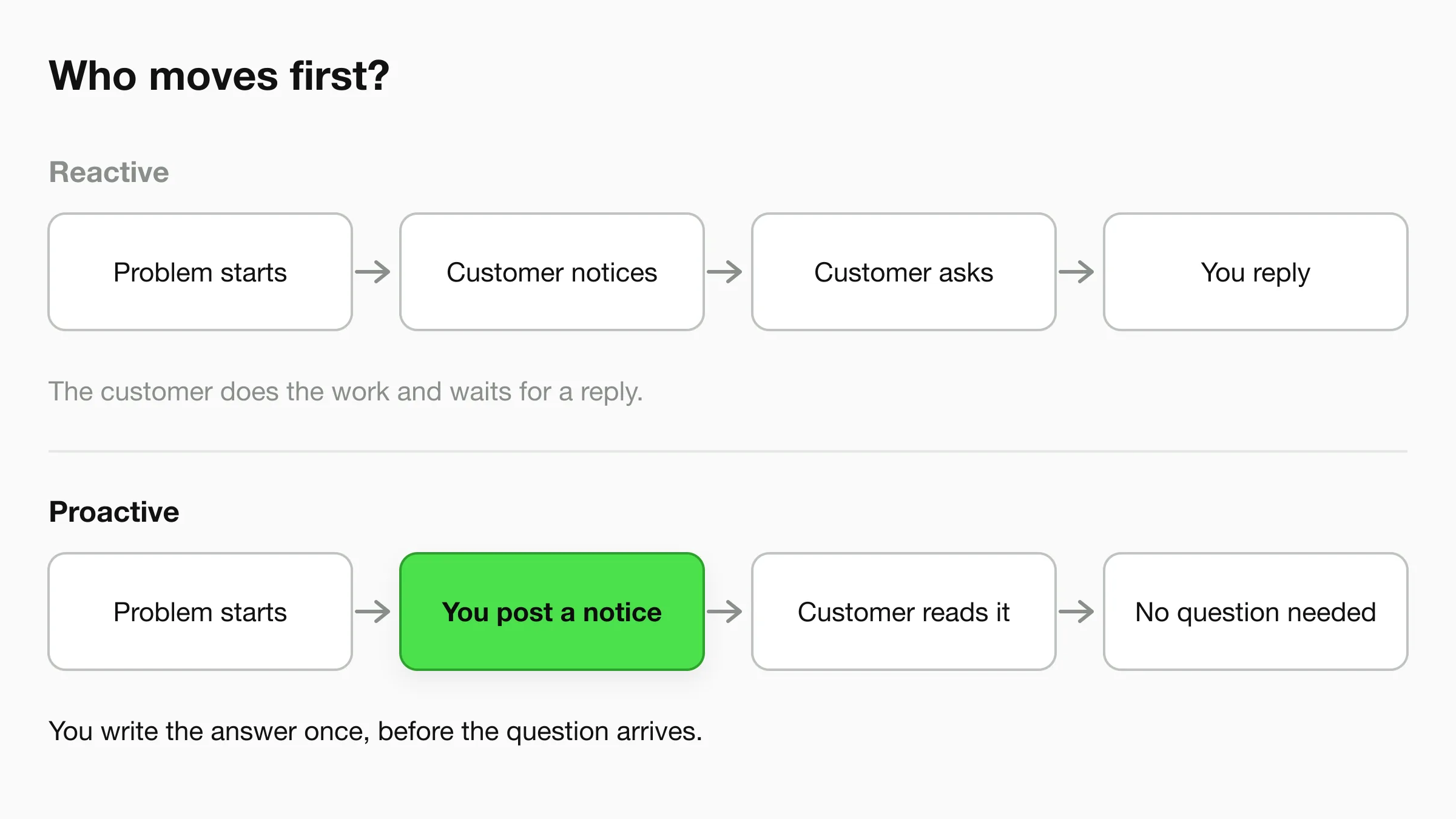
Reactive customer service starts when the customer contacts you. Proactive customer service starts when you see the question coming. Both are needed. Reactive support is how you handle the questions nobody predicted. Proactive support removes the ones you could have predicted.
| Reactive | Proactive | |
|---|---|---|
| Who starts it | The customer | You |
| Trigger | A question, complaint or request | A change, a pattern or a date you can see coming |
| Where the answer lives | In a reply to one person | On a page, banner, greeting or message sent to many |
| Typical channels | Inbox, chat, phone, direct messages | Website, confirmations, chat greeting, email, your usual messaging tool |
| What it costs you | A reply every time the question comes up | One write-up, then upkeep |
| Main risk | Customers wait, or give up | Notices that are vague, badly timed or too frequent |
| What to track | Reply speed, resolved conversations | Repeat questions per topic, follow-up contacts after a notice |
A good AI front desk is mostly a reactive tool: it answers whoever starts a conversation, at any hour. Proactive work happens around it, in the content you publish and the notices you send. The two reinforce each other, because every question the front desk keeps answering is a candidate for something proactive.
What the research says about proactive outreach
Gartner surveyed more than 4,800 customers in November and December 2021. As reported by CX Today, about two-thirds of customers contacted customer service after receiving a proactive notification, often to ask for more detail or confirmation. Gartner's Eric Keller said outreach that raises unanswered questions erodes the benefit. Write every notice so it answers the obvious next question: what happened, what it means for me, what happens next, and who to contact.
12 Proactive Customer Service Examples for Small Businesses
The examples below run roughly from least effort to most. Each one names the channel it runs on and the person who should own it. An owner matters: a proactive step with no owner is stale within a month. The first six cost almost nothing, and most small businesses can have them running within a week.
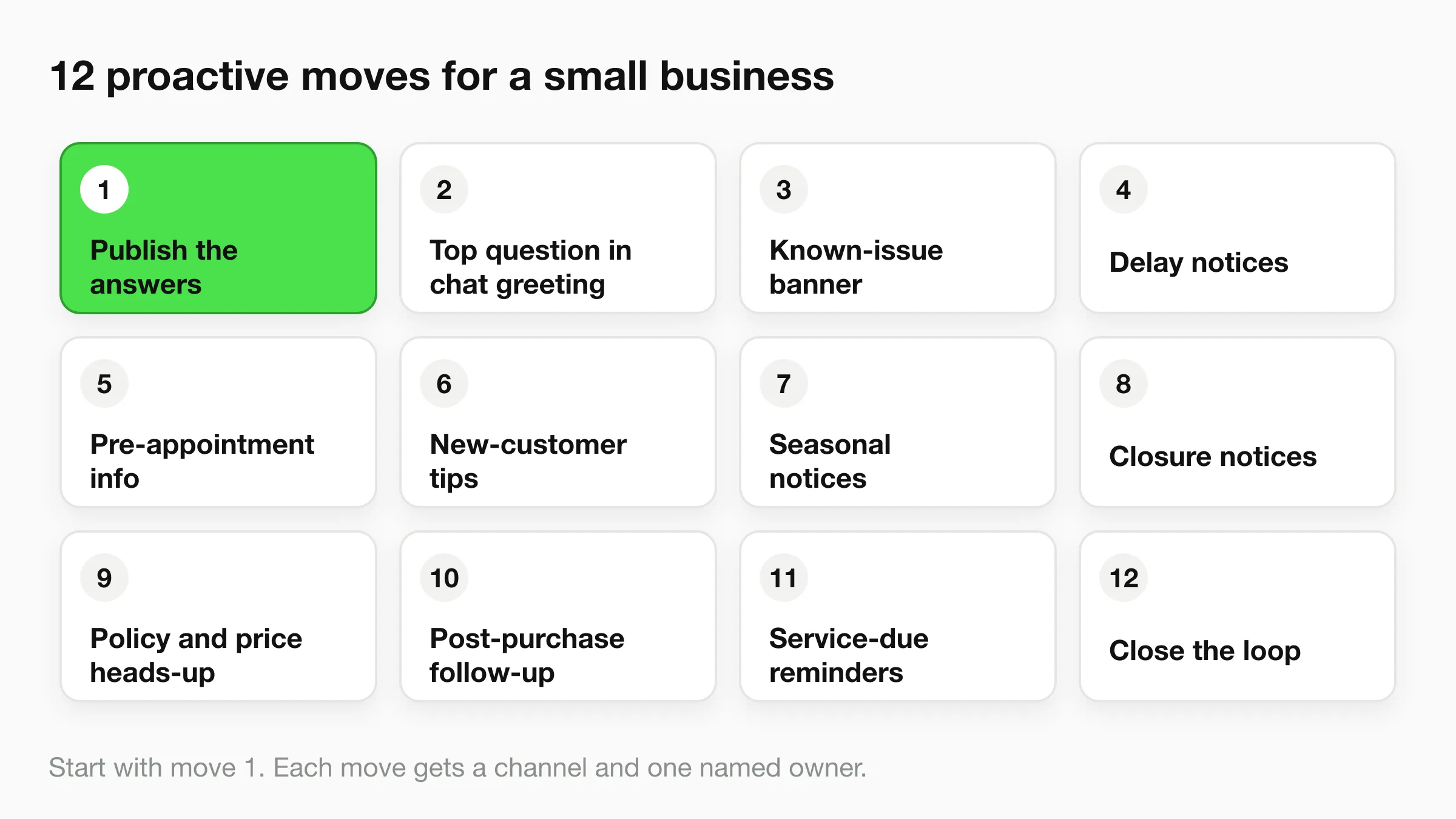
1. Publish the answers before people ask
Take the five questions you answer most often and put each one on a page: hours, pricing, how long things take, what is included, how to cancel. Link the page from the footer and from your confirmation messages. A salon that lists its cancellation window on the booking page stops fielding "what if I need to move it?" messages.
- Channel: Website, Google Business Profile, your chat knowledge.
- Owner: Whoever answers the most emails or messages. They know the questions best.
2. Put today's top question in your chat greeting
If one question dominates this week, address it in the first thing a visitor sees. A hotel the week before a local event can open its chat greeting with "Planning a stay during the festival? Ask about check-in times and parking." Update it when the topic changes. Our guide to welcome message examples covers wording in detail, so we won't repeat it here.
- Channel: Website chat greeting, conversation starters, chat button tooltip.
- Owner: The person who manages your website or chat setup. Review it weekly.
3. Add a known-issue banner
When something on your site or in your service is broken or slow, say so at the top of the page. A shop with a payment-page glitch can add one line: "Checkout is slow today. Orders are saved and we are fixing it." One banner saves dozens of "is your site down?" messages. Remove it as soon as the problem is fixed, or customers stop believing your banners.
- Channel: Site-wide banner, the top of your chat knowledge.
- Owner: Whoever deploys or fixes the issue, so the banner goes up when the problem is found.
4. Send delay and status notices
Lateness is forgivable. Silence is not. If a home-services technician will arrive after the promised window, a short message with a new time stops the "where are you?" call. The same goes for an order stuck in a warehouse or a quote that will take two more days.
- Channel: Email or your usual messaging tool. Send it from your own accounts.
- Owner: The dispatcher, store manager or whoever first learns about the delay.
5. Give pre-appointment information
Most appointment questions have predictable answers: where to park, what to bring, how long it will take, what to do beforehand. A dental clinic can put "bring your insurance card and arrive ten minutes early" in the booking confirmation. Put the details in the confirmation, not in a separate message nobody opens. For clinics, keep this to logistics and general preparation, and route anything clinical to staff.
- Channel: Booking confirmation, calendar invite description.
- Owner: Front desk lead.
6. Send new-customer onboarding tips
The first week with a new client generates the most questions. A gym or tutoring service can send two or three short messages that week: how to book, where to find the schedule, who to contact.
- Channel: Email, welcome page.
- Owner: Whoever runs customer onboarding. In a small team, that is usually the owner.
7. Announce seasonal and holiday changes early
Holiday hours, busy-season lead times and cutoff dates produce a wave of identical questions. Tell people two to three weeks ahead, repeat it a few days before, and update your chat knowledge on the same day as your website. For a source sheet and escalation plan, see our holiday hours playbook.
- Channel: Website, Google Business Profile, chat knowledge, email.
- Owner: The manager who sets the schedule.
8. Announce closures and emergencies the same hour
A burst pipe, a power cut or bad weather can close you without warning. Customers who turn up to a locked door remember it. Post the closure on your website banner and Google Business Profile, and message anyone with a booking that day.
- Channel: Website banner, Google Business Profile, email or your messaging tool for booked customers.
- Owner: The on-duty manager, with a named backup.
9. Warn people before a policy or price change
Price rises, new cancellation fees and changed hours land badly when customers learn about them at the till. Give notice, explain the reason in one sentence and say what stays the same. Update the page and chat knowledge before the notice goes out, so the first customer who asks gets a consistent answer.
- Channel: Email, website, in-person notice, chat knowledge.
- Owner: The business owner.
10. Follow up after a purchase or service
A short check-in after a visit catches problems while they are small. A cleaning company can ask the next day whether anything was missed. A shop can send care instructions with delivery. Ask one question, and have someone read the replies.
- Channel: Email or your usual messaging tool.
- Owner: Customer service lead or the person who delivered the service.
11. Remind customers when service is due
Some customers need a nudge: an annual HVAC check, a six-month dental recall, a warranty ending, a membership renewing. Send the reminder with the next step attached, such as a booking link, so they can act in one tap.
- Channel: Email, your booking or CRM tool.
- Owner: Whoever manages the customer list.
12. Close the loop on problems you fixed
When customers report something and you fix it, tell them. Go back through recent conversations, find the people who raised the issue and send a short note: "You told us the size guide was wrong. We have corrected it." It costs a few minutes and turns a complaint into proof that you listen.
- Channel: Email or the same channel where they raised it.
- Owner: The person who reviews conversations weekly.
Answer the repeat questions automatically
Hyperleap AI answers incoming questions from your own content on your website, WhatsApp, Instagram DM and Facebook Messenger, so your proactive pages and notices work harder.
Start for freeHow to Find What to Be Proactive About
Start with the questions customers already ask. Your repeated questions show where a page, banner or message would remove the most work. The method takes an afternoon.
- Collect 30 days of questions. Pull them from your inbox, chat logs, voicemail notes and review complaints.
- Sort them by topic. Use broad labels: hours, delivery, pricing, booking, returns, access. Ten or fewer.
- Count each topic. Rough tallies are fine.
- Ask one question per topic: could we have told them earlier? If yes, it is a proactive candidate. If it was a one-off or needs judgment, leave it reactive.
- Pick the top three. Fix those first, then recount next month.
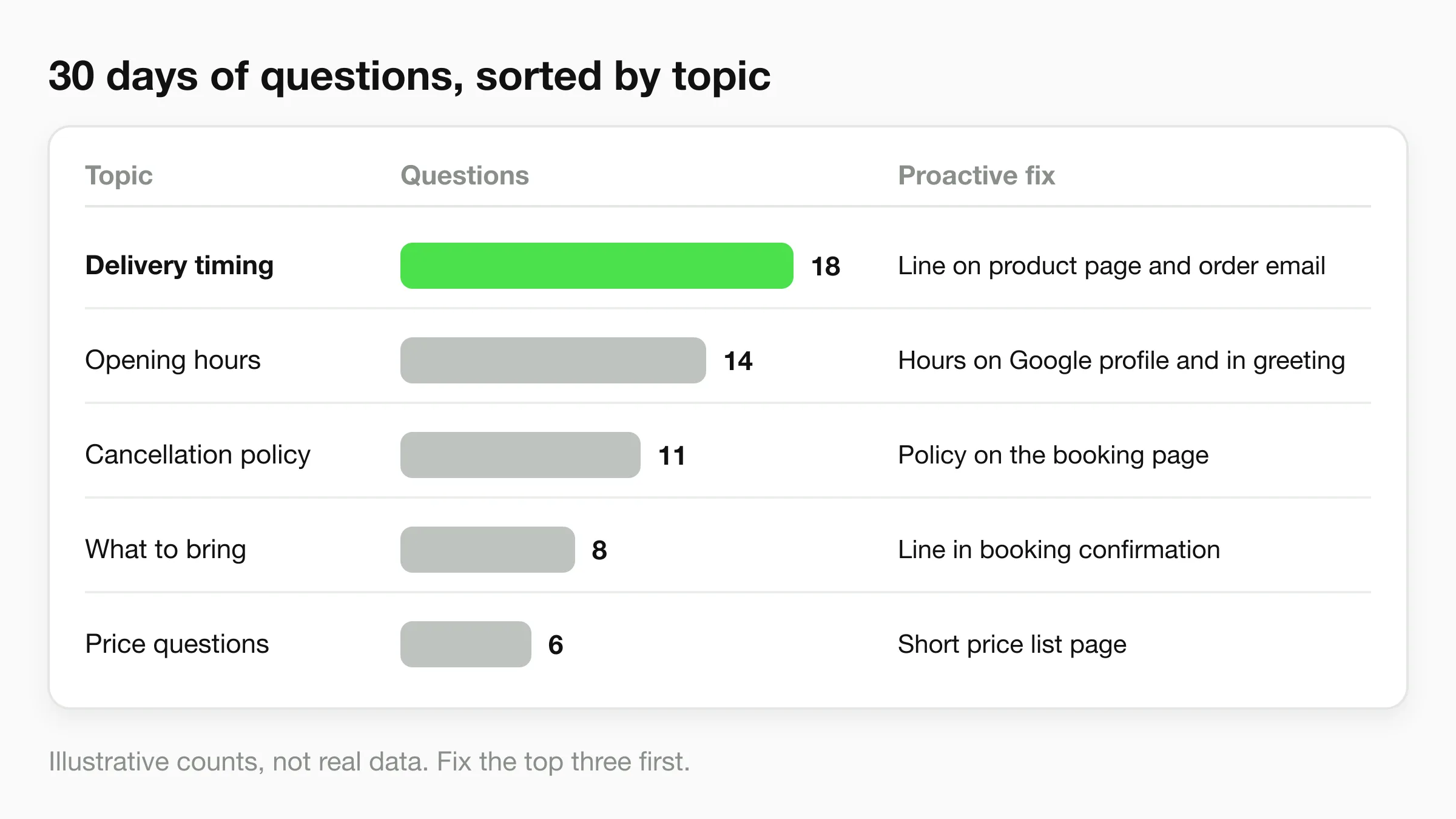
If a delivery-time question tops your list, a line on the product page and in the order confirmation may remove most of it. If "what should I bring?" tops it, the fix is in the booking confirmation.
Use your conversation logs
If an AI front desk handles your incoming conversations, it is already collecting the data. In Hyperleap Studio the unified inbox puts conversations from your website, WhatsApp, Instagram DM and Messenger in one place. Each conversation log shows which of your attached sources an answer drew on. A question answered from a long policy PDF suggests the answer deserves its own short page. A question with no good source tells you what to write next. For more on reading transcripts, see what conversation analysis shows about AI chatbots.
You can also ask an assistant. Hyperleap's MCP connection lets Claude or ChatGPT read your leads and conversations, and it is included on every paid plan. It is read-only, so it cannot change anything. Ask it something like "What questions came up most in the last 30 days?" and treat the answer as a starting list. Check it against the logs before you act on it. The same method works with an exported spreadsheet if you prefer.
Check your knowledge base after each fix
Every banner, policy change or moved date is a second place for the answer to go stale. Update your chat knowledge the same day, so a customer who reads the banner and then asks your chat gets the same answer. Our guide to knowledge base best practices covers keeping sources current.
What Hyperleap Does and Does Not Do for Proactive Service
Hyperleap answers conversations that customers start. It does not send outbound or broadcast messages. It does not send reminders, delay notices or follow-ups to your customer list, and it does not message customers on its own initiative. Use your email tool, booking tool or messaging app for moves 4, 10 and 11.
What it does support:
- Greeting and starters (move 2). In the chatbot editor you can write the greeting, heading and input placeholder, add conversation starters and a tooltip on the chat button, and turn on AI follow-up suggestions, which are clickable next-step options in the chat. AI follow-up suggestions can use responses from your plan when switched on.
- Current answers (moves 1, 3, 7, 9). Your agent answers from the documents and pages you attach. Version history keeps every published version, with draft, test and publish steps, so you can update a policy and review it before customers see it.
- Team alerts after conversations (move 12). Agentic Workflow, on Pro and Max, runs your instructions after a conversation ends and emails the right people on your team. For example, you could tell it to email the service manager a short brief whenever a conversation was about a late order. That is proactive for your team, not for the customer.
- Pattern spotting. The unified inbox, source citations in logs and MCP help you find the repeat questions that deserve a proactive fix.
Plus starts at $40/month, with a 7-day free trial and a card required. See pricing for what each plan includes.
For the wider approach, our customer service automation guide explains what to automate and what to keep human, and the customer support chatbot page shows how Hyperleap fits.
How to Measure Proactive Customer Service
Measure proactive service by the contacts it prevents and the follow-ups it triggers. Pick two or three numbers and track them monthly. Use your own data. Do not borrow benchmarks from other businesses.
| What to track | What it tells you | How to get it |
|---|---|---|
| Repeat questions per topic | Whether a page, banner or message removed demand | Tally by topic, before and after |
| Contacts after a notice | Whether the notice answered the obvious questions | Count messages in the 48 hours after sending |
| Time to notice | How quickly you tell customers about a problem | Time the problem started versus time the notice went out |
| Notice-related complaints | Whether timing or frequency is wrong | Tag complaints that mention your messages |
| Customer effort | How hard it was to get an answer | A one-question survey: "How easy was it to get what you needed?" |
Record the baseline before you start: how often customers asked about the topic you plan to fix. Count again after two to four weeks. If it did not fall, the answer is probably in the wrong place.
Keep the numbers honest
Small samples move around, and a drop in one month may be seasonal. Compare the same period last year if you have it, and change one thing at a time.
Three Ways Proactive Service Backfires
Too many messages. If customers learn to ignore your notices, the ones that matter get missed. Send only what changes their plans.
Vague notices. "There may be a delay" invites a reply. "Your order ships Thursday instead of Tuesday because of a supplier delay" does not. State what, when and what happens next.
Messages that look like scams. In the Gartner survey above, 10 percent of business-to-consumer customers who got proactive outreach contacted the company just to check it was genuine. Send from a name and address customers recognise, and avoid unexpected links.
Frequently Asked Questions
What is proactive customer service?
Proactive customer service means giving customers information or help before they ask. Examples include delay notices, pre-appointment instructions, known-issue banners and follow-ups after a purchase. The aim is to remove the reason for the contact.
What is the difference between proactive and reactive customer service?
Reactive customer service responds after a customer reaches out. Proactive customer service anticipates the question and answers it first. Most businesses need both: proactive steps for predictable questions, reactive support for the rest.
What are some examples of proactive customer service for a small business?
A delay message from a delivery or service team, a booking confirmation that says what to bring, a banner when your site has a problem, holiday hours posted early, and a check-in after a purchase. This guide lists 12, each with a channel and an owner.
How do I build a proactive support strategy?
Collect 30 days of customer questions, sort them by topic, count them and ask which could have been answered earlier. Fix the top three first, assign each an owner, update your knowledge sources the same day, and recount after a month.
Can a chatbot do proactive customer service?
A chatbot can support the publish side, such as a greeting that mentions this week's top question and conversation starters, and it can answer follow-up questions at any hour. Hyperleap answers conversations customers start. It does not send outbound or broadcast messages, so send notices and reminders with your email or messaging tools.
How do I measure proactive customer service?
Track repeat questions per topic before and after a change, the number of contacts that follow a notice, and how quickly you tell customers about a problem. Compare against your own baseline, and change one thing at a time so you know what worked.
Answer It Before They Ask
Proactive customer service is a habit, not a campaign. Find your repeat questions, give each fix an owner and keep the answers current in every place customers look. Start with the three topics that come up most.
Hyperleap AI covers the reactive side while you build the proactive side. It answers customer questions on your website, WhatsApp, Instagram DM and Facebook Messenger from your own content, around the clock.
Cover the questions you cannot predict
Set up an AI front desk that answers from your own knowledge, and use your conversation logs to find the next thing to publish.
Start for freeIndustry Solutions
See how AI chatbots work for these industries:
Related Articles
View all
Guide14 min read
Chatbot Persona: A Worksheet for Tone, Name and Voice
Design a chatbot persona in one worksheet: role, name, tone dials, word lists, 'I don't know' lines, handoff and language rules, with four example cards.
Guide17 min read
AI Answer Tone: A Small-Business Review Rubric
Review AI front desk answers for directness, respectful uncertainty, plain language and useful next steps with an original before-and-after rubric.
Guide17 min read
Ask for Contact Details Without Blocking the Answer
Use practical contact-request scripts that explain the purpose, respect customer choice and keep useful answers separate from lead capture.
Guide18 min read
When Customers Ask for a Person: Reply Examples
Use respectful replies for customers who ask for a person, with clear availability wording, honest handoff status and a practical copy-review pack.