Guide
Chatbot for Helpdesk: The 2026 SMB Guide
A practical 2026 guide to choosing a chatbot for helpdesk work: must-have features, evaluation criteria, sample workflows, integrations and metrics to track.

Gopi Krishna Lakkepuram · Founder & CEO
· 19 min read
Most small-business guides tell you to measure a chatbot for helpdesk by its deflection rate. Chase a high percentage of closed tickets, they say, and your support costs will shrink overnight. In practice, optimizing for deflection is the fastest way to annoy customers, bury your staff in angry repeat contacts, and lose bookings.
Buyers are already used to automated support, and expectations are unforgiving. By 2024, 68% of people had interacted with an automated customer-service chatbot, according to an Ipsos statistic reported by ServiceNow. Adoption on the business side is just as crowded: in 2025, 80% of companies were using or planning to adopt AI-powered customer-service chatbots, per a Gartner figure cited by Desk365.
When an SMB bolts a bot onto its inbox without clear boundaries, the bot doesn't fail because it speaks poorly. It fails because it guesses policies it shouldn't touch, hands conversations off without context, or pulls outdated answers from another branch's webpage. If you want a helpdesk chatbot that protects your team's time, judge it by escalation quality and resolution by intent, and manage multi-location knowledge with the discipline of version control.
Table of Contents
- What a Helpdesk Chatbot Actually Does
- The Must-Have Features Checklist
- Why Most Helpdesk Chatbots Plateau at Pilot
- Running One Bot Across Multiple Locations
- Three Workflows You Can Ship This Week
- The Metrics That Show Real Helpdesk Value
- Evaluate, Integrate and Launch a Helpdesk Chatbot in Five Days
What a Helpdesk Chatbot Actually Does
A helpdesk chatbot isn't a ticket-closing machine. Treat it like a front door that answers routine questions from approved knowledge, captures structured context, and routes everything else to the right person. Think of a sharp receptionist who has memorized every standard operating procedure in the binder and knows the exact moment to walk down the hall and fetch a manager.
The visual below contrasts the ticket-closing mindset with the front-door model that holds up in day-to-day support operations.
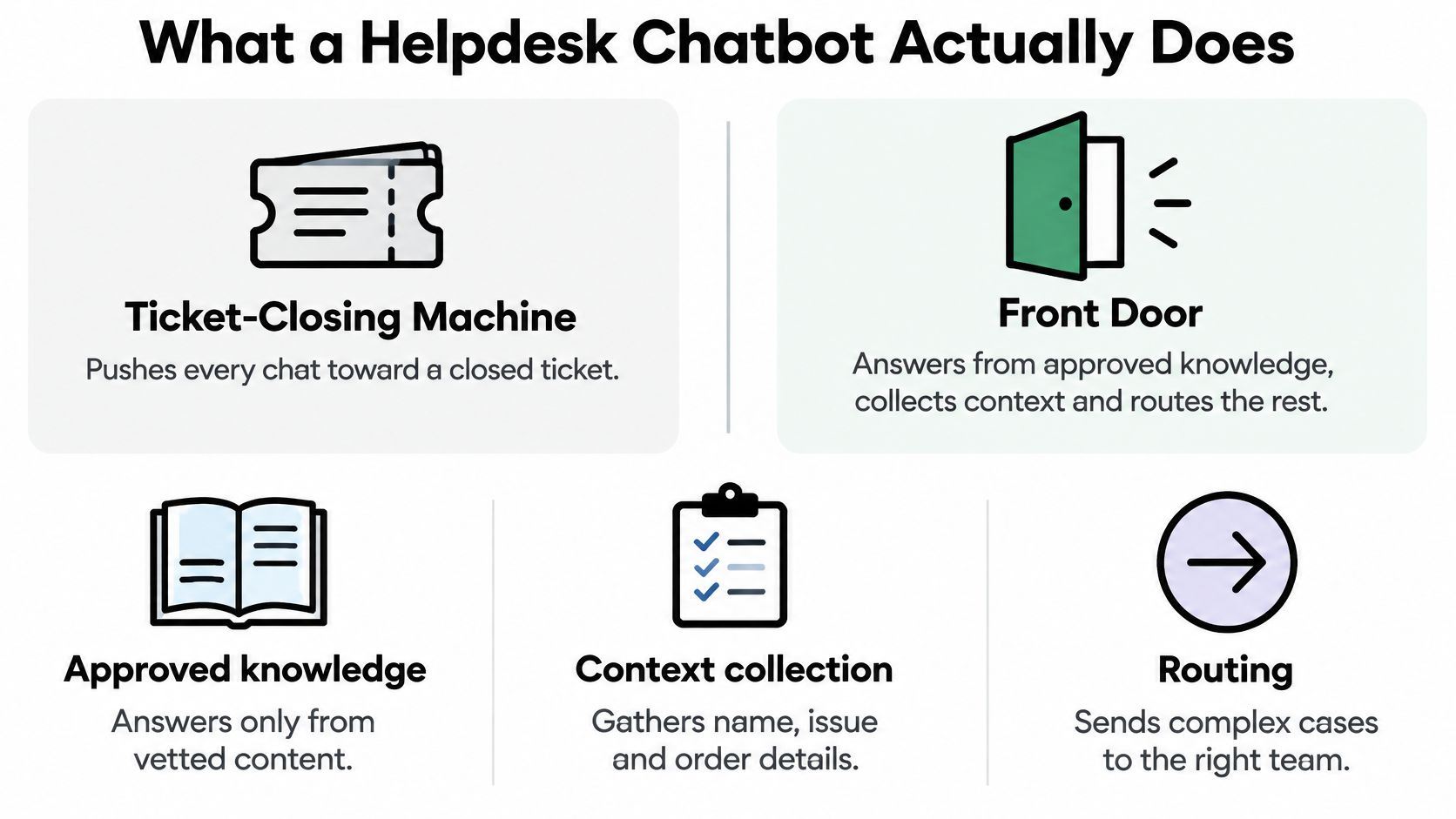
In a working SMB support operation, that front door carries three specific responsibilities:
- Instant first response across channels: The bot greets customers within seconds on website chat, WhatsApp, Instagram DM, and Facebook Messenger, including nights and weekends when nobody is watching the queue.
- Grounded answers to routine inquiries: It resolves repeatable requests such as opening hours, cancellation policies, shipping timelines, order status steps, and document requests directly from vetted business files.
- Structured capture and clean handoff: When a case needs human judgment, the bot gathers the customer's name, verified contact details, order or booking reference, and stated issue so an agent never has to ask twice.
Speed Versus Resolution in Practice
Speed is the easiest part of automation to prove, which is why vendors emphasize it in demos. Resolution is a different story. In a 2025 retrospective survey of 400 customer-service episodes, roughly 77% to 79% of chatbot users waited less than one minute, compared with only 24% to 33% of customers waiting for a live agent. Yet those same chatbots resolved just 34% to 42% of requests, while live agents resolved 79% to 87%. Satisfaction tracked the resolution gap, averaging 2.2 out of 5 for chatbots against 3.1 out of 5 for live agents.
Those numbers don't mean automation fails. They show where automation stops being helpful. A comparative customer-service study presented at PACIS 2022 reached a matching conclusion: human agents outperformed chatbots across most evaluated task metrics, but chatbots achieved comparable helpfulness on uncertain inquiries while replying much faster.
That split points straight to a tiered operating model rather than full automation. Let software absorb immediate triage, clarification, and repeatable lookups, and keep human capacity focused on exceptions and judgment calls.
Operating rule: Automate first-response triage, policy lookup, and structured intake; escalate ambiguity, customer frustration, and policy judgment to a person immediately.
The Must-Have Features Checklist
Demo chats look impressive because vendors test them on clean, predictable questions. When you evaluate a chatbot for helpdesk use in an SMB or multi-location business, strip away the sales pitch and test eight core capabilities under messy, real-world conditions.
| Feature | What it delivers | Quick test |
|---|---|---|
| Knowledge grounding | Answers only from your uploaded docs, website and SOPs; refuses when unsupported | Ask a question your docs never answer and check for a clean refusal plus escalation |
| Multilingual support | Replies in the language the customer writes in, 100+ languages, no configuration | Send a message in Spanish, Arabic and French and check tone and accuracy |
| Appointment routing | Hands off to Calendly or Cal.com at the booking moment with context attached | Ask to book a Thursday slot and confirm the booking lands on the right calendar |
| OTP-verified lead capture | Collects name, email, phone and intent with a verified phone number | Enter a fake number and confirm the bot rejects or re-prompts |
| Unified inbox and history | One thread per conversation across all channels, exportable to CSV or Excel | Export last week's chats and confirm channel, timestamps and fields survive |
| Channel coverage | Website, WhatsApp, Instagram DM and Facebook Messenger from one bot | Open a chat on each channel and confirm the same persona and knowledge |
| No-code setup and branding | Go live from a URL or document upload, match colours, fonts and chat style | Count the minutes from account creation to a live, correctly styled widget |
| Context-rich handoff | Transcript, collected fields and detected intent travel to the human | Escalate mid-conversation and check the agent sees the full history |
Separating Real Implementations From Polished Demos
Knowledge grounding is the first test to run. Upload your actual service catalog and policies, then ask the bot about a refund exception or warranty term that appears nowhere in those files. A reliable tool refuses cleanly and offers a human handoff; a weak one improvises a policy you'll end up honoring out of pocket.
OTP-verified lead capture solves a problem most support leads only discover after launch: junk phone numbers and mistyped email addresses clogging the follow-up queue. By validating phone numbers with a one-time passcode before handing a lead to your team or routing to Calendly or Cal.com, you protect staff from chasing dead contacts. Combine that with multilingual support that detects and answers in the customer's language automatically, and a lean team can cover global or tourist traffic without maintaining separate translation scripts.
Channel coverage and a unified inbox prevent fragmented support. Customers don't care whether they messaged your Instagram DM on Tuesday and your website widget on Wednesday; they expect one consistent answer and one conversation history you can audit or export to CSV or Excel for CRM imports. Pay close attention to how escalation works when the bot hits its limit, and align your configuration with proven chatbot human handoff best practices so transcripts, collected fields, and detected intent travel together.
Secondary Table Stakes and the Tier Boundary
No-code deployment from a website URL or document upload, along with custom colors, fonts, and chat styling, should take minutes rather than a sprint with a developer. Once those basics are in place, draw a hard operational line between Tier-1 and Tier-2 support. Tier-1 covers factual lookup, booking links, status instructions, and structured intake, which belong in the bot. Tier-2 covers billing adjustments, complaints, eligibility gray areas, and policy exceptions, which should always route straight to a person.
Why Most Helpdesk Chatbots Plateau at Pilot
Plenty of teams launch a pilot, celebrate fast reply times during week one, and turn the widget off two months later. Customer behavior explains why. In a June 2023 Gartner survey of 497 B2B and B2C customers conducted between December 2022 and February 2023, only 8% had used a chatbot during their most recent customer-service interaction, and just 25% of those users said they would use it again.
The same survey pinpointed the reason behind that drop-off. A chatbot's ability to move the customer's issue forward explained 18% of the variance in repeat-use likelihood. Resolution varied dramatically by topic as well: bots resolved 58% of returns and cancellations, but only 17% of billing disputes. When a bot chats politely without producing a booking, an order update, a captured request, or a fast transfer, customers stop clicking the bubble.
Most stalled pilots trace back to six recurring failure modes:
| Symptom | Underlying cause | Design fix |
|---|---|---|
| Pilot users stop coming back | Bot answers but does not move the issue forward; repeat use tracked to forward progress | Make every conversation end in a booking, a captured field, a resolved status check or a clean handoff |
| Confident wrong answer | Model answering from training data instead of your documents | Ground answers in versioned knowledge with refusal when retrieval finds nothing |
| Customers repeat themselves to staff | Handoff sends a ticket without transcript, fields or intent | Transfer full conversation plus collected fields and detected intent |
| Privacy review blocks launch | No disclosure, no data minimisation, no retention limits | Disclose AI use, collect only needed fields, set retention and access controls |
| One location gives another location's answers | Single shared knowledge with no location filter | Metadata filters by location, product and language, with overlay propagation tests |
| Billing disputes sit unresolved | Intent is ambiguous or policy-bound and should never be automated | Topic-based routing that sends disputes, complaints and emergencies straight to humans |
Grounding Answers With Retrieval Architecture
Confident hallucinations kill trust faster than slow queues. Comparative customer-support research published in MDPI Engineering Proceedings demonstrates that connecting a chatbot to an external document knowledge base via retrieval-augmented generation (RAG) improves factual grounding and reduces hallucination compared with a model answering solely from parametric memory, even though a zero-shot model may sound slightly more fluent.
Fluency without accuracy is a liability in clinics, financial services, and multi-location operations. A production helpdesk needs versioned source documents, strict metadata filters by product, region, language, and location, and logged retrieved passages so you can audit mistakes. Evaluate retrieval quality (did the system pull the right passage?) separately from answer quality (did the reply stick to that evidence, answer completely, and refuse when no supporting document existed?).
Fixing Handoff and Privacy Before Launch
The second architectural crack is the handoff black hole. According to the LiveOps 2025 Holiday AI Customer Service Report, 55% of surveyed consumers had to escalate an AI-handled issue to a human, and 45% reported that the AI failed to understand their problem. Escalation itself isn't the failure; making an already frustrated customer restate their name, order number, and problem from scratch is the failure.
Privacy governance is the third blocker that catches small teams late in the rollout. In a 2025 PayPal survey, 38% of small businesses cited data privacy and security as a concern when considering AI. Choosing a well-known AI model doesn't solve governance on its own. Before going live, disclose clearly that the customer is chatting with an AI assistant, enforce data minimization so the bot never asks for unnecessary health or payment details, set explicit retention limits and role-based inbox permissions, and apply prompt-injection filtering alongside topic-based routing that sends disputes, complaints, and emergencies straight to staff.
Can your helpdesk chatbot hand a conversation to a human without forcing the customer to repeat a single detail? If not, fix the handoff payload before you add another FAQ.
Running One Bot Across Multiple Locations
Say a boutique hotel group runs six properties, or a dental brand operates four suburban clinics. Both share one brand voice, one cancellation policy, and one deposit rule, yet every site has its own parking entrance, weekend hours, clinicians, and local contact number. Dumping all six sites into one flat FAQ folder guarantees cross-contamination, where a guest asking about downtown parking receives instructions for the airport location.
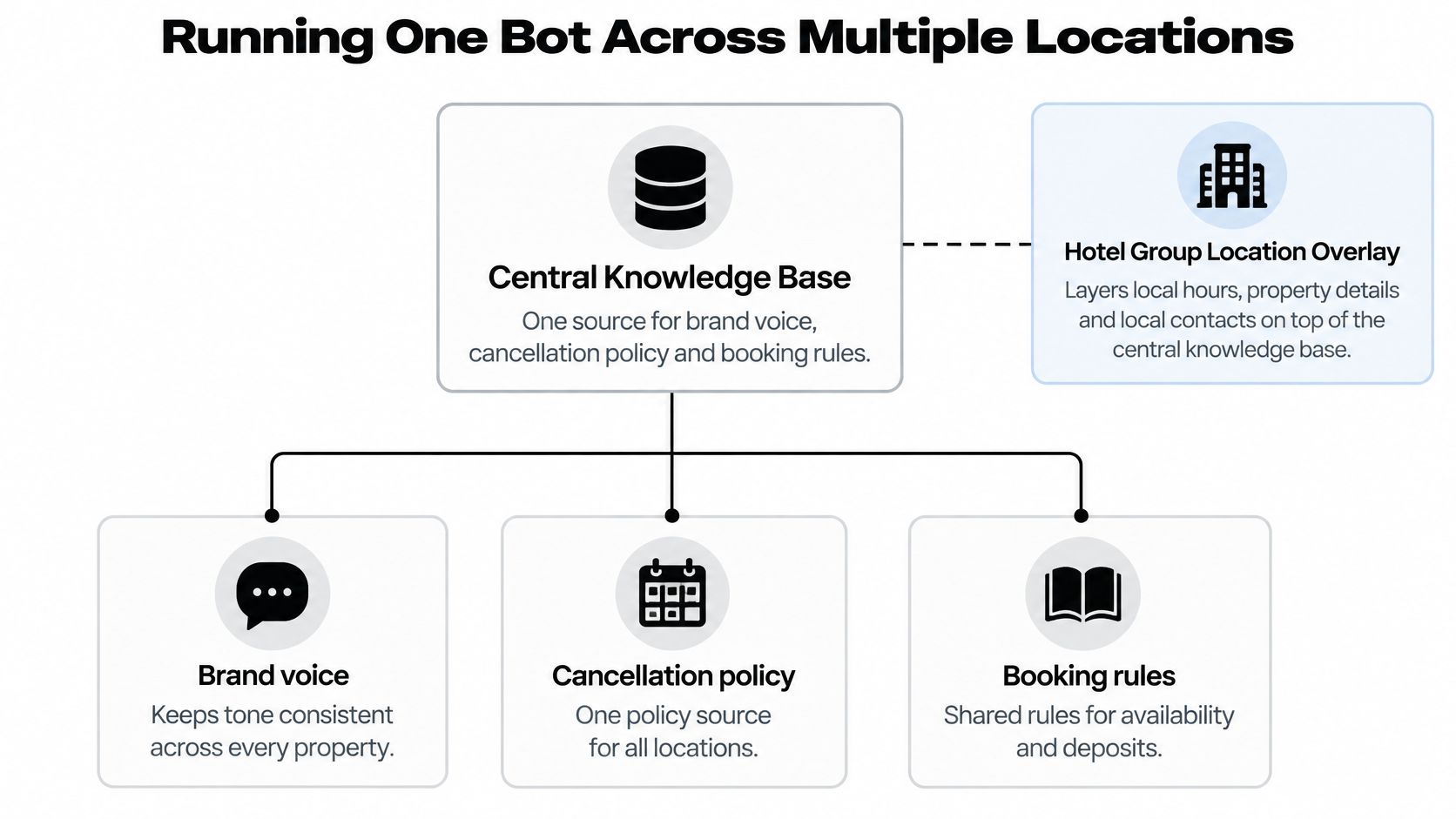
The cleaner architecture is a central knowledge base with location overlays, structured like the hierarchy below.
Version Control for Central and Local Knowledge
Treat your knowledge layers like software branches. The central layer holds brand tone, company-wide cancellation windows, and booking rules. Each location overlay sits underneath and supplies only what differs at that site: address, parking rules, opening hours, local service menus, provider bios, or property amenities.
Propagation becomes predictable under this model. Update the corporate cancellation window once in the central layer and every property inherits the change immediately. Adjust Friday hours at one clinic and only that branch's overlay changes. To keep knowledge rot from creeping back in, enforce four lightweight habits:
- Assign one named owner per layer: Operations owns central policies; each site manager owns their local overlay.
- Date-stamp every uploaded file: Include the effective date in the filename and header so stale PDFs stand out during audits.
- Retire conflicting files instead of appending: Delete or archive last season's pricing sheet before uploading the replacement so the retriever never pulls contradictory passages.
- Run a monthly three-question propagation check: Ask three site-specific questions per location (hours, parking or provider availability, and a central policy) to confirm the right overlay fired.
If you manage franchisees or regional branches with independent staff, mapping these boundaries carefully is the core of a durable multi-location franchise chatbot strategy.
Location-Aware Routing and Multilingual Guests
Knowledge separation only works when routing respects the same boundaries. Once the bot identifies the customer's site, OTP-verified leads should feed that site's designated inbox, and booking requests should route to the exact Calendly or Cal.com calendar for that branch. Inside your unified inbox, give regional managers visibility across every site while restricting site leads to their own queues so nothing gets lost in cross-branch noise.
This setup pays off immediately in hospitality, real estate, and healthcare. Because the bot replies automatically in the guest's language while pulling facts from the active location overlay, a French-speaking traveler messaging a resort in Lisbon gets your standard corporate cancellation policy paired with local Lisbon shuttle details, all written naturally in French without maintaining duplicate translated knowledge bases.
Three Workflows You Can Ship This Week
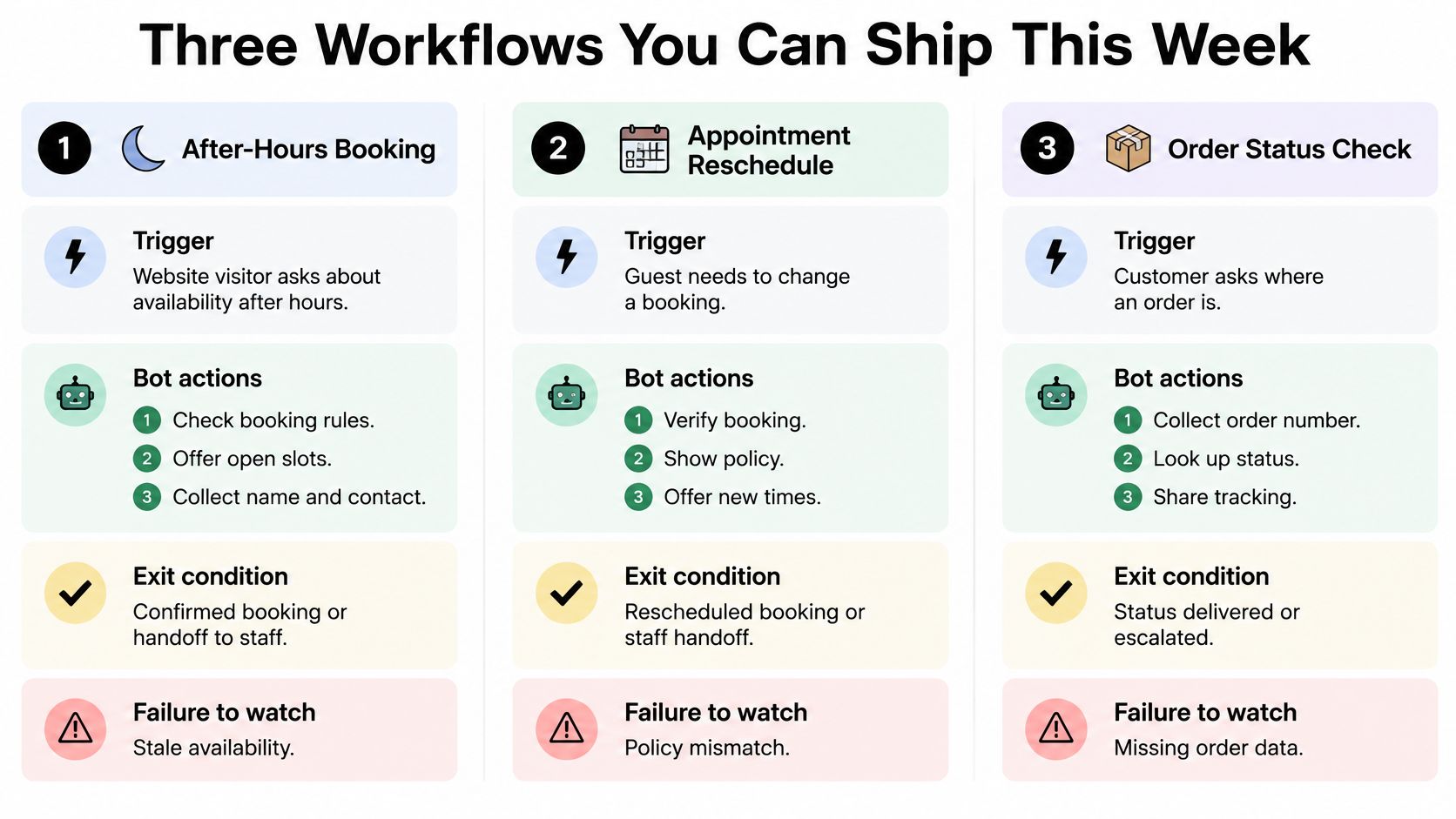
Don't try to automate your entire ticket taxonomy on day one. Ship three narrow, high-frequency workflows where the trigger is unmistakable, the exit condition creates tangible forward progress, and the human escalation boundary is written in plain rules.
The diagram below maps how three practical automated workflows move from customer trigger to resolution or staff handoff.
Workflow 1 After-Hours Booking
- Trigger: A website visitor opens chat at 9:00 PM asking about next-week availability and pricing for a service package.
- Grounded answer and qualification: The bot retrieves exact service details from your catalog, answers the pricing question, and asks two qualifying questions (preferred service type and timeframe).
- Verified capture: Before sharing the booking slot, the bot asks for the visitor's name and phone number and verifies the number via OTP so staff don't wake up to spam leads.
- Booking handoff: The bot routes the prospect directly to Cal.com or Calendly with prefilled context, then emails your team a structured summary noting intent and device details.
- Exit and watchpoints: Grade this flow on booking conversion rate and verified lead rate. Watch out for stale calendar availability, and escalate immediately to your on-call alert rule if the visitor mentions an urgent emergency (such as a burst pipe or acute medical issue).
Workflow 2 WhatsApp Returns and Order Status
- Trigger: A buyer sends a WhatsApp message asking where their parcel is or whether an item qualifies for a return.
- Policy lookup and context: The bot pulls your official return window and shipping policy from the knowledge base and asks for the order reference number and item condition.
- Structured resolution or escalation: For standard status guidance or straightforward returns and cancellations, the bot shares the exact tracking steps or return initiation link and closes with a confirmation prompt.
- Clean transfer on exceptions: If the customer claims a double charge, damaged delivery, or missing refund, the bot stops trying to close the chat and escalates the full WhatsApp transcript, order reference, and detected intent straight to a billing specialist.
- Exit and watchpoints: Grade this flow on intent resolution rate and 48-hour repeat-contact rate. Watch for missing order data that leaves customers guessing, and route every disputed charge or angry complaint straight to a human without extra hoops.
Seeing how automated support flows handle real questions and escalation triggers makes configuration much faster. This walkthrough shows how a helpdesk chatbot handles inquiries and routing in practice.
Workflow 3 Multi-Location Clinic Intake
- Trigger: A prospective patient messages on Instagram DM or website chat asking whether a specific neighborhood clinic accepts their insurance and has a hygienist or specialist open this week.
- Overlay activation: The bot identifies the branch, loads that branch's local overlay, and answers provider and accepted-insurance questions strictly from that clinic's current sheet.
- Intake with OTP verification: The bot collects full name, verified phone number via OTP, and brief reason for visit while avoiding sensitive clinical history inside chat.
- Branch calendar booking: The bot routes the patient to that specific clinic's Calendly or Cal.com link and posts the summary into the branch's unified inbox view.
- Exit and watchpoints: Grade this flow on location overlay accuracy and completed intake bookings. Watch for policy mismatches between branches, and hard-code an immediate escalation banner with the clinic's phone number whenever a patient describes urgent or worsening symptoms.
The Metrics That Show Real Helpdesk Value
A single blended "containment rate" tells you almost nothing about whether your helpdesk is healthier. If a bot handles simple store-hours questions all day while mishandling refund disputes, the headline percentage looks flattering while customer trust erodes underneath. Track a balanced set of operational metrics instead.
| Metric | How to calculate | Target | Decision it informs |
|---|---|---|---|
| First-response latency | Median seconds from customer message to first bot reply | Under 60 seconds | Channel and model performance |
| Resolution rate by intent | Resolved conversations divided by conversations for that intent | High for hours, status, returns; low for billing is expected | Which intents stay automated |
| Escalation accuracy | Escalations that needed a human divided by total escalations | Above 80% | Confidence threshold tuning |
| Repeat-explanation rate | Handoffs where the customer restates a detail already given | Under 10% | Handoff payload completeness |
| Repeat-contact rate | Conversations where the same customer returns on the same issue within 48 hours divided by resolved conversations | Under 15% | True resolution versus deflection |
| Post-handoff satisfaction | Average CSAT after an escalated conversation | 4 out of 5 or higher | Human capacity and routing quality |
| Booking conversion | Conversations that end in a booked appointment divided by booking-intent conversations | Baseline plus 10% in month one | Calendly or Cal.com routing placement |
| Verified lead rate | Leads with a passed OTP divided by captured leads | Above 90% | Lead quality and follow-up workload |
| Knowledge coverage | Top-20 questions answered correctly divided by 20 | 90% or higher | Knowledge pack maintenance |
Why Overall Containment Misleads Support Teams
Imagine your bot deflects a frustrated customer asking about an incorrect invoice by pasting a generic billing FAQ link. The chat closes, so a naive containment dashboard scores a win. Two hours later, that same customer emails support, calls the front desk, and leaves a one-star review. Deflection went up, total workload went up, and satisfaction fell.
Separating resolution rate by intent removes that blind spot. You should expect high automated resolution on hours, locations, shipping windows, returns, and routine status guidance, and you should intentionally keep automated resolution near zero on billing disputes, policy exceptions, and complaints.
The Counter-Metric Discipline
Pair every efficiency metric with a customer-effort counter-metric. Match first-response speed against 48-hour repeat-contact rate; match escalation volume against repeat-explanation rate and post-handoff CSAT. Building these pairs into your regular review of customer care KPIs ensures automation improves total time to resolution instead of shifting hidden work onto human agents.
During your first month after launch, block 30 minutes every week to read raw transcripts from both resolved and escalated chats. Once your refusal rules and handoff triggers stabilize, move to a monthly transcript audit. Paste this single scorecard header into your tracking spreadsheet to grade performance without bloated dashboards:
Weekly scorecard row: Intent | Volume | Resolution Rate | Escalation Accuracy | Repeat-Explanation Rate | 48h Repeat-Contact Rate | Post-Handoff CSAT
Evaluate, Integrate and Launch a Helpdesk Chatbot in Five Days
You don't need a six-month IT roadmap to deploy a reliable SMB helpdesk bot, provided you do the operational groundwork in the right order. Follow this five-day sprint, and treat each day's artifact as a gate before moving forward.
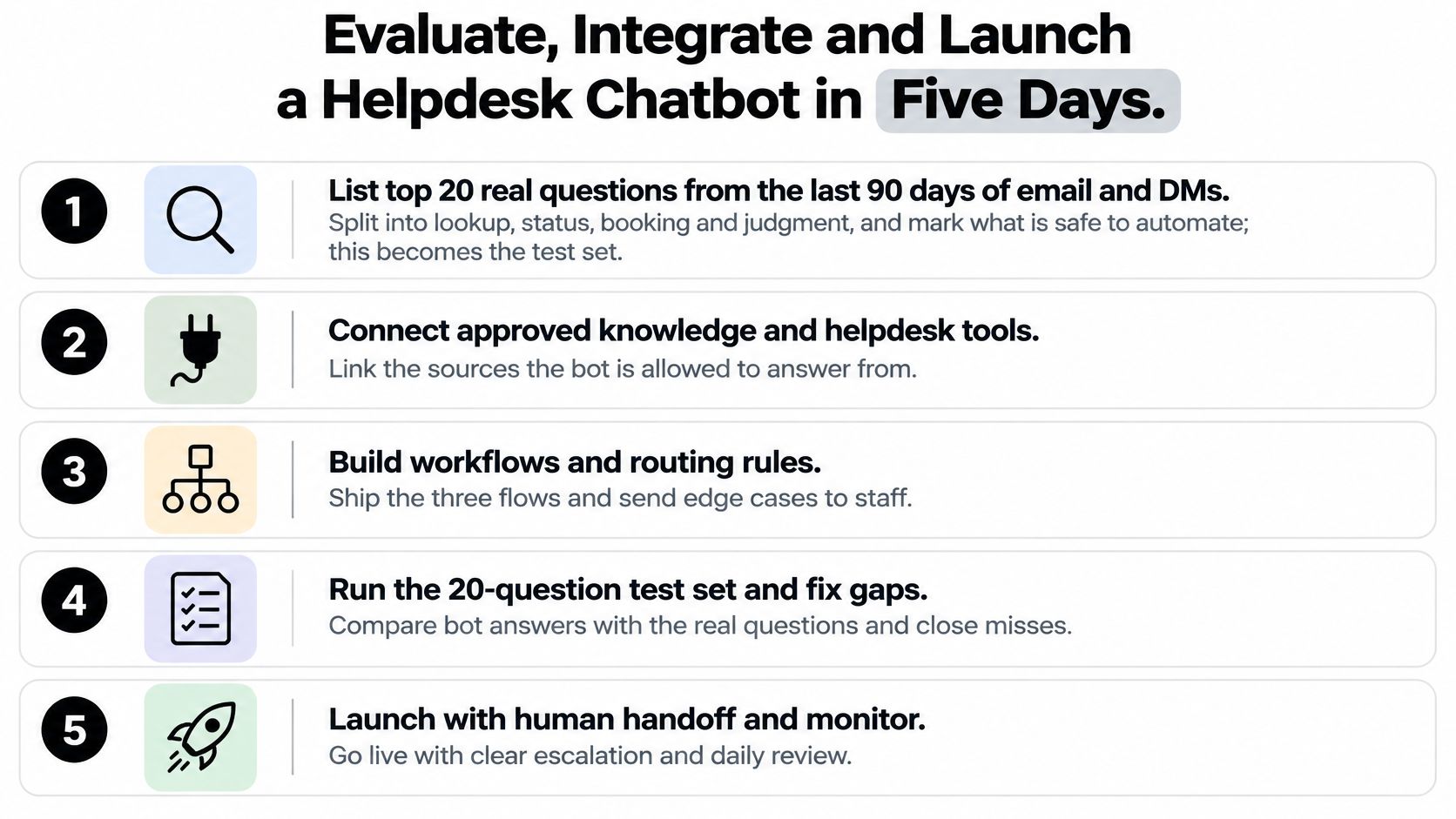
The five-day sequence below outlines each phase from auditing real customer questions to monitoring live handoffs.
Days One Through Three Audit Knowledge and Run the Bake-Off
Day 1, Build your 20-question test set. Export the last 90 days of emails, live chats, WhatsApp threads, and Instagram DMs, and pull the top 20 real customer questions verbatim, typos and all. Tag each question into one of four buckets: lookup, status, booking, or judgment. Mark lookup, basic status, and booking as automation candidates, and lock judgment questions as mandatory human escalations. Your finished spreadsheet is your objective bake-off test set.
Day 2, Assemble a clean, versioned knowledge pack. Gather only authoritative documents: your current website pages, service catalog, SLA sheet, SOPs, and onboarding checklist. Stamp each document with an owner and date, separate corporate rules from location-specific overlays, and delete conflicting legacy PDFs. Write one explicit refusal rule into the bot's instructions: answer only when a supporting passage is retrieved from approved documents, and escalate cleanly when nothing matches.
Day 3, Map integrations and score vendors live. List the exact connections your team uses every day: CRM exports or sync, Calendly or Cal.com booking links, website widget styling, and WhatsApp Business plus Instagram messaging through compliant Meta APIs. Run your 20-question test set across your shortlisted tools and score each one heavily on three pass/fail checks:
- Knowledge grounding: Ask two questions deliberately omitted from your knowledge pack and fail any tool that fabricates an answer.
- OTP fake-number test: Enter an invalid or burner phone number during lead capture to confirm the workflow blocks junk contacts.
- Handoff completeness: Trigger an escalation mid-chat and inspect whether the full transcript, captured fields, and detected intent arrive intact in the inbox.
Days Four and Five Governance Launch and Tool Fit
Day 4, Complete governance sign-off and escalation routing. Before signing a contract or pasting embed code, verify five baseline safeguards: clear AI disclosure in the greeting, data-minimization rules restricting unnecessary personal data, defined retention limits, role-based inbox access, and prompt-injection screening. Next, configure your unified inbox, assign a named human owner for escalations during business hours, and add a short exception policy the bot can quote whenever it transfers a conversation after hours.
Day 5, Launch narrow and audit every transcript. Go live on a single channel first (typically your website widget or WhatsApp) for a controlled slice of traffic. Read every transcript daily, tag misses in your knowledge pack, and compare resolution by intent against your team's existing human baseline. Once week one looks clean, roll out the remaining channels and lock in a simple maintenance rhythm: weekly transcript reviews for month one, monthly location-overlay checks, and quarterly metric reviews.
If you want a platform built specifically for this SMB rollout without writing code, our team at Hyperleap AI designed an AI front desk that sets up in three steps from industry templates, a website URL, or uploaded documents. You get strict knowledge grounding, OTP-verified lead capture, structured email summaries after chats, Calendly and Cal.com routing, a unified inbox with CSV and Excel export, and multi-location overlays managed from one central knowledge base across website chat, WhatsApp, Instagram, and Facebook Messenger. Plans include a 7-day trial and start with Plus at $40 per month (3,000 AI responses, 1 chatbot, 4 channels, and a 40MB knowledge source), scale to Pro at $100 per month (12,000 AI responses, 2 chatbots, 8 channels, and 50 team members), and extend to Max at $200 per month (30,000 AI responses, 5 chatbots, 20 channels, branding removal, and a 40MB knowledge source per chatbot).
Keep one decision rule on your desk throughout the rollout: automate immediate first response, vetted lookups, and verified intake; keep policy judgment human; and grade week one on escalation quality rather than raw deflection.
If you're ready to put a grounded, handoff-ready helpdesk chatbot live across your website, WhatsApp, Instagram, and Facebook without engineering overhead, Hyperleap AI gives your team OTP-verified lead capture, calendar routing, unified inbox history, and multi-location knowledge overlays out of the box. Start your 7-day trial and test your top 20 real customer questions directly on Hyperleap AI.