Guide
Conversational AI for Sales Teams in 2026
See how conversational AI for sales captures leads, qualifies buyers, books meetings, and which KPIs and pitfalls matter for SMBs.

Gopi Krishna Lakkepuram · Founder & CEO
· 13 min read
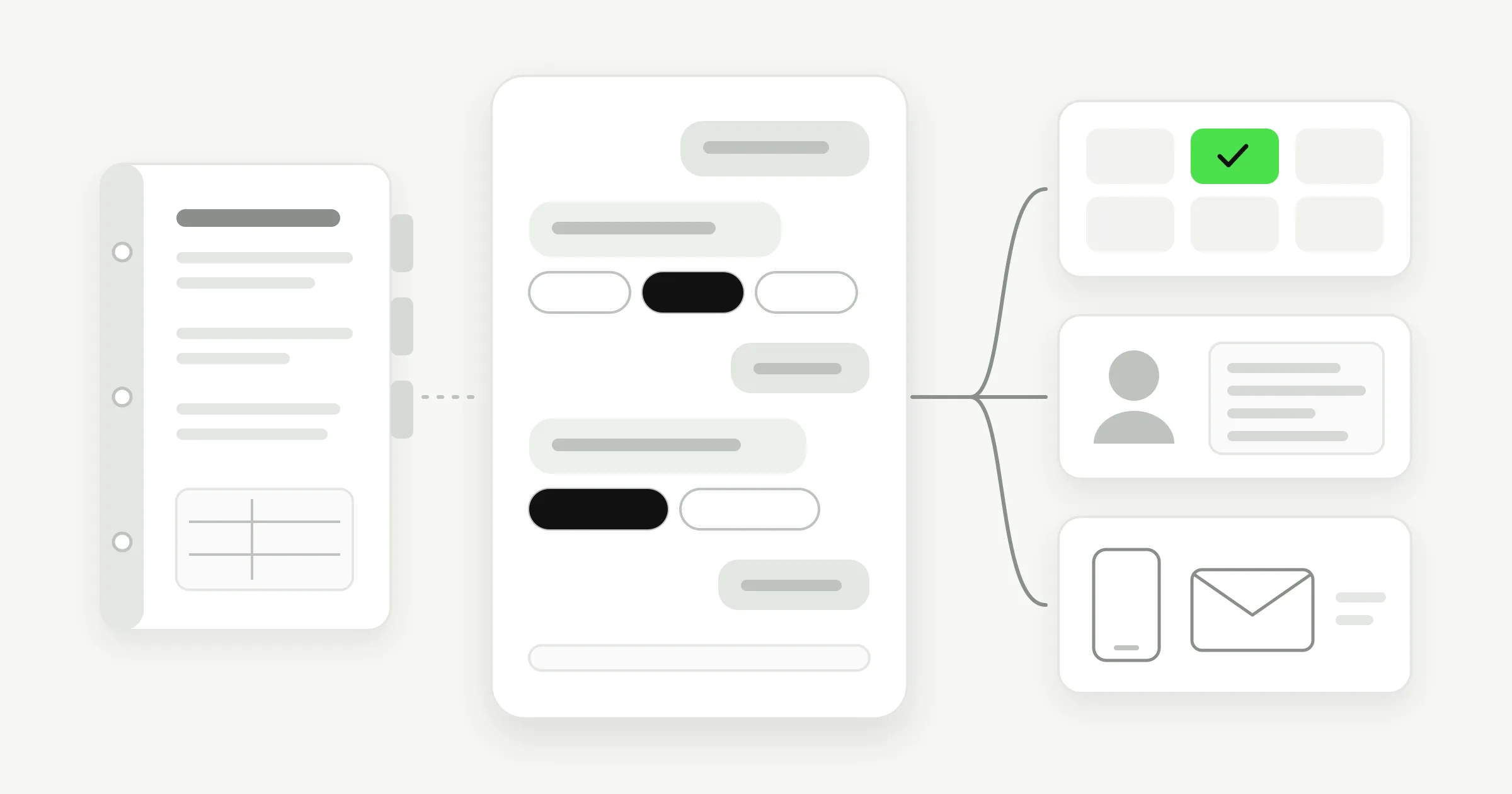
A prospective patient messages a dental clinic late in the evening: “Do you have anything available for a new patient?” The front desk is closed, and the message sits unanswered until morning. By then, the patient may have booked with a clinic that replied sooner. A multi-location business faces another version of the same problem: even when someone answers, they may give the wrong branch's hours or offer.
Conversational AI for sales can act as a front desk for these first exchanges. It can answer from information the business has approved, collect useful details and guide a visitor toward a suitable next step. The key is to give it clear boundaries and a reliable path to a person when the conversation needs human judgment.
Table of Contents
- What Conversational AI for Sales Actually Does
- Four Sales Jobs Worth Automating First
- How a Sales Conversation Agent Decides
- Roll Out a Sales Agent Without a Developer
- KPIs That Show the Agent Is Selling
- Pitfalls That Waste a Sales Rollout
- Pilot One Offer on One Channel
What Conversational AI for Sales Actually Does
Conversational AI for sales is software that holds a two-way conversation with a prospective customer, answers using the business's approved information and helps move the person toward a sensible next step. Instead of showing a visitor a menu of links, it can respond to a question, ask what service they need and collect contact details. It's a useful first point of contact, not a replacement for the person who handles a complex or high-value sale.
That distinction matters. A static FAQ widget may send someone to a page and leave them to work out what to do. An AI agent can ask a follow-up question and use the answer to choose what to offer next. But it shouldn't improvise a policy, negotiate a custom deal or try to settle a complaint. Those calls belong to a person.
For a small business, the operating value is straightforward: a visitor gets a response while interest is fresh, the team receives a usable record of what the person wants, and an appointment is offered only when the service and location fit. The written conversation gives staff something concrete to review, instead of making them reconstruct an enquiry from memory.
This guide is for SMB owners and operators, particularly those with several locations, who want to improve the first part of the sales process without rebuilding an enterprise contact centre. The four jobs to consider are lead capture, qualification, booking and light nurture. Use the comparison table next to decide which handoff is costing you the most when it waits for a person.
Four Sales Jobs Worth Automating First
| Sales job | What the agent does | Human handoff | Success signal |
|---|---|---|---|
| Lead capture | Greets, answers from approved info, collects name, contact, location and need | Angry, legal or high-value enquiries | A complete contact the team didn't already have |
| Qualification | Asks budget, timeline, location and fit one question at a time | Answers show a poor fit or a request the binder can't cover | Fewer unqualified follow-ups |
| Booking | Offers a real slot only after service and location match | No slot, a change or a cancellation | A meeting both sides can see |
| Light nurture | Shares the right brochure, photo or next step and invites a return | The person wants a custom quote or to negotiate | A returning chat with a clearer need |
| After-hours coverage | Runs the same four jobs when the desk is closed | Anything on the refuse list, at any hour | Night and weekend leads with a morning summary |
| Multi-location routing | Uses one knowledge base plus that site's hours, services and offers | The visitor's site is unclear after one clarifying question | The answer matches the right location |
Start with the job that has a clear boundary
Lead capture is often the simplest first job. Say a med-spa visitor asks about a treatment at night. The agent can answer from approved service information and collect the visitor's name, contact details, preferred location and service of interest. It needn't determine whether the treatment is right for them; its job is to give the team enough context to follow up.
Qualification can save the team from chasing enquiries that don't fit. A real-estate agent might ask a prospective customer about their budget band, preferred area, timeline and whether they're buying or renting. Asking one question at a time makes it easier to answer and helps staff see why the lead was routed or held for follow-up. For a closer look at building that exchange, see this guide to a lead qualification chatbot.
Booking works when the service, location and calendar rules are clear. A dental clinic's agent can match a new-patient enquiry to the right branch and offer an actual available appointment. If the clinic has no suitable slot, the agent should route the request to staff rather than inventing availability.
Light nurture keeps a conversation useful when the person isn't ready to book. A hotel group might answer questions about a possible group stay, share a suitable brochure or photo, and invite the visitor to return once their dates are firmer. It shouldn't pretend it can negotiate a group rate unless that authority and pricing are explicitly part of its instructions.
The last two rows in the table are operating rules, not extra conversation styles. After-hours coverage means the same jobs can still run while the desk is closed, with staff able to see what needs attention. Multi-location routing means the agent uses shared information alongside the correct site's details.
Automate the handoff where waiting currently costs you an enquiry. Keep negotiation, complaints and regulated advice with a person.
How a Sales Conversation Agent Decides
A well-briefed receptionist with a binder can answer routine questions and knows when to find a colleague. A conversational agent should follow the same operating principle: use approved material, ask only useful questions, and stop when the binder doesn't support an answer.
The binder needs more than a collection of marketing pages. Include services, hours, location details, prices the business is willing to state, booking rules and topics the agent must refuse. For a multi-site company, keep shared material in one knowledge base and label each location's own details clearly. Shared service descriptions can stay consistent while site-specific hours, availability and offers remain distinct.
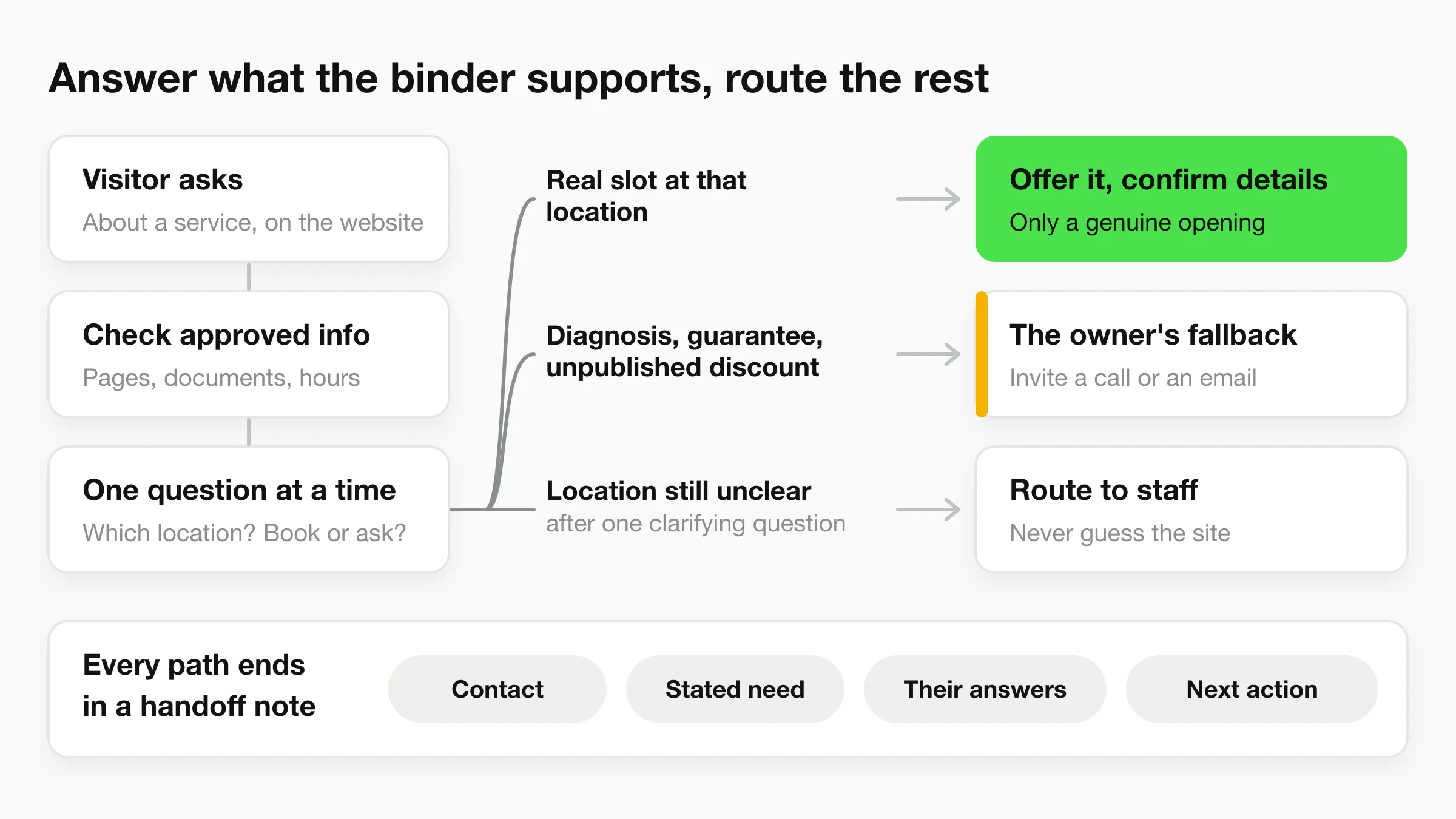
Follow one enquiry from message to handoff
Suppose a visitor messages a clinic through its website asking about a particular service. The agent looks for an answer in the clinic's approved pages and documents, responds in the visitor's language and asks one question at a time. It might ask which location the visitor prefers, then whether they want an appointment or have a general service question.
The next move depends on what the agent can support. If the visitor asks for an appointment and the service matches a real opening at that location, it can offer the available slot and confirm the details. If the visitor asks for a diagnosis, a guaranteed outcome or an unpublished discount, the agent shouldn't fill the gap with a plausible-sounding answer. It should follow the fallback the owner wrote, such as inviting the visitor to call or email the team.
For several locations, keeping each site's details clearly labelled is what prevents a London clinic from offering a Dubai appointment, or a hotel group from quoting the wrong property's details. If the visitor hasn't identified a location, the agent should ask a clarifying question before presenting location-specific information. If it still can't tell which site applies, it should route the enquiry instead of guessing.
The agent's handoff should tell staff what happened: the visitor's contact details, stated need, relevant answers and recommended next action. The owner should be able to review the transcript and check whether the agent stayed within its boundaries. Tone and chat colours can be refined later; clear answer limits, escalation rules and transcript review are the controls that protect the customer experience.
Roll Out a Sales Agent Without a Developer
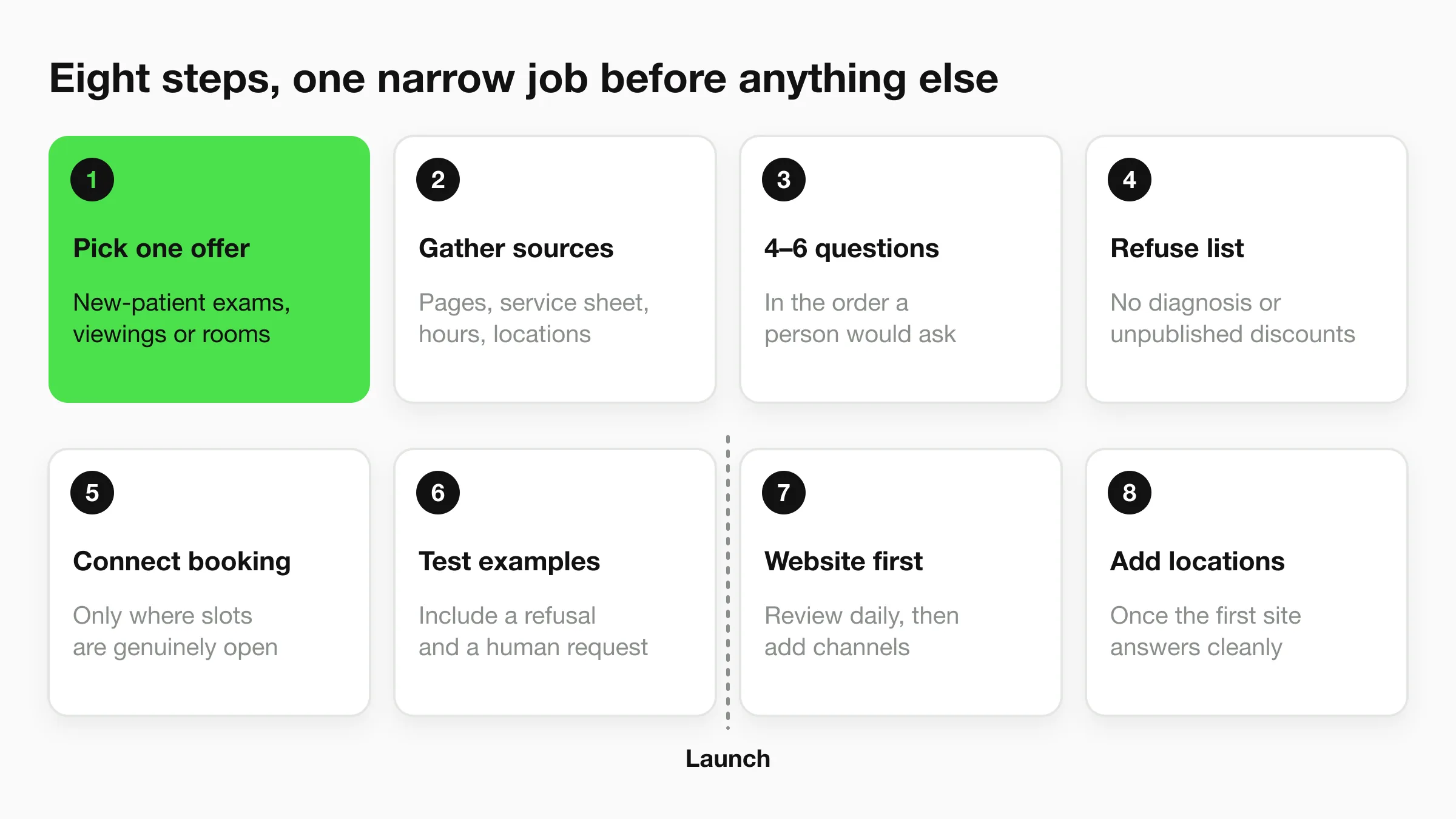
A good rollout starts with a narrow job, not a tour through every feature. Follow this sequence so the agent's first live conversations stay easy to test and correct.
Pick one high-intent offer. Choose a specific request, such as new-patient exams, property viewings or room enquiries. A focused offer gives the agent a clear job and prevents it from being asked to handle an entire catalogue at launch.
Gather the source of truth. Collect the relevant website pages, a short service sheet, business hours and accurate location facts. Leaving out a current policy can lead to confident answers that staff then have to undo.
Write four to six qualifying questions. Put them in the order a person would naturally ask, and decide which answers the team needs before taking over. This keeps the exchange purposeful instead of turning it into a long intake form.
Write the fallback and refuse list. Decide what the agent says when its information doesn't support an answer, and specify subjects it must not handle. For a clinic, refuse diagnosis and promises about treatment outcomes; for any business, exclude legal advice and unpublished discounts. Otherwise, the agent may treat an information gap as an invitation to improvise.
Connect booking only where availability is real. Use a calendar the team already trusts, and connect it only to services with genuine bookable slots. If staff have to correct false availability, customers lose confidence in both the agent and the appointment process.
Test examples before launch. Try ordinary questions, incomplete answers, a request the agent must refuse and a request to speak to a person. This reveals gaps in the content and handoff rules before real customers encounter them.
Launch on the website first, then review conversations daily. Once the answers are stable, add channels such as WhatsApp, Instagram or Facebook. Fix missing or unclear business information in the knowledge set rather than treating every poor answer as a model problem.
Add more locations after the first site is clean. Keep common material central and maintain each location's hours, services and offers separately. For updates to shared information, have one central owner make each change once so every site stays aligned. If an agency manages different client brands, keep a separate knowledge set for each brand.
A practical way to get comfortable with a no-code rollout is to follow a guide to building an AI chatbot without code.
Before launch, test three realistic questions for each location, including one that the agent must refuse. The test should confirm that the agent uses the right site information, offers only supported next steps and routes an unsupported request safely.
KPIs That Show the Agent Is Selling
Chat volume is a vanity measure on its own. A busy chat window might mean prospects are getting answers, or it might mean many visitors leave without sharing enough information for the team to follow up. Measure the movement from first response to attended appointment instead.
| KPI | What it measures | Healthy direction | Misread to avoid |
|---|---|---|---|
| First-response time | Delay before a useful reply | Prompt replies, including nights and weekends | A fast greeting that never answers the question |
| Lead capture rate | Chats that produce a usable contact | Up, on real visitors | Counting anonymous sessions as leads |
| Qualification completeness | Required fields filled before handoff | Up, without extra friction | A long form that people abandon |
| Qualified-to-booked rate | Fit chats that become a meeting | Up after the offer and calendar are stable | Booking people who were never a fit |
| Show rate | Booked people who arrive | Steady or up | More bookings that nobody attends |
| Helpful containment | Chats resolved without a human | Up only if answers stay on-policy | Hiding failures by never escalating |
| Language match | Reply language equals the visitor's language | Stable across languages you actually receive | Turning on languages you can't serve in person |
Read the path, not just the final number
Start with first-response time: it tells you whether visitors are getting useful answers promptly, not merely whether the agent has greeted them. Then check lead capture rate to see whether chats produce a contact the team can use. Don't count anonymous sessions as leads just to make the number look better.
Next, look at qualification completeness. If important fields are missing, staff may need to repeat the same questions or follow up without enough context. But adding every possible question can make visitors quit before they share the details the team needs.
Qualified-to-booked rate shows whether suitable conversations lead to appointments once the offer and calendar are working as intended. Show rate adds a necessary check: a booking that the customer doesn't attend isn't a complete win. If bookings rise but attendance slips, tighten qualification before adding another channel.
Containment needs a careful reading. A conversation closed without staff involvement is useful only if the answer stayed within policy and the agent handed off when it should. For businesses serving customers in more than one language, language match checks whether the agent stayed in the visitor's language without the customer needing to change a setting.
Use the same inbox export the team already reviews. During the first month, check it weekly; after that, a monthly review can help spot patterns. Compare results with the old problem you're trying to fix, such as missed evening enquiries, not with a vendor's promised outcome. For a broader measurement checklist, see these AI chatbot KPIs for measuring success.
Think of return in plain operating terms: recovered enquiries and booked time, minus the staff hours spent correcting bad answers. If the numbers point to weak fit or incomplete contact details, improve the questions and content before you expand.
Pitfalls That Waste a Sales Rollout
A dental clinic lets its agent invent a discount, then stops checking transcripts because the chat volume looks healthy. That's a warning, not a launch success. A bot can appear busy while creating promises, wrong-location answers or follow-up work that staff learn to ignore.
Six ways a live pilot can slip
A med-spa visitor is promised a treatment result. Put diagnosis and outcome claims on the refuse list, then sample transcripts every Friday to catch boundary failures.
A property agency's live page shows new Saturday hours, but its uploaded sheet is out of date. A viewing gets booked for a day the branch is closed. Give one named owner responsibility for checking hours, prices and offers against the live site every Monday.
The hotel inbox fills with first names and no contact details or travel dates. Staff stop opening the summaries. Don't send a handoff as complete unless it includes a usable contact method and the person's stated need, or clearly flags what's missing.
A Manchester guest receives the London spa menu. Correct that location's details and test a location-specific question for each site every week.
Chat volume grows, but new meetings don't. Freeze additional channels and tighten the qualifying questions before inviting more traffic into the same weak process.
An evening enquiry stays unread until the middle of the next day. Name a person to read the overnight summary before the first appointment and record that the review happened.
These failures have different causes, but they share a basic remedy: assign ownership. Someone must maintain the source material, inspect what the agent said and make sure the team acts on the handoffs. A summary that no one reads is just another unattended inbox.
Don't add another channel until all six checks are passing consistently. Keep the current setup steady long enough to confirm that the fixes hold.
Pilot One Offer on One Channel
Choose before you buy a stack of tools. If missed after-hours enquiries are common and accurate answers already live on your website or in a short set of documents, a pilot is reasonable. If prices change constantly and nobody will own the source information, wait. The agent can't compensate for content the business itself can't keep current.
For a pilot, pick one offer and one channel, then use the job that best matches the problem: capture, qualification, booking or nurture. Set a clear review routine, and make sure the owner can inspect past conversations to see exactly what the agent told a customer. A small test is useful because it shows whether the handoff works in your actual operation, not just in a demonstration.
For that use case, we offer an AI front desk for small businesses that answers from the business's website and documents, qualifies enquiries, collects contact details and supports booking across website chat and messaging channels (native Calendly and Cal.com booking on Pro and Max; on Plus it shares your booking link). Our agent can answer across website chat, WhatsApp, Instagram and Facebook, around the clock, while the business team can read past conversations and check what was said. For a multi-site group, the Multi-variant add-on (Pro and Max, $40/mo plus 2x credits per request) answers from the right location and asks which one when a question doesn't say, so one branch's details aren't confused with another's.
Your next action is concrete: write down the offer, the qualifying questions, the refuse list and the booking rule. Add the approved pages, switch on one channel, then review each summary the next morning before you consider another location or network.
Visit Hyperleap AI to explore an AI front desk that answers from your business information, captures leads and helps qualified customers book. Start with one offer and one channel, then use the conversation history to check whether the handoffs work for your team.