Guide
Customer Service vs Customer Support: Key Differences
Customer service vs customer support explained: roles, KPIs, channels and handoffs, plus when chatbots help small and multi-location businesses.

Gopi Krishna Lakkepuram · Founder & CEO
· 14 min read
Your receptionist is helping someone at the desk while a website visitor asks about insurance, prices, and Saturday appointments. Later, that same visitor messages on Instagram because a reminder never arrived. Your team answered the original question, but nobody knows who owns the unfinished booking.
That's where customer service vs customer support becomes an operating decision, not a vocabulary exercise. You need to decide who resolves the immediate issue, who owns the customer's next step, and what an automated assistant must pass to a person.
Table of Contents
- How Customer Service and Customer Support Differ
- Where Support Ends and Service Begins
- Who Owns Each Role as Your Team Grows
- KPIs for Resolution and for the Wider Experience
- Channels and Where Chatbots Fit
- Sample Handoff Workflows for Common Conversations
- Choose the First Workflow and Plan
How Customer Service and Customer Support Differ
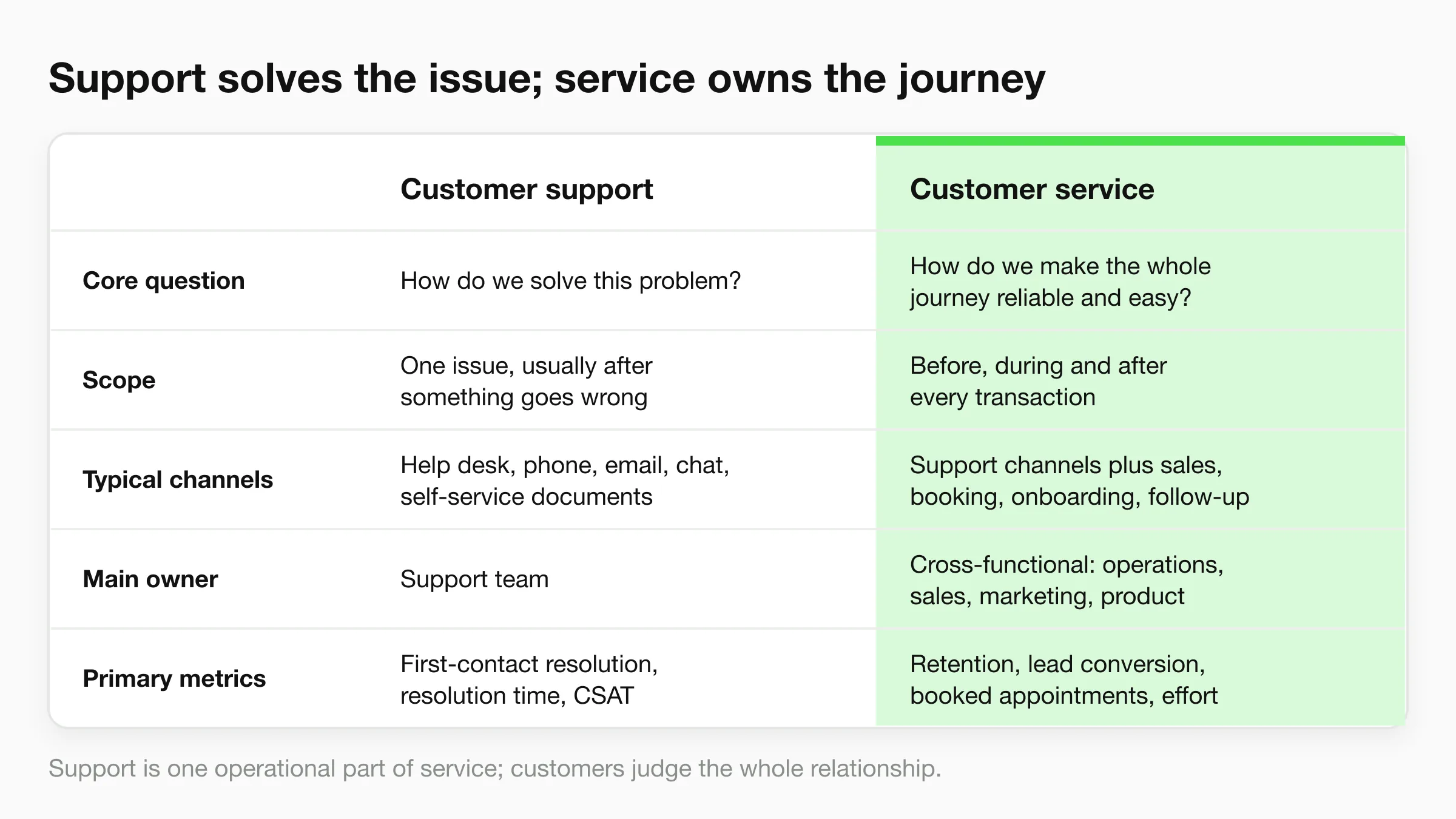
Customer support vs customer service at a glance
| Criterion | Customer support | Customer service |
|---|---|---|
| Core question | How do we solve this problem? | How do we make the whole journey reliable and easy? |
| Scope | One issue, usually after something goes wrong | Before, during and after every transaction |
| Typical channels | Help desk, phone, email, chat, self-service documents | Support channels plus sales, booking, onboarding and follow-up |
| Main owner | Support team | Cross-functional: operations, sales, marketing, product |
| Primary metrics | First-contact resolution, resolution time, CSAT | Retention, lead conversion, booked appointments, customer effort |
Customer support is the issue-resolution operation. A help desk closing a password reset is doing support: identify the problem, restore access, and confirm the customer can sign in.
Customer service covers the complete experience. A clinic confirming a booking, sending directions, and helping a patient rebook a missed visit is coordinating service. The customer judges whether the clinic made the process reliable, not which department sent each message.
The distinction is easier to remember visually.
Why the distinction matters operationally
Formal help desks took shape in the 1980s, replacing informal calls to a technician with a more organized support function, as described in Flamingo's help-desk guide. That structure remains useful: assign responsibility, record the issue, and make its status visible.
But a closed ticket doesn't tell you whether the customer achieved their larger goal. Someone can regain account access and still abandon a purchase because checkout instructions are unclear. The support task succeeded; the wider service experience still needs work.
For a small business, this doesn't require separate departments. The owner, receptionist, or sales coordinator may perform both roles during the same shift. What matters is separating task completion from customer outcome when you assign work and review results.
Working rule: Support is an operational part of service. Service is the outcome customers judge across the whole relationship.
Don't use the distinction to draw rigid boundaries around employees. Use it to identify missing responsibility. If the support agent has fixed the problem but nobody owns the promised callback, your service process has a gap.
Where Support Ends and Service Begins
Say a visitor opens a dental clinic's website chat and asks whether the practice accepts their insurance. That starts as a support question about an existing policy, but it won't necessarily stay there.
A clinic chat can cross several responsibilities without the visitor ever leaving the thread.
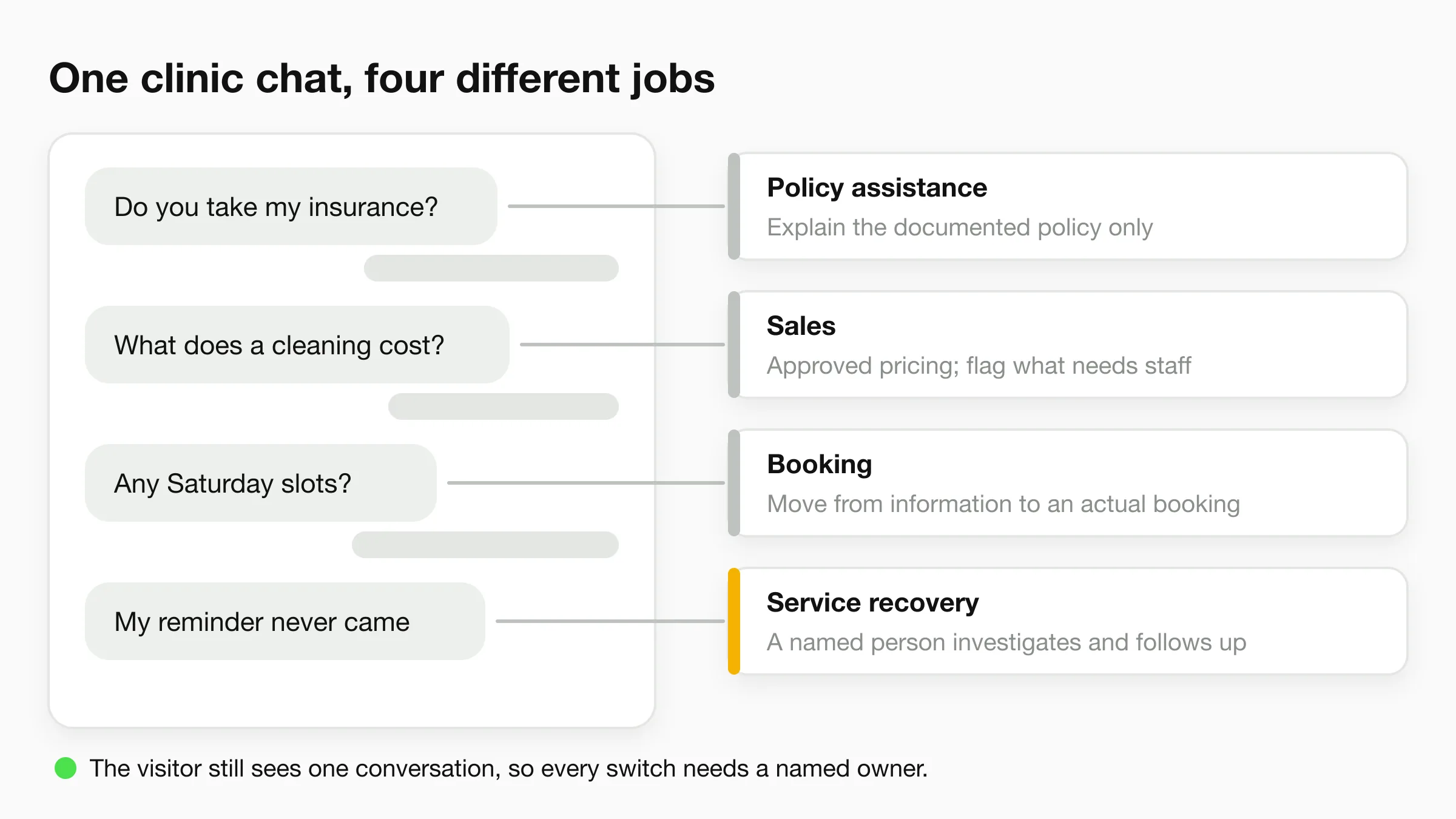
The visitor then asks about cleaning prices, requests a Saturday appointment, and later reports that a reminder never arrived. Your team has moved through policy assistance, sales, booking, and service recovery. The customer still sees one conversation with the clinic.
Follow the requested outcome
A useful way to assign the work is to track how the visitor's goal changes:
- Insurance question: Explain the clinic's documented acceptance policy without promising individual benefits or coverage.
- Price question: Provide approved pricing and identify what requires an assessment or staff confirmation.
- Saturday request: Move from information to availability and an actual booking process.
- Missed reminder: Give a person responsibility for investigating what happened and arranging the next step.
A correct price is useless if the Saturday slot gets lost during transfer. A missed reminder is a service failure even if staff closed the original inquiry correctly.
This is why service shouldn't be reduced to friendly wording or personalization. In Deloitte Digital's global customer-service research, personalized service was the least important customer priority, falling from 22% in 2023 to 16% in 2025. For this clinic, completing the booking matters more than adding the visitor's name to every reply.
Transfer context, not just responsibility
Keep the customer's name, relevant insurance or booking details, requested outcome, transcript, and outstanding action together. For a clinic, collect only the information needed to route the request, rather than inviting detailed medical disclosures into a general chat.
Use the following video alongside that distinction between answering and completing the customer's request.
Before automating the conversation, choose which moments the assistant may finish, which require a person, and which context fields must transfer. Those choices are more useful than trying to classify the entire thread as either support or service.
Who Owns Each Role as Your Team Grows
Who owns support and service at each business stage
| Business setup | Who handles support | Who owns service | Where automation fits |
|---|---|---|---|
| Solo owner or 1-3 staff | Owner, with after-hours coverage | Owner through a shared inbox | FAQs and booking intake |
| Growing team of 4-15 | Support lead and 2-3 agents | Front desk or sales for bookings and follow-up | Routine questions and lead capture |
| Multi-location group | Central team with location managers | Location managers within central standards | Shared knowledge base with location-specific details kept separate |
Treat these staffing bands as illustrative operating models, not hiring ratios. A business with complicated account issues may need more specialist capacity than a larger business answering straightforward availability questions.
For a solo owner, splitting departments on paper creates administration without adding capacity. Keep responsibility with the owner and use automation to collect requests when they can't respond.
A growing team needs clearer separation because bookings and unresolved issues compete for attention. The support lead owns diagnosis and resolution; the front desk or sales coordinator owns appointments and follow-up. Neither should assume the other has contacted the customer.
Scale ownership before adding channels
In Assembled's 2025 support-operations survey, 40% of respondents ranked scaling support as their most important strategic driver, while 33% ranked improving customer-experience quality first. Volume can make hiring feel urgent, but an extra agent won't fix an unassigned queue.
For multi-location businesses, central staff should maintain common policies and approved answers. Location managers should handle local availability, exceptions, and recovery decisions. Give each exception a named owner rather than sending it to a general regional inbox.
Keep judgment with people
Gartner's June 2025 announcement reported that 95% of customer-service leaders planned to retain human agents to define AI's role and projected that half of organizations expecting major workforce reductions would abandon those plans by 2027.
That's a better starting point than treating automation as a staffing cut. Staff still need time and authority for complaints, exceptions, and revenue conversations that require negotiation.
Apply this test when dividing the work:
- Automate documented repetition: Hours, published policies, basic qualification, and standard intake.
- Keep judgment human: Disputed charges, unusual circumstances, sensitive requests, and commitments outside policy.
- Assign maintenance: Name the employee who updates answers when the business changes a price, location, or procedure.
Automation adds coverage. It doesn't remove accountability.
KPIs for Resolution and for the Wider Experience
Support and service KPIs with reference values
| KPI | What it measures | Reference value | Reflects |
|---|---|---|---|
| First-contact resolution | Issues solved without a repeat contact | 74.75% in one dataset reported by CX Network's benchmark resource, which also reports 89.58% CSAT | Support |
| CSAT | Satisfaction after an interaction | Same benchmark dataset identified above | Support and service |
| One-response resolution | Tickets solved with a single reply | 71% across approximately 7,000 companies, with 86% resolved within SLA, in the Freshworks benchmark | Support |
| Resolution within SLA | Tickets closed inside the target window | Same Freshworks benchmark identified above | Support |
| Verified-contact rate | Leads with confirmed contact details | Establish a baseline from your own lead conversations | Service |
| Booked appointments per conversation | Conversations that end in a booking | Establish a baseline from booking-intent conversations | Service |
These are reference points, not targets to copy. Your customer mix, issue complexity, and channel design determine what a useful target looks like.
Complexity also changes the time required: the same Freshworks benchmark places simpler Level-1 interactions at roughly 9 minutes to 1 hour 50 minutes, while complex cases range from about 28 minutes to nearly 11 hours. Don't hold a policy lookup and an account investigation to one universal resolution target.
Separate speed from successful resolution
A fast acknowledgment doesn't count as a solved problem. If the customer must return because the answer was incomplete, your response-time dashboard may look healthy while your team creates more work.
Track first-contact resolution separately for automated and human-assisted conversations. Also distinguish one-response resolution from first-contact resolution: an issue may need several messages within a single conversation and still be resolved without another contact.
Use different measures for different intents:
- FAQ and policy requests: Correct containment, response time, and one-touch resolution.
- Technical or account-specific requests: Correct escalation, resolution-SLA compliance, and reopen rate.
- Sensitive requests: Routing accuracy and whether the assigned employee accepted responsibility.
Containment counts only when the customer reaches a correct resolution. Silence after an answer isn't proof that the answer worked.
Audit completed chats and look for unresolved requests, misleading answers, and customers who stop responding after an irrelevant reply. Don't count those exits as successful automation.
Add the business outcome
For lead capture, define verified-contact rate as confirmed contacts divided by the relevant lead conversations. Decide what verification means before reporting it; a typed email address alone isn't confirmation. In Hyperleap AI, phone confirmation is OTP verification (a paid add-on on Pro and Max, website chat only).
For appointment workflows, divide completed bookings by booking-intent conversations. Counting every chat in the denominator would penalize the booking workflow for visitors who only wanted directions.
Our guide to AI chatbot KPIs can help structure that combined operational and commercial scorecard. Keep the definitions visible so staff don't change denominators between reviews.
At each monthly review, ask which intent changed, on which channel, and against which KPI. Inspect the underlying conversations before changing staffing or instructions. A lower booking rate may come from unavailable appointments, not poor chatbot answers.
Channels and Where Chatbots Fit
A channel should have a job, not just a launch date. Adding messaging everywhere can create more unfinished work if nobody owns the follow-up.
| Channel | Best operational use | Main trade-off |
|---|---|---|
| Website chat | Pre-sale questions, qualification, booking intake | Visitors may leave before a person takes over |
| Repeat-customer contact and appointment changes | Staff need enough history to understand short follow-up messages | |
| Product discovery and local questions from followers | Detailed requests often need a different completion route | |
| Facebook Messenger | Business-page inquiries and service questions | A quick social reply can leave the actual request unfinished |
Match the channel to the next action
Website chat should help visitors move from a question to a useful next step. If someone asks about a consultation, the assistant should distinguish information-seeking from booking intent rather than sending the same generic answer to both.
WhatsApp works well for continuing a relationship, but short messages can be ambiguous. A customer asking to change an appointment needs the correct booking identified before anyone offers alternatives.
Instagram and Messenger often start with brief product or location questions. Give a concise answer, then move detailed discussions to a booking page, phone call, or appropriate staff member without making the customer reconstruct their request.
At Hyperleap AI, our agent replies in seconds on website chat, WhatsApp, Instagram, and Messenger, 24/7 in 100+ languages. It replies in whichever language the customer writes in, with nothing to configure, and uses your business information to answer across those channels.
Report each channel separately
The American Customer Satisfaction Index's 2025 federal-government study reported overall satisfaction of 70.4 out of 100, while call-center satisfaction rose 5% year over year to 65 and websites remained at 72. Those public-sector scores aren't small-business targets, but they illustrate why an organization-wide average can conceal different channel experiences.
Compare channel results within the same customer intent. Otherwise, website price questions and WhatsApp complaints can produce a misleading combined satisfaction score.
Keep these requests on a human route:
- Complaints and refunds: Staff must assess circumstances and authorize remedies.
- Clinical or legal questions: Route advice requests to the appropriate qualified person.
- Requests for a person: Don't force customers through more automated troubleshooting.
Conversation history should follow the customer, but don't assume that requires no setup. Confirm how identities and records will be matched across channels before promising that customers won't need to repeat details.
Sample Handoff Workflows for Common Conversations
A handoff needs a trigger, a receiving owner, and a completion condition. Sending an email is a notification; it becomes an operational handoff when someone accepts and acts on it.
Use this diagram to map the routes, then configure the rules for your own team.
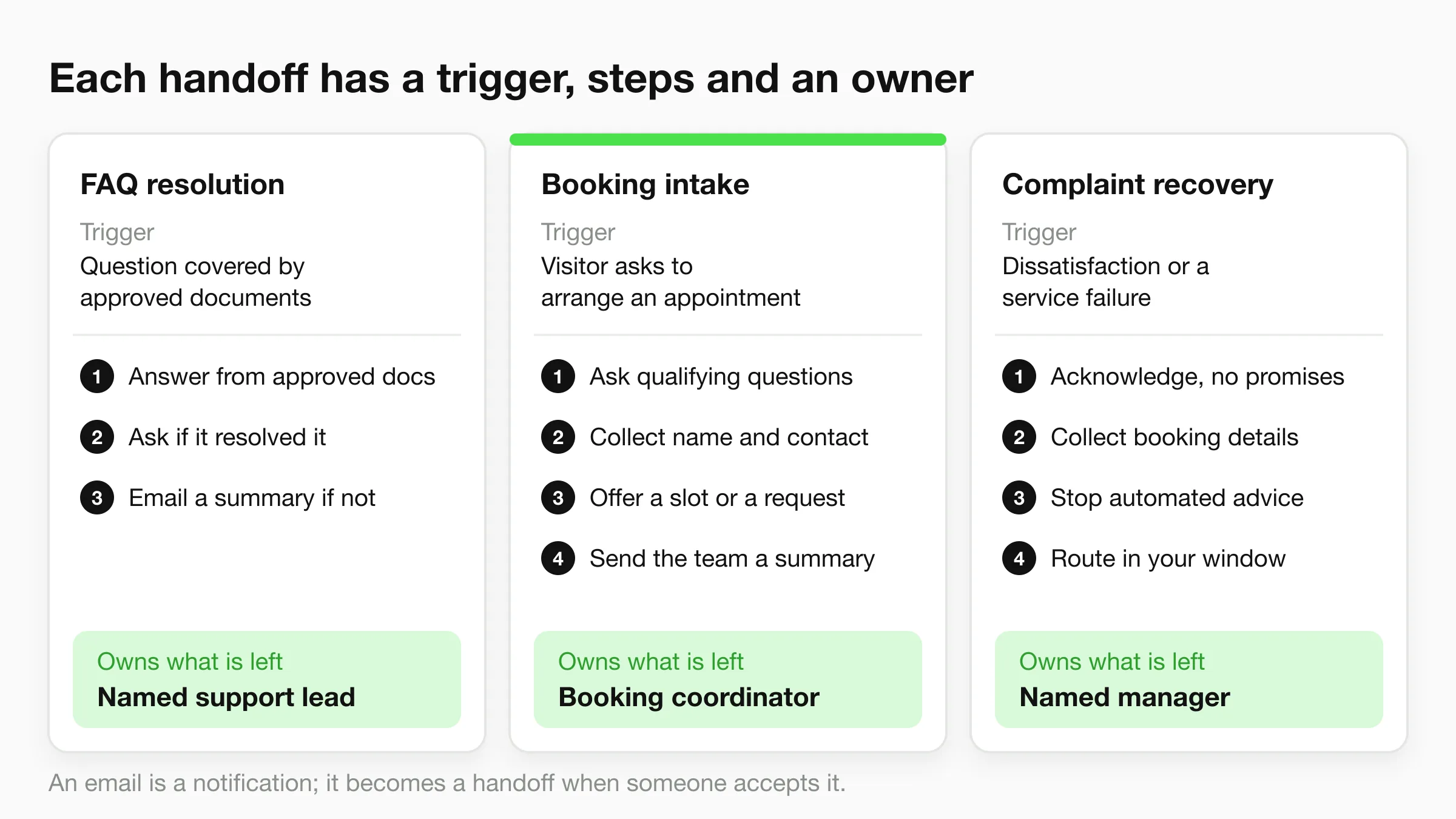
FAQ resolution
Trigger: A visitor asks a question covered by approved business documents.
- Answer only from the approved knowledge base, with the AI owning the response until uncertainty triggers a support handoff.
- Ask whether the answer resolved the question, with the AI retaining ownership until the visitor confirms or requests help.
- If it didn't resolve the question, email a summary to the named support lead, who owns the follow-up.
Don't escalate every successful FAQ just to create activity in the inbox. Keep unresolved cases visible, while using conversation records to audit answers that customers accepted.
Booking intake
Trigger: A visitor asks to arrange an appointment.
- Ask the qualifying questions needed for the appointment type, with the AI owning intake and routing exceptions to the booking coordinator.
- Collect the customer's name and contact details (and, if you use OTP verification (a paid add-on on Pro and Max, website chat only), confirm the phone number), with the AI handing failed verification to the coordinator.
- Offer a slot through the connected booking process, with the booking coordinator handling unavailable or unsupported requests.
- Send the team a summary of the outcome, with the booking coordinator owning any appointment that remains unconfirmed.
A preferred time isn't a confirmed appointment. If the assistant can only collect a request, its final message must say that staff still need to confirm availability. In Hyperleap AI, the agent books natively with Calendly or Cal.com on Pro and Max; on Plus it shares your booking link instead.
Complaint recovery
Trigger: A visitor reports dissatisfaction, a disputed outcome, or a service failure.
- Acknowledge the issue without assigning blame or promising compensation, with the AI owning acknowledgment before manager handoff.
- Collect the necessary order or booking details, with the AI transferring that context to the named complaint owner.
- Stop substantive automated advice, with the complaint owner taking responsibility for investigation.
- Route the request within your stated response window, with the named manager owning customer contact and resolution.
Fallbacks and acceptance
You choose what our AI says when it can't answer, including asking visitors to call or email your team, and which topics it should avoid. Your team receives customer details and chat history by email, ready to follow up; include the requested outcome and outstanding action in the summary.
Use our chatbot human-handoff guidance to define acceptance, reassignment, and missed-response handling. Measure time to human takeover, not just how many conversations the bot transferred.
Before launch, role-play five real questions from each workflow. Confirm that each reaches the intended owner with enough context to act.
Choose the First Workflow and Plan
Start with the workflow you can supervise, not the widest deployment you can afford. A narrow launch makes it easier to distinguish an answer problem from a routing problem.
For a solo owner or small clinic, I'd start with website chat and booking intake. Keep phone and email with the owner, and review missed questions weekly. Don't add another channel until someone can reliably act on the requests already arriving.
Use the scheduling screen and ownership document together when deciding who handles incomplete appointments.
Choose coverage you can manage
A growing team can add WhatsApp and a shared inbox once the assigned workflow owners have a dependable follow-up process. Separate automated and human resolution reporting so a strong combined average doesn't conceal an underperforming route.
A multi-location group should launch with a central knowledge base and clearly separated location-specific details. Test a local exception, such as different opening hours, and confirm that the appropriate location manager receives it.
Use this customer-support automation guide to turn the selected workflow into a setup checklist rather than deploying every possible use case at once.
Check cost, access, and responsibility
The Hyperleap AI Plus plan costs $40 per month and includes 3,000 AI responses. The cost per AI response is $0.013 on Plus, $0.008 on Pro, and $0.007 on Max.
Estimate responses rather than conversations, because a single booking discussion can require several replies. Compare expected usage with plan allowances before expanding channels.
Set the launch conditions explicitly:
- Access: Choose which team members can see customer details and conversations.
- Human decisions: Keep complaints, refunds, clinical or legal advice, and other judgment calls with your team.
- Coverage: Assign someone to act on escalations, including requests received outside working hours.
Our platform doesn't provide support coverage for your clients. Your team provides the support, including the decisions and follow-up that an automated reply can't complete.
Make a 30-day launch decision: choose one workflow, name its owner, and schedule a review on day 30. Use first-contact resolution for an FAQ launch or booked appointments per conversation for booking intake, then inspect the conversations behind the result.
Hyperleap AI offers an AI front desk that answers from your business information, captures customer details, and helps book appointments across website and messaging channels (native Calendly or Cal.com booking on Pro and Max; on Plus it shares your booking link). Visit Hyperleap AI to set up your first workflow, with a clear boundary between what the assistant finishes and what your team takes over.