Guide
Facebook Lead Generation: A Step-by-Step Playbook for 2026
Facebook lead generation step by step: pick the right objective, design offers, use Lead Ads and Messenger, verify leads, and measure cost per qualified lead.

Gopi Krishna Lakkepuram · Founder & CEO
· 14 min read
Facebook ads could reach nearly 2.2 billion people each month, according to DataReportal's Digital 2024 Global Overview. That's an enormous audience, but it doesn't tell a local business how many enquiries will become paying customers.
The useful question isn't whether Facebook can generate form submissions. It's whether you can verify those contacts, respond while they're interested, and turn enough of them into appointments at a sustainable cost. Facebook lead generation works best as a verification and response system, with the ad acting as its entry point.
Table of Contents
- Is Facebook Worth It and Which Numbers to Beat
- Choose Objective, Audience and Creative
- How to Set Up a Lead Campaign Step by Step
- Offers, Forms and Verification That Filter Real Prospects
- Responding Within Five Minutes Using Messenger and CRM Sync
- Measure Qualified Leads, Avoid Mistakes and Launch
Is Facebook Worth It and Which Numbers to Beat
Facebook lead campaign benchmarks
| Metric | Benchmark | Scope |
|---|---|---|
| Average lead-campaign conversion rate, all industries (2025) | 7.72% | Over 1,000 campaigns, cross-industry, in WordStream's 2025 benchmark |
| Restaurants and food conversion rate | 18.25% | Same 2025 WordStream benchmark |
| Attorneys and legal services conversion rate | 10.53% | Same 2025 WordStream benchmark |
| Education and instruction conversion rate | 10.05% | Same 2025 WordStream benchmark |
| Median lead-campaign conversion rate, all industries (2024) | 8.78% | WordStream's analysis of 2,946 campaigns, February 2023 to April 2024 |
| Click-through rate | 2.59% | The Ad Spend's dataset of 726 U.S. campaigns, April 2024 to June 2025 |
| Cost per click | $1.92 | Same U.S. campaign dataset |
| Cost per lead | $27.66 | Same U.S. campaign dataset |
These are reference points, not promises. The industry figures show why comparing a restaurant promotion with a legal consultation tells you little about either campaign's quality. The separate datasets also shouldn't be stitched together into a supposed universal Facebook funnel.
Use the closest relevant benchmark to check whether your results deserve investigation. If conversion looks weak, inspect the offer, creative and form before blaming targeting. If conversion looks excellent but your team can't reach anyone, the problem is further downstream.
When Facebook deserves your budget
Facebook is worth testing when customers need a conversation before they buy. Dental consultations, property viewings, hotel event enquiries and home-service quotes all give you a concrete next action to advertise.
The platform can introduce your business to someone who wasn't actively searching for it. That's useful, but it changes the sales task: your follow-up must help the person evaluate the service rather than assume they're ready to purchase.
Ask yourself:
- Can the prospect understand the offer quickly? A specific consultation or quote request is easier to evaluate than a vague invitation to learn more.
- Can your team serve the advertised area? Interest from outside your coverage isn't useful demand.
- Can you explain what happens next? Prospects should know whether they're requesting a callback, choosing an appointment or asking for an estimate.
- Can you follow through? A long offline sales cycle needs ownership and tracking before you increase spend.
For another service-business perspective on that last point, see GolfRep's lead handling approach. Use it to evaluate the operational commitment behind the advertising, not just the ability to collect enquiries.
Compare the right denominator
Cost per lead is ad spend divided by submitted leads. Conversion rate is leads divided by the relevant traffic measure, expressed as a percentage.
That traffic measure matters. Clicks, landing-page visits and impressions aren't interchangeable denominators. Before comparing your dashboard with a benchmark, check what each report counts as a conversion and what it divides by.
Your CRM introduces another distinction: someone who completed a form isn't necessarily someone who can buy. An impressive form conversion rate can coexist with disconnected numbers, out-of-area enquiries and people who misunderstood the offer.
Practical rule: Treat a low cost per submission as a reason to inspect the campaign, not a reason to scale it.
Set your economic target backwards from a customer. Consider the gross profit you can earn, the share of qualified prospects who become customers, and the staff time required to get there. Your affordable acquisition cost should leave room for all of those costs.
Response capacity belongs in that calculation too. The industry guide to response time and conversion rates can help you identify which handoffs to monitor.
The decision is straightforward: Facebook is worth it when the campaign produces serviceable prospects your business can convert profitably. Beating an industry conversion benchmark is useful, but a sustainable cost per qualified lead matters more.
Choose Objective, Audience and Creative
Make the strategic decisions before opening Ads Manager. Otherwise, it's easy to accept convenient defaults and discover later that the campaign was built around the wrong outcome.
Make the build decisions in order
Choose an objective that matches the business outcome. Use the Leads objective for a lead-generation campaign rather than choosing traffic because clicks look cheaper. Select the conversion location and performance goal your tracking can support; don't assume Meta can learn which prospects are valuable if you never record their outcomes.
Choose an audience you can serve. Start with your service geography, then use relevant targeting options where available and permitted for your category. Add customer or website-visitor audiences only when you have a lawful basis to use that information, and avoid layering so many restrictions that you can't gather useful results.
Write creative that attracts and excludes. State who the service is for, what the prospect receives and the next action. Include a service area or meaningful pricing context when that helps unsuitable prospects rule themselves out.
Write the qualification definition before producing the ad. For a contractor, that might mean a person in the service area requesting a job the company undertakes. For a hotel, it might require a suitable event type and an available date.
Give each creative one job
A headline offering a quote shouldn't lead into a form selling a consultation package. Keep the image, headline, form introduction and confirmation message aligned so prospects don't have to reinterpret the offer at each tap.
Test a distinct hook without changing everything else. For example, compare an image showing the finished service with an image showing the team, while keeping the offer and headline stable.
A useful ad doesn't attract everyone. It helps the right person recognize the offer and the wrong person leave without submitting.
Before launch, check category restrictions and local advertising requirements, particularly for housing, healthcare and financial services. Don't request sensitive information merely because it would be convenient for your sales team.
How to Set Up a Lead Campaign Step by Step
Build the campaign around a traceable handoff from ad to sales conversation. The setup should make it possible to identify where a prospect stopped progressing, not merely count how many people tapped Submit.
Use this process map to keep the business outcome visible while configuring the campaign.
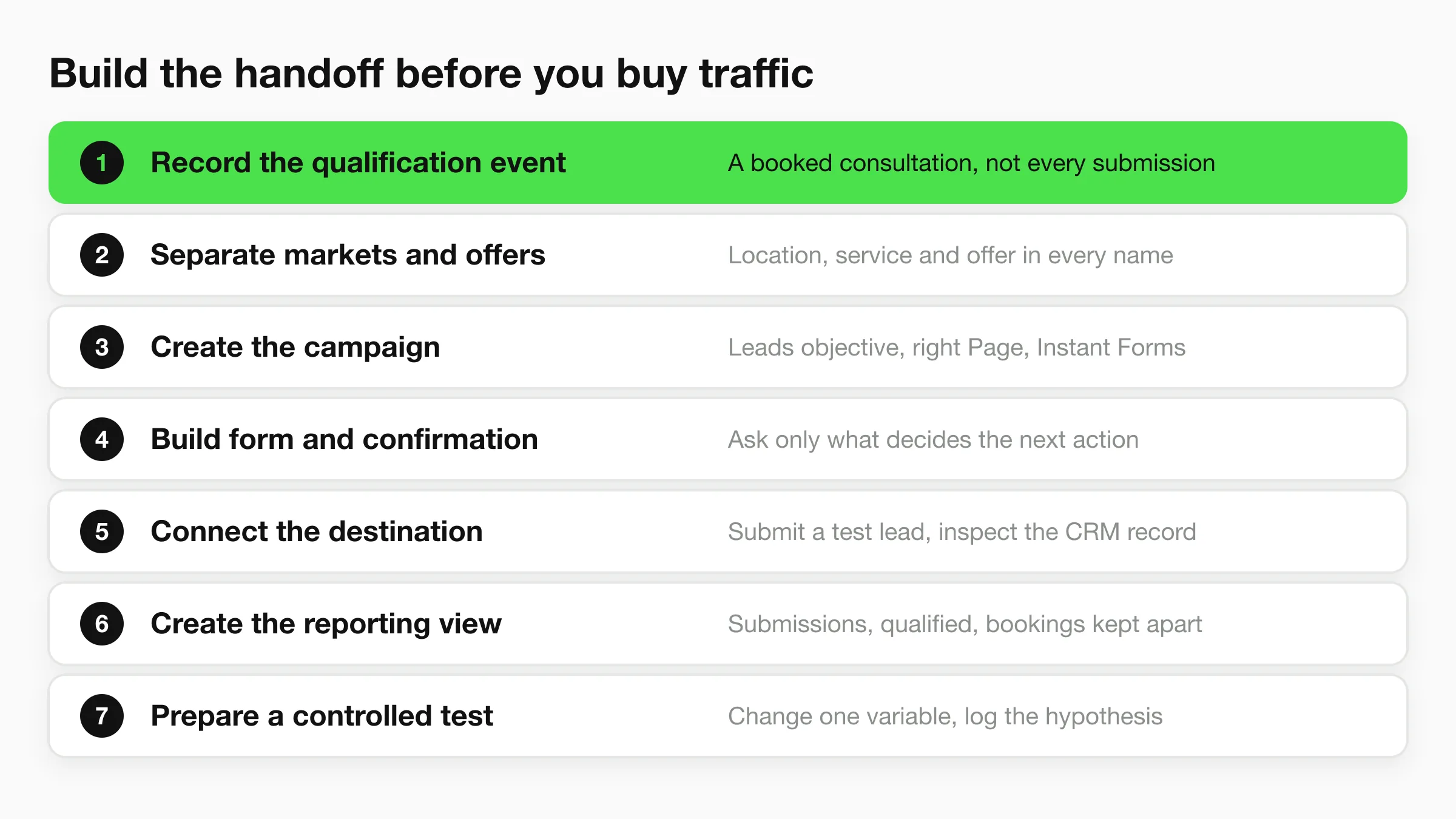
Build the campaign and its handoffs
Record the qualification event. Choose the milestone your team will report consistently, such as a sales-qualified conversation or a booked consultation, and document its acceptance criteria. The common slip is treating every submission as sales-ready, even though confirming contact details and confirming buying intent are different checks.
Separate markets and offers. Name campaigns and ad sets so the location, service and offer are identifiable in exported records. Mixing unrelated services makes the results difficult to interpret and sends staff enquiries they may not be equipped to handle.
Create the campaign in Ads Manager. Choose Leads, select the appropriate Facebook Page, configure the audience, budget and schedule, and select Instant Forms when using a native form. The common slip is publishing under the wrong Page or attaching an old form with an outdated offer.
Build the form and confirmation screen. Use prefilled contact fields where appropriate, then ask only what the team needs to decide the next action. Don't make the confirmation screen a dead end: explain the callback process or offer a suitable booking route.
Connect the destination before publishing. Map the form fields into your CRM or response workflow, including campaign identifiers and qualification answers. Submit a test lead and inspect the actual destination record, because a successful connection message doesn't prove every field arrived correctly.
Create the reporting view. Keep submissions, accepted qualified leads and bookings as separate stages, with campaign attribution attached. The common slip is letting ad-platform totals and sales-team spreadsheets use different definitions without reconciling them.
Prepare a controlled test. Keep a change log describing the hypothesis, the variable being changed and the outcome that will decide the result. Don't replace the audience, creative and form together, because you won't know which change helped.
Check readiness before buying traffic
For a fitness-specific application, the guide to fill your gym with Facebook leads provides a useful prompt to connect the advertised offer with the membership conversation that follows. Apply the same discipline to your own service: the next step must be operationally possible, not just persuasive in an ad.
A healthy initial test produces records you can trace from submission to outcome. It also reveals whether the form answers help staff, whether the booking route works and whether creative differences attract meaningfully different prospects.
Don't declare a winner because one version collected more forms. Check whether those people passed your acceptance criteria and progressed.
Offers, Forms and Verification That Filter Real Prospects
Attach each campaign to a concrete action: request a quote, reserve a consultation or arrange a site visit. A broad giveaway may attract attention, but it can also leave staff calling people who wanted the incentive rather than the service.
Make the form look like a continuation of that offer, not an unrelated intake questionnaire.
Minimal form or qualified form
A minimal form asks for contact details and little else. It reduces effort, but your team must discover service fit, location and urgency during follow-up.
A qualified form adds questions that determine what should happen next. Service needed, postcode and timeframe can help route an enquiry, provided each answer changes a real decision.
Test these designs against the same offer. A longer form isn't automatically better: irrelevant questions create friction without improving qualification. Conversely, removing every question may transfer the work from the prospect to your receptionist.
Decide whether verification pays
In Meta's Metje + Ziegler automotive case study, enabling SMS phone verification reduced invalid phone numbers by 34% and produced 2.2 times as many conversions compared with a campaign without the feature. That's a specific case, not a forecast for your business, but it demonstrates why maximum form completion isn't always the best objective.
Use your own campaign economics:
- Contactability: Track which submitted numbers can be reached.
- Labour: Include the time staff spend retrying unusable contacts.
- Progression: Compare appointments and eventual customers, not just verified numbers.
- Contribution: Subtract advertising, verification and follow-up costs from the gross profit attributable to the campaign.
Verification pays when the saved labour and additional profitable business exceed the extra cost of collecting verified contacts. Keep a fallback for prospects who can't receive a code, and test local number formats and message delivery before expanding into another country.
The guide to OTP-verified lead capture chatbots is useful when considering verification within a website-chat journey. Don't assume verification available in one capture method also exists in every messaging channel.
Explain how you'll use contact details in the form notice, including the intended follow-up. Check applicable privacy and messaging requirements before collecting information, and avoid adding prospects to unrelated marketing because they requested a quote.
Responding Within Five Minutes Using Messenger and CRM Sync
Response time and qualification outcomes
The historical findings summarized by LeadSync's speed-to-lead review distinguish the MIT/InsideSales comparisons from the separate Harvard Business Review analysis.
| Response window | Reported effect | Action to take |
|---|---|---|
| Within 5 minutes | Target window for attempting qualification in the MIT/InsideSales comparison | Validate, route and reply automatically |
| Within 1 hour | Qualification nearly 7 times more likely than waiting another hour in the HBR analysis | Alert the owner when the response target is missed |
| After 30 minutes | Odds of reaching the lead reduced by a factor of 100 and qualification odds by a factor of 21 versus 5 minutes in the MIT/InsideSales study | Escalate to a backup owner |
| After 24 hours | Contact within an hour was more than 60 times more likely to qualify than waiting at least this long in the HBR analysis | Review the delay and repair routing |
Use the timeline as an operational reminder, not a guarantee that every late lead is lost.
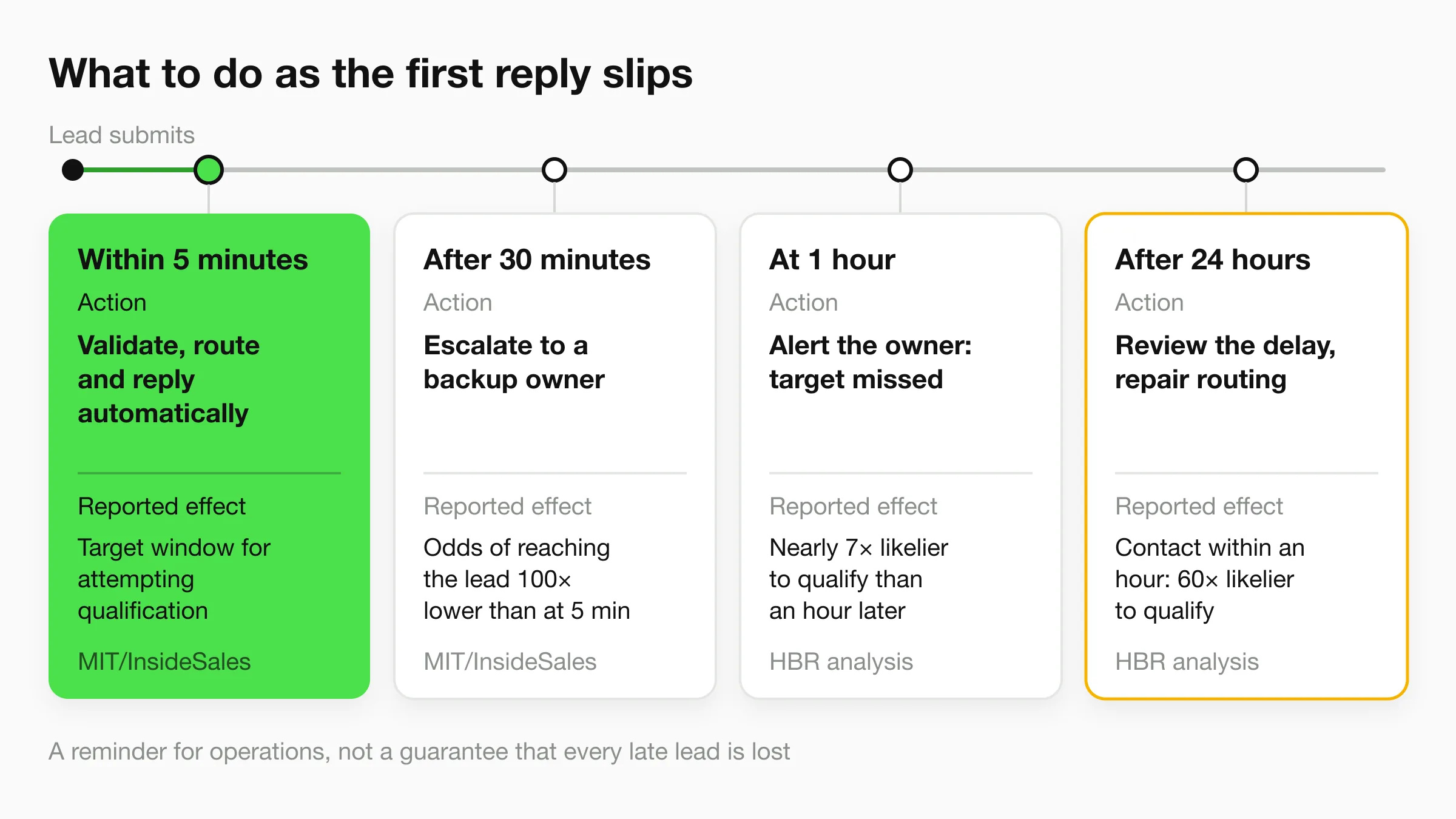
Build the response sequence
Validate the incoming record and check for duplicates first. Then acknowledge the request, assign a named owner and start qualification through a permitted contact channel.
An acknowledgment isn't the same as a useful response. Tell the prospect what happens next, answer the obvious question and provide a booking option when appropriate.
For Messenger conversations, automation can answer service questions, share an approved brochure and collect the details a person needs before calling. Don't assume a native-form submission automatically gives you permission or the technical ability to start a Messenger conversation; configure the capture route and follow-up permissions deliberately.
Retail shops have missed leads because they couldn't respond to Instagram DMs fast enough. An automated first reply can cover that gap while a person is unavailable, but it still needs accurate information and an escalation route.
At Hyperleap, our AI front desk answers enquiries around the clock, asks the right questions and sends the business a lead that's ready to call. The Messenger chatbot guide for local businesses explains how to structure that kind of conversation.
Monitor failures, not just replies
Log submission, CRM delivery, acknowledgment, meaningful first contact, qualification and booking separately. Otherwise, an instant automated receipt can conceal a long delay before anyone helps.
- Delayed sync: Add delivery monitoring and retries.
- Missing ownership: Assign a fallback when the primary owner is unavailable.
- Duplicate records: Merge the context rather than starting competing follow-ups.
- After-hours gaps: Keep the conversation useful and state when a person will respond.
Report median and 90th-percentile response times by market. The median describes the typical experience; the slower end reveals the leads your workflow neglects.
Measure Qualified Leads, Avoid Mistakes and Launch
Lead campaign KPIs and what they decide
| KPI | What it measures | Decision it supports |
|---|---|---|
| Cost per qualified lead | Ad spend divided by leads that pass qualification | Keep, pause or rebuild the offer |
| Verified-lead rate | Share of submitted leads with confirmed contact details | Whether verification needs strengthening |
| Appointment rate | Share of qualified leads that book | Whether the follow-up and booking process work |
| Speed to first response | Median and 90th-percentile time from submission to meaningful contact | Whether routing and alerts need repair |
| Revenue per lead | Attributable sales revenue divided by submitted leads; track gross profit per lead alongside it | Maximum affordable acquisition cost |
Keep revenue and gross profit separate. Revenue per lead helps compare sales output, but gross profit per lead is the more useful starting point for deciding what you can afford to spend.
Likewise, keep booked and attended appointments separate. A calendar full of people who don't attend can make a campaign look healthier than it is.
Give Meta a consistent quality signal
Meta's qualified-leads documentation states that new campaigns using the qualified-leads performance goal require CRM integration through Conversions API; Meta also reports that a test with 567 advertisers produced a 21% lower cost per quality lead than optimizing for lead volume.
The practical requirement is consistent event recording. Decide whether the relevant downstream event is a booked appointment, attended consultation or completed purchase, then map it to the appropriate supported event and integration.
Don't let one salesperson mark an unanswered enquiry qualified while another waits for a substantive conversation. Inconsistent labels make both your reporting and the feedback sent to Meta less useful.
Clean stage definitions are more valuable than a dashboard full of loosely defined conversions.
A small business doesn't need an elaborate sales taxonomy. It needs a dependable record of who submitted, who qualified, who booked and who bought, with clear reasons for rejection.
Fix the mistakes that distort decisions
- Sending outcomes back in batches: Automate eligible event delivery promptly, with the original event time and required identifiers. Delayed, incomplete feedback makes reconciliation harder.
- Counting repeat submissions as new prospects: Deduplicate before reporting acquisition totals, while preserving legitimate repeat enquiries.
- Calling a test too early: Set a review window in advance and require enough qualified outcomes to make the comparison meaningful.
- Ignoring attribution gaps: Preserve campaign and ad identifiers through the CRM handoff rather than asking staff to guess the source.
- Launching without a privacy notice: Publish the notice and make sure the form accurately describes the intended processing.
- Scaling beyond staff capacity: Increase budget only when the team can maintain its response and booking standards.
Change the part of the system the evidence points to. Strong contactability with weak booking suggests a different problem from high booking with poor attendance.
Launch with a decision rule
Choose a service offer your team can deliver, document the acceptance criteria and complete a test submission through the entire workflow. Confirm that the owner receives the right information, the prospect gets a useful next step and the eventual outcome appears in your reporting.
Then launch with a written decision rule: what would justify keeping the campaign, what would require a form change and what would make you pause it? Review the funnel by campaign and location, and change a single meaningful variable rather than rebuilding everything in response to a disappointing day.
For messaging integrations, we're a Meta Technology Provider and Business Partner, and our WhatsApp, Instagram and Messenger channels run on Meta's official Business APIs. That credential doesn't replace your own responsibilities for consent, access control and accurate customer information.
Hyperleap AI offers an AI front desk that answers customer questions, collects contact details and books appointments on your website and messaging channels (native Calendly and Cal.com booking on Pro and Max; on Plus it shares your booking link). Visit Hyperleap AI to build the response and booking workflow behind your Facebook lead campaigns, so your team receives enquiries with the context needed for the next conversation.