How to Deploy an AI Chatbot in Under a Week
A realistic day-by-day plan for SMBs to deploy an AI chatbot across Website, WhatsApp, Instagram DM, and Facebook Messenger — no developer required.

TL;DR: Deploying an AI chatbot does not require a developer or a multi-month project. With the right platform, the realistic timeline is: Day 1 — account setup and channel decisions; Day 2 — knowledge base preparation; Day 3 — conversation flow and qualification logic; Day 4 — channel activation; Day 5 — structured testing; Days 6–7 — go-live and monitoring. This guide walks through each day in practical terms, covers the four channels where deployment actually matters (Website, WhatsApp, Instagram DM, Facebook Messenger), explains the one genuine external constraint (WhatsApp API approval), and flags the mistakes that turn a five-day plan into a five-week one.
What "Deploying an AI Chatbot" Actually Means
Deploying an AI chatbot means getting a working, tested conversational agent live on the channels your customers actually use — answering questions from your business knowledge, capturing leads, and handing off to your team when a human is needed.
That is different from two things that often get confused with deployment:
Building a chatbot suggests writing code, designing conversation trees, and integrating APIs from scratch. For most SMBs, this is not the right approach. Modern AI chatbot platforms let you configure rather than code.
Setting up a chatbot demo is not deployment. A demo that answers generic questions from a default knowledge base, with no channels connected, no qualification logic, and no team handoff, is not a live system. Deployment means it is handling real customer conversations on your actual business channels.
The reason this distinction matters: many SMB owners believe deployment requires months of IT involvement. In practice, with the right platform, deployment is a configuration exercise. It takes time, but it is measured in days — not sprints.
If you want the broader category context before diving into the timeline, the AI chatbot for business overview explains what these agents do and who they are built for.
Why Most Deployments Take Longer Than They Should
Before the day-by-day plan, it helps to understand what actually causes delays — because most of them are avoidable.
Unclear use case. Teams that start deployment without deciding what the chatbot should handle end up rebuilding the knowledge base three times. The most productive first step is a 30-minute internal conversation about the top five questions your customers ask and the top three actions you want the chatbot to drive.
Knowledge base gaps. An AI chatbot answers questions from the documents and knowledge you give it. If your pricing page is outdated, your FAQs are incomplete, or your service descriptions live only in the head of your senior sales rep, the chatbot will either not answer or give imprecise responses. Preparing the knowledge base is typically the most time-consuming step, but it is also the most one-time.
Channel approvals. WhatsApp Business API access requires a Meta Business verification step. Instagram DM automation requires a connected Facebook Page and approved app permissions. These are not blocking tasks, but they take clock time — sometimes 24–48 hours of waiting on platform review. Starting them early is the single highest-leverage scheduling decision you can make.
Testing gaps. Teams that go live without testing against real customer questions regularly encounter edge cases in the first week that could have been caught in an afternoon of structured testing.
Platform mismatch. If your platform requires developer involvement for every change to the knowledge base or qualification flow, you will slow down every iteration. Platforms where non-technical team members can update content and flows independently are significantly faster to deploy and maintain.
The AI chatbot implementation checklist for SMBs goes deep on each of these — it is a useful companion to this timeline and worth bookmarking for the testing and go-live phase.
The Realistic Day-by-Day Deployment Plan
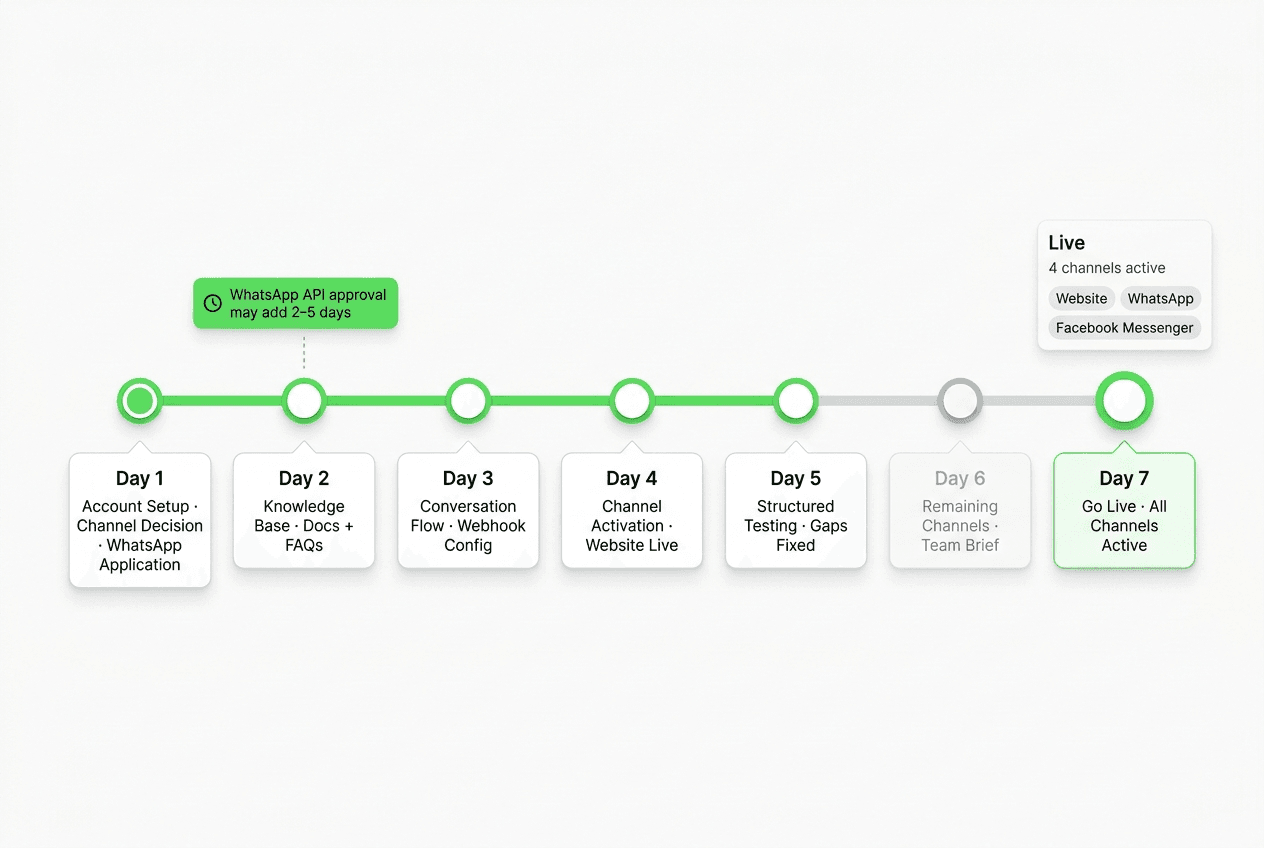
The plan below assumes you are deploying on one primary channel first and expanding to additional channels during Days 4–6. Starting with your highest-traffic channel — usually your website widget — and expanding from there is the approach that gets value fastest while keeping the scope manageable.
Day 1 — Platform Selection and Use Case Definition
Goal: Choose your platform, open your accounts, and write down the three things you need the chatbot to do.
The platform decision is the most consequential one in the entire timeline, so it is worth a focused few hours rather than a checkbox.
Questions to answer before committing to a platform:
- Which channels does it ship on? Verify that Website, WhatsApp Business API, Instagram DM, and Facebook Messenger are included — not roadmap items.
- How does knowledge grounding work? Does the chatbot answer only from your uploaded documents, or does it mix in general AI responses? Document-grounded responses are more predictable and consistent for business use cases.
- What does the handoff look like? When the chatbot can't answer or qualifies a high-intent lead, how does your team get notified? REST API and webhooks are the right answer for flexibility.
- What is the trial structure? A meaningful trial means access to all channels and the full feature set, not a limited demo environment.
- What does a realistic setup look like? Ask to see documentation or a walkthrough — not a sales deck.
For a full evaluation criteria list, the AI chatbot for business overview includes what to look for across platforms.
Use case definition: write down, concisely, the answers to three questions:
- What are the top five questions customers ask your team that a chatbot should handle?
- What is the primary action you want the chatbot to drive — booking a call, capturing a lead, answering a product question?
- Which team member will receive the chatbot's lead summaries or escalation alerts?
By end of Day 1: Platform account created, trial started, three use cases documented.
Channel timing note: Submit your WhatsApp Business API access request today if WhatsApp is in your plan. Meta's review typically takes 24–48 hours. The earlier this clock starts, the less it delays Day 4.
Day 2 — Build Your Knowledge Base
Goal: Assemble the documents and content the chatbot will use to answer customer questions.
The knowledge base is the single biggest determinant of answer quality. A well-configured knowledge base means the chatbot draws on accurate, specific information about your business. A thin or outdated knowledge base means vague or imprecise responses that erode visitor trust.
What to include:
| Content type | Priority | Notes |
|---|---|---|
| Product/service descriptions | Must-have | What you offer, at what price, for whom |
| Pricing page or rate sheet | Must-have | Even a simplified version beats "contact us for pricing" |
| FAQ document | Must-have | Your team's top 10–15 most common customer questions |
| Qualification criteria | Must-have | What makes a lead worth routing to a human |
| Booking/contact information | Must-have | Where to send high-intent visitors |
| Case studies or social proof | Nice-to-have | Qualitative examples of outcomes, no fabricated metrics |
| Terms and policies | Nice-to-have | Return, refund, or service policy basics |
Format tip: Plain text and Markdown documents train the fastest. PDFs with complex layouts or tables sometimes parse inconsistently — convert them to clean text if you are using PDFs.
Keep it honest: Do not load aspirational claims, invented statistics, or outcomes you cannot substantiate. The chatbot will repeat what you give it. Document-grounded responses are only as reliable as the documents themselves.
By end of Day 2: Knowledge base documents prepared and uploaded to your platform.
Day 3 — Configure the Chatbot and Qualification Flow
Goal: Set up the chatbot's conversation design, qualification logic, and lead handoff rules.
This is where your use case definition from Day 1 becomes the actual chatbot. The configuration work has three parts:
Conversation opening: How does the chatbot greet a visitor? The opening should be direct, not generic. "Hi! How can I help?" is fine as a starting point but will convert less than an opening that signals what the chatbot can do: "Hi — I can answer questions about [your service], share pricing, or connect you with our team. What brings you here today?"
Qualification flow: If lead capture is a goal, set up the branching questions that collect intent, company fit, and timeline signals. Keep it to five turns or fewer. The AI lead capture chatbot guide covers qualification frameworks in detail — specifically the ICTT method (Intent, Company fit, Timeline, Transfer signal) that works well in chat environments.
Handoff rules: Define when the chatbot should route to a human. Common triggers: visitor asks to speak to someone, question is not in the knowledge base, lead clears your qualification threshold, visitor expresses urgency. The chatbot should acknowledge the handoff: "I'll flag this for our team — you'll hear back within [timeframe]."
Webhook configuration: Set up your REST API or webhook endpoint so that lead summaries and escalation events fire to your CRM or team notification channel the moment they occur. This is a 30-minute task for most platforms with standard webhook support — it is worth doing now rather than retroactively.
By end of Day 3: Chatbot configured, qualification flow tested in the platform's preview mode, webhook endpoint connected.
Day 4 — Connect Your Channels
Goal: Deploy the chatbot on your website and initiate the additional channel connections.
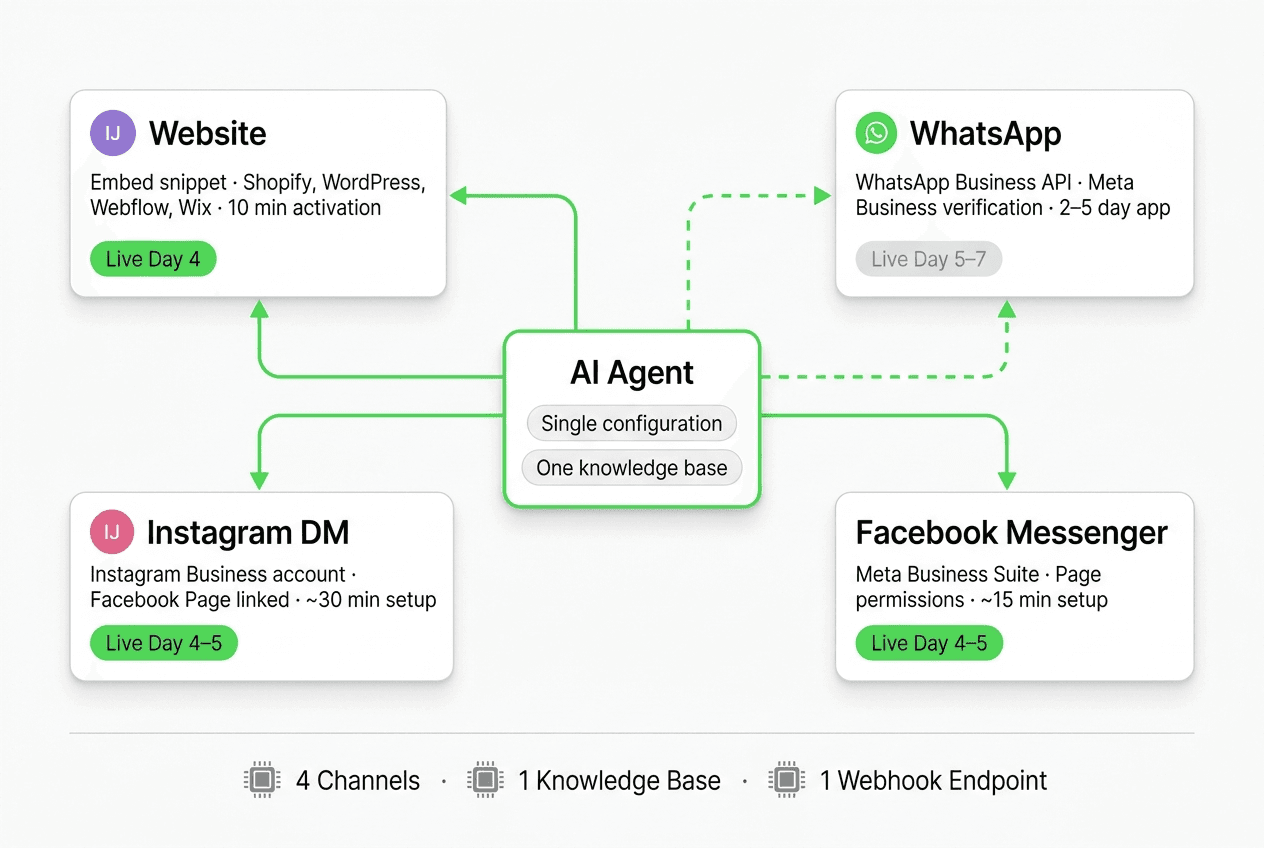
Website widget: This is the fastest channel to go live. Most platforms provide a JavaScript snippet you paste into your site's <head> or before the closing </body> tag. On Shopify, WordPress, Webflow, Squarespace, Wix, or any custom HTML website, this is a 10-minute task — no developer needed.
WhatsApp Business API: If you submitted your access request on Day 1 and it has been approved, connect the API credentials to your platform today. If approval is still pending, you will likely complete this on Day 5 or 6 — build it into your plan rather than assuming 24-hour turnaround. The WhatsApp Business API page explains the connection requirements.
Instagram DM: Connect your Instagram Business account via your platform's channel settings. You will need a Facebook Page linked to the Instagram account and the platform's app authorized in your Meta Business Settings. This typically takes under 30 minutes once you have the right permissions.
Facebook Messenger: Connect via the same Meta Business Suite setup as Instagram. If the Page permissions are already in order from the Instagram connection, Messenger usually takes under 15 minutes.
Rollout advice: The most common mistake here is trying to go live on all four channels simultaneously on Day 4. Instead, go live on your website widget first. Run it live for 12–24 hours before enabling the other channels. You will catch the most common configuration gaps on your website — where you can see traffic and test — before they appear on channels where the feedback loop is less immediate.
By end of Day 4: Website widget live on your site, WhatsApp/Instagram DM/Facebook Messenger either live or actively in progress.
Day 5 — Structured Testing
Goal: Test the chatbot against realistic customer questions before the full go-live, using your actual team.
Do not skip this step. The difference between a five-day deployment and a five-week one is usually whether the team ran structured tests before going live.
Structured testing checklist:
- Ask the top five questions customers ask your team. Are the answers accurate and drawn from your knowledge base?
- Ask an off-topic question that should trigger a human handoff. Does it route correctly?
- Complete a full qualification flow as a test lead. Does the lead summary arrive correctly at your webhook endpoint?
- Ask a question where the answer is not in the knowledge base. Does the chatbot say so gracefully, rather than guessing?
- Test on mobile — most of your WhatsApp and Instagram DM conversations will happen on phones, not desktops.
- Check that the chatbot's opening message works for a visitor who has never heard of your business.
- Verify that the booking link, pricing URL, or contact prompt in the handoff message is correct.
Who should test: At minimum, one person from your sales or customer success team alongside the person who configured the chatbot. Sales reps know the real customer questions and will catch gaps that a technical reviewer misses.
By end of Day 5: Testing complete, critical gaps fixed, launch decision made.
Days 6–7 — Launch Checklist and Go-Live
Goal: Complete the pre-launch readiness check and go live on all planned channels.
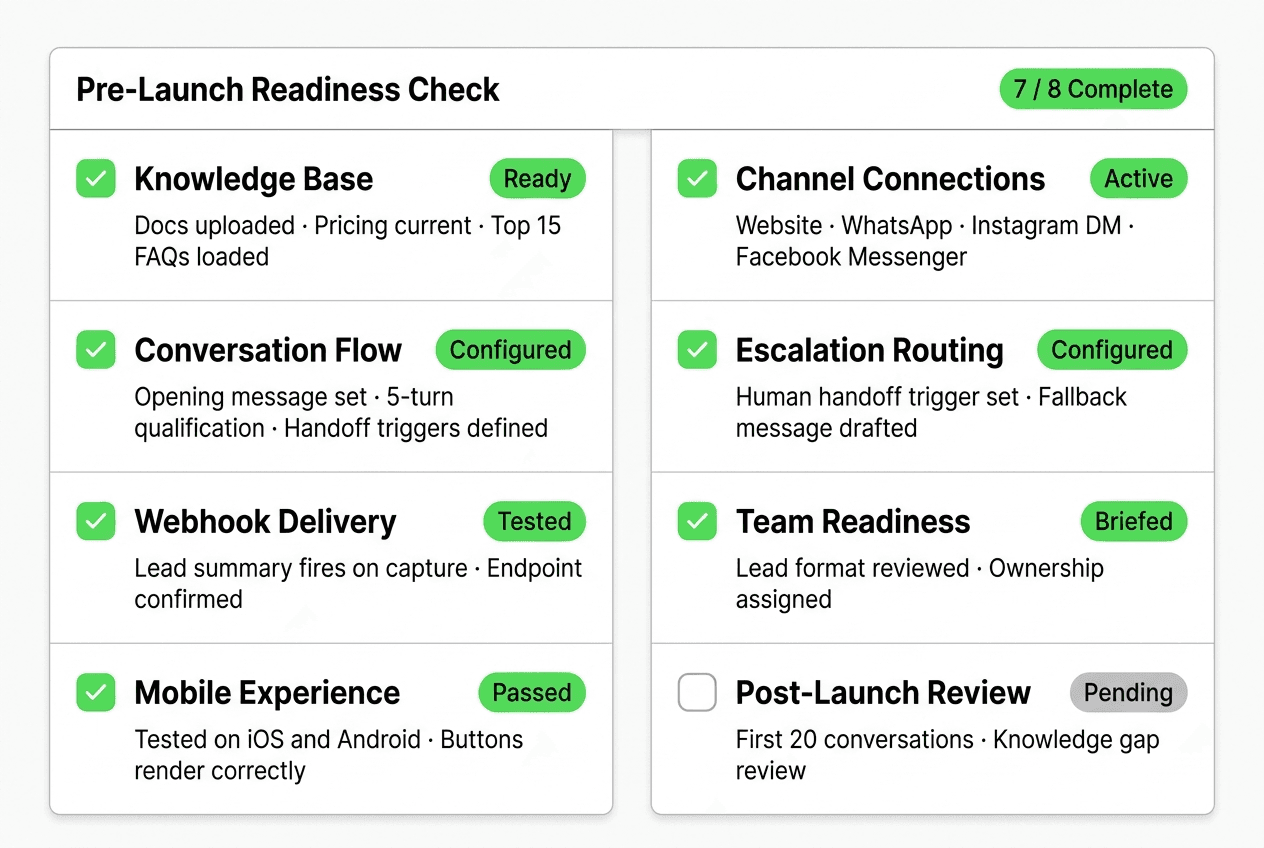
Before marking the deployment complete, verify each item:
| Area | Readiness check |
|---|---|
| Knowledge base | All key documents uploaded; pricing and FAQ current |
| Conversation flow | Opening message direct and context-aware; five-turn qualification ceiling respected |
| Handoff rules | Human escalation triggers defined; webhook delivers lead summaries within seconds |
| Channel connections | Website widget live; WhatsApp/Instagram DM/Facebook Messenger connected and tested |
| Mobile experience | Tested on iOS and Android; messages render correctly on both |
| Team readiness | At least one team member has reviewed lead summary format; knows the escalation channel |
| Fallback language | Chatbot has a graceful "I don't have that information" response, not a blank response |
| Contact confirmation | Chatbot sends a confirmation message after capturing a lead with expected response timeframe |
After go-live: The first week of live traffic is your best feedback source. Watch for questions the chatbot answers vaguely (knowledge base gap), questions it fails to answer at all (missing content), and drop-offs in your qualification flow (too many questions or wrong sequence). Iterate the knowledge base and flow based on what you observe — not on assumptions.
Deploying on Hyperleap AI: What the Timeline Looks Like
Hyperleap AI is built for SMBs that need to deploy across all four channels without developer involvement. Here is what the timeline above looks like in practice on the platform.
Day 1 (Platform + Account): Sign up for a 7-day free trial at Hyperleap — credit card required. All four channels are available on every paid plan. The Hyperleap Studio is the configuration environment — no separate developer console.
Day 2 (Knowledge Base): Upload your documents directly in Hyperleap Studio. Supported formats include plain text and Markdown. The system uses your documents as the grounding source for all responses — the chatbot does not mix in general AI training data for factual claims about your business. For teams with several similar locations, products or pricing tiers, the Multi-variant (locations, courses, etc) add-on ($40/mo, Pro and Max plans) answers from the right one and asks which one when a customer doesn't say.
Day 3 (Configuration): Build your qualification flow in Studio's visual conversation editor. Set up your webhook endpoint (webhooks are on Pro and Max) — Hyperleap delivers lead summaries, conversation events, and escalation triggers via REST API and webhooks. If your CRM has a webhook endpoint, the integration takes under an hour.
Day 4 (Channels): Connect your website widget via a one-line embed compatible with Shopify, WordPress, Webflow, Squarespace, Wix, and custom HTML. Connect WhatsApp Business API, Instagram DM, and Facebook Messenger via the Channels settings panel. See the multi-channel setup options for the detailed walkthrough.
Days 5–7 (Test and Launch): Use Hyperleap Studio's built-in preview to run through your test scenarios. When the team is satisfied, flip each channel to live. For teams that want the initial configuration handled professionally, the Managed Setup add-on is $299 Free.
Pricing reference:
| Plan | Price | AI Responses/mo | Chatbots |
|---|---|---|---|
| Plus | $40/mo | 3,000 | 1 |
| Pro | $100/mo | 12,000 | 2 |
| Max | $200/mo | 30,000 | 5 |
All plans include a 7-day free trial. There is no free plan. Full plan details at Hyperleap pricing.
Common Deployment Mistakes and How to Avoid Them
Trying to cover everything on Day 1
The impulse to document every edge case, load every possible FAQ, and configure every qualification variant before going live will push your timeline to weeks. Launch with your core five use cases handled well. The knowledge base is not a one-time setup — it is a living document you will update based on real conversations.
Using a single knowledge source for all channels
A visitor on your website has different context than someone who clicked an Instagram ad. Consider whether your opening message and qualification flow should differ slightly by channel — website visitors are often further along in research, while Instagram DM visitors may need a softer entry point before qualification questions.
Skipping the webhook test
Teams that configure webhooks but don't verify delivery before go-live discover the gap only when the first real lead fails to appear in their CRM. Send a test webhook from your platform's settings and confirm receipt at your endpoint before you launch.
Going live on all channels simultaneously without staged testing
Each channel has slightly different rendering behavior and user expectations. A message that reads clearly in a website widget may feel abrupt in WhatsApp. Test each channel individually, not just the website widget, before marking the deployment complete.
Not reviewing the first 20 conversations
The first 20 real conversations your chatbot handles are your best product intelligence. Block 30 minutes at the end of the first week to review them. You will learn which knowledge gaps to fill, which qualification questions to reorder, and which handoff triggers are firing too early or too late.
For a more detailed look at what makes implementations fail, the common AI chatbot mistakes post covers the patterns that show up most often across SMB deployments.
Start Your Deployment This Week
Deploying an AI chatbot across your website, WhatsApp, Instagram DM, and Facebook Messenger is a five-to-seven day project — not a quarter-long initiative. The plan above assumes you have a clear use case, a solid knowledge base, and a platform that does not require developer involvement for every configuration change.
Ready to start?
- Start your 7-day free trial — all four channels, credit card required
- See the full feature set — qualification flows, lead summaries, REST API, webhooks, MCP
- Review pricing — Plus at $40/mo, Pro at $100/mo, Max at $200/mo
- See channel setup options — Website, WhatsApp Business API, Instagram DM, Facebook Messenger
FAQ
How long does it realistically take to deploy an AI chatbot?
With a well-organized knowledge base and a no-code platform, most SMBs can go live on their website widget within two to three days, and across all four channels (Website, WhatsApp, Instagram DM, Facebook Messenger) within five to seven days. The most common causes of longer timelines are incomplete knowledge bases, waiting on WhatsApp Business API approval from Meta, and insufficient pre-launch testing. Start your WhatsApp application on Day 1 to avoid a scheduling bottleneck.
Do I need a developer to deploy an AI chatbot?
For most SMB deployments on a modern no-code platform, no developer is required. Website widget installation is a one-line embed compatible with Shopify, WordPress, Webflow, Squarespace, Wix, and custom HTML. Channel connections (WhatsApp, Instagram DM, Facebook Messenger) are configured through platform settings using Meta Business credentials. Webhook setup for CRM handoff is typically a 30-minute task requiring only your CRM's endpoint URL. A developer becomes useful when you need custom webhook processing logic or deep integration with a proprietary internal system.
Which channel should I deploy on first?
Start with your website widget. It is the fastest to go live (10–15 minutes after account setup), has the most forgiving feedback loop for spotting knowledge base gaps, and typically serves your highest-intent visitors — people who arrived from search or direct intent. Once your website configuration is stable, expand to WhatsApp, Instagram DM, and Facebook Messenger in whatever order matches your existing channel traffic.
What is the minimum knowledge base I need to launch?
At minimum: a product or service description (what you offer and for whom), a simplified pricing sheet (even a range is better than nothing), your top 10–15 most common customer questions with answers, and clear instructions for when the chatbot should hand off to a human. You can expand the knowledge base based on gaps you observe in real conversations after launch. Do not delay launch waiting for a perfect knowledge base — launch with a solid core and iterate.
How do I connect an AI chatbot to my existing CRM?
Most modern platforms, including Hyperleap, connect to CRM systems via REST API and webhooks rather than native plug-in integrations. Your CRM receives a webhook event the moment a lead is created — containing the lead summary, qualification data, and conversation context. You define the payload mapping and destination endpoint. If your CRM supports incoming webhooks (most do), this is typically a 30-minute setup. Scheduling is different: Hyperleap connects natively to Calendly and Cal.com on Pro and Max, so the chatbot can show live availability and book the slot in the conversation (in-chat booking needs Calendly Standard or higher); on Plus, or for other scheduling tools, it shares your booking link.
What happens if the chatbot can't answer a question?
A well-configured chatbot should have an explicit fallback response for questions outside its knowledge base — something like "I don't have that information, but I can connect you with our team." Do not leave this unconfigured. A blank or confused response erodes visitor trust. The fallback should trigger human escalation or offer the visitor an alternative action (booking a call, sending an email to your team). Test this scenario explicitly during your Day 5 structured testing.
Is a credit card required to start a trial?
Yes. Hyperleap requires a credit card to start the 7-day free trial. There is no free plan. This is different from some platforms that offer a limited free tier — Hyperleap's trial gives you access to the full platform, including all four channels and all paid plan features at the plan tier you select. After the trial ends, you are billed at your chosen plan rate unless you cancel.
Related Articles

AI Chatbot Implementation Checklist for SMBs: 10 Steps
A complete, ordered AI chatbot implementation checklist for small and mid-sized businesses — inputs, owners, time estimates, and the mistakes that derail rollouts.

How to Add an AI Chatbot to Squarespace (Step by Step)
Step-by-step guide to adding an AI chatbot to Squarespace via Code Injection, plus plan requirements, troubleshooting, and a pre-launch checklist.

Website Chatbot Embed Guide for Any Site
Learn how to embed a chatbot on any website — Shopify, WordPress, Webflow, Squarespace, Wix, or custom HTML — with one JS snippet and per-platform steps.

Chatbot Lead Summaries: What Your Team Should Receive
A raw transcript creates work. A chatbot lead summary — contact details, intent, qualification signals, timeline, and a next action — means your rep is ready to call in 30 seconds.