Guide
Live Chat Software for Website: Features, Setup and Costs
Learn what live chat software for website does, which features matter, how to set it up without code, and how to choose the right tool.

Gopi Krishna Lakkepuram · Founder & CEO
· 15 min read

It's 9:12 on a Tuesday night and someone is on your delivery page, reading the same paragraph for the third time. They want one answer: will this reach them before Friday. Your contact form promises a reply within one business day, so they close the tab, and the order goes to whichever competitor answers first.
Live chat software for website visitors closes that specific gap. It puts a conversation on the page where the question appears, answers in seconds from information you've already approved, and keeps a record of what was said. What follows covers how the technology works, which features are worth paying for, how to set it up without a developer, and where automation should stop so a person can take over.
Table of Contents
- How Live Chat Software Works on Your Website
- Benefits for Small and Multi-Location Businesses
- Must-Have Features and How to Verify Each
- Setting Up Live Chat Without a Developer
- Lead Capture, Booking and Human Handoff Flows
- Metrics That Show Whether Chat Pays Off
- Real-World Use Cases from Clinics to Multi-Location Groups
- Choose Your Software and Test It Before You Commit
How Live Chat Software Works on Your Website
The visitor is a shopper on a product page at 9 pm with one question about delivery times. A chat window opens in the corner, they type three words, and an answer comes back before they lose interest. That exchange is what live chat software for website owners really buys: a conversation at the moment of hesitation, instead of a form that promises a reply tomorrow.

The software is one layer sitting on top of your site. It opens a real-time conversation, decides whether an AI assistant or a person should answer, and stores the transcript so whoever reads it next knows what's already been said. Every tool runs the same three steps.
- The visitor opens a chat. They click a bubble, type a question, or reply to a greeting that appears on a page where people tend to stall.
- The business receives the request. Routing decides who answers: an assistant grounded in your content, a pool of agents, or a named person by department or branch.
- A reply returns in the same session. No switch to email, no waiting for a callback, no repeating the question to a second employee.
That workflow is older than often assumed. Web-based business chat arrived in the late 1990s, and the history of live chat software records LivePerson, founded in New York in 1995, launching a commercial platform in 1998 that let companies talk to website visitors in real time. Early versions were built for support rather than sales or booking. Modern platforms layer automated answers, lead qualification and appointment booking onto the same loop.
Preference and habit don't move at the same speed. Chat ranks high among the channels people say they want and far lower among the channels they use, which puts the weight on availability, discoverability and answer quality rather than on demand. And a modern tool isn't confined to a browser tab: one knowledge base can answer on website chat, WhatsApp, Instagram and Facebook Messenger.
Benefits for Small and Multi-Location Businesses
A five-person team can't watch a phone line at 10 pm on a Sunday, and it shouldn't have to. Live chat earns its place by scaling attention without adding headcount: the assistant handles the repeatable questions, and the people you already employ deal with the ones that need judgement.
Four gains that show up in the first month
- Coverage outside opening hours. Someone comparing prices at 9 pm gets an answer built from documents the owner approved, rather than silence until Monday. This matters most in trades, clinics and professional services, where the first business to reply usually wins the job.
- A faster first contact. Visitors abandon a form more readily than a conversation. Acknowledging every chat promptly and routing the unresolved ones to a person keeps the visitor inside the session instead of sending them to a competitor's widget.
- Lead capture while interest is live. A visitor who wants a callback leaves a name and phone number in the same session, while they still remember what prompted them to ask. That's a better moment than a form filled in after the tab has closed.
- One inbox holding the whole story. When the assistant hands a chat to a colleague, the transcript travels with it. The visitor doesn't have to retype the order number they already gave.
What multi-location groups gain
For a hotel group, a franchise or a real estate office with several branches, the benefit is consistency before it's speed. One central knowledge base with location overlays means a change to parking rules, check-in times or a cancellation policy reaches every branch at once. Managers also get something they rarely have now: chat volume compared by location, rather than a guess about which office is underwater.
The limit to state plainly: chat adds a channel, it doesn't retire one. Phone and email still carry the questions that need a document, a signature or a difficult conversation, so the gains above depend entirely on routing those to a person quickly.
Must-Have Features and How to Verify Each
A feature only counts if you can test it before you pay. Every row below should be something you personally confirm during a trial, not something you infer from a pricing page.
| Feature | What it does | What to verify |
|---|---|---|
| AI answers grounded in your content | Replies from your pages and uploaded documents | Answers come only from approved sources and the bot says when it doesn't know |
| Lead capture | Collects contact details during the chat | You can choose which fields visitors see before chatting |
| Booking integration | Books appointments inside the chat | Calendly or Cal.com support and which plan includes it |
| Unified inbox and history | Keeps every conversation in one place | Full transcript history and CSV or Excel export |
| Human handoff | Passes a chat to a person | Escalation triggers, business-hours routing and transcript transfer |
| Channel coverage | Answers on website, WhatsApp, Instagram and Messenger | Same knowledge base and rules on every channel |
| Multilingual replies | Answers in the visitor's language | Languages supported and quality tested in your own content |
| Multi-location knowledge base | One central base with location overlays | How quickly a change reaches every location |
| Accessibility | Keyboard, screen-reader and contrast support | Tested against WCAG 2.2 Level AA with keyboard-only and screen-reader checks |
| API and integrations | Connects site platform and CRM | Platform support and a documented REST API |
The two rows teams misjudge most
Grounded answers. Ask the assistant something your site doesn't cover, such as a policy you've never published. A well-grounded system says it doesn't have that information and offers a human. A system that improvises will invent a delivery window, and you'll find out when a customer quotes it back to you.
Handoff. Test it during a busy hour and outside business hours. Confirm the transcript arrives with the escalation, not a blank ticket that forces the customer to start again.
Data handling belongs in the same test
Ask what the system stores and what it refuses to collect. In a seven-country study, 54% of consumers said their trust that companies use personal data properly had declined over the previous two years, according to Verizon's 2025 customer experience insights report. A smaller knowledge base you control is usually safer than a broad one that guesses.
Accessibility is a feature, not a checkbox
Website chat is an interactive component, not a decorative pop-up. According to accessibility guidance on web chat considerations, a compliant implementation needs keyboard operability, visible focus, logical focus movement into and out of the chat window, screen-reader labels, sufficient colour contrast, reflow support and announcements when new messages arrive. It also needs a keyboard-accessible close control.
Automated scanners miss dynamic message updates and focus traps, so pair them with keyboard-only and screen-reader testing on every release. WCAG 2.2 Level AA is a sensible acceptance target, and it happens to improve usability for everyone on a phone.
Setting Up Live Chat Without a Developer
Most of setup is configuration, and the order matters more than the tool you pick. Paste first, then style, then load the knowledge, then break it on purpose before a customer does.
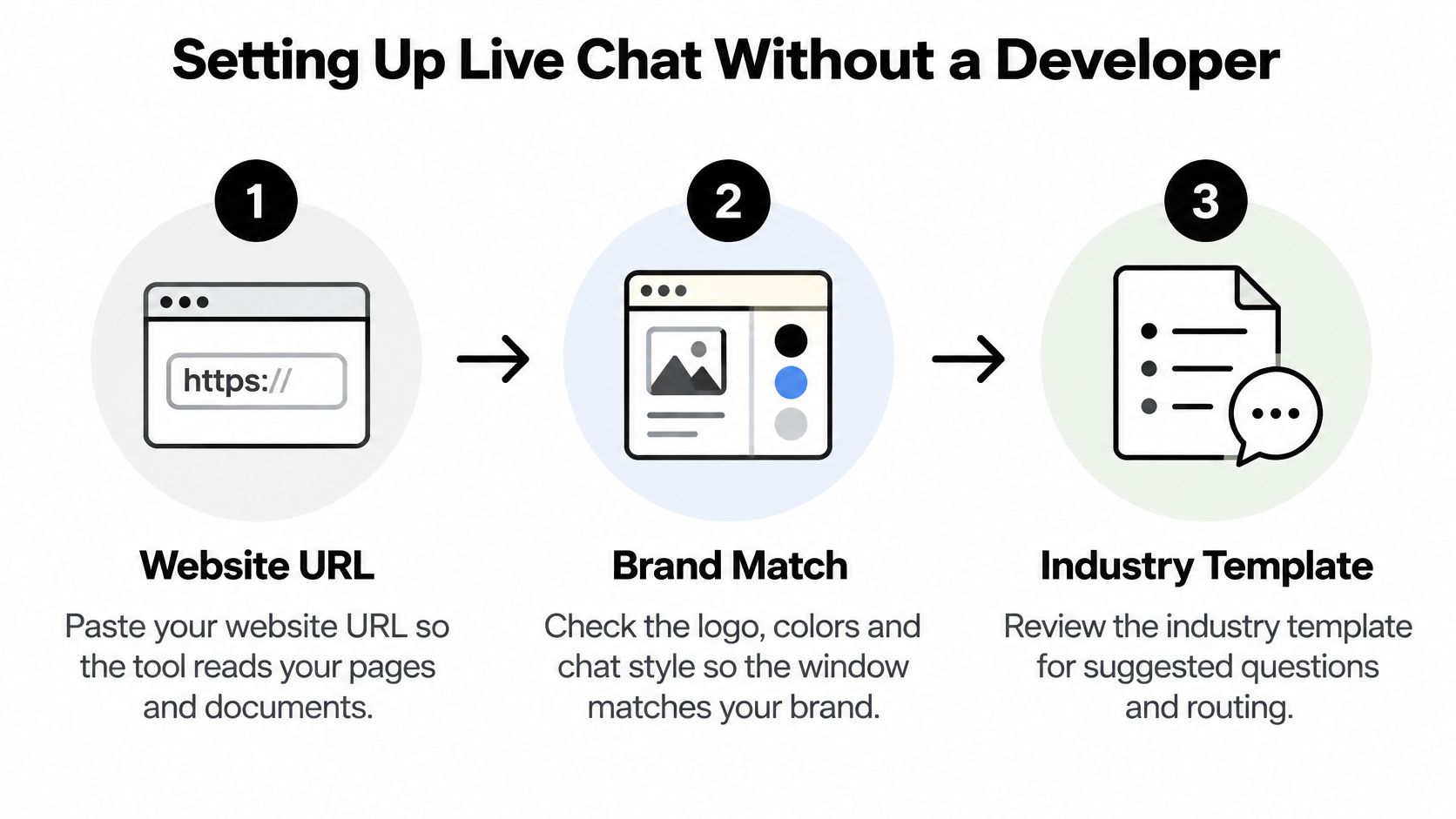
- Paste your website URL. The tool reads your pages and builds a first draft of the knowledge base. This step gives you something to correct rather than a blank screen.
- Match the brand. Check the logo, colours and chat style so the window looks like part of your site. A widget that clashes with your header reads as an ad.
- Review the template greeting. Each industry template ships with a greeting and instructions for common questions. Rewrite them around your real prices, hours and policies before anything goes live.
- Upload the documents. Price lists, FAQs, service descriptions, policies. Then delete the outdated versions, because a stale PDF will answer questions with last year's prices.
- Choose pre-chat fields. Keep them to a name and one contact method. Every extra field costs you conversations.
- Set the handoff. Decide who receives the email summary, what your business hours are, and which triggers push a chat to a person.
- Add the script tag. One snippet covers Shopify, WordPress, Webflow, Squarespace, Wix and custom HTML. For stores, this Shopify live chat support guide covers theme-level placement.
- Test with 20 real questions. Type the questions customers often ask, compare every answer against your source document, then repeat on a phone and with keyboard only.
- Go live and read the transcripts. The first week tells you which answers drifted and which questions you never anticipated.
Hyperleap AI goes live in under 5 minutes once you paste your URL and add the script tag, and the assistant picks up your logo and colours from your existing pages.
Why step 8 decides whether launch works
Almost every launch failure is a wrong answer, not a broken widget. The window opens, the visitor types, and the reply contradicts your returns policy. Twenty questions answered against your own documents will surface that in an afternoon, which is cheaper than discovering it from a customer. You can build and adjust the whole assistant in a no-code builder, so fixing a bad answer is an edit, not a project.
Lead Capture, Booking and Human Handoff Flows
A visitor asks whether you take their insurance. The assistant answers from your documents, asks one qualifying question, then requests the contact details needed to follow up. If the visitor wants an appointment, it can offer available times. Each step should move the conversation toward a useful next action, not turn it into a long form.
Ask only for what the next step needs. A callback may need a name and phone number. A quote may also require a postcode. Extra fields add friction, so collect them only when they help your team respond.
Verifying the lead before it reaches your team
A number entered in chat could be mistyped or invented. Hyperleap AI offers OTP Verification in website chat on Pro and Max plans. It sends a one-time code to help confirm that a visitor's phone number is real before the lead reaches your team. Verification is usage-based. Your team receives the customer's details and chat history by email, ready to follow up.
Booking should feel like a continuation of the conversation, not a separate task. On Pro and Max, Hyperleap AI can show real open times from Calendly or Cal.com and book the appointment in chat. In-chat Calendly booking requires Calendly Standard or higher, so confirm your account supports it before offering that option.
Trust rules that change how the flow runs
Trust affects whether a visitor shares contact details or accepts an automated answer. Findings reported by Verizon on AI and the human-first customer experience show higher satisfaction with mostly or fully human interactions than with AI-driven ones, and identify difficulty reaching a person as a leading frustration with automated service.
Three rules for the flow: identify the assistant as AI in its greeting, explain how to reach a person, and route sensitive or complicated conversations to staff.
A handoff works only if someone receives it and can continue the conversation. Set escalation triggers in writing, name the person or team responsible, and check that each handoff is completed. For guidance on setting escalation rules and transferring chat context, follow these chatbot human handoff best practices. Automation can answer routine questions, but it should not block access to a person when a customer needs help.
Metrics That Show Whether Chat Pays Off
Two numbers get confused constantly, and the confusion makes dashboards useless. Queue wait time measures routing and staffing capacity. Response time measures how fast an agent or the assistant handles a chat. Track them separately or you'll hire staff to fix a routing problem.
| Metric | Benchmark or target | What it tells you |
|---|---|---|
| Average response time | 44.8 seconds (2025 benchmark average) | How quickly visitors get a first reply |
| Customers waiting under 30 seconds | 81.37% of benchmarked sites | Whether routing and staffing keep up with demand |
| First acknowledgement | Within 30 seconds | Operating target before escalating to a person |
| Average CSAT | 79.6% (2025 benchmark average) | Whether speed turns into satisfaction |
| Unresolved rate | No published benchmark. Set your own baseline in month one | Share of chats that end without an answer |
| Escalation completion | No published benchmark. Set your own baseline in month one | Whether handoffs reach a person |
| Lead completion | No published benchmark. Set your own baseline in month one | Share of chats that yield usable contact details |
Comm100's 2025 live chat benchmark report puts the average response time across participating sites at 44.8 seconds, a 3.03% improvement year on year, with 81.37% keeping customer wait time below 30 seconds and an average CSAT of 79.6%.
Speed alone misleads
The same benchmark found that the small group reporting waits above two minutes still recorded 82.5% CSAT. Thorough resolution and the mix of customers can offset a slower reply, which is why a single speed target is a poor goal on its own.
Put wait time, resolution rate, repeat contacts, lead completion and CSAT on one dashboard and read them together. If waits rise while CSAT holds, your team is handling harder conversations, not failing. If CSAT drops while speed stays flat, the answers themselves are wrong. For a fuller set of measures that connect chat to revenue, this breakdown of customer care KPIs is worth bookmarking.
A workable rhythm: review transcripts weekly, adjust one answer at a time, and give the assistant the immediate questions while people take the ambiguous, high-intent or sensitive ones.
Real-World Use Cases from Clinics to Multi-Location Groups
Four setups cover most of the ground. Each one works for the same reason, and each fails the same way when a business skips a decision.

A dental practice or med spa uses chat for intake and appointment booking. The setup decision is a visible AI label plus an immediate route to staff for anything describing symptoms, and the data collected stops at what the booking needs. The mistake to avoid is turning the assistant into a triage nurse: a bot that offers clinical advice creates a risk no scheduling gain justifies.
A hotel group or real estate office with several branches runs one central knowledge base with location overlays for check-in times, parking, office hours or individual listings. When the policy changes, one edit propagates to every branch, and each location still answers with its own details. The failure mode is a knowledge base so broad that two documents contradict each other and the assistant picks the wrong one.
A Shopify, WordPress or Webflow store answers shipping, returns and sizing questions from its own product pages, with the script placed on the site rather than relying only on a marketplace inbox. The AI works with Shopify, WordPress, Webflow, Squarespace, Wix and custom HTML sites, which matters because an inline widget on your own domain also captures leads and books appointments, something a marketplace messaging tool doesn't cover. The trap is letting the assistant quote a shipping window from an old announcement page.
A marketing agency manages WhatsApp, Instagram and Facebook messages for several clients from one inbox, with a separate knowledge base per client. Here the risk isn't technology, it's data: one client's pricing must never surface in another client's chat.
The common thread: every one of these failures comes from the assistant answering beyond its approved documents, or from collecting details the business has no use for.
Choose Your Software and Test It Before You Commit
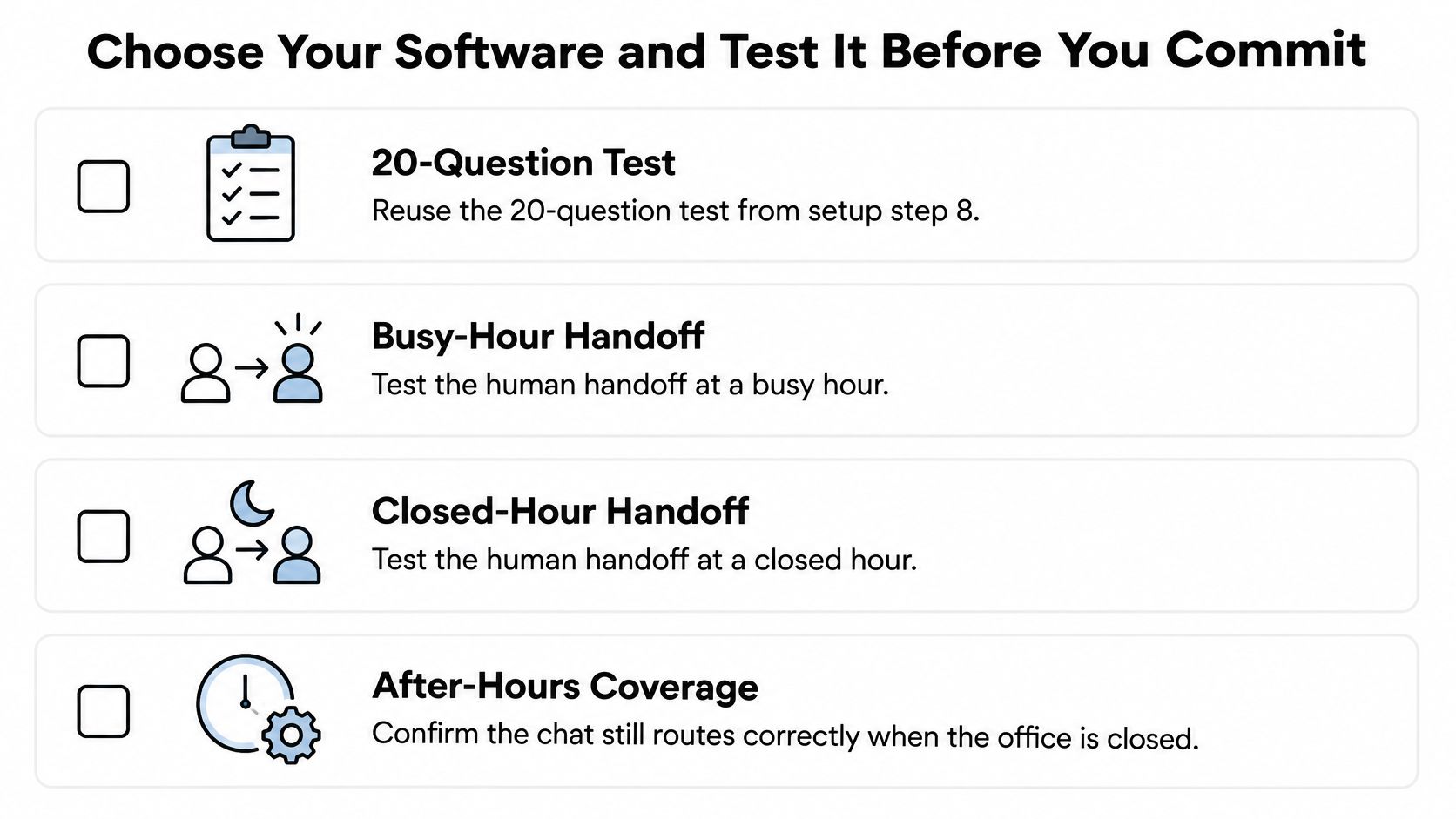
The trial exists to answer questions a demo can't. Treat it as a checklist you run yourself, at realistic volume, before you commit a card.
- Run 20 real questions. Type the ones customers send, including a policy you've never published, and compare each answer against your own documents.
- Test handoff at a busy hour. Mid-morning on a Tuesday tells you whether a queue exists.
- Test handoff when you're closed. Confirm what the visitor sees at 11 pm and whether they can still reach a person or leave a verified number.
- Complete a booking end to end. From chat to confirmed appointment, on your own calendar, including the confirmation the visitor receives.
- Check the team email. It should arrive with the customer's details and the full transcript, not a link that expires.
- Ask what visitors are told. If the disclosure isn't visible in the chat window, the trial fails on that point alone.
- Ask about deletion and export. You need a straight answer on how a visitor's data is removed and how you get your transcripts out.
- Ask which model answers. Confirm which version is running and whether changes to it are logged.
Consumer research explains why this diligence pays. A Capgemini Research Institute survey of about 9,500 consumers across 13 countries found 40% placed a chatbot or live chat among their three preferred service channels in 2024, up from 32% a year or two earlier, behind phone at 60% and ahead of email at 49%. Yet only 7% had used a chatbot during their most recent service interaction, while 49% said they would have been willing to.
That gap is the whole argument for testing. People are willing. They just haven't met a system worth using.
Price it against your real volume
Once a tool passes the tasks above, cost becomes the second filter. The Hyperleap AI Plus plan costs $40 per month and includes 3,000 AI responses, with extra responses billed at $0.013 on Plus, $0.008 on Pro and $0.007 on Max.
| Plan | Monthly price | Included AI responses | Extra response rate | In-chat booking |
|---|---|---|---|---|
| Plus | $40 | 3,000 | $0.013 | Not included |
| Pro | Not published | Not published | $0.008 | Included |
| Max | Not published | Not published | $0.007 | Included |
Here's the arithmetic for a busy month. If you use 4,500 responses on Plus, you pay $40 plus 1,500 responses at $0.013, which is $19.50. That's $59.50 a month. Model your own busy month the same way, using your peak week rather than your average one, because overage only ever bites during the weeks that matter.
The video below walks through the same evaluation from the other direction, starting with what a visitor experiences.
Pick the option that completes your trial tasks at your expected volume, and ignore the quote that wins on price while failing the handoff test. A cheap widget that can't reach a person will cost you more in lost bookings than the subscription ever saves.
You can have a working assistant on your site this afternoon: paste your URL, add one script tag, and put twenty of your hardest real questions through it before you tell anyone it's live. Hyperleap AI answers from your own website and documents, verifies phone numbers in website chat, and books meetings through Calendly or Cal.com on Pro and Max, with every conversation landing in one inbox your team can pick up. Start with the 7-day trial at Hyperleap AI and bring the questions your customers ask.