Guide
Small Business Customer Service Solutions: A 2026 Guide
Compare small business customer service solutions, from chatbots to unified inboxes. Get must-have features, a selection checklist, rollout steps and KPIs.

Gopi Krishna Lakkepuram · Founder & CEO
· 14 min read
A missed call at 8 p.m. doesn't sit in a queue until morning. For a small business, it often turns into a booking made elsewhere, a lead that goes cold, or a repeat customer who stops asking.
Table of Contents
- Why Service Speed Decides Small Business Growth
- Five Solution Types Compared Side by Side
- Must-Have Features for Multi-Channel Service
- Selection Checklist and Scoring Criteria
- Which Conversations Need a Human
- Four-Phase Rollout Roadmap
- Industry Use Cases From Clinics to Agencies
- Measure Results and Start a Trial
Why Service Speed Decides Small Business Growth
In Microsoft's 2018 State of Global Customer Service survey, which polled 5,000 consumers across Brazil, Germany, Japan, the United Kingdom, and the United States, 95% considered customer service important when choosing or remaining loyal to a brand, and 61% said they had switched brands because of inadequate customer service. Treat service as retention work, not ticket cleanup.
Say a dental clinic closes at six. At seven, someone with a chipped tooth messages through the website, gets no reply, and books with the clinic down the road that answered in seconds. That's not an unresolved ticket. It's a lost booking, plus the cleanings and referrals that might've followed.
The pressure keeps rising, too. The same Microsoft survey found 59% had higher customer-service expectations than the previous year. Slow replies cost more now because customers compare you with the fastest business they've dealt with, not with the business next door.
What Counts as a Solution
A customer service solution is any setup, human or software, that answers, captures, and routes every inquiry. It doesn't have to be elaborate. It does have to cover the places customers contact you: phone, social media, text, and website forms, often at the same moment one person is serving someone in store.
That's why the cost case for small business customer service solutions rests on outcomes you can count: bookings saved, leads captured, repeat business kept. If you're weighing the damage from delay, it's worth understanding how slow response times cost businesses before you compare tools.
Start with one blunt question: how many inquiries did we miss last week, and when? The answer tells you whether you need coverage, routing, or both.
Five Solution Types Compared Side by Side
Read this table from the channel where most of your inquiries arrive, not from the tool with the longest feature list. Buying for a channel you barely use is how small teams end up paying for software nobody opens.
| Solution type | Main job | Typical channels | Best for | Setup effort |
|---|---|---|---|---|
| AI chatbot | Answer repeat questions and capture leads | Website, WhatsApp, Instagram, Facebook | Businesses losing after-hours inquiries | Low to medium |
| Helpdesk software | Ticket queues, service levels and assignment | Email, web forms | Teams resolving many support tickets | Medium |
| Unified inbox | One conversation thread per customer across channels | Website chat, social messages, email, WhatsApp | Teams juggling several channels | Low |
| Phone and VoIP | Call routing, voicemail and missed-call follow-up | Phone calls, SMS | Service businesses where calls drive bookings | Low to medium |
| CRM integration | Links contacts, deal stages and conversation history | Any channel that syncs | Businesses tracking leads through a sales cycle | Medium to high |
When Each One Is the Wrong Choice
An AI chatbot is wrong if your real problem is unresolved complaints piling up in email. It answers repeat questions well, but it won't fix a broken internal process.
Helpdesk software is wrong if you're still a two person team with a handful of emails a day. You'll spend more time assigning and tagging than answering. A shared inbox handles that volume fine, and a helpdesk only earns its cost when ticket volume outgrows it and you need service levels, queues, and clear ownership.
A unified inbox is wrong if nearly everything arrives by phone. Consolidating chat channels you don't use adds a login, not capacity. It's the right first move when staff are checking a website widget, two social accounts, and WhatsApp separately and losing track of who's replied.
Phone and VoIP is wrong if customers mostly message you and rarely call. But if bookings come in by phone, missed call text back and sensible routing matter more than any chat feature. Some businesses solve the same gap with people instead of software, and if you'd rather hire virtual receptionist coverage for calls, that can pair well with automated messaging for the written channels.
A CRM integration is wrong as a first step if you aren't capturing leads reliably yet. Connecting an empty pipeline to a database gives you tidier emptiness. Capture first, then sync contacts and deal stages once follow up volume justifies it.
Simple rule: If the problem is missed inquiries, start with a chatbot. If the problem is slow resolution across a team, start with a helpdesk.
For most small firms, a chatbot or unified inbox comes first, a CRM link follows once leads need tracking, and everything else waits until the first piece is earning its keep.
Must-Have Features for Multi-Channel Service
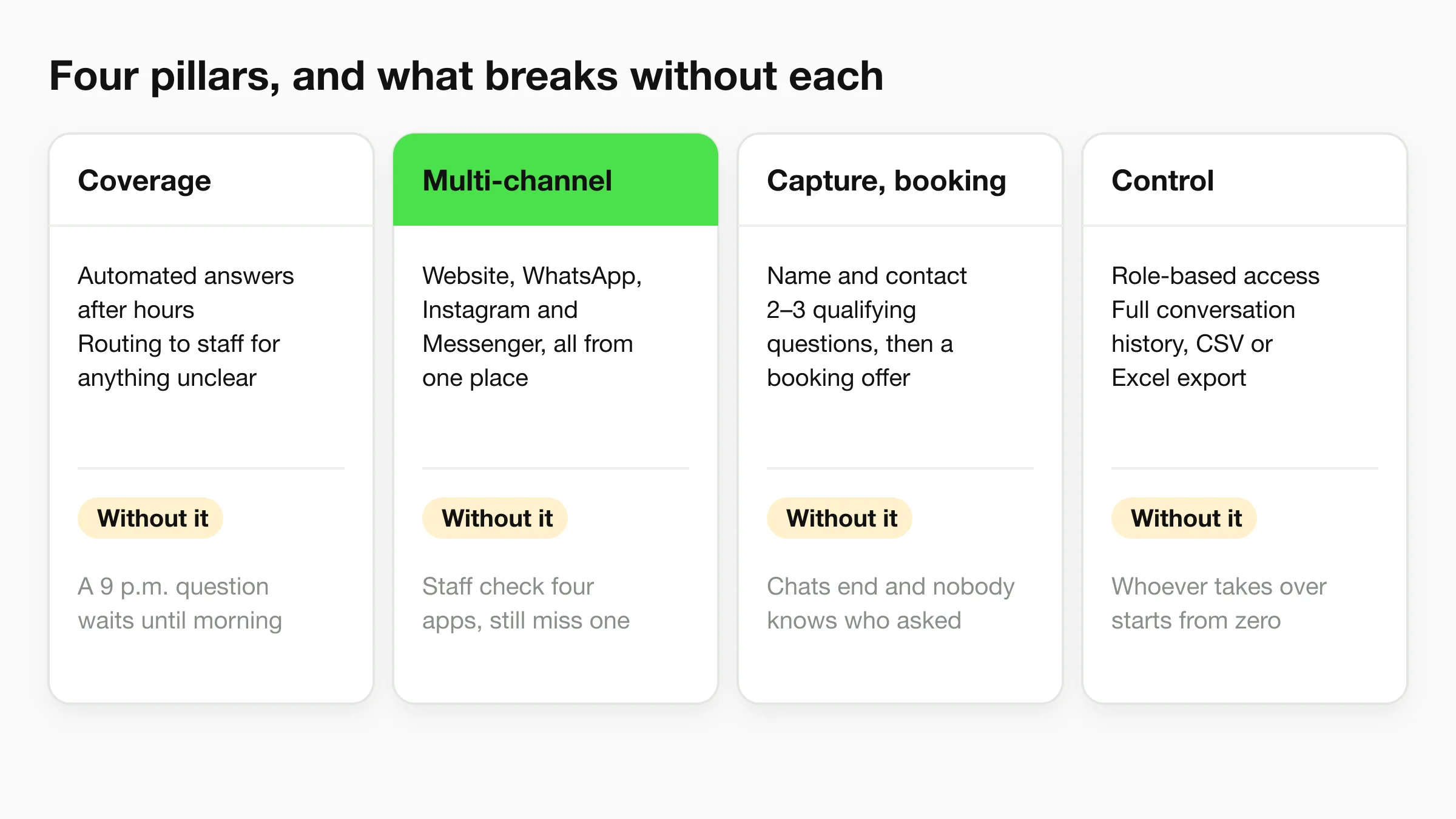
Customers don't organize themselves around your staffing. A Small Business Majority survey on digital transformation found 68% of participating businesses used phone calls to communicate with customers, while 59% used social media, 58% used text messages, 54% used their websites, and 24% used a website chat tool. Four pillars cover what you need across that spread.
Coverage and Multi-Channel Messaging
Coverage means automated answers outside opening hours, with clear routing to staff for anything ambiguous. Without it, a 9 p.m. question waits until morning and often expires. Multi-channel messaging means website chat, WhatsApp, Instagram, and Facebook Messenger work from one place, because the customer picks the channel. Without it, staff check four apps and still miss one. Our AI agent answers, qualifies, and books across the website, WhatsApp, Instagram, and Facebook, 24/7 (in-chat booking with Calendly or Cal.com is on Pro and Max; on Plus it shares your booking link), and planning that spread deliberately matters, as a sound multi-channel AI chatbot strategy keeps one consistent answer set behind every channel.
Lead Capture and Booking
Capture means the assistant collects a name and contact details, asks two or three qualifying questions, and offers booking through a calendar tool such as Calendly or Cal.com at the moment intent is clear. Without it, you get pleasant chats that end with nobody knowing who asked.
Control and Compliance
Control means role-based access so only chosen staff see customer details, full conversation history with CSV or Excel export, and a way to answer from the right location when several sites share one knowledge base (on Hyperleap AI, that's the Multi-variant add-on: $40/mo plus 2x credits per request, Pro and Max). Without history, the person taking over starts from zero. Without location handling, one location hands out another location's opening hours. Every plan we offer includes answers drawn from your website and documents, and one inbox for every channel, which keeps that control in one view.
Useful extras come after the pillars: language support for the customers you serve, and sending brochures, photos, or videos inside the chat when a picture settles a question.
Selection Checklist and Scoring Criteria
Score every shortlisted tool on the same sheet. Give each check 0 to 2, double the weight of channel coverage and handoff, and treat a total below 12 out of 20 as a reason to keep looking.
- Channel coverage: Does it run on your two busiest channels today? Pass: both live without workarounds. Red flag: your main channel is "coming soon."
- Handoff: Can a person take over the chat with full history in one step? Pass: one click, nothing retyped. Red flag: the customer has to start over by email.
- Knowledge control: Are answers drawn from your own website and documents, and can you edit them? Pass: you fix a wrong answer yourself. Red flag: answers come from a generic script you can't see.
- Language coverage: Does it serve the languages your customers use? Our AI agents reply to customers in 100+ languages, which is a strong benchmark. Red flag: machine translation bolted on without testing.
- Permissions: Can you choose which team members see customer details and conversations? Pass: per person access you control. Red flag: one shared login for everyone.
- Integrations: Does it export to CSV or Excel, connect to your calendar and CRM, and offer an API? We provide a full REST API for developers. Red flag: your data only leaves through screenshots.
- Trial and pricing: Can you start small, move up as conversations grow, and test before paying? Pass: published plans and a trial. Red flag: pricing hidden behind a sales call.
- Compliance: Where's data stored, what security standard applies, and is the messaging connection approved by the platform owner? Pass: written answers you can file. Red flag: vague reassurance.
Three Walk-Away Red Flags
- No human handoff: The bot becomes a wall between you and an unhappy customer.
- No conversation export: You can't audit answers, train staff, or leave with your records.
- Hidden pricing: If the price needs a salesperson, small business customer service solutions will cost more than the quote.
A tool that fails one of these three isn't a bargain at any monthly price.
Which Conversations Need a Human
A faster wrong answer costs more than a slower right one. It creates a second contact, a correction, and a customer who trusts you less than before they asked. Governance isn't paperwork on top of small business customer service solutions. It's the part that stops speed from doing damage.
That caution is widespread. An American Express small business study reported 88% of surveyed small businesses said they were still learning to use AI effectively, while 21% of non-adopters questioned its accuracy and 23% cited security concerns. The fix is sorting conversations by risk before you automate any of them.
| Risk tier | Conversation examples | Handling rule | Owner |
|---|---|---|---|
| Tier 1: routine | Opening hours, directions, published service menu | Automate fully | Automation |
| Tier 2: booking and intake | Appointment requests, contact details, qualifying questions | Automate and send an email summary | Staff reviews the summary |
| Tier 3: exceptions | Discounts, custom quotes, refunds, changed appointments | Assistant gathers details, staff approves | Staff member on duty |
| Tier 4: sensitive | Medical symptoms, legal or financial questions, complaints, distress | Escalate immediately with a fallback message | Named manager |
Controls That Make the Tiers Work
Write a fallback script for unknown questions, something honest like an admission that you don't have that detail, plus a promise of a named follow up. Tell customers they're talking to an AI assistant. Name one owner for each escalation path, because "the team" means nobody. Getting these transfers right is where chatbot human handoff best practices earn their keep.
Run a weekly accuracy audit on sampled chats and correct the source answer, not just the single conversation. Track re-contact rate and unresolved-intent rate, because a chat that closes without an answer still costs you. Deflection alone hides that.
Write your SLA tiers, service inclusions, and escalation procedures into the assistant from day one. The assistant can then explain your tiers and procedures to clients from the start, so the customer hears the same commitments your staff would give.
Four-Phase Rollout Roadmap
Speed gains are real when automation is grounded in your own material. The Freshworks Customer Service Benchmark Report 2024 reports that organizations using AI-powered productivity features achieved up to a 37.60% improvement in first-response time and a 38.70% improvement in resolution time. You get there in stages, not in one launch.
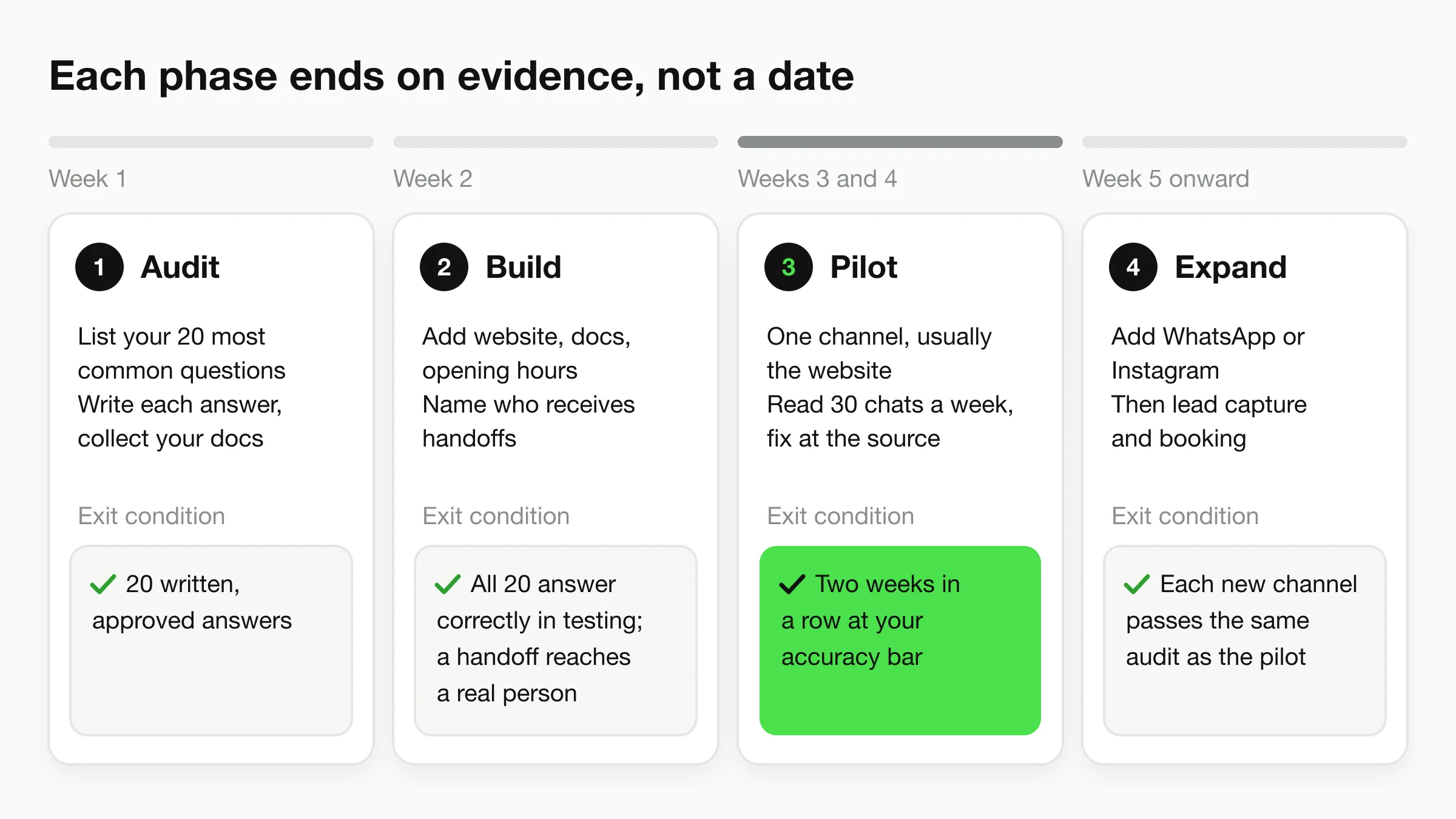
Phase 1 Audit, Week 1
List the 20 questions you receive most often across email, calls, direct messages, and walk-ins. Write the correct answer for each in plain language. Collect your service catalog, SLA sheet, standard operating procedures, and onboarding checklist, because during setup you can attach those exact documents so the AI answers in your own way. Exit condition: 20 written, approved answers. Skipping this produces generic replies that sound confident and are wrong.
Phase 2 Build, Week 2
Paste your website URL: the assistant's instructions are drafted from your site, and you can edit them. Add your documents, set opening hours, and name the staff member who receives handoffs (on Hyperleap AI, human handoff is on Pro and Max). Exit condition: the assistant answers your 20 questions correctly in testing, and a handoff reaches a real person.
Phase 3 Pilot, Weeks 3 and 4
Go live on one channel, usually the website. Limit the assistant to FAQs, policies, opening hours, and appointment logistics. Read 30 conversations each week and correct every wrong answer at the source. Exit condition: two consecutive weeks where sampled answers meet the accuracy bar you set. Launching all channels on day one hides errors a single channel pilot exposes in days.
Phase 4 Expand, Week 5 Onward
Add WhatsApp or Instagram only after accuracy holds, for example 95% of sampled answers correct in your own audit. Then switch on lead capture and booking. Exit condition: each new channel passes the same audit as the pilot channel did.
Honest checkpoint: A finished phase produces evidence, written answers, test results, or audit scores. If you can't point to the evidence, you haven't finished the phase.
Industry Use Cases From Clinics to Agencies
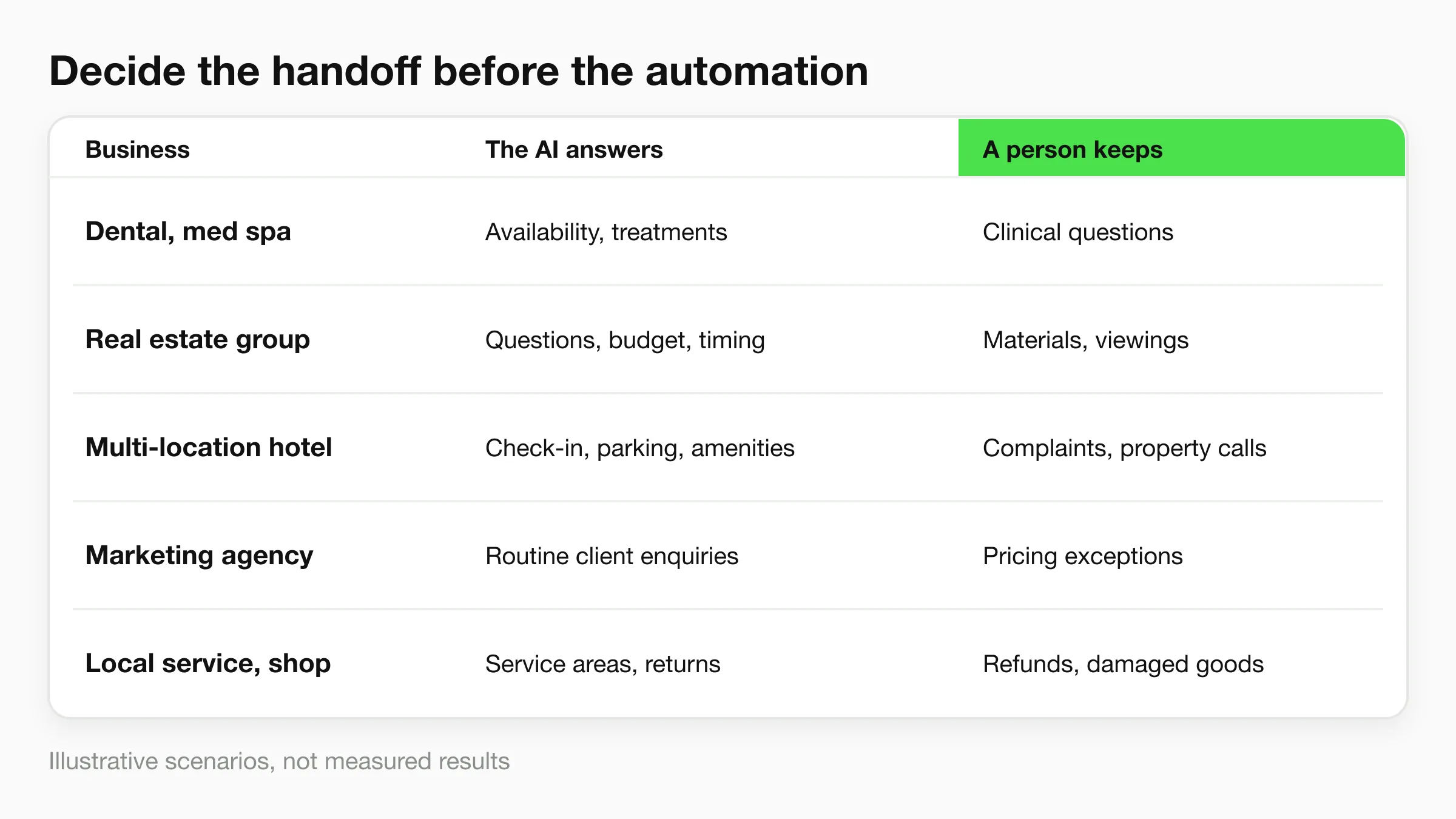
Customer service workflows differ by industry, but each needs clear boundaries: what the AI can answer, what details it should collect, and when a person must take over. The scenarios below are illustrative, not measured results. Hyperleap AI offers agents for healthcare and wellness, home and field services, professional services, beauty and fitness, hospitality and events, retail, auto and local businesses, and education.
Five Scenarios
Dental and med spa clinics: After-hours questions often concern appointment availability or treatments. The assistant can answer from the clinic's website and documents, then collect contact details for follow-up. Route clinical questions to staff; an automated answer should not substitute for professional judgment.
Real estate groups: An assistant can answer questions using the business's own information, collect a prospect's budget and timing, and send the team a summary with the chat history. Staff can then decide whether to share property materials or arrange a viewing.
Multi-location hotels: Property-specific details such as check-in times, parking, and amenities need clear, accurate answers. Keep that information organized in the source material the assistant uses, and set a handoff for complaints or requests that require a property-level decision.
Marketing agencies: One team can manage WhatsApp, Instagram, and Facebook conversations for several clients through a unified inbox. Choose which team members can see customer details and conversations. Keep pricing exceptions and other client-specific decisions with the staff responsible for them.
Local service and e-commerce businesses: An assistant can answer questions about service areas, shipping, and returns using the business's website and documents. Set a human handoff for refunds, damaged goods, or other cases that need judgment; review those handoffs to catch enquiries that could otherwise become lost bookings or repeat contacts.
Across all five cases, define the human handoff before turning on automation. The assistant handles routine enquiries; staff retain responsibility for sensitive questions, exceptions, and complaints.
Measure Results and Start a Trial
Measure against your own baseline, not a vendor's promise. A customer service KPI guide reports a first response time of about 6.6 hours for email teams with 1 to 10 employees and an average of about 35 seconds for live chat. Use these as context, then compare results with your own service levels.
| Metric | Benchmark or target | How to measure |
|---|---|---|
| First response time, email | About 6.6 hours for teams of 1 to 10 staff | Median and 90th percentile, tracked separately |
| First response time, live chat | About 35 seconds | Median and 90th percentile, tracked separately |
| Reply within one hour | Track against your current baseline | Share of inquiries answered within 60 minutes |
| Escalation rate | Stable or falling as accuracy improves | Escalated conversations divided by all automated conversations |
| Re-contact rate | Lower than pre-automation baseline | Customers who write again on the same question within 7 days |
| CSAT by response-time bucket | Rising as response time falls | Post-chat survey grouped by response time |
| Lost bookings | Falling toward zero after hours | After-hours inquiries with no reply within 24 hours divided by all after-hours inquiries |
| Cost per AI response | $0.013 Plus, $0.008 Pro, $0.007 Max | Total AI responses multiplied by the rate for your plan |
Track median and 90th-percentile response times separately for email, website chat, and social messaging. A single average can hide the slowest replies. If response time improves while escalations and re-contacts rise, the system may be answering quickly without resolving customers' questions.
Set clear handoff rules before judging results. Track whether sensitive questions, complaints, and exceptions reach a person, and whether the team follows up on time. A low escalation rate is not a win if customers have to repeat themselves or bookings go unanswered.
The Plus plan is $40 per month and includes 3,000 AI responses. You can start small and move up a plan as conversations grow. As an illustrative example, one recovered $80 after-hours booking covers the $40 monthly fee. Compare recovered bookings with plan cost, and track re-contacts alongside response volume.
Before committing, test the answers and the handoff process. Start the 7-day trial on any Hyperleap AI plan, load your top three questions, and run 30 test conversations. Check answers, escalations, follow-up details, and booking outcomes against the thresholds you set during rollout.
If missed inquiries are costing you bookings, Hyperleap AI provides an AI front desk that answers from your website and documents, collects contact details, and sends your team a summary. Start with three common questions, run your test conversations, and keep the service only if the results meet your own targets.