Guide
What Is Hyperautomation? a Practical Guide
Learn what is hyperautomation, its core technologies, ROI for small businesses, and a phased rollout plan with governance tips.

Gopi Krishna Lakkepuram · Founder & CEO
· 18 min read
Your team starts Monday morning with a familiar pileup. Three prospects sent WhatsApp messages over the weekend, two website visitors filled out a contact form, and a returning client left a voicemail asking to reschedule. Nobody dropped the ball on purpose, yet your staff now spends two hours copying names into the CRM, checking calendar availability, and sending follow-up replies before real billable work even begins.
When business owners hear software vendors talk about what is hyperautomation, the pitch usually sounds like a shopping list of expensive enterprise tools. In practice, it's much simpler and far more grounded than the buzzword suggests. You don't need a massive IT department or a dozen software bots to run it.
The practical test for any hyperautomation project comes down to three straightforward questions. Does the workflow cross several business systems without manual retyping? Does it measurably cut cycle time from start to finish? And when an unusual request arrives, does it hand off to a person with full context instead of leaving the customer stuck? Passing that three-part test matters far more than counting how many bots you've turned on.
Table of Contents
- What Hyperautomation Means and Where the Term Came From
- The Technologies That Make Up a Hyperautomation Stack
- Hyperautomation Versus a Chatbot or Single RPA Bot
- Business Benefits, ROI and the Metrics to Track
- Pitfalls and Governance Controls to Set Up Early
- How to Roll Out Hyperautomation in Six Phases
- Choose Tools by Workflow, Then Start With One Process
What Hyperautomation Means and Where the Term Came From
Say a dental clinic closes its front desk at 6:00 pm. At 8:40 pm, a new patient sends a message on Instagram asking about teeth whitening availability on Thursday afternoon. Within seconds, an automated assistant answers the pricing question using the clinic's approved fee sheet, verifies the patient's phone number, books an open Thursday slot in the practice calendar, updates the patient record in the CRM, and drops a neat summary into the receptionist's morning queue. Nobody touched a keyboard, and the patient didn't wait twelve hours for a reply.
That connected sequence is hyperautomation: a coordinated, disciplined approach to finding and automating as many business and IT processes as possible by combining several technologies into one end-to-end workflow. Think of the difference between a single robot vacuum and a smart home. A robot vacuum cleans one floor on a fixed path and stops when it hits a closed door, whereas a smart home senses motion, adjusts the thermostat, locks the doors, and sends you an alert when something needs your attention.
Gartner coined the term in October 2019, placing hyperautomation at the top of its Top 10 Strategic Technology Trends for 2020 in Gartner's Top 10 Strategic Technology Trends for 2020 ebook. In that publication, Gartner defined hyperautomation as a disciplined method for rapidly identifying, evaluating, and automating as many processes as possible using multiple technologies together, including artificial intelligence, machine learning, robotic process automation (RPA), process mining, intelligent business-management software, and low-code tools.
From Single Tools to a Full Automation Lifecycle
Gartner didn't frame hyperautomation as a one-time software purchase. Instead, the definition covers a complete automation lifecycle that keeps workflows accurate as your business changes:
- Discovering and analyzing processes: Mapping how requests move through your business so you spot delays before building anything.
- Designing and automating execution: Pairing the right tools to handle decisions, integrations, and exception routing across connected apps.
- Measuring results and monitoring performance: Tracking speed, accuracy, and handoffs while the workflow runs live.
- Reassessing what should change: Updating rules, documents, and routing whenever customer questions, prices, or policies shift.
Operating model, not a software aisle: You can't buy "hyperautomation" in a single shrink-wrapped box. It's the habit of linking your tools, rules, measurement, and human judgment so whole workflows run cleanly from start to finish.
For a small or medium-sized business, that operating model shows up in focused, high-value work rather than sprawling corporate programs. Answering customer questions accurately, capturing verified leads, summarizing conversations, and booking appointments across website chat and social channels all follow the exact same blueprint. When you evaluate a new software vendor, this framing helps you tell immediately whether you're buying one isolated gadget or a piece that fits into a connected system.
The Technologies That Make Up a Hyperautomation Stack
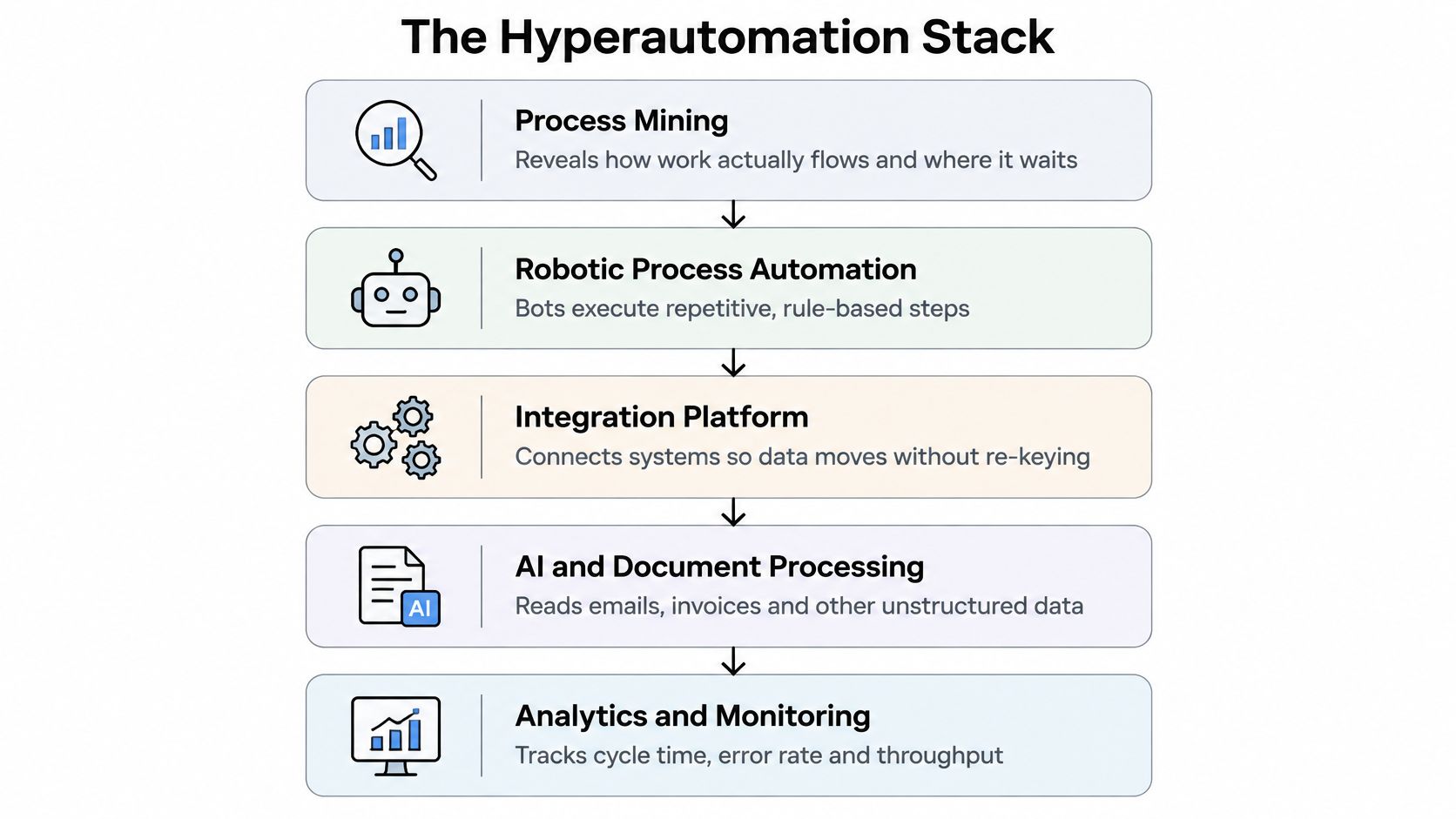
Because hyperautomation runs an entire process from intake to completion, no single tool can carry every step. You're building an end-to-end automation architecture where each layer covers a different operational gap. As IBM's guide to hyperautomation explains, combining these layers gives you broad coverage across structured and unstructured work, while process mining locates process gaps, latency, and bottlenecks before you automate a single step.
The infographic below illustrates how the core layers connect from initial process discovery through execution, integration, intelligent reading, and ongoing analytics.
How Each Layer Fills a Specific Gap
Work usually stalls in predictable places. Someone doesn't see where requests pile up, an employee retypes data from an email into an older accounting program, or a messy customer message confuses a rigid script. Each layer of the stack targets one of those failure points.
Process mining examines logs from your existing tools to show how work flows rather than how you assume it flows. Think of it as a security camera for your operations: it records what happened, not what the manual says should happen. Low-code and no-code tools let operations staff assemble forms, approvals, and routing rules visually without waiting on custom software developers. When your business relies on legacy desktop software that has no modern API, robotic process automation (RPA) steps in to repeat deterministic clicks and field entries automatically.
Unstructured inputs like free-form emails, PDFs, and chat threads require AI, machine learning, and natural language processing (NLP) to classify intent and pull out key details. A customer writing "hey, any chance I can move Thursday's appointment?" needs a layer that reads casual language, not a keyword matcher. Integrations and APIs move clean data directly between modern cloud apps so nobody copies and pastes records twice. Sitting across the middle, orchestration works like an air-traffic controller, managing queues, retries, schedules, error logs, and handoffs between digital workers and staff.
Finally, human escalation belongs in the architecture from day one. It routes ambiguous, sensitive, or regulated cases to a trained person with the full conversation history attached, so your staff never asks a customer to repeat themselves.
Matching Each Technology to Everyday Small-Business Work
Seeing how these seven components map onto routine small-business tasks makes the stack concrete.
| Technology | Job in the stack | Small-business example |
|---|---|---|
| Process mining | Finds how work actually flows and where it stalls | Showing that new leads wait three days for a first reply |
| Low-code and no-code tools | Builds workflows quickly without custom code | A web form that creates a CRM record and an email task |
| Robotic process automation (RPA) | Runs repetitive clicks and data entry in legacy software | Copying invoice details into an older accounting tool |
| AI, machine learning and NLP | Classifies messages and handles unstructured input | Sorting customer messages by intent such as booking, pricing or complaint |
| Orchestration | Coordinates queues, handoffs, retries and logs | Routing a missed call to a follow-up text and a staff task |
| Integrations and APIs | Moves data between systems without retyping | Writing a confirmed appointment to the team calendar |
| Human escalation | Passes unclear or regulated cases to a person with context | Sending a complaint to the owner with the full transcript |
Notice what the table implies: a layer only earns its place if it helps a workflow cross several systems, shortens the cycle time, or hands work to a person with full context. A component that does none of those three is extra machinery, not progress.
In specialized fields, these connected layers handle heavy administrative loads that no standalone bot could survive. In healthcare billing, for instance, RCM automation for specialty practices illustrates how combining claim scrubbing, payer status checks, and exception routing removes manual rework across clinical and financial systems.
IBM also points out that poor-quality data and limited technical skills commonly constrain automation readiness, so trying to install every layer at once usually backfires. The project goes wrong the same way most renovations do: tearing out every wall before checking which one carries the load. Start with the single component that removes your biggest daily delay, make sure it connects cleanly to your existing tools, and add the next layer only when the workflow demands it.
Hyperautomation Versus a Chatbot or Single RPA Bot
A surprising number of small businesses install a website chat widget or build one spreadsheet macro and assume they've adopted hyperautomation. The widget answers basic hours-of-operation questions, or the script copies one column of numbers, yet staff still manually verify leads, update the CRM, and chase missed bookings. That's isolated task automation, not hyperautomation.
The dividing line is practical and easy to spot. A chatbot handles a conversation, while hyperautomation connects that conversation to downstream business actions such as lead qualification, identity verification, CRM updates, appointment scheduling, team notifications, document handling, and human escalation. If you're weighing how conversational tools evolve from rigid FAQ scripts into action-taking workflows, our breakdown comparing AI agents and traditional chatbots walks through that shift in detail.
Why a Narrow Reliable Workflow Beats an Unmanaged Bot
As Camunda's hyperautomation guide emphasizes, the defining feature of hyperautomation is disciplined, end-to-end orchestration across connected business and IT processes rather than automating one isolated task. Most vendor explainers hand small businesses a glossy catalog of technologies without offering a clear test for whether a project delivers coordinated results.
A narrowly scoped, reliable workflow with clear ownership and clean handoffs beats a broad "fully autonomous" system that lacks integrations, exception handling, or measurable outcomes.
Putting a single bot side by side with a hyperautomated workflow exposes operational differences.
| Criterion | Single chatbot or RPA bot | Hyperautomation |
|---|---|---|
| Scope | One task or one conversation | A connected end-to-end process |
| Systems touched | One app | Several systems linked by APIs or connectors |
| Decisions | Scripted replies or fixed steps | Classification, business rules and confidence thresholds |
| Exceptions | Often fails or loops | Escalated to a person with full context |
| Measurement | Tasks completed | Cycle time, error rate and revenue captured |
| Ownership | Often one builder | Named owner and written governance |
Notice the final two rows in particular. Single bots are usually judged by vanity counts, like how many chat messages fired or how many scripts ran, and they often belong to whichever employee set them up last quarter. When that person gets busy or leaves, the script breaks.
Hyperautomation flips the starting question for small-business owners. Don't start by asking, "Which AI model should we use?" Ask instead, "Which customer or back-office process crosses the most systems, creates the most delay, and has clear rules for human takeover?" That question points straight to workflows where orchestration pays for itself.
Business Benefits, ROI and the Metrics to Track
Picture a local plumbing and HVAC company whose office closes at 5:30 pm. At 9:00 pm, a homeowner notices a leaking water heater and messages three local companies through their websites and WhatsApp. Two companies send an auto-reply promising a call back tomorrow morning. The third answers pricing and emergency-slot questions right away, verifies the homeowner's phone number, books the 8:00 am dispatch window, and alerts the morning dispatcher. By 9:10 pm, the homeowner stops searching, and the other two companies never even know they lost a job.
That after-hours gap is where small businesses feel the impact of hyperautomation fastest. Round-the-clock customer support keeps prospects engaged when your staff is off the clock, verified lead capture collects real contact details instead of spam entries, and automatic calendar booking cuts missed appointments. During business hours, your team also sheds hours of repetitive copying, pasting, and status-chasing so they can spend time on complex estimates and in-person service.

Calculating Return With a Realistic Formula
You don't need a financial analyst to sanity-check an automation investment. Use this straightforward ROI formula:
ROI = (Annual value of hours saved + Annual revenue from captured leads - Annual running cost) / Annual running cost
Let's walk through a clearly hypothetical example for a local clinic or service business to see how the numbers behave. Suppose the business receives 40 after-hours enquiries a month that previously waited until morning. With instant replies and direct booking, even if a small fraction of those enquiries convert into paying customers, multiplying those monthly bookings by your average job value and annualizing the total quickly turns missed night-time messages into meaningful captured revenue.
Now add staff time. Removing manual CRM entry and calendar confirmations reclaims hours of administrative work each month, which you can value at your team's hourly rate and annualize. Add that annualized time savings to your captured after-hours revenue, subtract your annual software subscriptions and light maintenance cost, and divide the result by that annual running cost to see your net return. Even if you cut the captured bookings in half in your own conservative estimate, the project still pays back quickly because it targets real delay rather than abstract convenience.
Five Metrics That Prove the System Works
ROI estimates only hold up if you measure a baseline before turning anything on. If you don't know how many hours an enquiry currently waits or how often staff fix booking errors, you're guessing after launch. Pairing operational metrics with customer care KPIs that track service quality ensures speed never comes at the expense of customer trust.
Track these five numbers instead of counting how many automations you've built.
| Metric | What it tells you | How to calculate |
|---|---|---|
| Cycle time | How long a process takes from start to finish | Average hours from first contact to completed booking |
| Completion rate | Share of requests finished without a person | Automated completions divided by total requests |
| Error rate | Share of actions that needed correction | Corrected records divided by total records |
| Revenue captured | Leads or bookings that would otherwise have been lost | Captured leads outside office hours multiplied by average deal value |
| Escalation quality | Whether handoffs carry full context | Escalations with transcript and reason attached divided by total escalations |
A metric only improves your business if a named person reviews it every month. Put a 20-minute recurring review on the calendar so rising error rates or sloppy escalations get fixed while they're small.
Pitfalls and Governance Controls to Set Up Early
The single most expensive mistake in automation isn't picking the wrong software. It's automating a broken, poorly understood process. When a workflow already suffers from inconsistent pricing sheets, unclear approval rules, or messy CRM records, adding speed reproduces those bottlenecks and errors at a much higher volume.
Engineering research on agentic hyperautomation published in the 2025 IEEE SMC paper by Tomasino et al. points to five architectural boundaries that keep automated systems governable: separating knowledge and data grounding, policy and confidence checks, tool and API actions, workflow state, and audit logs. That separation creates clear cause and effect. Grounding stops hallucinated replies, written policies block unauthorized actions, state management prevents lost or duplicate records, and full logs make exception analysis possible.
Five Common Failure Modes and the Control That Stops Each One
Most small-business automation projects stumble over the same five habits. Pairing each pitfall with a specific control from day one keeps minor glitches from turning into customer-facing headaches:
- Scope too broad: Teams try to automate sales, billing, support, and onboarding in one sprint, and nothing finishes cleanly. Control: Lock your first project to one workflow with written policy boundaries that list exactly which actions the system may execute alone (such as answering FAQs and booking standard slots) and which require staff approval (such as issuing refunds or quoting custom contracts).
- No named owner: Everyone assumes someone else is watching the automation, so expired tokens or outdated holiday hours go unnoticed for weeks. Control: Assign one operational owner who checks exception alerts weekly and updates rules whenever business policies change.
- No escalation path: Customers with unusual requests get trapped in endless "Sorry, I didn't understand" loops and walk away angry. Control: Set explicit confidence thresholds so any low-confidence, high-value, or regulated request triggers an immediate human handoff carrying the complete conversation transcript and the reason for escalation.
- Poor data quality and duplicate entries: Retried webhook calls or messy spreadsheets create double-booked appointments and split customer profiles. Control: Clean your core fields before launch and make booking and CRM actions idempotent, meaning a retried request checks existing workflow state and updates once rather than creating duplicate leads or calendar slots.
- AI answers not tied to approved content: An ungrounded language model guesses at cancellation policies, warranties, or medical guidance, creating legal and reputational risk. Control: Ground every customer-facing answer strictly in approved business documents and your website, and preserve complete audit logs of every conversation and API action so you can trace exactly why the system said or did anything.
Protecting Customer Data and Access
Governance also covers data privacy. Collect only the personal details a workflow needs to verify identity or complete a booking, avoid dumping raw customer chats into open spreadsheets, and write down which team members can view transcripts or export contact lists.
Governance isn't corporate red tape. It's the set of guardrails that turns AI-assisted automation into a reliable business system you can trust and audit.
How to Roll Out Hyperautomation in Six Phases
Trying to leap straight from manual chaos to full automation is why many small teams abandon projects after six weeks. A phased rollout breaks the work into manageable checkpoints where you verify each assumption before spending more time or money.
The timeline below shows how the six phases progress from mapping real behavior to scaling what works.
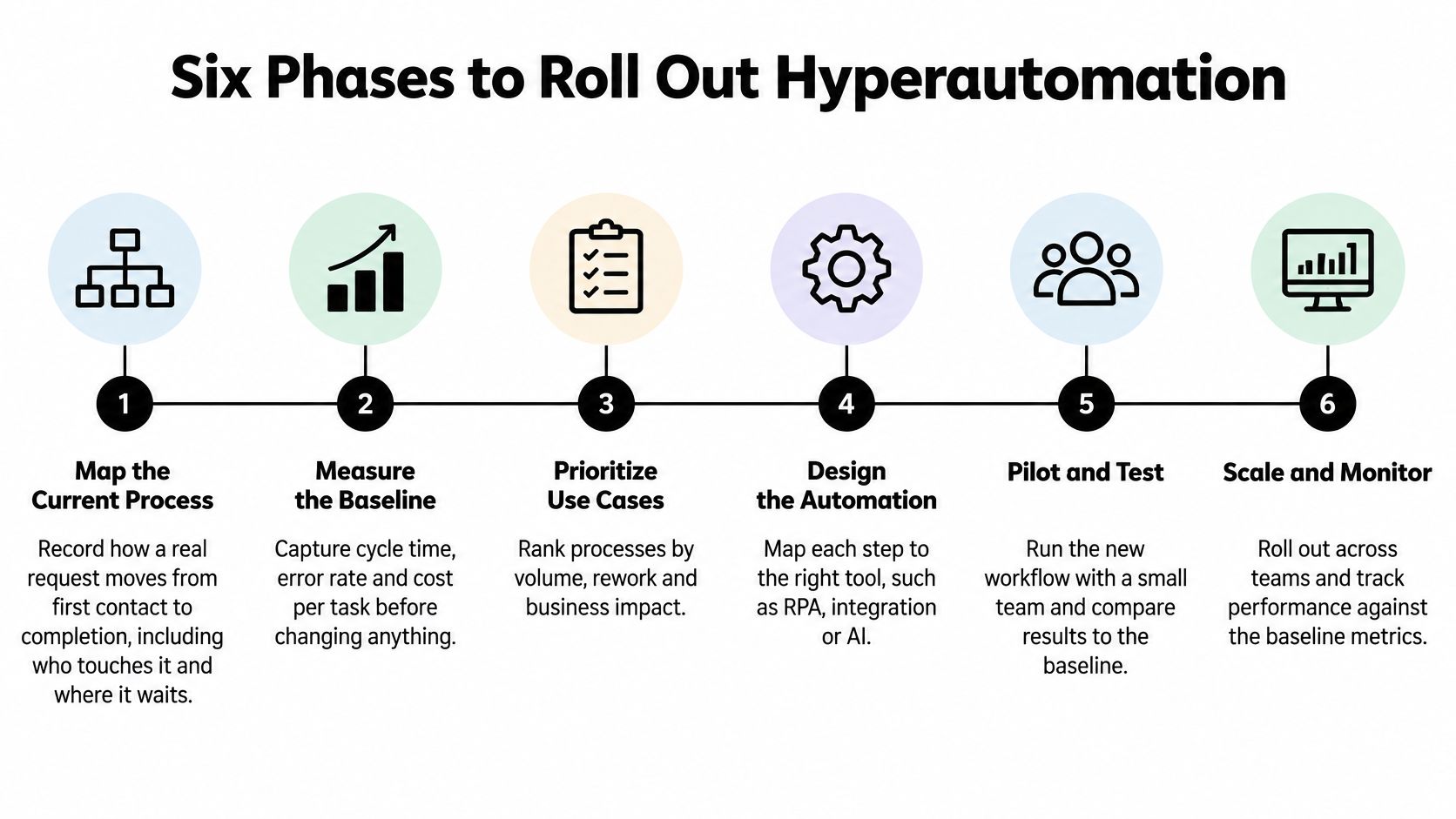
The Six-Phase Rollout Sequence
- Map the current process. Follow ten customer requests from first contact to completion, noting every app opened, every person who touches the request, and every hour it sits waiting in an inbox. Don't rely on how you think the process works; shadow the staff who run it. Common slip: Buying software and building automations before mapping the steps.
- Measure the baseline. Track your starting cycle time, request volume, and error rate for two to four weeks without changing how your team operates. Even a simple shared spreadsheet works here, as long as the numbers reflect normal weeks. Common slip: Skipping the baseline because you're eager to launch, which leaves you unable to prove whether automation helped.
- Pick one high-volume, rule-stable workflow. Choose a repeatable process that crosses at least two systems (such as website chat to calendar and CRM) and follows predictable rules most of the time. Save rare edge cases and messy judgment calls for humans. Common slip: Starting with a complex, once-a-month workflow that creates high risk and tiny time savings.
- Design the handoffs and guardrails. Write down which intents the automation resolves end to end, which actions require identity verification, and the exact confidence trigger that escalates a case to a person with full context. Confirm who receives each escalation and how fast they must reply. Common slip: Designing only the "happy path" and improvising escalations after customers complain.
- Automate and pilot on a limited channel. Launch the workflow on one channel or with one team first, such as after-hours website chat or a single clinic location. Read conversation transcripts and action logs daily during the first two weeks so you catch phrasing gaps, wrong links, or mapping bugs immediately. Common slip: Running a pilot without a live escalation path or skipping daily transcript reviews in week one.
- Measure, tune, and reassess. At the end of the month, compare cycle time, completion rate, error rate, and captured bookings against your pre-launch baseline. Fix recurring friction points first, and widen scope to a second channel or workflow only when the numbers beat your baseline cleanly. Common slip: Treating launch day as a finished project instead of reviewing performance monthly.
Seeing End-to-End Orchestration in Action
Watching how multiple tools hand off tasks makes the move from theory to daily operations much clearer. The short video below walks through how hyperautomation connects discovery, AI, and workflow execution across business systems.
Treat these six phases as a repeatable operating loop rather than a one-time installation. Each time you finish phase six on one workflow, your team has better data, cleaner integrations, and sharper instincts for the next process on your list.
Choose Tools by Workflow, Then Start With One Process
Software vendors love to pitch their category as the answer to every bottleneck. In reality, hyperautomation tools fall into four distinct groups, and choosing the right one starts with the workflow you mapped, never the other way around.
Use the table below to match your primary bottleneck to the tool group built for it, along with the main risk to check before signing a contract.
| Tool group | Choose it when | Watch out for |
|---|---|---|
| RPA suites | Repetitive clicks in legacy desktop software | Scripts break when the software's screens change |
| Low-code platforms | Building internal forms and workflows quickly | Workflows multiply without a named owner |
| Process mining tools | Finding bottlenecks in an existing process | Needs reliable event data before results mean anything |
| AI messaging platforms | Customer conversations across website and social channels | Answers must be grounded in approved business content |
Finance and operations teams apply this exact workflow-first discipline when evaluating back-office tools, as shown in CEFCore's look at the ROI of automating fund banking, where tying specific reconciliation and transfer steps to measurable time and error savings drives platform selection. If your primary bottleneck sits in customer messaging and lead intake rather than legacy accounting screens, evaluating AI agent platforms for connected workflows will point you toward tools built for multi-channel conversations, CRM sync, and calendar handoffs.
For a small business whose biggest delay is unanswered enquiries across website chat, WhatsApp, Instagram, and Messenger, an AI front desk like Hyperleap AI fits that messaging layer directly. It answers questions from your own website and uploaded documents, collects verified contact details, books confirmed appointments into your calendar, and hands complex cases to your staff with the full transcript. As a Meta Technology Provider and Business Partner, our WhatsApp, Instagram, and Messenger channels run on Meta's official Business APIs, keeping multi-channel messaging compliant and dependable.
Running Your First 30-Day Pilot
You don't need a six-month roadmap to get real value. Pick one customer-facing workflow that costs you leads today, such as capturing after-hours enquiries with verified contact details, booking confirmed slots into your team calendar, and routing complex requests to staff with the full transcript.
Run a focused 30-day pilot using the first five rollout phases: map the steps, log your baseline metrics, set your escalation rules, go live on one channel, and review transcripts closely in the opening two weeks. Close day 30 with a disciplined monthly review against your baseline numbers, and expand to a second channel or process only after the metrics improve. Your first measurable operational win matters far more than owning the flashiest software stack.
If missed after-hours enquiries and manual booking follow-ups are your biggest daily bottlenecks, Hyperleap AI helps you turn website chat, WhatsApp, Instagram, and Messenger into one connected front desk without writing code. Our AI agents answer strictly from your own website and documents, capture verified contact details, book appointments automatically, and pass complex conversations to your team with full summaries and transcripts. Explore how fast you can launch your first 30-day pilot at Hyperleap AI.