Comparison
Best Front Alternatives in 2026: 9 Tools Compared
Looking for Front alternatives? Compare Help Scout, Hiver, Missive, Zendesk, Freshdesk and more on seat pricing, channels and fit. As of November 2026.

Gopi Krishna Lakkepuram · Founder & CEO
· 17 min read
TL;DR: The best Front alternative depends on what is clogging your inbox. If the problem is team coordination on email, Missive, Help Scout and Hiver are the closest matches and cost less per seat. If you need full ticketing, look at Zendesk or Freshdesk. If most of the load is repeat questions arriving on website chat, WhatsApp, Instagram DM and Messenger, Hyperleap AI answers them before they reach a person. Hyperleap has no email inbox, so it works next to a shared inbox, not instead of one.
Quick Picker: Which Tool Fits Which Need
| If you need… | Start with |
|---|---|
| Fewer repetitive questions reaching your team from website chat, WhatsApp, Instagram DM and Messenger | Hyperleap AI |
| Customers answered outside business hours on those four channels, with a handoff to your team | Hyperleap AI |
| A collaborative email inbox with team chat inside each thread | Missive |
| An email-first shared inbox with a built-in knowledge base | Help Scout |
| A shared inbox that runs inside Gmail | Hiver |
| Full ticketing, SLAs and a large app marketplace | Zendesk or Freshdesk |
| A helpdesk built around Shopify orders | Gorgias |
| Support tied to a CRM you already run | HubSpot Service Hub |
| Messenger-style in-app support for a SaaS product | Intercom |
If you are not sure which bucket you are in, count what your team answered last week. If most of it was the same ten questions, start with Hyperleap. If most of it was threads that need two or three people, pick a shared inbox.
Last verified: November 2026
Prices and features below come from each vendor's public pricing page as of November 2026. Vendors change plans often, and several list one billing period only. Confirm the current price with the vendor before you buy.
Why Teams Look for Front Alternatives
Front is a shared inbox and customer operations platform, and it is a good one. Teams usually start looking elsewhere for one of four reasons, all of which you can check on Front's own pricing page.
Pricing is per seat, and it climbs by tier. As of November 2026, Front lists Starter at $25, Professional at $65 and Enterprise at $105 per seat per month on annual billing. A ten-person team on Professional pays $650 a month before any add-ons.
Features you may want sit on higher plans. Front's Starter plan covers a single channel type and up to 10 seats. Omnichannel, macros and SSO start on Professional. AI-powered routing and tagging, and the AI Copilot, are included on Enterprise.
AI costs more on top. Front lists Copilot at $20 per seat per month on Starter and Professional. Autopilot, its automated resolution product, starts at $0.39 per conversation.
Channels carry extra costs. Front's native WhatsApp channel is available on Professional and Enterprise, billed at Meta's WhatsApp costs plus a 20% admin fee, according to Front's pricing page.
None of this makes Front a poor choice. A support, sales and operations team that works complex requests together gets real value from it. The point is that smaller teams, and teams whose volume is mostly repeat questions, may be paying for coordination features they do not use.
What Front Does Well
Front describes itself as an "AI customer operations platform" built for complex customer work. Its strengths are specific.
- Shared inbox with collaboration. Teammates can @mention, assign and hand off a request, and AI agents sit in the same workspace.
- Channels in one place. Front's site names email, chat, SMS and WhatsApp.
- Breadth. It lists ticketing, a knowledge base, 160+ integrations and an API.
- A 14-day free trial that includes Professional features and needs no credit card.
If your team resolves multi-step requests across departments, such as logistics exceptions or account changes, keep Front on your shortlist.
Best Front Alternatives in 2026
1. Hyperleap AI: Best for Cutting Repetitive Load Before It Hits the Inbox
Hyperleap is not a shared inbox. It is the AI front desk for small businesses: an AI agent that answers customer questions on your website, WhatsApp, Instagram DM and Facebook Messenger, using the documents and pages you give it. It sits in front of your inbox and keeps the repeat questions out of it.
Picture a physiotherapy clinic. Most messages ask about opening hours, prices, insurance and parking. The AI agent answers those at any hour in 100+ languages. The messages that need a person, such as a billing dispute or a clinical question, go to the team.
What it does:
- Answers from your knowledge base on all four channels, designed to answer only from your documents.
- The website chat can collect contact details with a short form. On WhatsApp, Instagram DM and Messenger the contact comes from the platform.
- Shows every conversation from every channel in a unified inbox in Studio.
- On Pro and Max, visitors can ask for a person, your team is alerted in Studio, and any teammate can take over a live conversation and hand it back to the AI.
- On Pro and Max, books appointments in chat through Calendly or Cal.com. In-chat booking needs Calendly Standard or higher. On Plus, the agent shares your booking link.
- Hyperleap AI is a Meta Technology Provider and Business Partner. WhatsApp, Instagram and Messenger run on Meta's official Business APIs.
Pricing: Plus is $40/month for 3,000 AI responses, Pro is $100/month for 12,000 and Max is $200/month for 30,000. Pricing is per AI response and a flat monthly fee, not per seat. Plus includes up to 10 team members and Pro up to 50. Every plan has a 7-day free trial with a card required. See pricing. WhatsApp customers also pay Meta's WhatsApp fees directly to Meta.
Honest limits: There is no email channel (it is on the roadmap, not available today), no ticketing, no SLAs and no assignment rules. SMS and voice are also roadmap. If your customers write mostly by email, Hyperleap does not cover that.
Best for: Clinics, salons, home-service companies, real estate teams, hotels and online stores whose inbox is full of the same questions. See the AI front desk, the customer support chatbot and how conversational AI for customer service works.
2. Missive: Best for Collaborative Email
Missive calls itself "inbox collaboration for teams that run on email." Teams get a shared inbox, shared tasks, and a place to discuss an email inside the email thread. That last feature is why people pick it over a ticket-style tool.
Pricing (annual billing, per user per month, as of November 2026): Starter $14 (up to 5 users), Productive $24 (up to 50), Business $36 (unlimited). There is no free plan, and new teams get a 30-day trial of Productive with no credit card. Missive's pricing page lists email, SMS and social accounts on Starter, and names WhatsApp, Messenger and Instagram among its integrations.
Honest limits: It is built for people replying to people. It does not run autonomous customer conversations, and live chat is not mentioned on its pricing page.
Best for: Small teams that live in email and want the lowest per-seat price of the shared inboxes here.
3. Help Scout: Best for an Email-First Inbox With a Knowledge Base
Help Scout keeps conversations looking like email rather than tickets. Its plans bundle a shared inbox, a knowledge base and AI drafting tools. For a deeper look see our Help Scout alternatives guide.
Pricing (per user per month, as of November 2026): Free for up to 5 users and 1 inbox; Standard $25 (up to 25 users, 2 inboxes); Plus $45 (up to 50 users, 5 inboxes); Pro $75 (minimum 10 users, 10 inboxes). Standard and Plus include a 15-day trial without a card. Its AI add-on, Envoy, costs $0.75 per resolution.
Honest limits: The free plan is capped at 5 users, and Pro needs at least 10 users and a conversation with sales.
Best for: Support teams of 3 to 25 that want a tidy email workflow and a help center.
4. Hiver: Best for Teams That Already Work in Gmail
Hiver offers a helpdesk you run "directly from Gmail" (Hiver in Gmail) and a browser-based product called Hiver Omni. Its site lists email, chat, Slack, Teams, voice, SMS and WhatsApp as channels.
Pricing (Hiver Omni, per user per month, as of November 2026): Growth $25 annual or $35 monthly, Pro $55 or $65, Elite $85 or $95. A voice add-on is $30 per voice seat per month. Plans start at 2 seats, and there is a 7-day trial with no card.
Honest limits: Hiver's pricing page does not say which plans include WhatsApp or SMS, so confirm that before you buy. Several features, such as SLAs and API access, start on Pro.
Best for: Teams whose customers email a Google Workspace address and who want shared mailbox workflows without moving to a new interface.
5. Zendesk: Best for Full Ticketing at Scale
Zendesk is the standard helpdesk for teams that need ticketing, SLAs, reporting and a large marketplace. See our Zendesk chat alternatives guide for the chat side.
Pricing (per agent per month, as of November 2026): Support Team $19 annual or $25 monthly, Suite Team $55 or $69, Suite Professional $115 or $149. Enterprise is quote-only. Zendesk lists automated resolutions at $2.00 pay-as-you-go, with committed pricing for a lower rate, and a 14-day trial.
Honest limits: Setup takes time, the full suite costs more than shared-inbox tools, and the automated-resolution charge makes AI spend variable.
Best for: Teams of 15 or more agents with defined SLAs and process owners.
6. Freshdesk: Best Mid-Priced Helpdesk
Freshdesk covers ticketing, automation and AI at lower list prices than Zendesk. Read the Freshdesk alternatives guide for detail.
Pricing (per agent per month, annual billing, as of November 2026): Growth $19, Pro $55, Enterprise $89. Its Freddy AI Agent includes the first 500 sessions, then costs $49 per 100 additional sessions. Freddy Copilot is $29 per agent per month as an add-on on Pro and Enterprise. The trial is 14 days.
Honest limits: Its pricing page lists no free plan and no monthly prices.
Best for: Support teams that want ticketing and automation without Zendesk's price point.
7. Gorgias: Best for Shopify Stores
Gorgias calls itself a conversational AI platform for ecommerce and builds on a native Shopify integration. Its channels include email, live chat, SMS, voice and social.
Pricing (as of November 2026): Starter is $10 a month with 50 tickets, Basic $50 on annual billing with 300 tickets, Pro $300 with 2,000 and Advanced $750 with 5,000. It charges by ticket, not seat, and its AI Agent costs $0.90 per automated interaction on annual plans. The trial is 7 days with no payment details. The page also contains conflicting structured data with higher monthly figures, so check the live page before you budget.
Honest limits: It is designed for ecommerce brands. It is a poor fit for clinics or service businesses.
Best for: Online stores with a high ticket volume tied to orders. See also the Gorgias alternatives guide.
8. Intercom: Best for In-App Support in SaaS
Intercom pairs a helpdesk with its Fin AI agent, and it suits software companies with logged-in users. See the Intercom alternatives guide.
Pricing (as of November 2026): Essential seats list at $19 for new customers (shown as $29 before a 35% new-customer saving), Advanced at $85 and Expert at $132 per seat. Fin costs $0.99 per outcome. The trial is 14 days with no credit card.
Honest limits: Seat price plus per-outcome AI fees can be hard to forecast. Its pricing page does not say which billing period the seat prices apply to.
Best for: SaaS teams with in-app messaging at the center of support.
9. HubSpot Service Hub: Best When Your CRM Is Already HubSpot
Service Hub puts a shared inbox and ticketing next to your CRM records, so support sees the full customer history.
Pricing (as of November 2026): Free for up to 2 users, Starter from $7 per seat per month, Professional from $90 per seat (listed at $100 monthly) with a one-time $1,500 onboarding fee, Enterprise from $150 per seat with a $3,500 onboarding fee. View-only seats cost nothing extra. Its Customer Agent uses HubSpot Credits. See the HubSpot chatbot alternatives guide.
Honest limits: Onboarding fees and seat costs rise quickly on Professional. The pricing page does not describe shared inbox limits.
Best for: Teams already running sales and marketing on HubSpot.
Feature and Channel Comparison
| Tool | Shared email inbox | Instagram DM / Messenger | AI answers customers directly | |
|---|---|---|---|---|
| Front | Yes | Yes (Professional and above) | Not stated on its homepage | Yes (Autopilot add-on) |
| Hyperleap AI | No | Yes | Yes | Yes |
| Missive | Yes | Listed as an integration | Listed as an integration | AI assistant for drafting |
| Help Scout | Yes | Not stated on its pricing page | Not stated on its pricing page | Yes (Envoy add-on) |
| Hiver | Yes | Listed as a channel; plan not stated | Not stated | Yes (AI Agents) |
| Zendesk | Yes | Check with vendor | Check with vendor | Yes (per resolution) |
| Freshdesk | Yes | Check with vendor | Check with vendor | Yes (Freddy AI Agent) |
| Gorgias | Yes | Not stated on its pricing page | Social channels listed | Yes (per interaction) |
| Intercom | Yes | Check with vendor | Check with vendor | Yes (Fin) |
| HubSpot Service Hub | Yes | Check with vendor | Check with vendor | Yes (Customer Agent, credits) |
"Check with vendor" means we did not confirm it on the vendor's page in November 2026.
Pricing and Value Analysis
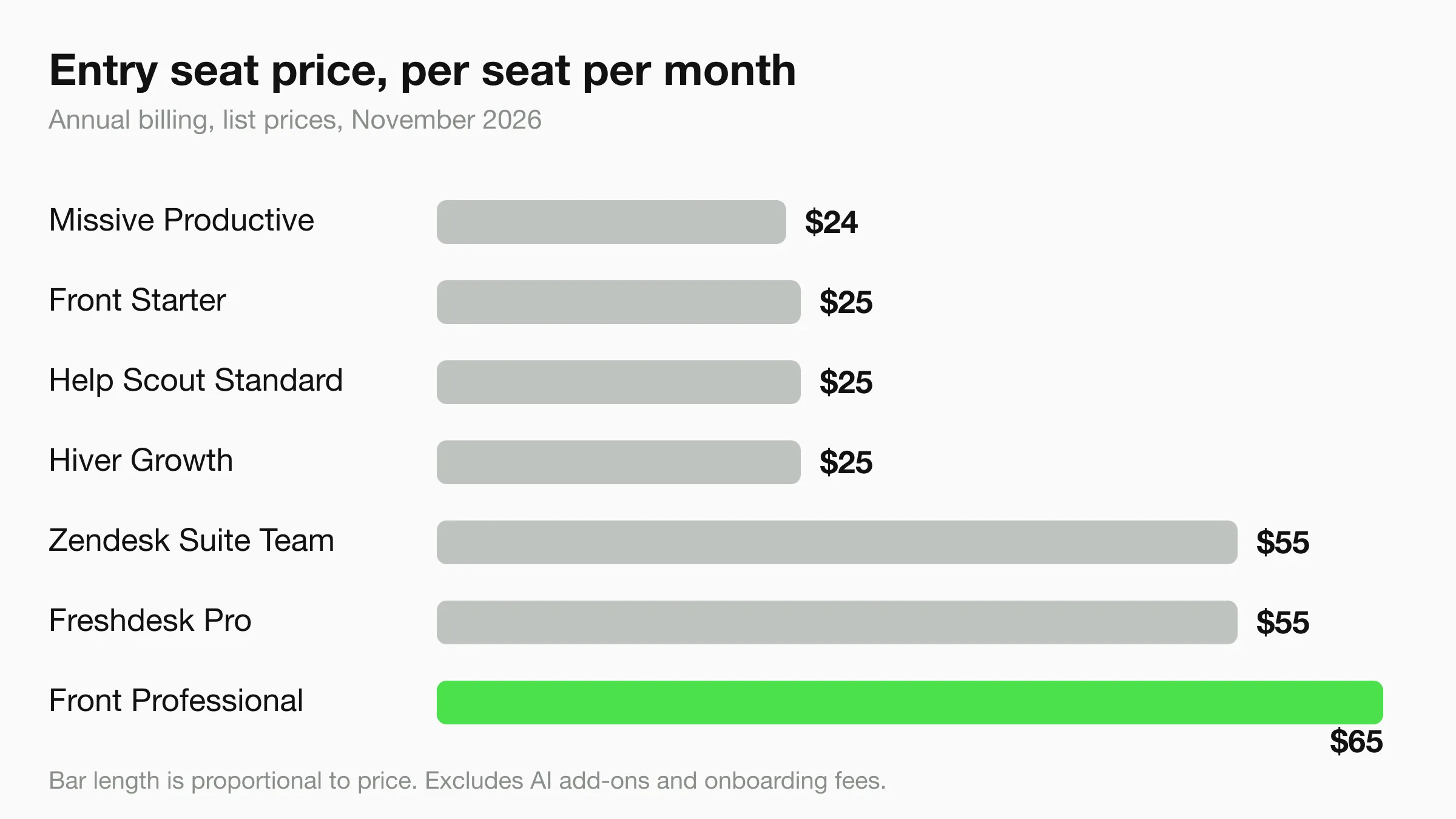
Per-seat tools get more expensive as the team grows. The table shows list prices for an illustrative 10-person team on annual billing. It is simple arithmetic from the vendors' public prices and leaves out AI add-ons, onboarding fees and taxes.
| Tool and plan | Per seat per month | 10 seats per month |
|---|---|---|
| Missive Productive | $24 | $240 |
| Front Starter | $25 | $250 |
| Help Scout Standard | $25 | $250 |
| Hiver Growth | $25 | $250 |
| Zendesk Suite Team | $55 | $550 |
| Freshdesk Pro | $55 | $550 |
| Front Professional | $65 | $650 |
Hyperleap is priced differently. Pro is $100 a month flat for 12,000 AI responses and up to 50 team members, with no per-seat fee. That is not a like-for-like comparison, because Hyperleap does not replace an email inbox. The useful question is how many hours a week your team spends on repeat questions, and what it costs to have an agent answer those first.
Count the questions before you count the seats
Export or skim a week of conversations and tag each one "repeat question" or "needs a person". If the second pile is small, you may need fewer inbox seats than you think.
Using an AI Front Desk Next to a Shared Inbox
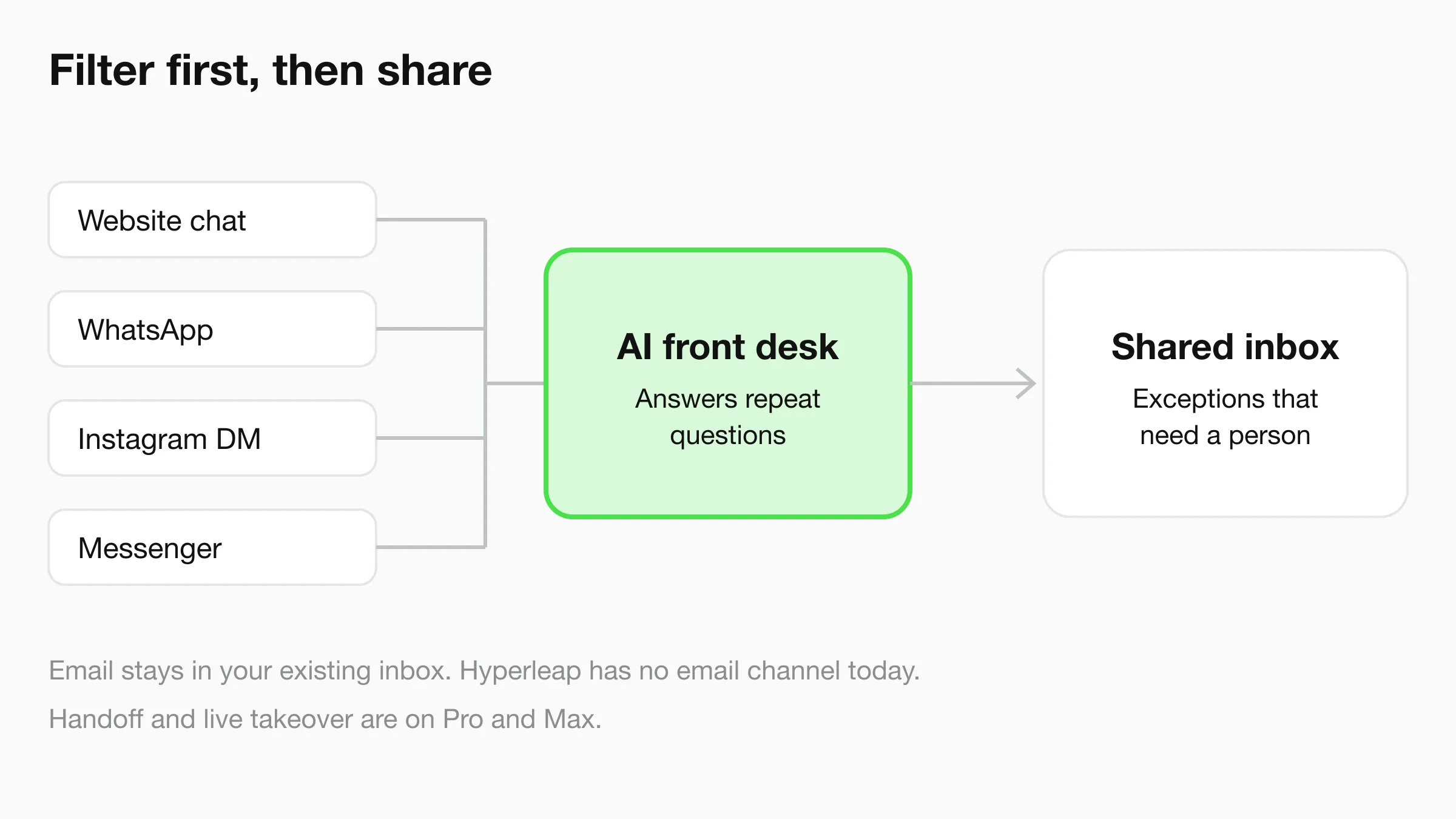
Many teams do not have to choose between Front and an AI front desk. They run both. The AI agent handles questions it can answer from your documents on website chat, WhatsApp, Instagram DM and Messenger. Anything that needs judgment goes to your team, and on Pro and Max a person can take over the live conversation.
Two practical points keep this working. Give each handoff a clear owner, and keep notes short. Our guides on unified inbox rules for small teams and a shift handoff template cover both. For wording when a customer asks for a person, see AI front desk human request messages and chatbot human handoff best practices.
Industry examples: a dental practice can let the agent handle hours and new-patient questions (dental agents), and a real estate team can answer listing questions after hours (real estate agents). The agent routes anything clinical or legal to your staff. It does not give medical or legal advice.
Decision Framework
Stay With Front If:
- Support, sales and operations share requests and need assignments and handoffs.
- You need ticketing, a knowledge base and many integrations in one platform.
- Your team is already trained on it and the seat cost is justified by the work it replaces.
Choose Missive, Help Scout or Hiver If:
- You mainly answer email and want to pay less per seat.
- You want team chat inside the thread (Missive), a help center (Help Scout) or Gmail-native workflows (Hiver).
Choose Zendesk or Freshdesk If:
- You need formal ticketing, SLAs and reporting, and have someone to run the setup.
Choose Gorgias, Intercom or HubSpot If:
- Your store (Gorgias), your product (Intercom) or your CRM (HubSpot) is the center of support.
Choose Hyperleap AI If:
- Customers reach you on website chat, WhatsApp, Instagram DM or Messenger, and most messages repeat.
- You want coverage outside business hours without hiring a night shift.
- You accept that email stays in your existing inbox.
Frequently Asked Questions
What is the best Front alternative for a small team?
Missive and Help Scout are the closest small-team matches, and both list lower per-seat prices than Front Professional as of November 2026. If your messages arrive on chat, WhatsApp, Instagram DM and Messenger, Hyperleap AI is a better fit because it answers them before they reach a person.
How much does Front cost?
Front lists Starter at $25, Professional at $65 and Enterprise at $105 per seat per month on annual billing, as of November 2026. Copilot is $20 per seat per month on Starter and Professional, and Autopilot starts at $0.39 per conversation. It offers a 14-day trial with no credit card.
Is there a free alternative to Front?
HubSpot Service Hub has a free tier for up to 2 users, and Help Scout has a free plan for up to 5 users and 1 inbox. Both have limits that most growing teams outgrow. Hyperleap has no free plan, only a 7-day free trial with a card required.
Can Hyperleap replace Front?
No. Hyperleap has no email inbox, ticketing or SLAs. It replaces the repetitive part of the work on website chat, WhatsApp, Instagram DM and Messenger. Many teams keep a shared inbox for email and use Hyperleap in front of their messaging channels.
Which Front alternative supports WhatsApp?
Front supports WhatsApp on Professional and above, with Meta's costs plus a 20% admin fee. Hyperleap supports WhatsApp on every plan, and you pay Meta's WhatsApp fees directly to Meta. Missive and Hiver also list WhatsApp, so check which plan you need.
Does moving off Front mean losing history?
Each vendor has its own import tools and limits, so ask before you commit. A safe approach is to run the new tool in parallel for two weeks and keep Front read-only until you are sure.
Conclusion
Front is built for complex, collaborative customer work, and it is priced for that. If your work is simpler, there are cheaper shared inboxes. If your inbox is mostly repeat questions on messaging channels, an AI front desk in front of it may cut the load more than a different inbox would.
Keep the Repeat Questions Out of Your Inbox
Hyperleap AI answers customers on your website, WhatsApp, Instagram DM and Facebook Messenger, from $40/month. Start a 7-day free trial (card required).
Start Free TrialPricing and features verified from vendor websites in November 2026. Confirm current details with each vendor before purchasing.
Related Articles
View all
Comparison22 min read
Best LiveAgent Alternatives in 2026: 8 Tools Compared
Compare the best LiveAgent alternatives for 2026, with current LiveAgent pricing and a LiveAgent vs Zendesk breakdown for small support teams.
Comparison34 min read
Best Help Scout Alternatives in 2026: 7 Platforms Compared
Looking for Help Scout alternatives? Compare AI-first chatbots, multichannel platforms, and full helpdesks. Features, pricing, and honest trade-offs.
Comparison30 min read
Best Zoho Desk Alternatives in 2026: 6 Platforms Compared
Looking for Zoho Desk alternatives? Compare AI agents, helpdesk tools, and multichannel platforms to find the right fit for your support team in 2026.
Comparison26 min read
Best Gorgias Alternatives in 2026: 6 Platforms Compared
Gorgias alternatives that cost less and do more. Compare AI agents, pricing, and channel coverage for DTC and ecommerce support teams.