A chatbot API that sends every new lead where you need it
Hyperleap AI posts a signed webhook to your URL when a lead is captured, a conversation starts, a message arrives, the AI replies, or a meeting is booked. Your CRM, spreadsheet or team tools get the data in seconds.
Quick answer
Hyperleap AI gives you four ways to connect a chatbot to your own systems. Webhooks push events to your URL (Pro and Max). The REST API lets your code call Hyperleap. Actions let the agent call your API during a chat (Pro and Max). The MCP server lets an AI assistant read your leads (every paid plan). Plans start at $40/month with a 7-day free trial.
What you can build
Connect your chatbot to the tools you already use
Most owners start with one job: get each new lead out of the chat and into the place the team already works. Webhooks do that. The rest of the API surface covers the cases around it.
Leads into your CRM or spreadsheet
When a visitor leaves their details, the lead captured event sends the name, email, phone, tags and form answers to your receiver. It writes a row or a CRM record.
An instant alert for your team
Forward the same event to any service that accepts an HTTPS POST, so the right person hears about a new lead while the customer is still online.
Conversations in your own database
Store every visitor message and AI reply in your own system for reporting, audits, or a customer record that shows the whole history.
Booked meetings in your ops tool
The appointment booked event carries the start and end time, time zone, meeting type and attendee, so your team tools see the booking too.
Order and account lookups mid-chat
Actions let the agent call your own HTTPS API to check an order status or stock level, then answer the customer in the same conversation.
Ask an assistant about your leads
Connect Claude, ChatGPT or Cursor through the MCP server and ask which leads came in from WhatsApp this week. No code needed.
For CRMs, the connection runs through webhooks, the REST API or Actions. There is no native sync for a specific CRM. The chatbot CRM integration guide covers field mapping and duplicates, and chatbot lead routing shows how to route each lead once it arrives.
Webhooks
Five webhook events, signed and logged
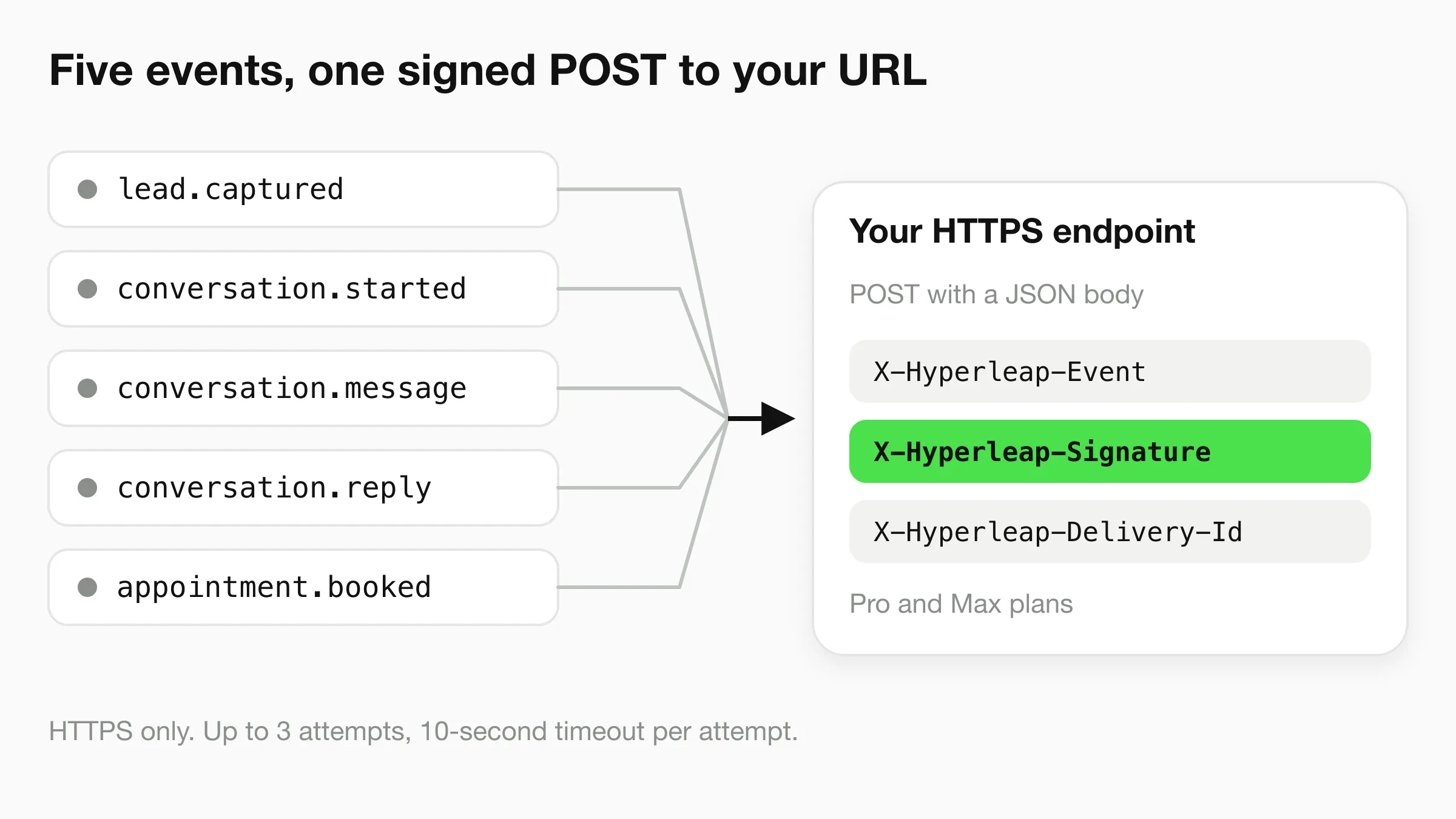
A webhook is an HTTP POST that Hyperleap sends to your URL when something happens, so you never have to poll. There are exactly five events. Each delivery is signed with HMAC-SHA256, and Studio has a test-event button and a delivery history of recent deliveries with your endpoint's response code. Webhooks are on Pro and Max.
| Event | When it fires | Key fields in data |
|---|---|---|
Lead captured lead.captured | A visitor submits the lead form or verifies with OTP | name, email, phone, companyName, tags, customFields, externalUserId |
Conversation started conversation.started | A new conversation is created | conversationId, channel, externalUserId, metadata |
New message conversation.message | The visitor sends a message | conversationId, message, channel, externalUserId |
New AI reply conversation.reply | The AI sends a reply | conversationId, messageId, userMessage, reply, channel |
Appointment booked appointment.booked | The chatbot books an appointment in the chat | conversationId, startUtc, endUtc, timeZone, meetingType, attendeeName, attendeeEmail |
Appointment booked appears once native booking is enabled for the chatbot. Booking needs Pro or Max with Calendly or Cal.com. See the webhooks help page for every payload.
For developers
An example payload and how to verify it
Every webhook body uses the same envelope, with the event-specific fields inside data. Here is an example lead.captured body. The values are made up. Fields the visitor did not give arrive as null.
{
  "eventType": "lead.captured",
  "chatbotId": "a1b2c3d4-...",
  "chatbotName": "Front Desk",
  "organizationId": "e5f6g7h8-...",
  "timestamp": "2026-11-15T10:30:00Z",
  "deliveryId": "d9e0f1a2-...",
  "data": {
    "name": "Jane Smith",
    "email": "jane@example.com",
    "phone": "+15551234567",
    "companyName": "Acme Inc",
    "externalUserId": "uuid-...",
    "tags": ["quote-request"],
    "customFields": { "budget": "5k" }
  }
}
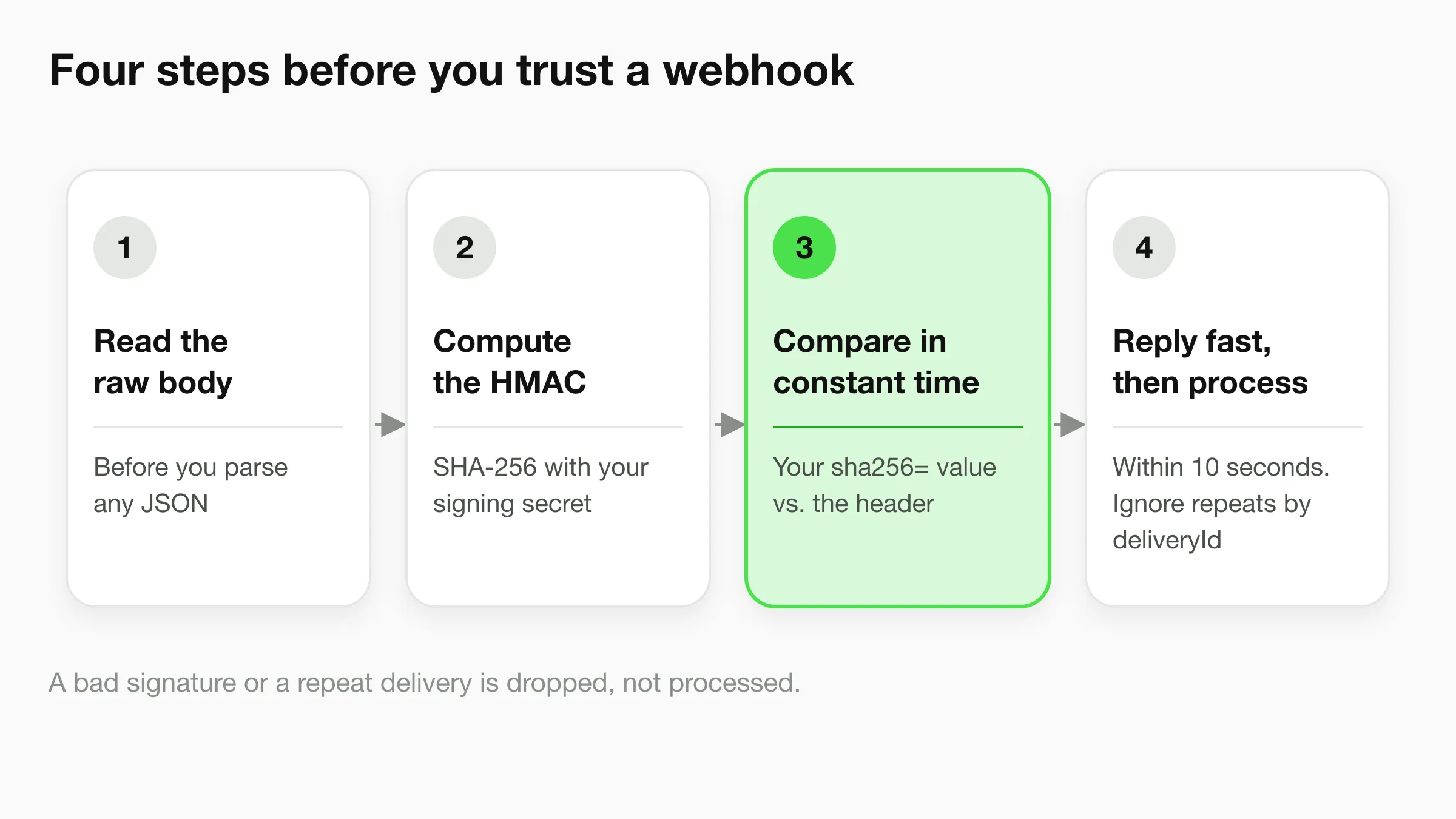
Each request also carries three headers: X-Hyperleap-Event (the event type), X-Hyperleap-Delivery-Id (a unique ID you can use to ignore repeats) and X-Hyperleap-Signature (sha256= plus the hex HMAC of the raw body, made with your signing secret). Verify the signature before you trust the request.
Verify the signature in Node.js
const crypto = require('crypto');
const express = require('express');
const app = express();

function verifySignature(rawBody, secret, signatureHeader) {
  const expected = 'sha256=' + crypto
    .createHmac('sha256', secret)
    .update(rawBody, 'utf8')
    .digest('hex');
  const a = Buffer.from(expected);
  const b = Buffer.from(signatureHeader || '');
  return a.length === b.length && crypto.timingSafeEqual(a, b);
}

// Use the raw body: re-serialized JSON will not match the signature.
app.post('/hyperleap-webhook', express.raw({ type: 'application/json' }), (req, res) => {
  const signature = req.get('X-Hyperleap-Signature');
  if (!verifySignature(req.body.toString('utf8'), process.env.HYPERLEAP_WEBHOOK_SECRET, signature)) {
    return res.status(401).send('Invalid signature');
  }

  const event = JSON.parse(req.body.toString('utf8'));
  res.status(200).send('ok'); // acknowledge within 10 seconds, then do the work

  // Skip repeats: a retry can deliver the same event twice (use event.deliveryId).
  if (event.eventType === 'lead.captured') {
    // write event.data to your CRM or sheet
  }
});
Delivery rules
- HTTPS only. Your endpoint must respond with a 2xx status within 10 seconds.
- Up to 3 attempts per delivery. Timeouts, network errors and HTTP 5xx, 408 and 429 responses are retried. Other 4xx responses are not.
- HTTP 410 Gone stops delivery for good and deactivates the matching subscription.
- The signing secret is shown once when you create a subscription. Copy it into your receiver then. If it leaks, regenerate it or recreate the subscription.
REST API
The REST API, when your code needs to call Hyperleap
The REST API uses the base URL https://api.hyperleapai.com and an API key sent in the x-hl-api-key header. You create the key in Studio under Manage, then API Keys. The documented resource groups are below. Use webhooks, not polling, when the goal is to get lead data out.
Create general or persona conversations, continue them with plain, SSE or HTTP/2 streaming replies, and read, rename, tag with metadata, or close them.
Run a saved prompt with non-streaming, SSE or HTTP/2 streaming responses.
Store a score against a conversation, a single message, or a prompt run.
Pull conversation and prompt-run records for review, and aggregated feedback to see how answers are rated.
Check content against moderation policies before it reaches a customer.
Start with the API reference introduction or browse the full API docs.
Choosing
Webhooks, REST API, Actions or MCP: which one
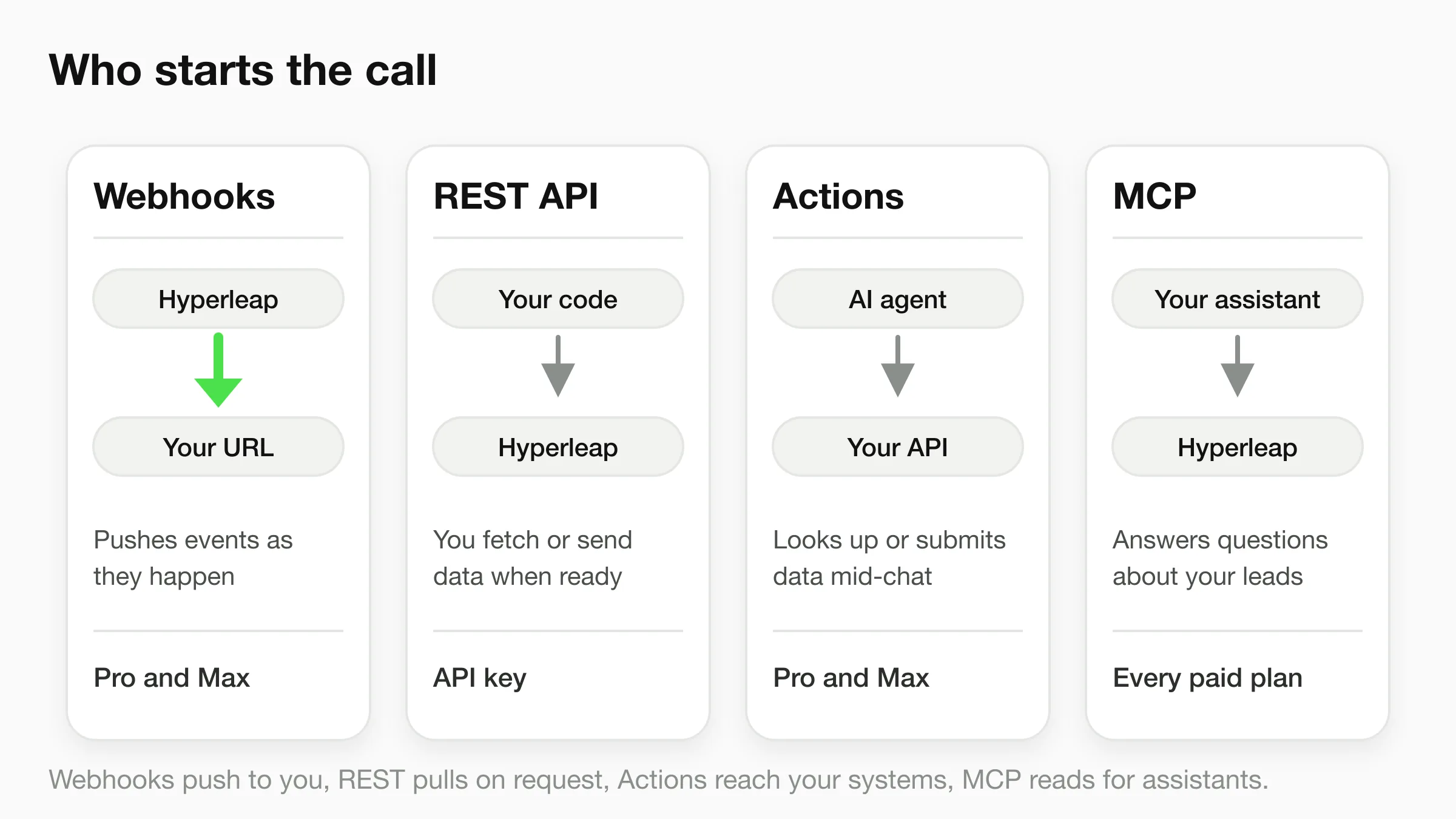
Pick by who starts the call. To get data out of the chatbot as it happens, use webhooks. To call Hyperleap from your own code, use the REST API. To let the agent use your systems, use Actions. To ask an assistant about your leads, use MCP. The MCP vs REST API vs webhooks guide goes deeper on the trade-offs.
| Webhooks | REST API | Actions | MCP server | |
|---|---|---|---|---|
| Who starts the call | Hyperleap, when something happens | Your code, when it needs data | The AI agent, mid-conversation | An AI assistant, when you ask it |
| Direction of data | Out of Hyperleap, to your URL | Both ways, through API calls | From your API into the chat | Out of Hyperleap, to the assistant |
| Best for | Leads to a CRM, alerts, logging | Your own chat experience and reports | Order status, stock, account lookups | Asking questions about your leads |
| Needs code | A small receiver on your side | Yes, calls from your backend | A guided form and your HTTPS API | No, a one-time sign-in |
| Can it change your data? | No, it only sends events | Yes, as the documented endpoints allow | Yes, if your API accepts the request | Read-only, apart from saving lead insights |
| Plans | Pro and Max | API key from Studio | Pro and Max | Plus, Pro and Max |
Actions are custom API tools, up to 10 per chatbot, set up with a guided form. See how Actions work. The MCP server is covered on the MCP page.
Plans
Which plan includes what
Plus is $40/month, Pro is $100/month and Max is $200/month. Webhooks and Actions start on Pro. The MCP server is included on every paid plan. Every plan has a 7-day free trial and requires a card to start. There is no free plan.
| Plus $40 | Pro $100 | Max $200 | |
|---|---|---|---|
| Webhooks (five events, signed, test event, delivery history) | No | Yes | Yes |
| Actions (up to 10 per chatbot) | No | Yes | Yes |
| MCP server (read-only access to your leads) | Yes | Yes | Yes |
See the full pricing page and the integrations overview. Hyperleap AI is an AI front desk for small businesses, and the same webhooks work for chatbot lead generation and customer support setups.
FAQ
Frequently asked questions
What is a chatbot API?
Does Hyperleap AI have a chatbot webhook?
How do I verify a Hyperleap webhook signature?
Can I send chatbot leads to my CRM?
What is the difference between webhooks and Actions?
Which plan do I need, and what does it cost?
Send your first lead to your own system today
Start a trial, turn on a webhook, and use the test-event button to see the payload arrive at your endpoint.
7-day free trial on all plans. Cancel anytime.