Guide
B2B Chatbot: How to Qualify and Book Buyers (2026)
A B2B chatbot should qualify on fit, answer technical questions from your docs, and book demos. Use cases, a question bank, and what to connect.

Gopi Krishna Lakkepuram · Founder & CEO
· 16 min read
TL;DR: A B2B chatbot is an AI agent on your website that answers buyer questions from your own documents, asks a few questions to learn whether the visitor is a fit, and books a call with the right person. It is not a B2C chatbot with a sales script. B2B visitors are researching, not impulse buying. They ask about security, integrations and pricing before they ever talk to a person, and several people at their company will check your site. This guide covers how B2B differs, five use cases, a bank of qualifying questions you can copy, what to connect (booking, webhooks, your CRM), the metrics to watch, and the mistakes that make visitors leave.
What is a B2B chatbot?
A B2B chatbot is a conversational AI agent that helps business buyers evaluate and contact a company. It answers product, pricing, security and integration questions, qualifies the visitor on fit, and moves good prospects to a booked demo or a conversation with sales.
The difference from a consumer chatbot is the job. A consumer bot often closes a small transaction in one sitting. A B2B bot rarely closes anything. It shortens the distance between "someone is looking at our site" and "the right person at our company is talking to the right person at theirs."
Hyperleap AI is built as an AI front desk for small businesses, and the B2B use case is a natural fit: agencies, IT services firms, accounting practices, consultancies and small SaaS companies all have a website full of buyers with specific questions and a small team that cannot answer each one live. Search also uses variations like "b2b ai chatbot" and "b2b website chatbot". They all mean the same thing: an agent on the site that handles the first conversation.
How B2B buyers differ from consumer visitors
B2B conversations differ in five ways that change how you configure a chatbot.
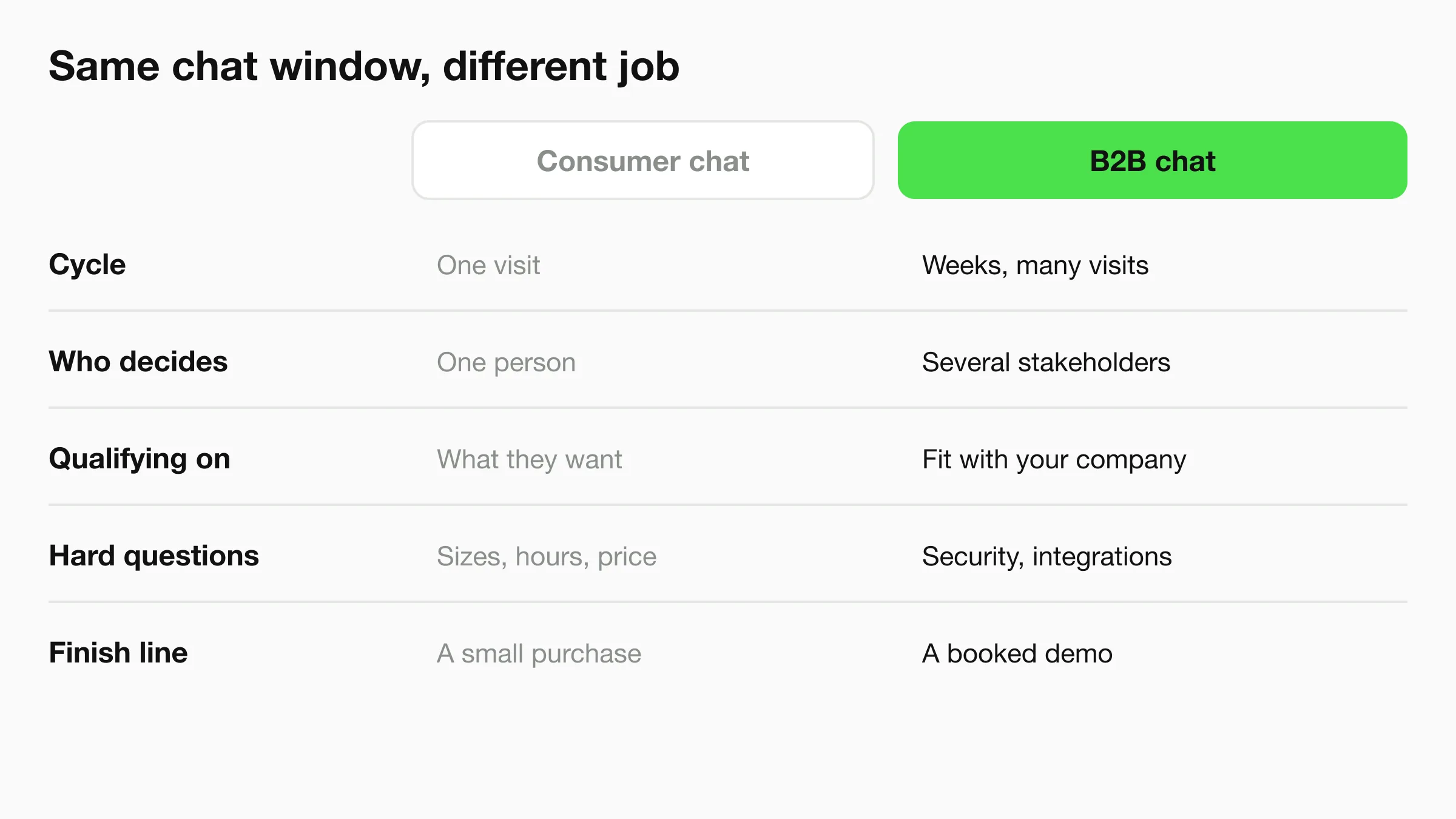
Longer cycles. A buyer may visit your site five times over six weeks. The chatbot will often meet someone at the start of research, not the end. Its goal at that stage is to be useful and to leave the door open, not to push for a decision.
More than one stakeholder. The person typing is often an analyst, an office manager or an engineer collecting information for someone else. They ask "can I send this to my manager?" and "who handles security reviews?" A good agent treats these questions as normal and offers a clear path, such as a short summary the visitor can forward.
Qualification on fit, not impulse. In consumer chat you ask what someone wants. In B2B chat you ask whether the two companies match: company size, the problem, the tools they already use, the timeline and who decides. Fit questions protect your team's time and help the visitor too, since a poor match wastes their week.
Technical and procurement questions. Buyers ask about integrations, data handling, contracts and API access. These are the questions that stall deals when nobody answers them quickly. They are also the questions your documentation already answers.
A meeting as the finish line. The success event is a booked demo, a discovery call, or a contact captured with enough context for a useful reply. Not a checkout.
Pricing pages are where B2B chats start
Many B2B conversations begin on the pricing or integrations page, not the home page. Make sure the agent knows what those pages say and can explain what changes between your tiers, so the visitor does not have to leave and email you.
Five B2B chatbot use cases
1. Qualify inbound visitors
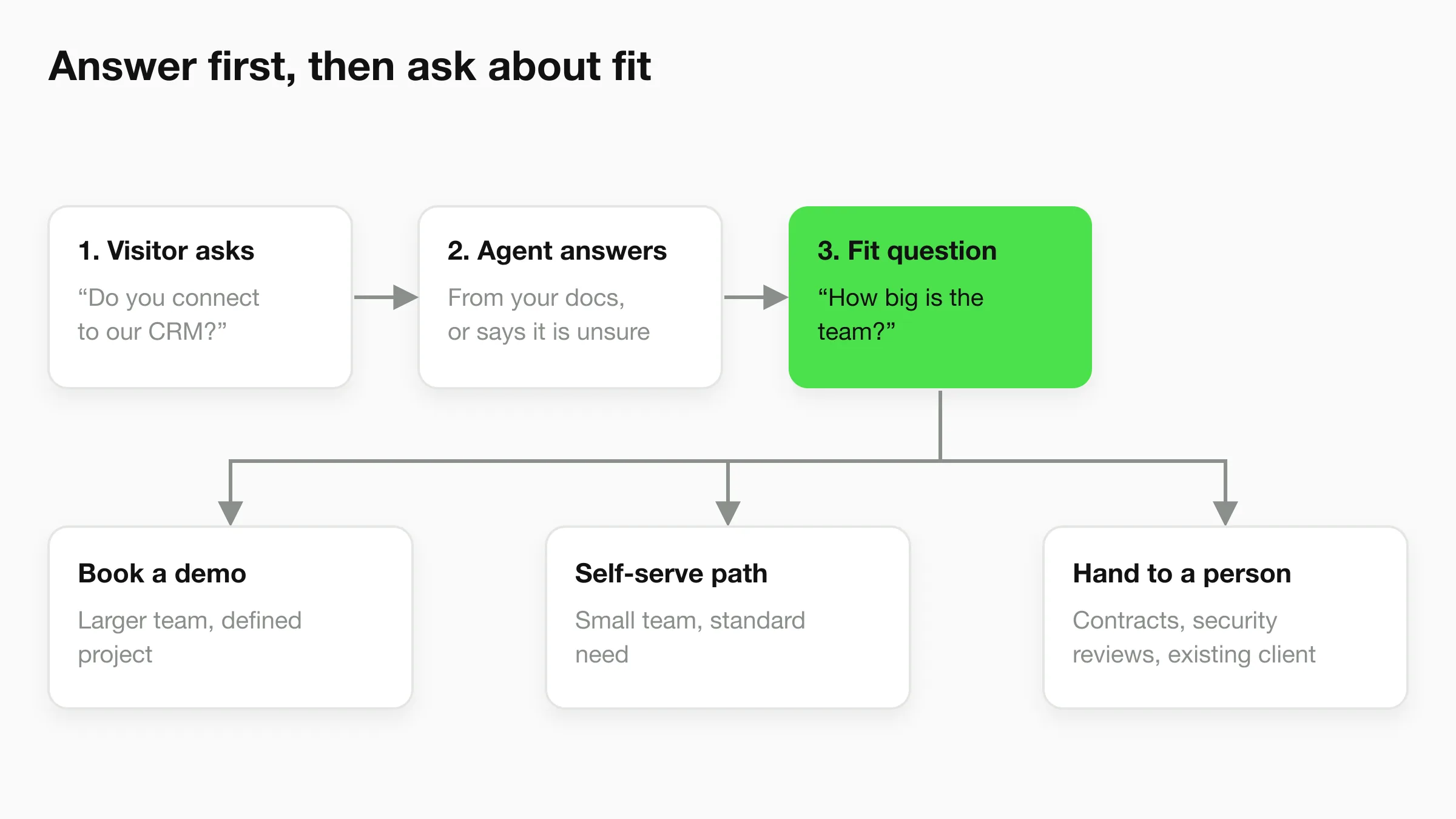
The agent asks a short run of questions in conversation, in the order a person would ask them, and passes the answers to your team in a summary. A visitor who says they run a 12-person agency and need client reporting gets a different next step than a student writing a paper.
This is the core job. If you only build one thing, build this. The lead qualification chatbot guide covers the mechanics in more depth, and the chatbot lead generation page shows how capture works on Hyperleap. If the chatbot should also run the sales conversation, see the AI sales agent page and these sales chatbot scripts.
2. Answer security and integration questions from your docs
Attach your help center, API documentation, security overview and pricing page as sources. The agent answers from those documents only. When a visitor asks "do you integrate with QuickBooks?" the agent answers from what your documentation says, and when the documentation is silent it says so and offers a person.
That second behavior matters more than the first. In B2B, a confident wrong answer about data handling can end a deal or create a contract problem. Keep the agent grounded in documents you control, and write your instructions so that anything about legal terms, custom security reviews or certifications goes to a human. Hyperleap's knowledge base chatbot page explains the grounding model, and the security and privacy guide covers what to check when buying.
3. Route by segment
Not every visitor should get the same next step. A common split:
- Larger company with a defined project: book a call with sales.
- Small company, standard need: share the self-serve path and pricing.
- Existing customer with a problem: point them to support, or hand off to your team.
- Partner or agency asking about reselling: send to whoever owns partnerships.
On Hyperleap, the agent collects the segment signals through its questions. After the conversation ends, the Agentic Workflow (Pro and Max) can follow your own instructions and email the right internal contacts, for example "email the partnerships lead a brief when the visitor says they are an agency."
4. Book demos
Booking is where chat pays off. On Pro and Max, the agent reads live availability from Calendly or Cal.com, offers real open times and creates the booking inside the conversation. In-chat booking needs Calendly Standard or higher. On Plus, the agent shares your booking link instead. It creates new bookings only. It does not reschedule or cancel, so visitors use the links in their confirmation email for that. More on the options in booking links versus booking integrations.
5. Support existing accounts
The same agent that qualifies new buyers can answer existing customers' how-to questions from your docs, which keeps your team free for the work only they can do. For SaaS companies this often becomes the second job after sales qualification. The AI chatbot for SaaS guide walks through onboarding and ticket deflection.
A B2B qualifying question bank
Here is a bank of questions to adapt. These are examples to pick from, not a script. Ask two or three per conversation at most, and only after the visitor has received something useful.
Problem and context
- "What are you hoping to fix or set up?"
- "Is this for a project that is already planned, or are you comparing options?"
- "What are you using today?"
Size and fit
- "Roughly how many people are on your team?"
- "How many clients (or customers, or locations) would this cover?"
- "Which tools does it need to work with?"
Timeline and decision
- "When do you want this running?"
- "Will anyone else be involved in the decision? I can summarize this chat so you can share it."
- "Would a 20-minute call with our team help, or do you prefer to look around on your own first?"
Contact
- "What is the best email to send the summary and booking confirmation to?"
- "What is your company website?"
The website chat can collect contact details with a short form, but a form is optional. On WhatsApp, Instagram DM and Facebook Messenger the platform already gives you the contact. Hyperleap does not score leads. The agent's conversation and the summary it produces do the work: your team reads what the visitor said in their own words.
Question banks by business type
Different firms need different fit questions. These are illustrative examples for each type.
| Business type | Fit questions worth asking | Typical next step |
|---|---|---|
| Digital agency | Monthly budget range, channels they need, in-house team or not | Discovery call |
| IT services | Number of users or devices, current provider, urgency | Scoping call or incident routing |
| Accounting firm | Entity type, software in use, filing deadline | Intro call with the right partner |
| Consultancy | Project type, start date, who sponsors it | Short scoping conversation |
| Small SaaS | Team size, use case, tools to connect | Demo or self-serve trial |
Industry pages show these patterns in more detail: AI agents for IT services and AI agents for accounting firms. If you run an agency yourself and want to put this on client sites, the agency launch checklist is the right companion.
What to connect
A B2B chatbot is only as useful as where its output lands. Three connections matter, and it helps to be exact about what each plan includes.
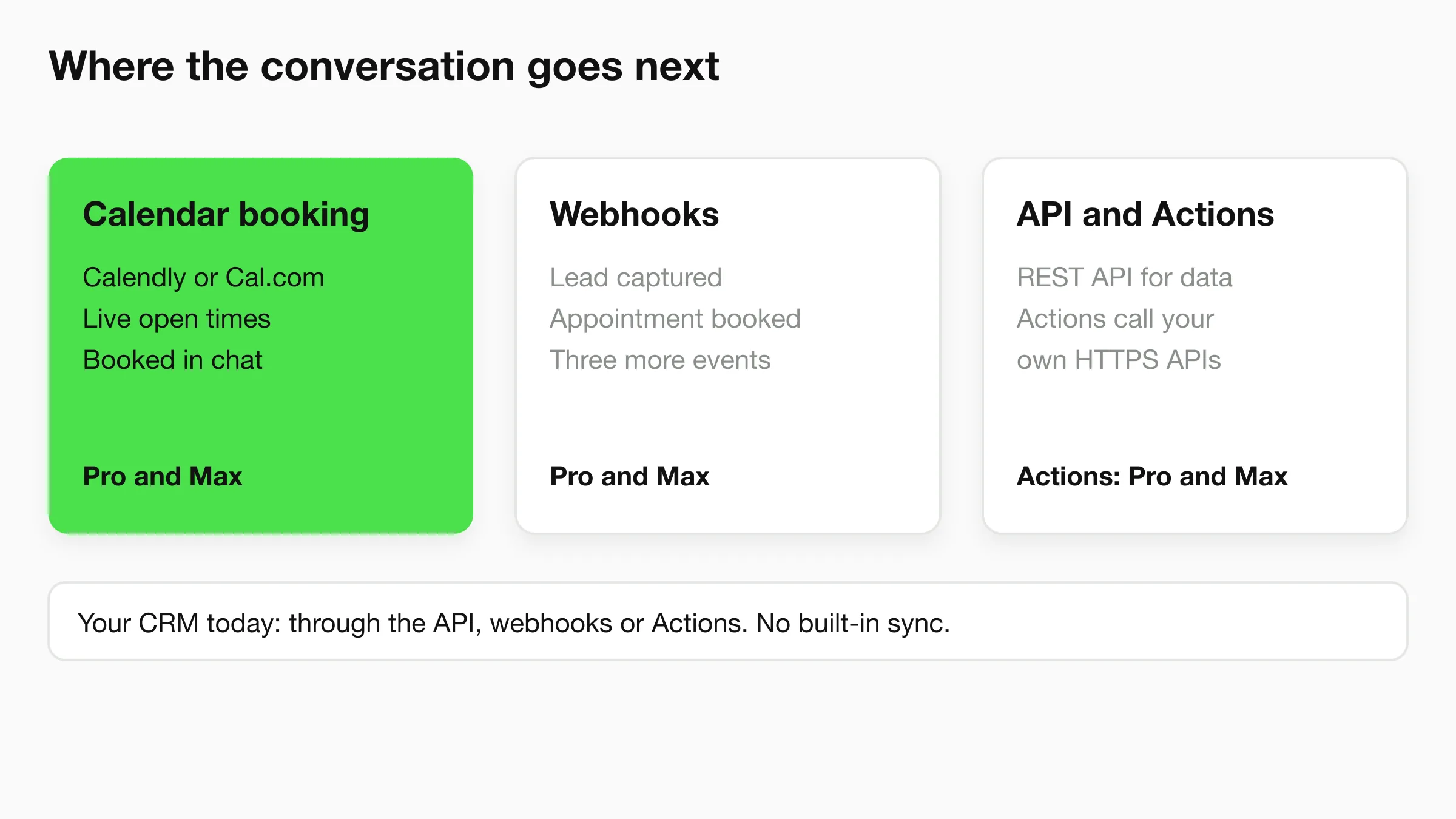
Calendar booking. Calendly and Cal.com, native on Pro and Max. This is the shortest path from question to meeting.
Webhooks. Hyperleap sends signed webhooks for five events: lead captured, conversation started, new message, new AI reply, and appointment booked. Webhooks are on Pro and Max. A small automation tool or a few lines of code can receive "lead captured" and create a record in your CRM.
REST API and Actions. The REST API lets you pull conversations and leads into your own systems. Actions (Pro and Max) let the agent call your own HTTPS APIs during a conversation, for example to look up an account or submit a request to your own endpoint. Up to ten Actions per agent.
CRM. Today, the route to a CRM is the REST API, webhooks or Actions, not a built-in sync. If your sales process needs a lead to appear in a specific CRM field the moment a chat ends, plan a small amount of setup. The chatbot CRM integration guide compares the options.
Plan around what exists today
Booking, webhooks, Actions and human handoff are Pro and Max features. Plus ($40/mo) shares your booking link and captures leads, but has no webhooks. Check pricing before you design the flow.
Your own tools. Hyperleap's MCP server is included on every paid plan. You can connect Claude, ChatGPT or Cursor and ask plain-English questions about the leads your agent captured, such as which came from the pricing page this week. It is read-only apart from one tool that saves lead insights to the lead's profile.
Setup in four steps
- Collect sources. Gather your pricing page, product docs, integration list, security overview and FAQ. Add them as sources. Quick-start can read your website and generate a starting prompt, and the agent can be live in under five minutes. Tuning is the work after that.
- Write the instructions. Tell the agent who it talks to, which two or three questions to ask, which topics go to a person (contracts, security reviews, custom pricing), and what the next step is for each segment.
- Connect booking and a destination for leads. Add Calendly or Cal.com, set up the webhook, and decide who gets the post-chat email.
- Test with real questions. Ask your agent the ten hardest questions your sales team gets. Fix the answers by fixing the sources, then publish.
Start with the website, which is where B2B research happens. WhatsApp can be added where your buyers already use it for business. Meta's WhatsApp fees are billed by Meta separately from your Hyperleap plan.
Metrics to track
Use counts you can read from your own conversations rather than industry averages.
| Metric | What it tells you |
|---|---|
| Chats that reach a fit question | Whether the opening answers are good enough to keep people talking |
| Demos booked from chat | The primary outcome |
| Booked-demo show rate | Whether the right people are being booked |
| Questions the agent could not answer | The next document to write |
| Handoffs requested | Where the agent is missing information or trust |
| Time to first reply on inbound | The gap the chatbot closes after hours |
Read the conversation logs weekly for the first month. The logs show which sources the agent used for each answer, so a wrong answer usually points to a missing or outdated document. The unanswered questions list is often the most valuable output: it is a list of what your buyers care about that your site does not say.
Put a B2B front desk on your site
Paste your URL, add your docs, and have an agent that qualifies and books buyers. Plans start at $40/mo with a 7-day free trial.
Start for freeMistakes that cost B2B conversations
Putting a form inside a chat. If the first message is "Name, email, company, phone, budget," you have rebuilt your contact form with extra steps. Answer first. Ask one question at a time. Collect contact details after the visitor has received something.
Gating everything. Do not require an email before answering a pricing or integration question. B2B buyers research quietly, and the ones who hit a gate often leave to a competitor whose site simply answers. Gate the meeting, not the information.
Letting the agent guess on sensitive topics. Legal terms, compliance statements, custom security questionnaires and contract language should go to a person. Say so in the instructions.
Treating every visitor as a prospect. Existing customers, job seekers and vendors also use chat. Give each group a polite next step.
Asking too many questions. Three fit questions is plenty. If your sales team needs ten answers, get them on the call.
Never reading the logs. The agent improves when you fix the sources it draws on. Skipping the review means the same gaps repeat.
Pretending to be human. Say it is an AI agent, and make it easy to reach a person. On Pro and Max, visitors can ask for a person, your team is alerted in Studio, and any teammate can take over the live conversation and hand it back.
B2B chatbot examples by business type
Digital agency. The agent answers "do you work with e-commerce brands?" from your case studies page, asks about budget range and channels, and books a discovery call. Out-of-scope requests get a polite redirect.
IT services firm. One visitor has a server down, another wants a quote for managed IT. The agent separates them in the first two messages: emergencies go to the right person, project enquiries get qualifying questions and a scoping call.
Accounting firm. A business owner asks whether you handle payroll and multi-state filings. The agent answers from your services page, asks about entity type and software, and books an intro call. It does not give tax advice.
Consultancy. The agent explains how engagements work, asks about project type and timing, and offers a short scoping conversation with a partner.
Small SaaS company. The agent handles "does it integrate with X" from your docs, qualifies team size, and sends smaller teams to the trial while booking demos for larger ones.
Frequently Asked Questions
What is the best B2B chatbot?
The best B2B chatbot for a small company is one that answers from your own documents, asks fit questions, books meetings and passes leads to your tools. Judge platforms on those four things, not on how clever the demo is. Hyperleap AI covers all four, with booking, webhooks and Actions on the Pro and Max plans.
How does a B2B chatbot differ from a B2C chatbot?
A B2B chatbot supports a longer, multi-person buying process. It focuses on qualification, technical answers and booking a meeting. A B2C chatbot usually helps one person complete a smaller purchase in one sitting.
Can a chatbot generate B2B leads?
Yes, when it captures contact details and the context of the conversation. It helps most outside office hours and on pages where visitors have questions but no time to fill in a form. See chatbot for lead generation for how capture works.
Does Hyperleap integrate with my CRM?
Not as a built-in sync today. Leads and conversations can reach your CRM through the REST API, webhooks (Pro and Max) or Actions (Pro and Max). The CRM integration guide explains how.
Can the chatbot answer security questionnaires?
It can answer common security and privacy questions from documents you provide. Formal questionnaires, certifications and contract terms should go to your team. Hyperleap does not hold third-party certifications such as SOC 2, so do not expect your agent to claim them on your behalf.
Can it book demos on my calendar?
On Pro and Max, yes, with Calendly or Cal.com. In-chat booking needs Calendly Standard or higher. On Plus, the agent shares your booking link. It creates new bookings but does not cancel or reschedule.
How much does a B2B chatbot cost?
Hyperleap plans are Plus $40/mo, Pro $100/mo and Max $200/mo, with a 7-day free trial and a card required to start. Annual billing saves up to 40%. See pricing for what each plan includes.
How long does setup take?
The quick-start path can have an agent live in under five minutes: paste your URL and add one script tag. Plan a few hours afterward to add documents, write instructions and test with real questions.
Start with the first conversation
Buyers form an opinion of your company before they speak to anyone. A B2B chatbot makes that first conversation useful: it answers from your documents, learns whether the visitor fits, and hands your team a booked meeting with context. Begin with one page, one set of sources and three questions, then read the logs and improve.
See what your buyers ask first
Start with your website and your docs. Add booking on Pro or Max when you are ready.
Start for freeIndustry Solutions
See how AI chatbots work for these industries:
Related Articles
View all
Guide23 min read
Lead Qualification Chatbot: Questions, Fields, and Handoff Rules
Qualify leads in chat before a rep wastes the first call. The four-question stack, routing rules based on the answers, and handoff logic that works.
Guide22 min read
AI Lead Capture Chatbot: Convert Website Visitors Into Qualified Leads
An AI lead capture chatbot does what forms can't: qualify intent, capture contacts, and hand clean leads to your team — across four channels, 24/7.
Guide17 min read
Sales Chatbot: A 6-Stage Flow With Scripts to Adapt
Design a sales chatbot conversation in six stages, with example scripts for five business types, objection answers and what not to automate.
Guide9 min read
How Many Languages Does ChatGPT Support?
OpenAI doesn't publish an official language count for ChatGPT. Here's what's known, and why it matters less than you'd think for a business chatbot.