Guide
Sales Chatbot: A 6-Stage Flow With Scripts to Adapt
Design a sales chatbot conversation in six stages, with example scripts for five business types, objection answers and what not to automate.

Gopi Krishna Lakkepuram · Founder & CEO
· 17 min read
A sales chatbot is a chat agent on your website or messaging channels that answers a prospect's questions, asks a few qualifying ones, collects contact details and sends the person to a booking or a teammate. It does not close deals. Its job is to make sure no interested person waits for an answer while your team is busy, asleep or on a job site.
Speed matters here. A Harvard Business Review study of online sales leads found that most companies respond too slowly. In the full article, firms that tried to reach a web lead within an hour were roughly seven times as likely to have a meaningful conversation with a decision maker as firms that waited one hour longer. That study is from 2011 and shows correlation, not proof, but the direction holds for a small business: the first useful reply tends to win.
A fast reply only helps if the conversation behind it is well designed. Most sales chatbots fail on design, not technology. They open with "How can I help you?", ask for an email in the second message and answer pricing questions with "Please contact us." This guide gives you a six-stage flow, example scripts for five business types, answers to common objections, and a list of things to leave to people.
What Does a Sales Chatbot Actually Do?
A sales chatbot handles the part of selling that happens before a person needs to get involved: first response, answering questions, light qualification, contact capture and booking or routing. It works on inbound conversations. Someone writes in, and the chatbot replies.
That scope is deliberate. A sales chatbot built on Hyperleap does not message people first, send outreach or process payments. It answers visitors who start a chat on your website, WhatsApp, Instagram DM or Facebook Messenger, using the content you give it. Everything outside that scope is a job for your team or another tool.
The difference from lead capture is where the effort goes. A lead generation chatbot is judged by the leads it collects. A sales chatbot is judged by whether the right prospects reach a conversation, a booking or a quote request, with their questions already answered. For the question stack and lead record in detail, see our guide to the lead qualification chatbot. This post covers the layer above it: the conversation itself. The product view is on the AI sales agent page.
How to use the scripts in this guide
Every script below is an illustrative example, not a result from a real customer. Swap the bracketed placeholders for your own prices, service areas and policies before you publish anything.
The Six-Stage Sales Chatbot Conversation Flow
A good sales chatbot conversation has six stages: greet with context, understand the need, answer objections from your own content, qualify, capture contact details, then book or route. The order matters. Contact capture sits fifth because people give their details to a business that has already been useful.
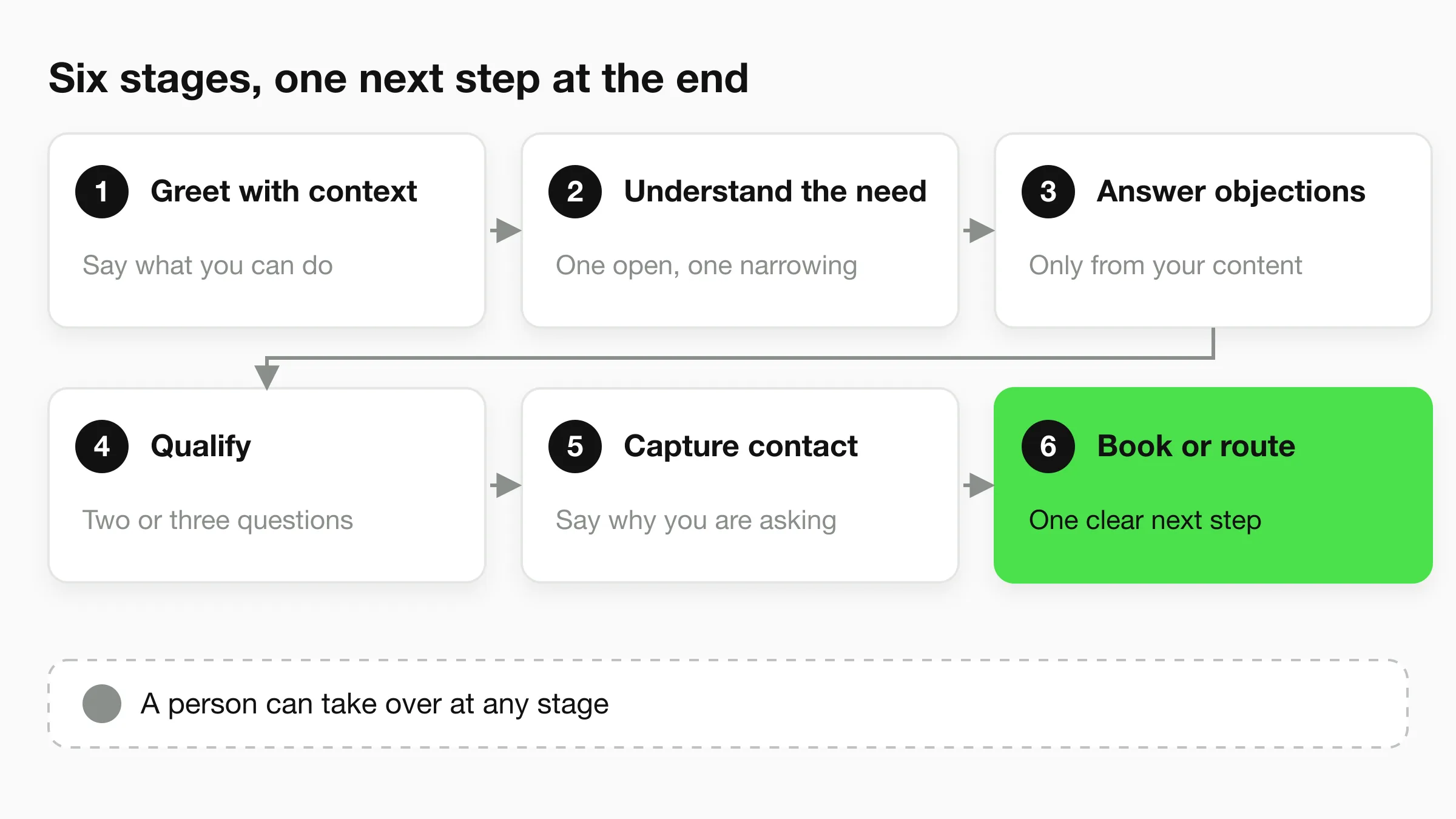
Stage 1: Greet with context
Open with one sentence that says what the chatbot can do and offer two or three starting points. "Hi, I can answer questions about our services, check what a job usually involves, or set up a visit. What are you after?" beats "How can I help you?" because it shows the visitor what is on offer.
Context means using what you already know. A visitor on WhatsApp who came from an ad has a different intent than someone browsing your pricing page. Write the opener for the situation, and keep it under 30 words.
Stage 2: Understand the need
Ask one open question, then one narrowing one. "What are you trying to get done?" followed by "Is this for a home or a business?" tells you more than a five-field form. Reflect the answer back in one line before moving on, so the visitor knows it was understood.
Do not ask for anything personal yet.
Stage 3: Answer and handle objections
This stage runs through the whole conversation. Prospects ask about price, timing, fit and trust before they commit. Answer from your approved content: your price ranges, service area, process, policies, FAQs and past work. If the answer is not in your content, say so and offer a person. The objections section below covers the six most common ones.
Stage 4: Qualify
Ask two or three questions that change what happens next, such as location, timeline, budget range or size of job. Every question must earn its place: if the answer would not change who follows up or how, drop it. Explain why you ask when it is not obvious ("So I can tell you whether we cover your area").
Stage 5: Capture contact details
Ask once, state the reason and keep the answer useful whether or not the visitor shares. "If you'd like a quote, I can pass this to our team. What's the best email or number to reach you?" On WhatsApp, Instagram DM and Messenger, the platform already gives you a way to reply, so you may only need a name and a preferred time. On your website, the chat can collect details with a short form, and the form is optional. Our guide to asking for contact details without blocking the answer has wording you can copy.
Stage 6: Book or route
End every conversation with a next step. Three options cover most businesses:
- Book: the visitor picks a time from your real calendar.
- Route: the chatbot sends a summary to the right person and tells the visitor when to expect a reply.
- Link: the chatbot shares your booking page or a quote form and the visitor finishes there.
Pick one default per enquiry type. The tradeoffs between booking inside the chat and sharing a link are covered in AI booking links vs booking integrations.
Sales Chatbot Script Examples for Five Business Types
These sales chatbot scripts are examples for you to adapt. The business details in brackets are placeholders. Replace them with facts from your own business, and publish only answers you can stand behind.
Home services (plumbing, HVAC, roofing, cleaning)
Goal: turn an urgent or price-driven enquiry into a visit or an estimate request.
Bot: Hi, I can help with repairs, installs and quotes, and I can book a visit. What do you need done? Visitor: My water heater is leaking. Bot: Sorry to hear that. If water is actively flooding, I'll route you to our team straight away. Is it flooding, or a slow leak? Visitor: Slow leak. Bot: Thanks. We repair and replace water heaters in [service area]. Which suburb or postcode are you in? Visitor: [Postcode]. Bot: We cover that area. A visit usually takes [duration], and we quote on site. Can I get your name and best number so [team member] can confirm a time today or tomorrow?
Why it works: the urgency question separates emergencies from quotes, the area question qualifies in one line, and the close names a person and a time window. Our home services agents page covers the inquiry patterns for trades in more detail.
Med spa
Goal: answer treatment questions safely and move interested people to a consultation.
Bot: Hi, I can share how our treatments work, what a consultation involves and open appointment times. What are you curious about? Visitor: How much is [treatment]? Bot: [Treatment] starts from $[amount] and the final price depends on the area treated and your consultation. Would you like to book a consultation so a practitioner can confirm what's right for you? Visitor: Is it safe with my skin condition? Bot: I can't give medical advice, and that question needs one of our practitioners. I can pass it to them with your question so they can answer before your visit. What's the best email to reach you?
Why it works: the chatbot gives a price anchor from your content, then routes medical questions to a person instead of improvising. It routes; it does not assess. See AI chatbot for med spa treatment bookings and the med spa agents page.
Real estate
Goal: find out whether the enquirer is a buyer, seller or renter, then get them to a viewing or a call.
Bot: Hi, I can answer questions about our listings and our service, and set up a viewing or a call. Are you buying, selling or renting? Visitor: Buying. Bot: Great. Which area are you looking in, and what's your rough budget range? Visitor: [Area], around $[range]. Bot: Thanks. Our team works across [areas]. How soon are you hoping to move? Visitor: Within three months. Bot: That's helpful. I'll pass this to [agent name] with your area, budget and timeline so they can send matching options. What's the best email or WhatsApp number?
Why it works: buyer, seller and renter need different follow-up, and timeline tells the agent how fast to respond. Keep listing data to what you upload; do not promise live MLS feeds. More detail is in real estate chatbot lead qualification and on the real estate agents page.
B2B services (IT, accounting, consulting, agencies)
Goal: separate real projects from research browsing, then book a discovery call.
Bot: Hi, I can explain what we do, how projects run and whether we are a fit. What are you looking to solve? Visitor: We need help with [problem]. Bot: We do that for [type of company]. Roughly how big is the team or the project? Visitor: [Size]. Bot: And is this planned for this quarter, or are you comparing options for later? Visitor: This quarter. Bot: Then a 20-minute discovery call is the best next step. Here are open times this week. Which suits you?
Why it works: business buyers want fit before pricing, so the chatbot asks about size and timing, then offers a call. If a visitor asks for pricing first, share your range or pricing model if you publish one.
Coaching and education
Goal: help a prospective student or client choose the right programme and take the next step.
Bot: Hi, I can answer questions about our programmes, schedules and fees, and help you pick one. What would you like to achieve? Visitor: I want to improve my [skill/subject]. Bot: Which level are you at now: beginner, intermediate or advanced? Visitor: Beginner. Bot: Our [programme name] is built for beginners. It runs [schedule] and costs $[amount]. Would you like to book a free intro session or see the full course outline here in the chat?
Why it works: level and goal pick the programme, and the close offers two low-friction steps. Avoid promising outcomes such as results or grades; describe what the programme covers instead.
Build one of these flows in an afternoon
Paste your website URL and Hyperleap AI drafts an agent from your content. Plans start at $40/mo with a 7-day free trial; a card is required.
Start for freeHow to Answer the Six Most Common Sales Objections
A sales chatbot handles objections by answering from your approved content, never from the model's guesses. Write down the six objections below, answer each in two or three sentences using your own policies and prices, and add a clear handoff when the visitor wants more than your content says.
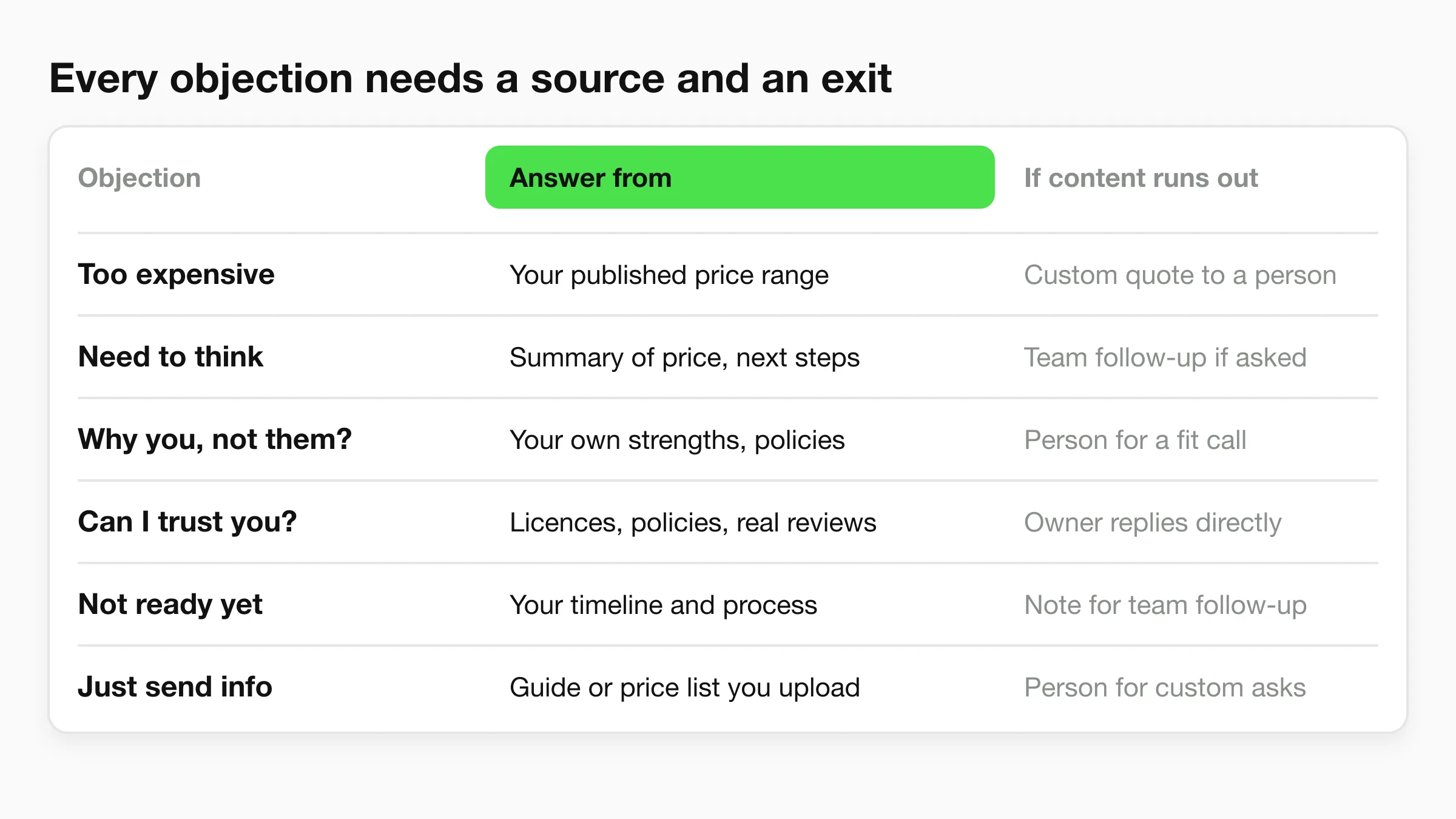
"It costs too much." Give the price range or pricing model you publish, then explain what is included. Offer a lower-cost option if you have one. Do not discount in chat. Example: "Our [service] starts from $[amount] and includes [inclusions]. We also offer [smaller option] from $[amount]. Would a quote for either help?"
"I need to think about it." Do not push. Ask what would help the decision and offer to send a summary. "Of course. Would it help if I summarised the price range and next steps here, so you can come back to it?"
"How are you different from [competitor]?" Describe your own strengths from your content and avoid statements about the competitor. "I can only speak to us. We [specific difference from your content]. If you tell me what matters most to you, I can say whether we are a good fit."
"Can I trust you?" Point to facts: years in business, licences or registrations you hold, policies, and customer reviews you are allowed to cite. Do not invent reviews or numbers.
"I'm not ready yet." Ask when they expect to be ready and offer to continue then. "No problem. When are you hoping to start? I can note that for our team."
"Just send me information." Share it, but pair it with a question. "Happy to. I'll share our [guide or price list] here. What's the one question you most want answered, so I can point you to the right part?"
Three rules keep this safe. The chatbot answers only what your content supports. When it does not know, it says so and offers a person. Negotiations, complaints and personal circumstances go to a human.
What You Should Not Automate
Hand these to a person, and design the chatbot to recognise them: negotiated pricing and discounts, custom quotes for unusual jobs, complaints and refund requests, medical, legal or financial advice, anything urgent or safety-related, and any conversation where the visitor asks for a human.
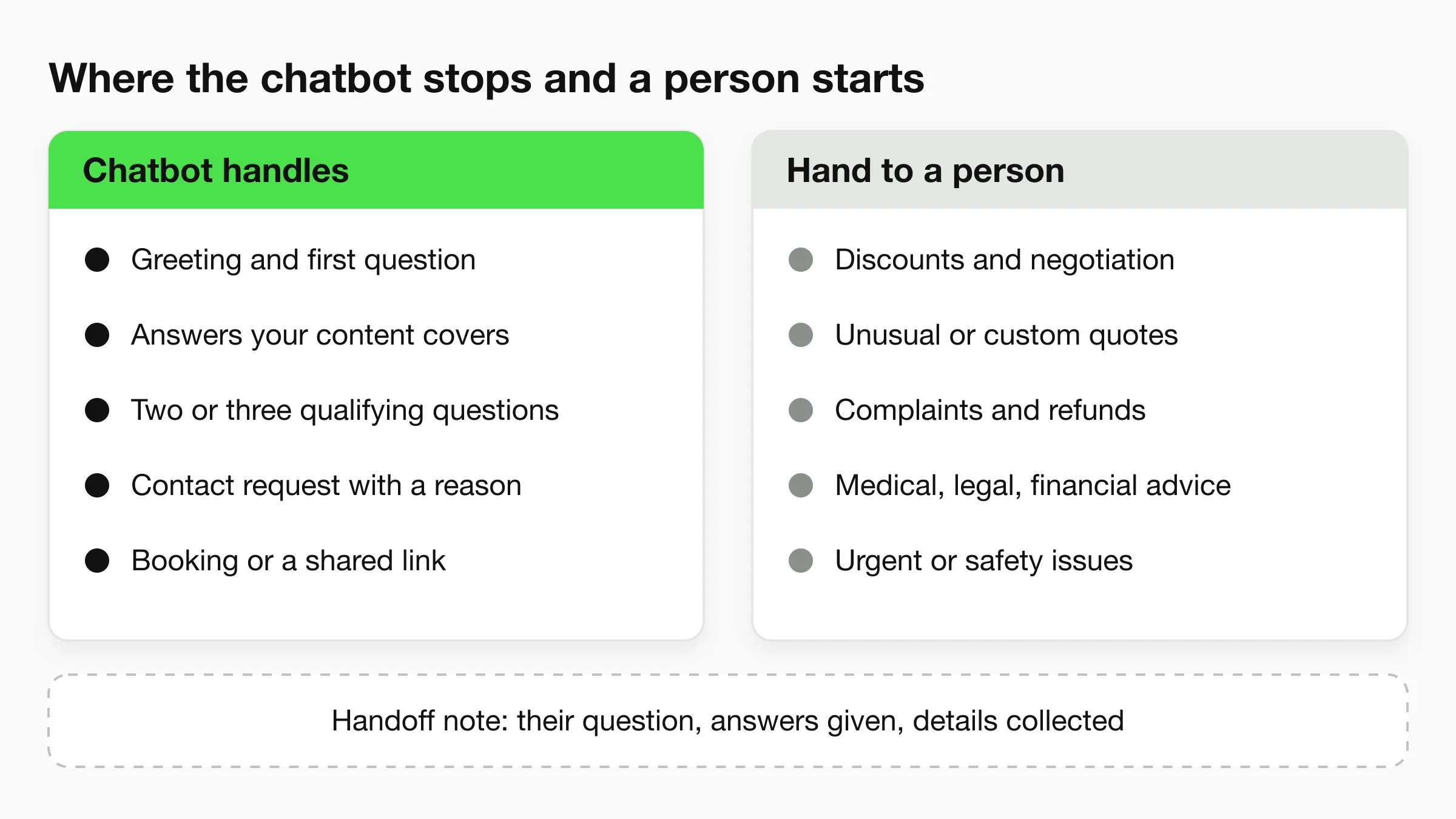
At the boundary, the chatbot's job is a clean handoff: the visitor's question in their own words, what has been answered, what was collected and when they wrote in. Without that, the visitor repeats themselves, which is what a chatbot should prevent.
Do not push the chatbot past what your content supports. If your pricing depends on a site visit, say so. A chatbot that sounds certain about something it cannot know costs more trust than one that says "I'll check with the team."
How to Measure a Sales Chatbot
Measure a sales chatbot on conversations that reached a useful next step, not on messages sent. Five measures cover most small businesses, and you can track all of them in a spreadsheet to start.
- Conversation-to-contact rate: of the people who started a chat, how many shared contact details.
- Contact-to-next-step rate: of those, how many booked or had a staff follow-up.
- Handoff rate and reasons: how often a person took over and why. A rising "pricing" reason means your content is missing something.
- Unanswered questions: questions the chatbot could not answer from your content. Each one is a gap to fill.
- Time to first human reply: after a handoff, how long the visitor waited.
Review ten real conversations a week for the first month. Where did the visitor stop replying? That message is the one to rewrite. Set targets from your own baseline, since no industry benchmark fits every business.
Building This Flow on Hyperleap AI
Hyperleap AI is an AI front desk for small businesses. You paste your website URL, it drafts an agent from your content, and the same agent works on your website, WhatsApp, Instagram DM and Facebook Messenger. You can go live in under 5 minutes, then spend their time tuning answers using the scripts above. Once you have drafted your flow, the product page for this use case covers the details.
For the flow in this guide, the relevant parts are:
- Knowledge base: the agent answers from the documents and pages you add, which is what makes the objection answers above safe to use.
- Qualifying questions and summaries: you write the questions in the agent's instructions, and each conversation produces a lead record you can read in the unified inbox or download as CSV or Excel.
- Booking: on Pro and Max, the agent books through Calendly or Cal.com inside the chat (in-chat booking needs Calendly Standard or higher). On Plus, it shares your booking link instead.
- Human handoff: on Pro and Max, visitors can ask for a person, your team is alerted in Studio and a teammate can take over the live conversation.
Plans run from $40/mo (Plus) to $200/mo (Max), with a 7-day free trial and a card required. See pricing for details, or read about the AI front desk and the chatbot lead generation page for the broader picture.
Frequently Asked Questions
What is a sales chatbot?
A sales chatbot is a chat agent that talks to prospects on your website or messaging channels. It answers questions from your content, asks qualifying questions, collects contact details and books or routes the prospect to your team. It supports your sales process rather than replacing the people in it.
How is a sales chatbot different from a lead generation chatbot?
A lead generation chatbot is measured by the contacts it collects. A sales chatbot is measured by whether the right prospects reach a booking or a conversation, with their questions already answered. The two overlap, and the flow in this guide covers both.
What should a sales chatbot script include?
A good script has a greeting that says what the chatbot can do, one or two questions about the need, objection answers from your content, two or three qualifying questions, a stated reason for asking contact details and one clear next step, in six to ten messages.
Can a sales chatbot book appointments?
Yes, if it connects to your calendar. On Hyperleap AI, native in-chat booking works with Calendly and Cal.com on the Pro and Max plans. On Plus, the agent shares your booking link. Other scheduling tools work through link sharing only.
Will a sales chatbot replace my sales team?
No. It covers first response and routine questions so your team spends time on conversations that need judgment: negotiation, custom quotes, complaints and relationship building. Design the handoff so a person can take over at any point.
How do I stop a sales chatbot from making things up?
Give it approved content to answer from, tell it to say when it does not know, and review real conversations weekly. A chatbot grounded in your documents is designed to answer from them, but you should still test it on pricing, policy and edge-case questions before you publish.
Start With One Flow
Pick the enquiry type that costs you the most missed conversations. Write the six stages for it from the example script closest to your business. Load your real prices, policies and FAQs, then test it with ten questions your customers actually ask. After the first week, fix the messages where visitors stopped replying.
A sales chatbot works when it sounds like your best front desk person on a good day: quick, clear about what it knows and quick to bring in a colleague.
Put your sales flow in front of real visitors
Start a 7-day free trial, paste your URL and test the flow on your own site. A card is required; plans from $40/mo.
Start for freeIndustry Solutions
See how AI chatbots work for these industries:
Related Articles
View all
Guide24 min read
Chatbot Lead Summaries: What Your Team Should Receive
A raw transcript creates work. A chatbot lead summary — contact details, intent, qualification signals, timeline, and a next action — means your rep is ready to call in 30 seconds.
Guide20 min read
OTP-Verified Lead Capture for AI Chatbots
OTP-verified lead capture confirms a visitor's phone number inside the chat before the lead enters your queue — here's how it works, what it costs, and which industries need it most.
Guide19 min read
Chatbot Lead Routing: How to Send the Right Inquiry to the Right Team
Chatbot lead routing determines which team, rep, or action receives each qualified conversation. Here's how routing logic works, and how to deliver leads via webhooks.
Guide23 min read
Lead Qualification Chatbot: Questions, Fields, and Handoff Rules
Qualify leads in chat before a rep wastes the first call. The four-question stack, routing rules based on the answers, and handoff logic that works.