Guide
21 Chatbot Examples for Small Business (With Sample Chats)
21 chatbot examples with sample conversations, grouped by job and by industry, plus a fill-in template to write your own.

Gopi Krishna Lakkepuram · Founder & CEO
· 20 min read
TL;DR: A good chatbot example is a short exchange where the bot answers from the business's own information, asks one useful question, says what it cannot do, and ends with a next step. This guide shows 21 sample exchanges: 13 grouped by the job the chatbot does (answer FAQs, qualify leads, book appointments, look up orders and status, hand off to a person, speak other languages, cover after-hours) and 8 grouped by industry (dental, home services, real estate, hotels, salons, e-commerce, law, education). It ends with a template you can fill in to write your own.
Every exchange here is illustrative
We wrote these conversations to show a pattern. They are not transcripts from named customers and they carry no performance numbers. For examples from live deployments and large public rollouts, read 12 conversational AI examples from real businesses. That post covers conversational AI broadly. This one is about the chat exchanges themselves: what the bot says, in what order, and why.
Most chatbot examples pages show a screenshot and say "great experience." That does not help you build one. What helps is the exchange itself, so each example below is a short chat followed by what makes it work.
Chatbot Examples by Job
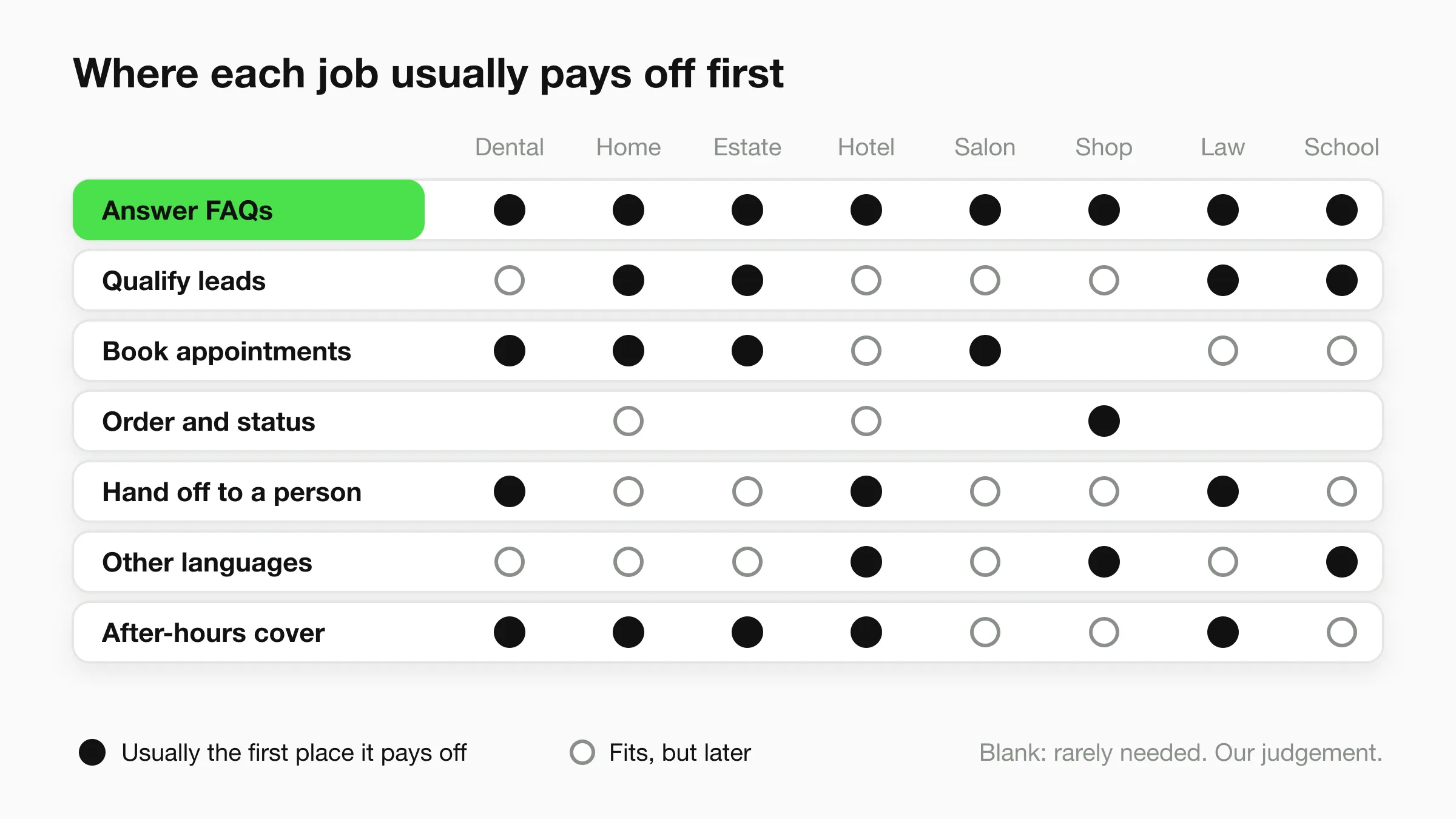
The same seven jobs show up in almost every business. A clinic and a plumber use different words, but both need a bot that answers questions, collects the right details, books a time or passes the lead along, and admits what it cannot do. The matrix shows where each job usually pays off first. It is our judgement, not measured data.
Job 1: Answer FAQs
The most common chatbot job is answering the questions your team has answered a hundred times. Hours, prices, parking, policies, what is included. The bot reads your website and documents and replies from them.
Example 1: Opening hours and parking (fitness studio)
Customer: Are you open Sunday? And is there parking?
Chatbot: Yes, we're open Sundays from 8am to 2pm. There's free parking behind the building, and the entrance is on the side street. Are you thinking of a class or a tour?
What makes it good: It answers both questions in the order asked, in two sentences. The closing question moves the visitor toward a booking instead of ending the chat.
Example 2: Returns policy (online shop)
Customer: Can I send back a jacket I wore once?
Chatbot: Our policy covers unworn items with tags attached, within 30 days of delivery. A jacket that's been worn isn't covered, but if it arrived damaged or the wrong size, tell me what happened and I'll pass it to the team.
Customer: It arrived with a torn seam.
Chatbot: Sorry about that. I've noted a damaged item. Can you share your order number and a photo? The team will reply by email.
What makes it good: It quotes the policy as written and separates the case it does not cover from the one it does. It promises no refund it cannot give.
Job 2: Qualify leads
Qualifying means asking the two or three questions your team always asks before quoting, so the lead arrives with context. This is a short conversation, not a form.
Example 3: Roof replacement enquiry (roofing company)
Customer: Need a quote for a new roof.
Chatbot: Happy to help set that up. Is it a house or a commercial building, and roughly how old is the current roof?
Customer: House, about 20 years old.
Chatbot: Thanks. Are you seeing leaks now, or planning ahead? And what's the best email for the estimate?
What makes it good: Every question changes how the team will quote. It asks one thing per message, and it asks for the email last, once the visitor has already invested a few seconds.
Example 4: New project brief (marketing agency)
Customer: We want help with our website.
Chatbot: Glad you reached out. Is this a new site or a redesign of an existing one, and do you have a launch date in mind?
Customer: Redesign, ideally by spring.
Chatbot: Got it. Our team usually asks about budget range early so they can propose the right scope. Do you have a range in mind, or would you rather discuss it on a call?
What makes it good: It explains why it is asking about budget, and it gives the visitor a way out.
Job 3: Book appointments
Booking turns a chat into a calendar entry. On Hyperleap, native in-chat booking works with Calendly and Cal.com on Pro and Max (Calendly needs the Standard plan or higher for in-chat booking). On Plus, the agent shares your booking link instead. Both flows are below.
Example 5: In-chat booking (hair salon, Pro or Max)
Customer: Can I get a cut this Thursday?
Chatbot: Thursday has openings at 11:00, 14:30 and 16:00. Which suits you?
Customer: 14:30.
Chatbot: Booked for Thursday at 14:30. A calendar invite is on its way to your email. If you need to change it, use the link in that email.
What makes it good: It offers real open times instead of "when works for you?", which saves three rounds of back and forth. It also tells the customer where to go to reschedule, because the bot creates bookings but does not cancel or move them.
Example 6: Link sharing (dental clinic, Plus plan)
Customer: I'd like to book a cleaning.
Chatbot: Of course. You can pick a time that suits you here: [booking link]. Are you a new patient, or have you visited us before?
Customer: New patient.
Chatbot: Welcome. Please choose the "New patient cleaning" option so we set aside enough time. Anything else I can help with?
What makes it good: Without native booking, the bot still removes friction. It sends the link, tells the visitor which option to choose, and learns whether the patient is new, which the front desk needs anyway.
Job 4: Look up orders and status
Customers ask "where is my order?" and "is my repair done?" more than almost anything else. A bot can answer by calling your own system. On Hyperleap this is Actions, available on Pro and Max: the agent calls your HTTPS API during the chat, with up to 10 actions per chatbot. It connects to your API. It is not a built-in integration with any particular order system.
Example 7: Order status (e-commerce store with an order API)
Customer: Where's my order? It's #48213.
Chatbot: Order #48213 shipped on Monday and is with the carrier. The tracking link is in your confirmation email, and I can resend it if you can't find it. Anything else on this order?
What makes it good: The answer comes from live data, not from a guess. It gives the one fact the customer wanted, status, and the next useful thing, the tracking link.
Example 8: Repair job status (appliance repair shop)
Customer: Has my washing machine been repaired yet? Name's Okafor.
Chatbot: I'm showing the repair for Okafor as waiting on a part, with the part expected Wednesday. I can't promise the date, but the technician will call once it arrives. Want me to ask the team to confirm the timing?
What makes it good: It reports what the system says and no more. It will not promise a date that only the technician controls, and it offers a human check instead.
Job 5: Hand off to a person
A good chatbot knows when to stop. On Pro and Max, visitors can ask for a person, your team is alerted in Studio, and any teammate can take over the live conversation and hand it back. For more on designing this, read chatbot human handoff best practices.
Example 9: Complaint (restaurant)
Customer: My order last night was wrong and nobody answered the phone.
Chatbot: I'm sorry, that's a poor experience. I'm passing this to a manager now so you don't have to repeat yourself. Can you tell me what was wrong with the order and the name it was under?
What makes it good: It apologises once, says what happens next, and collects the details a manager needs. It does not try to resolve a complaint it has no power to resolve.
Example 10: "Let me talk to someone" (accounting firm)
Customer: Can I speak to a real person?
Chatbot: Yes. I've alerted the team, and someone will pick this up as soon as they're free. While you wait, can you tell me in a sentence what you need help with, so they're ready?
What makes it good: It never argues with the request. It hands over immediately, and the one-sentence summary means the human does not start cold.
Job 6: Speak the customer's language
Hyperleap agents reply in 100+ languages, so a visitor can write in their own and get an answer in it. The knowledge base can stay in one language. This example shows a Spanish exchange.
Example 11: Spanish-language visit (pet grooming)
Cliente: Hola, ¿cuánto cuesta bañar a un perro mediano?
Chatbot: Hola. Un baño para un perro mediano cuesta entre 40 y 55 dólares, según el pelaje. ¿Quiere que le muestre horarios disponibles esta semana?
What makes it good: It replies in the customer's language without asking them to switch. The price comes from the shop's own list, and the follow-up is a concrete offer.
Job 7: Cover after-hours
After-hours is the time when the other six jobs matter most. Nobody is at the desk and the visitor is deciding now. The bot answers what it can, captures the rest, and says when a human follows up.
Example 12: Burst pipe at 11pm (plumber)
Customer: Pipe burst under my kitchen sink. Water everywhere.
Chatbot: First, if you can, turn off the main water valve, usually near the meter or where the supply enters the house. If you feel unsafe, call your local emergency number. I'm sending your details to the on-call plumber now. What's your address and the best number to call?
What makes it good: It gives one piece of general safety guidance, it points to emergency services where the situation calls for it, and it moves straight to capturing the address.
Example 13: Sunday quote request (landscaping)
Customer: Looking for someone to redo my front garden.
Chatbot: Nice project. Our team is out of office until Monday morning and will reply by then. To help them quote, what size is the area, roughly, and do you have a budget range in mind?
What makes it good: It states when a human will respond, so nobody waits in silence.
Chatbot Examples by Industry
Industry changes the boundaries. A dental bot must route emergencies, a law-firm bot must not give advice, and a hotel bot must not pretend it can see live inventory. Each example below shows one industry rule. Our industry templates and the customer service chatbot templates give copy-paste scripts for more of them.
Dental
The rule that matters here is that the bot routes urgent symptoms to your team and does not assess them. See the dental AI front desk.
Example 14: Tooth pain (dental clinic)
Customer: My tooth has been throbbing since yesterday and my face is swollen.
Chatbot: I'm sorry you're in pain. I can't assess symptoms, but swelling with pain is something the team should see quickly. I'm alerting the clinic now. If you have trouble breathing or swallowing, please call your local emergency number. What's the best number to reach you?
What makes it good: It states its limit plainly, routes the case to a human, and names the emergency escape route.
Home services
Owners are often on a roof or under a sink when the enquiry arrives, so the bot scopes the job and the urgency. See the AI front desk for home services.
Example 15: Air conditioner not cooling (HVAC contractor)
Customer: Our AC is running but the house won't cool down.
Chatbot: That's frustrating in this heat. Is the unit running now, and is it a central system or a window or wall unit? Roughly when did it start?
Customer: Central. Started two days ago.
Chatbot: Thanks. I'll pass this to the team as a same-week service request. What's your address and the best number to reach you?
What makes it good: Two scoping questions give the dispatcher the system type and the timeline. The bot books nothing it cannot book and sets the right expectation for urgency.
Real estate
Buyers and renters write to several agents at once, so the bot qualifies and books the viewing. See the AI front desk for real estate.
Example 16: Viewing request (estate agency)
Customer: Is the two-bedroom on Alder Street still available?
Chatbot: I'll check with the agent, because I only share what's in our current listings. If it's still on the market, would you like a viewing? Are you looking to buy or rent, and what's your timeline for moving?
What makes it good: It does not state availability it cannot confirm. It qualifies on intent and timeline, the two answers an agent uses to prioritise follow-up.
Hotels
The bot answers from your property information and never claims to see live rates or rooms. See the AI front desk for hospitality.
Example 17: Early check-in (boutique hotel)
Guest: We land at 9am. Can we check in early?
Chatbot: Standard check-in is from 3pm. Early check-in depends on the day's availability and the team confirms it, so I'll pass your request along. I can also arrange luggage storage so you can explore first. Shall I note your booking name?
What makes it good: It quotes the standard rule, is honest that the exception is a human decision, and offers a useful alternative in the meantime.
Salons and spas
Price questions dominate salon chat. The bot gives a range and the factors behind it.
Example 18: Colour pricing (hair salon)
Customer: How much for balayage?
Chatbot: Balayage starts at $180 and goes up with hair length and how many tones you want. A short consultation lets the stylist give an exact price. Would you like to book one? It's 15 minutes.
What makes it good: It gives a starting price instead of "it depends," says why it varies, and turns the uncertainty into a consultation booking.
E-commerce
Online stores get repeat questions about sizing, shipping and returns. The bot answers from your product pages and policies, and the widget embeds on Shopify and other website platforms. It does not process payments or recover abandoned carts.
Example 19: Sizing question (clothing store)
Customer: I'm 5'10" and usually a medium. Will the Harlow shirt fit?
Chatbot: The Harlow shirt runs true to size according to our size guide, and a medium fits chest sizes 38 to 40 inches. If you like a looser fit, size up. Want me to link the full size chart?
What makes it good: It answers from the size guide and does not guess at fit beyond it. It pairs the answer with a decision rule the customer can use.
Law firms
A law firm's chatbot is an intake assistant. It collects the matter type and contact details and does not give legal advice.
Example 20: Intake (family law practice)
Customer: My spouse and I are separating. What are my rights?
Chatbot: I'm sorry you're going through this. I can't give legal advice, but a lawyer here can talk it through with you. Could I take your name, a phone number or email, and whether children are involved, so the right person reaches out?
What makes it good: It declines the legal question in the first sentence and moves directly to intake. The one question about children tells the firm which attorney to assign.
Education
The bot answers from the course pages and captures interest.
Example 21: Course enrolment (language school)
Customer: Do you have a beginner Italian class in the evenings?
Chatbot: Yes. The beginner Italian course runs Tuesday and Thursday evenings, 6:30 to 8:00pm, and the next cohort starts on the 10th. Would you like the fee and a link to enrol, or would you like to book a short placement chat first?
What makes it good: It answers the question asked, gives the three facts a student needs (days, time, start date), and offers two sensible next steps instead of one.
What Every Good Example Has in Common
Look back across the 21 and four moves repeat. The bot answers first, before it asks anything. It asks one question at a time. It states a boundary when it hits one. And it ends with a next step, whether that is a booking, a link, a handoff or a time when a human will reply.
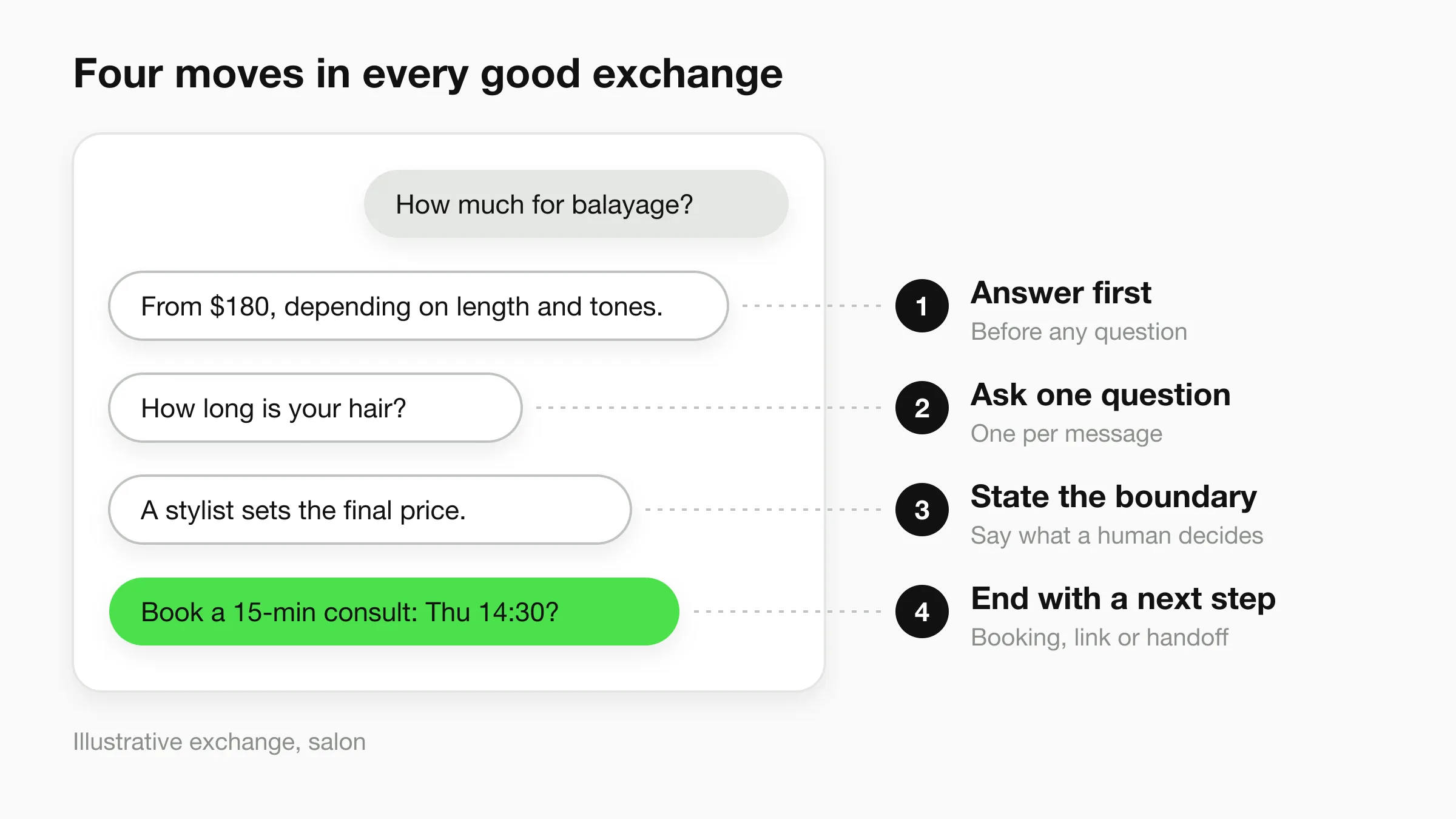
Weak chatbots break one of these four. They ask for an email before answering, ask five questions at once, pretend to know something they do not, or end with "Is there anything else?" and nothing more.
Test with your five most common questions
Before you publish, write down the five questions your team answers most. Ask your chatbot each one, then ask a follow-up. If an answer is wrong or missing, fix the source document first, not the chat script.
How to Build These With Hyperleap
Hyperleap AI is the AI front desk for small businesses. You paste your website URL, Studio reads the site, imports your branding, detects your industry and writes a starting prompt, and you add one script tag to go live in under 5 minutes. Then you tune: attach PDFs and price lists, write guardrails, set the fallback message, and test.
FAQs, languages and the website, WhatsApp, Instagram DM and Messenger channels are on every plan. Native booking, Actions and human handoff are on Pro and Max.
Plans start at $40/month with a 7-day free trial, and card details are required to start. See pricing for what each plan includes, and the appointment scheduling chatbot page for how booking works.
Build one of these in minutes
Paste your website URL and get a working AI front desk you can test before you publish.
Start for freeWrite Your Own Chatbot Example
Writing your own exchange takes about ten minutes per job. Use the card below, fill in one per job, and test each against real customer messages. Keep the exchange under six messages.
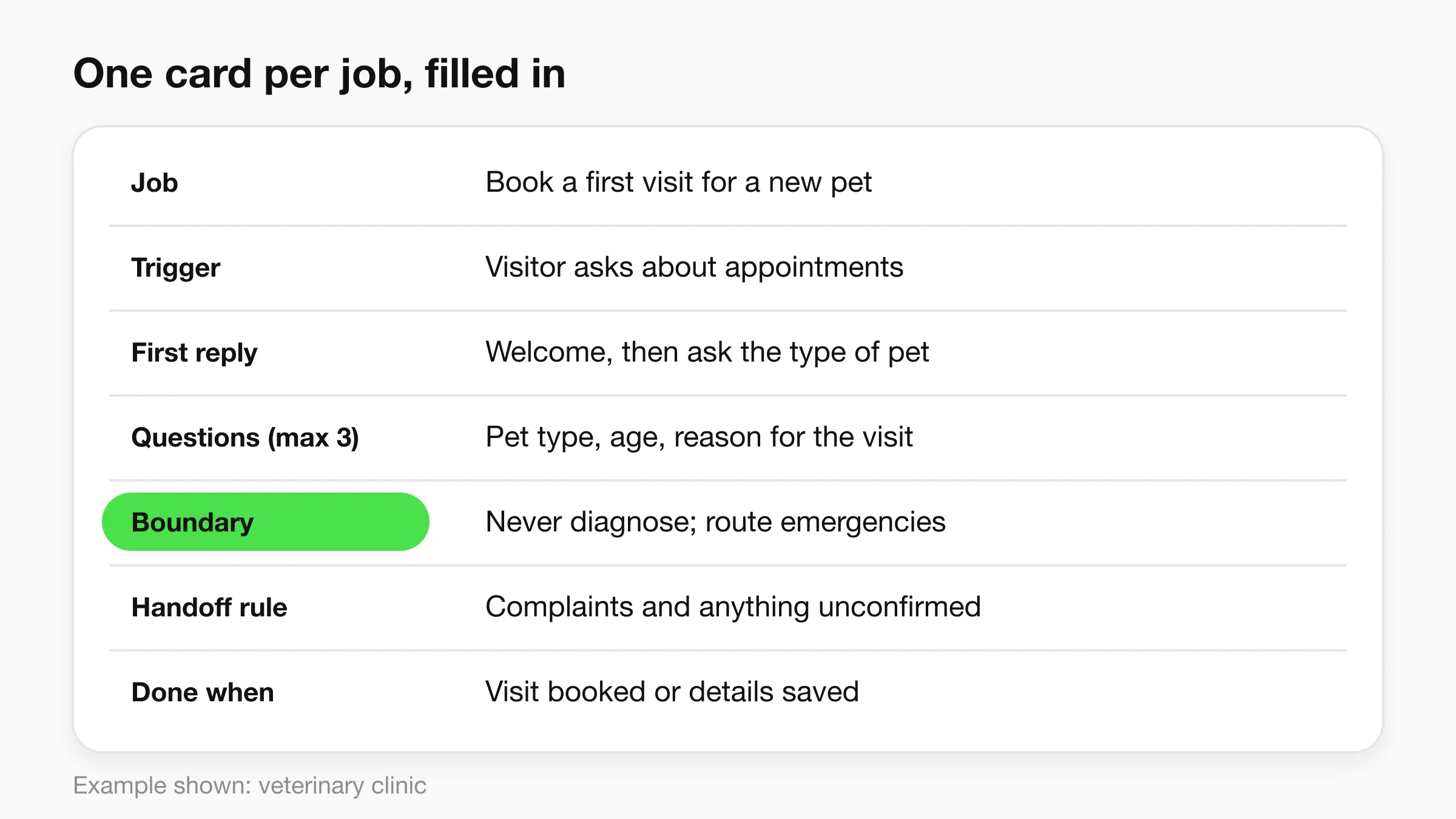
Filled in for a veterinary clinic: the job is booking a first visit for a new pet. The trigger is a question about appointments. The first reply confirms new patients are welcome and asks the type of pet. The bot asks at most three questions (type, age, reason for the visit). The boundary is that it never diagnoses and routes emergencies to the team with the emergency number. It hands off complaints and anything it cannot confirm. It is done when a visit is booked or the details are saved for the team.
For greeting lines, see our chatbot welcome message examples. Use the template for the body of the conversation.
Four mistakes to avoid when you write examples
- Answering with a question. If the customer asks the price, state the price or range first.
- Asking for contact details too early. Give something first. The website chat can collect details with a short form, but it is optional.
- Promising what a human controls. Refunds, exact dates and legal or medical opinions are for your team.
- Skipping the dead end. Decide what the bot says when it does not know. "I'll pass this to the team, can I take your email?" beats a confident wrong answer.
Frequently Asked Questions
What are some good examples of chatbots for business?
Good business chatbots answer FAQs, qualify leads, book appointments, check order or job status, hand off to a person, reply in the customer's language, and cover after-hours. The 21 examples above show each of these with a sample conversation.
What are the most common chatbot use cases?
The most common chatbot use cases are answering repeat questions, capturing and qualifying leads, booking appointments, giving status updates and routing complaints to a human.
Can a chatbot really book appointments?
Yes, when it connects to a scheduling tool. On Hyperleap, the agent reads live availability and books in the chat through Calendly or Cal.com on Pro and Max. In-chat booking needs Calendly Standard or higher. On Plus, or with any other scheduling tool, the agent shares your booking link. It creates new bookings only, so customers cancel or reschedule from their confirmation email.
How many questions should a chatbot ask a lead?
Two or three, one at a time, and each should change what your team does next, such as project type, timeline or location. More than that and visitors leave. If you need more detail, let the chatbot hand the lead to a person who can ask it.
What should a chatbot never do?
A chatbot should not give medical or legal advice, promise refunds or dates it cannot control, or claim to see data it is not connected to. It should say so plainly and route the case to your team. Hyperleap does not process payments in chat or recover abandoned carts.
Can I use these chatbot examples as scripts?
Yes, as patterns. Replace the details with your own prices, hours and policies and keep the structure: answer first, one question, a boundary, a next step. A chatbot built on your documents phrases answers differently each time, so test the answers rather than the exact words.
Start With One Job
The best chatbot example is the one that fits a job you already do by hand. Pick the question your team answers most, write the exchange with the template above, test it against real messages, and add the next job once it works.
Put your first chatbot example live
Start with your top five questions. Paste your site, test the answers, and publish when they read right.
Start for freeIndustry Solutions
See how AI chatbots work for these industries:
Related Articles
View all
Guide26 min read
Conversational AI for Small Business: A Starter Guide
A practical guide to conversational AI for small business: what to build first, a 5-step setup, real costs, and the 3 use cases that pay for it first.
Guide19 min read
12 Conversational AI Examples From Real Businesses
12 real conversational AI examples organized by job-to-be-done — after-hours capture, FAQ deflection, booking, and more — with sourced outcomes.
Guide18 min read
Conversational AI vs Chatbot: The Real Difference
Conversational AI vs chatbot explained: rule-based scripted bots versus LLM-powered conversational AI, plus a comparison table and decision framework.
Guide19 min read
What Is Conversational AI? A Plain-English Guide
Conversational AI explained in plain English: how NLU, LLMs, and RAG work, how it differs from chatbots, and where businesses use it today.