Guide
Website Redesign? Audit Your AI Front Desk Sources
Audit old and new website sources, service claims and booking links so your AI front desk keeps giving useful answers after a redesign.

Gopi Krishna Lakkepuram · Founder & CEO
· 18 min read
Your redesigned website is live. The navigation is cleaner, service pages have new names and the booking route finally makes sense. Then the AI front desk sends a customer to an old page or describes the package you removed. The website launch was successful, but the answering sources did not receive the same review.
A chatbot website redesign checklist should treat the visible site and the AI source set as related but separate release surfaces. Check which old pages were attached or imported, what claims changed, which links remain valid and whether the resulting answers still reflect the business. A new design does not prove that every source behind the chat is current.
This guide provides an old-to-new source ledger and a practical regression review. It is not another embed tutorial or a promise of automatic synchronization. The examples are illustrative and focus on the content responsibilities that a business owner, website editor and front-desk maintainer can review together.
What Changes When a Website Is Redesigned
A redesign may change presentation, navigation, URLs, service terminology or actual business offers. These are different kinds of change, and the source audit should distinguish them. A visual refresh may leave the meaning intact; a new package description may require new answer boundaries even if the URL stays the same.
The AI front desk's source set may include more than current website pages. Uploaded guides, brochures and earlier imports can repeat information that the new site removed. Check the configured answering material instead of assuming the public website is the only source.
| Change type | Audit question |
|---|---|
| Visual layout | Can the customer still find the relevant destination? |
| New URL | Does the front desk share the correct current link? |
| Renamed service | Does the answer connect old customer wording to the current service? |
| Changed offer | Were scope, price explanations and conditions updated? |
| Retired page | Is its information still approved anywhere? |
| New booking route | Does the reply explain the actual next step? |
The website embed guide covers putting the widget on a site. This audit asks a different question: once the site changes, does the front desk still say the right thing and send customers to the right place?
The knowledge-base guide provides the source-structure foundation. A redesign audit builds on it by tracking relationships between old and new material. It should leave a clear decision for each important source: keep, replace, remove from the answering set or investigate.
An AI front desk can be quick to launch, but a quick setup does not settle the ongoing editorial responsibility. Treat source review as part of the website change itself rather than a separate task someone might remember after customers report a problem.
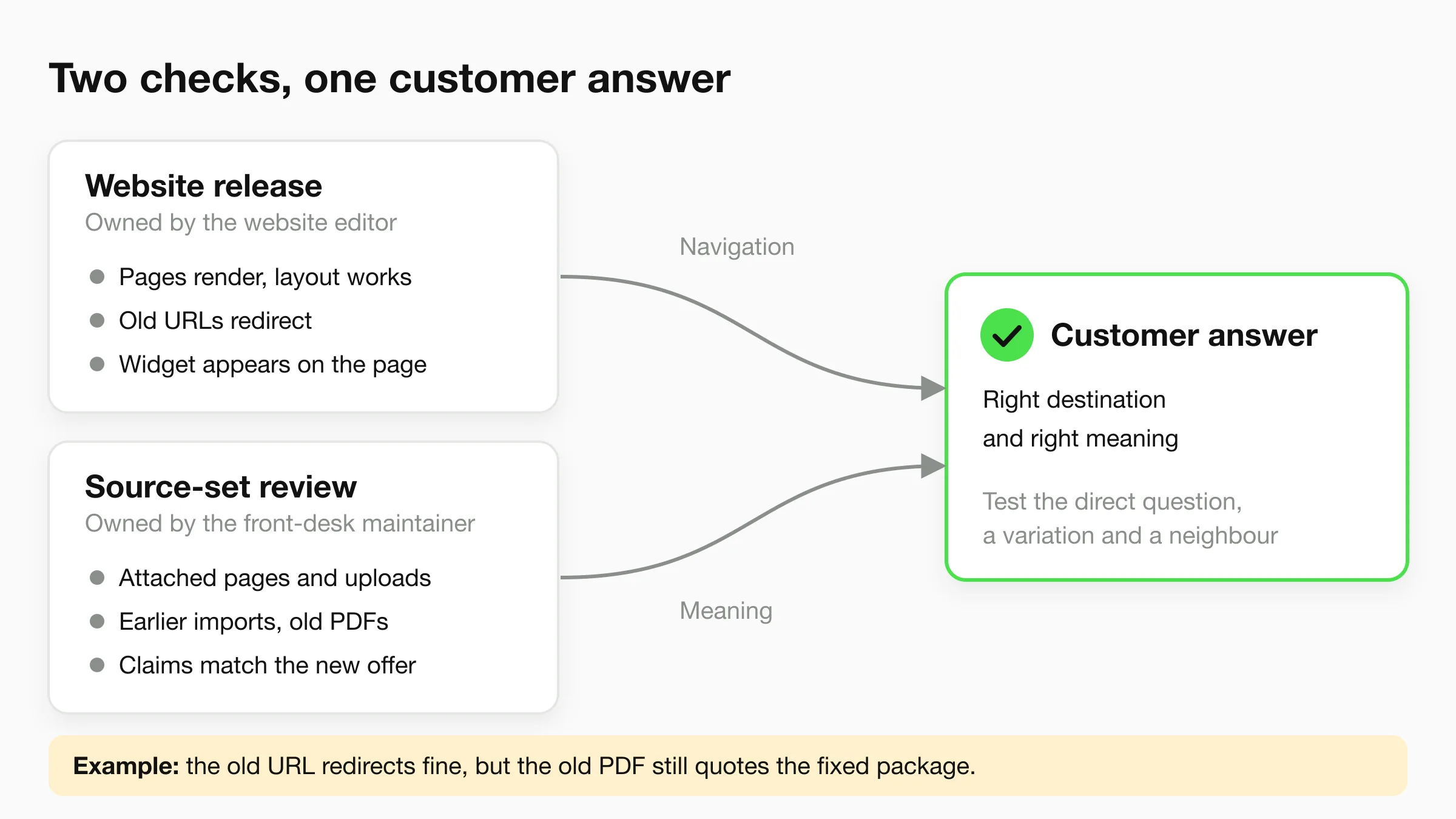
A working redirect is not a complete content audit
An old link may open a new page while the chat still describes the retired offer. Check the destination and the meaning of the answer separately. Successful navigation does not prove current policy.
Why the Front Desk Can Drift After a Successful Launch
The project tracks pages, not customer claims
A launch checklist may confirm that every page renders while overlooking repeated service facts. If a package changes, the same claim may appear in a brochure and a conversation instruction. Track the claim across its sources instead of checking the new page alone.
The old source remains attached
A replaced public page does not necessarily remove an earlier attached document or imported copy. The maintainer needs to inspect the actual source set. Do not infer synchronization from the fact that the new site looks correct in a browser.
New labels break familiar customer wording
Customers may keep using the old service name after the redesign. The front desk should connect that language to the current approved explanation when appropriate, without reviving a retired offer. A naming change needs a meaning decision, not just a replacement string.
The booking destination changes its function
The old page may have confirmed appointments while the new one collects requests for review, or vice versa. The acknowledgement must match the actual process. A link can be technically correct while the sentence describing it is wrong.
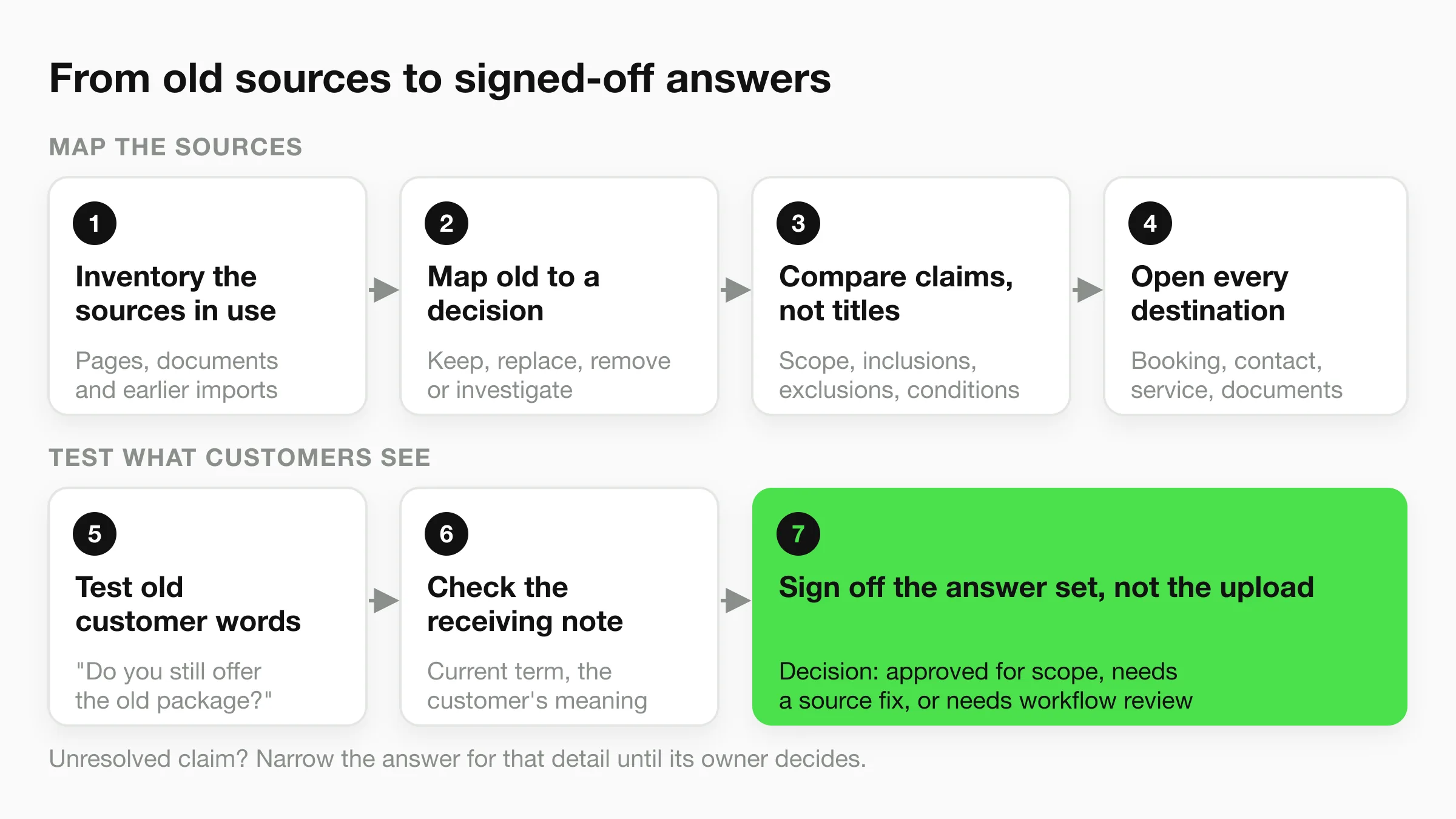
7 Checks for the Website-to-Front-Desk Release
1. Inventory the sources the front desk actually uses
List attached pages, uploaded documents and other approved material in the current configuration. Do not begin with a complete archive of the company's website history. Focus on the sources that can influence customer answers and the destinations the front desk can share.
Record a human-readable title, source location, owner and purpose. “Website” is too broad when the source set includes several service pages and a policy guide. A reviewer should be able to identify the material without guessing which import or attachment the note means.
| Source record | Example of useful detail |
|---|---|
| Title | Current service overview |
| Purpose | Explain which requests the business accepts |
| Owner | Operations or service owner |
| Current location | Approved page or document reference |
| Redesign impact | Renamed, rewritten, moved or unchanged |
Do not place credentials, private preview tokens or customer records in a shared audit document. Use internal references appropriate to your team's access rules.
Ask the person answering enquiries which sources they rely on. They may know that a downloadable guide contains the real operational detail while the website page is only a summary. That distinction matters when deciding what the AI should use after the redesign.
2. Map old material to a current decision
For each important old source, identify its current destination or retirement decision. A page-to-page map is useful, but a source may split into several new pages or disappear because the business no longer offers the service. Record that explicitly.
| Old source | New state | Front-desk action |
|---|---|---|
| Renamed service page | Same scope, new wording | Update source and test old terminology |
| Combined package page | Separate service pages | Clarify which service the customer means |
| Retired promotion | No current equivalent | Remove from answering set |
| Old contact page | New team route | Update destination and response wording |
| Unchanged policy | Same approved meaning | Verify attachment and link still match |
Do not direct every removed source to the homepage and call the audit complete. The customer may need a specific answer or a clear statement that the old offer is no longer current. The appropriate website redirect decision belongs to the website owner; the AI answer still needs its own meaning review.
Where no owner can decide whether an old statement remains valid, mark it unresolved and avoid using it as a current promise. A new design does not authorize the maintainer to invent a replacement policy.
3. Compare claims, not just page titles
Read the old and new service descriptions for changes in scope, inclusions, exclusions and conditions. A familiar page title can conceal a different offer. A renamed page can preserve the same offer. The answer should follow the approved meaning, not the superficial label.
Choose a customer question for each important change. If a package no longer includes an additional item, ask whether that item is included. If the service area changed, ask about a boundary location. If the business moved to quotation-based pricing, test whether an old fixed price still appears.
Write the expected answer in plain language and include the prohibited inference. For example: “Explain that the additional item needs review; do not say it is included in the standard package.” This gives the tester something more concrete than “use the new website.”
For a home-services front desk, this may affect scope and quotation language. For a hotel front desk, it may affect room descriptions, arrival guidance or booking links. Keep the source owner's decision separate from the wording the AI uses to express it.
Do not reproduce outdated claims in a new instruction merely to explain the history. Keep the current source unambiguous and retain historical comparison in the team's audit record, outside the active answering material where appropriate.
4. Inspect every important customer destination
Check the links the front desk shares for booking, contact, service information and documents. Open them in the actual customer journey. A successful response code is useful technical evidence, but a human still needs to confirm that the page has the right purpose.
Ask whether the destination belongs to the correct service and location. Check whether the customer can identify the next step on a phone. Look for an old campaign page that still loads but no longer describes the current offer.
For booking links, distinguish the link from the transaction. When Calendly or Cal.com is connected (on Pro and Max), Hyperleap AI reads live availability and books the appointment in the chat; on Plus, or for any other booking destination, it shares the link, and that alone does not establish availability or a confirmed appointment. If the new page only collects a request, the chat should not describe it as an instant confirmation process.
Illustrative corrected wording: “Use this page to submit a request for the team to review.”
Do not replace that with “your appointment is booked” unless the authoritative process has actually confirmed it. The link and the sentence describing it should be reviewed together.
Record the destination's owner and review trigger. A link map is only useful if someone updates it when the website team changes the route again. The front desk should be included in that change notice, not left to discover the new path through customer complaints.
5. Test old customer language against the new source
Customers may ask for a retired package name, an old department or a familiar page title. Decide how the front desk should respond before treating those questions as irrelevant. The correct answer may explain the current equivalent or ask a clarifying question.
Customer: “Do you still offer the old starter package?”
Front desk: “The current service information uses a different structure. I can explain the approved options, or the team can review whether they match what you need.”
In a real configuration, name the current offer only if the business has approved the relationship. Do not assume a renamed service is equivalent in every respect. A product title is not a guarantee of unchanged scope.
Test ambiguous references such as “the package on your old page” and “the booking link you used to have.” The front desk should not invent a history or claim a retired price remains available. It can identify the current source and route an exception request to a person.
Keep a small list of old terms that still appear in enquiries. Review them for legitimate meaning, not merely as keywords to insert. The aim is to help customers find the current service without reviving inaccurate content in the knowledge base.
6. Review the receiving notes and follow-up route
A redesign may change contact destinations as well as public content. Verify that enquiries reach the appropriate team process and that the summary still contains the context needed for follow-up. Do not assume a visible success message proves the receiving side works.
Use a synthetic enquiry that references a changed service. Inspect the actual receiving record where your workflow allows it. The note should identify the current request and preserve any unresolved question about the old offer.
The lead-summary guide provides a useful structure. In this audit, add one specific check: does the summary use the current service terminology without losing the customer's original meaning? A note that silently changes an old package request into a new one may conceal an important difference.
Do not claim a delivery action occurred unless it was verified. If the front desk only shares a contact route, describe that accurately. If a team process receives the enquiry, confirm it through the actual system rather than trusting the generated acknowledgement.
The human-handoff guide can help define fallback behavior if a new route is not ready. The customer needs an understandable alternative while the team fixes the release issue.
7. Sign off the answer set, not just the source upload
Finish with a review of the important customer questions. A source update is a maintenance action; an answer test checks the behavior customers will see. Keep both pieces of evidence in the release record.
For each changed claim, test the direct question, a natural variation and a neighboring question that should not have changed. This catches an instruction that fixes the new offer but accidentally broadens it to unrelated services.
Record the observed answer, source reference and reviewer decision. “Looks good” is not enough for a future maintainer to understand what was checked. Note remaining issues and the temporary boundary used while they are unresolved.
Choose a clear release decision: approved for the defined scope, needs source correction or needs workflow review. These are suggested team statuses, not a native approval feature claim. If a major policy is unresolved, narrow the answer rather than treating the rest of the successful redesign as permission to guess.
Keep the audit with the website release notes so future editors can see that the front desk is a dependent surface. The next redesign should begin with this map rather than rediscovering which sources mattered after launch.
Keep your front desk aligned with the new website
Use Hyperleap AI with an approved source set, current links and a clear review of the answers customers depend on.
Start for freeThe Old-to-New Source Ledger
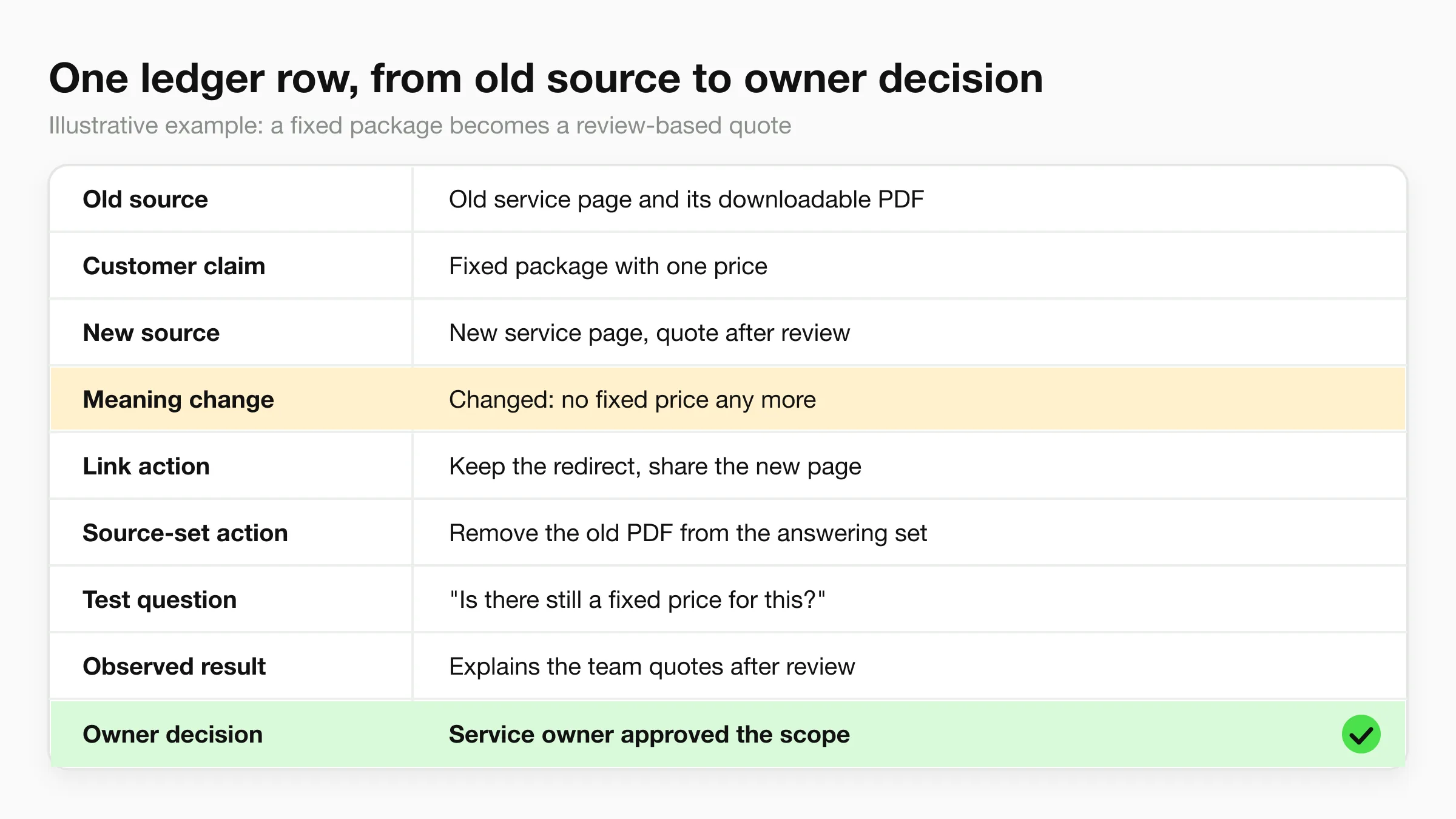
Use this ledger to keep the audit inspectable. It is an editorial working record, not a claim that the product automatically migrates sources or approves website releases.
| Field | What it should show |
|---|---|
| Old source | The page or document previously used |
| Customer claim | What the source helped answer |
| New source | Current approved location or retirement decision |
| Meaning change | Same, narrowed, expanded or unresolved |
| Link action | Replace, keep or route to a different next step |
| Source-set action | What was actually updated or removed |
| Test question | A customer prompt affected by the change |
| Observed result | What the front desk actually replied |
| Owner decision | Who approved the meaning and scope |
Consider a fictional service page that moves from a fixed package to a review-based quotation. The URL may redirect correctly, but the old PDF still contains the fixed offer. The ledger should show both the website destination and the source-set correction. Otherwise the customer can reach the right page while receiving the wrong promise.
Review the release in terms of customer tasks. Can a visitor understand the current offer, find the right booking route and ask about an old name without being misled? Those observations are stronger evidence than simply counting updated URLs.
After launch, monitor the issues your team can actually observe: obsolete links in answers, stale offer descriptions, repeated clarification requests and misdirected handoffs. Do not treat a quiet inbox as proof that every source is correct. Keep a path for staff to report a misleading answer with the relevant conversation reference.
Fit the Audit Into the Website Release
Before launch, ask the website editor for the list of meaningful source changes. Include service owners where the content changed, not just the designer who moved the page. Gather the current source inventory and identify the customer questions most affected.
Prepare the replacements and expected answers. Do not assume that a preview site is appropriate to attach as a permanent source. Keep unpublished or unapproved material out of the live answering set until the business has decided it is ready.
At release, update the actual sources and customer destinations through the approved process. Check that old conflicting copies are no longer active. Run the selected questions against the customer-facing configuration and inspect the relevant handoff route.
Separate any visual or embed checks from content checks. The widget appearing on the redesigned page proves presentation, not source correctness. The implementation checklist can help coordinate those responsibilities without conflating them.
If a source conflict appears, do not automatically restore the previous answer. The old policy may now be invalid. Use a bounded response for the disputed detail while the owner resolves it, and keep unaffected answers available where appropriate.
Hyperleap AI's quick-start path can get a front desk live in under five minutes; a redesign audit is ongoing tuning and maintenance around that setup. Treat it as a focused review of changed facts and destinations, not as an excuse for a long reinvention of the entire front desk.
Close the release with evidence and open items. A future editor should be able to see which sources were changed, what was tested and who owns the remaining question. That is what makes the next maintenance task smaller.
Frequently Asked Questions
Does a website redesign automatically update my AI front desk?
Do not assume it does. Inspect the configured sources and verify the current content they contain. Uploaded documents and earlier imports may still repeat old facts. Test the affected customer questions after updating the sources rather than relying only on the appearance of the new website.
If an old URL redirects correctly, is the answer safe to keep?
Not necessarily. The link may work while the reply still describes an outdated offer or process. Review the destination and the answer's meaning separately. A redirect solves a navigation problem; it does not by itself resolve a source conflict or update a business claim.
Should we delete every old document from the business archive?
No. Archiving is a separate business records decision. The audit concerns which material belongs in the current answering set. Remove or replace stale conflicting sources there while retaining historical records according to your own approved process where needed.
How do we handle customers using an old service name?
Have the business owner decide whether the old name maps to a current service and under what conditions. The front desk can explain the approved relationship or ask a clarifying question. It should not assume that a new name means identical scope, pricing or availability.
Is this the same as checking the widget embed?
No. An embed check establishes whether the interface appears and behaves on the page. A source audit checks what the front desk says and where it sends customers. Both can matter during a redesign, but passing one does not establish the other.
What should we do if the new source is still disputed?
Ask the responsible owner to resolve the meaning. Until then, narrow the answer for that detail and offer the appropriate review route. Do not let the maintainer or AI choose a policy simply because the website launch is otherwise complete.
Launch the New Site and the Right Answers Together
A redesigned website changes more than how the business looks. It can change the information your front desk relies on and the next steps customers are told to take.
Map the old sources, approve the new meaning, check destinations and retest the questions that matter. Keep a separate record of source maintenance and observed answers. Include the receiving team where enquiry routes have changed.
That gives your launch a more useful finish line: customers can see the new website and receive answers that match it, without your staff having to explain why the chat is still describing the old business.
Build a front desk that stays connected to your content
Create a Hyperleap AI front desk and maintain its sources alongside the website your customers use.
Start for freeIndustry Solutions
See how AI chatbots work for these industries:
Related Articles
View all
Guide18 min read
Keep AI Answers Current When Hours and Prices Change
Use a knowledge source checklist to update hours, prices and policies, retire stale copies and retest AI answers before customers rely on them.
Guide16 min read
Multiple Hotels, Different Policies: An Answer Matrix
Keep multi-property hotel answers accurate with a property-specific source matrix, clarification scripts and boundaries around shared brand information.
Guide16 min read
AI Lead Attribution: From Source to Follow-Up
Connect conversation source evidence, shared-link activity and staff follow-up without confusing chatbot attribution with proven revenue.
Guide14 min read
Chatbot Persona: A Worksheet for Tone, Name and Voice
Design a chatbot persona in one worksheet: role, name, tone dials, word lists, 'I don't know' lines, handoff and language rules, with four example cards.