Comparison
Best Customer Communication Tools in 2026
The best customer communication tools for small businesses in 2026, grouped by job: AI front desk, shared inbox, messaging, live chat, help desk, CRM.

Gopi Krishna Lakkepuram · Founder & CEO
· 19 min read
TL;DR: The best customer communication tools in 2026 depend on the job you need done. Hyperleap AI is the pick if you want an AI front desk that answers customers on your website, WhatsApp, Instagram DM and Messenger, from $40/month. Front and Help Scout suit teams that live in a shared email inbox. respond.io and Wati suit WhatsApp-heavy teams. Tidio, Text (formerly LiveChat) and tawk.to cover website live chat. Zendesk and Freshdesk cover full ticketing. HubSpot fits businesses that already run their CRM there.
Pricing as of November 2026
We checked each vendor's public pricing and channel pages in November 2026. Where a vendor's page did not show a clear price, we say "see vendor pricing page" instead of guessing. Plans change often, so confirm before you buy.
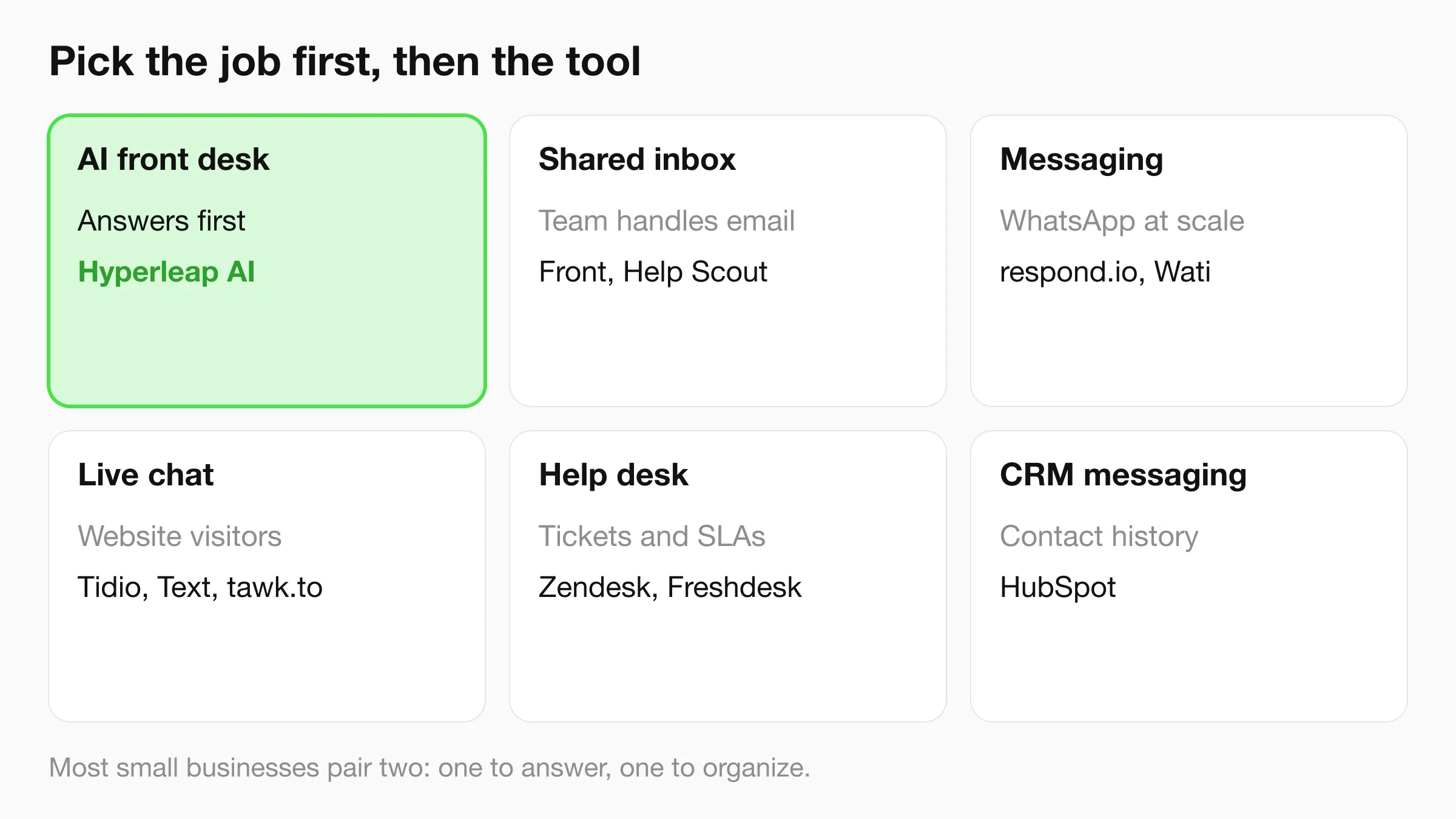
Customer communication software is the set of tools a business uses to talk to customers: answering messages, sharing replies across a team, tracking requests and following up. No single tool does all of it well. Most small businesses end up with one tool that answers first (an AI agent or live chat) and one that organizes the work behind it (an inbox or help desk). This guide groups 11 tools by job so you can pick the right pair.
How we evaluated these customer communication tools
We scored every tool against the same five questions, using what each vendor publishes on its own site.
- Which channels does it cover? Website chat, WhatsApp, Instagram DM, Facebook Messenger, email, SMS, phone.
- Who answers first? A human, a rules-based bot, or an AI agent trained on your content.
- How does a team share the work? Inbox, assignment, notes, handoff.
- What does it cost for a team of three to five? Per-seat and per-resolution pricing both count.
- What does it not do? Every tool has gaps. We list them, including Hyperleap's.
We did not use vendor claims about resolution rates or accuracy, and we do not repeat them here.
Quick picker: which tool fits which job
| If you need... | Start with |
|---|---|
| An AI agent that answers customers on your website, WhatsApp, Instagram DM and Messenger from one knowledge base | Hyperleap AI |
| One inbox where AI replies and your team's replies sit together, with a 7-day free trial | Hyperleap AI |
| A shared email inbox with team collaboration | Front or Help Scout |
| WhatsApp broadcasts and campaigns at team scale | respond.io or Wati |
| Basic website live chat on a tight budget | tawk.to or Tidio |
| Ticketing with SLAs and reporting | Zendesk or Freshdesk |
| Messaging inside the CRM you already use | HubSpot |
If you are not sure which bucket you fall into, start with Hyperleap: it answers the questions that arrive on your messaging channels today, and you can add a help desk later if ticket volume grows.
The 11 best customer communication tools for small businesses
Group 1: AI front desk and agents
1. Hyperleap AI: best AI front desk for small businesses
Best for: small businesses that get the same questions all day on their website and messaging apps and want an AI agent to answer them from their own content.
Hyperleap AI is an AI front desk. You paste your website URL, Studio reads the site, imports your branding and builds a starting agent, and you add documents or edit the instructions afterward. Most teams are live in under 5 minutes. One agent answers on four channels, and every conversation lands in one unified inbox in Studio. See the full picture on the AI front desk page and the customer support chatbot page.
Channels: website chat, WhatsApp, Instagram DM, Facebook Messenger. WhatsApp, Instagram and Messenger run on Meta's official Business APIs, and Hyperleap is a Meta Technology Provider and Business Partner. See all channels.
Pricing (as of November 2026): Plus $40/month, Pro $100/month, Max $200/month, with a 7-day free trial and a card required. Annual billing brings these to $30, $70 and $120 a month. Plans are flat, not per seat. Meta's WhatsApp fees are billed by Meta separately. Full details on the pricing page.
Pros:
- Answers in 100+ languages from your own documents and website.
- One agent across four channels, one inbox.
- Pro and Max add human handoff (a teammate can take over a live chat, including on WhatsApp, Instagram and Messenger and hand it back to the AI), native Calendly and Cal.com booking, webhooks and Actions that call your own APIs.
- Flat pricing with no per-seat charge for your team.
Cons (stated plainly):
- No email channel. Email is on the Roadmap, not shipped.
- No SMS and no voice. Both are on the Roadmap.
- No ticketing. There is no ticket queue, SLA timers or help desk reporting. If you need those, pair Hyperleap with a help desk.
- Human handoff, native booking and webhooks are Pro and Max, not Plus.
- Not a replacement for a full CRM.
Hyperleap also includes an MCP server on every paid plan, so you can ask Claude or ChatGPT about your leads in plain English. It is read-only apart from saving the insights it extracts.
See your own AI front desk in minutes
Paste your website URL, review the agent Studio builds, and test it before it talks to a customer.
Start for freeGroup 2: Shared inbox
2. Front: best shared inbox for team collaboration
Best for: teams that handle customer requests by email, plus chat and messaging, and need assignment, internal comments and routing.
Front turns a shared mailbox into a workspace. Teammates can assign a thread, comment privately and see who is on what. It adds AI as paid features: Copilot at $20 per seat per month on Starter and Professional, and Autopilot starting at $0.39 per conversation.
Channels: email on every plan. Starter covers a single channel type (email, chat or SMS). Professional and Enterprise are omnichannel, including SMS, social and WhatsApp.
Pricing (as of November 2026): Starter $25, Professional $65 and Enterprise $105 per seat per month, billed annually. Starter is capped at 10 seats and Professional at 50. 14-day free trial.
Pros: strong collaboration features and routing; works well when email is the main channel. Cons: per-seat pricing grows with the team; the AI agent is a metered add-on; omnichannel needs Professional or above.
3. Help Scout: best for a simple, human-feeling inbox
Best for: small support teams that want shared email, a knowledge base and live chat without a heavy help desk.
Help Scout is built around conversations that feel like email. It adds a Docs knowledge base, a chat widget and AI assist. Its Envoy add-on resolves questions at $0.75 per resolution. Compare options in our Help Scout alternatives guide.
Channels: email, live chat, SMS, WhatsApp, Instagram and Messenger are listed on the paid plans. Phone is via integration.
Pricing (as of November 2026): Standard $25, Plus $45 and Pro $75 per user per month as listed on the pricing page (see vendor pricing page for which billing period applies). A free plan covers up to 5 users.
Pros: easy to learn; a free tier for very small teams; knowledge base included. Cons: per-user pricing; deeper automation and reporting sit on higher tiers.
Group 3: Messaging platforms
4. respond.io: best for multi-channel messaging teams
Best for: teams running customer conversations and campaigns across many messaging apps, with workflows and routing.
respond.io is a conversation-management platform. It supports a wide set of messaging channels, and AI Agents arrive from the Growth plan. See the respond.io alternatives guide for how it compares.
Channels: WhatsApp, Instagram, Facebook, TikTok, chat and email, calls and more. The pricing page does not map each channel to a plan, so check it before you buy.
Pricing (as of November 2026): Starter from $79/month, Growth from $159/month and Advanced from $279/month when billed yearly, with monthly billing higher. Each plan includes a set number of users and AI credits, and extra users and contacts cost more. 7-day free trial.
Pros: broad channel coverage, workflow automation, team routing. Cons: starting price is higher than flat-priced AI agents; contacts, users and AI credits all meter the bill.
5. Wati: best for WhatsApp-first teams
Best for: businesses whose customer conversation happens mostly on WhatsApp, including template broadcasts and campaigns.
Wati is built around the WhatsApp Business API. Its Growth, Pro and Business plans add an AI agent, automation triggers and a team inbox. Meta's template message charges apply on top of the plan. Compare it in the Wati alternatives guide.
Channels: WhatsApp is the core. The Growth plan also lists Facebook, Instagram, TikTok and webchat.
Pricing (as of November 2026): see vendor pricing page. Wati displays prices in local currency and by billing period, and the page we checked did not show a USD monthly figure.
Pros: deep WhatsApp tooling and campaign features. Cons: WhatsApp-centric; message fees and plan fees are separate things to budget.
Group 4: Live chat
6. Tidio: best for small stores starting with live chat
Best for: small online shops and service sites that want live chat plus a starter AI agent on a free or low-cost plan.
Tidio offers a free plan with 50 billable conversations. Its Lyro AI agent is priced by conversation, with the first 50 free for the account's lifetime. See Tidio alternatives.
Channels: live chat, Messenger, Instagram, WhatsApp and email integrations are listed on every plan.
Pricing (as of November 2026): Free $0, Starter from $24.17/month, Growth from $49.17/month, Plus from $300/month plus usage. Lyro AI standalone starts at $32.50/month for 50 conversations.
Pros: a real free plan; quick setup; ecommerce-friendly. Cons: billable-conversation limits make costs hard to predict as traffic grows; AI conversations are bought separately.
7. Text (formerly LiveChat): best for sales-led website chat
Best for: teams that want a polished chat agent app, proactive chat invitations and reporting.
LiveChat is now sold under the Text brand. Essential and Growth include an AI agent, with Essential limited to 10 AI resolutions a month and Growth to 200. Extra resolutions come in packs of 50 for $49.50.
Channels: website chat and an omnichannel inbox with ticketing. Check the vendor page for messaging-app support.
Pricing (as of November 2026): Essential $19/user/month billed annually ($25 monthly), Growth $79/user/month billed annually ($99 monthly). 14-day free trial.
Pros: mature chat tooling, reporting and workflow automation. Cons: per-agent pricing; the included AI resolutions are small.
8. tawk.to: best free live chat
Best for: very small sites that need a free chat widget and do not mind the "Powered by tawk.to" label.
tawk.to's chat, ticketing and knowledge base are free if you keep the branding. Branding removal is $29/month, AI Assist starts at $29/month, and you can hire human chat agents at $1 per hour. See tawk.to alternatives.
Channels: website chat, ticketing and a hosted knowledge base. Its pricing page does not list WhatsApp or Instagram.
Pricing (as of November 2026): free with branding; add-ons as above.
Pros: $0 entry point; no seat cost. Cons: limited messaging channels; AI is an add-on; support depth varies.
Group 5: Help desk
9. Zendesk: best full help desk for growing teams
Best for: teams with ticket volume, SLAs, multiple agents and reporting needs.
Zendesk bundles email, chat, social and phone into a Suite. Its AI agents bill per automated resolution. See Zendesk alternatives.
Channels: email, messaging and live chat, social channels and telephony. SMS and phone minutes are add-ons.
Pricing (as of November 2026): Suite Team $55/agent/month billed annually ($69 monthly); Suite Professional $115 ($149 monthly). Each plan includes a few automated resolutions per agent, then you pay per resolution. Enterprise is through sales.
Pros: depth, reporting, integrations, scale. Cons: per-agent cost and add-ons add up quickly for a team of three; more setup than a small team may want.
10. Freshdesk: best value ticketing
Best for: small teams that want proper ticketing at a lower per-agent price.
Freshdesk's Growth plan lists a shared inbox, customer portal and AI-powered email service. Freddy AI Agent includes the first 500 sessions, then $49 per 100. Freddy Copilot is $29/agent/month on Pro and Enterprise. See Freshdesk alternatives.
Channels: email is the channel named on the pricing page. Other channels depend on plan and add-ons, so check the page.
Pricing (as of November 2026): Growth $19, Pro $55 and Enterprise $89 per agent per month, billed annually. 14-day free trial.
Pros: lower entry price than most help desks; ticket automation. Cons: pricing page is email-centric; AI sessions are metered; per-agent pricing.
Group 6: All-in-one CRM messaging
11. HubSpot Service Hub: best if your CRM already lives in HubSpot
Best for: businesses that already use HubSpot for sales and marketing and want chat, tickets and email tied to the same contact records.
HubSpot's free tools include live chat and limited bots (with HubSpot branding). Paid Service Hub plans add more, and its Customer Agent runs on HubSpot Credits. WhatsApp integration is listed for Professional and Enterprise. See HubSpot chatbot alternatives.
Channels: live chat, email, Messenger, WhatsApp (Professional and up), calling.
Pricing (as of November 2026): free for up to 2 users; paid plans are per seat, and Professional and Enterprise carry one-time onboarding fees. See vendor pricing page for current per-seat amounts.
Pros: one contact record across marketing, sales and service. Cons: the cost climbs with seats, credits and onboarding fees; best value only if you use the rest of HubSpot.
Summary table
| Tool | Best for | Main channels | Starting price (Nov 2026) | AI agent |
|---|---|---|---|---|
| Hyperleap AI | AI front desk | Website, WhatsApp, Instagram DM, Messenger | $40/mo flat | Core product |
| Front | Shared inbox | Email, plus chat/SMS/social by plan | $25/seat/mo (annual) | Add-on |
| Help Scout | Simple team inbox | Email, chat, social | $25/user/mo | Envoy add-on |
| respond.io | Multi-channel messaging | WhatsApp, Instagram, Facebook, TikTok, more | $79/mo (annual) | From Growth |
| Wati | WhatsApp campaigns | WhatsApp first | See vendor pricing page | Included in plans |
| Tidio | Starter live chat | Chat, Messenger, Instagram, WhatsApp | Free; paid from $24.17/mo | Lyro, per conversation |
| Text (LiveChat) | Sales-led chat | Website chat | $19/user/mo (annual) | Included, capped |
| tawk.to | Free live chat | Website chat | Free | Add-on from $29/mo |
| Zendesk | Full help desk | Email, chat, social, phone | $55/agent/mo (annual) | Per resolution |
| Freshdesk | Value ticketing | Email-centric | $19/agent/mo (annual) | Freddy, per session |
| HubSpot | CRM-based service | Chat, email, WhatsApp (Pro+) | Free tier; see vendor pricing page | Credit-based |
Channel coverage compared
| Tool | Website chat | Instagram DM | Messenger | SMS | Phone | ||
|---|---|---|---|---|---|---|---|
| Hyperleap AI | Yes | Yes | Yes | Yes | Roadmap | Roadmap | Roadmap |
| Front | Yes (single channel type on Starter) | Professional+ | Professional+ (social) | Professional+ (social) | Yes | Yes | Via integration |
| Help Scout | Yes | Listed | Listed | Listed | Yes | Listed | Via integration |
| respond.io | Chat listed | Yes | Yes | Yes (Facebook) | Listed | Not listed | Calls listed |
| Wati | Webchat (Growth) | Yes | Yes | Yes (Facebook) | Not listed | Not listed | Calling listed |
| Tidio | Yes | Yes | Yes | Yes | Yes | Not listed | Not listed |
| Text (LiveChat) | Yes | Not listed | Not listed | Not listed | Ticketing | Not listed | Not listed |
| tawk.to | Yes | Not listed | Not listed | Not listed | Ticketing | Not listed | Not listed |
| Zendesk | Yes | Social and business channels | Social and business channels | Social and business channels | Yes | Add-on | Yes |
| Freshdesk | See vendor pricing page | See vendor pricing page | See vendor pricing page | See vendor pricing page | Yes | See vendor pricing page | See vendor pricing page |
| HubSpot | Yes | Professional+ | See vendor pricing page | Yes | Yes | See vendor pricing page | Calling listed |
"Listed" or "Not listed" refers to what the vendor's public pricing page shows in November 2026, not a statement about every integration or add-on.
For a deeper channel-by-channel view, read the multi-channel chatbot comparison.
Cost for a five-person team
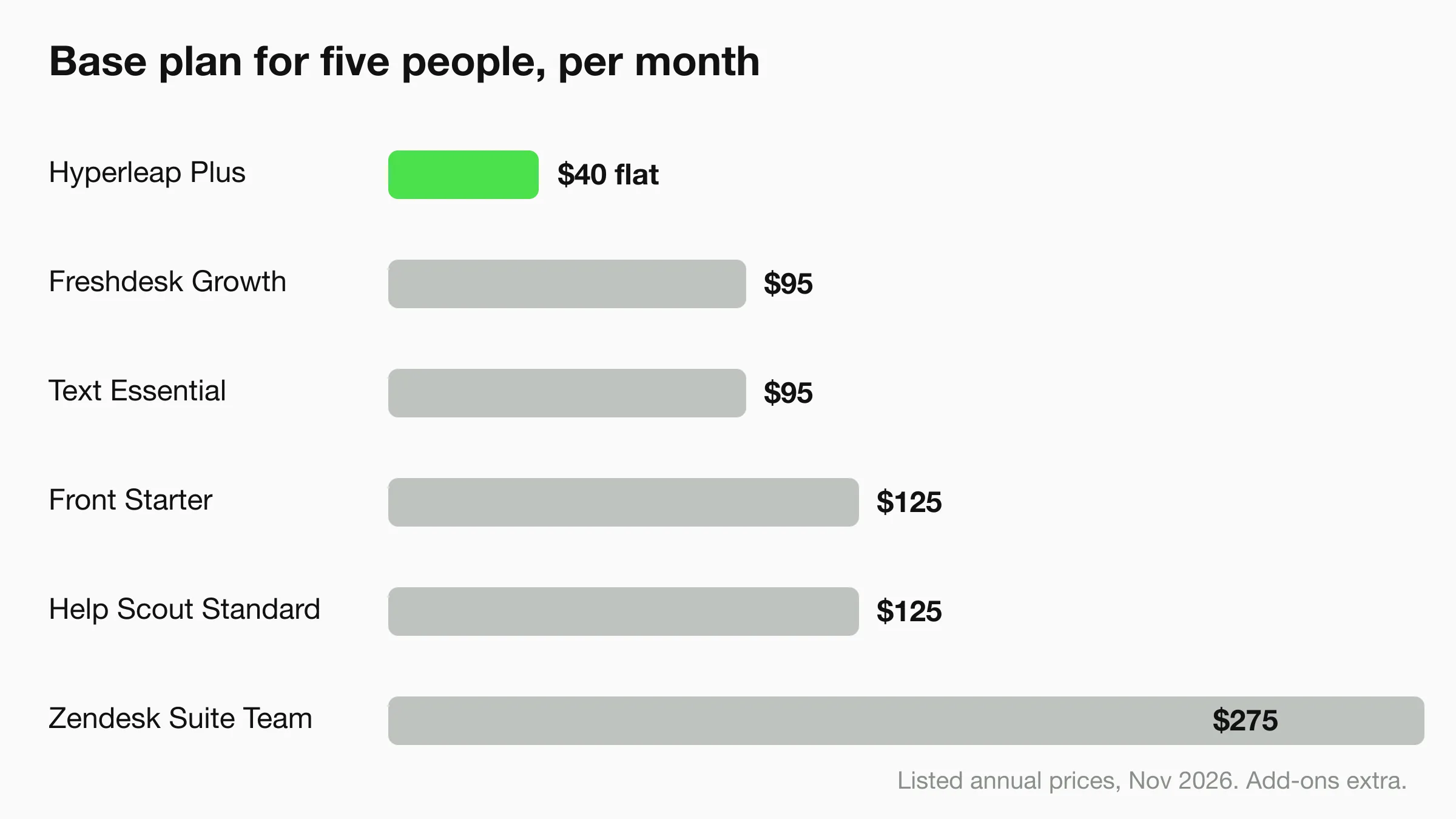
Per-seat tools get expensive as a team grows, while flat-priced AI agents do not. This table uses only listed per-seat prices and shows the arithmetic, not a quote.
| Tool | Listed price | Five seats, per month |
|---|---|---|
| Hyperleap AI | $40/mo flat (Plus) | $40, no per-seat charge |
| Front Starter | $25/seat (annual) | $125 |
| Help Scout Standard | $25/user | $125 (free plan covers 5 users with limits) |
| Text (LiveChat) Essential | $19/user (annual) | $95 |
| Zendesk Suite Team | $55/agent (annual) | $275 |
| Freshdesk Growth | $19/agent (annual) | $95 |
These figures cover the base plan only. AI resolutions, add-ons, WhatsApp fees and onboarding charges come on top for most tools. Hyperleap's WhatsApp usage is billed by Meta separately.
How to choose by business type
- Clinics, salons and service businesses: you need fast answers about hours, prices and booking, often on WhatsApp and Instagram. An AI front desk covers that, and Pro adds native Calendly and Cal.com booking. See the dental agent page.
- Ecommerce stores: start with live chat (Tidio or Text) for the site and add an AI agent for after-hours questions. Heavy order-ticket volume points to Zendesk or Freshdesk.
- Real estate and agencies: enquiries arrive on Instagram and WhatsApp at all hours. An AI agent that captures contact details and hands off to a person fits; see real estate agents.
- Email-heavy B2B teams: Front or Help Scout, because email is the main channel and Hyperleap has no email channel yet.
- Teams with ticket queues and SLAs: Zendesk or Freshdesk, with an AI agent in front if you want fewer repeat questions.
- Already on HubSpot: HubSpot Service Hub keeps contact history in one place.
A common small-business pairing is an AI agent for the first answer plus a shared inbox or help desk for the work that needs a person. Our guides on a unified inbox for AI and human conversations, human handoff best practices and what small-business customers expect from messaging cover the setup. For a wider software roundup, see the best customer service software for small business and our overview of conversational AI for customer service.
A simple test before you buy
Take your last 20 customer messages. Count how many were questions your documents already answer, how many needed a person, and how many needed a ticket. If most were answerable, start with an AI front desk. If most needed a person, start with an inbox. If most needed tracking, start with a help desk.
Frequently asked questions
What are customer communication tools?
Customer communication tools are software for talking with customers across channels: live chat, messaging apps, email and phone. They include AI agents, shared inboxes, live chat widgets, help desks and CRM messaging. Most small businesses combine two of them.
What is the best customer communication tool for a small business?
It depends on the job. For an AI agent that answers on your website, WhatsApp, Instagram DM and Messenger, Hyperleap AI starts at $40/month. For a shared email inbox, Front or Help Scout. For ticketing, Zendesk or Freshdesk. For a free chat widget, tawk.to.
What is the difference between a customer messaging platform and a help desk?
A customer messaging platform handles real-time conversations on chat and messaging apps. A help desk turns requests into tickets with owners, statuses and SLAs. Messaging platforms suit quick questions; help desks suit work that takes several steps or several people.
Can one tool replace live chat, a shared inbox and a help desk?
Rarely. Zendesk and HubSpot come closest but cost more per seat. Hyperleap covers AI conversations and a unified conversation inbox on four channels, but it has no email channel, SMS, voice or ticketing, so some teams pair it with a help desk.
Do these tools cover WhatsApp and Instagram?
Several do. Hyperleap, respond.io, Wati and Tidio list WhatsApp and Instagram, and Help Scout lists both on its paid plans. Front and HubSpot gate WhatsApp to higher plans. tawk.to's pricing page lists website chat only. Customers pay Meta's WhatsApp message fees separately with most tools, so check Meta's current pricing.
How much do customer communication tools cost?
Free options exist (tawk.to, Tidio's free plan, HubSpot's free tools). Flat-priced AI agents start at $40/month with Hyperleap. Per-seat tools range from about $19 to $115 per seat per month on the plans listed above, before AI and channel add-ons.
Is Hyperleap a full replacement for Zendesk?
No. Hyperleap is an AI front desk, not a ticketing system. It has no ticket queue, SLA timers or help desk reporting, and no email channel yet. It fits businesses whose customer questions arrive on web chat and messaging apps and who want an AI to answer first.
Start with the first answer
Set up an AI front desk for your website, WhatsApp, Instagram DM and Messenger. 7-day free trial on every plan.
Start for freeConclusion
Pick by job, then pair tools. An AI front desk answers first, a shared inbox or help desk organizes what needs a person, and a CRM remembers who the customer is. Hyperleap AI is the place to begin if your customers message you on your website, WhatsApp, Instagram or Messenger. Add Front, Help Scout, Zendesk or Freshdesk when email or ticket volume demands it. Compare plans on the pricing page and see how the channels work on the channels page.
Pricing and channel details were checked on each vendor's public site in November 2026 and may have changed since.
Related Articles
View all
Comparison16 min read
Hyperleap AI vs AnyChat (2026): Full Comparison
AnyChat is a support hub with live chat and 50+ channel buttons. But if you need AI that responds, the comparison shifts fast.

Comparison27 min read
Best No-Code Chatbot Builders in 2026
No-code chatbot builders compared: visual builders that train on your FAQ content without heavy coding — features, pricing, and channels for 2026.
Comparison20 min read
Best AI Agents for Small Business in 2026
The best AI agents for small business in 2026, grouped by job: front desk, phone, sales, back office and assistants. Pricing and setup for each.
Comparison17 min read
Hyperleap AI vs JivoChat (2026): Pricing & Comparison
JivoChat puts human agents on chat, calls, and messengers from $28/agent. Hyperleap is an AI front desk that answers first. Pricing and fit compared.