Comparison
Best Help Desk Software for Small Business (2026)
Compare 10 help desk tools for small teams: prices, free plans and fit by team type, plus when an AI front desk should come first.

Gopi Krishna Lakkepuram · Founder & CEO
· 21 min read
TL;DR: The best help desk software for a small business is the one your team will actually keep clean. For most small support teams that means Freshdesk, Help Scout or Zoho Desk. Gmail-based teams should look at Hiver, online stores at Gorgias, IT teams at Jira Service Management, and teams that want one inbox for everything at Front. If most of your tickets are the same ten questions, you may need an AI front desk in front of the help desk before you need a bigger help desk. That is the job Hyperleap AI does. It is not a help desk, and many teams run both.
Last verified: November 2026
Prices below come from each vendor's own pricing page as of November 15, 2026, in USD per agent per month unless noted. Vendors change plans often and some pages do not say whether a figure is annual or monthly, so confirm the price on the vendor's site before you buy.
Quick picker: which help desk fits which team
| If you need… | Look at first |
|---|---|
| A full ticketing system with automations that a small team can run | Freshdesk |
| An email-style shared inbox that does not feel like ticketing | Help Scout |
| A help desk with a free tier for up to 3 agents | Zoho Desk |
| To stay inside Gmail and share a support@ address | Hiver |
| The deepest feature set and room to grow | Zendesk |
| Support tied to a CRM you already use | HubSpot Service Hub |
| Order-aware support for a Shopify, Magento or BigCommerce store | Gorgias |
| Internal IT or employee requests | Jira Service Management |
| Email, chat, social and phone in one tool at a low per-agent price | LiveAgent |
| One inbox for email, chat and team threads | Front |
| Fewer repeat questions reaching any of the above | An AI front desk such as Hyperleap AI, alongside a help desk |
What a help desk does, and what small teams need from one
A help desk turns customer messages into tracked tickets, so nothing gets lost between people. Each message becomes a ticket with an owner, a status and a history. The tool then adds the parts that make a team faster: assignment rules, saved replies, a knowledge base, reports and service-level timers.
A team of two to ten people needs less than the vendor pages suggest. Before you compare features, check these five things.
- Where your customers write. Email only, or also chat, WhatsApp, Instagram and Messenger. Channel support differs more between tools than any other feature.
- Price per agent against your team size. Per-agent pricing multiplies. A $55 plan for six people is $330 a month before add-ons.
- Which plan has the feature you want. Automations, service-level timers and reporting often sit one tier above the entry plan.
- How long setup takes. A tool that needs a consultant is the wrong tool for a four-person team.
- What AI actually does. Most help desks use AI to draft replies for your agents or summarize a thread. That helps your agents. It does not stop the repeat questions from arriving. We come back to this below.
The 10 best help desk tools for small business in 2026
1. Freshdesk: best for a full-featured help desk on a small-team budget
Freshdesk is a complete ticketing system from Freshworks that is priced for teams that do not have an admin. It covers email, a web portal, chat, phone and social, with ticket automations, saved replies and a knowledge base.
Pricing (as of November 2026): Growth is $19, Pro is $55 and Enterprise is $89 per agent per month, billed annually. Freshworks lists a 14-day trial that opens on the Enterprise plan. Its pricing page shows no permanent free plan. Freshdesk used to offer a free plan for 10 agents, and it has been cut back since, so be skeptical of older roundups that still list it.
Best for: Small teams that want ticketing, automation and a knowledge base in one tool, without Zendesk-level cost.
Watch for: The features small teams ask for most, such as automations and service-level timers, sit on Pro, which is nearly three times the entry price. See Freshdesk alternatives if the tiering does not fit.
2. Help Scout: best for a shared inbox that feels like email
Help Scout treats support as a conversation instead of a queue of tickets. Replies look like email threads, teammates leave notes inside the thread, and the interface stays quiet. It also includes a knowledge base called Docs and an embeddable widget.
Pricing (as of November 2026): Standard is listed at $25, Plus at $45 and Pro at $75 per user per month. Its pricing page also lists a free plan with 5 users, 1 inbox and 1 Docs site, and a 15-day trial on Standard and Plus. The page does not say which billing term the prices assume.
Best for: Teams of two to ten that answer mostly by email and want something simple that new hires learn in an hour.
Watch for: Advanced workflows and more than one SLA policy start on Plus. Compare it with other Help Scout alternatives if you need heavier ticketing.
3. Zoho Desk: best free tier and best fit for Zoho users
Zoho Desk is a full help desk with a genuine free edition, and it connects tightly to the rest of the Zoho suite. Teams already on Zoho CRM or Zoho Books get customer context inside the ticket.
Pricing (as of November 2026): The free edition includes three user licenses, and paid plans run through Express, Standard, Professional and Enterprise tiers. Zoho lists a 15-day trial that drops you to the free edition when it ends. Zoho's pricing page shows prices in your local currency, so check the USD figure for your region.
Best for: Very small teams that want a free start, and any business already using Zoho.
Watch for: The free edition has limited capabilities, and the product has a lot of settings for a team of three. More options in Zoho Desk alternatives.
4. Zendesk: best for teams that expect to grow
Zendesk is the reference point for help desks. It has the widest feature set, the largest marketplace of apps and the most mature reporting. For a small team, the entry plan is a ticketing system with email, web form and chat. Messaging channels and the full agent workspace sit on the Suite plans.
Pricing (as of November 2026): Support Team is $19 per agent per month billed annually or $25 monthly. Suite Team is $55 or $69, and Suite Professional is $115 or $149. Enterprise is quote-only. Zendesk offers a 14-day trial with Suite Professional features and lists no free plan.
Best for: Teams that will outgrow a lightweight tool within a year or two and want to avoid migrating later.
Watch for: The cost and the setup effort are real for a small team, and add-ons raise the bill. Read Zendesk chat alternatives for lighter options.
5. HubSpot Service Hub: best if HubSpot is already your CRM
Service Hub puts tickets, a knowledge base and customer feedback next to the contact records your sales and marketing teams already use. Support sees the full history of each customer.
Pricing (as of November 2026): Free tools are available for up to 2 users. Starter seats are listed in the $7 to $20 per seat per month range depending on billing term, and Professional seats at $90 to $100 per seat with a one-time $1,500 onboarding fee. Enterprise is $150 per seat with a $3,500 onboarding fee.
Best for: Businesses that already run sales and marketing in HubSpot and want support in the same system.
Watch for: The jump from Starter to Professional is steep, and the onboarding fee matters for a small team. Most of the useful ticket automation sits on Professional.
6. Gorgias: best for online stores
Gorgias is built for e-commerce. It pulls order data from your store into the ticket, so an agent can see the order, refund it or edit it without switching tabs. Email, chat, social and SMS tickets land in one view.
Pricing (as of November 2026): Gorgias prices by ticket volume, not by agent. Starter is $10 a month for 50 tickets, Basic is about $50 to $60 for 300 tickets and Pro is about $300 to $360 for 2,000 tickets, with extra tickets billed at roughly $0.36 to $0.40 each. The 7-day trial opens all features. The page shows two sets of figures for the higher plans, so confirm the number before you commit.
Best for: Shopify, Magento and BigCommerce stores with order status, returns and shipping questions.
Watch for: A busy month raises your bill because overage is per ticket. Read Gorgias alternatives for options that price differently, and see AI chatbots for e-commerce for the pre-ticket side.
7. Hiver: best for teams that live in Gmail
Hiver runs inside Gmail. Your team shares support@ or help@ as a shared inbox, assigns emails, adds notes and sees status without leaving the Gmail window. There is almost nothing to learn.
Pricing (as of November 2026): Growth, Pro and Elite are listed at $25, $55 and $85 per user per month on the annual rate, and $35, $65 and $95 monthly. The page lists a 7-day trial with Elite features and no free plan. The page does not label which column is annual, so treat that split as our reading.
Best for: Teams using Google Workspace that answer by email and want ownership and status on every thread.
Watch for: It is built around email and Gmail. If you need chat widgets and a customer portal as the center of the product, look elsewhere.
8. Jira Service Management: best for IT and internal requests
Jira Service Management handles requests, incidents and changes, and it connects to Jira for engineering work. It is the usual choice when the "customers" are employees or when support hands tickets to developers.
Pricing (as of November 2026): Atlassian offers a free plan for up to 3 agents, and the Standard plan costs roughly $20 per agent per month, with the rate changing with the number of agents. Atlassian's pricing calculator gives the exact figure for your team size.
Best for: IT teams, internal service desks and software companies where support escalates to engineering.
Watch for: It is more setup than a customer-support tool needs. For a four-person customer support team, Freshdesk or Help Scout are easier to start with. See IT services agents for how IT firms handle the inbound side.
9. LiveAgent: best for many channels at a low per-agent price
LiveAgent combines email, live chat, social, phone and a knowledge base. It prices low per agent and sells on breadth of channels.
Pricing (as of November 2026): Starter is $15 per agent per month at the regular monthly rate and $11 on promotional annual pricing. Team is $26 to $35 and Business is $44 to $59, depending on billing and promotion. Starter covers up to 5 agents and Team up to 15. There is a 30-day trial and no permanent free plan. A promotional price is shown until November 22, 2026.
Best for: Small teams that want phone, chat and email in one tool and are cost-sensitive.
Watch for: Breadth means the interface has more to learn than Help Scout. Compare LiveAgent alternatives before you decide.
10. Front: best for one inbox across email and team threads
Front is a shared inbox that brings email, chat and messaging into one view and adds internal comments, so the team can discuss a customer message next to the message itself. It suits teams that handle support, account management and sales conversations in the same place.
Pricing (as of November 2026): Starter is $25 per seat per month for up to 10 seats, Professional is $65 for up to 50 seats and Enterprise is $105. Front lists a 14-day trial with Professional features and no free plan.
Best for: Customer-facing teams that blur support, success and sales.
Watch for: It is priced like a collaboration tool, so the cost per seat is higher than entry plans at Freshdesk or Zendesk. Read Front alternatives for a wider set.
Help desk software compared: pricing and free plans
| Tool | Entry price (USD, as of Nov 2026) | Free plan | Trial | Priced by |
|---|---|---|---|---|
| Freshdesk | $19 Growth, annual | No permanent plan listed | 14 days | Agent |
| Help Scout | $25 Standard | Yes, 5 users | 15 days | User |
| Zoho Desk | Local currency on page | Yes, 3 users | 15 days | User |
| Zendesk | $19 annual, $25 monthly | No | 14 days | Agent |
| HubSpot Service Hub | Starter seats $7 to $20 | Free tools, 2 users | See HubSpot | Seat |
| Gorgias | $10 Starter, 50 tickets | No | 7 days | Tickets |
| Hiver | $25 Growth (annual) | No | 7 days | User |
| Jira Service Management | About $20 Standard | Yes, 3 agents | See Atlassian | Agent |
| LiveAgent | $15 regular, $11 promo | No | 30 days | Agent |
| Front | $25 Starter | No | 14 days | Seat |
Free help desk software for small business
Free plans do exist, with small limits. As of November 2026, Zoho Desk (3 users), Help Scout (5 users), HubSpot's free tools (2 users) and Jira Service Management (3 agents) list free tiers on their own pricing pages. A free plan is a good way to run real tickets for a month. Plan for what happens when your team grows past the limit, because the next tier is where automations and reporting usually start.
Help desk features that matter at small-team size
The long feature tables on vendor sites hide the few differences that change your week.
| Feature | Why a small team cares | Where it often sits |
|---|---|---|
| Shared inbox and assignment | Stops two people replying to the same customer | Every plan |
| Saved replies | Cuts typing on repeat answers | Every plan |
| Knowledge base | Gives customers an answer without a ticket | Entry plan or one tier up |
| Automations | Auto-assign, tag and route without manual work | Often the middle tier |
| Service-level timers | Flags tickets that are about to go late | Often the middle tier |
| Reporting | Shows volume, response time and busy hours | Basic on entry, deeper higher up |
| Chat and social channels | Meets customers where they write | Varies widely by tool |
| AI features | Drafts replies or summarizes threads for agents | Usually an add-on or upper tier |
How to choose by team type
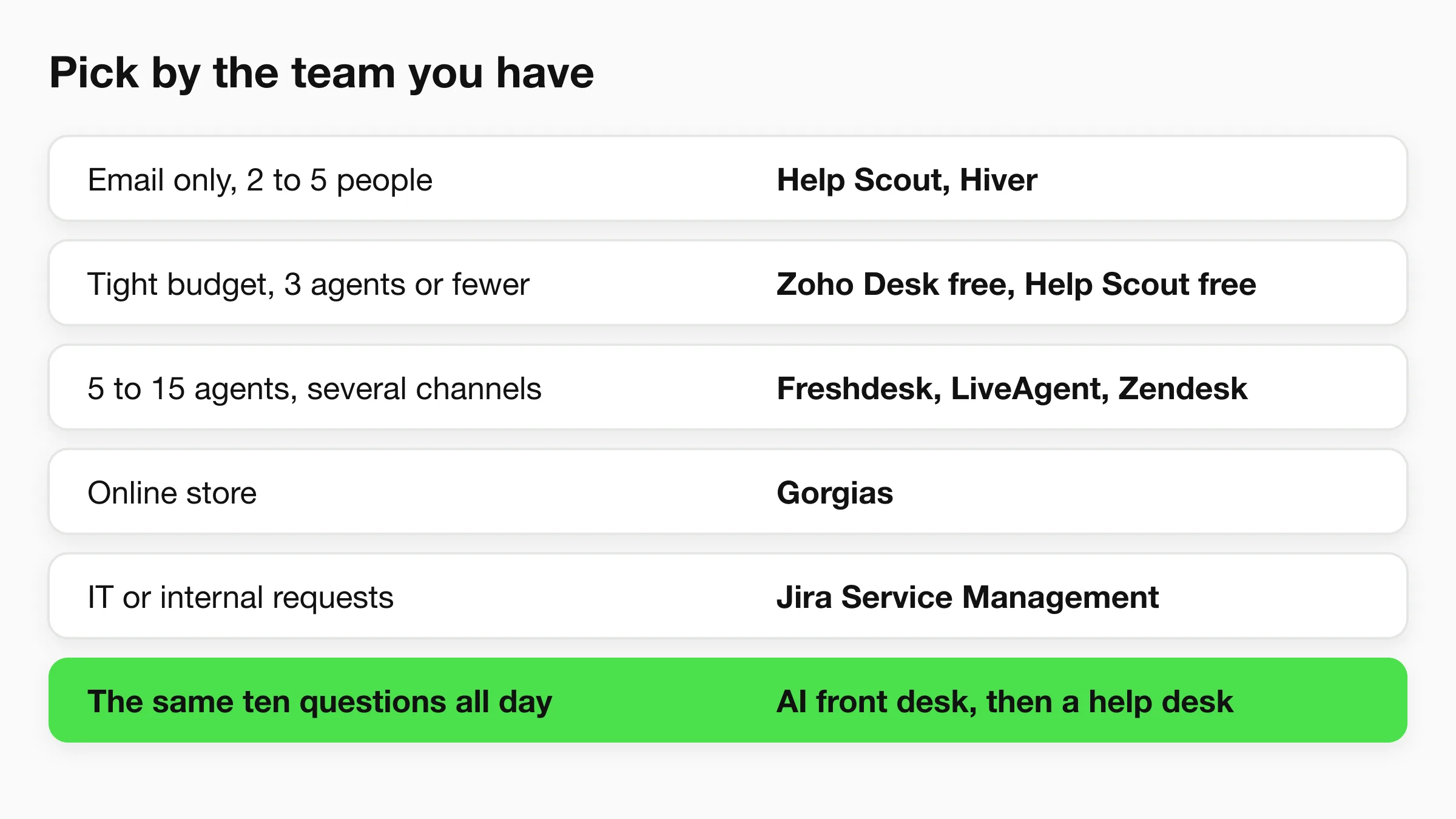
- Two to five people, email only: Help Scout or Hiver. Keep it simple.
- Three agents or fewer and a tight budget: Start on a free tier at Zoho Desk or Help Scout and see what you outgrow.
- Five to fifteen agents, several channels: Freshdesk, LiveAgent or Zendesk.
- Online store: Gorgias, with the store connection doing most of the work.
- Already on HubSpot or Zoho: Use their own help desk first. The shared customer record is worth more than a few missing features.
- IT or internal requests: Jira Service Management.
- Sales, success and support in one team: Front.
- Home services, clinics and salons with a small front office: You may not need a ticketing tool yet. A shared inbox plus a way to answer repeat questions without a person is often enough. See home services agents for the pattern.
For a longer map of the category, see our guide to customer service software and the roundup of AI customer support software.
Do you need a help desk, or an AI front desk first?
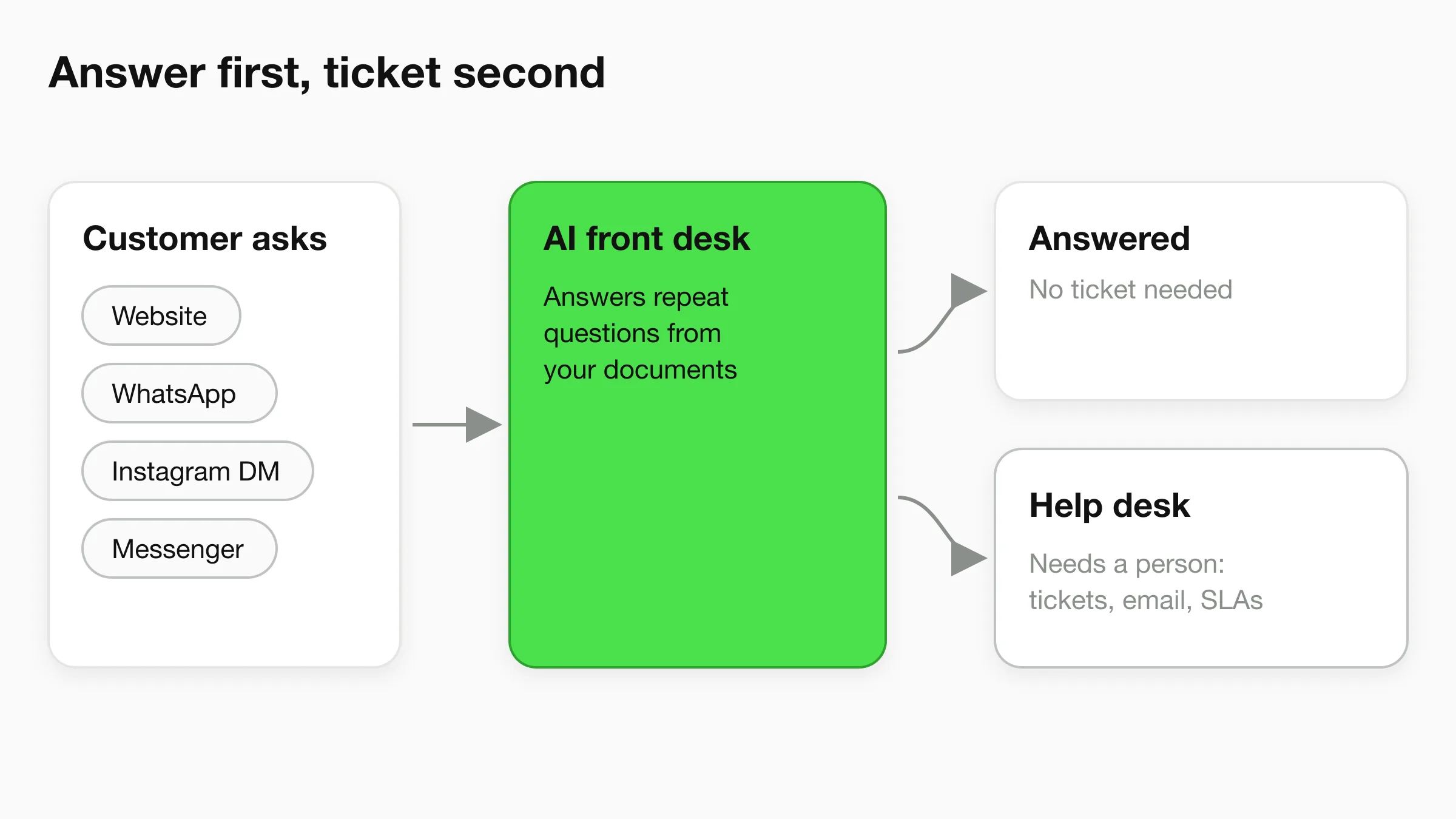
If most of your tickets are the same ten questions, an AI front desk can remove them before they become tickets. A help desk manages the tickets you have. An AI front desk reduces how many arrive. They solve different problems, and many teams run both.
Take a clinic, a hotel or a home-services company. Hours, prices, directions, "do you cover my area", "can I move my booking". These questions arrive on the website, on WhatsApp and in Instagram DMs at all hours. Each one costs an agent a minute or two, and none needs a ticket history. This is what ticket deflection means in practice: the customer gets a correct answer from your own documents, and your team only sees what needs a person.
Where Hyperleap AI fits
Hyperleap AI is an AI front desk for small businesses. It answers customer questions from your own documents on your website, WhatsApp, Instagram DM and Facebook Messenger, in 100+ languages, collects contact details and sends your team a summary. It is a Meta Technology Provider and Business Partner, so WhatsApp, Instagram and Messenger run on Meta's official Business APIs. Read more on the customer support chatbot page, or see conversational AI for customer service.
Hyperleap is not a help desk. Be clear about what it does not do:
- No ticketing. It does not create tracked tickets with owners and statuses.
- No email channel. It does not read or answer your support inbox. Email is on the roadmap, not shipped.
- No SLA timers or shared email inbox. Those stay in your help desk.
Here is how teams pair the two:
- The AI front desk answers the repeat questions on every channel at any hour.
- When a conversation needs a person, human handoff alerts your team in Studio and any teammate can take over the live chat, including on WhatsApp, Instagram and Messenger (Pro and Max).
- Your team gets an email summary of conversations, so the follow-up lands where you already work. Many help desks turn mail sent to a support address into tickets, and you can set that up on your side.
- On Pro and Max, Actions can call your own HTTPS APIs, and webhooks send events such as a captured lead to other tools. Check that your help desk exposes a suitable API before you plan around this. We do not list a native help desk integration.
Pricing is simple. Plus is $40 a month, Pro is $100 and Max is $200, with a 7-day free trial and a card required. One AI reply counts as one response, with no model-credit math. Plus covers 3,000 responses a month, which is a useful size for a small business testing how many of its questions repeat.
A quick test before you buy anything
Export your last 100 tickets and sort them by topic. If a handful of topics make up most of the list, answer those first with a knowledge base or an AI front desk. If the list is varied and each one needs a lookup or a decision, you need a help desk, and the right one from the list above.
See how many of your questions an AI front desk can answer
Paste your website URL, and Hyperleap AI reads it, builds a starting agent and gets you live in under 5 minutes. Try it alongside the help desk you already use.
Start for freeCommon mistakes when picking a help desk
- Buying for the team you hope to have. Choose for the next 12 months, not the next five years. Migrating a small ticket history is easy.
- Ignoring per-agent cost at your team size. The headline price is one seat. Multiply it.
- Paying for channels you do not use. If 90 percent of your tickets are email, an email-first tool costs less.
- Assuming AI means fewer tickets. AI that drafts replies speeds up the agent. It does not change how many questions arrive.
- Skipping the free trial with real tickets. Forward a week of real messages through the tool before you commit.
Frequently Asked Questions
What is the best help desk software for small business?
For most small teams, Freshdesk, Help Scout and Zoho Desk are the best starting points. Freshdesk gives you full ticketing at a low per-agent price. Help Scout gives you a calm email-style inbox. Zoho Desk has a free tier. The best choice depends on where your customers write and how many agents you have.
Is there free help desk software for small business?
Yes, with limits. As of November 2026, Zoho Desk lists a free edition with three users, Help Scout a free plan for five users, HubSpot free tools for two users and Jira Service Management a free plan for three agents. Freshdesk's pricing page lists a trial but no permanent free plan. Check each vendor's page, because free tiers change.
How much does help desk software cost for a small team?
Entry plans for the tools in this guide start at about $15 to $25 per agent per month, so a team of five pays roughly $75 to $125 a month on an entry plan. Plans with automations and service-level timers cost more, and Gorgias prices by ticket volume instead. Prices are from vendor pages as of November 2026.
Do I need a help desk or a shared inbox?
A shared inbox is enough when you have two to four people, one email address and no need for service-level timers. You need a help desk when tickets need owners, statuses, automation or reporting. Tools like Help Scout and Hiver sit between the two.
What is the difference between a help desk and live chat?
A help desk tracks every customer issue as a ticket across channels and keeps the history. Live chat is a channel inside it, usually answered in real time by a person. Many help desks include live chat, and some chat tools include light ticketing.
Can an AI chatbot replace a help desk?
No. An AI chatbot answers questions in conversation, but it does not give you tickets, owners, SLA timers or an email queue. Hyperleap AI, for example, does not do ticketing and does not have an email channel. It works in front of a help desk by answering repeat questions on your website, WhatsApp, Instagram DM and Messenger, so fewer reach your agents.
Can I use Hyperleap AI with Zendesk, Freshdesk or Help Scout?
Yes, as a separate layer in front. Hyperleap answers on your website and messaging channels and hands people over to your team, while your help desk keeps handling tickets. There is no native integration with these tools today. On Pro and Max, webhooks and Actions can connect to a help desk through its API, and email summaries can reach a support address.
Which help desk is best for an online store?
Gorgias, because it shows order data inside the ticket and lets agents act on orders without switching tools. For store visitors who ask about shipping, returns and sizing before they buy, an AI chatbot on the site can answer those first. See AI chatbots for e-commerce.
Conclusion
Pick the help desk that matches where your customers write and how many agents you have, then test it with a week of real messages. Freshdesk, Help Scout and Zoho Desk cover most small teams. Gorgias, Hiver and Jira Service Management are better for specific cases.
Before you pay for a bigger plan, look at what your tickets are made of. Repeat questions are cheaper to answer once, correctly, than to handle hundreds of times. Read more on reducing tickets with deflection, how to automate customer support and the channels customers use for support.
Put an AI front desk in front of your help desk
Hyperleap AI answers repeat questions on your website, WhatsApp, Instagram DM and Messenger from $40 a month, with a 7-day free trial.
Start for freePrices and plan details in this guide come from vendor websites as of November 15, 2026. They change often, so confirm before you buy.
Related Articles
View all
Comparison17 min read
Best AI Customer Support Software in 2026 (10 Tools)
10 AI customer support tools compared for 2026: pricing models, real costs, and fit for small teams, help desks, and enterprises.
Comparison17 min read
Hyperleap AI vs Botsify (2026): Full Comparison
Botsify is built for agencies reselling AI agents across many channels. Hyperleap is an AI front desk for small businesses. Pricing, channels, and fit compared.

Comparison18 min read
Hyperleap AI vs UChat (2026): Full Comparison
UChat gives you 15+ channels and a visual flow builder — but if you want lead quality and AI that works without flows, gaps show.
Comparison16 min read
Best Agentforce Alternatives in 2026
Agentforce alternatives for businesses that don't run on Salesforce: how Copilot Studio, Zendesk, Fin, Ada, Chatbase and Hyperleap price and fit.