Guide
Customer Support Channels: 11 Options Compared (2026)
Compare 11 customer support channels by speed, staffing cost and automation, then pick the 2 to 4 that fit where your customers already are.

Gopi Krishna Lakkepuram · Founder & CEO
· 17 min read
TL;DR: The main customer support channels are phone, email, website live chat, AI chat, WhatsApp, Instagram DM, Facebook Messenger, SMS, a help center, social comments and in-person service. A small business should run two to four of them, chosen by where its customers already write to it, not by what a vendor sells. Messaging channels answer fastest and are the cheapest to automate. Phone and in-person are the most expensive to staff. Whatever you pick, give every channel the same answers and one place to read the conversations.
Most small businesses do not choose their support channels. They accumulate them: a phone number, then an email address, then an Instagram account, then a WhatsApp number because a customer asked. Soon one person watches five inboxes and answers the same question five ways.
This guide compares the eleven channels in one table, shows how to pick the right two to four, walks through a staffing calculation you can copy for your own numbers, and covers the part most guides skip: routing, consistency and measurement.
What counts as a customer support channel?
A customer support channel is any place where a customer can ask you a question or report a problem and expect an answer. Some are conversations (phone, chat, DMs). Some are one-way (a help center article). Some are public (a comment under a post).
Each type sets a different expectation. Someone who sends a DM expects a reply in minutes, someone who emails expects an answer the same day, and someone who reads a help article expects to find it without talking to anyone. A channel you cannot staff to its expectation does more damage than not offering it.
The 11 customer support channels compared
The table below rates each channel on four things. "Speed expectation" is what customers typically expect on that channel, and it is our judgment from how people use each one, not a measured benchmark. "Cost to staff" is relative: how much human time the channel needs per contact. "Automation potential" is how much of the volume an AI agent or a system can handle without a person.
| Channel | Speed expectation | Cost to staff | Best for | Automation potential |
|---|---|---|---|---|
| Phone | Immediate, live | High: one person per call | Urgent issues, complex or emotional problems, older customers | Low today; voice AI exists but is a separate category |
| Same business day | Medium: long replies, slow threads | Detailed requests, documents, formal records | Medium: drafts and routing help, replies still need review | |
| Website live chat (human) | Seconds to a few minutes | Medium to high: staffed during open hours | Visitors comparing options on your site | Low unless paired with AI |
| AI chat on your website | Seconds | Low per conversation | Repeat questions, lead capture, bookings, after-hours | High |
| Minutes, often async | Low to medium | Customers who already message you; service and booking follow-up | High | |
| Instagram DM | Minutes to hours | Low to medium | Product, price and availability questions from social followers | High |
| Facebook Messenger | Minutes to hours | Low to medium | Local businesses with an active Facebook page | High |
| SMS | Minutes | Low to medium | Reminders and short notifications | Medium to high |
| Help center / self-service | Instant, no contact | Low once written; ongoing upkeep | How-to, policy and troubleshooting questions | Very high: it is automation |
| Social comments | Hours | Medium: public, tone matters | Quick public answers and complaint triage | Low |
| In-person | Immediate | Highest: a person on site | Retail, clinics, restaurants, hotels | None |
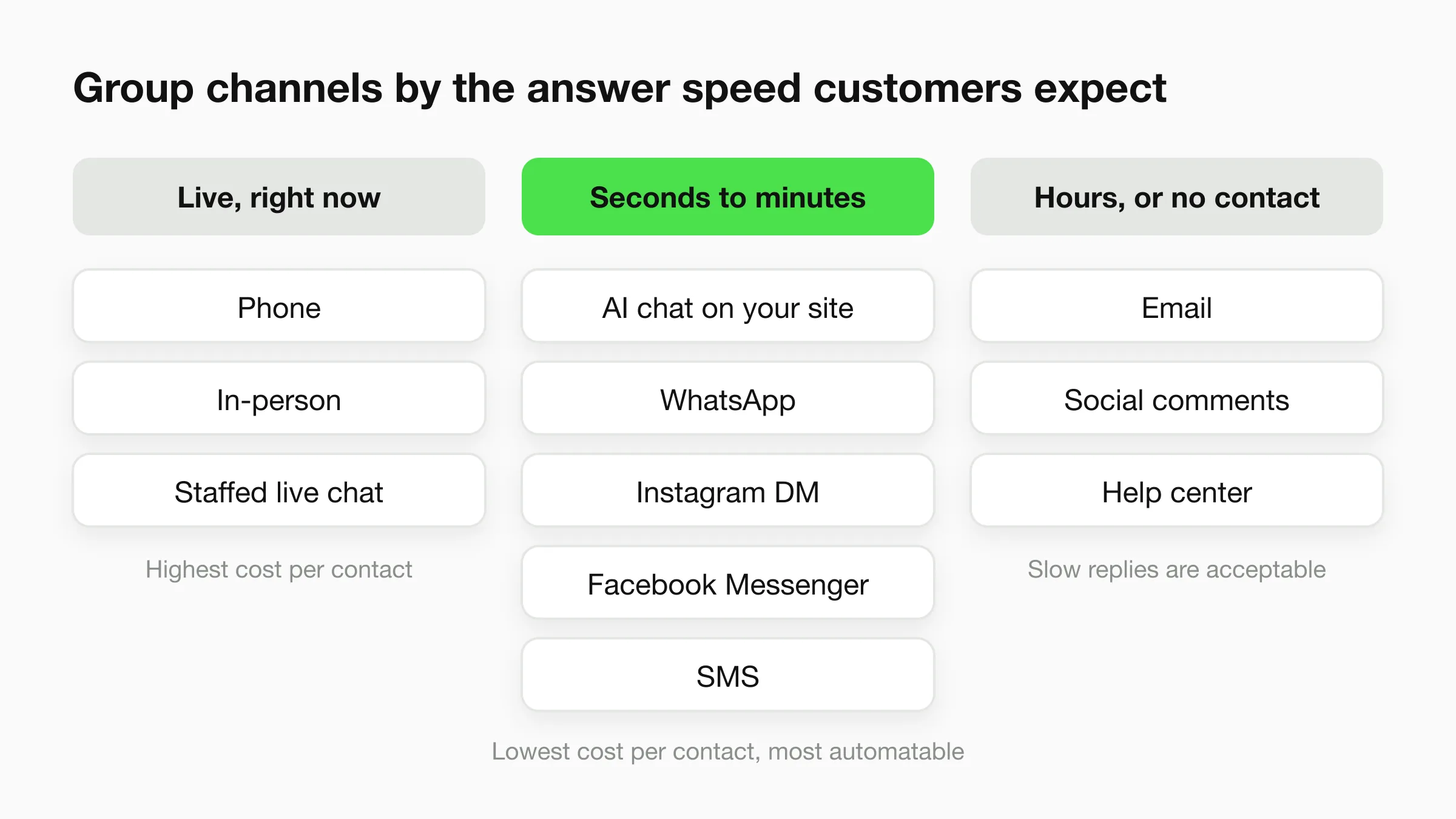
Three patterns show up. Channels with a live human on the other end (phone, in-person, staffed live chat) cost the most per contact and cannot be paused. Messaging channels cost much less, because one person or one AI agent can hold many conversations at once. A help center is the cheapest per answer, but only for questions people can look up.
Phone
Phone is still the channel for urgent and emotional problems: a burst pipe, a canceled flight, a billing error. Customers who call usually want a person and want one now. It is also the hardest channel to staff, because a call occupies one person completely and misses happen the moment that person is busy.
If you offer phone, publish your hours and put voicemail or a callback option behind it. Many small businesses end up using phone as the escalation path for cases that need a voice.
Email suits detailed requests, attachments and anything that needs a written record: quotes, contracts, invoices, complaints. Customers expect a reply the same business day, which is easy to promise and easy to miss during a busy week.
The cost is in the length. Threads run long and each reply is composed from scratch. Templates help, but email is where a small team loses the most hours per contact.
Website live chat and AI chat
Website chat meets a visitor at the moment of doubt, while they are still on the pricing page. There are two ways to run it.
Human live chat needs someone online during open hours, and an unanswered chat window looks worse than no window. AI chat answers from your own documents at any hour, collects contact details when a visitor is ready to talk to someone, and passes the conversation to your team when it should. We compare the two in detail in AI chatbot vs live chat vs contact form.
For a small business, AI chat on the website is usually the first channel worth adding, because the website is the one channel you fully own. Your site is not subject to another platform's rules.
WhatsApp, Instagram DM and Facebook Messenger
These three are messaging channels, and they behave alike: short messages, asynchronous replies, customers who expect a response within minutes but will wait if you tell them how long. A customer who starts a chat on Instagram after seeing a post, or on WhatsApp because they already have your number, does not want to be sent to a contact form.
WhatsApp is strongest where it is the default way people message businesses. Instagram DM suits businesses whose customers find them through posts and stories: salons, studios, boutiques, restaurants. Messenger suits local businesses with an established Facebook page. We cover each in more depth in WhatsApp business statistics, Instagram DM automation and Facebook Messenger for local business.
Two cautions. These channels run on Meta's platforms, so Meta's rules, fees and policies apply to you, and WhatsApp business messaging has per-message fees that Meta sets and changes. Check Meta's current WhatsApp pricing before you commit. And treat them as places where customers reach you, not as the foundation of your support: your website and your knowledge base should stay yours.
SMS
SMS is fast and works on any phone with no app, which suits appointment reminders, delivery updates and short notifications. It is weaker for two-way support: messages are short and long conversations get awkward.
Hyperleap does not run SMS today. It is on our roadmap, not something we offer, so if SMS is a core channel for you, plan to run it separately.
Help center and self-service
A help center answers the question before anyone has to ask it. A short page with hours, prices, policies and "how do I..." answers removes a share of contacts and works at 3 a.m. with no staff.
It has two limits. It only covers questions you have already anticipated, and it needs upkeep: an outdated policy page does more harm than a missing one. A good test is whether your ten most common questions each have a findable answer. Use the same content as the knowledge base for your chat channels, so the two never disagree. That is the approach behind a knowledge base chatbot.
Social comments
Comments under your posts are public support, whether you planned it or not. An unanswered question under an ad is visible to every other prospect. Reply briefly in public and move anything account-specific to DMs.
Comments are hard to automate well, because tone matters and a public mistake is visible to everyone. Hyperleap answers Instagram DMs, not comments, so comments stay with a person.
In-person
For retail, clinics, restaurants and hotels, the front desk is a support channel, and often the one customers judge you by. It is also the most expensive per contact, and the most interrupted: staff helping a customer are also asked to answer the phone and the DMs.
Every "what time do you close?" handled in chat is one less interruption at the counter.
The honest limit of any list
A channel you list but do not watch is worse than one you never offered. Customers read a phone number or a Messenger button as a promise of an answer. Before adding a channel, decide who watches it and when.
How to choose 2 to 4 channels
Choose by where your customers already are, then by what you can staff. Four steps work for most small businesses.
1. Look at where contact already happens. Open your phone log, inbox and social inboxes for the last 30 days and count contacts by channel. Customers vote with their behavior. If most of your questions arrive on Instagram, that is your first channel, whatever the guides say.
2. Match the channel to the question type. Urgent and emotional goes to phone. Documents and quotes go to email. Quick questions about price, hours and availability go to messaging and your website. Anything that can be looked up goes to the help center.
3. Count what you can staff. A channel with a live human behind it needs coverage for every hour you advertise. A channel an AI agent covers needs a good knowledge base and a clear handoff to your team.
4. Pick a floor and a ceiling. Most small businesses do well with one self-service channel (website and help center), one or two messaging channels where customers already are, and one human channel for escalation (phone or email). More than four usually means some are watched badly.
Some examples:
- A dental or medspa clinic often wants phone for urgent cases, website chat and WhatsApp for appointment questions, and email for forms. See dental agents.
- A home services company wins on the speed of the first reply: website chat for quote requests, phone for emergencies.
- A salon tends to live on Instagram DM and WhatsApp, with booking links in both.
- A hotel usually combines in-person, WhatsApp and website chat, with email for group bookings.
- An online store often leans on a help center for order and returns questions, with website chat and Instagram DM for pre-sale questions.
Staffing math for a small team
Here is a worked example. The numbers are illustrative assumptions, not benchmarks. Replace them with your own counts from step 1 above.
Imagine a small clinic with one front-desk person and 60 inbound contacts a day:
| Channel | Contacts per day | Minutes per contact | Staff minutes per day |
|---|---|---|---|
| Phone | 12 | 6 | 72 |
| 18 | 5 | 90 | |
| Messaging (website, WhatsApp, Instagram) | 30 | 3 | 90 |
| Total | 60 | 252 (4.2 hours) |
At 252 minutes, support takes more than half of a seven-hour desk shift before anyone has checked in, which is why callers get busy signals and DMs wait.
Now assume that an AI agent answers the repeat questions in the messaging channels (hours, prices, services, directions, "do you take new patients?") and that this covers 60% of the 30 messaging contacts. That 60% is an assumption for this example. Your share depends on how repetitive your questions are, and you can check it by tagging a week of real messages.
| Channel | Contacts handled by staff | Staff minutes per day |
|---|---|---|
| Phone | 12 | 72 |
| 18 | 90 | |
| Messaging | 12 (the other 18 answered by the AI agent) | 36 |
| Total | 198 (3.3 hours) |
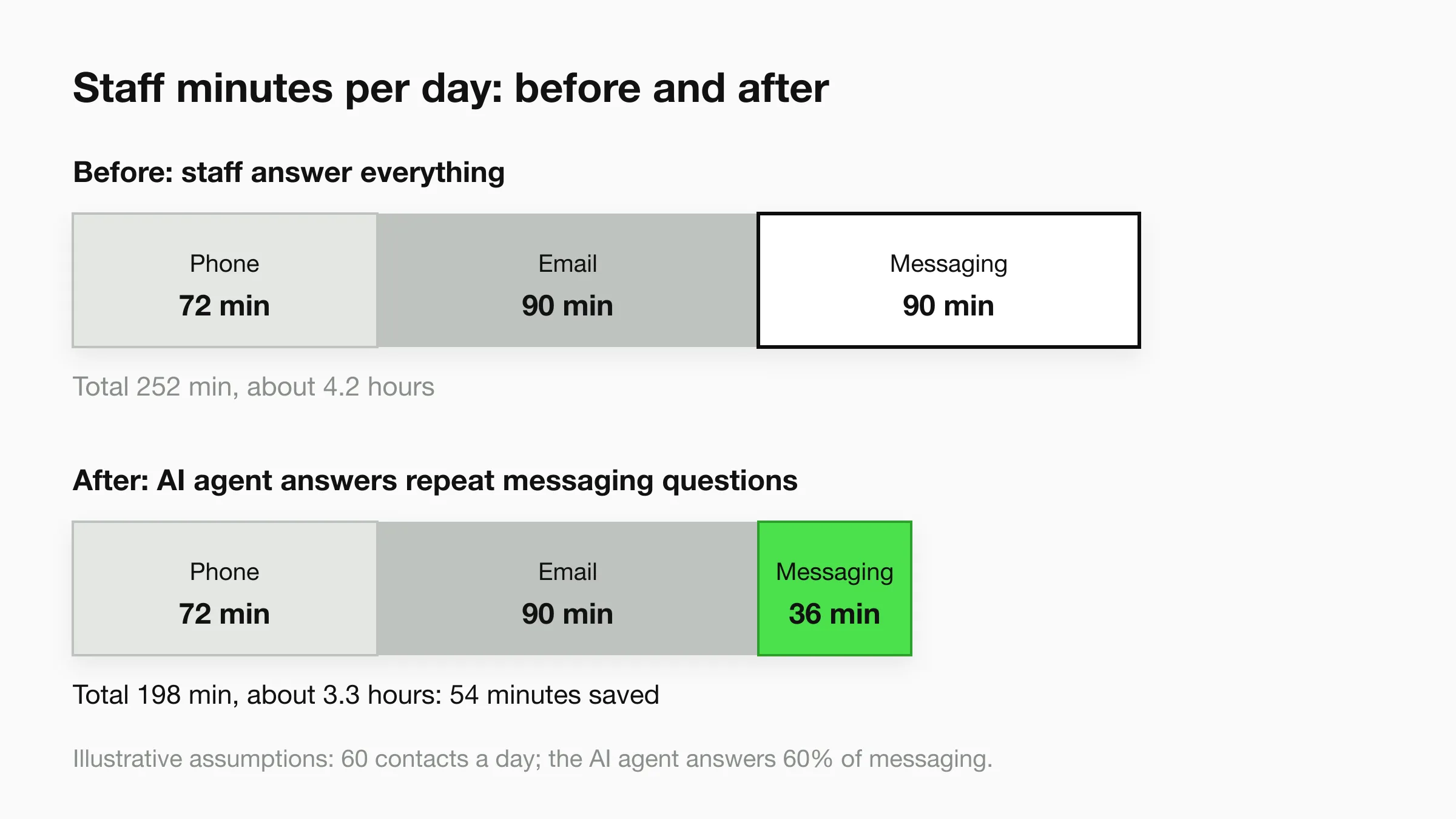
The example saves 54 minutes a day, all from messaging, because those are the questions that repeat. Phone and email are unchanged. Automation takes the repetitive part of the messaging load and leaves the conversations that need a person.
Coverage is a separate problem from workload: a ten-hour open day needs ten hours of phone coverage, whatever the call volume. A channel an AI agent covers has no shift to staff.
Route and keep answers consistent
The more channels you run, the more they drift. Prices change in one place and not another. A policy gets updated on the website but not in the DM template. Customers notice when two channels give two answers.
Three habits prevent most of this.
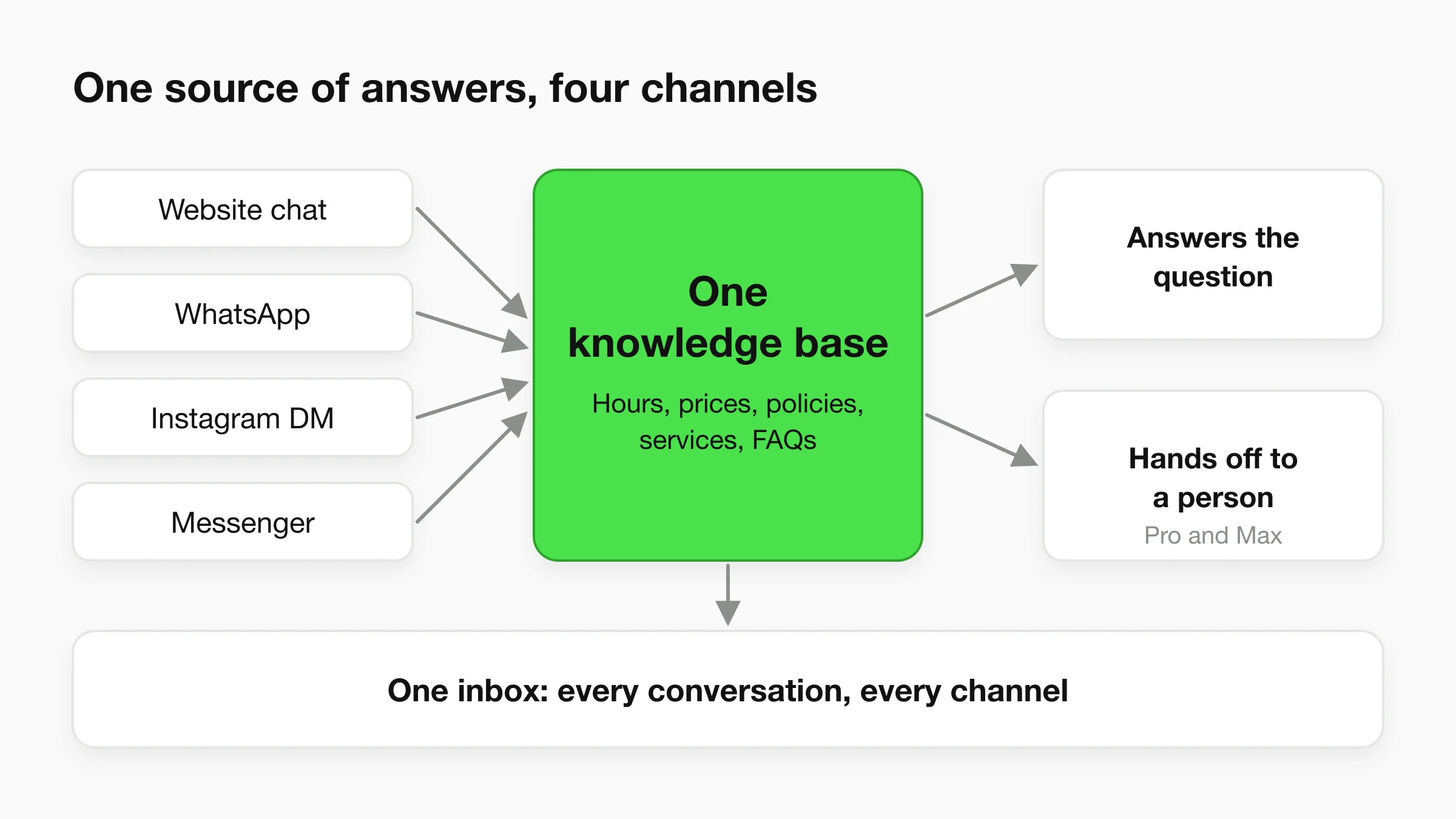
One source of answers. Keep a single set of documents that every channel draws from: hours, prices, policies, service areas, FAQs. When something changes, you change it once. The same principle applies whether the answers come from a person or an AI agent.
One place to read conversations. If the website chat is in one tool, WhatsApp in a phone and Instagram in an app, nobody sees the whole customer. A single inbox lets a teammate see what a customer already asked on another channel. We cover this in unified inbox for AI customer conversations.
A written handoff rule. Decide in advance what goes to a person and how fast: refunds, complaints, anything urgent, anything the knowledge base cannot answer. Write down who gets it and what the customer is told while they wait. The handoff is what separates a front desk from an auto-reply.
What Hyperleap covers
Hyperleap AI is an AI front desk for small businesses. It covers four channels from one knowledge base: your website chat, WhatsApp, Instagram DM and Facebook Messenger. You write your hours, prices and policies once, and the same agent answers on all four. It collects contact details, books appointments with Calendly or Cal.com on Pro and Max (on Plus it shares your booking link), and hands conversations to your team. Every conversation lands in one inbox in Studio.
Hyperleap is a Meta Technology Provider and Business Partner, and WhatsApp, Instagram and Messenger run on Meta's official Business APIs. Customers pay Meta's WhatsApp fees directly to Meta, separately from their Hyperleap plan.
What it does not cover is just as useful to know when you are picking channels:
- Phone and voice: not supported today. Keep a phone number or voicemail for urgent calls.
- Email as a channel: not supported today. Hyperleap emails lead summaries and transcripts to your team, but it does not answer your inbox.
- SMS: not supported today. It is on our roadmap.
- Instagram comments: not supported. Hyperleap answers Instagram DMs only.
- Human handoff and live takeover: available on Pro and Max, not Plus.
So a typical small business would run Hyperleap for website, WhatsApp, Instagram DM and Messenger, keep phone for urgent issues, and keep email for documents and quotes. The AI front desk takes the repetitive messaging load, and your team keeps the conversations that need judgment. See the channels overview for how each channel is set up, multi-channel AI chatbot strategy for deployment, and best multi-channel chatbots 2026 to compare tools. For the product overview, see AI front desk. Plans start at $40 a month with a 7-day free trial; see pricing.
Cover your messaging channels from one knowledge base
Paste your website URL and Hyperleap builds a starting agent for your website, WhatsApp, Instagram DM and Messenger.
Start for freeMeasure each channel separately
Measure by channel, because averages hide the channel that is failing. Four numbers are enough for a small team.
| Metric | What it tells you | How to collect it |
|---|---|---|
| Volume by channel | Where customers actually are | Count contacts per channel each month |
| First response time | Whether you meet the speed customers expect | Timestamps in your inbox; for calls, answered vs missed |
| Resolution without handoff | How much the channel handles on its own | Tag conversations that needed a person |
| Contacts that became a booking or sale | Whether the channel earns its keep | Ask "how did you contact us?" and tag it |
Review them monthly. A channel with low volume and high staffing cost can be dropped or folded into another. A channel with high volume and slow first response is where to add automation or hours first. Our guide to customer service metrics goes deeper on definitions, and omnichannel customer service covers how the channels fit together.
Start with a one-week count
Before changing anything, record every contact for one week: its channel, its question type and whether a person had to answer. That count will tell you which channels to keep better than any benchmark.
Frequently Asked Questions
What are the main customer support channels?
The main channels are phone, email, website live chat, AI chat, messaging apps (WhatsApp, Instagram DM, Facebook Messenger), SMS, a help center or self-service, social media comments and in-person service. Most small businesses use two to four of them.
How many customer support channels does a small business need?
Two to four is a practical range. One self-service channel such as a website with a help center, one or two messaging channels where your customers already write to you, and one human channel for urgent issues. Adding more than you can watch usually makes service worse, not better.
What is the best customer service channel for a small business?
There is no single best channel, because it depends on where your customers already contact you. For many small businesses, website chat plus one messaging app (often WhatsApp or Instagram DM) covers most routine questions at low cost, with phone or email kept for urgent and detailed cases.
What is the cheapest channel to staff?
A help center is the cheapest per answer once it is written. Among conversational channels, messaging and AI chat cost the least per contact, because one person or one AI agent can hold many conversations at once. Phone and in-person cost the most, because each contact needs one person fully engaged.
Does Hyperleap work on phone, email or SMS?
No. Hyperleap covers four channels today: website chat, WhatsApp, Instagram DM and Facebook Messenger. Phone, voice, SMS and an email channel are not supported, and SMS is on the roadmap. Hyperleap does email lead summaries and transcripts to your team.
How do I keep answers consistent across channels?
Keep one set of source documents for hours, prices and policies, and have every channel draw from it. Use one inbox so your team can see a customer's earlier conversations, and write a handoff rule for what goes to a person.
See your channels in one inbox
Start a 7-day free trial and test the agent on your website before you connect WhatsApp, Instagram DM or Messenger.
Start for freeIndustry Solutions
See how AI chatbots work for these industries:
Related Articles
View all
Guide18 min read
Customer Self-Service: Options, Examples and Setup
Customer self-service explained for small businesses: seven options compared by cost and effort, how to pick what to automate, and how to measure it.
Guide19 min read
Customer Service Metrics: 13 Defined, 6 to Start With
The customer service metrics that matter for a small business: definitions, formulas, what to track, what to skip, and a simple weekly scorecard.
Guide19 min read
Customer Service Skills: 14 That Matter, With Examples
The 14 customer service skills a small business needs, each with a plain definition, a weak vs better reply, and a way to train it in a small team.
Guide13 min read
Customer Success vs Customer Support: The Real Difference
Customer success vs customer support: support fixes problems when asked, success prevents them. Compare goals and metrics, and see how small teams do both.