Guide
Customer Success vs Customer Support: The Real Difference
Customer success vs customer support: support fixes problems when asked, success prevents them. Compare goals and metrics, and see how small teams do both.

Gopi Krishna Lakkepuram · Founder & CEO
· 13 min read

TL;DR: Customer support answers a customer who has a problem or a question right now. Customer success works on the customer who has not asked anything, so they get the result they bought and stay. Support is reactive and measured in speed and satisfaction. Success is proactive and measured in retention and expansion. A small business does not need two departments to do both. It needs one clear rule for which work is which, a clean handoff between them, and something that handles the repetitive questions so people have time for success work.
What is customer support?
Customer support is the team, process and tools that respond when a customer reaches out with a problem, a question or a request. The customer starts the conversation. Support finishes it. A good support interaction ends with the customer unblocked and the ticket closed.
The work is mostly triage and answers: "How do I reset my password?", "Can I change my appointment?", "Why was I charged twice?" It runs on a queue, and the clock matters because the customer is waiting.
What is customer success?
Customer success is the practice of helping customers reach the outcome they bought your product or service for, before they have to ask for help. You start the conversation. The goal is that they renew, keep their membership, extend the retainer, or buy more.
The term came out of subscription software, where revenue depends on customers staying, but it applies to any business with repeat revenue. A gym that checks in with a member who stopped showing up is doing customer success. So is an agency that reviews results before the renewal date.
The work is onboarding, check-ins, usage reviews, training, renewal conversations and spotting accounts that are drifting. Nobody opens a ticket for any of it.
Customer success vs customer support at a glance
The cleanest way to separate them is by who starts the conversation and what you are trying to move. Support is triggered by the customer's problem and aims to resolve it. Success is triggered by your own plan or a risk signal and aims to grow the relationship.
| Customer support | Customer success | |
|---|---|---|
| Goal | Resolve the issue fast and well | Help the customer reach their outcome and stay |
| Trigger | Customer reaches out | Your schedule, a milestone or a risk signal |
| Posture | Reactive | Proactive |
| Core metrics | First response time, resolution time, CSAT | Retention or renewal rate, net revenue retention, expansion |
| Time horizon | This conversation | The whole customer lifetime |
| Typical tools | Inbox, help desk, live chat, knowledge base | CRM, usage data, onboarding checklists, check-in calendar |
| Typical owner in a small business | Whoever answers the inbox, plus an AI agent for routine questions | The owner, an account manager, or the person closest to the customer |
| Failure looks like | Slow, wrong or repeated answers | A customer who quietly leaves and never complained |
A few terms in that table are worth defining.
CSAT is customer satisfaction, usually a one-question survey after an interaction. First response time is how long a customer waits for the first reply. Net revenue retention (NRR) is the revenue you keep and grow from the customers you had at the start of a period, as a share of what they paid at the start. The usual formula is starting recurring revenue, plus expansion, minus downgrades and cancellations, divided by starting recurring revenue. New customers are left out.
Not every business tracks NRR. A clinic or a gym is better served by renewal rate, repeat-visit rate or membership length.
Reactive vs proactive: why the difference matters
Reactive work is easy to see because customers push it to you. Proactive work is easy to skip because nobody is pushing. That asymmetry is why most small businesses are good at the first and weak at the second.
A support queue gives you a to-do list every morning. Success has no queue. A customer about to leave looks like a happy customer until the day they cancel. You catch them by checking signals on a schedule: a member who has not visited in three weeks, a client who has not opened your reports, a patient overdue for a recall.
A reactive-only business answers every message promptly, has a fine CSAT, and still loses customers it never heard from. Support fixed every reported problem. Nobody worked on the unreported ones.
Customer service vs customer support
People also search for "customer success vs customer service." Customer service is the broad term for every way you serve customers, before and after a sale. Customer support is the narrower part that solves problems and answers questions. Customer success sits on top of both and is aimed at long-term outcomes. For a closer look at the service side, read our guide to AI customer service best practices.
How small businesses do both without two departments
A small business separates the two by time and by rule, not by headcount. Support happens in the moment, as messages come in. Success happens on a calendar. If you try to do both in the same hour, support always wins and success never happens.
Four habits make this work for a team of one to ten.
- Block success time on the calendar. One hour a week is enough to start. Treat it like a meeting you cannot skip. During that hour, you review who is at risk, who is due for a check-in and who just hit a milestone.
- Pick two or three risk signals and watch only those. For software it might be "no login in 14 days." For a gym, "no visit in three weeks." For an agency, "no reply to the last two reports."
- Make onboarding a checklist, not a feeling. Write the five things a new customer should have done by day 7 and check them off.
- Turn repeated support questions into fixes. Review the inbox weekly for the top five repeated questions. Each one becomes a better help article, a clearer onboarding step or a change to the product.
The handoff: where support ends and success starts
The most common failure between the two is information that never crosses over. Support hears "this isn't what I expected." Success is about to send a cheerful renewal email. If those two facts never meet, you lose the renewal.
Define the handoff in both directions.
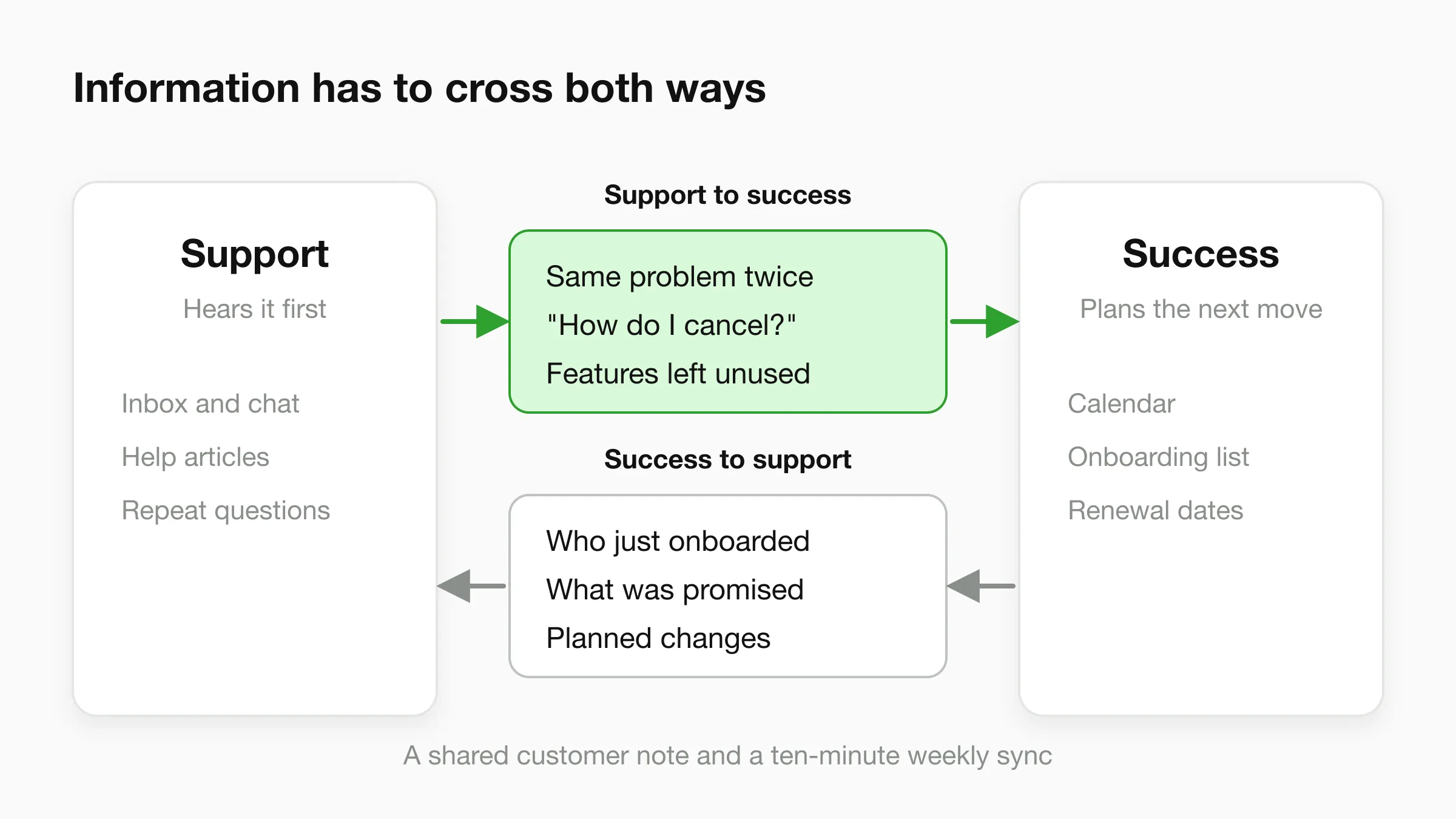
From support to success, pass these along:
- Customers who contacted you more than once about the same problem
- Anyone who said they are comparing alternatives, or asked how to cancel or pause
- Questions that reveal the customer is not using the thing they bought
From success to support, pass these along:
- Who just onboarded, and what they were promised
- Planned changes, price updates or outages that will trigger questions
The simplest mechanism is a shared note on each customer record and a ten-minute weekly sync. A CRM note or a tagged conversation is enough, as long as "hand off" is a defined step with an owner.
When a conversation has to move from an AI agent or a first-line responder to a person, the same discipline applies. The person taking over should see the full conversation and the customer's details so nobody repeats themselves. See chatbot human handoff best practices.
Examples: support and success in four small businesses
The split is easiest to see in a few ordinary businesses. These are illustrative scenarios, not case studies.
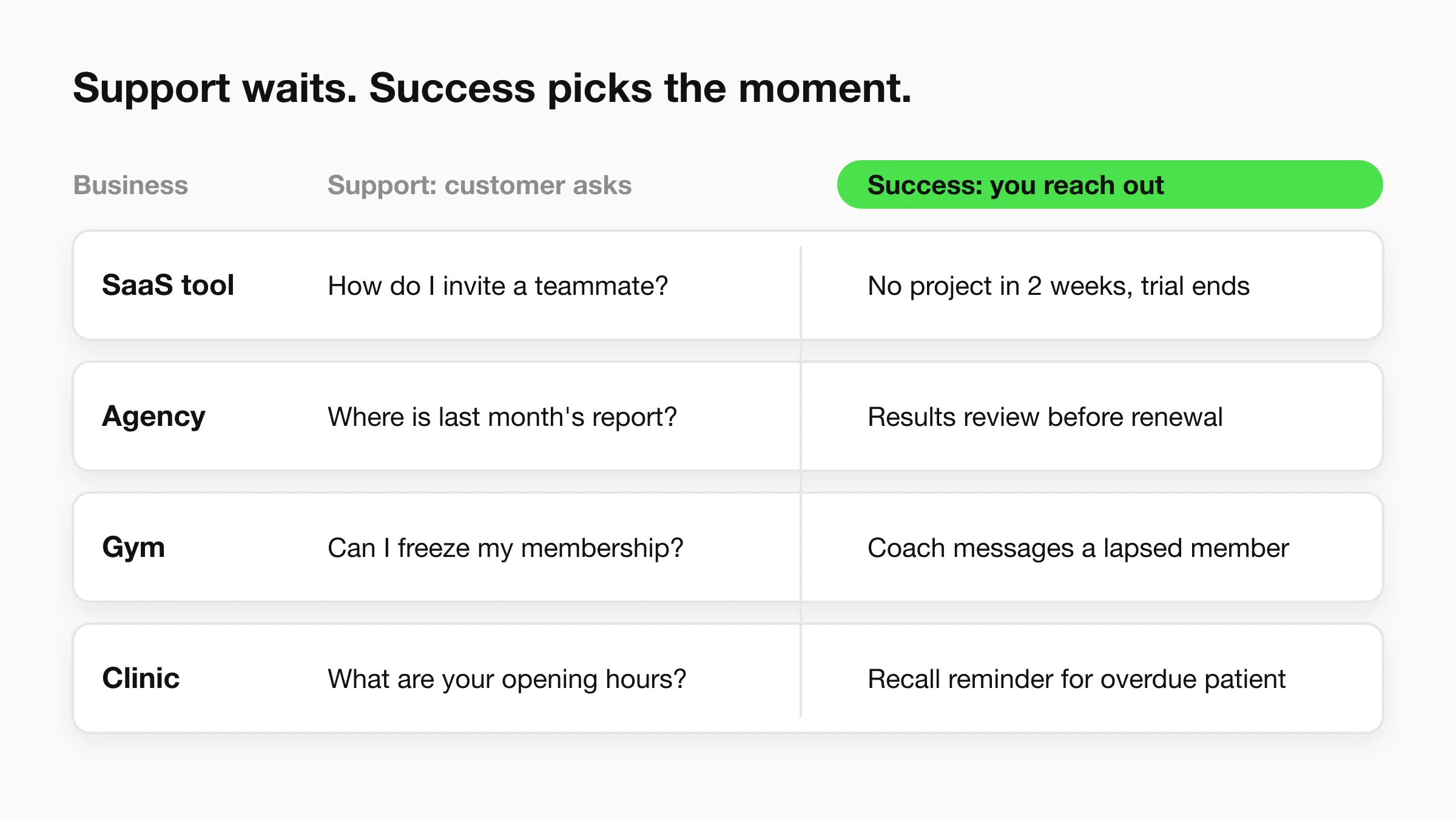
A small SaaS tool
Support: A user writes in asking how to invite a teammate. Someone answers with the right link in minutes.
Success: The account has not created a project in two weeks, and the trial ends Friday. The founder sends a short note offering a 15-minute walkthrough. For more on how software teams split this work, see our guide to an AI chatbot for SaaS.
A marketing agency
Support: A client asks where to find last month's report. The account manager replies with the link.
Success: The retainer renews in 45 days. The account manager books a results review, brings three wins and one honest miss, and proposes next quarter's plan.
A gym or fitness studio
Support: A member asks about freezing their membership while travelling, or what time the Saturday class starts.
Success: A member who came three times a week in the spring has not checked in for a month. A coach sends a personal message, not a discount blast, and offers to rebuild their routine. Gyms and studios often lose members slowly and silently, which is why this outreach matters. Our page on AI agents for gyms and fitness studios shows how a front desk handles the routine questions so staff have time for exactly these messages.
A clinic
Support: A patient asks about opening hours, accepted insurance types or how to prepare for a visit. The front desk answers or routes the question to the right person.
Success: A patient is overdue for a recall or a follow-up. The clinic sends a reminder and an easy way to book, because a returning patient is worth more than a new one. If your clinic is a dental or aesthetic practice, see dental agents or medspa agents for the front-desk side of this.
Support waits for the customer. Success picks the moment.
Where AI fits: answers for support, time back for success
AI belongs on the support side, handling the repetitive questions, so humans can spend their time on success work that needs judgment. An AI agent that answers from your own documents covers the "what are your hours?" and "how do I reset my password?" messages. It does not replace the check-in call with a customer who is thinking of leaving.
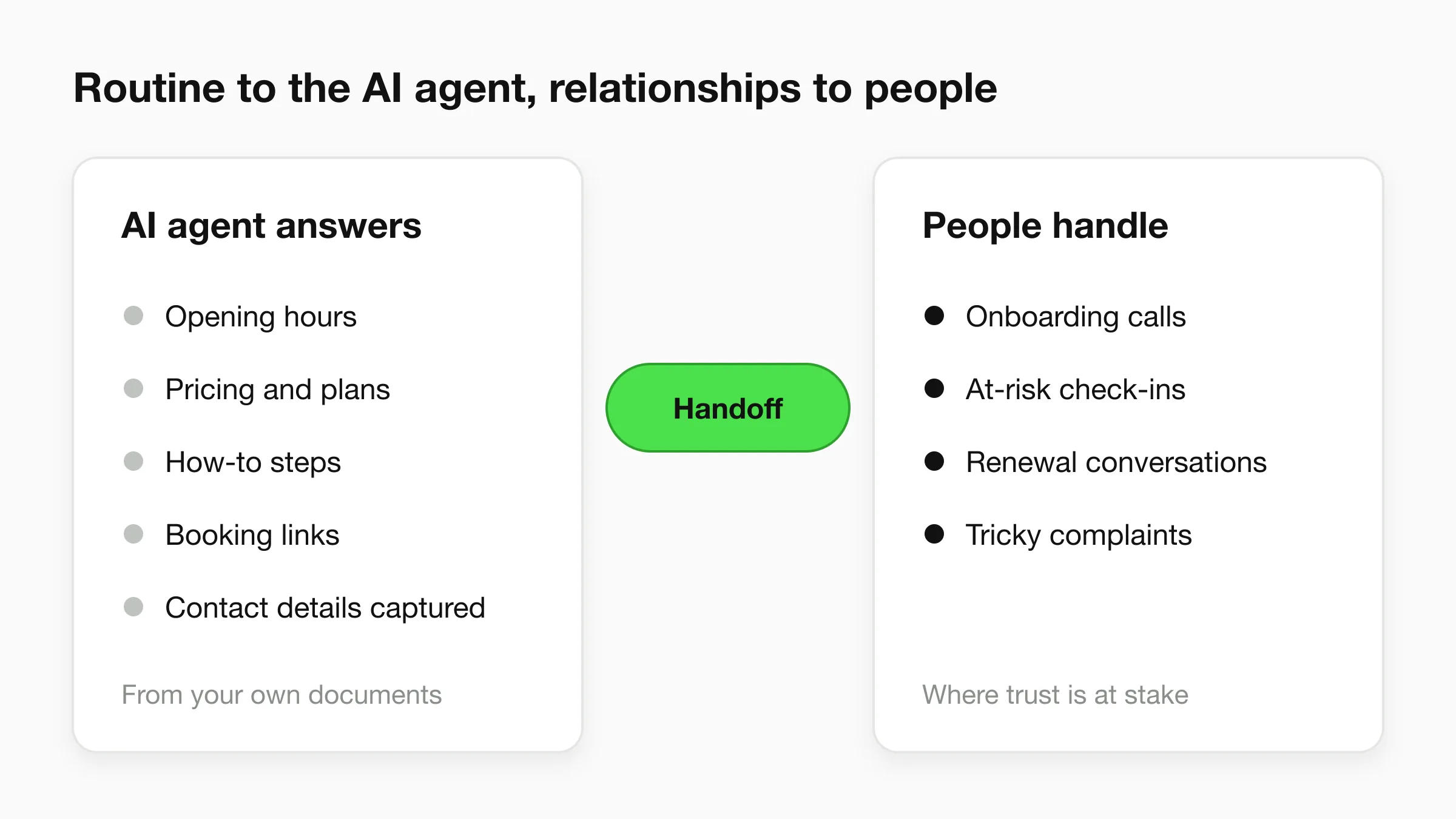
A practical division of labour looks like this:
- AI agent: routine questions, hours, pricing, how-to steps, order or booking links, collecting contact details, and capturing a question it cannot answer.
- People: onboarding calls, check-ins with at-risk customers, renewal conversations, complaints that need judgment, and anything involving a customer's trust.
Hyperleap is the AI front desk for small businesses. It answers from your knowledge base across your website, WhatsApp, Instagram DM and Facebook Messenger. On the Pro and Max plans, a customer can ask for a person, your team is alerted in Studio, and a teammate can take over the live conversation and hand it back. The unified inbox keeps every channel's conversations in one place, and the conversation log shows which of your sources an answer drew on. That log doubles as a source of repeated questions to feed back into onboarding and help content. The setup is covered on our customer support chatbot page, and reduce customer support costs with AI covers the cost side.
To be clear about the limits: Hyperleap does not score customer health, track renewals or run success playbooks. It handles the support layer and gives you cleaner data, and the success work stays with your team. That is the right split. A chatbot cannot decide that a long-time client deserves a phone call.
Free up time for the work that keeps customers
Let an AI agent answer the routine questions from your own documents, and keep your team's attention for check-ins and renewals.
Start for freeMistakes to avoid
Most small businesses stumble in the same five places.
- Counting support as success. Fast replies keep customers calm. They do not make customers succeed. If you only measure response time, you are measuring half the job.
- Hiring a "success manager" before you have signals. A person with nothing to watch becomes a second support rep.
- Using discounts as outreach. A coupon does not fix a customer who never got value. Reach out with help.
- Skipping the handoff. Two teams that never share notes behave like strangers. A weekly ten-minute sync fixes most of it.
- Automating the relationship. Automate the routine answer, not the renewal conversation.
A one-week starting plan
Monday: write down your two risk signals. Wednesday: list the five most repeated questions from last month. Friday: block one hour next week for check-ins. That is enough to start without a new hire. To measure the support side, our guide to chatbot KPIs covers which support numbers are worth watching.
Frequently Asked Questions
What is the main difference between customer success and customer support?
Customer support reacts to a customer's request and aims to resolve it quickly. Customer success acts before the customer asks and aims to help them reach their goal and stay. Support is measured in speed and satisfaction. Success is measured in retention, renewals and expansion.
What is customer success in simple terms?
Customer success is the work of making sure customers get the result they bought your product or service for, so they stay and often buy more. It includes onboarding, check-ins, training and renewal conversations. The aim is to prevent problems and churn, not just fix them.
Do small businesses need a separate customer success team?
Usually not. A small business can run both with the same people if it blocks calendar time for success work, watches two or three risk signals and defines a handoff from support. A dedicated role makes sense once the account base is too large for the owner to know each customer.
What metrics should I track for each?
For support, track first response time, resolution time and CSAT. For success, track retention or renewal rate, and net revenue retention if you have recurring revenue. Businesses without subscriptions can use repeat-visit rate or membership length instead.
Can an AI chatbot do customer success?
An AI agent is a good fit for the support side: it answers routine questions from your documents at any hour and passes anything unclear to your team. The success side, such as check-ins and renewal conversations, needs a person. Using AI for support frees time for that work.
Put the routine questions on autopilot
Set up an AI agent that answers from your own content across your website and messaging channels. Plans start at $40 per month with a 7-day free trial.
Start for freeNew to AI agents? Start with getting started with AI agents, or see how an AI front desk fits a small team. Current plans and limits are on the pricing page.
Industry Solutions
See how AI chatbots work for these industries:
Related Articles
View all
Guide16 min read
Customer Engagement Strategies: 15 Ideas for Small Business
15 customer engagement strategies for small teams: what to do this week, the channel, the effort, and the one number to track for each.
Guide18 min read
Customer Self-Service: Options, Examples and Setup
Customer self-service explained for small businesses: seven options compared by cost and effort, how to pick what to automate, and how to measure it.

Guide19 min read
Customer Service Metrics: 13 Defined, 6 to Start With
The customer service metrics that matter for a small business: definitions, formulas, what to track, what to skip, and a simple weekly scorecard.
Guide19 min read
Customer Service Skills: 14 That Matter, With Examples
The 14 customer service skills a small business needs, each with a plain definition, a weak vs better reply, and a way to train it in a small team.