Guide
Customer Self-Service: Options, Examples and Setup
Customer self-service explained for small businesses: seven options compared by cost and effort, how to pick what to automate, and how to measure it.

Gopi Krishna Lakkepuram · Founder & CEO
· 18 min read
TL;DR
- Customer self-service lets customers get an answer or finish a task without waiting for your team. For a small business it works best as a short ladder: an FAQ page first, then a conversational AI agent, then articles and a portal as your question list demands.
- Decide what to put in self-service by counting real customer questions, not by guessing. Automate the questions that are frequent and have the same answer for everyone. Keep the rest with people.
- Every path needs a visible way to reach a human, a named owner for each answer, and a weekly review of what customers could not find.
Customer self service is any way a customer gets an answer or finishes a task without waiting for someone on your team. An FAQ page is self-service. So is a help article, a booking link, an order-tracking page, and an AI agent that answers questions in a chat window at 11pm. This guide compares the main options, shows how to choose what to automate, and covers the exit to a person and how to measure results.
What customer self-service is, and why most of it fails
Customer self-service is a set of resources and tools that let customers resolve their own questions and tasks at any hour, without contacting your staff. It comes in three forms:
- Read it: the customer finds a page or article, such as an FAQ or help center.
- Ask it: the customer types a question and gets an answer, such as an AI agent or site search.
- Do it: the customer completes a task, such as rebooking, tracking an order or downloading an invoice, in a portal or booking tool.
Customers want this. Dixon, Ponomareff, Turner and DeLisi (2017) reported in Harvard Business Review that across industries 81% of customers try to take care of matters themselves before contacting a live representative. The figure is from 2017, so treat it as a direction, not a current measurement.
The harder finding is how often it fails. A Gartner survey of 5,728 customers, published in August 2024, found that 73% of customers use self-service at some point, yet only 14% of issues are fully resolved there. Even for issues customers called "very simple," only 36% were resolved in self-service. The most common reason was that customers could not find content relevant to their issue (43% of failures), and 45% of those who started in self-service said the company did not understand what they were trying to do. CX Today's report on the survey covers the same numbers.
Read those figures as faults you can fix. Customers do not avoid self-service. They give up when the answer is missing, hard to find, or phrased in your internal vocabulary, and when nothing tells them what to do next. The rest of this guide is built around those faults.
Self-service customer support options compared
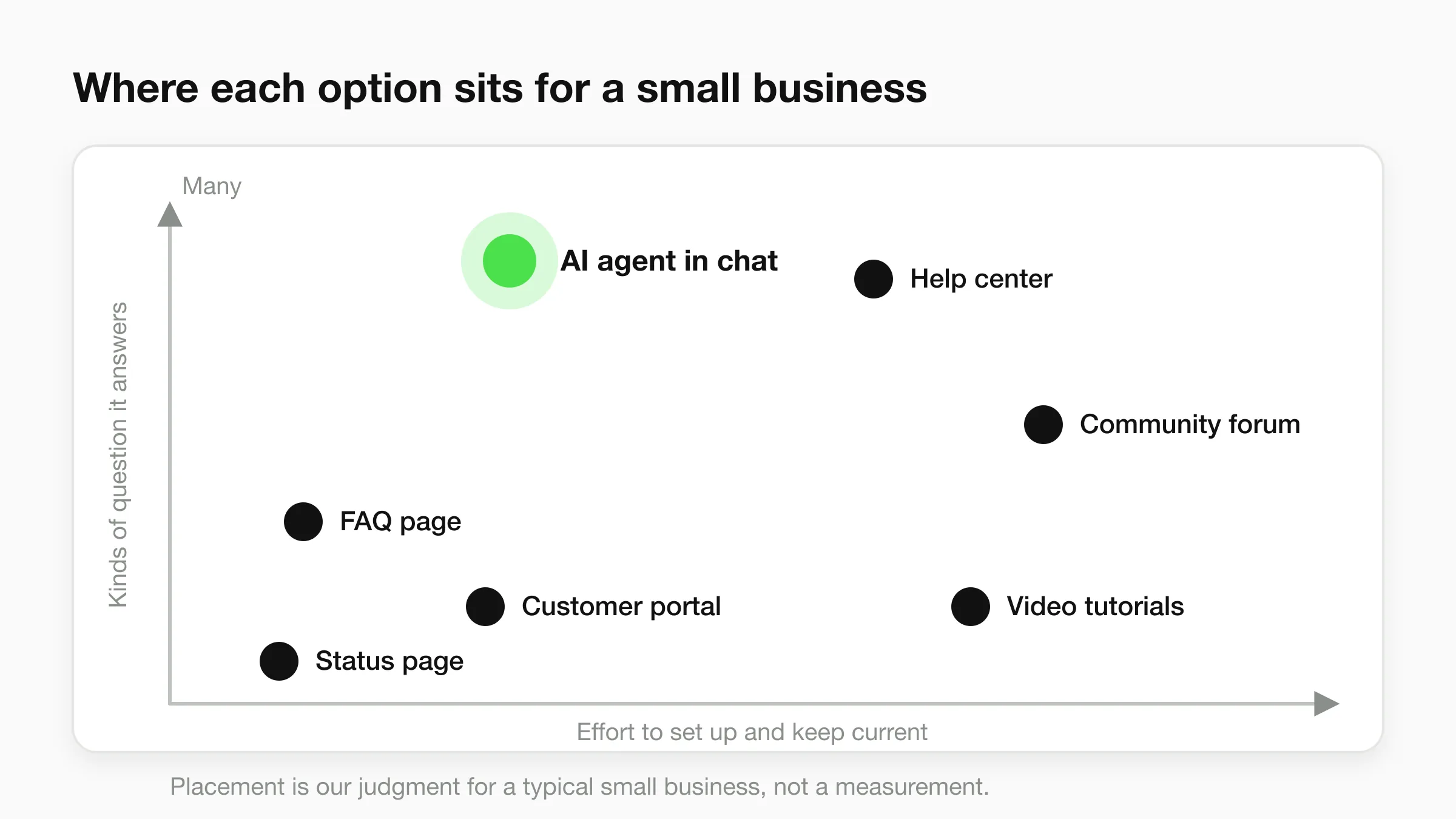
There are seven common options. They differ in what they can answer, what they cost to start, and how much upkeep they need. Costs below are relative, so check current prices for any tool you consider.
| Option | What it handles best | Cost to start | Upkeep | Fit for a small business |
|---|---|---|---|---|
| FAQ page | Hours, prices, policies, delivery, cancellations | Free: an hour or two on your website | Low, until the page turns into a wall of questions | Every business. Start here. |
| Help center or knowledge base | How-to steps, troubleshooting, detailed policies | Free to low (a page on your site, or a monthly help-center subscription) | Medium to high: every article needs an owner and a review date | Products and services with how-to questions |
| AI agent in chat | Any question in the customer's own words, on your website and messaging channels | From $40/month on Hyperleap; live in under 5 minutes, then tuning | Low to medium: weekly review of conversations and source gaps | Businesses that get repeat questions in chat and DMs |
| Customer portal | Orders, bookings, invoices, account changes | Usually built into your booking, store or billing tool | Low once configured | Businesses with accounts and repeat transactions |
| Community forum | Peer tips and product workarounds | Low for the software, high in moderation time | High | Software products with a large user base. Rarely a local business. |
| Status page | Outage and incident updates | Low | Low, but it must be updated during incidents | Online services only |
| Video tutorials | "Show me" tasks: assembly, setup, aftercare | Your time and a phone | High: re-record when the product changes | Physical products and software walkthroughs |
The FAQ page is the floor, not the ceiling. It answers the questions you thought of, not the customer who phrases it differently. What an FAQ chatbot adds on top of an FAQ page shows where the page stops helping.
Help centers are often the most work for the least return at small scale. Sixty unmaintained articles are worse than a good FAQ page with 15 answers, because stale articles give confident wrong answers. Write articles one at a time, only for questions you have counted.
A portal and an AI agent do different jobs. A portal lets a customer act on their own account. An agent answers questions. Hyperleap is not a customer-account portal; on Pro and Max, Actions let the agent look up information from your own API during a chat, such as an order status, if you have an API that exposes it.
Skip community and status pages until you need them. A forum with five members looks abandoned, and a status page only matters for an online service customers depend on.
For the knowledge side, the knowledge base chatbot page explains how an agent answers from your documents, and how to automate customer support covers the build step by step.
Customer self-service examples by business type
The repeat questions differ by business, so the first things to automate differ too.
- Dental or medical clinic: hours, directions, parking, accepted insurance, visit preparation, booking. Questions about symptoms or treatment go to the team. The agent routes; it does not assess.
- Hair or nail salon: prices, durations, patch-test rules, cancellation policy, booking. See what a front desk agent does for a salon.
- Home services: service area, what a call-out fee covers, how to request a quote. Emergencies go straight to a person.
- E-commerce store: shipping times, returns, sizing, order status, discount rules.
- Hotel or guesthouse: check-in and check-out times, parking, pet policy, breakfast.
- Agency: services, process, onboarding steps, how to start.
In all six, facts identical for every customer go into self-service. Anything that depends on the customer's situation goes to a person.
How to decide what goes into self-service
Decide by counting the questions customers actually ask. Owners tend to misjudge which ones dominate, because the memorable ones are the odd ones.
Step 1: Collect 30 to 60 days of real messages. Pull them from your inbox, WhatsApp, Instagram DMs, Messenger, contact form and call notes. A few dozen is enough to see a pattern. If you have thousands, sample 200.
Step 2: Tag each message with one theme. Use plain labels such as "hours and location," "price," "booking change," "complaint." Keep it to about ten themes and merge small ones into "other."
Step 3: Count and sort. A spreadsheet with a theme column is enough. Sort by count, descending.
Here is a fictional example. The numbers are illustrative, not real data. A salon tags 120 messages from one month:
| Theme | Messages |
|---|---|
| Hours and location | 31 |
| Price list | 24 |
| Booking change | 22 |
| Patch test and aftercare | 14 |
| Custom quote | 12 |
| Complaint | 9 |
| Other | 8 |
The top three themes are 77 of the 120 messages, and each has the same answer for everyone, so they go into self-service first. Complaints and custom quotes are fewer and need judgment, so they stay with people.
Step 4: Sort each theme with two questions. Is it frequent? Is the answer the same for everyone, and does it stay the same for months? Those two questions give four outcomes.
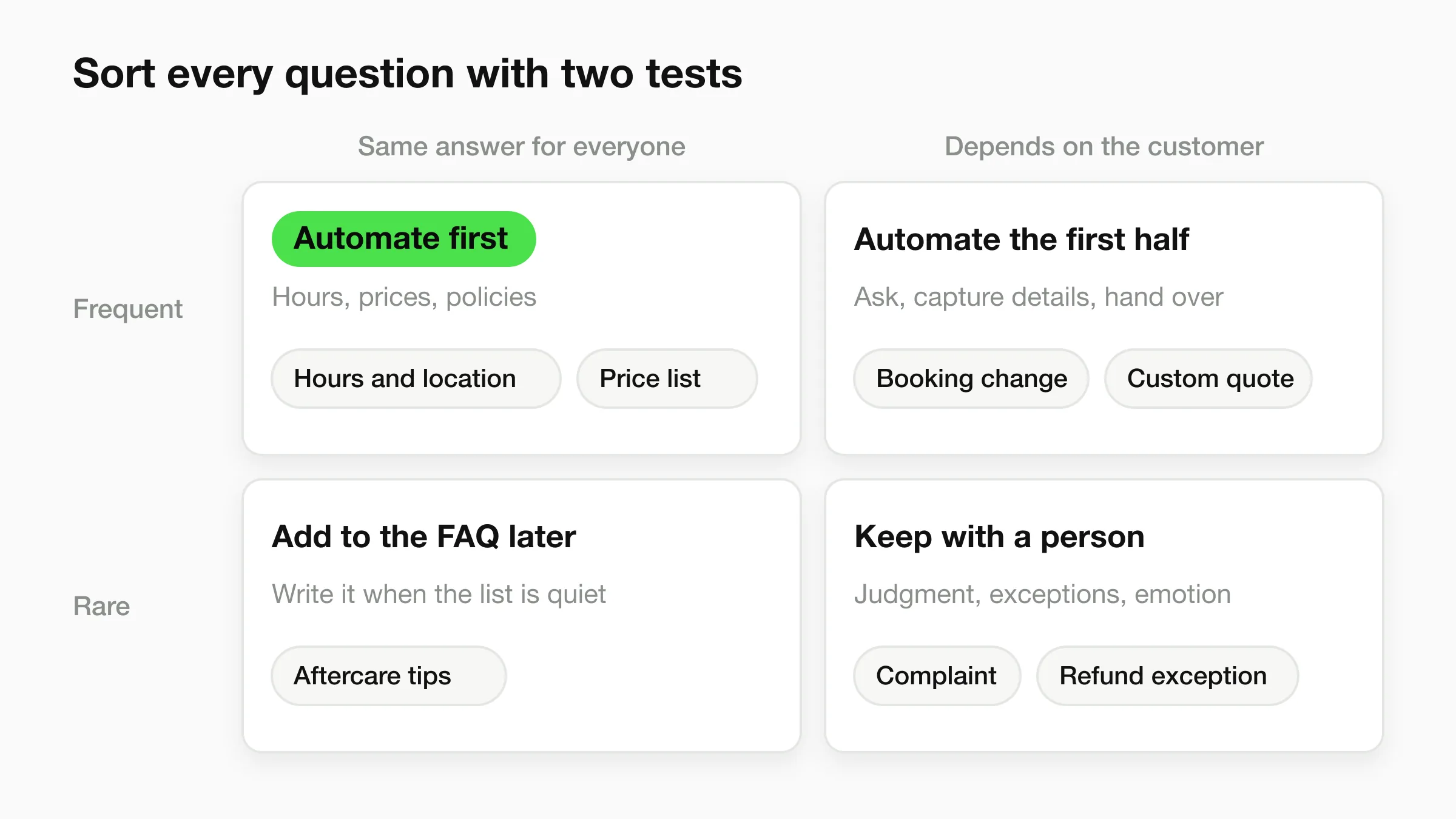
- Frequent and the same for everyone: automate first. Hours, prices, policies.
- Frequent but depends on the customer: automate the first half. Let self-service ask the clarifying questions and capture the details, then pass the case to a person. Booking changes and quote requests often fall here.
- Rare but the same for everyone: add to the FAQ later, when the list is quiet.
- Rare and needs judgment: keep with a person. Complaints, refunds with exceptions, anything emotional or high-stakes.
Step 5: Write each answer once, in the customer's words. "Can I change my appointment?" beats "Rescheduling policy." Gartner found that customers could not find relevant content in 43% of failures, and writing in your own internal vocabulary is an easy way to cause that.
Give every answer one named owner, even if that owner is you, and write a review date next to it. An answer with no owner is the one that goes out of date.
Put your top questions to work
Paste your website, add your FAQs and documents, and your AI front desk starts answering on your website, WhatsApp, Instagram DMs and Facebook Messenger. 7-day free trial.
Start for freeDesign the escape hatch to a human
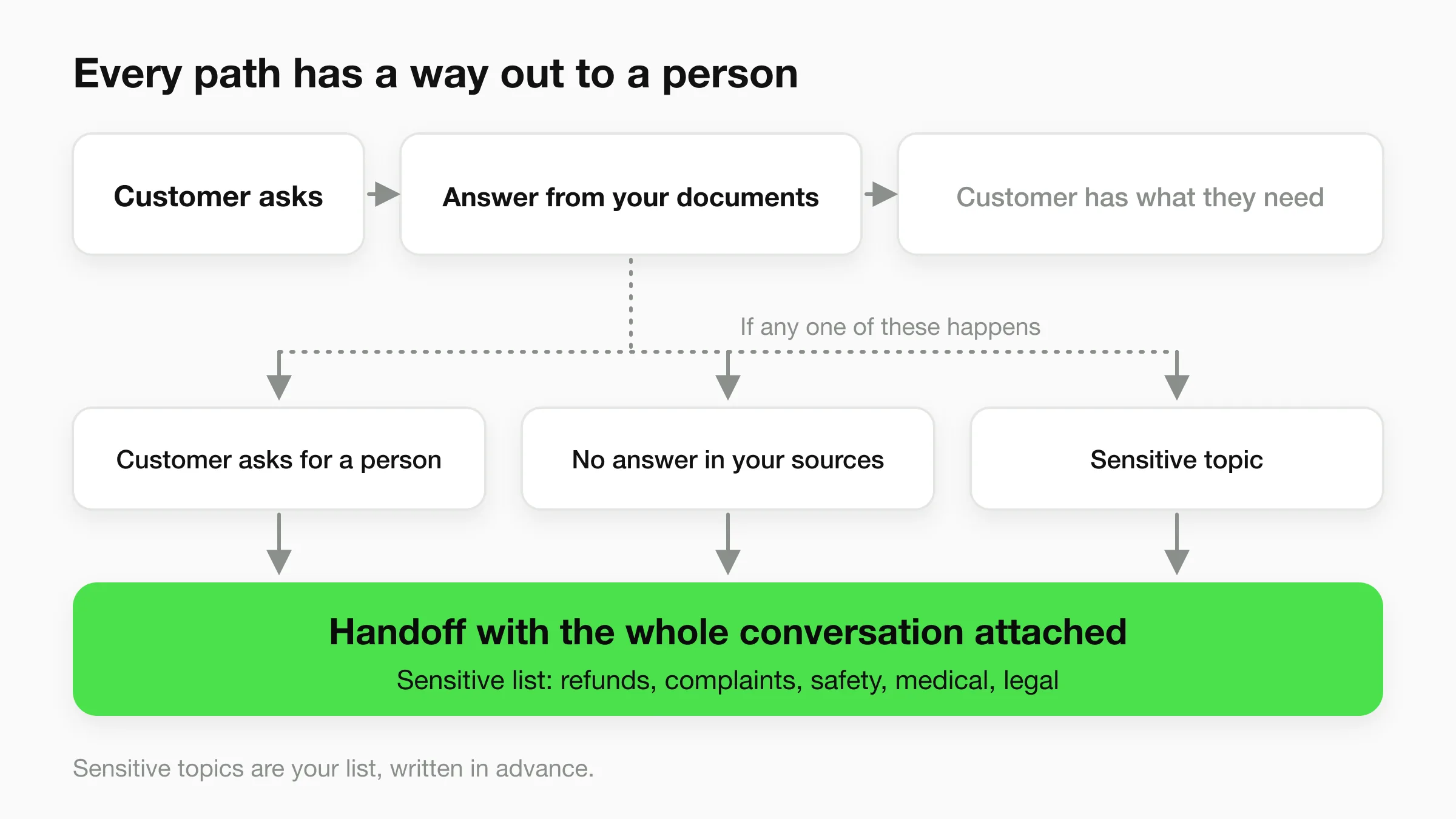
Every self-service path needs a visible, working exit to a person. That exit is what separates self-service customers trust from self-service they resent. Gartner found that 45% of customers who started in self-service felt the company did not understand what they were trying to do. A missing exit makes that feeling worse.
The rules for a good exit are short.
- Make it visible from the first screen. Put "talk to a person" in the welcome message, not buried in a menu.
- Never loop. If the agent cannot answer, it says so once and offers the exit. Repeating "please rephrase" three times is a dead end.
- Define the triggers in advance. The customer asks for a person, the agent has no answer in your documents, or the topic is on your sensitive list: refunds, complaints, safety, anything medical or legal. Write these down rather than leaving them to the agent's judgment.
- Pass the context. The person who picks up sees the whole conversation, so the customer never repeats the question.
- Say what happens next, honestly. "Our team replies within one business day" only works if it is true. If nobody is on after hours, say so and capture contact details for the morning.
- Treat emergencies differently. A gas leak or a medical emergency should not wait in a queue. Give those a clear message and an immediate alert to whoever is on call.
For the operating detail, chatbot to human handoff best practices goes through triggers, routing and what to send with the handoff.
What this looks like in Hyperleap. On Pro and Max, visitors can ask for a person, your team is alerted in Studio, and any teammate can take over a live conversation, including on WhatsApp, Instagram DM and Facebook Messenger, then hand it back to the AI. The AI can also be paused for a contact on the social channels. On Plus, there is no live takeover. Use the fallback message to tell customers how to reach you, and have the agent collect contact details so your team can follow up from the unified inbox.
How to measure customer self-service
Measure whether customers got what they came for, not whether they used the tool. A page view or a chat opened tells you nothing about resolution. Five measures are enough for a small business.
| Measure | How to compute it | What it tells you |
|---|---|---|
| Self-service resolution rate | Self-service conversations where the customer did not contact you again about it within 7 days, divided by all self-service conversations | Whether answers actually solved the problem |
| Contact rate | Messages that reach a person, per 100 customers, orders or bookings | Whether the load on your team is falling as you add answers |
| Escape rate | Conversations handed to a person, divided by all conversations | Whether the exit is working; zero often means the exit is hidden |
| Repeat contact | Customers who ask the same thing twice within 7 days | Answers that look complete but are not |
| Unanswered questions | Count of questions with no answer in your sources, grouped by theme | The next articles or FAQs to write |
Two cautions about reading these.
A rising resolution rate can be a customer giving up. An abandoned chat looks the same as a solved one unless you check for a repeat contact, which is why the rate above includes the seven-day follow-up. What is ticket deflection explains this problem and how deflection differs from containment.
Escape rate has no good value on its own. A high rate means missing answers or overly broad triggers. A rate near zero may mean customers cannot find the exit. Watch the trend and read a sample each week.
The AI chatbot KPI guide covers a wider set of measures.
A 20-minute weekly review
Once a week, read 10 conversations that went to a person and 10 that did not. For the first set, note the missing answer or wrong trigger. For the second, check the answer was right. Then add the top one or two unanswered questions to your sources and re-read any answer past its review date.
In Hyperleap, the conversation log shows which attached sources an answer drew on, which speeds up the second check. The log is for you; customers do not see citations in their chat.
Common customer self-service mistakes
These are the mistakes that most often turn self-service into a dead end. Most are cheap to fix.
- The dead-end bot. It answers a few scripted questions, then repeats itself or shows a menu with no way out. Give it a visible exit on every screen and a rule that two misses trigger a handoff offer.
- Stale articles. A last year's price, a policy that changed in spring, a phone number that no longer rings. A wrong answer on your own site is worse than no answer. Use owners, review dates and the weekly check.
- Your vocabulary, not theirs. "Service tiers" when customers say "how much." Use the customer's words as headings.
- Automating the wrong questions. Complaints, exception refunds and safety topics belong on your sensitive list, routed straight to a person.
- No owner, or building before counting. Everyone assumes someone else updates the answers, and 60 articles get written for questions nobody asks. Count first, then assign a name to each answer.
- Measuring usage. Chat opens and page views can climb while repeat contacts climb too. Track resolution with the seven-day follow-up.
Where an AI front desk fits as self-service
An AI front desk is self-service in the "ask it" form: the customer types a question in their own words and gets an answer drawn from your documents. That addresses the findability problem Gartner found behind 43% of failed journeys, because the customer does not need to know where the answer lives. In Hyperleap:
- It answers from your material. You attach your website, PDFs, Word documents, text and FAQ pairs as sources. Answers are designed to stay within them, with a fallback message you write for what it cannot answer. Knowledge base best practices for AI chatbots covers how to prepare those sources.
- It covers four channels. The same agent answers on your website chat, WhatsApp, Instagram DM and Facebook Messenger. Hyperleap AI is a Meta Technology Provider and Business Partner, and those three channels run on Meta's official Business APIs.
- It answers in 100+ languages.
- It hands off. On Pro and Max, visitors can ask for a person and a teammate can take over live. On Plus, it captures contact details for follow-up.
- It is quick to start. Paste your website and Studio reads it. A live FAQ-and-pricing agent takes under 5 minutes, followed by the weekly review above.
Plans are $40/month (Plus), $100/month (Pro) and $200/month (Max), with a 7-day free trial and a card required. Pricing lists what each includes.
Hyperleap does not replace a status page, a community forum, a video library or a customer-account portal. It sits in front of them and answers questions about them. See the customer support chatbot page for the full workflow and the AI front desk overview for the broader product.
A simple order of operations
Write a 15-answer FAQ page first, because a good source makes any tool better. Add an AI agent second, using that FAQ as its first source. Add help articles only for themes your unanswered-questions list keeps surfacing, and a portal or video when the counts justify the work.
Data sources
- Gartner, Survey Finds Only 14% of Customer Service Issues Are Fully Resolved in Self-Service, August 2024.
- CX Today, Only 1 in 7 Customer Service Queries Resolved with Self-Service, August 2024.
- Dixon et al., Kick-Ass Customer Service, Harvard Business Review, 2017.
- The salon example and its message counts are fictional.
Frequently Asked Questions
What is customer self-service?
Customer self-service is any resource or tool that lets customers get an answer or complete a task without contacting your staff. Common forms are FAQ pages, help center articles, AI chat agents, customer portals, community forums, status pages and video tutorials.
What are examples of customer self-service?
An FAQ page with your hours and prices, a help article explaining returns, an order-tracking page, a booking link, an AI agent answering questions on your website or WhatsApp, and an assembly video are all self-service. The right choice depends on which questions customers repeat most.
What is a customer self-service portal?
A customer self-service portal is a logged-in area where customers manage their own account: view orders, change bookings, download invoices. Many small businesses already have one inside their booking, store or billing tool. A portal handles tasks and an AI agent handles questions, so they work well together.
How do I choose which questions to put in self-service?
Collect 30 to 60 days of real customer messages, tag each with a theme, count them and sort. Automate themes that are frequent and have the same answer for every customer, such as hours, prices and policies. Keep complaints, exceptions and anything high-stakes with a person.
Will self-service replace my support team?
No. Self-service removes repetitive questions so your team can spend time on the ones that need judgment. Gartner's 2024 survey found only 14% of issues were fully resolved in self-service, so a clear route to a person belongs in any design.
How do I measure whether customer self-service is working?
Track resolution rate with a seven-day check for repeat contact, contact rate per 100 customers or orders, escape rate to a human, and questions with no answer in your sources. Review a sample of conversations weekly. Page views and chats opened do not show resolution.
Does Hyperleap include human handoff?
Human handoff and live takeover are included on Pro and Max. Visitors can ask for a person, your team is alerted in Studio, and a teammate can take over a live conversation on any of the four channels and hand it back to the AI. On Plus, the agent can collect contact details so your team follows up.
Give your customers answers at any hour
Start with your FAQs and website. Your AI front desk answers on your website, WhatsApp, Instagram DMs and Facebook Messenger, and Pro and Max teams can step in live. Plans from $40/month.
Start for freeIndustry Solutions
See how AI chatbots work for these industries:
Related Articles
View all
Guide19 min read
Customer Service Metrics: 13 Defined, 6 to Start With
The customer service metrics that matter for a small business: definitions, formulas, what to track, what to skip, and a simple weekly scorecard.
Guide19 min read
Customer Service Skills: 14 That Matter, With Examples
The 14 customer service skills a small business needs, each with a plain definition, a weak vs better reply, and a way to train it in a small team.
Guide13 min read
Customer Success vs Customer Support: The Real Difference
Customer success vs customer support: support fixes problems when asked, success prevents them. Compare goals and metrics, and see how small teams do both.
Guide17 min read
Customer Support Channels: 11 Options Compared (2026)
Compare 11 customer support channels by speed, staffing cost and automation, then pick the 2 to 4 that fit where your customers already are.