Build your AI front desk with a no-code agent builder
Paste your website address and Hyperleap Studio drafts an agent that answers, qualifies, and books your customers. Tune it, test it, then publish it on your website, WhatsApp, Instagram, and Messenger.
Quick Answer
An AI agent builder lets you create an AI agent without writing the agent yourself. Hyperleap is built for the agent your customers talk to: it reads your site, follows your rules, qualifies leads, books appointments, and runs on four channels. The quick start takes under 5 minutes, and plans start at $40/month with a 7-day free trial.
Scope
What a customer-facing agent builder needs
Most “agent builder” tools are made for internal work: moving data, drafting documents, running back-office tasks. A customer-facing agent has a different job. It talks to people who are not on your team, so it needs rules, a way to hand over, and a way to be tested before it goes live.
Use this list to judge any builder, ours included. A builder that cannot do the first six has not been built for this job.
| The agent needs | Why | In Hyperleap Studio |
|---|---|---|
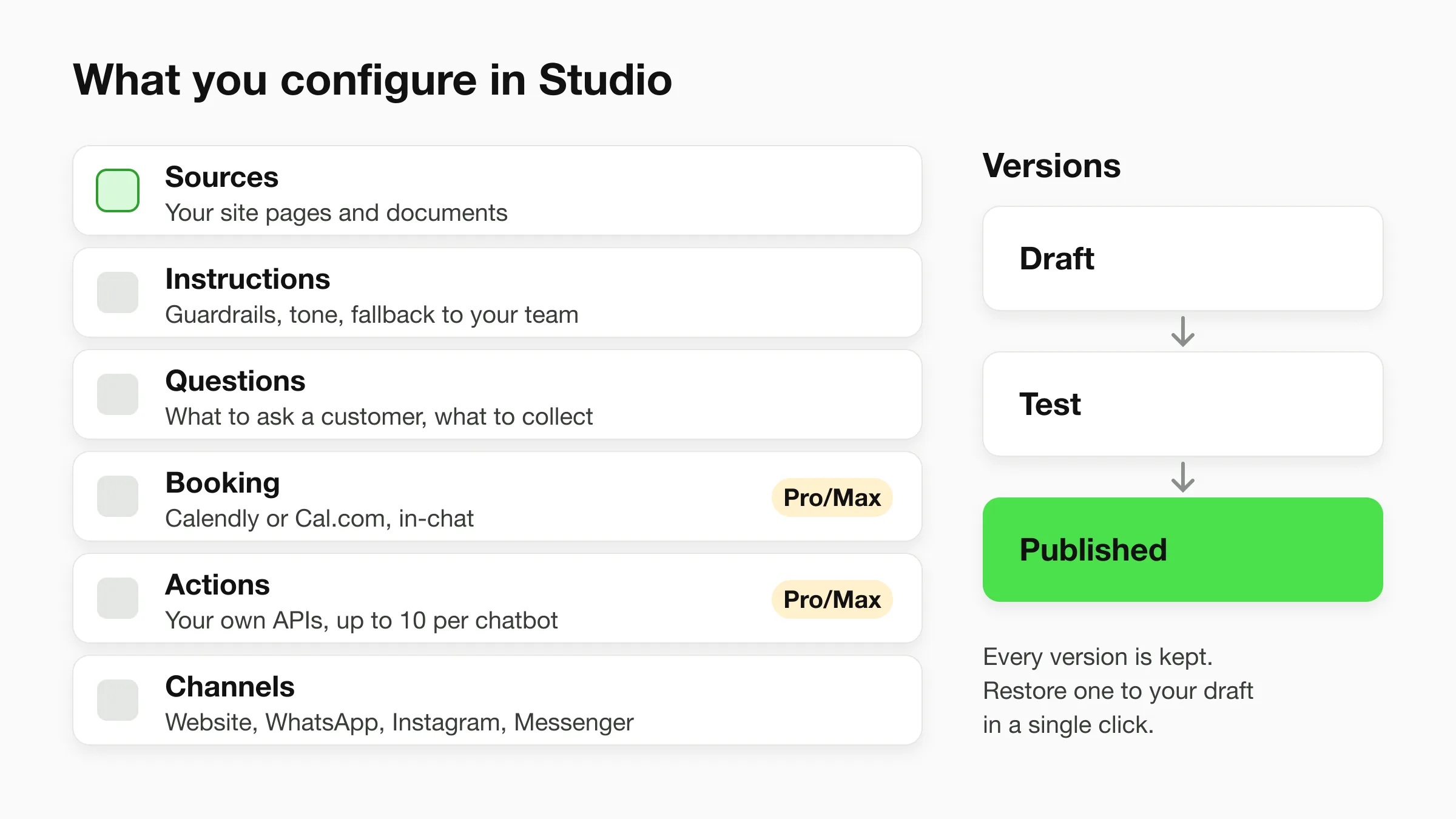
| Reads your business content | Answers come from your pages and documents, not general knowledge. | Paste a URL, then add PDFs, FAQs, and policy files as sources |
| Guardrails and a fallback | The agent needs to know what is out of scope and who to hand over to. | Written instructions, including what to say when it cannot help |
| Qualifying questions | Your team gets a lead with the answers it needs, not a bare email address. | Questions to ask and contact details to collect |
| Booking | A customer who is ready should be able to pick a time in the chat. | Calendly or Cal.com (Pro and Max); Plus shares your booking link |
| Access to your systems | Order status and stock live in your software, not in a PDF. | Actions that call your APIs (Pro and Max, up to 10 per chatbot) |
| Testing before customers see it | A changed instruction can break a good answer. | Draft, test in a preview, then publish |
| A way back | Someone will make a bad edit eventually. | Every published version kept, restore to draft in one click |
| The channels customers use | Customers write wherever they already are. | Website, WhatsApp, Instagram DM, and Facebook Messenger |
Build
How to build the agent in Hyperleap Studio
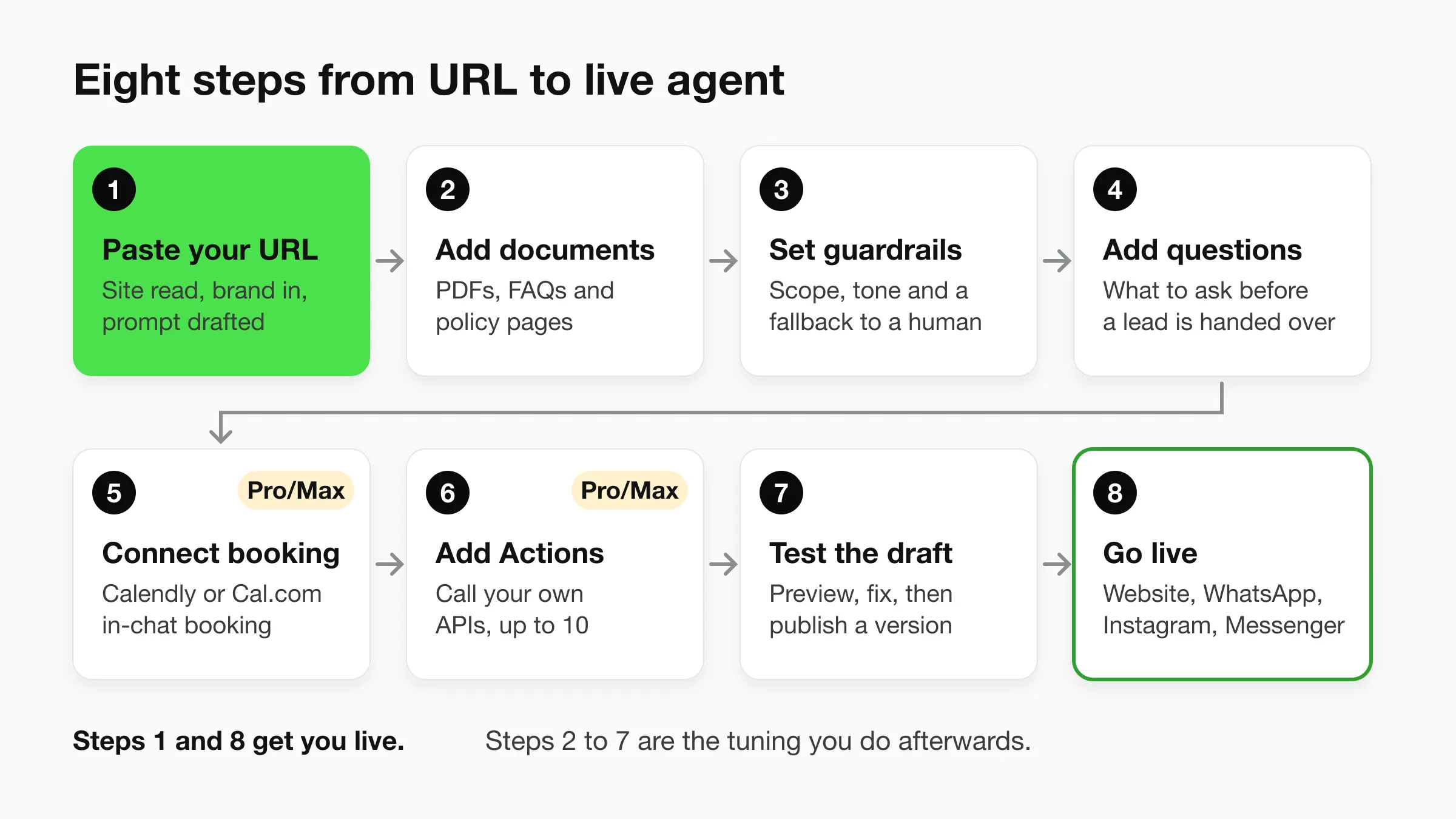
You can be live in under 5 minutes. Paste your website address and Studio reads the site, imports your branding, detects your industry, and drafts a starting prompt. Add one script tag to your site and the agent is running. Everything between those two steps is tuning you do afterwards, in this order.
1. Paste your URL
The agent starts from your own site. Studio crawls it, takes your colors and logo, picks the closest industry, and writes a first version of the instructions. Read that draft. It is a starting point, and it already knows your services and tone.
2. Add documents
Upload what a website does not say well: price lists, policy PDFs, intake FAQs, service terms. The agent answers from these sources, and the conversation log shows which source each answer used, so a wrong answer points you to the file to fix. For the mechanics, see the knowledge base chatbot page.
3. Write guardrails and a fallback
Instructions are plain text. Say what the agent covers, what it never answers (a clinic agent routes emergencies to your team rather than assessing them), and what it says when it does not know: share your contact details and offer to pass the question on. On Pro and Max, visitors can ask for a person and your team can take over a live conversation.
4. Add qualifying questions
Decide what your team needs before it replies. A roofing company might ask the address and the kind of damage. A salon might ask which service and which stylist. On the website the chat can collect contact details with a short form; on WhatsApp, Instagram, and Messenger the contact comes from the platform.
5. Connect booking (Pro and Max)
Connect Calendly or Cal.com and the agent reads live availability, offers real open times, and books in the conversation. In-chat booking with Calendly needs the Standard plan or higher, and the agent creates new bookings only: customers cancel or reschedule from their confirmation email. On Plus, the agent shares your booking link instead.
6. Add Actions that call your APIs (Pro and Max)
When an answer lives in your own software, an Action lets the agent call your HTTPS API mid-conversation: look up an order, check stock, or submit a request. You can add up to 10 Actions per chatbot, set them up with a guided form, and test each one as a draft before it goes live. See Actions for the full setup.
7. Test the draft, then publish
Edits save as a draft and do not touch the live agent. Ask it the ten questions your customers ask most, including the awkward ones, and adjust. When it answers the way you want, publish. Every published version is kept with a section-by-section view of what changed, and you can restore an earlier one to your draft. See how version history works.
8. Go live on four channels
Add the script tag to your website, or connect WhatsApp, Instagram DM, and Facebook Messenger. One agent and one knowledge base sit behind all four, and every conversation lands in one inbox in Studio. WhatsApp, Instagram, and Messenger run on Meta's official Business APIs, and Hyperleap AI is a Meta Technology Provider and Business Partner. See channels.
Which model runs the agent
GPT-6 Luna (the default) and Claude Haiku 5.5 are included on every plan, and each reply counts as one response, so there is no model-credit math to do. If you want to use your own account with a provider, you can add your own OpenAI or Anthropic API key on any plan.
Compare
Three kinds of agent builder, and which one you need
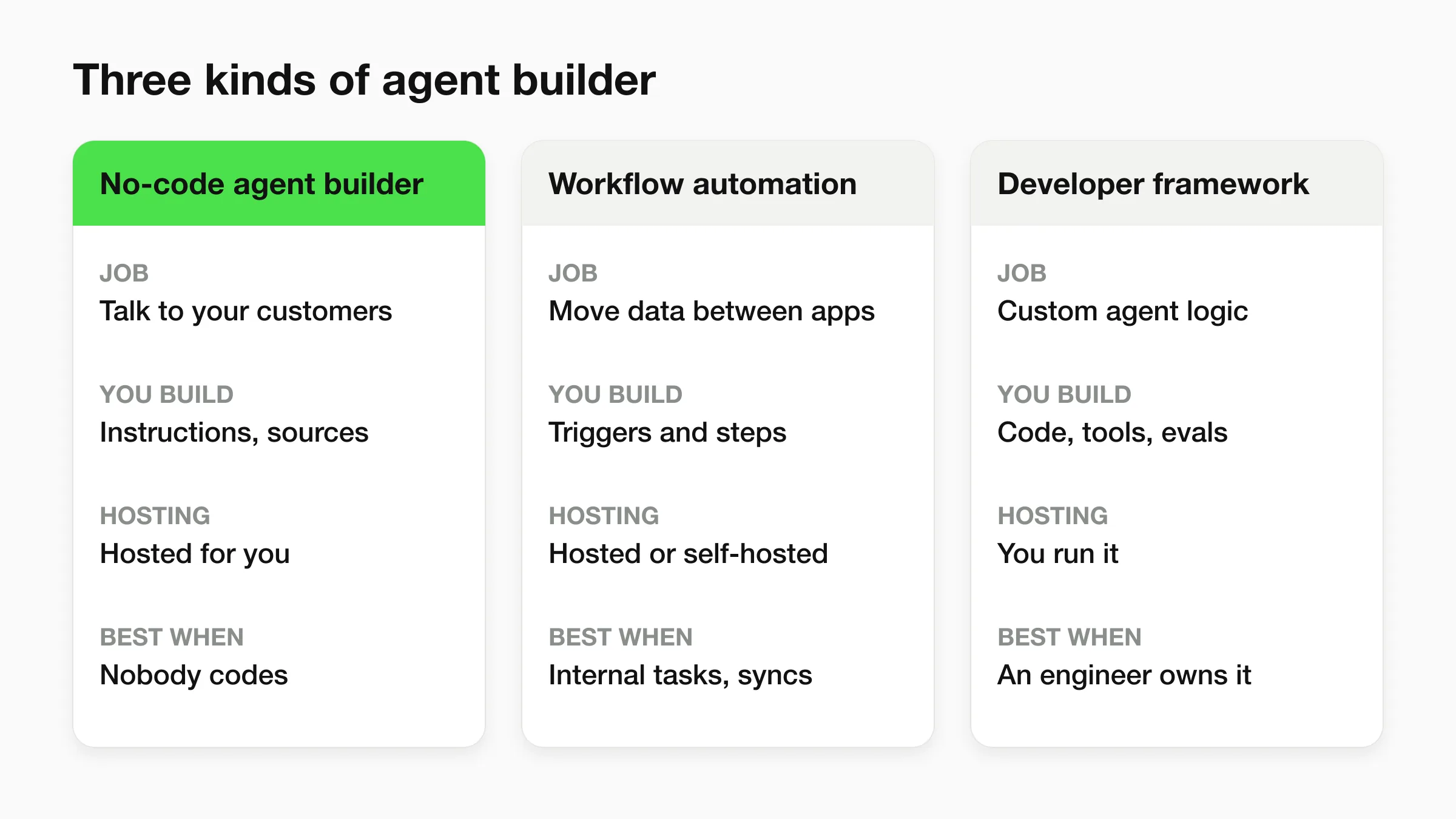
Pick by who the agent talks to and who maintains it. If it talks to your customers and nobody on the team writes code, use a no-code customer agent builder. If it moves data between your own apps, use workflow automation. If an engineer will build and run it, use a developer framework.
When a developer framework fits better
Frameworks such as LangChain and the OpenAI Agents SDK give an engineer full control over how an agent reasons, which tools it uses, and how it is evaluated. Choose one when you need logic a chat agent does not offer, when the agent is part of your own product, or when you want to own the hosting and the data path. The cost is that you build and run everything around the model: channels, a place for your team to read conversations, human handoff, and versioning.
When a general builder fits better
Workflow tools in the Zapier and n8n family are the better choice when the work is internal: when a form is submitted, update the spreadsheet, notify the team, create the invoice. They connect many apps. They are not built to hold a customer conversation across WhatsApp and Instagram, follow guardrails, or book appointments. Many teams use both, with Hyperleap talking to customers and a workflow tool handling what happens afterwards through webhooks on Pro and Max.
For a side-by-side of no-code chatbot tools, read best no-code chatbot builders in 2026. If you only want the three-step version of this page, see the no-code chatbot builder overview.
Pricing
What building an agent costs
Plans start at $40 a month, and every plan includes a 7-day free trial, all four channels, and both included models. There is no free plan, and a credit card is required to start the trial.
| Plan | Price | AI responses | Chatbots | Booking and Actions |
|---|---|---|---|---|
| Plus | $40/mo | 3,000 | 1 | Shares your booking link |
| Pro | $100/mo | 12,000 | 2 | Booking, Actions, human handoff, webhooks |
| Max | $200/mo | 30,000 | 5 | Everything in Pro, more capacity |
Annual billing saves up to 40%. Extra chatbots are $40/month each. Customers pay Meta's WhatsApp fees directly, separate from the plan. Full pricing.
FAQ
Frequently asked questions
What is an AI agent builder?
Can I build an AI agent without coding?
How long does it take to build an AI agent?
Which AI models can my agent use?
Can the agent connect to my own systems?
When should I use LangChain or the OpenAI Agents SDK instead?
Related
Keep exploring
- AI agents: what a Hyperleap agent does day to day.
- Features: the full list of what Studio includes.
- AI front desk: the outcome the agent is built for.
- Hyperleap MCP: ask Claude or ChatGPT about your leads, on every paid plan.
- How to build an AI chatbot with no code: the step-by-step guide.
- How to build an AI chatbot for your business: planning before you build.
- Customer support chatbot: deflect repeat questions, route the rest.
- AI agents for dental practices: an industry example.
Paste your URL and see your first draft
Studio reads your site and drafts the agent. You tune it, test it, and publish when it answers the way you want.
7-day free trial on all plans. Card required. Cancel anytime.