Guide
25 AI Agent Use Cases for Small Business (2026)
25 AI agent use cases for small and mid-size businesses, each with what it needs, its risk and a readiness score, plus a value-and-risk matrix to pick first.

Gopi Krishna Lakkepuram · Founder & CEO
· 20 min read
TL;DR: The AI agent use cases that work for a small business today share three traits. The answer is already written down, a mistake is cheap to undo, and a person can check the result in under a minute. This guide lists 25 AI agent use cases across seven business functions, scores each one for readiness and risk, and marks the 11 where Hyperleap does the job today. The other 14 are outside what Hyperleap does, and we say so.
Most lists of AI agent examples read like a brochure. Every function gets "automate X", and nothing says what the agent needs or what happens when it is wrong. That gap is expensive. Gartner predicts that over 40% of agentic AI projects will be canceled by the end of 2027, citing rising costs, unclear business value and inadequate risk controls. Picking the wrong first use case is how a small business ends up in that 40%.
How to read this guide
Each use case has four parts: what the agent does, what it needs (data, tools, permissions), a risk level, and a readiness score from 0 to 4. A tag tells you whether Hyperleap runs it today. For a definition first, read our getting started guide to AI agents. For support only, the AI customer service agents guide covers whether to deploy at all. This post is the catalogue across the whole business.
What is an AI agent use case?
An AI agent use case is a repeatable job where software reads a request, uses the data and tools you have given it, and takes the next step toward finishing the job, inside limits a person sets. Answering a pricing question from your documents is a use case. So is drafting a reply to a one-star review for a person to approve.
A scripted bot follows a fixed path. An agent decides which of your documents or tools to use for the question in front of it. Our piece on AI agents vs chatbots covers that difference in detail, and the AI agents overview shows how Hyperleap builds them.
How we score readiness, risk and value
Every use case below gets a readiness score, a risk level and a value rating. All three are our editorial judgment for a typical business with fewer than 50 people. They are not measurements, and yours will differ. Use them to compare options, not as a forecast.
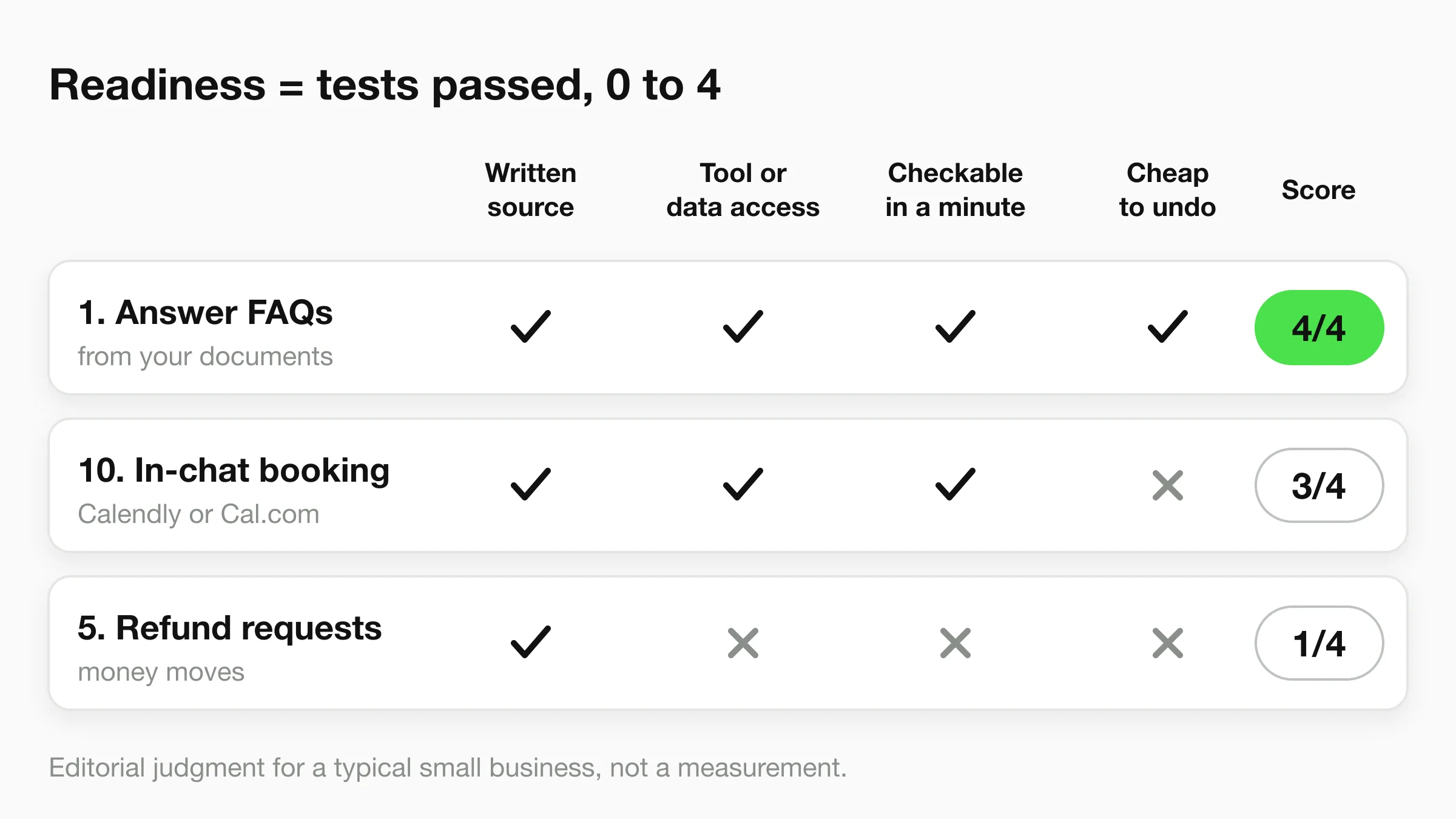
Readiness (0 to 4) counts how many of four yes/no tests the use case passes:
- Written source of truth. The answer or the rule exists in a document, a calendar or a system, not only in someone's head.
- Tool or data access. Whatever the agent must read or change has an API or standard connection, or needs none.
- Checkable in a minute. A person can look at the result and know whether it is right.
- Cheap to undo. A wrong result can be corrected without lasting damage, such as money gone or a public post.
Risk describes what happens when the agent is wrong. Low means the error is caught or corrected in the next message and nothing leaves the building. Medium means a customer sees wrong information or a record in your systems is wrong, and a person can fix it. High means money, legal exposure or a public post that is hard to take back.
Value is High when the use case touches revenue or saves hours every week, and Moderate otherwise.
Customer service AI agent use cases
Customer service is where most small businesses start, because the questions repeat and the answers already exist in your documents. These five range from the safest use case in this guide to one of the riskiest.
1. Answer questions from your own documents
Hyperleap runs this today, on every plan, on Website, WhatsApp, Instagram DM and Messenger.
The agent answers hours, prices, policies, service areas and how-to questions from the documents and web pages you attach, and hands over when it does not know. A physiotherapy clinic can answer "do you take walk-ins?" the moment someone asks. Needs: a knowledge base you keep current. Risk: Low. Readiness: 4 of 4. Value: High.
2. Look up order, booking or account status
Hyperleap runs this today with Actions, on Pro and Max.
The agent calls your own HTTPS API during the conversation to fetch order status, stock or account details, or to submit a request. It connects to your API. It is not a native integration with your shop or field-service software, and each chatbot can have up to 10 Actions. Needs: an API you can point it at, plus authentication. Risk: Medium, because it shows customer-specific data. Start with read-only lookups. Readiness: 3 of 4. Value: High.
3. Hand over to a person with the context attached
Hyperleap runs this today, on Pro and Max.
Visitors can ask for a person, and your team is alerted in Studio. Any teammate can take over a live conversation, including on WhatsApp, Instagram and Messenger, and hand it back to the AI afterwards. Our guide to chatbot-to-human handoff covers what to pass along. Needs: someone watching Studio during your hours, and a written rule for what escalates. Risk: Low. Readiness: 4 of 4. Value: High.
4. Answer in the customer's language
Hyperleap runs this today, on every plan, in 100+ languages.
A customer writes in Spanish, and the agent replies in Spanish from a knowledge base written in one language. Needs: your documents in one language, plus someone who can spot-check replies in the languages your team cannot read. Risk: Medium, because you cannot easily review what you cannot read. Readiness: 3 of 4. Value: Moderate.
5. Handle complaints and refund requests
Outside Hyperleap. Hyperleap can collect the details and route the customer to your team, but it does not process payments or issue refunds.
An agent built for this collects the order number, the reason and any photos, drafts a recommended outcome, and issues the refund only after a person approves. Needs: payment-system access, a refund policy in writing and an approval step. Risk: High. Readiness: 1 of 4. Value: Moderate. Draft the outcome with an agent. Keep the money decision human.
Sales AI agent use cases
Sales agents earn their keep in the first minutes after someone shows interest, and in the notes nobody has time to write.
6. Qualify enquiries with a short conversation
Hyperleap runs this today, on every plan.
The agent asks what you would ask on the phone: the service needed, timeline, budget range, location. It captures the contact details and the answers, shows the conversation in a unified inbox, and lets you export leads as CSV or Excel. Qualification here means asking questions and summarising, not scoring leads. On website chat, a short contact form is optional, and OTP verification is a paid add-on on Pro and Max (website chat only). Our lead qualification guide has question sets. Needs: the three to five questions that decide whether a lead fits. Risk: Low. Readiness: 4 of 4. Value: High.
7. Brief the sales team after every conversation
Hyperleap runs this today with Agentic Workflow, on Pro and Max.
When a conversation ends, an AI step follows your instructions and emails the right people. An instruction might read "email the sales team a brief on every enquiry that asked for a quote." It sends email to your internal contacts only. Needs: written instructions and a list of who gets which brief. Risk: Low. Readiness: 4 of 4. Value: Moderate.
8. Push new leads into your CRM
Hyperleap covers part of this. Hyperleap sends webhook events (lead captured, conversation started, new message, new AI reply, appointment booked) on Pro and Max, and has a full REST API. You or your integration layer build the receiving side.
A script, a workflow tool or your CRM's inbound webhook creates the record. Needs: a CRM that accepts inbound data and a decision on field mapping and duplicates. Risk: Medium, because duplicates and wrong owners cost real follow-up time. Readiness: 3 of 4. Value: Moderate.
9. Research prospects and draft outbound emails
Outside Hyperleap.
The agent reads a prospect's website, finds one specific thing worth mentioning and drafts a short first email for a person to approve. Needs: a lead list, a sending domain in good standing and a clear opt-out process. Risk: Medium, because sender reputation and anti-spam rules apply. Readiness: 2 of 4. Value: Moderate.
Scheduling AI agent use cases
Scheduling looks simple until you list the edge cases. These three show where automation stops being safe.
10. Book appointments inside the chat
Hyperleap runs this today, on Pro and Max, with Calendly and Cal.com.
The agent reads live availability, offers real open times and creates the booking in the conversation. The customer gets the calendar invite by email. In-chat booking needs Calendly Standard or higher, and Cal.com works with Cal.com-hosted event links. On Plus, and for any other scheduler, the agent shares your booking link instead. It creates new bookings only: changes go through the customer's confirmation email. A dental clinic is a typical fit, and the dental agents page shows that setup. Needs: a Calendly or Cal.com account with real availability. Risk: Medium, because a wrong event type means a wrong appointment. Readiness: 3 of 4. Value: High.
11. Send reminders and chase no-shows
Outside Hyperleap. Hyperleap does not send reminders or no-show follow-ups.
An agent reads tomorrow's appointments, sends a reminder on a channel the customer agreed to, and follows up with anyone who did not show. Needs: calendar data, a permitted messaging channel and recorded consent. Risk: Medium, because a sent message cannot be recalled. Readiness: 3 of 4. Value: High for appointment businesses.
12. Reschedule, cancel and fill the gap
Outside Hyperleap. Hyperleap creates new bookings only.
When a customer cancels, the agent finds a new slot, then offers the freed one to people on a waitlist. Needs: write access to the calendar, a waitlist and your rules on notice and fees. Risk: Medium. Readiness: 2 of 4. Value: Moderate.
Marketing AI agent use cases
Marketing agents mostly draft. Anything that publishes without a person looking is where small teams get hurt.
13. Draft and repurpose content
Outside Hyperleap.
The agent turns one long piece into a newsletter and three social posts, in your voice. Needs: brand voice notes, a list of claims you can and cannot make, and a person who edits. Risk: Medium, because agents invent facts and published content stays published. Readiness: 3 of 4. Value: Moderate.
14. Draft replies to public reviews
Outside Hyperleap.
The agent drafts a reply that names the specific complaint or compliment in a new review. A person approves each one. Needs: access to the review feed, tone rules and an approver. Risk: Medium, because replies are public. Readiness: 3 of 4. Value: Moderate.
15. Summarise campaign results each week
Outside Hyperleap.
The agent reads exports from your ad and analytics accounts and writes a plain-English summary that lists the numbers it used, so you can check them. Needs: read-only access to reports. Risk: Low. Readiness: 3 of 4. Value: Moderate.
16. Turn ad and social DMs into conversations
Hyperleap runs this today, on every plan.
Someone taps a message button from an ad or a profile and lands in Instagram DM or Facebook Messenger. The agent answers straight away, from your documents, instead of leaving the message unread until tomorrow. On Pro and Max, link tracking shows which source or campaign started each conversation. Hyperleap handles direct messages only, not replies to public comments. Needs: your Meta business accounts connected and a current knowledge base. Risk: Low. Readiness: 4 of 4. Value: High.
Operations AI agent use cases
Operations agents touch your systems, so grant the smallest set of permissions that does the job.
17. Suggest stock reorders
Outside Hyperleap.
The agent watches stock levels and sales, then proposes a purchase order for a person to approve. Needs: inventory data, supplier lead times and an approval step. Risk: Medium. A wrong order ties up cash. Readiness: 2 of 4. Value: Moderate. Let it suggest, not order.
18. Turn service requests into tickets
Hyperleap runs this today with Actions, on Pro and Max.
The agent collects the details a job needs (address, problem, urgency, contact) and submits them to your own system through an Action. Deciding who goes where stays with your dispatcher. This fits home services businesses well, where the same five questions open every job. Needs: a system that accepts requests through an HTTPS API and a fixed list of required fields. Risk: Medium, because a bad submission lands in your queue. Readiness: 3 of 4. Value: High.
19. Extract data from documents
Outside Hyperleap.
The agent reads quotes, forms or supplier PDFs and fills a spreadsheet, flagging anything it is unsure about. Needs: sample documents, a destination sheet and a person who checks the flagged rows. Risk: Medium. Readiness: 3 of 4. Value: Moderate.
Internal knowledge AI agent use cases
Internal agents answer to staff, not customers, but the content can be sensitive.
20. Answer staff questions from your SOPs
Outside Hyperleap. Hyperleap's agent is customer-facing, and Slack and Microsoft Teams are Roadmap, not shipped.
A new hire asks how to process a return, and the agent answers from the written procedure. Needs: current procedures and access rules, so payroll documents do not appear in answers to everyone. Risk: Medium, because a wrong policy answer spreads fast. Readiness: 3 of 4. Value: Moderate.
21. Ask questions about your leads and conversations
Hyperleap runs this today with MCP, on every paid plan.
You connect Claude, ChatGPT or Cursor to Hyperleap through a single sign-in, then ask in plain English: "Which leads came in from WhatsApp this week?" or "Summarise what this lead asked for." The connection is read-only, with one exception: when it extracts insights, it saves them to the lead's profile. It cannot send messages or change settings. The MCP page explains the setup. Needs: an assistant that supports MCP and leads already in Hyperleap. Risk: Low. Readiness: 4 of 4. Value: Moderate.
22. Turn meeting notes into tasks
Outside Hyperleap.
The agent reads a transcript or notes, lists the decisions and drafts tasks with owners. Needs: the notes, a task tool and a rule that a person confirms each owner. Risk: Low. Readiness: 3 of 4. Value: Moderate.
Finance and admin AI agent use cases
This function holds the highest-risk use cases in the guide. Money moves, and some mistakes cannot be reversed, so every one of these is a draft-first job.
23. Capture and match invoices
Outside Hyperleap.
The agent reads a supplier invoice, matches it to a purchase order and proposes the account coding. A person approves payment. Needs: accounting-system access, purchase order data and a clear approval rule. Risk: High. Readiness: 2 of 4. Value: High, because the hours add up.
24. Categorise expenses and chase receipts
Outside Hyperleap.
The agent sorts card transactions into your categories and asks staff for missing receipts. Needs: a bank or card feed, your category list and a way to contact staff. Risk: Medium. Readiness: 3 of 4. Value: Moderate.
25. Draft late-payment reminders
Outside Hyperleap.
The agent reads the overdue-invoice report and drafts a reminder with the right tone for how late the payment is. A person approves each one before it goes out. Needs: an aged-receivables report, a tone ladder you have written down and an approver. Risk: High, because tone affects the relationship and collection rules vary by place. Readiness: 2 of 4. Value: Moderate.
Which use cases to start with: the value and risk matrix
Start with high value and low risk, and add risk one step at a time. Plot all 25 on two axes and the order shows.
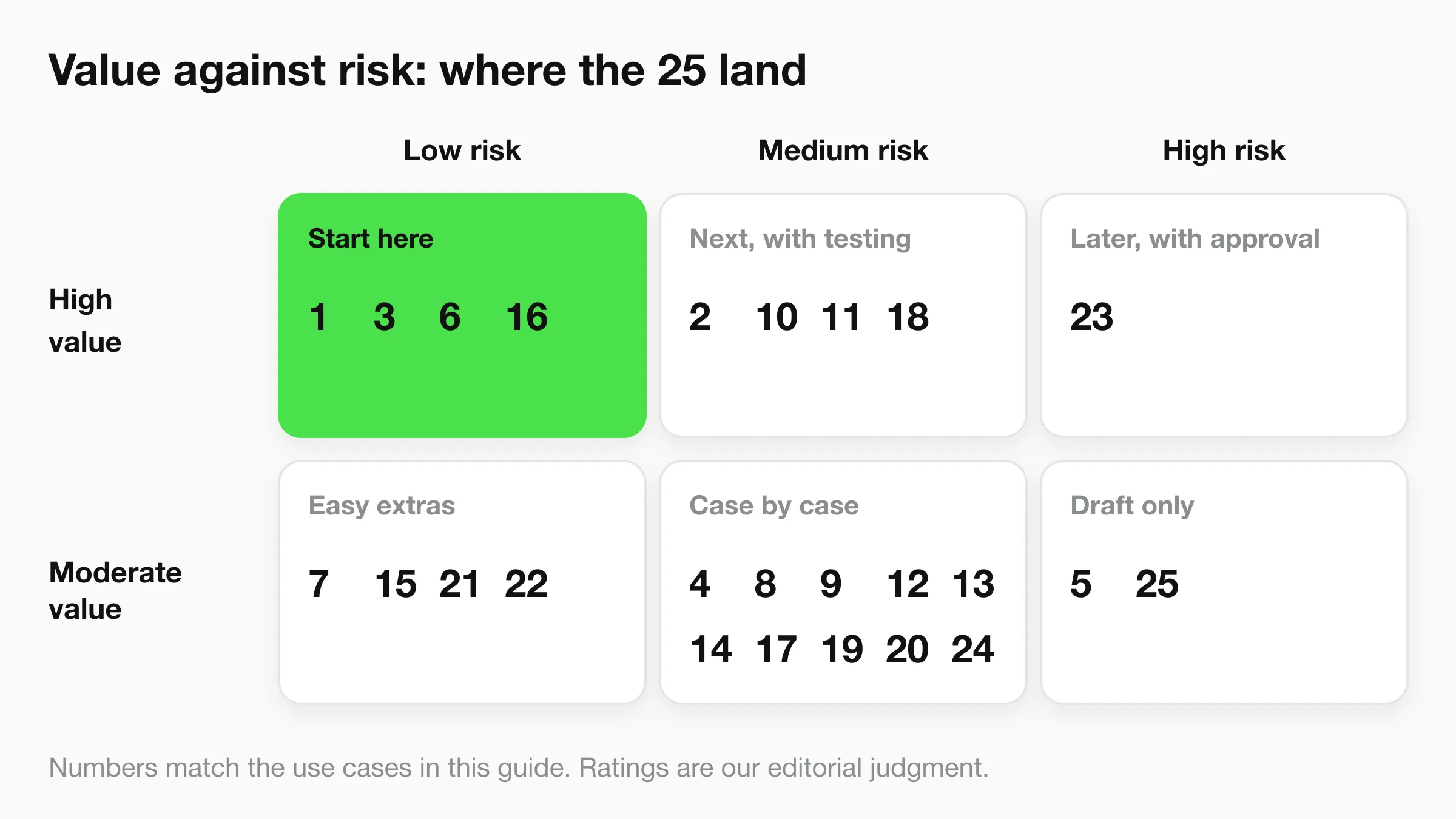
- High value, low risk (1, 3, 6, 16): answers, handoff, qualification and DM replies. Start here. All four need only a current knowledge base and someone watching the inbox.
- High value, medium risk (2, 10, 11, 18): status lookups, booking, reminders and ticket intake. These touch your tools, so add them one at a time.
- High value, high risk (23): invoice matching. Worth doing, with a human approving every payment.
- Moderate value, low risk (7, 15, 21, 22): useful extras that cost little to try.
- Moderate value, medium risk (4, 8, 9, 12, 13, 14, 17, 19, 20, 24): decide case by case. Several become high value in specific businesses, such as multilingual support for a hotel.
- Moderate value, high risk (5, 25): keep these as drafts for a person to approve, or skip them for now.
All four use cases in the starting cell, and three of the four in the next one, are ones Hyperleap runs. Weigh that overlap accordingly: we wrote the scoring and we sell the product. Check the logic against your own business.
Choose how much the agent may do
Decide an autonomy level for every use case before you build it. The level decides how bad a mistake can be.
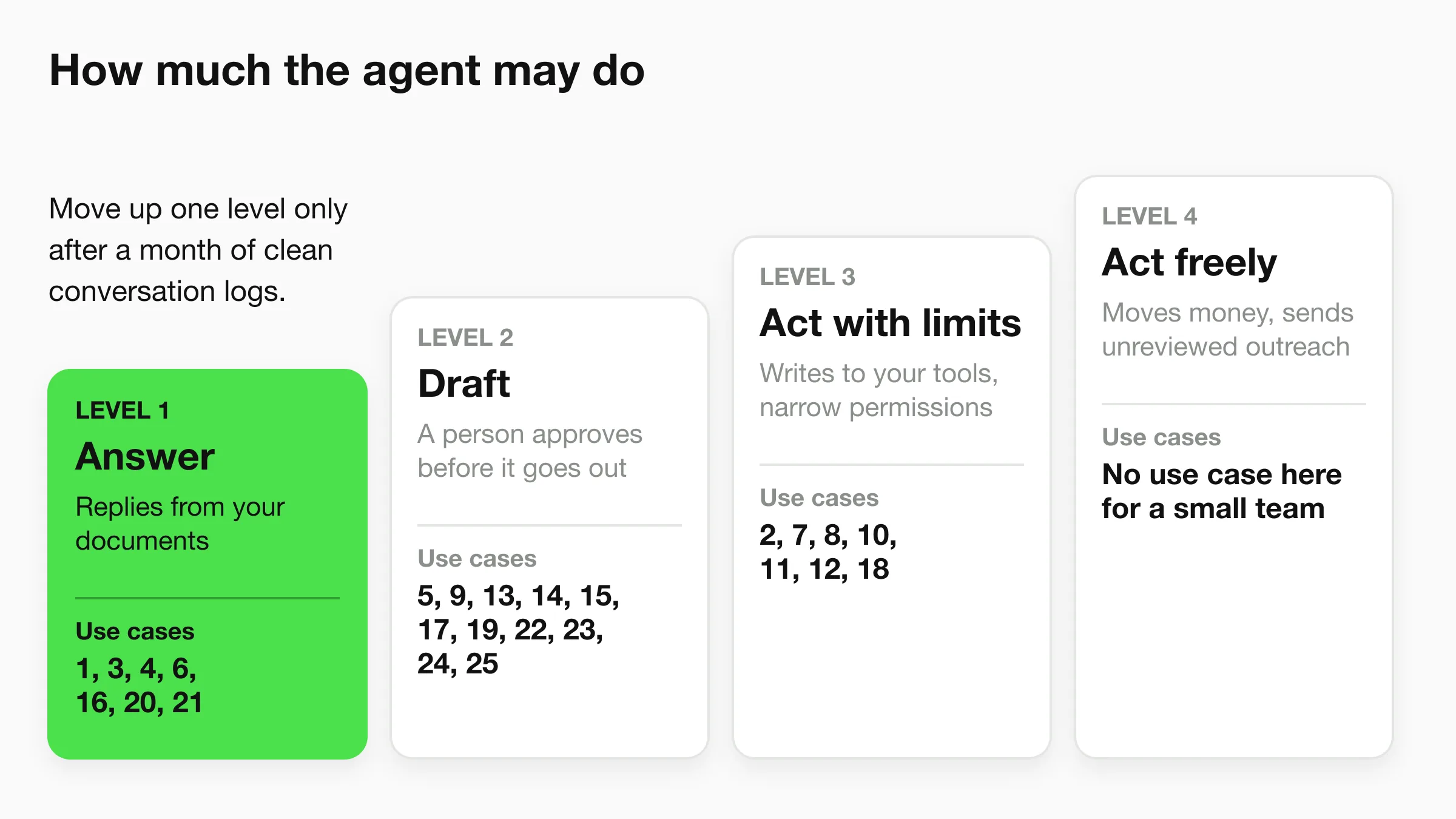
- Answer. The agent replies from your documents and records the conversation.
- Draft. The agent prepares the work and a person approves it before anything goes out.
- Act with limits. The agent writes to your tools with narrow permissions, such as creating a booking or submitting a ticket.
- Act freely. The agent moves money or sends outreach nobody reviewed. We put no use case here for a small team.
Read your conversation logs weekly, and move up a level only after a month of clean logs.
Where Hyperleap fits across the 25
Hyperleap is the AI front desk for small businesses. It covers 11 of the 25 use cases, all customer-facing or lead-facing, and none that sit inside your accounting, inventory or staff tools. Plans are as of November 2026.
| # | Use case | What Hyperleap does | Plan |
|---|---|---|---|
| 1 | Answer from documents | Replies on Website, WhatsApp, Instagram DM, Messenger | All plans |
| 2 | Status lookups | Calls your HTTPS API through Actions | Pro, Max |
| 3 | Handoff with context | Team alert and live takeover in Studio | Pro, Max |
| 4 | Multilingual replies | 100+ languages | All plans |
| 6 | Qualify enquiries | Questions, captured contacts, CSV export | All plans |
| 7 | Brief the sales team | Agentic Workflow emails after a conversation | Pro, Max |
| 8 | Leads to your CRM | Webhooks and REST API (you build the receiving side) | Pro, Max |
| 10 | In-chat booking | Calendly and Cal.com; Plus shares your booking link | Pro, Max |
| 16 | Ad and social DMs | Replies in Instagram DM and Messenger; link tracking | All plans (tracking: Pro, Max) |
| 18 | Service-request tickets | Submits to your API through Actions | Pro, Max |
| 21 | Ask about your leads | MCP, read-only apart from saving extracted insights | All paid plans |
Plans are Plus at $40 a month, Pro at $100 and Max at $200, each with a 7-day free trial and a card required to start. There is no free plan. Native booking, Actions, handoff, webhooks and Agentic Workflow are on Pro and Max. MCP is included on every paid plan.
Things Hyperleap does not do today: it does not send reminders, reschedule or cancel bookings, process payments, or reach customers over SMS or voice (both Roadmap). If your first priority sits in the other 14 use cases, a different tool will serve you better. If it sits in the 11, the AI front desk page shows how they fit together.
Start with the four lowest-risk use cases
Answering, handoff, qualification and DM replies run from one agent. Paste your website address and see it answer from your own pages.
Start for freeA 30-day plan for your first three use cases
- Week 1: write it down. Collect the answers to your 30 most common questions, your prices and your policies in one place. This one task decides whether use case 1 works.
- Week 2: switch on use cases 1 and 6. Go live on your website first, then add the channels customers actually use. Quick-start can read your website and have a first version live in under 5 minutes, and tuning comes afterwards.
- Week 3: read every conversation. Add answers for what the agent could not handle, and set the rule for when it hands over to a person.
- Week 4: add one action. Turn on booking if you use Calendly or Cal.com, or an Action if you have an API. Add only one, and watch it for a week.
A real estate team will weight qualification (6) and booking (10) highest, and a plumber will lean on 18.
Frequently Asked Questions
What are the best AI agent use cases for a small business?
The best starting use cases are answering questions from your own documents, qualifying enquiries, handing over to a person, and replying to social DMs. They score highest on readiness and carry low risk. Add booking and ticket intake once those run cleanly.
How are AI agents different from chatbots?
A chatbot follows a script. An AI agent reads the request, chooses from your documents and tools, and writes a reply or takes a step. Our AI agents vs chatbots comparison goes through the differences in detail.
How much do AI agents cost for a business?
Hyperleap plans cost $40 a month for Plus, $100 for Pro and $200 for Max, with a 7-day free trial and a card required. Agents for finance, inventory or internal tools are priced by whichever product you choose, and cost depends on the tools they connect to.
Which AI agent use cases are too risky for a small business?
Refund processing, invoice payment and late-payment collection carry the highest risk, because money moves or relationships are on the line. Use an agent to draft in those areas and keep a person on the approval.
Do I need a developer to use AI agents?
Not for answering, qualifying and handoff. You attach documents and connect channels in a dashboard. Use cases that call your own systems, such as status lookups, ticket intake or CRM pushes, need someone comfortable reading API documentation.
Data Sources
- Gartner, "Gartner Predicts Over 40% of Agentic AI Projects Will Be Canceled by End of 2027", June 25, 2025
- Hyperleap AI product capabilities and plans, as of November 2026
See which use cases fit your business
Pick one high-value, low-risk use case, put it live this week and read the transcripts before you add the next.
Start for freeIndustry Solutions
See how AI chatbots work for these industries:
Related Articles
View all
Guide19 min read
AI Customer Experience: A Practical Guide for 2026
How AI improves customer experience at each stage of the journey, where it hurts, and a 30-day plan for small businesses to get it right.
Guide20 min read
21 Chatbot Examples for Small Business (With Sample Chats)
21 chatbot examples with sample conversations, grouped by job and by industry, plus a fill-in template to write your own.
Guide24 min read
AI Customer Service Best Practices for 2026
12 AI customer service best practices covering disclosure, escalation design, knowledge base upkeep, weekly KPI review, and PII handling for SMB teams.
Guide19 min read
Benefits of Conversational AI for Business (With Caveats)
The real benefits of conversational AI — 24/7 coverage, speed, cost, scale — with the conditions that make each one true, and where it doesn't hold.