Guide
AI Customer Experience: A Practical Guide for 2026
How AI improves customer experience at each stage of the journey, where it hurts, and a 30-day plan for small businesses to get it right.

Gopi Krishna Lakkepuram · Founder & CEO
· 19 min read
AI customer experience is the way AI shapes every contact a customer has with your business: finding you, asking a question, booking, getting help and coming back. It improves that experience when it answers fast, gets the answer right and hands over to a person cleanly. It damages it when it traps people in a loop, answers wrongly with confidence or hides the human.
Most writing on AI in customer experience targets enterprises with a CX team and a large platform budget. This guide is for a business with a website, a few channels and one person who also answers the messages. It walks the customer journey stage by stage, looks at what customers say they want, covers the failure modes that cost you trust, and ends with a 30-day plan and a short list of numbers to watch.
Key takeaways
- Think in journey stages, not tools. AI helps most at the points where customers wait: the first question, the booking and the after-hours message.
- Customers are wary of AI in service. Gartner found 64% would prefer companies did not use it. The main fear is not reaching a person. Design for that fear.
- Every AI answer needs an exit. A path to a human in one step is the single biggest CX rule.
- Wrong answers are worse than slow answers. Answer from documents you maintain, and say "I'm not sure" when the documents are silent.
- Start small. One channel, 30 questions, a weekly log review. Expand when the numbers hold.
What "AI customer experience" actually covers
AI customer experience (often shortened to AI CX) covers any point where AI changes what a customer sees, hears or waits for. That includes a chat agent on your website, an AI that answers WhatsApp or Instagram DMs, a recommendation on a product page and an AI summary that helps your staff before they call someone back.
It is wider than customer service. AI customer service is the support slice: answering questions and resolving problems. Customer experience starts earlier, when someone is still deciding whether to contact you, and it runs past the resolution, into whether they return.
That wider view changes what you measure. A support team asks, "Did we close the ticket?" A CX view asks, "Did the customer get what they came for, and would they use us again?" Both questions matter. This post concentrates on the second, and leaves day-to-day support operations to the AI customer service best practices guide.
Where AI improves CX across the customer journey
AI improves customer experience most at five stages: discover, ask, buy or book, get help and return. At each one the benefit is the same shape: the customer stops waiting. The risk is also the same shape: the customer gets stuck.
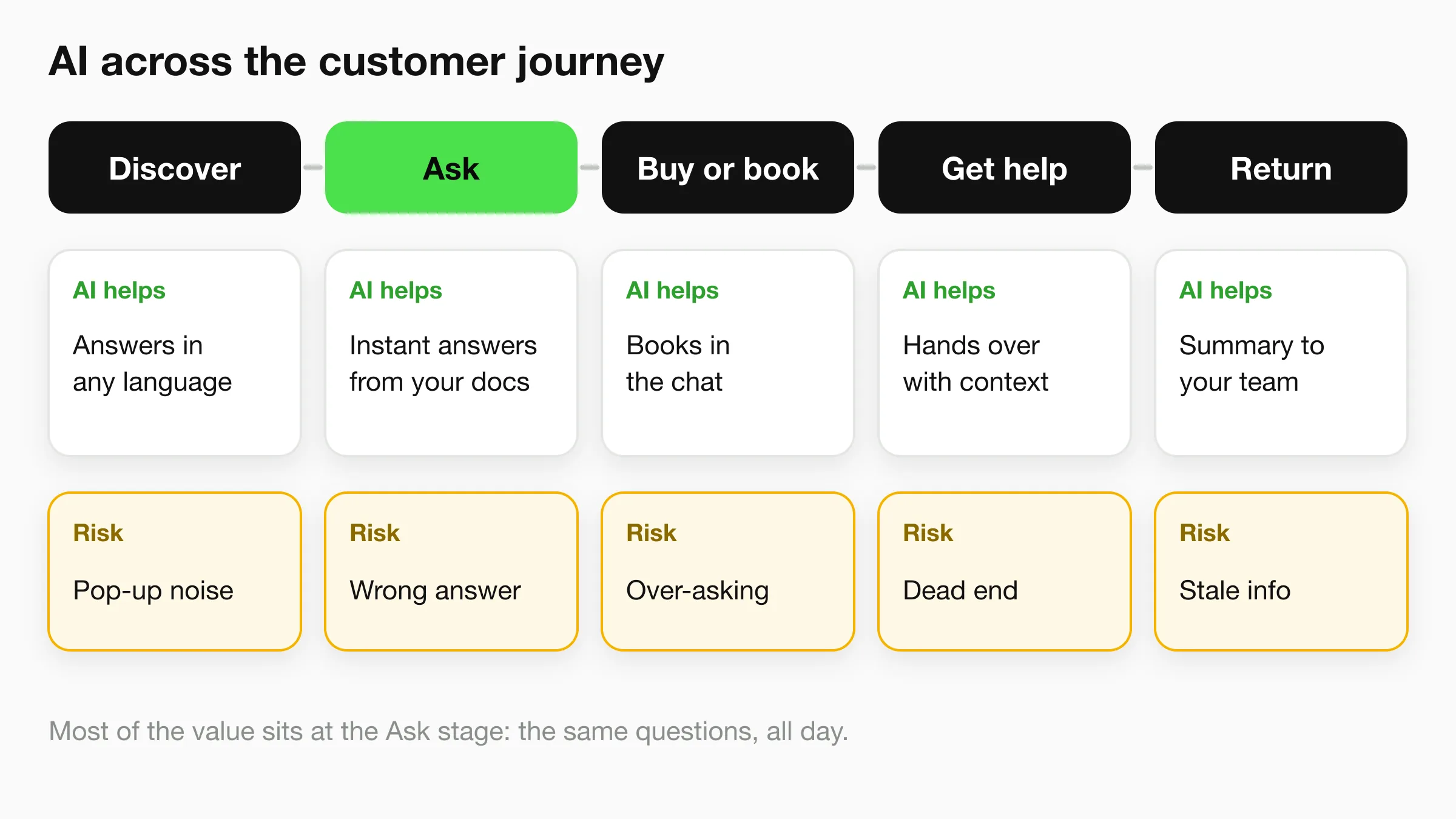
Stage 1: Discover
A visitor lands on your site and has a question that the page does not answer. Perhaps they want to know if you serve their area, whether you take their insurance, or whether the room allows pets. Without help, they leave or send an email and wait.
An AI agent on the site answers in the moment, in the visitor's language. For a small business that sees a mix of visitors, language coverage is a real CX gain: an agent that handles 100+ languages meets a Spanish-speaking customer where they are, without you hiring for it.
The risk at this stage is noise. A chat bubble that pops open over the page and asks "How can I help?" before the visitor has read anything is an interruption, not help. Let it wait, or open it on pages where questions are common, such as pricing and contact.
Stage 2: Ask
This is where most AI CX value sits. Customers ask the same twenty or thirty questions all day: opening hours, prices, what is included, how long it takes, what to bring. An AI agent that answers from your own documents handles those instantly, at any hour.
The quality bar is accuracy. A fast wrong answer on price or policy does more harm than a slow right one. That is why the agent should answer from a knowledge base you control, not from general model memory. The knowledge base best practices guide covers how to build that, and the generative AI explainer covers how retrieval keeps answers grounded.
Stage 3: Buy or book
When someone is ready to act, every extra step loses some of them. AI shortens the path by collecting the details you need in conversation, and, where a scheduling tool is connected, by offering real open times and booking in the chat.
A physiotherapy clinic is a clear case. A new patient asks whether you treat a particular injury, learns that you do, and sees three open slots in the same conversation. They book without leaving the chat. The clinic's receptionist sees a confirmed appointment instead of a voicemail to chase.
The risk is overreach. AI that asks for too much too early makes the customer feel interrogated. Ask only what the next step needs.
Stage 4: Get help
When something has gone wrong, speed matters and empathy matters more. AI can handle the routine part: "Where is my order?", "Can I change my appointment?", "What is your refund policy?" It can look up an order status if it is connected to your own system, and it can tell people what to do next.
It should not handle the emotional part. A customer who writes "this is the third time I've asked" needs a person, quickly, who has the full history in front of them. The best AI CX at this stage is a clean handoff: the agent recognises the situation, passes the conversation with its context and tells the customer a person is taking over. The human handoff best practices cover the triggers and the wording.
Stage 5: Return
Repeat customers come back when the last experience was easy. AI helps here in quiet ways. It can email your team a summary of each conversation so the follow-up is informed, and it gives you a log of real questions to learn from.
The log is the underrated part. Every conversation tells you what customers could not find on your site. Fix the pages those questions point to, and the next customer never needs to ask. That is AI improving CX without the customer ever noticing it was there.
What customers actually want from AI
Customers want fast, correct answers and an easy way to reach a person. Survey data on AI in service shows more caution than enthusiasm, which is useful: it tells you what to build for.
Two sources are worth knowing, both from large surveys:
- Gartner (July 2024) surveyed 5,728 customers in December 2023. It found that 64% would prefer companies did not use AI for customer service, and 53% would consider switching to a competitor if they learned a company planned to use it. The top concern was that it would become harder to reach a person (60%), followed by job losses (46%) and wrong answers (42%).
- Qualtrics XM Institute (2026 consumer trends report) surveyed more than 20,000 consumers across 14 countries in Q3 2025. It reports that nearly one in five consumers who used AI for customer service saw no benefit, a failure rate almost four times higher than for AI use in general. Half of consumers are concerned that AI will keep them from reaching a human.
These are surveys of customers of mostly larger companies, and sentiment moves quickly, so treat the exact figures as a snapshot. The pattern is stable across both, though. People are not objecting to speed. They are objecting to getting stuck.
Three design implications follow:
- Make the human path obvious. If 60% of the worry is "I won't reach a person", the cheapest trust-builder is a visible, working way to reach one.
- Be right before being fast. Wrong answers appear in the top three concerns. Accuracy comes from your documents, not from a better prompt.
- Use AI for the questions it can finish. The Qualtrics finding hints that AI fails when it is used to deflect, not resolve. Point it at questions it can actually close.
For broader adoption and response-time data, see the state of AI customer service for small businesses. For how businesses in different industries apply it, see companies using AI for customer service.
Where AI hurts CX, and the design rules that prevent it
AI hurts customer experience in three repeatable ways: dead ends, confident wrong answers and a hidden human. Each one has a design rule that prevents it.
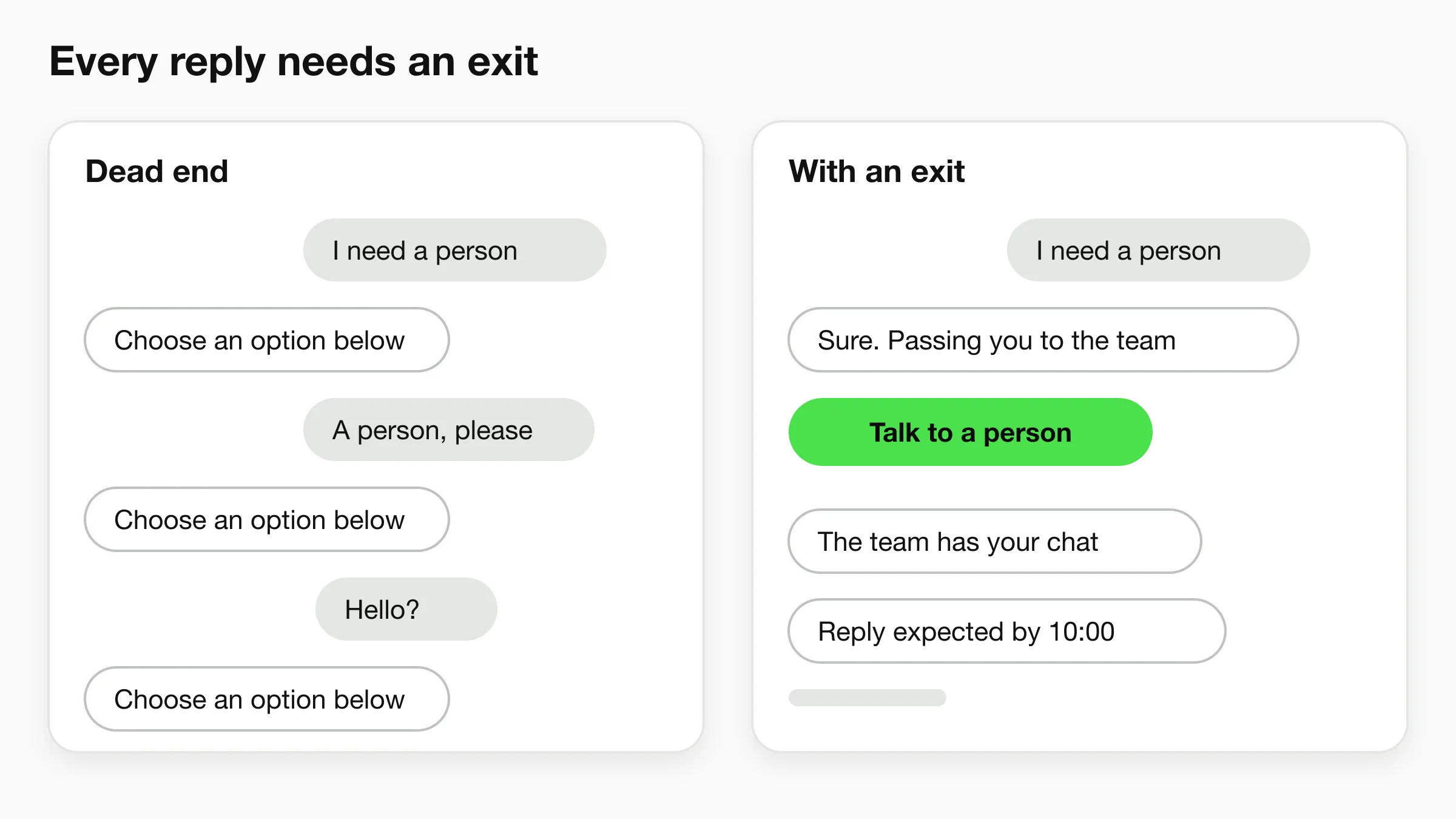
Failure 1: The dead end
The customer asks for something the AI cannot do. It replies with the same menu again. They rephrase. Same menu. They leave, annoyed, and now they are angrier than if you had no chat at all.
Rule: every reply has an exit. After two failed attempts, or on the words "agent", "human" or "person", the AI offers a person. If nobody is available right now, it says so and takes a name and contact detail, with a time you will reply by. Never offer a human you cannot deliver.
Failure 2: The confident wrong answer
The AI states a price that changed last month, or a policy you do not have. The customer acts on it and arrives expecting something you will not honour. This is the failure that costs money and trust together.
Rule: answer from your documents, and allow "I'm not sure". Keep pricing, hours and policies in the knowledge base and update them when they change. Write a fallback line for questions the documents do not cover: "I don't have that detail, so I'll ask the team." A fallback is not a weakness. It is the reason customers believe the other answers. Retrieval-based agents are designed to reduce wrong answers, but no AI is immune, which is why a weekly log review stays on the plan below.
Failure 3: The hidden human
Some businesses give the bot a human name and a stock photo and hope nobody asks. Customers usually work it out, and the discovery turns a neutral experience into a feeling of being tricked.
Rule: say it is AI, and say who is behind it. A short opening line does the job: "I'm the AI assistant for Harbor Dental. I can answer questions and book you in, and the team steps in whenever you ask." That one sentence sets expectations and removes the suspicion before it forms.
Sensitive topics need a person, not a better prompt
Medical symptoms, legal questions, complaints about safety and customers who are clearly upset belong with a human. Configure the AI to route these to your team, not to answer them. For clinics, the AI's job is appointment routing, intake questions and FAQs, never diagnosis or clinical assessment.
What it looks like in practice: three illustrative examples
These are sample scenarios, not customer results. They show the journey logic on small-business shapes.
A home-services company. A homeowner messages at 9pm asking whether the company repairs a particular type of boiler, and whether they work on weekends. The AI answers both from the service pages and asks for the postcode and a good time to call. The owner opens the summary the next morning and phones back with the details in hand. The customer was answered in seconds and the owner did not work an evening. See how this looks for home services teams.
A boutique hotel. A guest asks on Instagram DM about check-in times, parking and whether dogs are welcome. The AI replies from the property's policies. A guest who then wants to change dates is passed to the front desk with the thread attached. The AI handled the routine questions and the person handled the exception. More on this in hospitality.
A dental practice. A new patient asks whether the clinic accepts a particular insurance plan and whether there is a Saturday slot. The AI answers from the practice's published information, offers open times and books the visit. A patient who mentions severe pain is routed to the team straight away, since the AI does not assess symptoms. See dental practices.
In each case the AI does the repeatable part and the person does the part that needs judgment. That split is what good AI CX looks like.
How Hyperleap maps to the customer journey
Hyperleap is the AI front desk for small businesses: an AI agent that answers questions, qualifies enquiries, books where a scheduler is connected and passes conversations to your team. Here is how what ships today maps to each stage of the journey, with plan notes where a feature is gated.
| Journey stage | What Hyperleap does | Plan |
|---|---|---|
| Discover | Website chat widget that answers visitor questions from your knowledge base, in 100+ languages | All plans |
| Ask | Document-grounded answers on Website, WhatsApp, Instagram DM and Facebook Messenger. Photos, documents and videos can be shared as cards | Answers on all plans; rich media on Pro and Max |
| Buy or book | Captures lead details in conversation. In-chat booking with Calendly or Cal.com (Calendly needs Standard or higher). Other schedulers get your booking link | Native booking on Pro and Max; Plus shares your link |
| Get help | Human handoff with live takeover, and Actions that call your own HTTPS API for things like order status | Pro and Max |
| Return | Unified inbox of every conversation, summaries emailed to your team, lead export to CSV or Excel, and an after-conversation step (Agentic Workflow) that emails the right person | Inbox and export on all plans; Agentic Workflow on Pro and Max |
A few honest limits. Hyperleap does not process payments, so a booking or lead is captured and the transaction happens in your own system. Booking creates new appointments only; changes go through the customer's confirmation email. SMS and voice are not available, and the channels are the four above. Link tracking, which shows which campaign drove a conversation, is on Pro and Max. WhatsApp message fees are charged by Meta, separately from your Hyperleap plan.
Hyperleap is a Meta Technology Provider and Business Partner, and WhatsApp, Instagram and Messenger run on Meta's official Business APIs. Setup is a quick start: paste your site URL, Studio reads the page, imports your branding and drafts a starting prompt, and you add one script tag. You then tune answers over the following days.
Plans start at $40 a month (Plus), with Pro at $100 and Max at $200, and every plan has a 7-day free trial that requires a card. See pricing for what each plan includes, or read the AI front desk overview.
Put an AI front desk on your site
Paste your URL and Hyperleap drafts a starting agent from your site. Answer questions, take bookings where a scheduler is connected, and pass people to your team.
Start for freeA small-business AI CX plan in 30 days
Start with one channel and your most common questions, then expand once the weekly numbers hold. Thirty days is enough to launch, correct and decide.
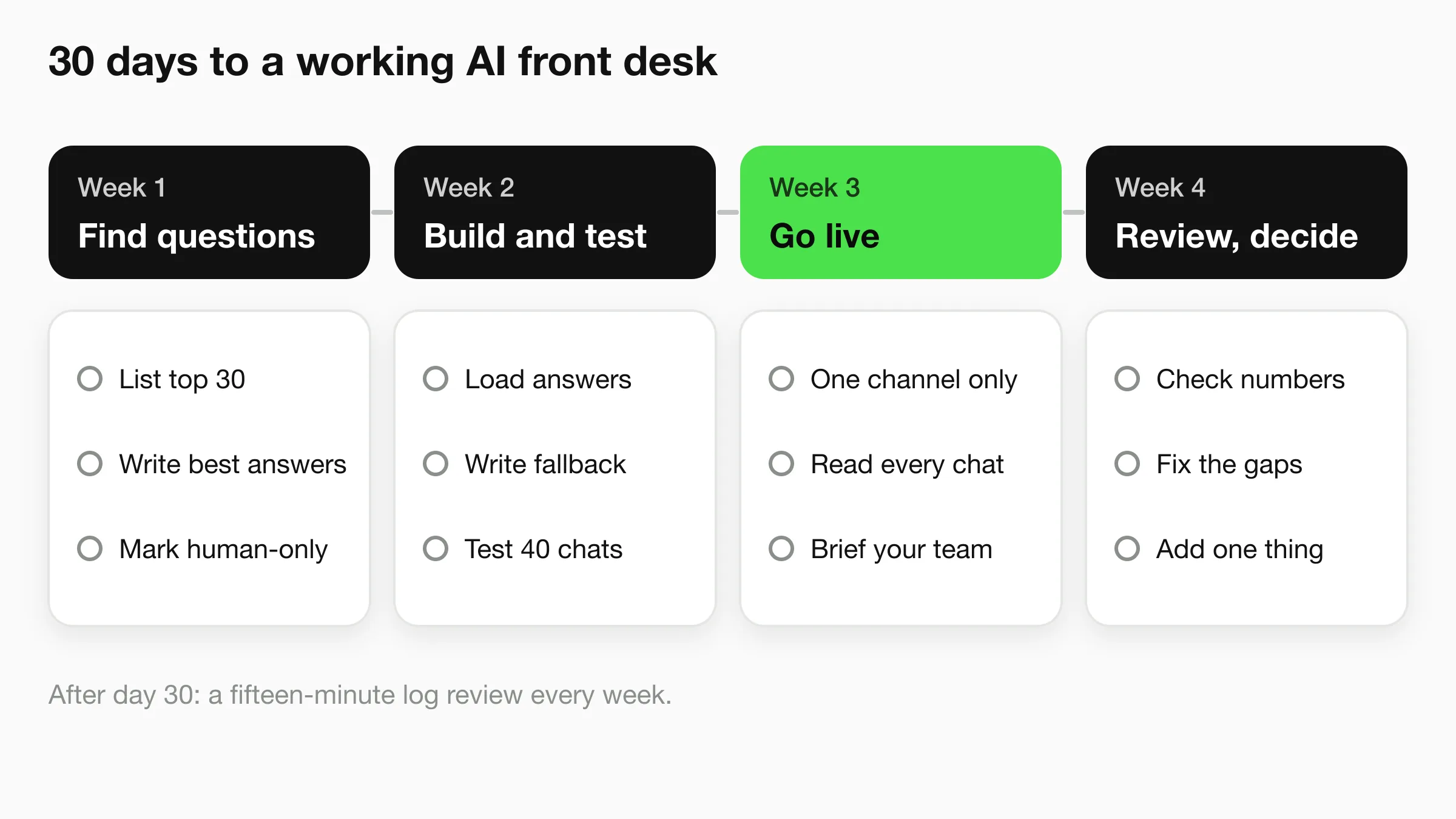
Week 1: Find the questions
Pull the last 60 days of customer messages from email, DMs and the contact form. Group them. You will find that 20 to 30 questions cover most of the volume. Write the best answer to each in plain language, and note which ones need a person every time (complaints, medical, legal, anything involving money you owe).
Week 2: Build and test
Load the answers and your key pages into the AI agent's knowledge base. Write your fallback line and your handoff rule. Set the opening message so it says it is AI. Test with 30 real questions from week 1, plus ten awkward ones: a rant, another language, a refund request, a question you do not answer. Fix every wrong reply before anyone outside the team sees it.
Week 3: Go live on one channel
Launch where most of your enquiries arrive. For many businesses that is the website. Tell your team what the AI handles and what lands with them, and agree who watches the inbox and how quickly they respond to a handoff.
Read every conversation this week. It is the fastest way to find gaps.
Week 4: Review and decide
Look at the numbers (the next section) and read the conversations that went badly. Update the knowledge base for every gap. Then decide: add a second channel, add booking, or add an action that looks up order status. Add one thing at a time.
After this, keep a fifteen-minute weekly log review. The operating checklist covers it in detail.
How to measure AI customer experience
Measure three things: whether the customer got an answer, whether they got to a person when they needed one, and whether they would come back. Everything else is secondary.
You do not need a CX platform for this. A spreadsheet and the conversation log are enough at small-business scale. Track:
| Measure | What it tells you | How to get it |
|---|---|---|
| Answered without a person | How much of the routine load the AI closes | Share of conversations that end without a handoff, checked against a log sample |
| Handoff rate and reason | Whether the AI is being used for the wrong questions | Count handoffs, tag the reasons |
| Time to first reply | The speed customers feel | Timestamp of first message vs first reply |
| Time to human reply after handoff | Whether the exit works | Time from handoff to your team's first message |
| Wrong or unsupported answers | Whether your knowledge base is current | Weekly sample of 20 conversations, scored by a person |
| Leads and bookings from chat | Business outcome | Leads captured and bookings made in the conversation |
| Customer rating | Whether the experience felt good | A one-question rating after the chat, if you collect one |
Two cautions. A falling handoff rate is not automatically good: it can mean the AI is blocking people who needed help, so read a sample before celebrating. And compare against your own baseline from before launch, not a vendor's average. The customer service metrics guide and the chatbot KPI framework go deeper on definitions.
Ask the customer, not just the log
Add one question at the end of a chat: "Did you get what you needed?" Even a few answers show problems the metrics miss.
Common mistakes to avoid
- Launching everywhere at once. Four channels with no review habit means four places for errors to hide. Start with one.
- Letting the knowledge base go stale. Prices and hours change. Assign one person to update the documents the same day.
- Skipping the disclosure. A clear "I'm the AI assistant" costs nothing and prevents the worst reaction.
- Measuring volume instead of outcomes. Thousands of chats mean little if customers left without answers.
See how it handles your own questions
Start a trial, paste your site and test the agent with real customer questions before you put it live.
Start for freeFrequently asked questions
What is AI customer experience?
AI customer experience is how AI shapes each contact a customer has with your business, from first visit to repeat purchase. It includes chat agents, AI answers on messaging channels and AI summaries that help your staff. It is good when it is fast, accurate and easy to hand over to a person.
How does AI improve customer experience?
AI improves customer experience by removing waiting: instant answers to routine questions, bookings completed in the conversation and a clean handoff when a person is needed. It also gives you a log of real customer questions, which shows what to fix on your site.
What are examples of AI in customer experience?
Common examples are a website chat agent that answers from your documents, an AI that replies to WhatsApp or Instagram DMs, in-chat appointment booking, and AI summaries of conversations for your team. Each one speeds up a stage of the customer journey.
Do customers actually want AI in customer service?
Many are wary. Gartner's survey of 5,728 customers found 64% would prefer companies did not use AI for customer service, mostly because they fear not reaching a person. The practical answer is to offer AI as a faster route for routine questions and keep a human path always open.
What is the biggest risk of using AI for CX?
The biggest risk is the dead end: AI that cannot help and will not hand over. A close second is a confident wrong answer. Both are preventable with an exit to a person on every conversation and answers drawn from documents you keep current.
How long does it take to improve CX with AI?
A small business can launch on one channel within the first few weeks. The 30-day plan above covers the question list, build, launch and review.
How do I measure AI CX?
Track whether customers got an answer, how fast they got one, how often and why they were handed to a person, and how quickly your team replied after a handoff. Add a weekly sample review for wrong answers and, if you can, a one-question customer rating.
Does Hyperleap replace my team?
No. Hyperleap handles repeatable questions and routine bookings, and passes conversations to your team on Pro and Max with live takeover. The team handles the judgment calls, upset customers and sensitive topics.
Industry Solutions
See how AI chatbots work for these industries:
Related Articles
View all
Guide20 min read
25 AI Agent Use Cases for Small Business (2026)
25 AI agent use cases for small and mid-size businesses, each with what it needs, its risk and a readiness score, plus a value-and-risk matrix to pick first.
Guide20 min read
21 Chatbot Examples for Small Business (With Sample Chats)
21 chatbot examples with sample conversations, grouped by job and by industry, plus a fill-in template to write your own.
Guide24 min read
AI Customer Service Best Practices for 2026
12 AI customer service best practices covering disclosure, escalation design, knowledge base upkeep, weekly KPI review, and PII handling for SMB teams.
Guide19 min read
Benefits of Conversational AI for Business (With Caveats)
The real benefits of conversational AI — 24/7 coverage, speed, cost, scale — with the conditions that make each one true, and where it doesn't hold.