Guide
Chatbot Marketing: A 6-Step Playbook for Small Business
Chatbot marketing for small businesses: turn ad, Instagram and landing-page traffic into qualified, booked conversations in six steps.

Gopi Krishna Lakkepuram · Founder & CEO
· 18 min read
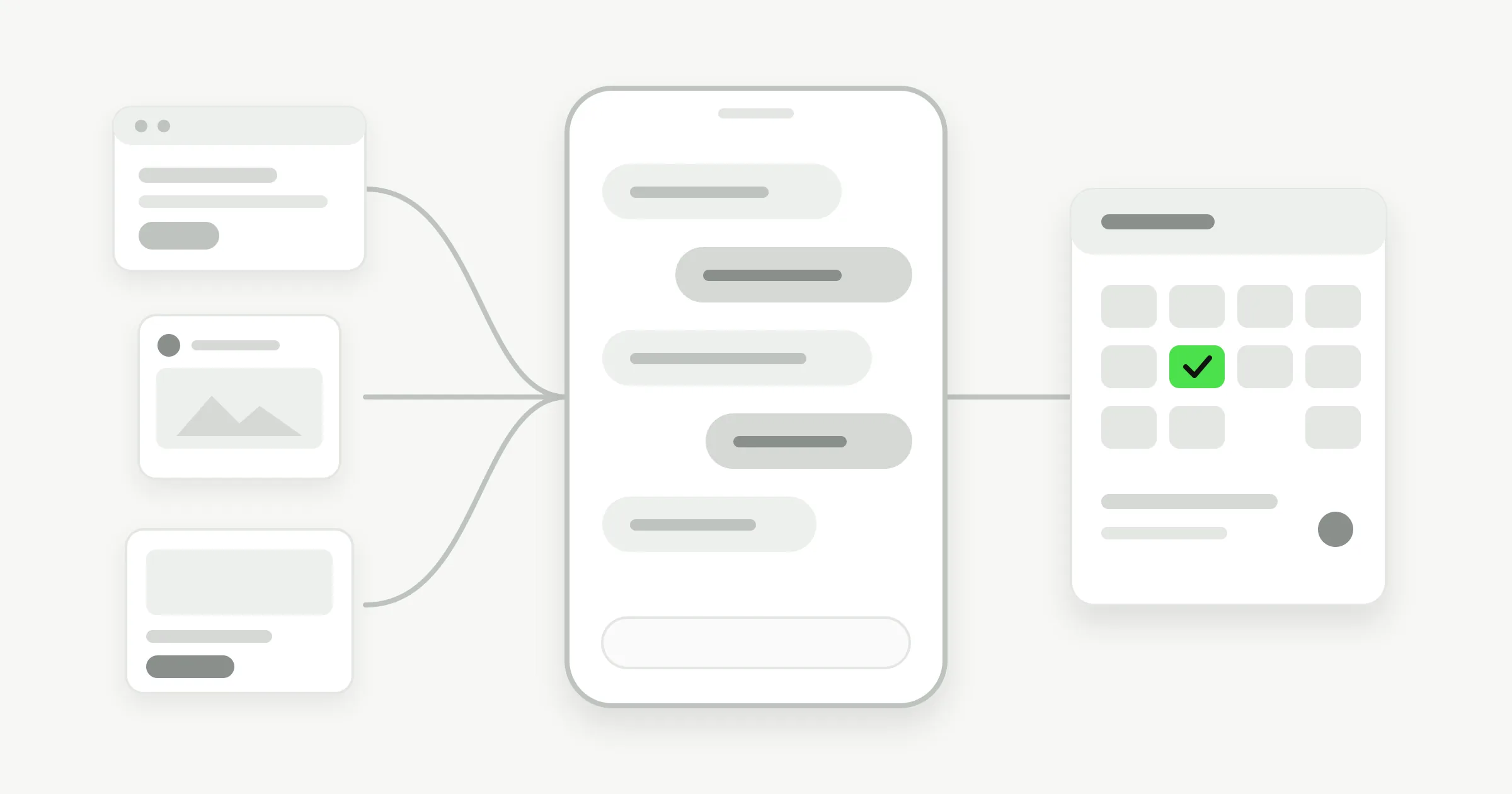
TL;DR: Chatbot marketing means using a chatbot to answer the people your marketing brings in, so that more of them become qualified, booked conversations. You pay for ads, post on Instagram and publish landing pages. A chatbot is what meets the visitor at the end of each one. The six steps: pick one campaign, send its traffic into a conversation, teach the agent the offer, ask three qualifying questions, book or hand off, then tag and measure. Your team still does the follow-up. The chatbot makes sure nobody is left waiting until then.
What Is Chatbot Marketing?
Chatbot marketing is the practice of placing a chatbot where your marketing traffic lands, so every visitor or message gets an immediate answer and a clear next step. It covers ads that open a chat, Instagram DMs that start after a post or story, landing pages with a chat widget, and the follow-up that happens after the chat ends.
It is not a new channel that replaces the others. Your ads, posts and pages still create the interest. The chatbot changes what happens in the moment right after: a person asks "Do you have Saturday slots?" or "What does this cost?", and either gets an answer now or waits for someone to open an inbox.
That wait matters. A peer-reviewed study of online lead response, published in Harvard Business Review by James Oldroyd, Kristina McElheran and David Elkington, concluded that most companies are not responding nearly fast enough. The details differ by industry, but the direction is the same one every small business owner knows from experience: the first business to answer usually gets the conversation.
This guide is for small business owners and marketers who already spend on attracting people (a few ads, a steady Instagram account, a decent website) and want more of it to become appointments. For qualification frameworks and flows in depth, see the lead generation chatbot playbook. This post covers the marketing side: where traffic comes from, what you point it at, and how you know it worked.
A marketing chatbot and an AI front desk are the same thing here
Hyperleap is the AI front desk for small businesses. In this post, a "marketing chatbot" is that front desk answering the people your campaigns bring in: it answers from your documents, asks a few questions and sends your team the details.
Where Chatbots Fit in Your Marketing
A chatbot fits at four places: your website and landing pages, Instagram DMs, ads that open a chat in Meta's apps, and Facebook Messenger (the same agent answers people who message your Facebook page). Each is a point where interest turns into a message. The channels are ones your front desk covers, not a strategy by themselves. Your website is the one you own, so start the thinking there.
Landing pages and your website
Paid clicks, newsletter links and search traffic all land on a page. Most visitors leave without filling in the form, because forms ask for commitment before the visitor has an answer. A chat widget on the page lets them ask the question that was blocking them first.
On website chat, the agent can collect contact details with a short form. The form is optional and you decide where in the conversation it appears. This is the most controllable setup, and it is where link tracking and source attribution work best on Pro and Max.
Instagram DMs
When someone sees a post or a story and sends your account a message, that DM is an enquiry. The Hyperleap agent answers incoming DMs from your knowledge base, asks its questions and passes the details to your team. Our Instagram chatbot page covers setup.
Be clear about the limits. Hyperleap works on DMs only. It does not reply to comments, and it does not trigger on story mentions. If your campaign depends on "comment a word and get the link", a rule-based tool does that job. The Instagram DM automation comparison explains where each approach wins.
Ads that open a chat
Meta offers click-to-message ads that send people into a conversation with your business on WhatsApp, Messenger or Instagram Direct instead of to a web page. You build and pay for those ads in Meta's Ads Manager. If the number or account the ad points to is connected to your Hyperleap front desk, the agent answers the first message.
Two honest notes. First, Hyperleap does not create or manage ads. Second, customers pay Meta's WhatsApp fees directly to Meta, separately from their Hyperleap plan, and Meta changes its pricing model often. Check Meta's current pricing before you budget a WhatsApp campaign.
The 6-Step Chatbot Marketing Strategy
A workable chatbot marketing strategy is six steps, in order: choose one campaign, route its traffic into a conversation, load the agent with the offer, qualify with three questions, book or hand off, and tag and measure. Skip a step and the gap shows up later as confused customers or unreadable numbers.
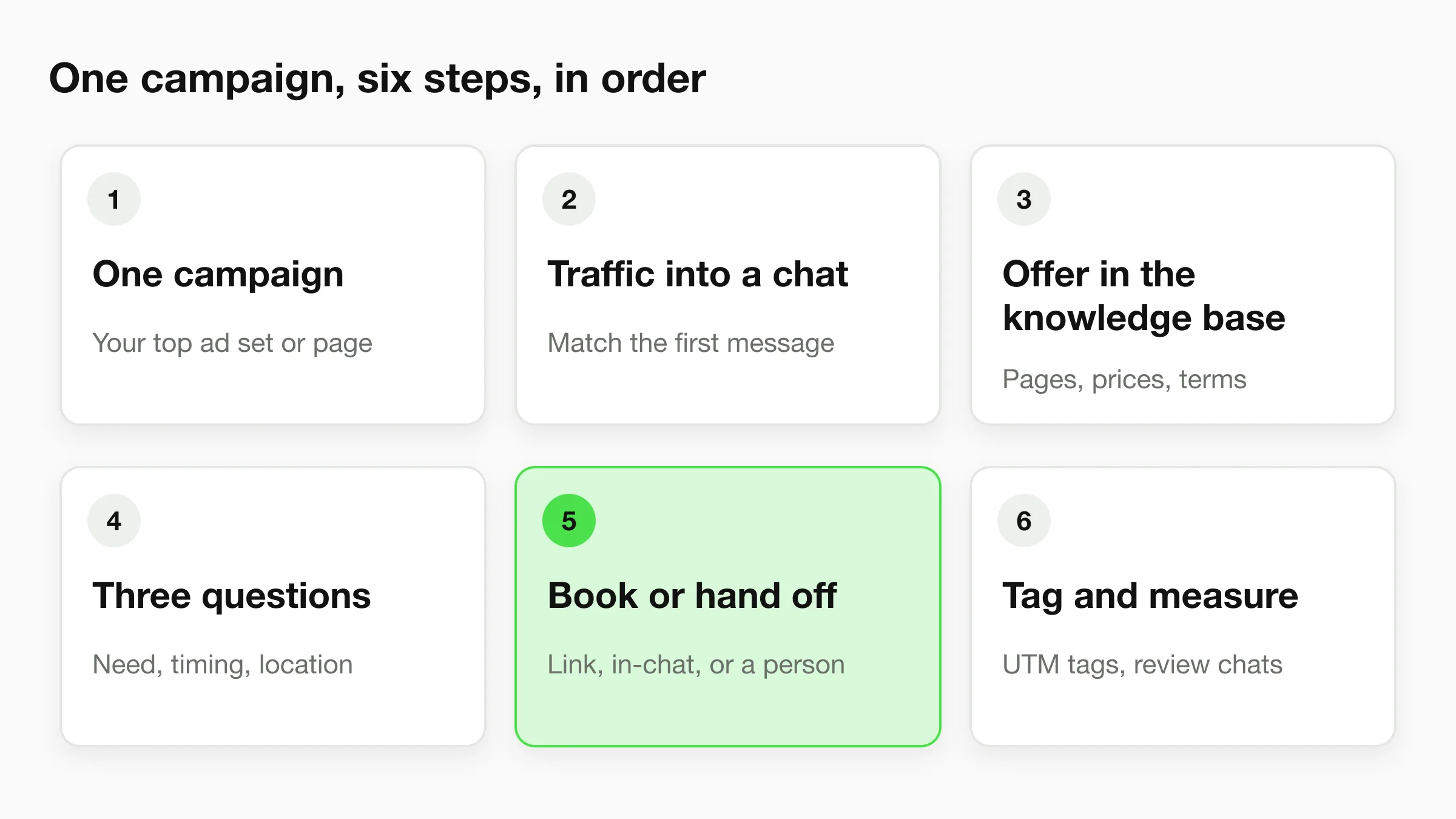
Step 1: Pick one campaign
Start with a single campaign, not your whole marketing mix. Choose the one with the most traffic or the most spend: a paid ad set, your best landing page, or the Instagram account that already gets messages.
One campaign keeps the test honest. Change the ads, the page and the chatbot at once and you will not know which helped. Write down what a good result looks like, such as "more booked consultations from this ad set" or "fewer enquiries that never get an answer".
Step 2: Send the traffic into a conversation
Decide where the chat begins. For a landing page, the widget sits on the page and the greeting refers to the offer on that page. For a click-to-message ad, the ad opens the chat directly. For Instagram, your bio and story links point people to message you.
Make the first message match the promise. If the ad says "Free first consultation", the greeting should talk about the consultation, not say "How can I help you today?" A mismatch at this step loses people before the chatbot has done anything.
Step 3: Teach the agent the offer
The agent answers from the documents you give it, so the campaign's offer has to be in them. Add the landing page, the pricing sheet, the terms of the promotion, opening hours, service areas and the five questions your team gets asked most.
This is where marketing and the front desk meet. Every time an ad promises something, the agent needs the fine print. A promotion that ended last week should be removed from the knowledge base the same day. Setup itself is quick: paste your website URL and Studio reads the site, so you start from your real content and tune from there.
Step 4: Ask three qualifying questions
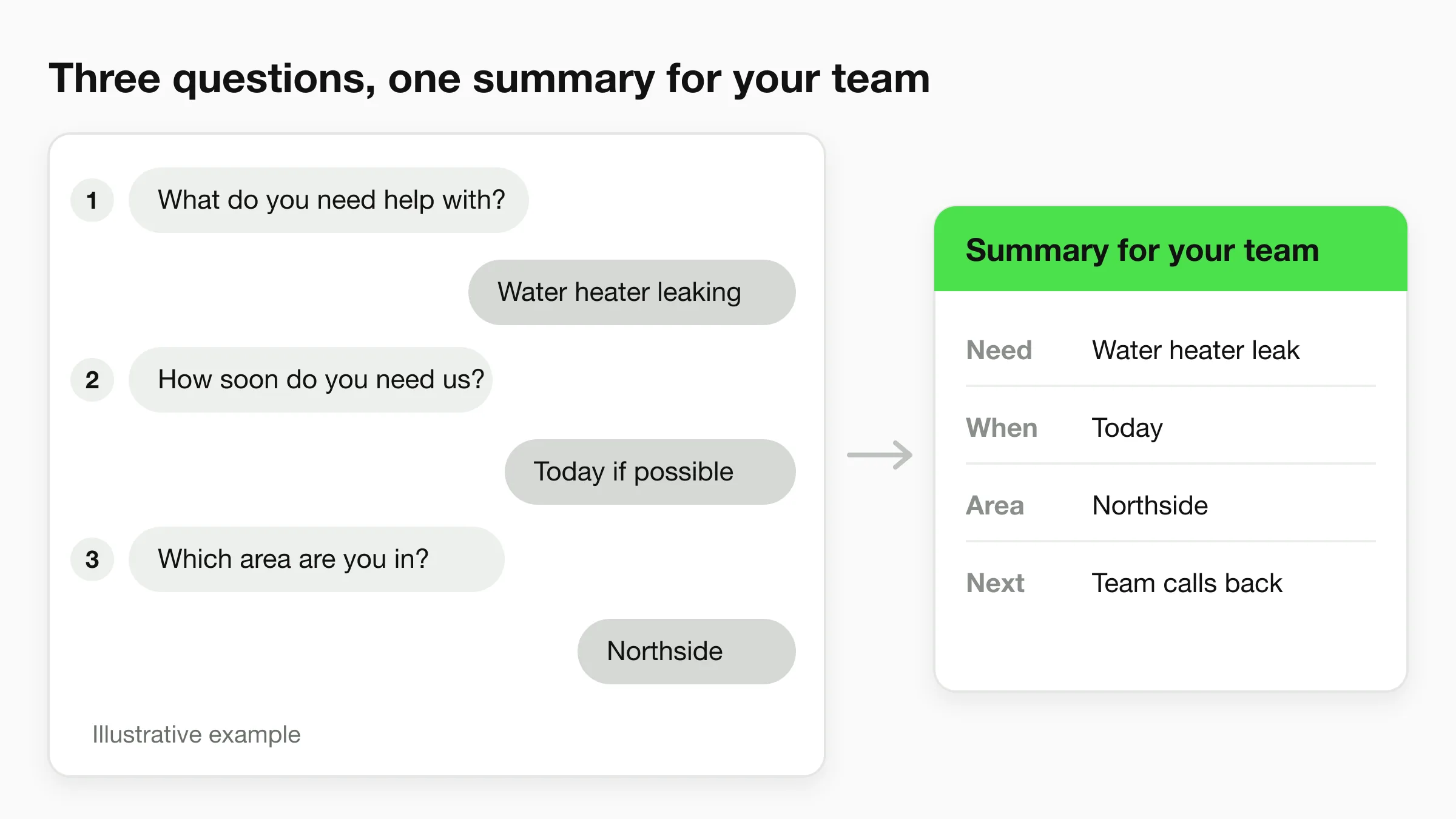
Qualifying means learning enough to route the conversation. Three questions is a good ceiling for marketing traffic, because each extra question costs you people.
A pattern that works for most small businesses:
- What do you need? The service or product they are asking about.
- When do you need it? The timeframe, which tells your team how urgent it is.
- Where are you? Or any single fact that decides if you can serve them, such as location, party size or property type.
Then ask for contact details if the conversation has not already provided them. On WhatsApp, Instagram DM and Messenger the platform supplies the person's phone number or profile. On website chat, the optional short form collects it. The lead qualification guide goes deeper on choosing questions. Hyperleap does not score leads. It collects the answers and your team reads them.
Step 5: Book or hand off
Every conversation should end with a next step the customer can take. There are three.
- Book it. On Pro and Max, the agent books directly in the chat if you use Calendly or Cal.com. It reads live availability, offers real open times and creates the booking. In-chat booking with Calendly needs Calendly Standard or higher. The agent creates new bookings only. Changes go through the customer's confirmation email.
- Share the link. On Plus, or with any other scheduling tool, the agent shares your booking link. The booking links versus integrations guide explains the difference.
- Hand off. On Pro and Max, a visitor can ask for a person, your team is alerted in Studio, and a teammate can take over the live conversation and hand it back to the AI.
Step 6: Tag and measure
Know which campaign each conversation came from, then review what those people asked. On Pro and Max, Hyperleap records source and campaign attribution for conversations and tracks clicks on links the agent shares, when the data is present. Tag your ad and post URLs with UTM parameters so there is something to record.
Keep claims modest. A recorded source shows how a conversation was associated with a visit. It does not prove that the ad caused a sale. The attribution guide explains what each piece of evidence does and does not show.
Chatbot Marketing Examples by Industry
The examples below are illustrative scenarios, not customer results. They show how the six steps look in different small businesses. All numbers are left out on purpose.
| Business | Campaign | What the chatbot asks | Next step |
|---|---|---|---|
| Dental clinic | Ad for a new-patient consultation | New or existing patient, preferred day, reason for the visit | Booking link or in-chat booking; urgent requests routed to the team |
| Home services | Local search ad for a seasonal service | Service needed, postcode or area, how soon | Hand off to the team with the job summary |
| Salon or med spa | Instagram posts of finished work | Treatment of interest, preferred day, first visit or returning | Book a consultation |
| Real estate agent | Listing ad or landing page | Buy or rent, area, timeframe | Viewing request sent to the agent |
| Boutique hotel | Offer page for a weekend package | Dates, guests, package interest | Share booking link or route to reservations team |
| Online store | Product launch landing page | Which product, sizing or stock question, delivery country | Answer from the product pages, hand off order issues |
Dental clinic: an ad that gets a same-day answer
A clinic runs a new-patient ad. Without a chatbot, a visitor lands on a form, fills it in and waits for a call the next morning. With one, the visitor asks "Do you take evening appointments?", gets the answer from the clinic's hours page and leaves with a booked slot or a booking link. The agent routes urgent or sensitive requests to the team. It does not assess symptoms. See dental agents for the full pattern.
Home services: the job summary your dispatcher wants
A plumbing or HVAC company pays for local ads in a busy season. The chatbot asks what is wrong, where the property is and how soon the customer needs help, then sends the dispatcher a summary of the answers. The dispatcher calls with the context in hand instead of starting from scratch. See home services agents.
Real estate: viewing requests from a listing page
An agent's landing page for a single listing gets traffic from Instagram and paid ads. The chatbot answers questions about the listing from the brochure, asks about timeframe, and collects viewing requests for the agent to confirm. Integration with listing systems like MLS is not something to assume. Pass details to your own tools through the API or webhooks if you need that. See real estate agents.
Salon, hotel and store
For beauty and wellness, Instagram is the storefront, so the DM is the enquiry. For a hotel, the offer page is the campaign and the chat captures dates and guests. For a store, the chat answers product and delivery questions from your pages.
Following Up: What the Chatbot Does and What Your Team Does
The chatbot answers, qualifies and captures. Your team follows up. That split is deliberate, and it is where small businesses either win or waste the work.
Here is what happens after the chat:
- Everything lands in one place. Conversations from website, WhatsApp, Instagram DM and Messenger show up in a single inbox in Studio, with the details the agent collected.
- Your team gets a brief. On Pro and Max, an Agentic Workflow runs after a conversation ends and emails the contacts you choose, following instructions you write, such as "email the sales team a brief on each new enquiry".
- Leads can be exported. Download them as CSV or Excel for your own spreadsheet or CRM.
- Pro and Max can push data out. Webhooks fire on events such as lead captured and appointment booked, so your existing tools can react.
What Hyperleap does not do: it does not run automated outbound campaigns, send broadcasts to a list, or send automated follow-up sequences. If a lead goes quiet, a person from your team decides whether and how to reach out. Set a rule for that, for example "every new enquiry gets a human reply within a working day", and check the inbox against it.
Write the follow-up rule before you launch
The most common failure in chatbot marketing is a good conversation with nobody assigned to follow it up. Decide who owns new enquiries, how fast they respond, and where they record the outcome. A chatbot makes the first minute better. It cannot own the second day.
Put a front desk behind your next campaign
Paste your website URL, review what the agent learned, and answer the people your ads and posts already bring in.
Start for freeChatbot Marketing Metrics That Matter
Track five numbers, and define each before you read it: conversations started, conversations that reached a qualifying answer, bookings or handoffs, shared-link clicks, and the questions the agent could not answer. None of them needs a benchmark from someone else's business. Compare this month against your own last month.
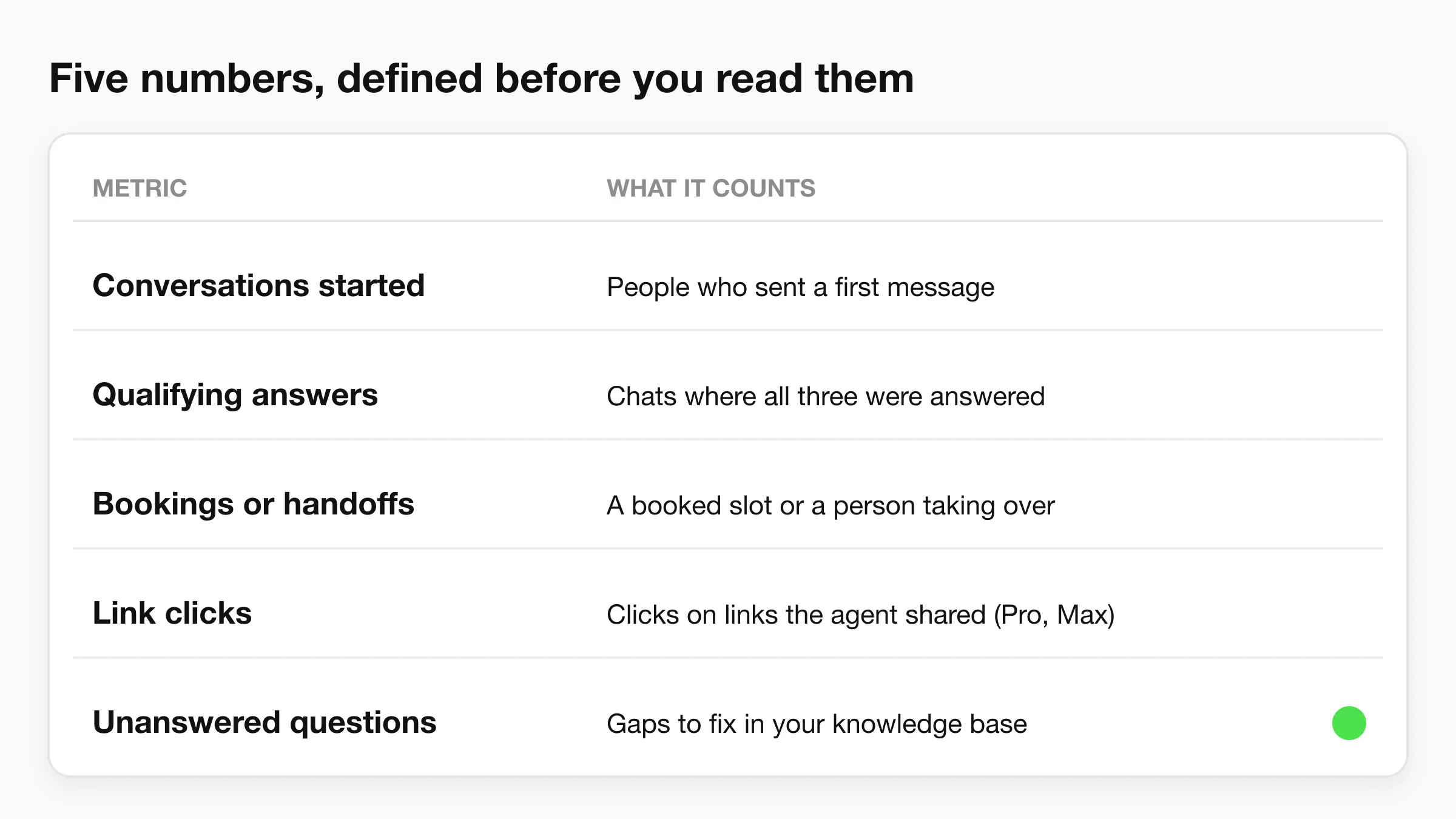
| Metric | What it tells you | Where to look |
|---|---|---|
| Conversations started | Whether the campaign brings people into the chat | Inbox in Studio, filtered by source on Pro and Max |
| Reached a qualifying answer | Whether people stay for the questions | Conversation details |
| Bookings or handoffs | Whether the chat leads to a next step | Booking records, handoff alerts |
| Shared-link clicks | Whether people act on links the agent shares (Pro and Max) | Link tracking view |
| Unanswered questions | Gaps in your knowledge base or your offer | Conversation log |
The last metric is the cheapest source of campaign improvement. If many people ask a question your page does not answer, add it to the page and to the knowledge base. Our chatbot analytics overview shows what Studio reports.
Be careful with revenue. A conversation, a click and a booking are separate events, and only your own sales records show whether money followed. Say "conversations from this campaign", not "revenue from this campaign", unless your records back it up.
Chatbot Marketing Mistakes to Avoid
Most failures come from the setup around the chatbot, not the chatbot itself.
- Sending traffic to a generic greeting. The ad says one thing, the chat opens with another. Match the first message to the promise.
- Leaving old offers in the knowledge base. The agent answers from your documents. If an expired discount is still in them, it will quote it.
- Asking too many questions. Every extra question loses people. Start with three and cut any your team never uses.
- Treating a comment-reply tool as the same thing. Hyperleap does not reply to Instagram comments. Do not plan a campaign around it.
- Expecting broadcasts. The front desk answers people who message you. It does not send blasts. Use a separate tool and your own list for announcements.
- Measuring everything, deciding nothing. Pick one change per month based on one metric.
- Over-trusting attribution. A source label is evidence, not proof of what caused a sale.
Chatbot Marketing With Hyperleap: What You Get on Each Plan
Hyperleap AI covers the answer, qualify and capture stages with one agent across website chat, WhatsApp, Instagram DM and Facebook Messenger. Plans start at $40 a month, with a 7-day free trial and a card required to start. See pricing for the full table.
| Plus ($40/mo) | Pro ($100/mo) | Max ($200/mo) | |
|---|---|---|---|
| Answers from your documents on all four channels | Yes | Yes | Yes |
| Leads in one inbox, CSV or Excel export | Yes | Yes | Yes |
| Booking | Shares your link | In-chat with Calendly or Cal.com | In-chat with Calendly or Cal.com |
| Source and campaign attribution, link tracking | No | Yes | Yes |
| Human handoff and live takeover | No | Yes | Yes |
| Agentic Workflow email briefs | No | Yes | Yes |
| Webhooks | No | Yes | Yes |
If your campaigns send people to a booking page and you want to know which campaign they came from, Pro is the plan that fits. If you mainly want every enquiry answered quickly and your team handles the rest, Plus is enough to start. The AI front desk overview explains the full loop, and the lead generation chatbot page covers the capture side.
Hyperleap is a Meta Technology Provider and Business Partner, and WhatsApp, Instagram and Messenger run on Meta's official Business APIs.
Frequently Asked Questions
What is chatbot marketing?
Chatbot marketing is using a chatbot to answer the people your marketing brings in. It sits behind your ads, Instagram account and landing pages, answers questions instantly, asks a few qualifying questions and passes the details to your team or a booking page.
How do small businesses use chatbots in marketing?
Most use them in four places: a chat widget on landing pages, Instagram DMs after posts and stories, ads that open a chat in Meta's apps, and Facebook Messenger. The chatbot answers from the business's documents, qualifies with a few questions, then books or hands off to a person.
What is a good chatbot marketing strategy?
Start with one campaign. Send its traffic into a conversation, load the offer into the knowledge base, ask three qualifying questions, end with a booking or a handoff, and tag the source so you can review results. Change one thing per month based on one metric.
Can a marketing chatbot send broadcasts or follow-up campaigns?
Not with Hyperleap. The agent answers people who message you or chat on your site. It does not send broadcasts or automated outbound sequences. Your team follows up, and on Pro and Max an Agentic Workflow emails them a brief after each conversation.
Does Hyperleap reply to Instagram comments?
No. It handles Instagram DMs only. It does not reply to comments and does not trigger on story mentions. If a campaign depends on comment-triggered messages, use a rule-based tool for that part and let the AI front desk handle the conversations that follow.
How do I know which campaign a conversation came from?
On Pro and Max, Hyperleap records source and campaign attribution for conversations and tracks clicks on links the agent shares, when that data is present. Tag your URLs with UTM parameters. Treat the result as evidence of association, not proof of what caused a sale.
How much does chatbot marketing cost?
Hyperleap plans are Plus at $40 a month, Pro at $100 and Max at $200, with a 7-day free trial and a card required. Your ad spend is separate. Customers pay Meta's WhatsApp fees directly to Meta, separate from their Hyperleap plan.
Start With One Campaign
Chatbot marketing works when the chat is the end of a campaign, not a separate project. Pick the campaign with the most traffic, put an agent behind it, ask three questions and give your team a follow-up rule. After a month, read the conversations, fix what people kept asking, then move to the next campaign.
Answer every campaign enquiry, not just the first few
Start a 7-day trial, paste your URL and see what your AI front desk learns from your site in minutes.
Start for freeIndustry Solutions
See how AI chatbots work for these industries:
Related Articles
View all
Guide18 min read
Conversational Marketing: A Small Business Guide (2026)
Conversational marketing replaces form-and-follow-up with a live dialogue. Learn the 4-step framework, channels, examples and how to start in a week.
Guide17 min read
Multilingual Hotel Chat: A Guest-Question Test Kit
Test English and Spanish hotel enquiries against the same approved facts, with arrival, policy, access and staff-handoff cases your team can review.
Guide14 min read
Chatbot Persona: A Worksheet for Tone, Name and Voice
Design a chatbot persona in one worksheet: role, name, tone dials, word lists, 'I don't know' lines, handoff and language rules, with four example cards.
Guide17 min read
Proactive Customer Service: 12 Examples for Small Business
Proactive customer service means answering before customers ask. See 12 examples with the channel and owner for each, plus how to measure it.