Guide
ChatGPT for Customer Service: 12 Prompts and Its Limits
How to use ChatGPT for customer service: 12 copy-paste prompts for your team, plus what it cannot do when customers talk to it directly.

Gopi Krishna Lakkepuram · Founder & CEO
· 16 min read
TL;DR: ChatGPT is a good writing assistant for your support team. It drafts replies, macros, FAQ entries and tone fixes in seconds, and a person reads and sends every one. It is not a customer service deployment. It does not know your policies unless you paste them in, it does not sit on your website or WhatsApp, and it keeps no lead records or handoff trail. This guide gives you 12 prompts for the first job and explains what a business AI agent adds for the second.
How to use ChatGPT for customer service
There are two different ways to use ChatGPT for customer service, and most confusion comes from mixing them up.
- Staff use ChatGPT as a drafting tool. A person pastes in a customer message and your policy, ChatGPT drafts a reply, and the person edits and sends it. The customer never talks to ChatGPT.
- Customers talk to an AI directly. The AI answers on your website or messaging channels without a person in the loop for each reply. This needs more than a chat window with a language model.
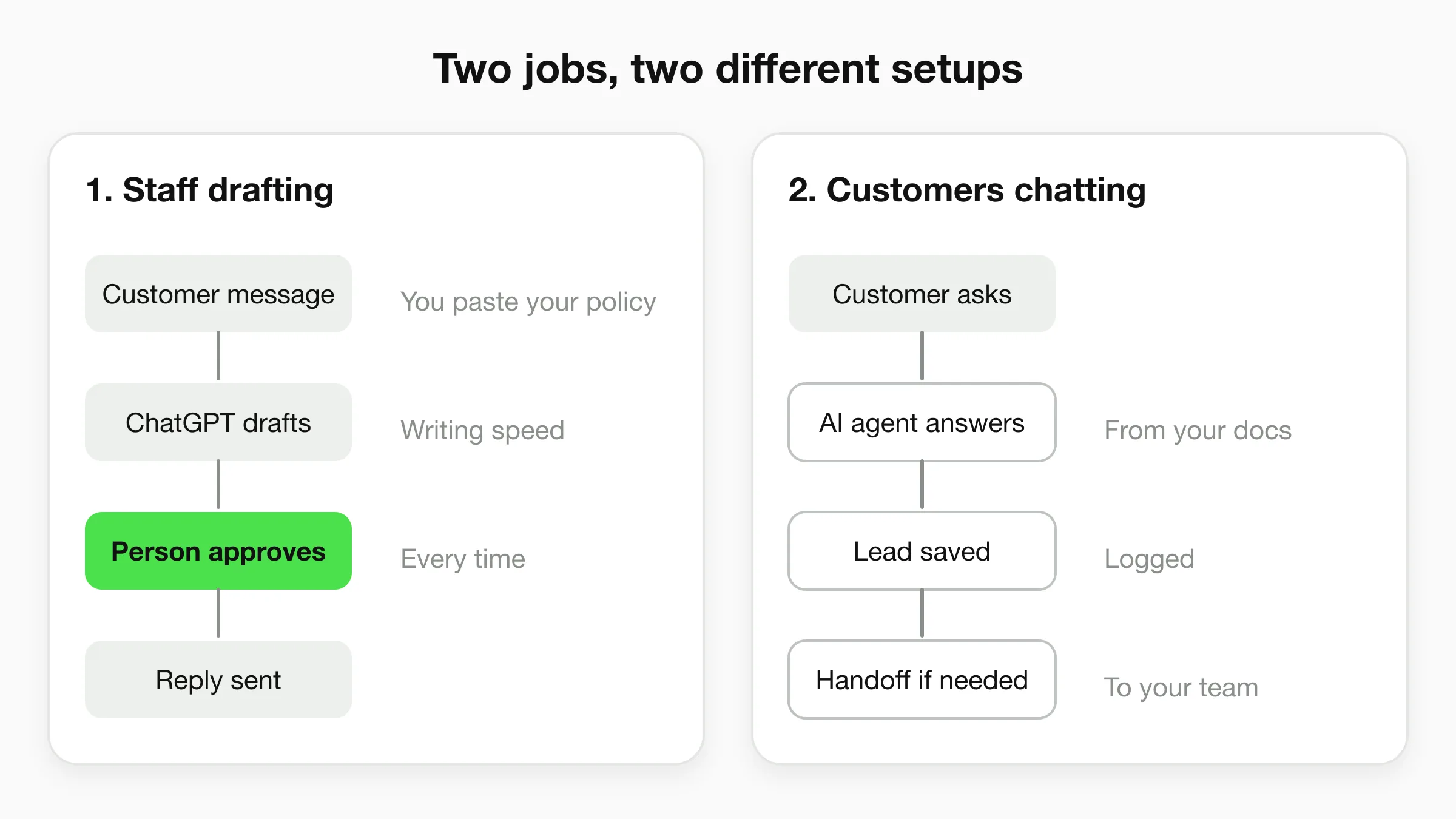
The first job is cheap, safe and useful today. The second job is where small businesses get burned, because a general chat assistant looks like it can do it. This post covers the first in detail, then shows exactly where the second breaks down. If you want the wider picture first, read our overview of generative AI for customer service.
Who this is for
Owners and managers at small businesses (clinics, salons, home services, shops, agencies) who already answer customer messages by hand and want to know what ChatGPT can safely take off their plate.
Use 1: ChatGPT as your team's writing assistant
ChatGPT works best in customer service when it writes the first draft and a person owns the final answer. The wins are speed, consistency and tone. The risk is a confident reply that quotes a policy you do not have.
A good prompt has five parts, and the figure below shows them.
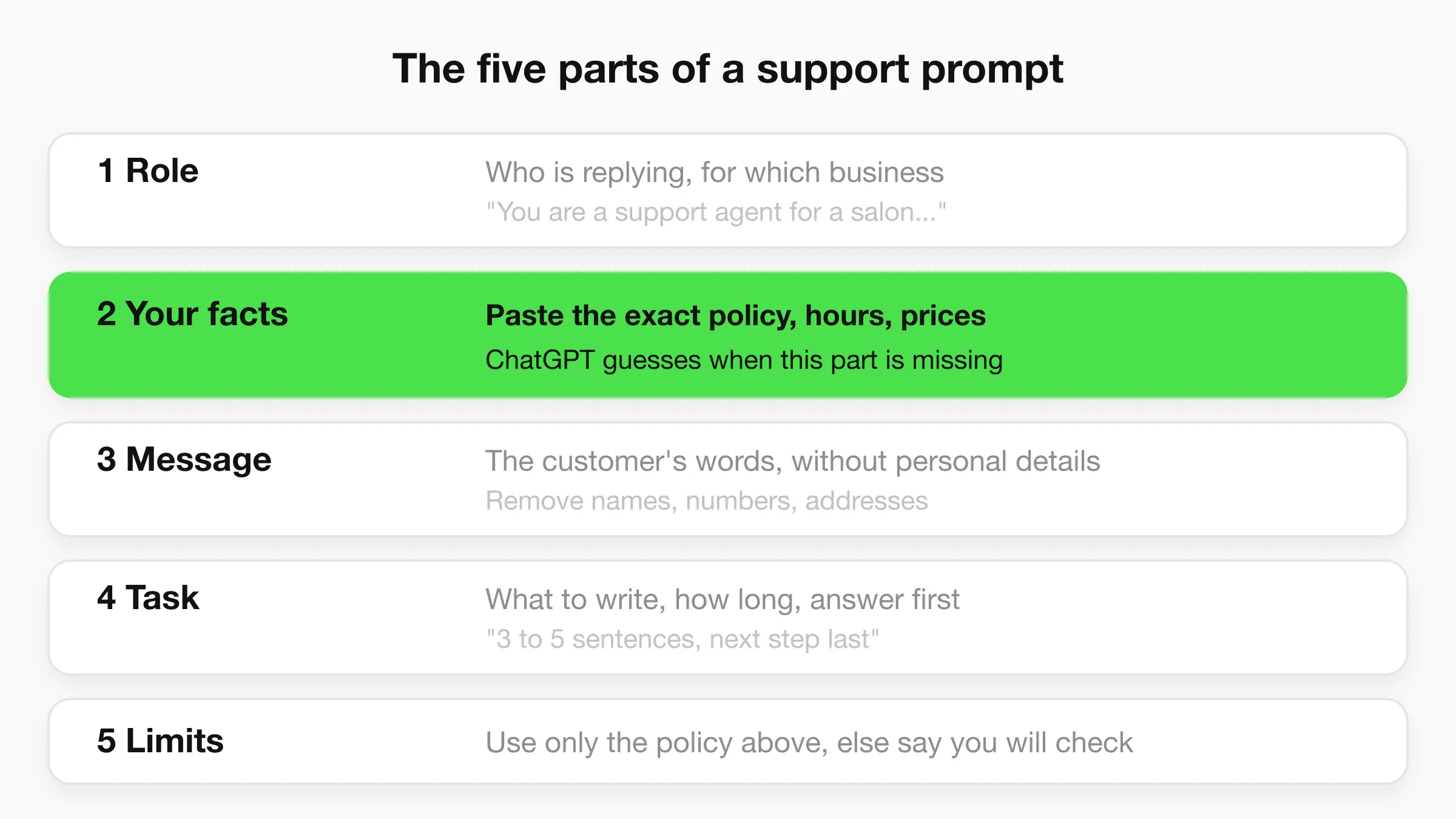
The part people skip is your facts. ChatGPT does not know your refund window, your opening hours or your cancellation fee. If you leave them out, it invents plausible ones. Paste the relevant policy into the prompt every time, or keep it in a saved note you can reuse.
Replying to a customer message
1. The standard reply. Use this for the everyday question where the answer is in your policy.
You are a customer service agent for [business name], a [type of business].
Our policy: [paste the exact policy text here].
Customer message: "[paste message]"
Write a reply of 3 to 5 sentences. Answer the question first, then give the next step.
Use only the policy above. If the policy does not cover the question, say you will
check and get back to them. Tone: warm, plain, no jargon.
2. The angry customer. Draft, then read it before sending. Never send an apology you would not stand behind.
A customer is upset. Message: "[paste message]"
What happened, from our records: [facts: dates, order number, what went wrong]
What we can offer: [exact options you are willing to give]
Write a reply that acknowledges the specific problem in the first sentence, states what
we will do and by when, and does not blame the customer or make promises beyond the
offer above. Keep it under 120 words.
3. The "no" that keeps the customer. Refusals are where tone matters most.
We have to say no to this request: "[paste request]"
Reason: [the real reason, e.g. past the 30-day return window in our policy].
Write a reply that says no clearly in the first two sentences, explains the reason in
one sentence, and offers this alternative: [alternative]. Do not apologise more than once.
4. Fix the tone of my draft. Often the best use is editing, not writing.
Here is my draft reply: "[paste draft]"
Rewrite it to sound friendly and professional. Keep every fact and number exactly as
written. Cut anything that sounds defensive. Return only the rewritten reply.
Building reusable content
5. A macro (saved reply) from a real conversation. Turn the question you answer ten times a week into a template.
Here are three real customer messages asking about the same thing:
1. "[message]"
2. "[message]"
3. "[message]"
Write one saved reply that answers all three. Put [FIRST NAME] and [ORDER NUMBER] where
details change. Keep it under 100 words. Our policy: [paste policy].
6. FAQ entries from your inbox. Paste a batch of past questions and let ChatGPT cluster them.
Below are 25 customer questions from the last month.
Group them into topics. For each topic, write a question and a 2-sentence answer for
our FAQ page, using only the facts I provide: [paste policies, hours, prices].
Flag any topic where my facts are missing.
7. Turn a policy into plain language. Legal-style terms confuse customers and generate tickets.
Rewrite this policy so a customer can understand it in under 30 seconds. Use short
sentences and one example. Do not change any numbers, dates or conditions.
Policy: [paste policy]
Handling the harder cases
8. Translate and localise a reply. Useful for the odd message in another language.
Translate this reply into [language] for a customer. Keep the tone polite and natural,
not literal. Keep the numbers and names unchanged. Reply: "[paste reply]"
9. Summarise a long thread before a handover. Saves the next person from re-reading ten messages.
Summarise this email thread for a colleague taking over. Give: what the customer wants,
what has been promised, what is still open, and the next action. Maximum 5 bullet points.
Thread: [paste thread]
10. Review a reply before it goes out. Use ChatGPT as a second pair of eyes.
Check this draft against our policy. List any statement that the policy does not support,
any promise we may not be able to keep, and any sentence that could read as rude.
Policy: [paste]. Draft: [paste]
11. Write an internal escalation note.
Write a short internal note to our [manager / technician / billing team].
Include the customer's request, what has been tried, what we promised, and the deadline.
Details: [paste details, without the customer's personal information]
12. Turn a bad review into a response. Keep it brief and factual.
Here is a public review: "[paste review]"
Facts from our side: [what actually happened]
Write a public reply of under 80 words. Thank them, address the specific issue, offer to
fix it offline, and do not argue or reveal personal details.
If you want more ready-made wording, our customer service response templates cover the most common situations by scenario.
Privacy: what not to paste
Treat anything you paste into ChatGPT as data leaving your business. Strip names, phone numbers, addresses, payment details and health information from prompts unless you have checked what your plan does with them. The rules differ by plan.
- On personal ChatGPT accounts, there is a data control called "Improve the model for everyone." OpenAI's Data Controls FAQ explains where to find it and what turning it off does.
- On OpenAI's business products and API, OpenAI states that it does not use your inputs and outputs for training by default. See OpenAI's business data page for the current terms and retention options.
Read both pages for your own plan before you decide what your team may paste. If your work involves regulated data, such as health records, get advice from someone qualified. A rule that works: prompts contain facts about the policy and the problem, never facts that identify a person.
Want customers to get answers without a draft step?
Hyperleap answers from your own documents on your website, WhatsApp, Instagram DM and Facebook Messenger. 7-day free trial.
Start for freeUse 2: Putting ChatGPT in front of customers
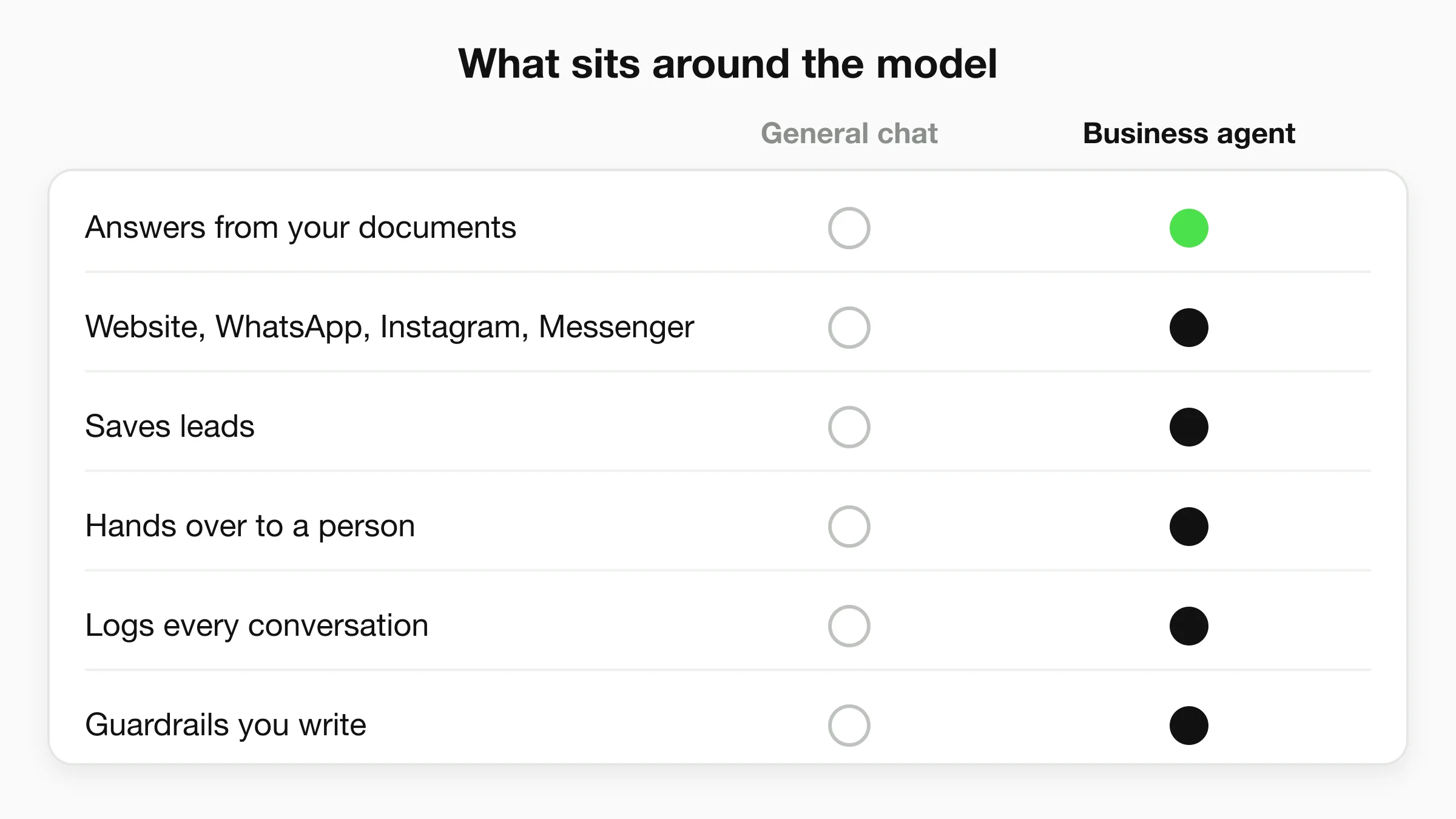
You cannot hand customers a general ChatGPT window and call it customer service. A language model is one part of a customer service system. The rest of the system is what keeps the answers correct, on the right channel and visible to your team.
Here is what a general chat assistant, or a custom GPT, leaves out. As of November 2026, check OpenAI's current documentation, because these products change.
Your documents are not the starting point
Out of the box, ChatGPT answers from its general training. It has never read your return policy. A custom GPT can take uploaded files, so it is not blind to your content. What it lacks is a business-grade process around that content: instructions that limit answers to your material, a way to see which sources an answer used, and a clear fallback when the answer is not in your files.
For a customer, a wrong answer about your refund window is a broken promise. That is why how accurate AI chatbots are depends far more on grounding and guardrails than on which model you pick. A knowledge base chatbot is built around that job.
It does not live where your customers are
A custom GPT lives inside ChatGPT. Your customers are on your website, in WhatsApp, in Instagram DMs and in Facebook Messenger. A customer who asks a question at 9pm will not open a separate app to talk to your GPT. A business agent is embedded where the question is asked.
No lead capture
A customer service chat is also your best source of new enquiries. When someone asks about a price or a booking slot, you want their name and contact details saved and sent to your team. A chat window that forgets the conversation when it closes gives you no lead to follow up.
No human handoff
Some conversations need a person: a complaint, an exception, an upset customer. A business agent hands the conversation to your team, with the history, and lets you take over. A raw model keeps talking.
No logs, no controls
You need to read what your AI told customers last week. You also need to set rules: topics it must not discuss, what to say when it does not know, when to route to a human. A general chat assistant gives you none of that as a managed system.
Could you build it yourself on the API?
You can. A developer can call OpenAI's API, add retrieval over your documents, connect WhatsApp and Instagram, store conversations, build a handoff screen and keep it all running. That is a software project with ongoing maintenance, not a prompt. It is a fair choice for a company with engineers. For most small businesses, a platform that has already done it costs less than the hours.
ChatGPT vs a customer service chatbot: side by side
The honest comparison is between three options: ChatGPT as a drafting tool, a custom GPT, and a business AI agent platform.
| ChatGPT (staff drafting) | Custom GPT | Business AI agent (e.g. Hyperleap) | |
|---|---|---|---|
| Who talks to the customer | A person, after editing | The customer, inside ChatGPT | The AI, on your channels |
| Knows your policies | Only what you paste each time | Can use uploaded files | Answers from your attached documents |
| Website, WhatsApp, Instagram DM, Messenger | No | No (lives inside ChatGPT) | Yes, four channels |
| Lead capture | No | No | Yes, saved with CSV/Excel export |
| Human handoff | Not needed, a person sends | No | Yes, on Pro and Max |
| Conversation logs for your team | Your own chat history | No managed log | Yes, in a unified inbox |
| Best for | Writing faster | Internal Q&A, prototypes | Replying to customers |
Our plain read: use ChatGPT to make your team faster, and use a business agent when customers need answers without waiting for your team. They work together. Many owners do both.
If your question is really "which model should power it", our comparison of Claude, GPT and Gemini for customer support covers that. And if you are weighing an internal ChatGPT subscription against a customer-facing agent, see the ChatGPT Enterprise vs custom AI agent cost breakdown.
What a business AI agent adds
A business AI agent is a language model plus the parts above. Here is how Hyperleap AI covers each one. We are the AI front desk for small businesses, so read this section knowing we sell it.
- Models. GPT-6 Luna is the default model, and Claude Haiku 5.5 is also included on every plan. Each counts as one response per reply. If you already pay for an OpenAI or Anthropic API key, you can bring your own on all plans.
- Grounded on your documents. You attach PDFs, pages and files. The agent is designed to answer only from them, and the conversation log shows which sources an answer drew on.
- Four channels. Website chat, WhatsApp, Instagram DM and Facebook Messenger. Hyperleap AI is a Meta Technology Provider and Business Partner, and the social channels run on Meta's official Business APIs.
- Guardrails you write. You set what the agent covers, what it refuses and what it says when it does not know.
- Leads and logs. Contact details are collected in conversation, stored with the full transcript, and can be downloaded as CSV or Excel. The website chat can use a short form if you want one, and it is optional.
- Human handoff. Visitors can ask for a person, your team is alerted in Studio, and any teammate can take over and hand back to the AI. This is on Pro and Max.
- Booking. On Pro and Max, the agent books through Calendly or Cal.com in the conversation. Calendly needs a Standard plan or higher for in-chat booking. On Plus, the agent shares your booking link.
Setup starts with a URL. Paste your website, Studio reads it, drafts a starting prompt and gives you a script tag, so live in under 5 minutes is realistic for the quick-start path. Tuning the answers, adding documents and writing guardrails comes after.
Plans run $40, $100 and $200 a month. See pricing for limits. There is a 7-day free trial and a card is required. Our customer support chatbot page shows the full set, and conversational AI for customer service explains how the pieces fit together.
What an AI agent will not fix
Neither ChatGPT nor an agent replaces judgment on refunds, medical or legal questions, or angry customers. Keep those routed to a person, and write that rule into the guardrails.
A simple way to start
Do the cheap thing first, then add the system.
- This week: save prompts 1, 4 and 10 as notes. Use them for every reply you draft. Always paste your policy.
- This month: run prompt 6 on your last 25 customer questions. The FAQ it produces is also the first set of documents an AI agent would learn from.
- When replies are the bottleneck: put an agent on your website and messaging channels, grounded on that FAQ, with handoff to your team. A home services business, for instance, can start with its home services agent setup and cover after-hours enquiries.
Whatever you choose, keep a person in the loop for exceptions, and review the logs weekly.
Frequently Asked Questions
Can I use ChatGPT for customer service?
Yes, as a drafting assistant for your team. A person pastes in the customer message and your policy, reviews the draft and sends it. Using ChatGPT as the thing customers chat with is a different job that needs grounding, channels, handoff and logs.
Is it safe to paste customer messages into ChatGPT?
It depends on your plan and the data. Remove names, contact details, payment and health information unless you have checked your plan's data controls. OpenAI publishes its Data Controls FAQ for personal accounts and a business data page for its business products and API. Read the one that matches your plan.
What is the best ChatGPT prompt for customer service replies?
Give it a role, your exact policy, the customer message, a clear task and limits such as length and tone. The policy is the part that matters most. Without it, the model fills gaps with guesses.
Can ChatGPT replace a customer service chatbot?
No. ChatGPT is a general assistant. A customer service chatbot adds answers grounded in your documents, channels such as WhatsApp and your website, lead capture, human handoff and conversation logs. Staff can use both.
Can a custom GPT answer my customers on my website?
A custom GPT lives inside ChatGPT, so it does not sit on your website, WhatsApp, Instagram or Messenger by default. If you want customers to chat on those channels, you need an embedded agent or a custom build on the API.
Which model does Hyperleap use?
GPT-6 Luna by default, with Claude Haiku 5.5 also included on every plan. You can bring your own OpenAI or Anthropic key on all plans.
Do I still need staff if I use an AI agent?
Yes. The agent handles routine questions and captures leads, and your team handles exceptions, complaints and decisions. On Pro and Max, any teammate can take over a live conversation from the AI.
Put an AI front desk on your channels
Paste your website URL, attach your documents, and answer customers on web, WhatsApp, Instagram DM and Messenger.
Start for freeData Sources
- OpenAI, Business data privacy, security, and compliance
- OpenAI Help Center, Data Controls FAQ
- Hyperleap AI product documentation (November 2026)
Related Articles
View all
Guide18 min read
AI Knowledge Base: What It Is and How to Build One
An AI knowledge base is the content an AI answers from, or a help center with AI search. Here is how each works and how a small business builds one.
Guide19 min read
Customer Service Metrics: 13 Defined, 6 to Start With
The customer service metrics that matter for a small business: definitions, formulas, what to track, what to skip, and a simple weekly scorecard.
Guide13 min read
Customer Support vs Customer Service: The Difference
Customer service helps people through the whole buying relationship. Customer support fixes problems with what they bought. Here is how to run both.
Guide19 min read
Omnichannel Customer Service: A Small Business Guide
Omnichannel customer service gives customers one connected experience on every channel. Learn how it differs from multichannel and how to set it up.