Guide
AI Knowledge Base: What It Is and How to Build One
An AI knowledge base is the content an AI answers from, or a help center with AI search. Here is how each works and how a small business builds one.

Gopi Krishna Lakkepuram · Founder & CEO
· 18 min read
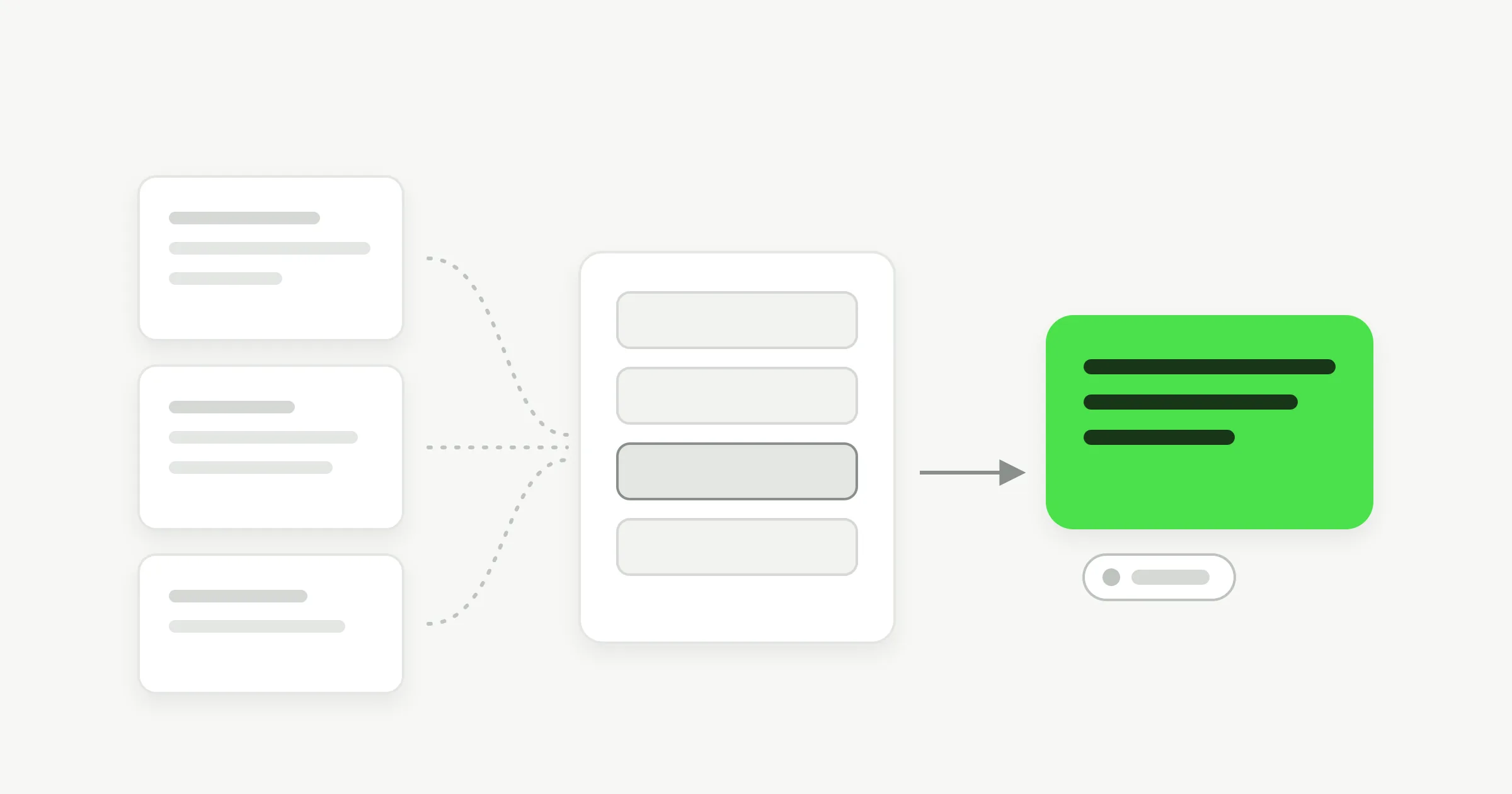
TL;DR: An AI knowledge base is the body of business content that an AI reads, searches and answers from. The term covers two products. One is a help center or wiki that uses AI for search and writing. The other is the set of sources a customer-facing AI agent answers from. This guide explains both, shows how retrieval turns your pages into an answer, and gives a small business a plain checklist for what to include, how to write it, who owns it and how to test it.
What Is an AI Knowledge Base?
An AI knowledge base is a collection of your own content (pages, documents, policies, FAQs) that an AI system searches and uses to answer questions. The AI does not rely on its general training alone. It looks up your material first and writes the reply from what it finds.
People use the phrase for two different things, and mixing them up leads to buying the wrong tool.
Meaning 1: a knowledge base with AI features. This is a traditional help center, internal wiki or documentation site. The AI adds search that understands questions, answers with links back to articles, and help drafting or cleaning up pages. The knowledge base is the product. People read it, and the AI helps them find and write things.
Meaning 2: the knowledge an AI agent answers from. Here the AI agent is the product. The knowledge base is its source material: your website, PDFs, price list and policies. Customers never browse it. They ask a question in chat and the agent answers from it. This is the meaning behind searches such as "knowledge base for AI chatbot".
Both meanings share one engine, called retrieval-augmented generation, or RAG. The idea comes from a 2020 research paper, Retrieval-Augmented Generation for Knowledge-Intensive NLP Tasks (Lewis et al.), which pairs a language model with a searchable index so that generated text can draw on retrieved material. The rest of this guide explains that in plain terms. If you want the engine on its own page, see our RAG chatbot overview.
Which meaning do you need?
If your goal is a place where customers or staff read articles, you want meaning 1. If your goal is fewer repeated questions landing in your inbox, chat and DMs, you want meaning 2. Many small businesses end up wanting both: articles on the site, and an agent that answers from the same content.
How an AI Knowledge Base Works
An AI knowledge base works in four steps: it ingests your content, splits it into short parts, retrieves the parts that match a question, and writes an answer from them. Every system that answers from your content follows this shape, whatever it calls the steps.
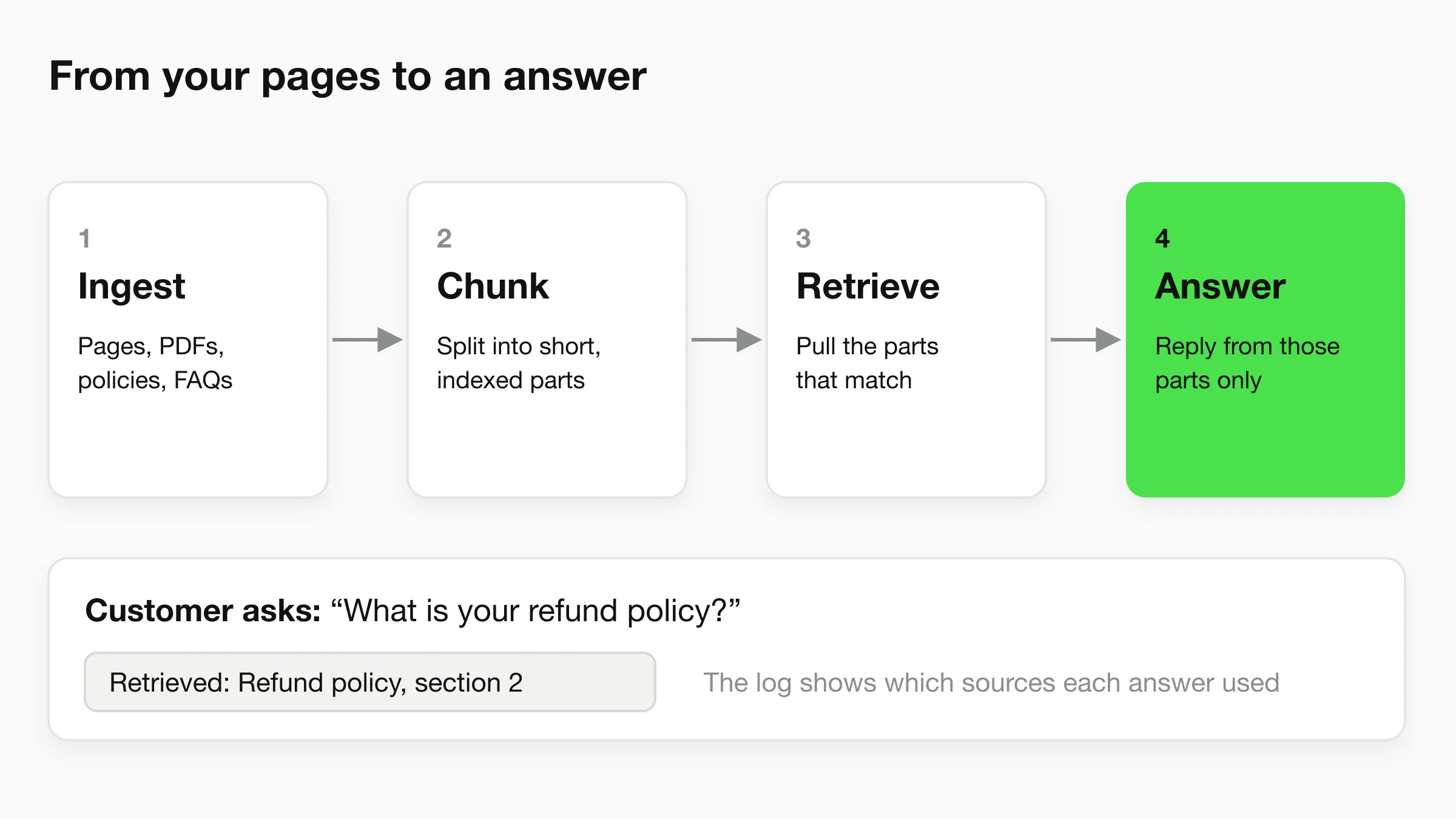
1. Ingestion
Ingestion is how content gets in. You connect a website so its pages are read, upload files such as PDFs and Word documents, or paste text and question-and-answer pairs. The system extracts the text and keeps track of where each piece came from.
Ingestion is where many problems start. A scanned PDF or a price inside an image gives the system nothing to read. If you cannot select and copy the text yourself, assume the AI cannot read it either.
2. Chunking
Chunking splits each document into short parts that can be searched one at a time. A 40-page policy PDF is far too long to hand to a model for every question, so the system keeps it as many small pieces. Each piece is then turned into a numeric representation of its meaning, which lets search match on meaning and not only on exact words.
This is why structure matters. A chunk that contains one clear fact ("Refunds are issued within 14 days of return") is easy to match. A chunk that mixes shipping, refunds and warranty in one paragraph is harder to match and easier to misread.
3. Retrieval
When a customer asks a question, the system searches the chunks and pulls the few that fit best. Ask "can I get my money back?" and retrieval should surface the refund policy chunk even though the words "money back" never appear in it.
Retrieval can only find what exists. If your return window lives on no page, no search will retrieve it. The quality of retrieval is capped by the quality and coverage of your content.
4. Answer generation, and citations
The model then writes a reply from the retrieved chunks. A well-configured agent is told to answer from those parts and to say it does not know when they do not cover the question. Our guide to AI hallucinations covers why that instruction matters and what still goes wrong.
Citations show which source an answer used. Where they appear depends on the product. Notion, for example, says its AI answers come with citations. In Hyperleap, the conversation log shows which of your attached sources an answer drew on. That is a review tool for you and your team, not a footnote shown to the customer in chat.
Grounded does not mean infallible
Answering from your documents reduces invented answers. It does not remove errors. If a document is wrong, old or contradicts another one, the AI can repeat it faithfully. Treat the knowledge base as the thing you maintain, and treat testing as routine.
AI Knowledge Base Software: Three Categories
Software that fits the phrase "AI knowledge base" falls into three groups. Match the group to the job before comparing features. The descriptions below come from each vendor's own public pages, checked in November 2026, and vendors change features often, so confirm current details on their sites.
| Category | Examples | What the knowledge base is for | AI role |
|---|---|---|---|
| Help-center AI | Zendesk, Intercom | A support team's articles and internal content | An AI agent answers customer questions from those sources |
| Wiki and workspace AI | Notion, Confluence | Team documentation and shared work | AI search, answers across the workspace, and writing help |
| Customer-facing AI agents | Hyperleap | Your website, documents and policies | The agent answers customers directly in chat |
Help-center AI
Zendesk describes its AI agents as answering customer questions using content from your trusted knowledge sources. Intercom's Fin AI agent can answer from help center articles, internal support content, PDFs and web pages, which it manages in a content library. These tools suit teams that already run a help desk with a ticket queue and want the agent inside that system.
Wiki and workspace AI
Notion says its AI can search across connected apps, answer questions using workspace context, show citations, and help write and edit pages. Atlassian describes Rovo as searching across Confluence, Jira, Slack and other apps, answering questions, and helping draft documents. These tools suit internal knowledge: onboarding, procedures, project notes. They are strongest when your team's knowledge already lives in that workspace.
Customer-facing AI agents
This is the group Hyperleap belongs to. The goal is not a browsable library. It is an AI front desk that answers customers on your website, WhatsApp, Instagram DM and Facebook Messenger, from content you control. If your problem is the same questions arriving all day, and you do not run a help desk, this is the shorter path. The knowledge base chatbot page shows what that looks like in practice.
You can combine groups: your team writes policy in a wiki and the agent answers from the approved version. Be clear about which copy is the source of truth.
What to Put in an AI Knowledge Base
Put in the content that answers the questions customers actually ask, in its final approved form. For a small business that is usually six kinds of source, ordered by how often they decide whether an answer is right.
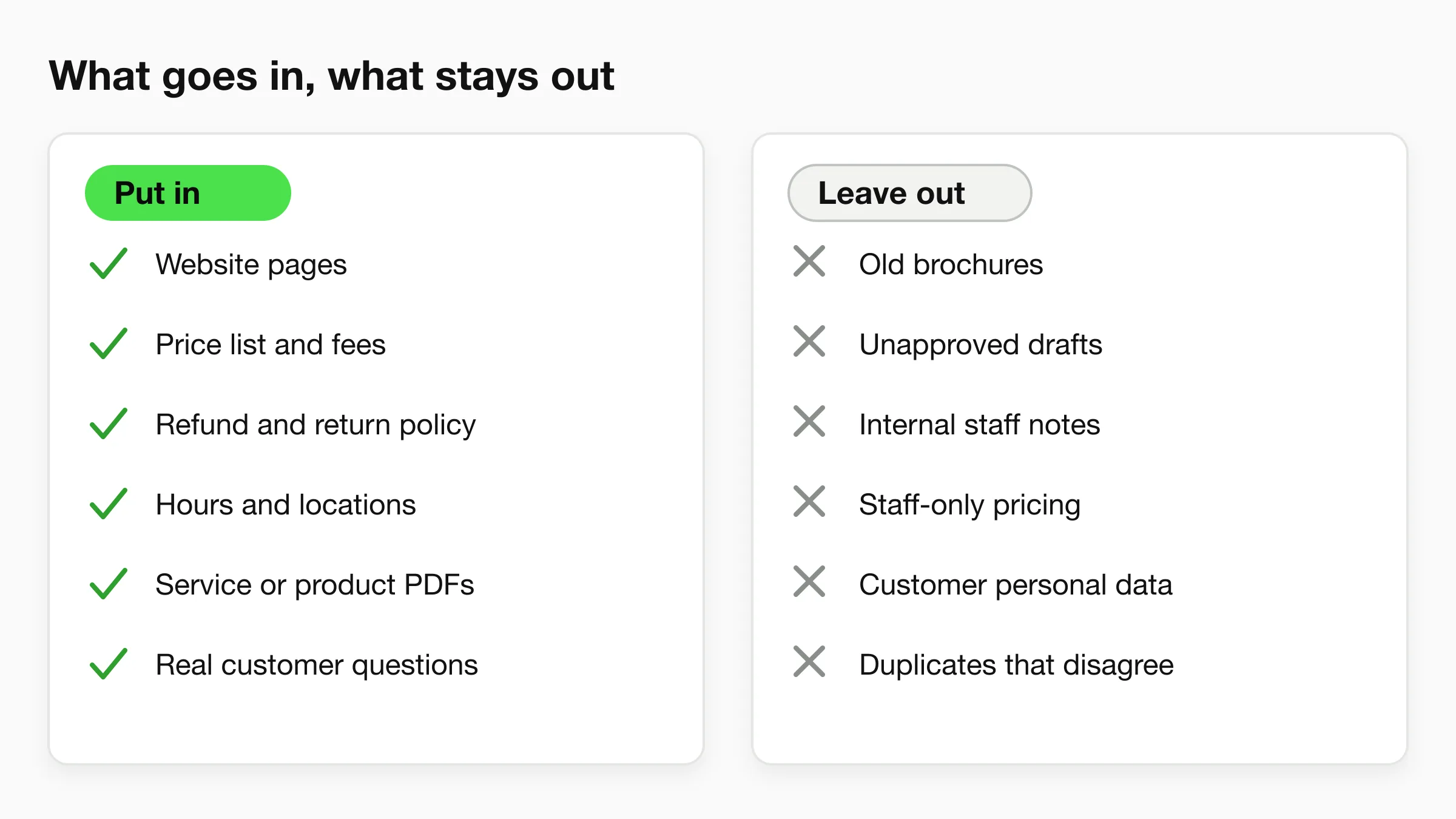
The checklist: put in
- Website pages. Services, products, about, locations and contact pages. These are already public and already approved, so they are the fastest place to start. Hyperleap can read a website and keep it as a source.
- Price list and fees. The single most asked question. Include what is covered, what is extra and any minimums. If prices vary, say what they depend on.
- Policies. Refunds, returns, cancellations, deposits, warranties, delivery windows. State the rule and its exceptions together.
- Hours, locations and contact routes. Include holiday hours and which team handles which request.
- Service or product documents. Brochures, spec sheets, menus, treatment descriptions and care instructions, as PDFs or Word files.
- Real customer questions. Mine your inbox, DMs and chat history for the questions people ask in their own words, then write a short answer to each. Question-and-answer pairs are also the easiest format for retrieval to match.
The checklist: leave out
- Old brochures and superseded documents. If two versions of a price sheet exist, the AI may cite either. Remove the old one.
- Unapproved drafts. Anything not ready for a customer to read is not ready for an AI to quote.
- Internal notes. Staff comments, margin notes and internal debates read like policy to a model that cannot tell the difference.
- Staff-only pricing. Trade rates, discount ceilings and margins do not belong in a source a customer-facing agent can retrieve.
- Customer personal data. Do not upload files that contain customers' names, contact details or records. The knowledge base is for business content, not for customer files.
- Duplicates that disagree. When the same fact appears in two places with two values, resolve it before upload. We cover this in how to resolve knowledge conflicts.
How much do you need?
Less than you think. A dental clinic, for instance, can start with its services pages, a fee guide, new-patient forms information, opening hours and an insurance and payment policy, which already covers most first-contact questions. The point is not volume. It is completeness on the questions people ask most. Hyperleap includes 40MB of knowledge per chatbot on every plan, and most small businesses fit comfortably, since text takes little space. See the pricing page for the plan details.
See your own site answer questions
Point Hyperleap at your website and test real questions. Plans start at $40/mo with a 7-day free trial.
Start for freeHow to Structure and Write for Better AI Answers
Write each source so that one chunk holds one complete fact. This is the biggest lever you control, and it costs nothing. Here are the rules that matter most.
Lead with the question or the topic
Give each section a heading that matches how a customer would ask. "Can I cancel my booking?" is a better heading than "Section 4.2: Termination provisions". Retrieval compares the customer's question to your text, so wording that mirrors the question helps.
One topic per section, one fact per sentence
Keep a refund rule apart from a shipping rule. Short sections give retrieval a clean target, and short sentences are harder to misread. For a longer treatment of document structure, see our best practices for chatbot knowledge bases.
Say the number and its condition together
"The deposit is $50" fails the moment someone asks "deposit for what?" Write "The deposit for a color appointment is $50, refundable up to 48 hours before." The condition travels with the fact, so any chunk that carries the number also carries its meaning.
Name things the way customers do
If customers say "tune-up" and your page says "preventive maintenance service", write both.
Write the "no" answers
Add what you do not do: "We do not offer same-day delivery." Without a stated no, the agent has nothing to retrieve and may guess a yes.
Keep exceptions next to rules
A policy with its exceptions in a different document is a conflict waiting to happen. Put both in one place, with the effective date.
Use question-and-answer pairs for the sharp edges
Q&A pairs suit specifics such as parking, accepted payment methods and what to bring. Hyperleap accepts FAQs as a source type alongside documents, website pages and text.
For multi-location or multi-product businesses with near-identical pages, there is one extra consideration: the agent has to pick the right branch or plan before answering. We explain that in hierarchical RAG explained.
Keep It Fresh: Owner, Review Cadence and Change Log
An AI knowledge base goes wrong over time, not on day one. Prices change, hours change, policies change, and the AI keeps answering from last quarter's version until someone fixes the source. The remedy is not a clever tool. It is ownership.
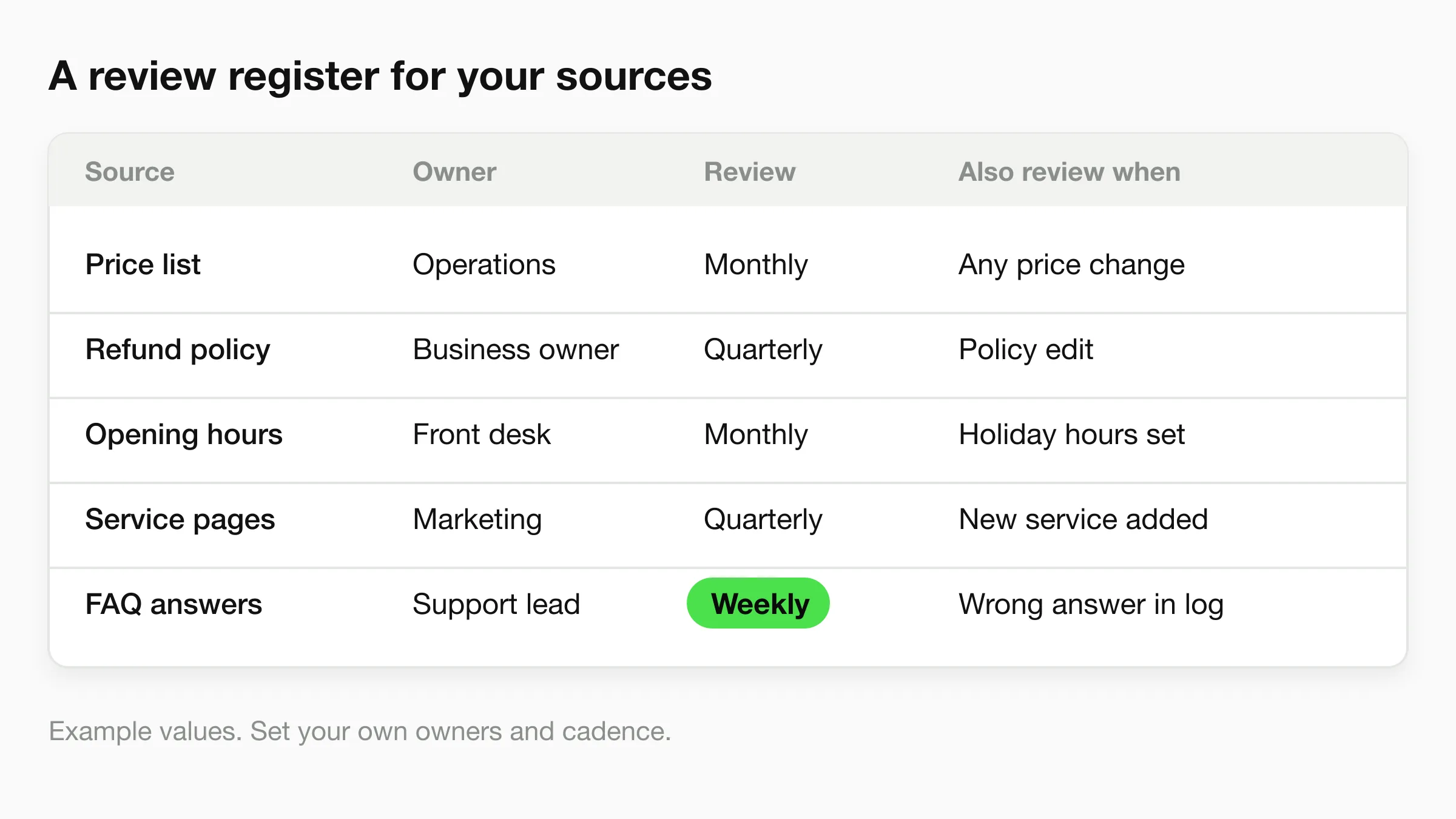
Give every source an owner
One named person is responsible for each source, not a team. The person who changes the price list should be the person who updates the knowledge base, ideally in the same sitting. When the owner is "everyone", the knowledge base goes stale.
Set a review cadence, plus triggers
A calendar review catches slow drift: monthly for prices and hours, quarterly for policies and service pages. Triggers catch fast change: a price change, a new service, a holiday, a wrong answer found in the conversation log. The example register above shows both columns. The cadences are examples, so set your own to match how often your business actually changes.
Keep a change log
Write down what changed, when, who approved it and which sources were updated or removed. The log answers the question that always comes up after a wrong answer: was the source wrong, or did the AI misuse a correct source? Our source change checklist turns this into a repeatable routine.
Use the tools that already exist
In Hyperleap, every published version of your agent is kept with per-section diffs and a one-click restore to draft, and changes move from draft to test to publish. That gives you a built-in change history for the agent itself. It does not replace your own register of who owns which source, so keep that as well.
Know what syncs and what does not
Treat any source as a snapshot until you have confirmed how and when it refreshes in your tool. Note that Hyperleap does not yet sync Notion, Google Drive or Confluence as knowledge sources. That is on the roadmap, not live. If your policies live in one of those tools, export the approved version and attach it, then record that export in your change log.
How to Test an AI Knowledge Base
Test with real customer questions, in the customer's wording, before launch and after every change. A knowledge base that looks complete in a folder can still fail on the third question a customer asks.
Build a starter question set
Pull 25 to 50 questions from your inbox, DMs and chats, in real phrasing. Group them: pricing, policies, hours, services, edge cases and things you do not do. Add ten questions the knowledge base should not answer, such as a competitor's prices, to check that the agent declines.
Score each answer on three points
- Correct. Does the answer match your current policy exactly?
- Complete. Did it include the condition or exception that changes the answer?
- Sourced. Does the log show it drew on the right source?
Where an answer fails, fix the source first, not the prompt. A prompt that says "always say 14 days" patches one answer and leaves the real conflict in the sources.
Retest the neighbors
When you fix one answer, rerun the questions around it. A changed refund window affects the questions on exchanges, store credit and damaged goods. Our policy-change regression tests give a ready set for this, and fallback message templates help you write the "I don't know" reply so it still helps the customer.
Read the real conversations weekly
After launch, real conversations replace your guesses. Read a sample each week, flag answers that were wrong, vague or missing, and add the missing content. This is the loop that makes the knowledge base better than any pre-launch checklist can.
Do not skip the human route
A knowledge base reduces repeat questions. It does not cover every situation. Decide who takes over when the AI cannot answer, and write that route into the agent's instructions. On Pro and Max, human handoff and live takeover are available in Studio.
Where Hyperleap Fits
Hyperleap is an AI front desk for small businesses, so it sits in the second meaning: the knowledge your agent answers from. You can base an agent on your website, upload documents such as PDFs and Word files, and add FAQs and text. The agent answers customers on your website, WhatsApp, Instagram DM and Facebook Messenger, in more than 100 languages. The conversation log shows which sources an answer drew on, and version history keeps every published version.
It is not the right fit if you need a public help-center site with article pages and categories for customers to browse, or if your team's internal wiki is the main thing you want AI to search. Those are meaning 1, and help-center and wiki tools cover them.
For a business such as a dental practice, the first week looks like this: attach the services pages and fee guide, add a short FAQ for insurance and first-visit questions, test the question set, and read the logs. The whole AI front desk loop (answer, qualify, book, route, report) depends on that first step being right.
Build your knowledge base around real questions
Start with your website and your top 25 customer questions. Hyperleap plans start at $40/mo, with a 7-day free trial.
Start for freeFrequently Asked Questions
What is an AI knowledge base?
An AI knowledge base is a set of your own content that an AI searches to answer questions. It can be a help center or wiki with AI search and writing tools, or the source material a customer-facing AI agent answers from. Both use retrieval to find relevant content first and then write an answer from it.
What is the difference between a knowledge base and an AI knowledge base?
A traditional knowledge base relies on people browsing categories or typing keywords. An AI knowledge base adds search that understands the meaning of a question, and often an assistant that writes a direct answer from the matching content. The content still has to be accurate, current and well organized for either to work.
What should a small business put in an AI knowledge base?
Start with website pages, a price list, policies, hours and locations, service documents and real customer questions with short answers. Leave out old versions, drafts, internal notes, staff-only pricing, customer personal data and duplicates that disagree. Complete coverage of the most common questions matters more than volume.
How is an AI knowledge base different from training an AI model?
Most business AI agents do not retrain a model on your data. They retrieve from your content at the time of each question and write the answer from what they find. That means fixing an answer usually means fixing or adding a source, which takes minutes, not a training run. Our comparison of RAG, fine-tuning and prompt engineering goes deeper.
How often should I update my AI knowledge base?
Update a source in the same sitting as the business change that affects it, and review each source on a schedule, such as monthly for prices and hours and quarterly for policies. Also review whenever the conversation log shows a wrong answer. Assign a named owner to every source so updates actually happen.
Does Hyperleap work with Notion, Google Drive or Confluence as knowledge sources?
Not yet. Syncing knowledge from Notion, Google Drive and Confluence is on the roadmap and is not available today. You can export the approved version of a page or document and attach it as a file, then record the export date in your change log.
Can an AI knowledge base give wrong answers?
Yes. Answering from your documents reduces invented answers, but it cannot fix a source that is wrong, old or in conflict with another. Test with real questions, review conversation logs, and keep a human route for anything the AI cannot answer. Our guide to a FAQ chatbot shows the simplest starting point.
Data Sources
- Lewis et al., "Retrieval-Augmented Generation for Knowledge-Intensive NLP Tasks" (2020), arxiv.org/abs/2005.11401
- Zendesk Support, "About generative AI features in Zendesk Guide" (zendesk.com, accessed November 2026)
- Intercom Help Center, "Fin AI Agent explained" (intercom.com, accessed November 2026)
- Notion AI product page (notion.com, accessed November 2026)
- Atlassian, Confluence and Rovo AI page (atlassian.com, accessed November 2026)
Industry Solutions
See how AI chatbots work for these industries:
Related Articles
View all
Guide18 min read
What is MCP (Model Context Protocol)? SMB Guide
MCP lets AI tools like Claude and Cursor query your business data directly. Here is what Model Context Protocol means, why it matters, and how to use it.
Guide14 min read
How Accurate Are AI Chatbots in 2026? An Honest Benchmark
Document-grounded (RAG) chatbots answer far more reliably than vanilla LLMs. How to benchmark accuracy and what accurate enough means.
Guide25 min read
AI Chatbot Knowledge Base: Best Practices for Accuracy
Your AI chatbot is only as good as its knowledge base. Learn how to structure, write, and maintain content for accurate responses.
Guide18 min read
AI Agents vs Chatbots: What's Actually Different in 2026
AI agents and chatbots are not the same. Learn the real technical differences and why the distinction matters for your business.