Guide
Omnichannel Customer Service: A Small Business Guide
Omnichannel customer service gives customers one connected experience on every channel. Learn how it differs from multichannel and how to set it up.

Gopi Krishna Lakkepuram · Founder & CEO
· 19 min read
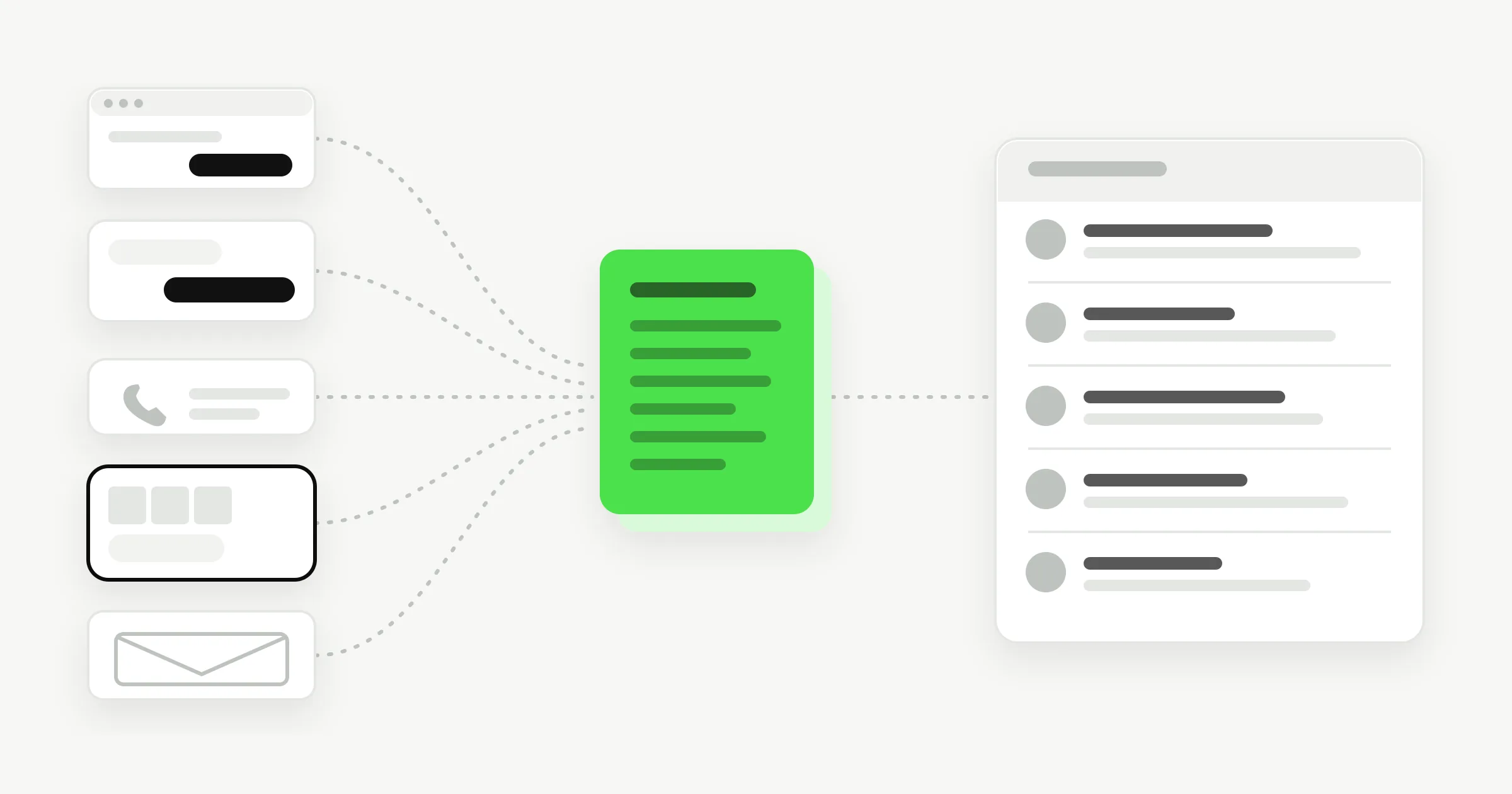
TL;DR: Omnichannel customer service means a customer can contact you on any channel and get the same accurate answer, with the context of earlier conversations available to whoever replies next. Multichannel service only means you are present on several channels. For a small business, the work comes down to six steps: audit your channels, keep one source of answers, make replies consistent, work from one inbox, write handoff rules, and measure a few simple numbers.
Most small businesses already run several channels. The website has a contact form, WhatsApp has a business number, Instagram has DMs, Messenger has a page inbox, and the phone and email still ring. Omnichannel customer service is the practice of making those channels behave like one front desk instead of five separate ones. This guide defines the term, shows how it differs from multichannel service, and walks through a step-by-step omnichannel customer service strategy sized for a team of 2 to 20 people.
What Is Omnichannel Customer Service?
Omnichannel customer service is a support model where every channel connects to the same knowledge, the same customer context and the same team, so the customer never has to start over. A person can ask about your opening hours on Instagram, ask a follow-up on your website, and get the same answer both times.
Salesforce, which sells service software, puts the idea in one line: "multichannel is about offering access while omnichannel is about offering continuity" (Salesforce). Access means customers can reach you in many places. Continuity means what they said in one place is not lost when they move to another.
Three things have to be true for a service setup to count as omnichannel:
- Consistent answers. Price, hours, policies and availability are the same on every channel.
- Shared context. The person or AI replying can see what was already said, or at least what the customer wants.
- One place to work. The team does not log into five apps to find out what is waiting.
Omnichannel is a spectrum, not a switch. A five-person salon does not need a customer data platform. It can get most of the benefit by fixing the first and third points, which are cheap, and handling the second with simple team habits.
The idea has been studied most in retail. A Harvard Business Review study of 46,000 shoppers at one retailer, by Emma Sopadjieva, Utpal Dholakia and Beth Benjamin, concluded that omnichannel retailing works. That research is about shopping, not support, so treat it as background.
Omnichannel vs Multichannel Customer Service
The difference between omnichannel and multichannel customer service is whether the channels are connected. In a multichannel setup each channel works on its own, with its own inbox, its own people and its own idea of the right answer. In an omnichannel setup the channels share one source of answers and one view of the conversation.
| Multichannel | Omnichannel | |
|---|---|---|
| What it means | Customers can reach you on several channels | Channels work as one connected service |
| Where answers come from | Each channel owner answers from memory or their own notes | One shared knowledge source for every channel |
| Customer switches channel | Starts over and repeats the question | Context travels, or the team can find it |
| Inbox | One per channel | One shared view |
| Who owns it | The person who happens to watch that channel | The team, with written rules |
| Typical failure | WhatsApp says $90, the website says $110 | Rules are too rigid for unusual cases |
| Good fit | A business that is testing a new channel | A business whose customers already move between channels |
Most small businesses become multichannel by accident. Someone creates a Facebook page, someone else adds WhatsApp, a freelancer installs website chat. Nobody decided the channels should be a system. They just accumulated.
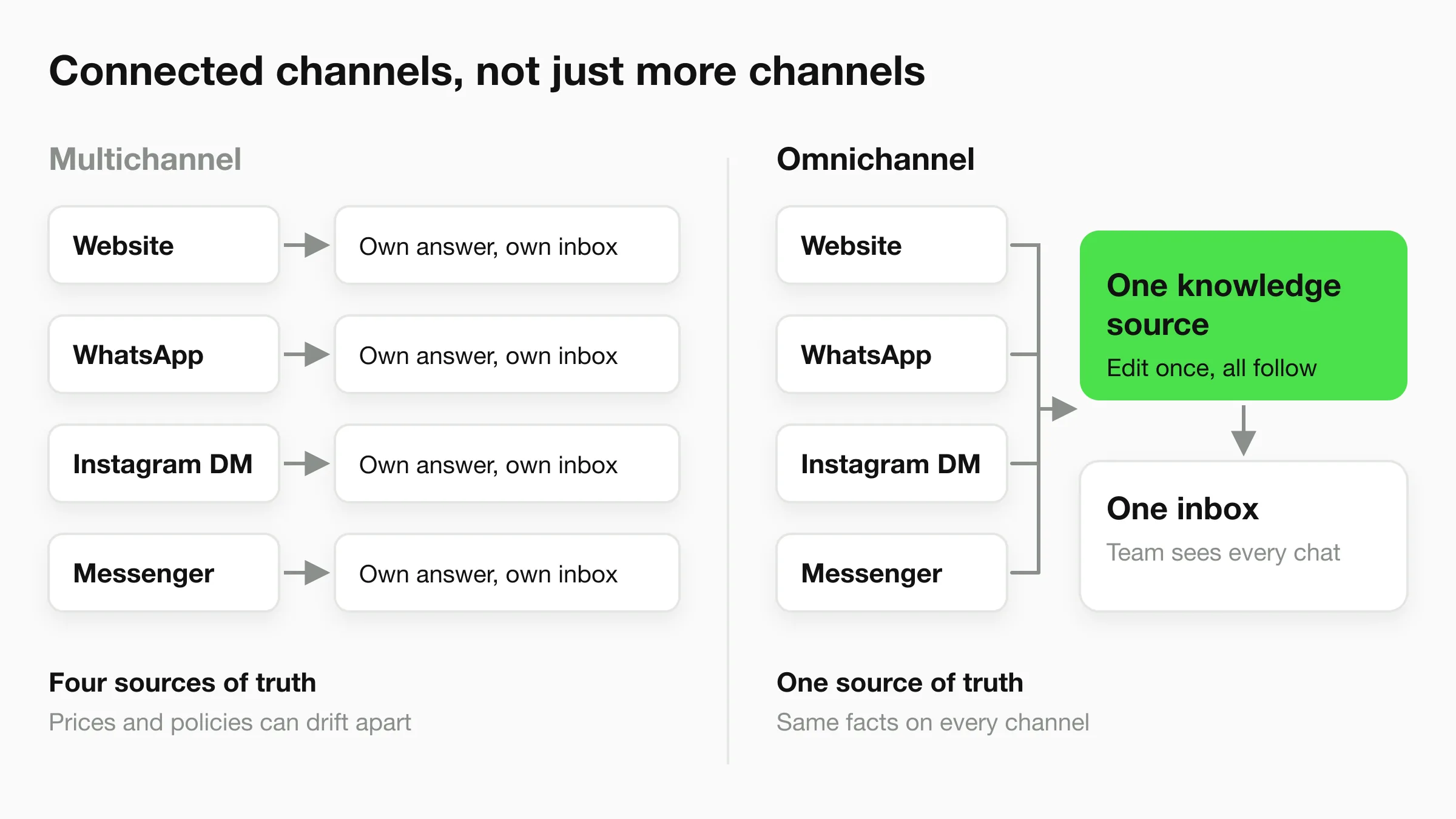
You do not need to pick a side as a matter of principle. If you only have two channels and a few enquiries a day, multichannel may be enough. Move toward omnichannel when you notice customers repeating themselves, staff giving different answers to the same question, or messages sitting unseen in an inbox nobody checks. If you want the narrower view of running an AI agent across messaging channels, our guide to multi-channel AI chatbot strategy covers channel-by-channel deployment. This guide covers the broader service model around it.
What Omnichannel Customer Service Looks Like With 3 to 5 Channels
For a small business, omnichannel customer service looks like one set of facts, one list of open conversations and a short list of rules for when a person steps in. It does not need a contact center. The channels that matter are usually a subset of these six: website chat, WhatsApp, Instagram DM, Facebook Messenger, phone and email.
Here is an illustrative example. A home services company with six technicians gets questions in five places.
- Website: a visitor at 9 p.m. asks whether you service their postcode and what a drain inspection costs.
- WhatsApp: a returning customer asks to move Thursday's visit.
- Instagram DM: someone saw a before-and-after photo and asks for a quote on a similar job.
- Phone: an emergency, a burst pipe, from someone who found the number on Google.
- Email: a property manager asks for an invoice copy.
In a multichannel setup, the office manager checks each of those in turn when she has a minute. The website question waits until morning. The Instagram DM is seen on Friday. Price answers differ because the technician who answers WhatsApp quotes from memory.
In an omnichannel setup, the routine questions get the same answer within seconds on the messaging channels, the booking and quote requests land in one inbox with the details already collected, and the emergency call goes to a person because that is the rule. The phone and email still exist. They are part of the system through rules, not through software.
| Channel | What customers use it for | Where the answer should come from | Who should handle it |
|---|---|---|---|
| Website chat | Research, pricing, availability, first contact | Shared knowledge source | AI first, team for exceptions |
| Follow-ups, scheduling, repeat customers | Shared knowledge source | AI first, team for changes and complaints | |
| Instagram DM | Visual interest, quote requests, "is this available?" | Shared knowledge source | AI first, team for custom quotes |
| Facebook Messenger | Page enquiries, older or local audiences | Shared knowledge source | AI first, team for exceptions |
| Phone | Urgent, complex or emotional issues | Same facts, read from the shared source | Person |
| Documents, invoices, formal requests | Same facts, read from the shared source | Person |
Be clear about what your tools cover
Hyperleap AI covers four channels: website chat, WhatsApp, Instagram DM and Facebook Messenger. Phone and email are not Hyperleap channels. In a real omnichannel setup you still answer them, and they should give the same facts as the other four. That is why the first step below is writing the facts down once.
A Step-by-Step Omnichannel Customer Service Strategy
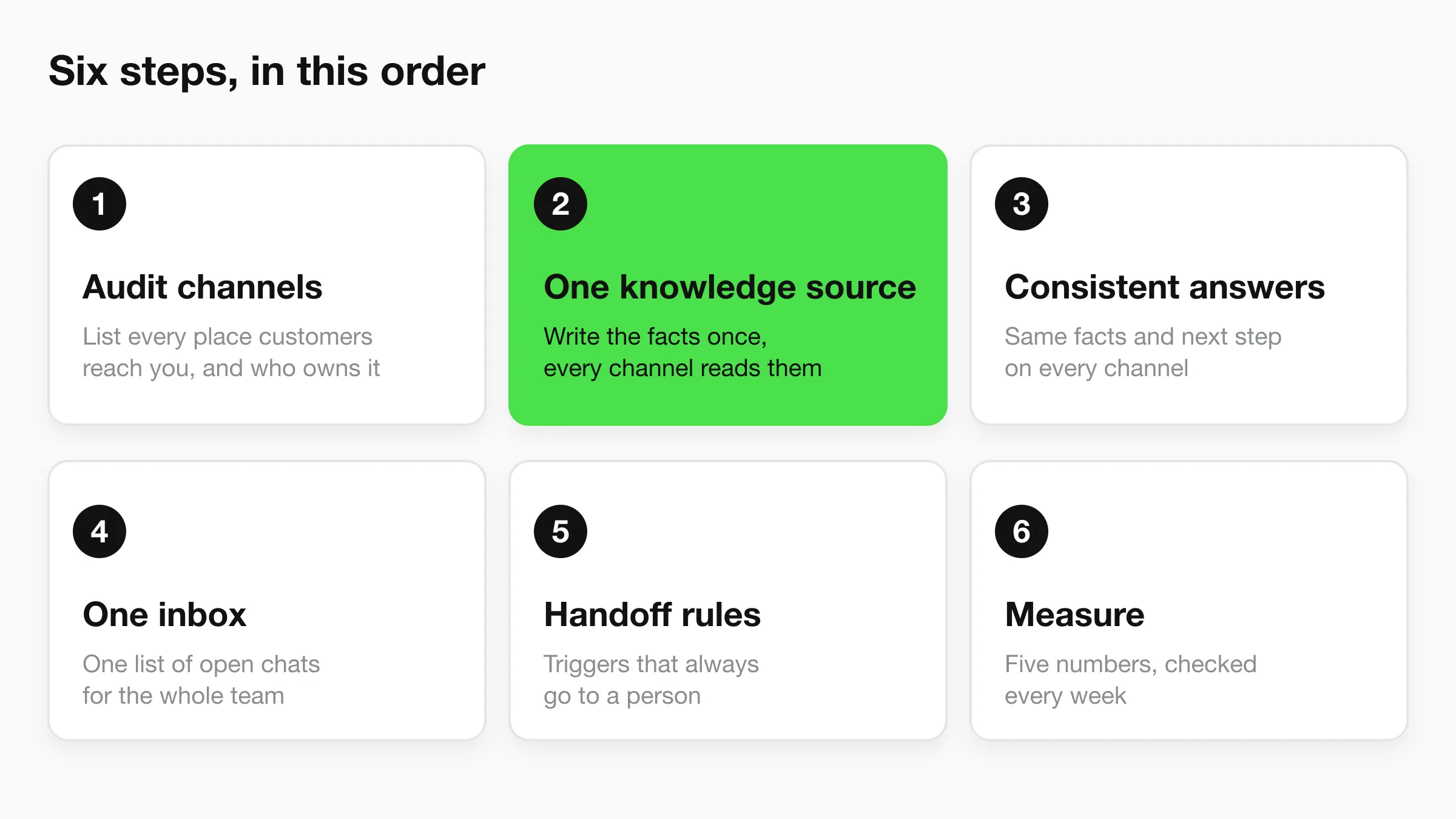
A workable omnichannel customer service strategy has six steps: audit your channels, create one knowledge source, make answers consistent, work from one inbox, write handoff rules, and measure a few numbers. Do them in this order. Each step makes the next one cheaper.
1. Audit your channels
List every place a customer can contact you today, including the ones you forgot, such as an old Facebook page or a contact form that emails someone who left.
For each channel, write down who watches it, how often, how quickly a reply usually goes out, and what customers mostly ask there. A week of notes from the people who answer is enough. The aim is to find the gaps: channels nobody owns, channels checked once a day, and questions that appear everywhere.
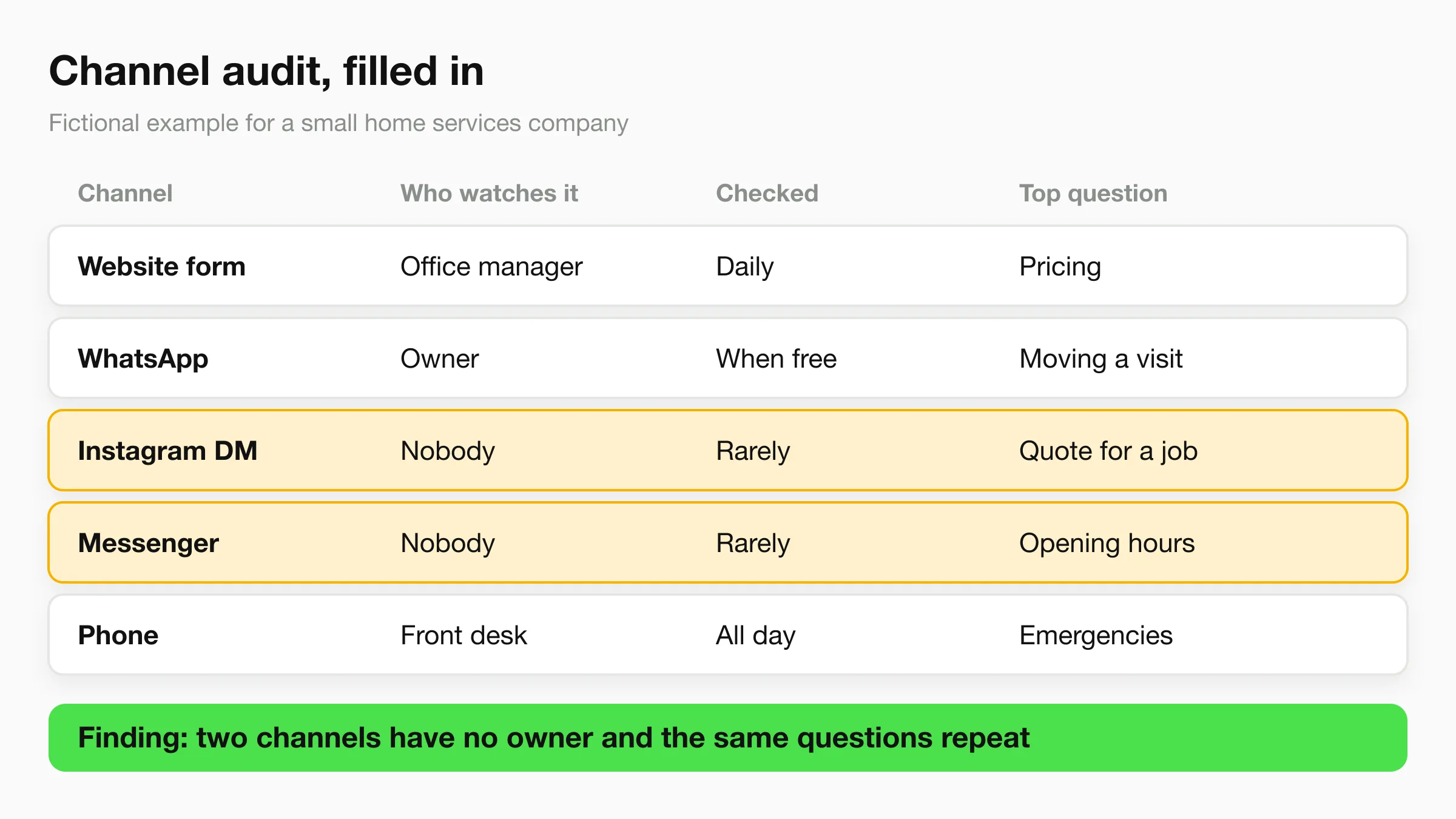
Then decide which channels you will keep. Closing a channel nobody can staff is a valid result. A dead Messenger inbox with a six-day reply time hurts you more than having no Messenger page at all, because it makes a promise you do not keep.
2. Create one knowledge source
Most inconsistent service comes from inconsistent sources. If the price list is a PDF on the website, a note on the manager's phone and a memory in the technician's head, the channels will disagree sooner or later.
Pick one place where the current answers live. For a small business that can be a document or a short set of pages covering:
- Services and what each includes
- Prices, or how prices are worked out
- Opening hours and holiday exceptions
- Service areas, locations or delivery zones
- Booking, cancellation and refund policies
- What you do not do, and who to refer customers to
Write it as you would answer a customer. Make it the only place that changes, so when a price rises you edit one document. Our guide to chatbot knowledge base best practices goes deeper on structuring this material so an AI agent can use it.
3. Make answers consistent across channels
Consistent does not mean identical wording. A WhatsApp reply can be shorter and warmer than a website reply. It means the facts, the policy and the next step match.
Write a half-page reply guide that applies to every channel and every person:
- Facts come from the knowledge source. If it is not there, say you will check and name who will reply.
- Tone: pick three adjectives (for example friendly, direct, calm) and one thing to avoid.
- Every reply ends with a next step: a booking link, a question, or a named person who will follow up.
- Uncertainty is stated. "I do not have that information, I will pass it to the team" beats a guess.
Test it with the same five questions on each channel. Ask about price, availability, a refund, an out-of-area address and something you do not offer. If the answers differ in substance, the source or the guide needs fixing, not the channel.
4. Work from one inbox
If staff open five apps, one will get skipped. A shared inbox means everyone sees the same list of open conversations, with an indicator of which channel each came from. Our guide to the unified inbox for AI customer conversations covers the rules for working one with a small team. The short version is that a shared view needs a named person who checks it and a named owner for each unresolved item.
Apply two checks to whatever tools you use. Can a new team member find yesterday's WhatsApp conversation in under a minute? When two people are online, is it obvious who is replying?
Phone and email will probably stay outside the inbox. Handle that with a simple log: a shared sheet or note where anyone who takes a call writes the customer's name, the issue and the outcome, so the next person who sees a message from that customer has context.
5. Write handoff rules
A handoff is the moment a conversation moves from the AI or one person to another. Most omnichannel failures happen here, because customers have to repeat themselves or because nobody realized a person was needed.
Write down the triggers that always go to a person. A starting list:
| Trigger | Who takes it | What the customer is told |
|---|---|---|
| Emergency or safety issue | On-call person, by phone | "I am connecting you with our team now" |
| Complaint or refund request | Owner or manager | "A team member will reply by [time]" |
| Custom quote | Sales or estimator | "We will send a written quote by [time]" |
| Customer asks for a person | Next available teammate | "Passing you to a person" |
| Anything the knowledge source cannot answer | Whoever owns that topic | "I will pass this to the team" |
| Regulated topics (medical, legal, financial advice) | Qualified staff | "That needs one of our team to answer" |
Add three more rules. Every handoff carries a one-line summary of what the customer wants. The customer is told when a person will reply, using a real time. And the person taking over reads the thread before typing. For more on designing these, see our guide to chatbot human handoff best practices.
6. Measure a few simple numbers
Track five things weekly, by channel:
- Volume. How many conversations arrived on each channel.
- First reply time. How long until the customer got a useful first response, and how that changes outside working hours.
- Handled without a person. The share of conversations resolved by the AI or the knowledge source without a staff reply.
- Handoffs and their causes. Which triggers fire most. A repeated cause points to a gap in the knowledge source.
- Repeat questions. Customers asking the same thing twice, which signals unclear answers.
Track outcomes too: bookings made, quote requests, leads captured. Where your tool supports it, attribute each conversation to its source so you can see which channel is producing work. Compare against your own earlier weeks, not against generic benchmarks you cannot verify.
See one front desk across four channels
Hyperleap AI answers from one knowledge base on your website, WhatsApp, Instagram DM and Facebook Messenger, with every conversation in one inbox. Plans start at $40/mo with a 7-day free trial.
Start for freeCommon Omnichannel Customer Service Mistakes
The most common omnichannel mistake is buying a tool before deciding who owns the answers. The other mistakes are mostly variations on the same theme: adding channels faster than you can staff them.
Adding channels you cannot answer
Every channel is a promise to reply. Opening Messenger, Instagram and WhatsApp in a week, with one person on the team, produces three slow inboxes. Add a channel when you can name who answers it and when.
Copying answers into each channel
Pasting the price list into a WhatsApp greeting, a website FAQ and an Instagram highlight creates three copies that drift. Keep one source and let channels read from it.
Treating the AI as a separate channel
An AI agent is not a channel. It is a way of answering on channels. If it answers from different information than your team uses, you have created a sixth source of truth. Give the AI and your staff the same knowledge.
No rule for when a person steps in
If the only handoff rule is "when the AI cannot answer," customers get stuck in loops. Define triggers up front, including the customer simply asking for a person.
Assuming identity matches across channels
The same person may message you on Instagram and then email, and you may not know it is the same person. Do not assume your tools match them. If a customer refers to an earlier conversation, ask for the details and log them. Do not merge records based on a similar name.
How an AI Front Desk Delivers Consistent Answers Across Four Channels
An AI front desk gives omnichannel-style consistency on messaging channels by answering from one knowledge base everywhere. With Hyperleap AI, you attach your documents, pages and policies once, and the same agent answers on your website chat, WhatsApp, Instagram DM and Facebook Messenger. Update a price in the source and every channel changes. That addresses steps 2 and 3 of the strategy directly.
Here is what it does and does not cover, using the six steps as a checklist.
| Step | What Hyperleap AI covers | What stays with your team |
|---|---|---|
| 1. Channel audit | Four channels: website, WhatsApp, Instagram DM, Messenger | Deciding which to keep; phone and email |
| 2. One knowledge source | One knowledge base for all four channels | Writing and maintaining the content |
| 3. Consistent answers | The same agent answers on every channel, grounded in your documents | The reply guide and tone rules |
| 4. One inbox | Unified inbox in Studio with all conversations from the four channels | Who checks it and who owns each item |
| 5. Handoff rules | Human handoff and live takeover on Pro and Max, including WhatsApp, Instagram and Messenger | Writing the triggers and responding on time |
| 6. Measure | Conversation logs, with source citations showing which sources an answer drew on; link tracking on Pro and Max | Reviewing the numbers weekly |
Some limits are worth stating plainly.
- Phone and email are not Hyperleap channels. Voice and an email channel are on the roadmap, not available. Keep your phone and email processes, and have them read from the same facts.
- Conversations are not merged into one profile across channels. Do not expect the same person's WhatsApp and website conversations to be combined automatically. The unified inbox gives your team one place to see them.
- Handoff and live takeover need Pro or Max. On Plus, the agent answers and captures contact details, and your team follows up from the inbox.
- Booking. On Pro and Max the agent can book appointments in the conversation through Calendly (Standard plan or higher) or Cal.com. On Plus it shares your booking link.
- WhatsApp fees. Meta charges WhatsApp fees separately from your Hyperleap plan, so check Meta's current pricing.
On the website chat, the agent can collect contact details through a short optional form. On WhatsApp, Instagram DM and Messenger, the contact comes from the platform. Hyperleap AI is a Meta Technology Provider and Business Partner, and the three Meta channels run on Meta's official Business APIs.
For the full picture of how the product fits customer support, see conversational AI for customer service, the channels overview and the wider AI front desk page. If you are choosing between platforms, the best multi-channel chatbots in 2026 comparison and the best omnichannel customer service software roundup lay out the trade-offs, and pricing lists what each plan includes.
Industry examples
A home services company can use one knowledge source for service areas, call-out fees and emergency rules, and send urgent messages to a person: see AI agents for home services. A salon can keep prices, stylist availability and cancellation rules in one place and let the agent handle Instagram DMs about them: see AI agents for beauty businesses.
Sources
- Salesforce, "What is Omnichannel Customer Service?", definition and multichannel comparison.
- Sopadjieva, Dholakia and Benjamin, "A Study of 46,000 Shoppers Shows That Omnichannel Retailing Works", Harvard Business Review, January 2017.
Frequently Asked Questions
What is omnichannel customer service?
Omnichannel customer service is a support model where every channel connects to the same knowledge, customer context and team. A customer can switch from website chat to WhatsApp to a phone call without repeating themselves, and receives consistent answers throughout. It focuses on continuity of experience, not on how many channels you offer.
What is the difference between omnichannel and multichannel customer service?
Multichannel service offers several ways to reach you, but each channel runs separately with its own inbox and its own answers. Omnichannel service connects the channels so they share information and context. Multichannel is about access. Omnichannel is about continuity.
How many channels does a small business need for omnichannel support?
Three to five is a practical range, and the right ones are where your customers already contact you. Start with the channels you can staff, usually your website plus one or two messaging apps and the phone. Adding channels you cannot answer promptly makes service worse, not better.
Can an AI chatbot support omnichannel customer service?
Yes, for the messaging channels it is connected to. One AI agent answering from a single knowledge base keeps website, WhatsApp, Instagram DM and Messenger answers consistent. It does not replace your phone or email processes, and your team still handles exceptions, complaints and anything that needs judgment.
What does Hyperleap AI cover and not cover?
Hyperleap AI covers website chat, WhatsApp, Instagram DM and Facebook Messenger from one knowledge base, with a unified inbox. Phone and email are not Hyperleap channels. Human handoff, native booking and link tracking are on Pro and Max. Plans start at $40/mo with a 7-day free trial and a card required.
Start With One Source of Truth
Omnichannel customer service does not require a bigger team or a bigger budget. It requires deciding which answers are correct, writing them down once, and making every channel read from that source. Audit your channels this week, pick the one inbox your team will work from, and write the five handoff rules that matter most.
Give every channel the same answer
Set up one AI front desk for your website, WhatsApp, Instagram DM and Facebook Messenger, and see every conversation in one inbox.
Start for freeIndustry Solutions
See how AI chatbots work for these industries:
Related Articles
View all
Guide19 min read
Customer Service Metrics: 13 Defined, 6 to Start With
The customer service metrics that matter for a small business: definitions, formulas, what to track, what to skip, and a simple weekly scorecard.
Guide17 min read
Customer Support Channels: 11 Options Compared (2026)
Compare 11 customer support channels by speed, staffing cost and automation, then pick the 2 to 4 that fit where your customers already are.
Guide13 min read
Customer Support vs Customer Service: The Difference
Customer service helps people through the whole buying relationship. Customer support fixes problems with what they bought. Here is how to run both.
Guide16 min read
ChatGPT for Customer Service: 12 Prompts and Its Limits
How to use ChatGPT for customer service: 12 copy-paste prompts for your team, plus what it cannot do when customers talk to it directly.