Guide
Ecommerce Customer Service: A Practical Guide for Stores
Ecommerce customer service for small stores: the six question types you get, how to answer each, policies to publish, and what to automate.

Gopi Krishna Lakkepuram · Founder & CEO
· 19 min read
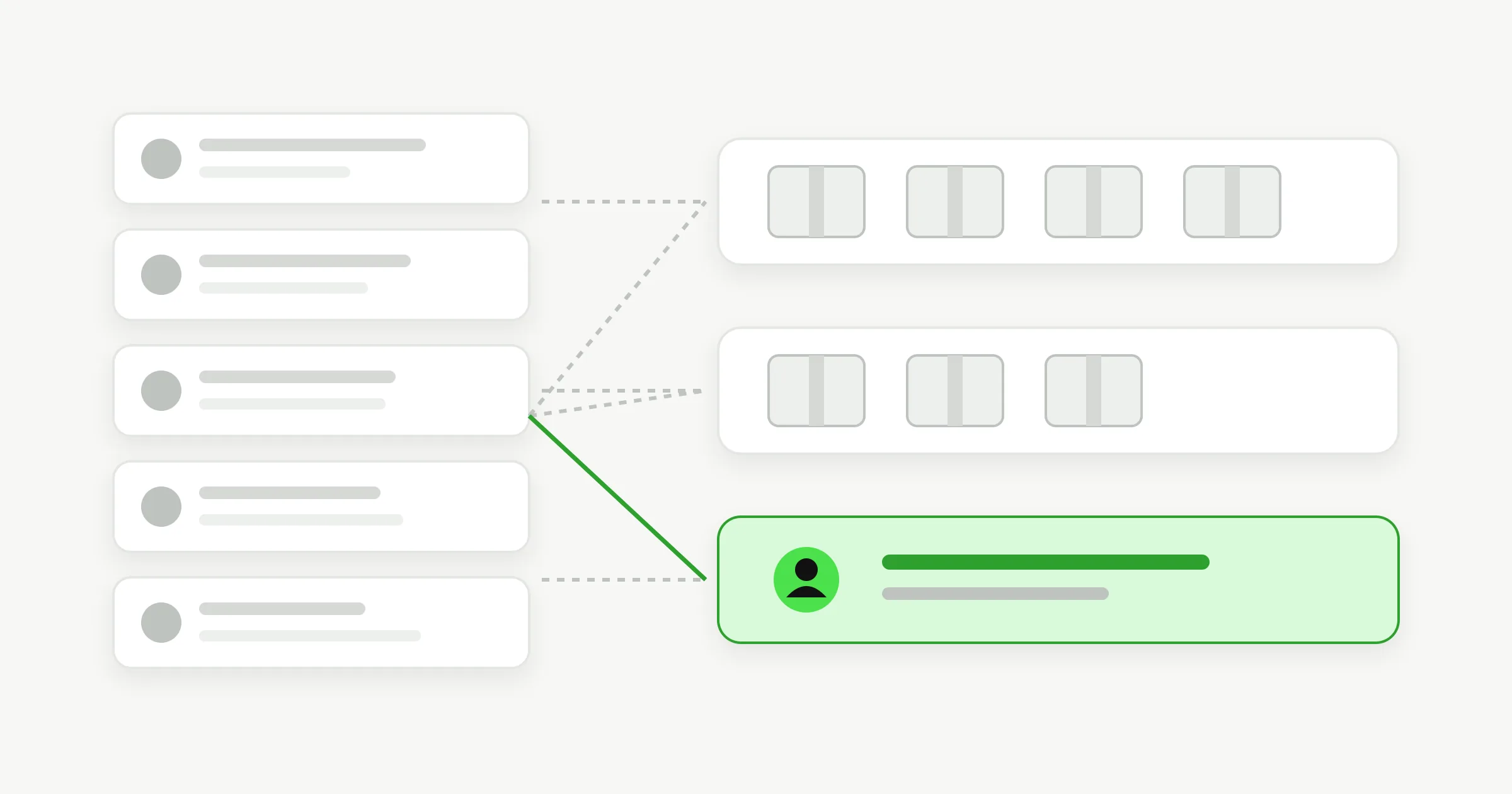
TL;DR: Good ecommerce customer service for a small store comes down to three things. Know the six kinds of questions you get (product, shipping, returns, order status, sizing, problems). Publish a clear policy for each so the answer exists before anyone asks. Then reply fast: a 2019 study of 750 online shoppers found 94% expect an email reply within a day and 96% expect a chat reply within five minutes. Automate the repeat questions that your policies already answer. Keep refunds, damaged goods and upset customers with a person.
What good ecommerce customer service looks like
Ecommerce customer service is every conversation a shopper has with your store before and after they pay: questions about a product, where the parcel is, how to send it back. For a small store it is rarely a department. It is the owner, plus maybe one part-timer, answering the same dozen questions between packing orders.
The goal is simple. Every question gets a correct answer, fast, and the questions that need judgment reach a person with the context already attached.
The six questions an online store gets
Almost every message to an online store fits one of six types. Sorting them is the first step, because each type has a different right answer and a different right owner.
| Question type | Typical message | Best answered by |
|---|---|---|
| Product questions | "Is this waterproof? Does it work with my model?" | Your product pages and spec sheets |
| Shipping | "Do you ship to Canada? When will it arrive?" | Your shipping policy |
| Returns and exchanges | "Can I send this back? Who pays postage?" | Your returns policy |
| Order status | "Where is my order?" | Your order system or carrier tracking |
| Sizing and fit | "I'm between sizes. Which should I get?" | Your size guide, then a person for edge cases |
| Problems | "It arrived broken." "I was charged twice." | A person |
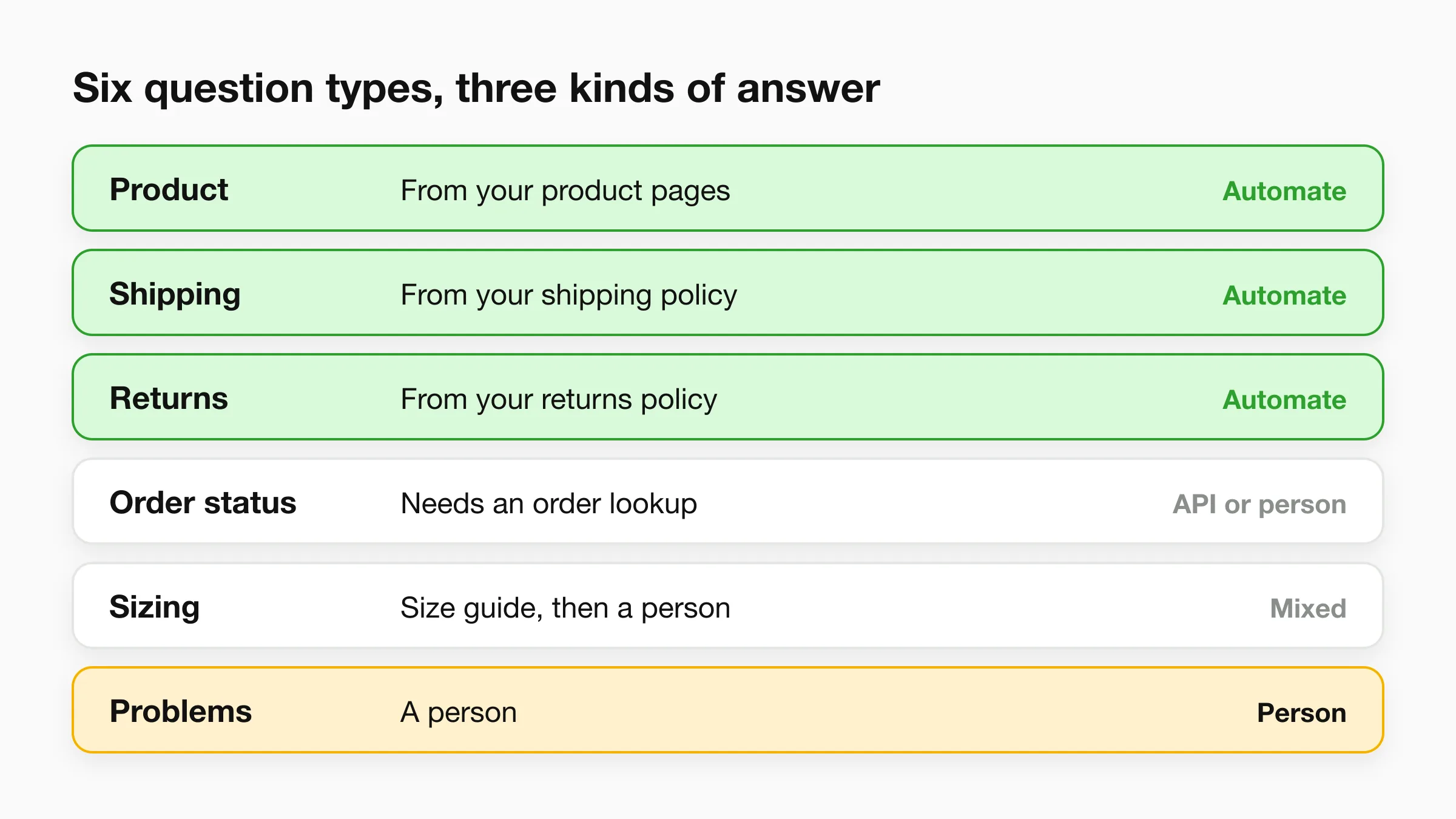
The first four answers already exist somewhere: in a policy, a product page or a tracking link. Those are the repeat questions. The last row is where your time is best spent. Section by section, here is how to handle each.
Pre-purchase product questions
Answer product questions with the facts already on the product page, then point to the exact page. A shopper asking "is this machine washable?" is one answer away from buying, so the reply has to be quick and specific.
How to handle them:
- Put the answer on the page first. When the same question lands three times, it belongs in the product description, not just in your inbox. Each repeat message tells you a gap in the page.
- Answer in one or two sentences, then link. "Yes, cold wash only, line dry. Care details are on the product page" beats a paragraph.
- Keep a short list of facts you never guess: dimensions, materials, ingredients, compatibility, certifications, warranty length. These come from your supplier sheets, not memory.
Baymard Institute asks shoppers who abandon a cart why they left. In its published research, 40% of those shoppers cited extra costs such as shipping, tax or fees being too high, 20% said delivery was too slow and 13% said the return policy was unsatisfactory. Pre-purchase questions are very often about exactly these three things: what will it cost me in total, when will it arrive, and what if it does not work out. Your product pages and policy pages should answer them without a conversation.
Shipping questions
Shipping questions are the most predictable part of your inbox. Where do you ship, how much does it cost, how long does it take, and what happens at customs or over a holiday.
The fix is one clear shipping page with:
- Countries you ship to, and countries you do not.
- Processing time (how long before you hand the parcel to a carrier) separate from transit time.
- A cost table or a free-shipping threshold, stated in your store currency.
- Your cutoff date for holiday delivery, set a week or more before you actually need it.
- Who pays duties and taxes on international orders.
Once that page is accurate, every shipping question has a one-line answer and a link.
Separate processing time from transit time
Many "late order" messages come from shoppers reading "ships in 3-5 days" as "arrives in 3-5 days". State both numbers on the product page, the cart and the confirmation email.
Returns and exchanges
Returns questions come before and after the sale, and the answer needs to be identical both times. Publish the policy once, link it from the footer, product pages and order confirmation, and answer every question from that single text.
According to the National Retail Federation and Happy Returns, retailers expected about 19.3% of online sales to be returned in 2025. Returns are a normal part of selling online, so a clear process is part of your service, not a concession.
A returns policy that prevents most follow-up questions answers these points:
- Window. How many days from delivery, not from order.
- Condition. Unworn, unopened, tags on, original packaging.
- Exceptions. Final-sale items, custom orders, hygiene products.
- Cost. Who pays return postage, and whether it is deducted from the refund.
- Exchange route. Whether a size swap is a new order or a direct exchange.
- Refund timing. How many business days after you receive the parcel, and to which payment method.
- How to start. The exact form, email address or link.
Your team decides every refund and exception. Writing the policy gets a customer to the right process faster. It does not replace your judgment on a borderline case, such as a return two days past the window on a first-time order.
Order status: "Where is my order?"
"Where is my order?" is the single most repeated message for most stores, and the one a policy page cannot answer on its own, because the answer is different for every customer.
Reduce these messages in the order they are cheapest to fix:
- Send tracking automatically. Your ecommerce platform or shipping tool should email a tracking link the moment the label is created.
- Put the tracking link where people look. Order confirmation, shipping email, and a "track your order" link in the site footer.
- Set expectations in the shipping email. "Carrier scans can take up to a day to appear after the label is created" prevents a worried message.
- Answer from the order record. When someone asks anyway, look up the order by number and email, and reply with the status and the tracking link.
- Proactively message delays. A short note before the customer asks costs less than the angry message after.
If you use an AI agent, this step has a specific limit. Hyperleap AI is installed on your store as a chat widget. It has no built-in connection to the Shopify catalog or orders. On Pro and Max, you can add an Action that calls an API your store already exposes, so the agent can look up an order's status and read it back during the chat. That depends on you having an API to call. On Plus, or without an API, the agent shares your tracking-page link and routes the question to your team.
Sizing and fit
Sizing questions look like product questions but carry more risk. A wrong size recommendation becomes a return, and for apparel and shoes sizing is a common reason people send items back.
Handle them in layers:
- A measured size guide. Chest, waist, hip, foot length in centimetres and inches, per product line, because fit differs between lines.
- Fit notes on each product. "Runs small, size up" written by whoever handled the sample.
- A rule for in-between sizes. Decide it once ("if you are between sizes, size up for relaxed fit, size down for a close fit") and use it every time.
- A person for edge cases. Pregnancy, medical devices, very tall or very short customers, and gifts for someone else are conversations, not table lookups.
Problems: damaged, wrong or missing items
Problems need a person, quickly, and a human tone. Damaged parcels, wrong items, charges that do not match, and customers who say they are upset are where reputation is won or lost.
Handle them with a simple sequence:
- Acknowledge in the first line. "I'm sorry, that should not have happened" before anything else.
- Ask for what you need once. Order number, a photo of the damage, a photo of the label. One message, not three.
- Offer the fix, not a menu of policies. "I'll send a replacement today" or "I've refunded the order" is better than a link to the returns page.
- Follow up when it is resolved. A one-line confirmation closes the loop.
A chat agent should not decide these. If a shopper writes that something arrived broken, the useful move is to apologise briefly, collect the order number, and pass the conversation to your team with the details attached.
Policies to publish before you automate anything
Publish five pages, keep them short, and make sure every answer you give anywhere (inbox, chat, social) comes from the same text. Conflicting answers are worse than slow ones.
| Policy | Must state |
|---|---|
| Shipping | Countries, processing time, transit time, costs, holiday cutoffs, duties |
| Returns and refunds | Window, condition, exceptions, return cost, refund timing, how to start |
| Order changes and cancellations | How long after ordering the customer can change an address or cancel |
| Sizing and product care | Measurement tables, fit notes, care instructions |
| Contact and response times | Channels, hours, and how long a reply takes |
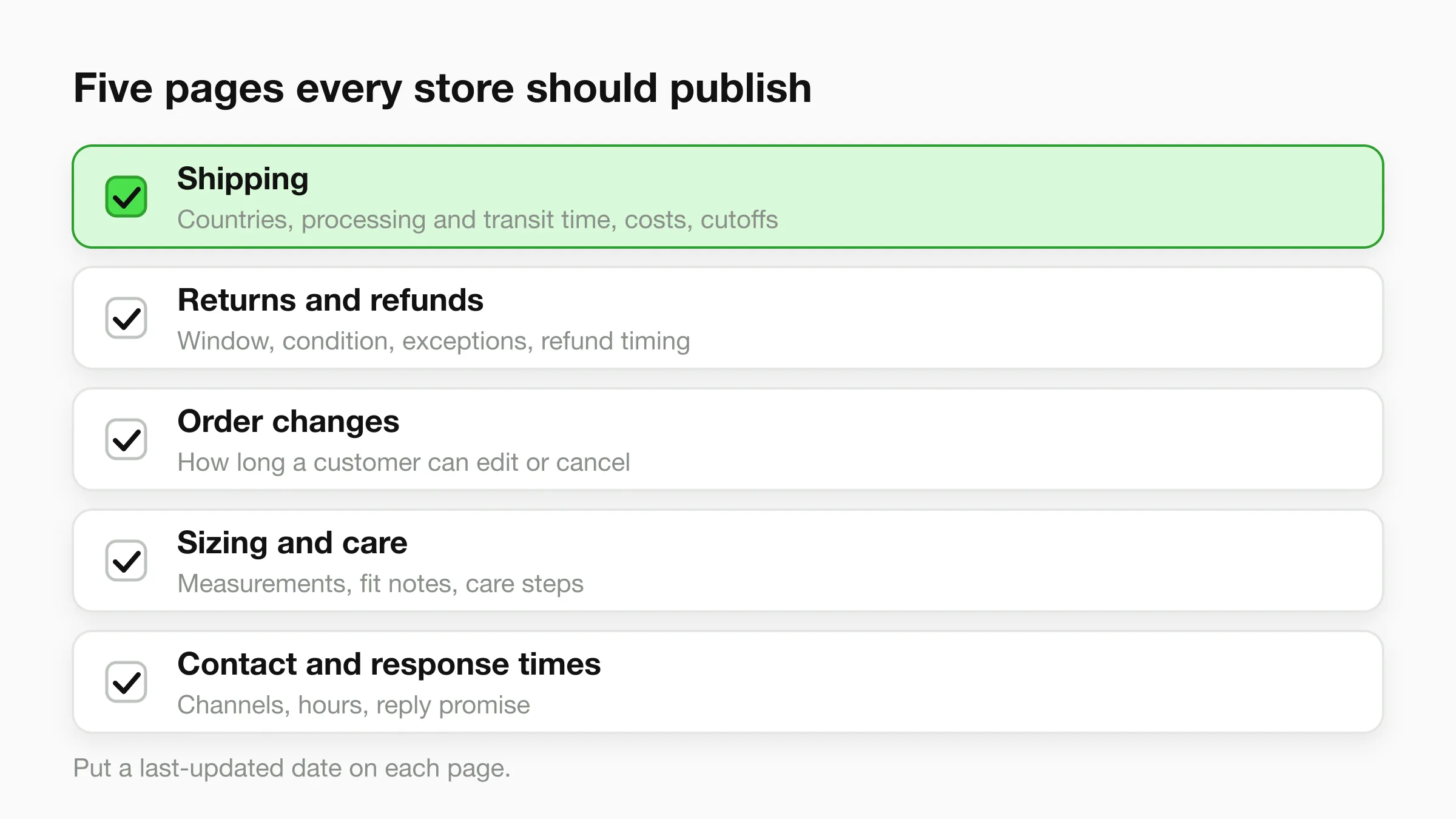
Put a "last updated" date on each page, and update the page the same day your practice changes. If you start accepting returns at 45 days instead of 30, your inbox and your site must not disagree.
Response-time expectations
Shoppers expect fast replies, and the fastest expectations are on live chat. The most useful ecommerce-specific numbers come from the 2019 eCommerce Customer Service Experience Study by Aircall, a survey of 750 online shoppers:
- Email: 94% expected a reply within 24 hours; 48% of those wanted one within six hours and 15% within one hour.
- Live chat: 96% expected a response within five minutes of starting a chat; 80% of those wanted an answer within two minutes.
This is a vendor survey from 2019, so treat it as a directional benchmark rather than a current measurement. The pattern is the useful part: email is measured in hours and chat in minutes.
For a small team, this suggests setting two targets and publishing them:
- Email: a first reply within one business day, or sooner on weekdays. State it on your contact page.
- Chat: only offer live chat if someone can answer within minutes, or if an agent answers the common questions instantly and hands the rest to a person with a clear "we'll reply by email by tomorrow" message.
Publishing a response-time promise you keep is better than an unstated one you miss. If you want to see how reply speed affects enquiries across industries, our response time conversion rates by industry piece collects the sourced figures.
A weekly operating rhythm for a small store
A small store does not need a help desk process. It needs a short weekly routine that turns the inbox into improvements. Here is one that adds about two hours of review to the daily replying you already do.
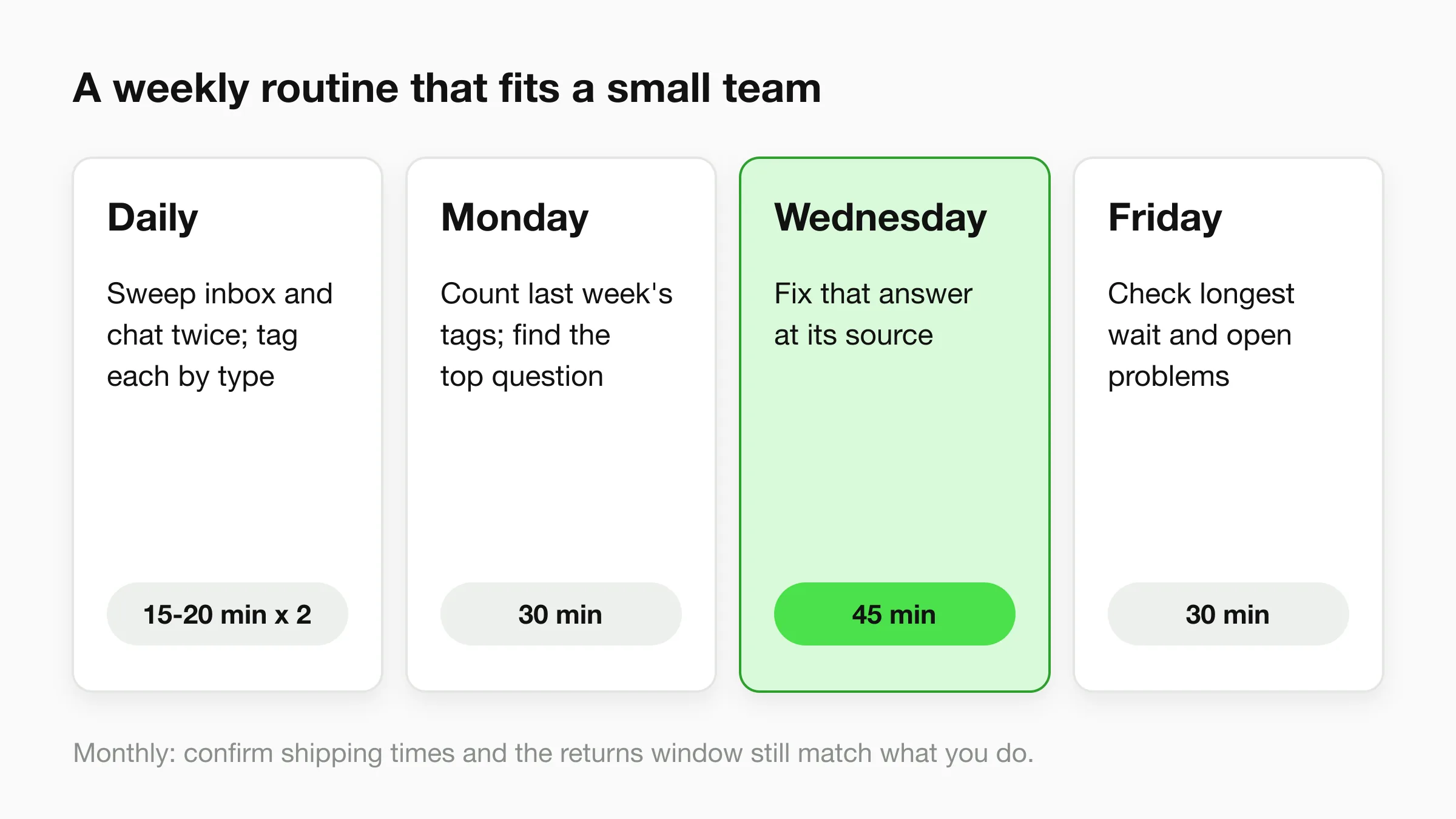
Every working day (15-20 minutes, twice a day). Sweep the inbox and chat log. Reply to anything waiting. Tag each conversation with one of the six question types, even if the tag is just a word in a spreadsheet column.
Monday (30 minutes): read last week's top questions. Count the tags. The type with the most messages tells you where your pages are failing. If "where is my order" leads, fix tracking emails. If sizing leads, fix the size guide.
Wednesday (45 minutes): fix one page. Pick the biggest repeat question and put its answer on the product page, shipping page or returns page. One fix a week compounds quickly.
Friday (30 minutes): check promises. Look at the longest time any customer waited this week, list any open problems (damaged, wrong, refund pending), and close each one or write down the next step.
First Friday of the month (30 minutes): check policies. Confirm shipping times, cutoffs and the returns window still match what you actually do, and update the dates.
What to automate and what to keep human
Automate the questions your published policies already answer. Keep every decision that involves money, judgment or emotion with a person. That split is the same one covered in our guide to customer service automation, applied to a store.
| Automate | Keep with a person |
|---|---|
| Shipping costs, countries, delivery times | Refunds and exceptions to the policy |
| Returns window and how to start | Damaged, wrong or missing items |
| Product facts from your pages and spec sheets | Anything about allergies, safety or medical use |
| Size guide lookups | Fit advice for edge cases |
| Order status, when you have an API to call | Chargebacks and payment disputes |
| Tracking emails and delay notices | Upset customers and complaints |
| Store hours and contact details | Wholesale and custom-order quotes |
Three rules keep it honest:
- Never let automation guess. If the answer is not in your policies or product pages, the agent should say so and pass the conversation to your team.
- Always offer a person. Every automated conversation needs a visible route to a human.
- Review the transcripts weekly. The questions the agent could not answer are your list of missing pages.
Where an AI agent fits, and where it does not
An AI agent can take the repeat questions off your plate when it answers from your own site and documents. Here is what Hyperleap AI does for an online store today, stated with the limits.
What it does
- Answers product and policy questions from your content. You point it at your website and upload your shipping policy, returns policy, size guides and spec sheets. It answers from those, in 100+ languages, and says when it does not know.
- Runs as a chat widget on your store. You paste a script into your theme, as covered in how to add an AI chatbot to Shopify. It also embeds on WordPress, Wix, Webflow, Squarespace and custom sites. It works on WhatsApp, Instagram DM and Facebook Messenger as additional channels, which matters if shoppers already message you there. For that channel, see WhatsApp chatbot for ecommerce. For store-specific setup, see the retail chatbot guide.
- Captures contact details and hands off. The chat can collect a name and email through a short form, and your team gets a summary. On Pro and Max, a teammate can take over a live conversation, including on WhatsApp, Instagram and Messenger.
- Looks up order status through your API (Pro and Max). Actions let the agent call your own HTTPS API during a chat. If your store or fulfilment tool exposes an order-status endpoint, the agent can read a status back to the customer.
What it does not do
- It has no built-in Shopify catalog, cart or order integration. It is a chat-widget embed, not a Shopify app.
- It does not process payments or change orders.
- It does not recover abandoned carts.
- It does not process refunds. Refund decisions stay with your team.
- It cannot look up orders at all unless you have an API for it to call, and Actions are on Pro and Max only.
If your main need is a full helpdesk with ticketing, macros and order data sitting beside every message, that is a different category. Our best Gorgias alternatives comparison covers helpdesk tools, and the best chatbots for Shopify in 2026 compares chat tools that connect more deeply to the Shopify catalog. Hyperleap fits when your problem is the repeat questions, not a ticket system. The ecommerce AI agent page has the product-side detail.
Take the repeat questions off your plate
Point Hyperleap AI at your shipping, returns and product pages and let it answer the questions your policies already cover. 7-day free trial on every plan; plans start at $40/month.
Start for freeMistakes that make ecommerce customer service worse
- Policies that conflict. The footer says 30 days, the product page says 14. Pick one and delete the other.
- No response-time promise. Customers cannot tell whether you are slow or have not seen the message.
- Answering the same question from memory every time. Each answer drifts a little. Write it once, link it everywhere.
- Automating before the answers exist. An agent can only repeat what your pages say. Fix the pages first.
Ecommerce customer service best practices checklist
Use this as a monthly check. Each line should be a yes.
- Shipping, returns, order-change, sizing and contact pages exist and are linked from the footer.
- Every policy page shows a "last updated" date.
- Tracking emails send automatically when a label is created.
- Product pages carry the facts customers ask about most.
- A response-time promise is published and met.
- Conversations are tagged by question type and reviewed weekly.
- One repeat question gets fixed at its source every week.
- Refunds, damaged goods and complaints route to a named person.
- Any automation answers only from your own content and offers a person.
- Transcripts are read weekly to find missing answers.
For small stores weighing options, online store customer support tools range from a shared inbox to full helpdesks. Start with the pages and the weekly rhythm. Add tooling when the repeat questions justify it. Our conversational AI for customer service overview explains how the pieces fit, and the Hyperleap pricing page lists each plan.
Frequently Asked Questions
What is ecommerce customer service?
Ecommerce customer service is how an online store answers shoppers before and after a purchase. It covers product questions, shipping, returns, order status, sizing and problem resolution, across email, chat and messaging channels. For a small store, it is mostly the owner answering the same questions repeatedly.
How fast should an online store reply to customers?
Aim to reply to email within one business day and to chat within minutes. A 2019 Aircall survey of 750 online shoppers found 94% expected an email reply within 24 hours and 96% expected a chat response within five minutes. Publish the target you can actually meet.
What are the most common ecommerce customer service questions?
They fall into six groups: product details, shipping, returns and exchanges, order status, sizing and fit, and problems such as damaged or wrong items. The first four can mostly be answered from published pages. The last needs a person.
Can an AI chatbot handle ecommerce customer service?
It can handle the repeat questions your policies and product pages already answer. It should hand refunds, damaged items and upset customers to a person. Hyperleap AI answers from your site and documents, but it does not process payments, change orders or recover abandoned carts.
Can Hyperleap AI tell customers where their order is?
Only if you have an API that returns order status. On Pro and Max, an Action lets the agent call your HTTPS API during a chat and read the result back. Hyperleap has no built-in Shopify order integration, so on Plus, or without an API, the agent shares your tracking link and routes the question to your team.
Does it work with Shopify?
It installs on Shopify as a chat widget by pasting a script into your theme. It answers from the content you give it. It does not read your Shopify catalog or orders directly.
How do I reduce "where is my order" messages?
Send tracking automatically when the label is created, link it from the confirmation email and the site footer, and state transit time clearly. Message delays before customers ask. If you have an order-status API, an agent on Pro or Max can answer the rest.
What should a returns policy include?
State the return window counted from delivery, required condition, exceptions, who pays return shipping, refund timing and how to start a return. Link the same text from the footer, product pages and order confirmation so every answer matches.
Data Sources
- Baymard Institute, reasons for cart abandonment during checkout
- National Retail Federation and Happy Returns, 2025 Retail Returns Landscape
- Aircall, 2019 eCommerce Customer Service Experience Study (750 online shoppers)
See it answer your own store's questions
Add your shipping and returns pages, test the agent in Studio, and embed the widget when you are happy with the answers. Plans from $40/month, 7-day free trial.
Start for freeRelated Articles
View all
Guide19 min read
How to Add an AI Chatbot to Shopify (Step by Step)
How to add an AI chatbot to Shopify with a theme.liquid embed — setup steps, Online Store 2.0 notes, and what a Shopify chatbot can and can't access.

Guide17 min read
Types of Chatbots: 6 Kinds With Examples (2026)
The types of chatbots by how they work, what they do and where they run, with one comparison table and a guide to picking one for a small business.
Guide19 min read
How to Build an AI Chatbot for Your Business
How to build an AI chatbot for your business: decide the jobs it should do, gather knowledge, choose channels, test, and go live in under 5 minutes.

Guide21 min read
How to Add an AI Chatbot to an HTML Website
Add an AI chatbot to a plain HTML site with one script tag before </body>. Step-by-step setup, testing, styling, and knowledge base tips.