Guide
Retail Chatbot: Setup Plan for Stores and Omnichannel
A retail chatbot answers hours, stock, returns and gift card questions for physical stores. Use cases, what to connect, setup steps and metrics.

Gopi Krishna Lakkepuram · Founder & CEO
· 17 min read
TL;DR: A retail chatbot is an AI agent that answers the questions shoppers ask before they walk into your store: when you open, whether an item is in stock, what the return policy says, whether you take a fitting appointment. It works from your own documents, runs on your website, WhatsApp, Instagram DM and Facebook Messenger, and hands the rest to your team. For a physical retailer the hard parts are stock and store-specific answers, so most of this guide is about those.
Most retail chatbot advice is written for online shops. A store with a front door has a different inbox. People ask whether you are open on Sunday, whether the blue one is in your Austin location, and whether someone can look at a watch strap this week.
This guide covers what a chatbot for a retail store should handle, what you can connect it to, a one-week setup and how to tell whether it works. If you mainly sell online, start with our ecommerce chatbot guide instead.
Who this is for
Owners and managers of physical retail: boutiques, hardware and garden stores, bike and sporting goods shops, pet supply stores, pharmacies, florists, bakeries and small chains with two to twenty locations. If you also sell online, the same agent can serve both.
What does a retail chatbot do for a physical store?
It answers repetitive pre-visit and post-visit questions at any hour, in the channel the customer chose. A good one cuts the "what time do you close?" calls so staff can look after the people in the shop.
The questions fall into eight groups, and each needs a different source. Hours and policies live in a document. Stock lives in a system. Appointments live in a scheduler.
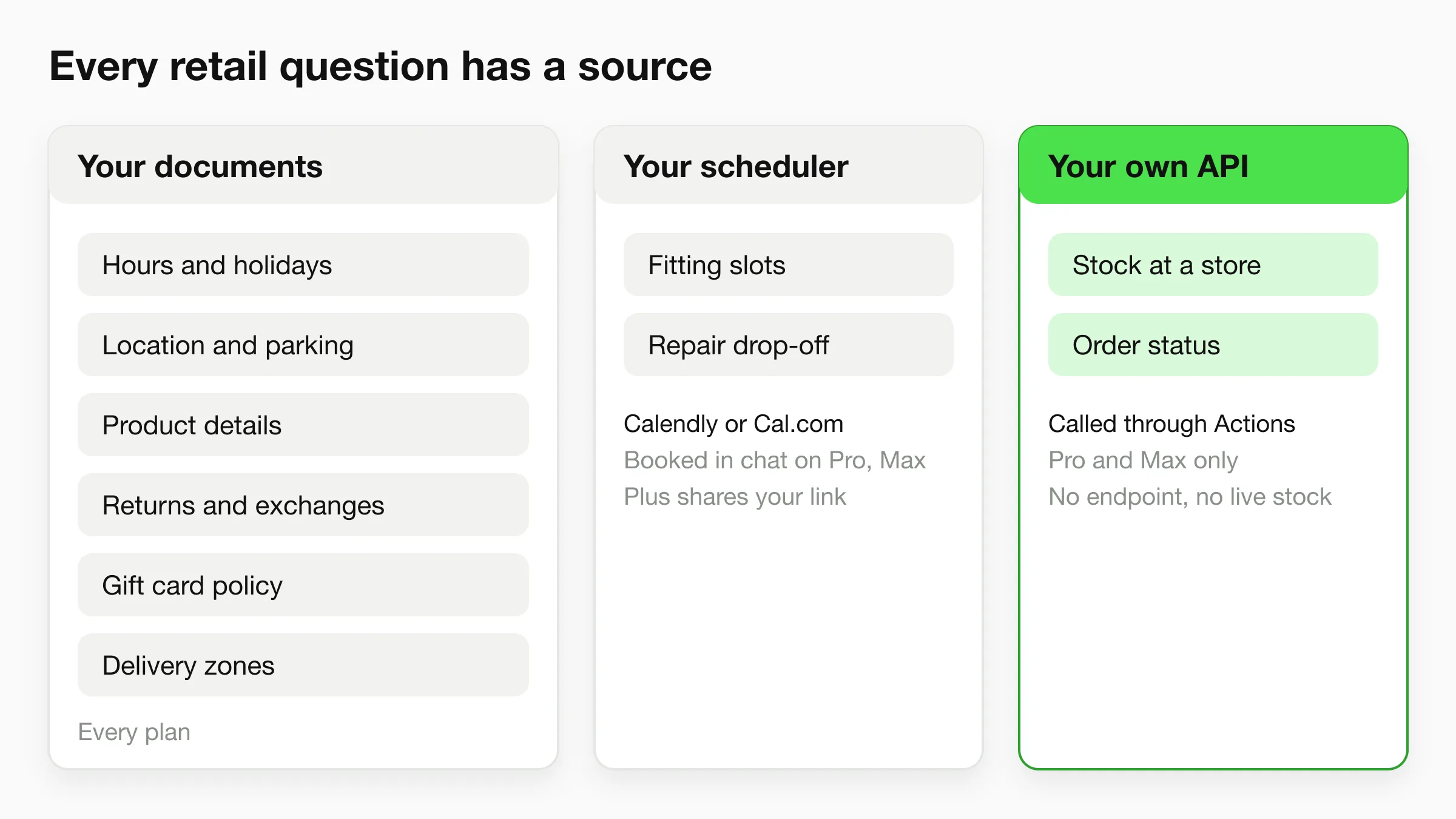
The eight questions retail customers actually ask
Almost every retail inbox is a mix of these. The "answer from" column is the part to plan before you build anything.
| Question | Example | Answer from |
|---|---|---|
| Hours and holidays | "Are you open Monday?" | A document you keep current |
| Location and parking | "Where do I park at the Plano store?" | A document per store |
| Stock availability | "Do you have the size 9 in black?" | Your own API, via an Action (Pro, Max) |
| Product details | "Is this jacket waterproof?" | Product sheets and your site |
| Returns and exchanges | "Can I return it without a receipt?" | Your policy document |
| Gift cards | "Can I buy one for someone in another city?" | Your policy document |
| Appointments | "Can I book a fitting on Saturday?" | Calendly or Cal.com (Pro, Max) |
| Local delivery | "Do you deliver to 78701?" | Your delivery zones document |
Stock and returns cause most of the trouble, because the answer depends on facts the chatbot may not have.
Seven retail chatbot use cases that pay off first
Start with the first three. They are pure documents and carry the least risk.
1. Store hours, holidays and directions
This is the highest-volume question and the easiest to get right. Put your regular hours, holiday hours and a short "how to find us" paragraph for each store into one document per location. The agent answers "are you open on Thanksgiving?" from that page instead of guessing.
The risk is staleness. Treat the hours document like a sign on the door: someone owns it and updates it when the sign changes.
2. Product details and basic recommendations
Customers ask about materials, dimensions, compatibility and care. If the answer is on your website or a product sheet, the agent finds it and says it plainly. It can also share photos and documents you attach, such as a lookbook or size guide.
The agent explains what is in your content. For details you never wrote down, it should say so and offer a person rather than invent a specification.
3. Returns, exchanges and warranty
"What is your return policy?" is a document question, so it is a good fit. Write the policy in full sentences: how many days, what condition, whether a receipt is needed, how store credit works, what happens to sale items, and who to contact for a warranty claim.
The agent should explain the policy, not decide an exception. "Can I return this opened item after 40 days?" is a judgement call, so tell the agent to pass edge cases to your team.
4. Gift card questions
Shoppers ask whether a gift card expires and whether it works online and in store. Answer those from a document. Hyperleap does not process payments, so the agent cannot sell a gift card or take a card number in chat. It can tell people how to buy one and link to your page or your counter. If you want it to read a card balance, that is a lookup against your own API through an Action, and it needs a system that exposes that data.
5. Fittings, repairs and appointments
Many stores sell something that needs a slot: a suit fitting, a bike tune-up, a watch battery, a custom frame, a consultation with a buyer. If the store uses Calendly or Cal.com, the agent on Pro and Max can read live availability, offer real open times and create the booking inside the chat. In-chat booking needs a Calendly Standard plan or higher. On Plus, the agent shares your booking link instead. Details are on our appointment scheduling chatbot page.
The agent creates new bookings only, so changes go through the confirmation email. With any other scheduler, it shares your booking link.
6. Local delivery and pickup questions
Put delivery zones, fees and same-day cutoffs in a document and the agent answers them. For "where is my order?", it can look up status through an Action if you have an API that returns it. Without one, it explains who can check.
7. Handoff to a person
Some situations need a person: a damaged item, an upset customer, a special order. On Pro and Max, visitors can ask for a person, your team is alerted in Studio, and any teammate can take over the live conversation, including on WhatsApp, Instagram DM and Messenger, then hand it back to the AI.
Plan handoff on day one, not after the first complaint.
Put an AI front desk on your store's website
Paste your URL and Hyperleap drafts a starting agent from your site. Test it with the questions your customers really ask before you put it live.
Start for freeWhat can a retail chatbot connect to?
It connects to three kinds of sources, in increasing effort: documents you upload, links the agent shares, and your own API through Actions. There is no native point-of-sale or inventory integration. Be clear about that when you plan, because it decides what the chatbot can say about stock.
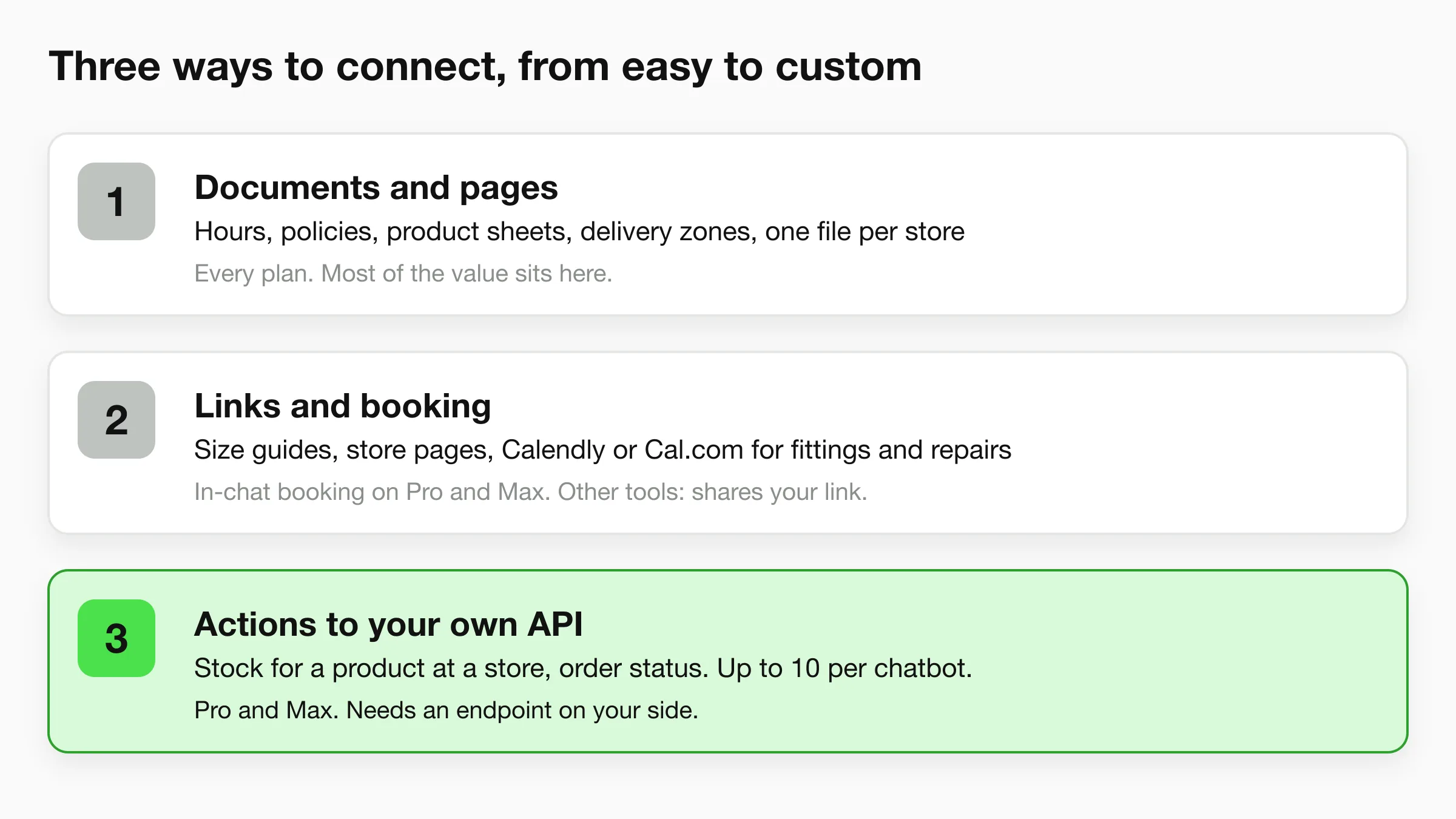
Tier 1: your documents. Upload or link your website, product sheets, policies, delivery zones and store pages. This covers hours, locations, product details, returns, gift card policy and delivery questions. Every plan does this, and it is where most of the value sits.
Tier 2: links and booking. The agent shares store pages, size guides and brochures. On Pro and Max it books fittings and repairs through Calendly or Cal.com. On any plan it can share a booking link.
Tier 3: your own API through Actions. Actions let the agent call your HTTPS endpoints in the middle of a conversation, for example to look up stock for a product at a store or to fetch an order status. You can set up to 10 per chatbot, and the credentials are stored encrypted and never shown to the visitor. Actions are available on Pro and Max.
Hyperleap connects to your API. It does not plug into your point-of-sale, inventory system or Shopify catalogue by itself. If your system already exposes an endpoint that returns stock for a SKU and a location, an Action can call it. If not, someone has to build that endpoint first, or stock questions go to a person. A chatbot that says "I can't check live stock, but the store will confirm today" beats one that guesses.
How to handle stock questions without an API
Plenty of small stores have no endpoint to call. You still have options, in order of effort:
- Say what you can say. "We carry this range in store. For today's stock of a specific size, ask below and the team will confirm." Pair it with a handoff.
- Publish a simple availability page that you update daily for your fast-moving items, and let the agent answer from it. Add the update time to the page so the answer can include it.
- Build the lookup later. Once your volume of stock questions justifies it, ask whoever runs your inventory system whether it can return availability over an HTTPS endpoint, then connect it as an Action.
Whichever you choose, tell the agent what it may not claim, such as "never say an item is on hold".
Multi-location retail: answering from the right store
If you run several stores, the common failure is a right answer from the wrong store. A customer asks about Sunday hours, and the agent quotes the downtown store's hours when they meant the airport location.
Start with structure that works on any plan: one document per store with the store name in the title and first line, plus a shared document for policies that apply everywhere. Tell the agent to ask "which store?" when the customer does not say. For two or three stores, that is usually enough.
For a chain with many near-identical store pages, the Multi-variant add-on is built for this exact shape. It answers from the right store, answers across all stores for questions like "which of your stores are open Sunday?", asks which store when the question does not say, and follows the conversation when the customer switches to "and the Round Rock one?". It costs $40/mo plus 2x credits per request and is available on Pro and Max. If you have one store, or your content differs by product rather than by location, you do not need it. The base product already answers accurately from your knowledge base.
For franchisees and regions, see chatbot strategy for multi-location franchises and the page on chatbots for multi-location businesses.
A one-week setup plan for a retail store
Hyperleap's quick-start path gets an agent live in under five minutes: paste your website URL and Studio reads the site, imports your branding, detects the industry and drafts a starting prompt. The week below is the tuning that turns that first draft into something you trust. It assumes one person spending an hour or two a day.
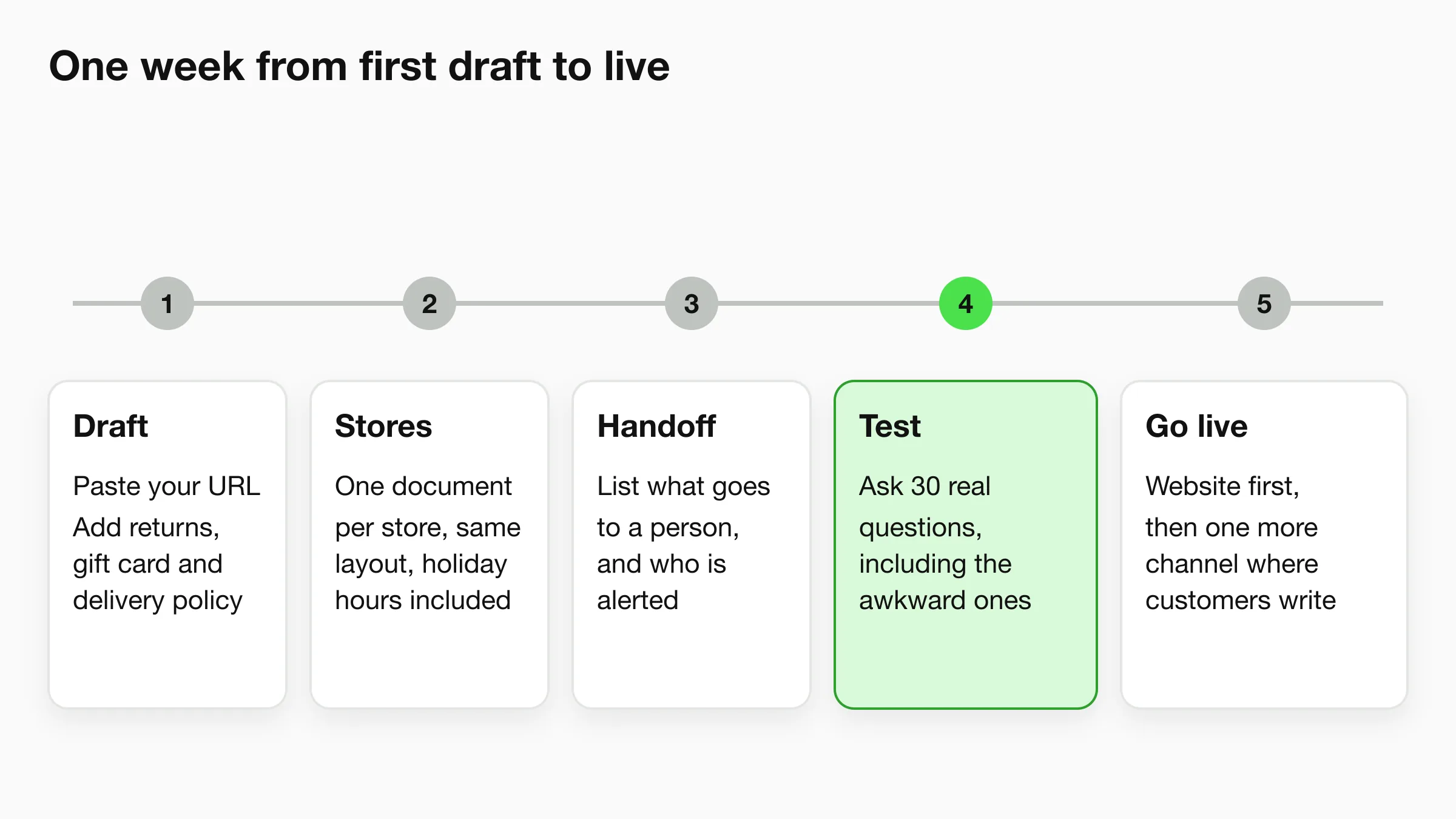
Day 1: Paste your URL and add policies. Let Studio draft the starting agent from your site. Then add what your site says badly: the full returns policy, gift card terms, delivery zones and fees, and an FAQ of the questions staff answer every day.
Day 2: One document per store. Hours, address, parking, phone, holiday hours and anything unusual. Use the same layout for every store.
Day 3: Write the handoff rules. List what must go to a person: complaints, damaged goods, special orders, refund exceptions, and anyone who asks for a human. On Pro or Max, set up human handoff in Studio. On Plus, put an email address or phone line in the instructions.
Day 4: Test with real questions. Use the Testing tab and send the 30 questions your staff actually get, awkward ones included. If an answer is wrong, the usual cause is a missing or contradictory document. Fix the document.
Day 5: Go live, then add one channel. Put the widget on your site with a single script tag. Then connect WhatsApp or Instagram DM if that is where customers already message you. WhatsApp fees are paid to Meta directly, separately from your plan, so check Meta's current pricing.
Our knowledge base chatbot guide covers how to structure source documents.
Write the document you wish a new hire had
Plain sentences, store names spelled out, the return policy with its exceptions, and a note on what to do when unsure. If a new hire could answer from it, the chatbot can too.
Which plan does a retail store need?
Plans are Plus at $40/mo, Pro at $100/mo and Max at $200/mo, with a 7-day free trial (card required) and annual billing that saves up to 40%. A single store with mostly document questions can run well on Plus. Move to Pro for in-chat booking, live handoff or Actions.
Full details and add-on prices are on the pricing page.
How to measure a retail chatbot
Measure whether it removes work and whether it sends customers to the right place. A handful of counts are enough, and you can read them straight from your conversation log. Retail varies too much for a benchmark to fit your store, so record your own baseline for two weeks, then compare.
- Question volume by type. Which of the eight question types appear most? This tells you which documents to improve first.
- Handoff rate. How many conversations ask for a person? A high rate on a single topic means a missing document, not a bad chatbot.
- Unanswered or wrong answers. Read a sample every week. Each wrong answer points to a document to fix.
- Calls and emails for the same questions. Count the "what time do you open?" calls at the store before and after. This is the number your staff will notice first.
- Bookings made. Count fittings and repairs booked through the chat.
- Leads captured. Website chat can collect contact details, and you can export them as CSV or Excel.
For a wider view, see our guide to customer service metrics. Reading twenty real conversations tells you more than any dashboard.
Common mistakes with retail chatbots
Letting the agent guess at stock. If it cannot check live availability, it must say so. A confident wrong "yes, we have it" sends a customer across town for nothing.
One blended document for every store. That is how a Dallas answer ends up in an Austin conversation. Separate the documents and make the agent ask when the store is unclear.
Stale hours and policies. Holiday hours are the classic failure. Put "update the chatbot" on the same checklist as changing the sign.
No handoff path. A customer with a damaged item who hits a wall is a lost customer. Pro and Max handle live takeover. On Plus, give a clear email or phone number.
Promising what the system cannot do. Write into the instructions that the agent cannot hold an item, issue a refund, take a gift card payment or reschedule an appointment.
Copying an ecommerce setup. Cart and shipping flows matter less for a store with a front door. Build around hours, stock, returns and appointments first.
How does this differ from an ecommerce or Shopify chatbot?
An ecommerce chatbot is built around the online order: product questions, shipping, order status and returns for parcels. A retail chatbot for a physical store is built around the visit: opening hours, stock at a specific location, parking, fittings, in-store returns. Many retailers need both, and one agent can answer both sets of questions.
If you sell through Shopify, our guide to adding an AI chatbot to Shopify walks through the embed, and the Shopify chatbot comparison covers the options. Hyperleap embeds on a Shopify storefront as a chat widget. It does not read your Shopify catalogue, cart or orders by itself. Stock and order questions go through documents or an Action to your own API.
For a store type with its own page, see our guide for florists. For the wider picture, read the AI front desk overview and the customer support chatbot page.
Test it on your own store's questions
Start a trial, paste your site and try the agent with the hours, returns and stock questions your customers ask before you go live.
Start for freeFrequently asked questions
What is a retail chatbot?
A retail chatbot is an AI agent that answers shopper questions about your stores and products on your website and messaging apps. It works from your documents, such as store hours, policies and product sheets. It can book appointments where a scheduler is connected and passes complex questions to your team.
Can a chatbot check whether an item is in stock?
Only if your own system can be called. On Pro and Max, an Action lets the agent call your HTTPS API to look up stock for a product and a location. Hyperleap has no built-in point-of-sale or inventory integration. Without an API, the agent explains what it cannot check and hands the question to your team.
Can it handle returns and exchanges?
It explains your return and exchange policy from your documents. It does not issue refunds or approve exceptions. Unusual cases go to a person through live handoff on Pro and Max.
Does a retail chatbot work for a store with several locations?
Yes. Keep one document per store, add a shared policy document, and tell the agent to ask which store when it is unclear. For chains with many near-identical store pages, the Multi-variant add-on answers from the right store and across all stores. It costs $40/mo plus 2x credits per request and is available on Pro and Max.
Can it sell gift cards or take payments?
No. Hyperleap does not process payments. The agent can explain your gift card terms and send customers to your page or counter to buy one.
Which channels can a retail chatbot use?
Your website chat, WhatsApp, Instagram DM and Facebook Messenger. They run from one dashboard, with one shared inbox in Studio. SMS and voice are on the roadmap and not available yet.
How long does it take to set up?
Under five minutes to go live: paste your URL and Studio drafts a starting agent. Plan about a week of tuning afterwards.
How much does it cost?
Plans start at $40/mo (Plus), with Pro at $100/mo and Max at $200/mo. All include a 7-day free trial with a card required. Annual billing saves up to 40%. Pro and Max add in-chat booking, live handoff and Actions. Prices are on the pricing page.
Related Articles
View all
Guide16 min read
ChatGPT for Customer Service: 12 Prompts and Its Limits
How to use ChatGPT for customer service: 12 copy-paste prompts for your team, plus what it cannot do when customers talk to it directly.
Guide19 min read
Customer Service Metrics: 13 Defined, 6 to Start With
The customer service metrics that matter for a small business: definitions, formulas, what to track, what to skip, and a simple weekly scorecard.
Guide13 min read
Customer Support vs Customer Service: The Difference
Customer service helps people through the whole buying relationship. Customer support fixes problems with what they bought. Here is how to run both.
Guide19 min read
Omnichannel Customer Service: A Small Business Guide
Omnichannel customer service gives customers one connected experience on every channel. Learn how it differs from multichannel and how to set it up.