Guide
Social Media Customer Service: A Small-Team Guide
Social media customer service for small teams: what to answer in comments, what to move to DMs, response targets, tone, escalation and metrics.

Gopi Krishna Lakkepuram · Founder & CEO
· 18 min read
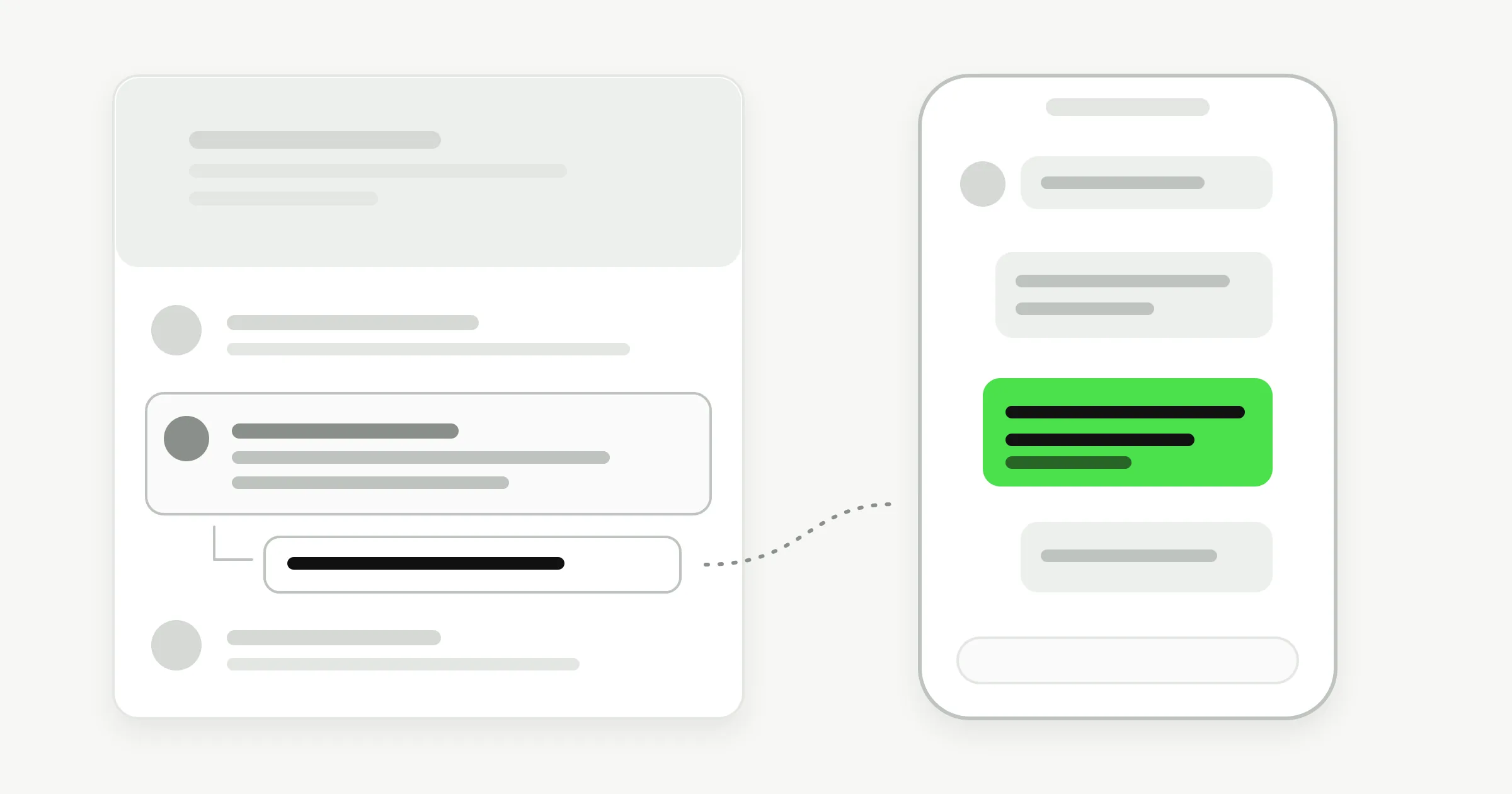
TL;DR: Social media customer service means answering customer questions and complaints where they ask them: in comments, direct messages (DMs) and mentions. The working rule for a small team is to acknowledge in public, resolve in private, and hand the hard cases to a named person. Below: response-time targets, a tone guide, complaint handling, staffing and metrics.
What social media customer service is, and who it is for
Social media customer service is support delivered on social platforms instead of by phone or email. A customer comments "is this still in stock?" under your post, DMs your Instagram account to ask about a booking, or tags you in a complaint. Each of those is a support request, and each one is visible to someone.
That visibility is what makes it different. A phone call is private, while a comment is a public exhibit every future customer can read. The job has two audiences: the person asking, and everyone watching how you answer.
This guide is for businesses without a support department: clinics, salons, home-service companies, boutique hotels, studios, online shops and agencies with a social account that has started to feel like an inbox.
Customers are not shy about what they expect. The 2025 Sprout Social Index found that about three-quarters of consumers expect a brand to respond on social within 24 hours, and that 73% of social users say they would buy from a competitor if a brand does not respond. Treat those as the cost of silence, not as a target to hit exactly.
Public vs private: where each message gets answered
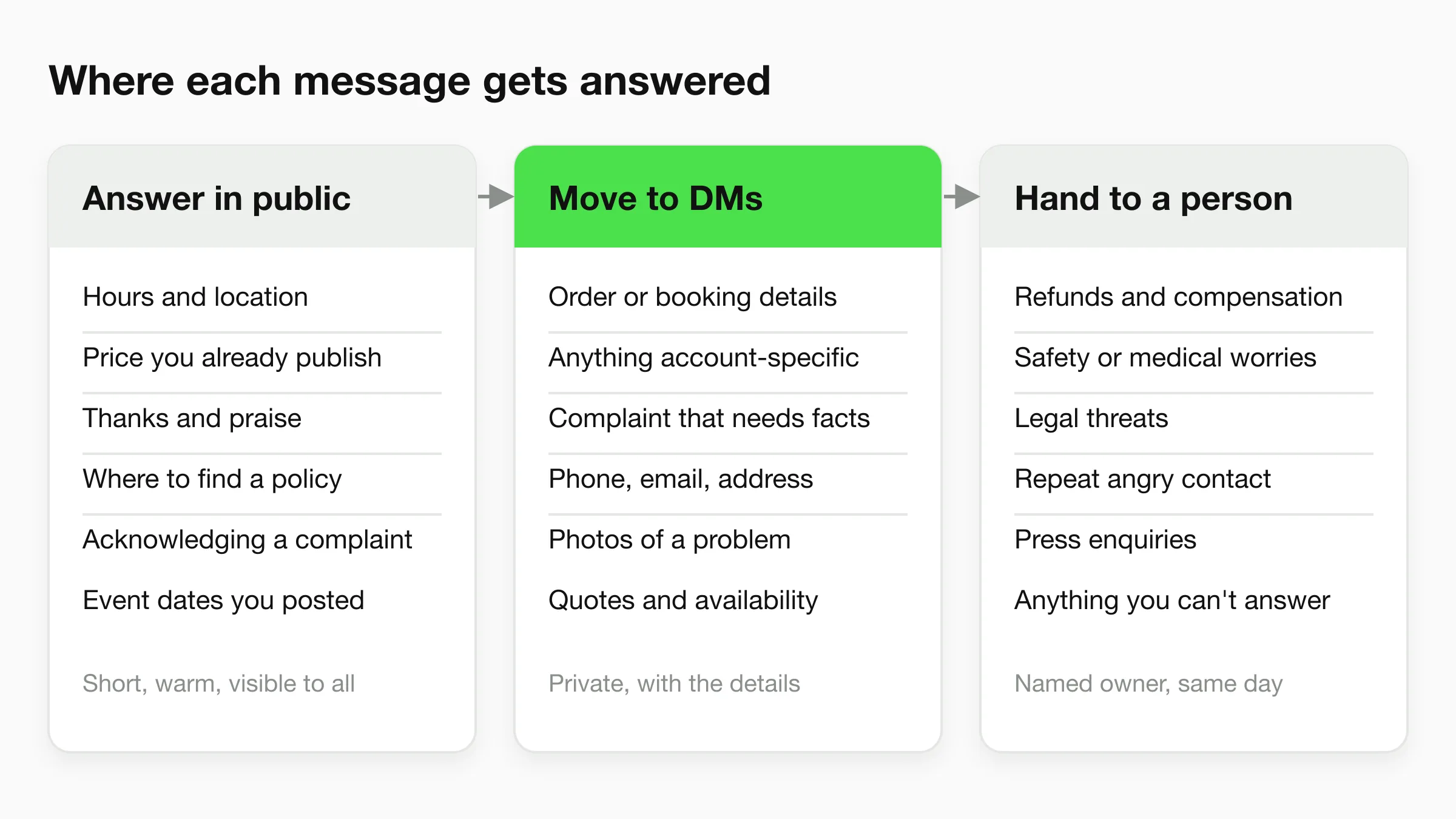
Answer in public when the reply helps everyone who sees it, move to a DM when the reply needs personal details, and hand the case to a named person when it needs a decision. That one sentence settles most daily questions.
What to answer in public comments
Public answers suit questions any customer might ask: opening hours, location, whether a price you already publish is still current, event dates and where to find a policy. Thanks and praise belong here too. Keep each reply to one or two sentences, use the person's name, and link to the page with the full answer.
What to move to a DM
Move the conversation private the moment you need something personal. Order numbers, booking details, phone numbers, email addresses, photos of a problem and anything tied to an account should never be collected in a comment thread. It is also kinder: an upset customer does not want a long back-and-forth under a post that hundreds of people can read.
What to hand to a person
Refunds and compensation, safety or medical worries, legal threats, repeat angry contact and press enquiries need a named owner who can decide. Write that owner's name in your policy so nobody has to guess at 6 pm on a Friday. An AI front desk follows the same rule: it answers what the business has documented and passes on the rest. Chatbot human handoff best practices covers the triggers and the context that should travel with a handoff.
Response times: what customers expect, and what to promise
Customers expect a reply within about a day, and many expect it sooner, so the safest promise is a specific one you can keep. The 2025 Sprout Social Index reports that about three-quarters of consumers expect a response on social within 24 hours or sooner. Treat that as a ceiling for most questions, not a goal.
Two other facts shape your plan.
First, public reach-outs deserve a public acknowledgement. Sprout Social's Q4 2025 Pulse Survey, reported on the same statistics page, found that 51% of consumers who reach out publicly expect a public acknowledgement before the conversation moves to a private DM. A comment you answer only by DM can look ignored to everyone else reading.
Second, Meta limits how long you can reply in a message thread. Under Meta's Messenger Platform and Instagram messaging policy, the standard messaging window is generally 24 hours, and a Human Agent tag lets a person respond manually within a separate 7-day period. Meta changes these rules, so check the current policy before you build a process around a specific window. A DM that waits two days may be one you can no longer answer in the normal way.
Suggested starting targets
No source publishes one correct set of response times for a small business. The table below is our suggestion for a team that is just starting, not an industry benchmark. Replace it with your own numbers after a month of data.
| Message type | Suggested first reply | Who replies |
|---|---|---|
| Simple question in a comment | Same business day | Whoever is on comment duty |
| Public complaint | Within a couple of hours in business hours, with a public acknowledgement | Comment duty, then the owner |
| DM with a clear question | Within minutes in business hours; any hour if an AI front desk covers DMs | Team or AI front desk |
| DM about a complaint or refund | Same business day, by the named owner | Named owner |
| Press, creator or partnership enquiry | Within two business days | Founder or marketing lead |
Write the targets where the whole team can see them. A DM like "do you have a slot this week?" is a buying signal, and the business that answers first usually gets the booking.
Customer service on Instagram
Customer service on Instagram happens in three places: comments under posts and Reels, DMs, and replies to your Stories. Each has a different pace and privacy level, so give each one a rule.
Comments are public and fast-moving. Reply to questions, thank people for praise, and hide only what breaks your stated rules (spam, abuse), never mere criticism. Deleting a fair complaint is the quickest way to turn one unhappy customer into a screenshot.
DMs, including Story replies, are where most real support work lands. People message to ask about prices, availability and booking, usually from a post they just saw. This is where you collect details and resolve.
To connect an automation or shared inbox tool to Instagram DMs through Meta's API, your account needs to be a Business or Professional account connected to a Facebook Page. Our guide to the Instagram DM chatbot for service businesses walks through that setup and an example booking conversation, and the Instagram chatbot page summarizes how Hyperleap handles the channel.
Facebook Messenger customer service
Facebook Messenger customer service is mostly one-to-one, so it behaves like email that expects an answer in minutes. People message a Page to ask if you are open, what a service costs, or where an order is. Comments on Page posts behave like Instagram comments: public, visible and worth a short acknowledgement.
Two habits help. Set your Page's instant reply and away message, so the customer knows when to expect an answer. Then keep the Page's hours, address and services current, and answer anything urgent inside Meta's messaging window described above.
The Facebook Messenger chatbot guide for local businesses covers what a Messenger bot should and should not handle, and the Facebook Messenger chatbot page covers the Hyperleap side.
One inbox beats three
If your team checks Instagram DMs, Facebook Messenger and WhatsApp in three different apps, messages will sit in the one nobody opened. Pick one place where every conversation lands, and make it the first thing someone looks at in the morning.
How to handle a complaint in public
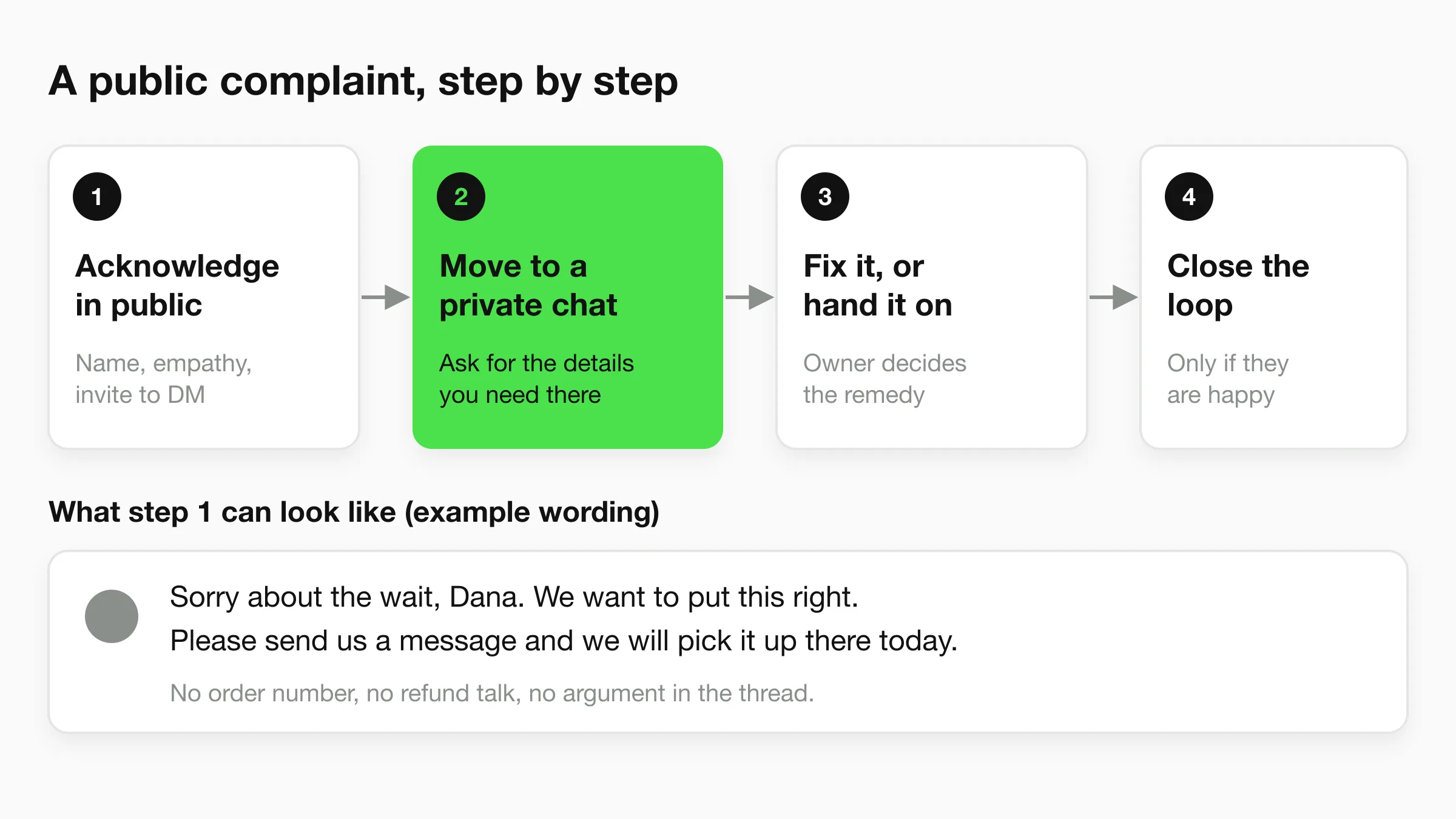
Handle a public complaint by acknowledging it quickly, taking it private, resolving it with facts, and closing the loop only if the customer is happy. Do not argue in the thread and do not delete the comment.
Step 1: acknowledge in public
Use the customer's name, say sorry for the experience (not for a fault you have not checked yet), and invite them to message you. Keep the reply to two sentences, like the example wording in the figure. Do not ask for an order number in the comment, discuss refunds, or defend your team. Anyone scrolling past sees one calm sentence and a clear next step.
Step 2: move to a private chat
In the DM, apologise once, restate the problem in your own words so the customer knows you read it, and ask only for the details you need. Say when they will hear back. If the customer will not move to DMs, answer in the thread and still keep personal data out of it.
Step 3: fix it, or hand it on
Fixing it means a real remedy: a replacement, a corrected invoice, a rebooked slot. If the remedy needs a decision you cannot make, hand the case to the named owner and say so: "I have passed this to our manager, Priya, who will message you today" beats a vague promise.
Step 4: close the loop
Once the problem is solved, you may add a short public note under the original comment, such as "Glad we could sort this out." Do not ask the customer to edit or delete a review or comment. Asking looks like pressure and can breach platform rules.
Tone guide for social customer service
Write the way a good front-desk person speaks: warm, plain and specific. Use short sentences, the customer's name and one clear next step. Your tone should change with the situation, but your voice should not.
| Situation | Do | Avoid |
|---|---|---|
| Praise | Thank them by name; mention what they liked | A copy-pasted "Thanks for the love!" on every comment |
| Simple question | Answer in one line and link to details | "Check our website" with no link |
| Complaint | Apologise for the experience; offer a next step | Defensive explanations; blaming the customer |
| Angry or abusive message | Stay calm; set a boundary once; hand to the owner | Matching their tone; sarcasm |
| Delay | Say what you know and when they will hear back | Silence, or "we'll get back to you" with no time |
| Your mistake | Own it plainly and say what changes | Passive phrases such as "mistakes were made" |
Pick three words that describe your voice (for example: friendly, direct, calm) and put them at the top of your policy. Use templates as starting points, not scripts, because a reply that is obviously a template loses the customer. Our customer service response templates page has starting wording you can adapt.
A one-page social media customer service policy
A written policy is the cheapest way to make a small team consistent, and one page is enough. These social media customer service best practices belong in it:
- Channels you answer: every account and every place a message can arrive.
- Response targets: use the table above as a draft.
- Public or private: copy the three columns from the first figure and edit them for your business.
- Owners: one person for comments, one for DMs, one for escalations, each with a backup.
- Escalation list: refunds, safety, legal and press go to the named owner.
- Never ask for in public: card numbers, passwords, full addresses and medical details.
- After-hours behavior: what happens outside business hours and what the customer is told.
- Review cadence: once a month, read a sample of conversations and update the policy.
Where one wrong answer causes real harm, such as a clinic or a legal practice, add an approval step for anything that states a policy or price.
The split works across small businesses. For a salon, comments handle thanks and styling questions, DMs handle availability and bookings, and the owner handles any reaction to a treatment (beauty agents). For a home-service company, comments get the public acknowledgement, DMs collect the address and photos, and a manager owns refunds (home services agents).
Staffing social media customer service with a small team
A small team should not watch social all day. Schedule short, fixed check-ins for comments and let DMs be covered by whatever answers fastest. The aim is predictable coverage, not constant presence.
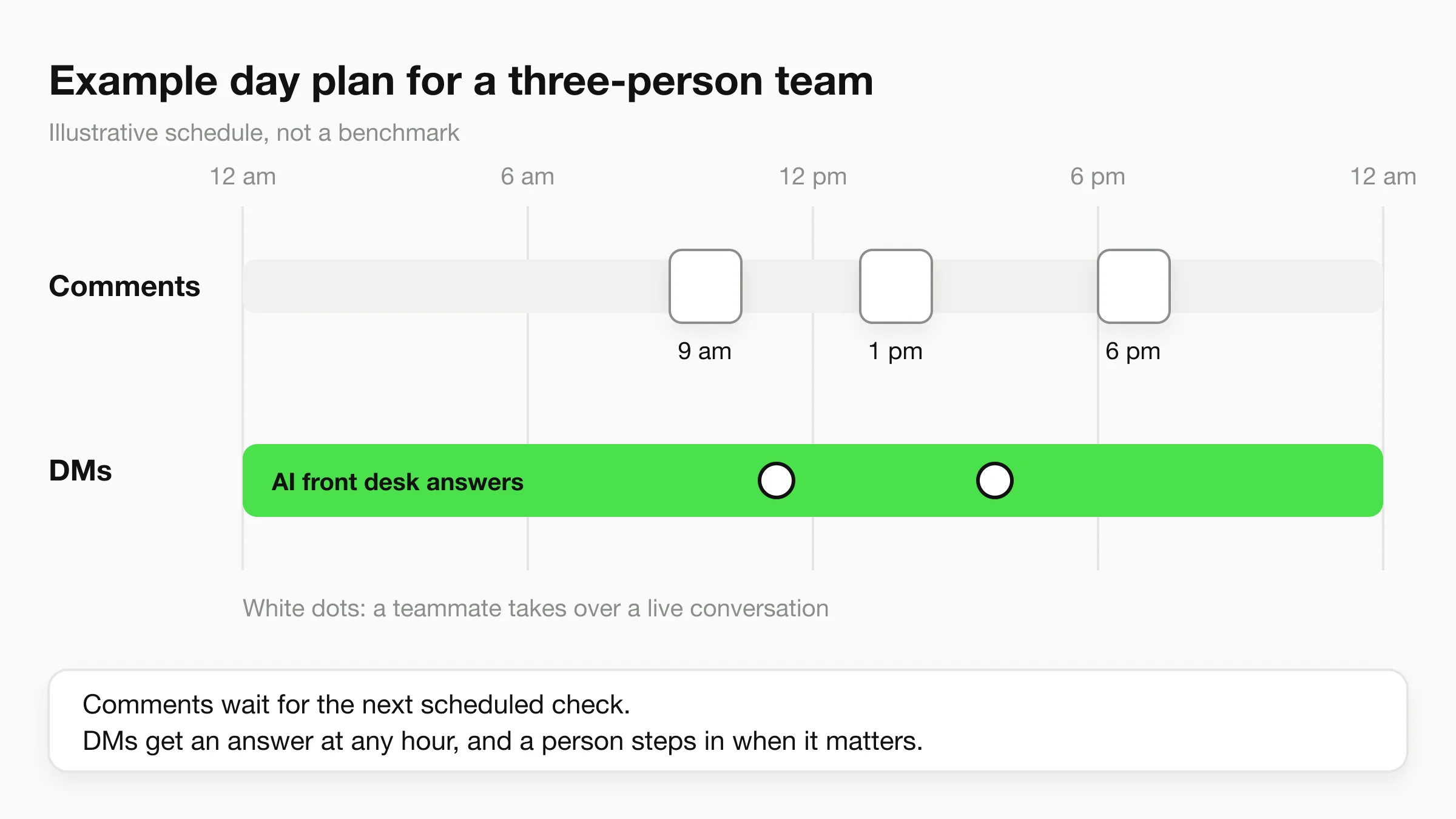
Here is an illustrative plan for a three-person salon, clinic or home-services company. It is not a benchmark.
- Comments: three scheduled checks a day of about 20 minutes each: mid-morning, early afternoon and early evening. One person owns each check and logs anything to escalate.
- DMs: the shared inbox is the first screen anyone opens. In opening hours, whoever is free replies. Outside them, an AI front desk can answer routine questions and collect details, and a person picks up at the next check.
- Escalations: one named owner reviews the list at the end of every day. Anything older than a day gets a status message to the customer.
- Weekly: fifteen minutes to read five or six conversations together and note what customers keep asking. Those repeated questions are the best source for your next post or FAQ.
If you are the only person, shrink the same plan to two comment checks and a clear after-hours message. Staff up when the numbers show the plan failing, not before.
Where an AI front desk fits
An AI front desk can answer your Instagram, Facebook Messenger and WhatsApp DMs at any hour, so your team spends its time on comments, complaints and decisions. It does not replace the public side of social media customer service, and it does not reply to comments.
Hyperleap AI is a Meta Technology Provider and Business Partner. WhatsApp, Instagram, and Messenger run on Meta's official Business APIs. Here is what that means for the workflow above:
- DMs on three social channels. One AI agent answers on Instagram DM, Facebook Messenger and WhatsApp from the knowledge you give it: your services, prices, hours and policies. It also runs on your website chat.
- Comments stay with your team. Replying to comments under posts and Reels is not a Hyperleap feature. Keep that work on your comment checks.
- Human takeover on social channels. On Pro and Max, any teammate can take over a live conversation, including on WhatsApp, Instagram and Messenger, and hand it back to the AI. The AI can also be paused for a single contact, so a customer you are handling personally does not get a second voice.
- Handoff when the AI cannot help. Visitors can ask for a person, and your team is alerted in Studio. This is also on Pro and Max.
- One inbox. Every conversation from every channel lands in a unified inbox in Studio, so the one-inbox rule above is already in place.
The AI answers from your documents, and when it does not know something it routes the question to a person. On WhatsApp, customers pay Meta's fees directly, separately from a Hyperleap plan, so check Meta's current pricing for your region.
Plans start at $40 per month for Plus (3,000 AI responses), $100 for Pro (12,000) and $200 for Max (30,000), with a 7-day free trial and a card required. See pricing for the full comparison. If you want the longer story, the AI front desk page explains the product. For a channel-by-channel comparison of tools, read best Instagram DM automation tools in 2026.
Cover your DMs while your team handles the rest
Hyperleap AI answers Instagram DMs, Facebook Messenger and WhatsApp from your own documents, and your team can take over any live conversation on Pro and Max.
Start for freeTools for social media customer service
You need three things: one place to see every message, a way to assign and track them, and a way to answer after hours. Most small teams start with free tools and add software when volume demands it.
- Native inboxes. Meta Business Suite provides a shared inbox for Facebook and Instagram messages and comments at the time of writing. It suits one or two people.
- Social management tools and help desks. These add assignment, tags and reporting for higher volume.
- An AI front desk. This answers routine DMs instantly and hands off the rest. It covers the hours your team is not there.
Check that whatever you pick connects through Meta's official APIs, because unofficial connections can break.
Metrics: how to know it is working
Track a small set of numbers weekly, and read them next to a handful of real conversations. Numbers alone will mislead you.
- First response time, split by comments and DMs.
- Share answered: the percentage of comments and DMs that receive any reply. A missing reply costs more than a slow one.
- Resolution time from first message to a solved problem.
- Escalation count and the reasons. A rising number points to a missing answer in your documents.
- Repeat contacts: customers who write twice about the same issue, the clearest sign of an unresolved problem.
Set your own baselines in the first month rather than borrowing someone else's. Customer service metrics defines the speed, quality and load measures in more detail and includes a weekly scorecard you can copy.
Read ten conversations a week
Every Friday, open ten recent conversations across your channels and read them as a customer would. Mark each as good, fine or poor. After a month, the pattern in the poor ones will tell you more than any dashboard.
Frequently Asked Questions
What is social media customer service?
Social media customer service is support delivered through social platforms: replying to comments, DMs and mentions from customers who have questions or problems. It covers public replies, private conversations and escalation to a person when a case needs a decision.
How fast should I respond to customers on social media?
About three-quarters of consumers expect a response within 24 hours, according to the 2025 Sprout Social Index, and many want faster replies for simple questions. Choose targets you can meet reliably, and write them down.
Should I answer complaints in comments or in DMs?
Do both. Acknowledge the complaint in a short public reply, then move the details to a DM. Sprout Social's Q4 2025 Pulse Survey found that 51% of consumers who reach out publicly expect a public acknowledgement before the move to a DM. Do not delete the comment or argue in the thread.
Can a chatbot handle customer service on Instagram?
A chatbot can answer Instagram DMs, such as questions about prices, hours and bookings, and pass complex cases to your team. Hyperleap AI answers Instagram DMs through Meta's official Business APIs. It does not reply to comments under posts or Reels, so those stay with your team.
How do I staff social media customer service with a small team?
Schedule short, fixed comment checks two or three times a day, name one owner for escalations, and keep every conversation in one inbox. An AI front desk can cover after-hours DMs while a teammate takes over when a customer needs a person.
Does Hyperleap AI reply to Facebook or Instagram comments?
No. Hyperleap AI answers direct messages on Instagram and Facebook Messenger, plus WhatsApp and website chat. Comment replies are not a feature, so your team keeps that part of social media customer service.
Start with the inbox you already have
Social media customer service does not need a department. It needs a short policy, a clear rule for public and private, one named owner for hard cases, and coverage for the hours nobody is at the desk. Write the policy this week, run the weekly conversation review for a month, and adjust from what you read.
Put an AI front desk on your social DMs
Answer Instagram DMs, Facebook Messenger and WhatsApp from your own knowledge, with human takeover on Pro and Max. Plans from $40/month, 7-day free trial.
Start for freeIndustry Solutions
See how AI chatbots work for these industries:
Related Articles
View all
Guide18 min read
Customer Self-Service: Options, Examples and Setup
Customer self-service explained for small businesses: seven options compared by cost and effort, how to pick what to automate, and how to measure it.
Guide19 min read
Customer Service Metrics: 13 Defined, 6 to Start With
The customer service metrics that matter for a small business: definitions, formulas, what to track, what to skip, and a simple weekly scorecard.
Guide19 min read
Customer Service Skills: 14 That Matter, With Examples
The 14 customer service skills a small business needs, each with a plain definition, a weak vs better reply, and a way to train it in a small team.
Guide13 min read
Customer Success vs Customer Support: The Real Difference
Customer success vs customer support: support fixes problems when asked, success prevents them. Compare goals and metrics, and see how small teams do both.