Guide
Property Management Answering Service: Options & Costs
What a property management answering service should handle, how in-house, live, AI phone and AI chat options compare, and a routing playbook for emergencies.

Gopi Krishna Lakkepuram · Founder & CEO
· 19 min read
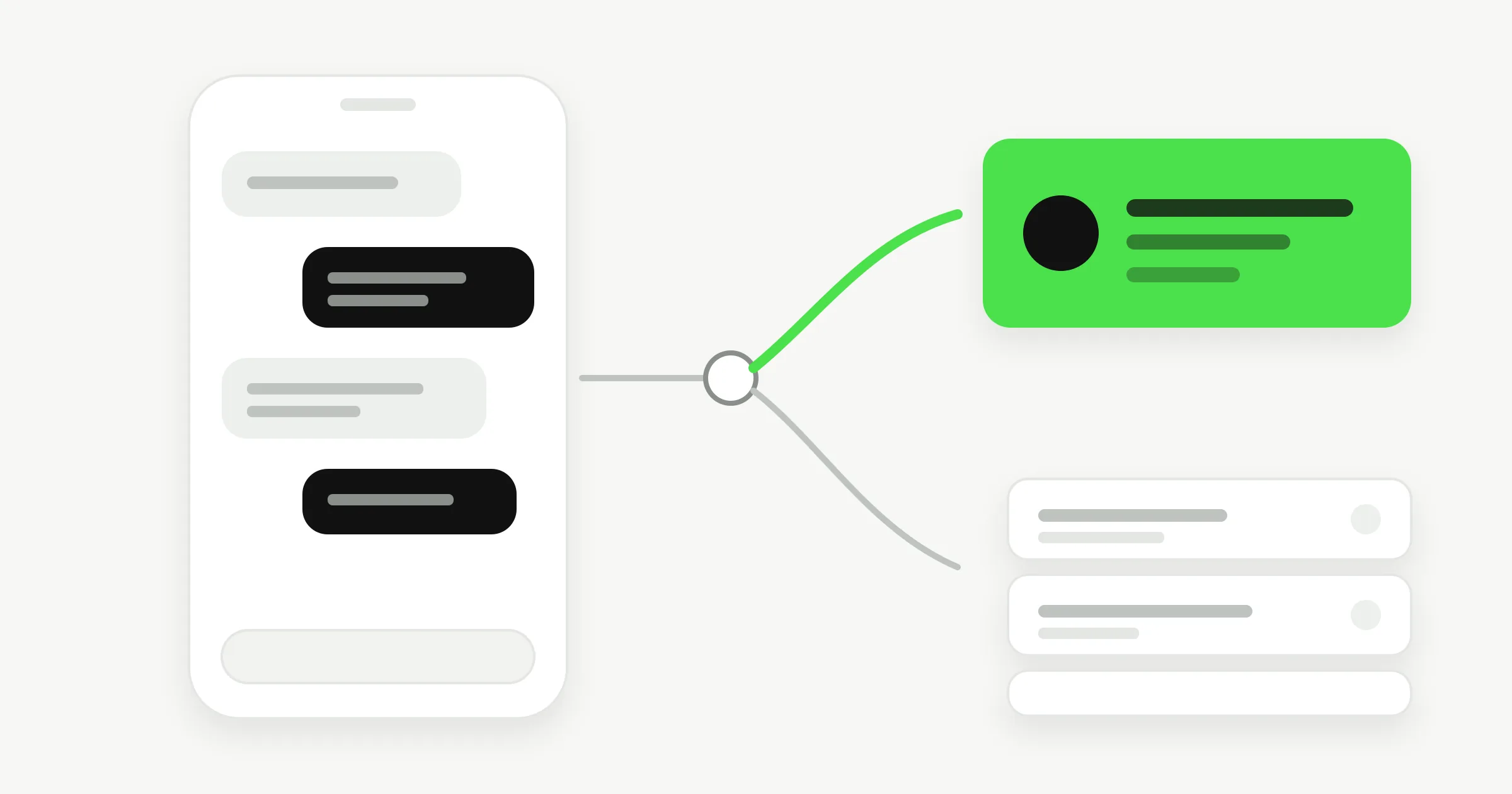
A property management answering service picks up when your office can't: nights, weekends, lunch hours and the Monday morning when twelve tenants contact you at once. Its job is to sort what arrives. A burst pipe goes to your on-call person in minutes. A dripping tap becomes a ticket for tomorrow. A prospect asking about a two-bedroom gets an answer before they message the next listing.
Most property managers search for this after one bad night, usually a flooding call that sat in voicemail until morning. This guide covers what the service should handle, the four ways to provide it, what each costs (with sourced ranges), and a routing playbook you can adopt whichever option you choose. We also say plainly where Hyperleap fits and where it doesn't: it answers messages, not phone calls.
What a Property Management Answering Service Should Actually Handle
A property management answering service should handle four kinds of contact: maintenance emergencies, routine maintenance requests, prospective tenant inquiries, and owner or rent questions. Each needs a different response speed and a different person at the other end, so a service that treats them all the same fails at least two of them.
Many small portfolios buy coverage for emergencies and assume the rest sorts itself out. Emergencies are rare. Routine requests and leasing questions are constant, so a bad system fails in both directions.
Other guides cover single categories: the property management chatbot buyer's guide for leasing offices, and AI chatbot for property managers for the tenant side. This post covers the decision above them: who answers, when, and how an urgent contact reaches a human.
Four Kinds of Contact, Four Different Jobs
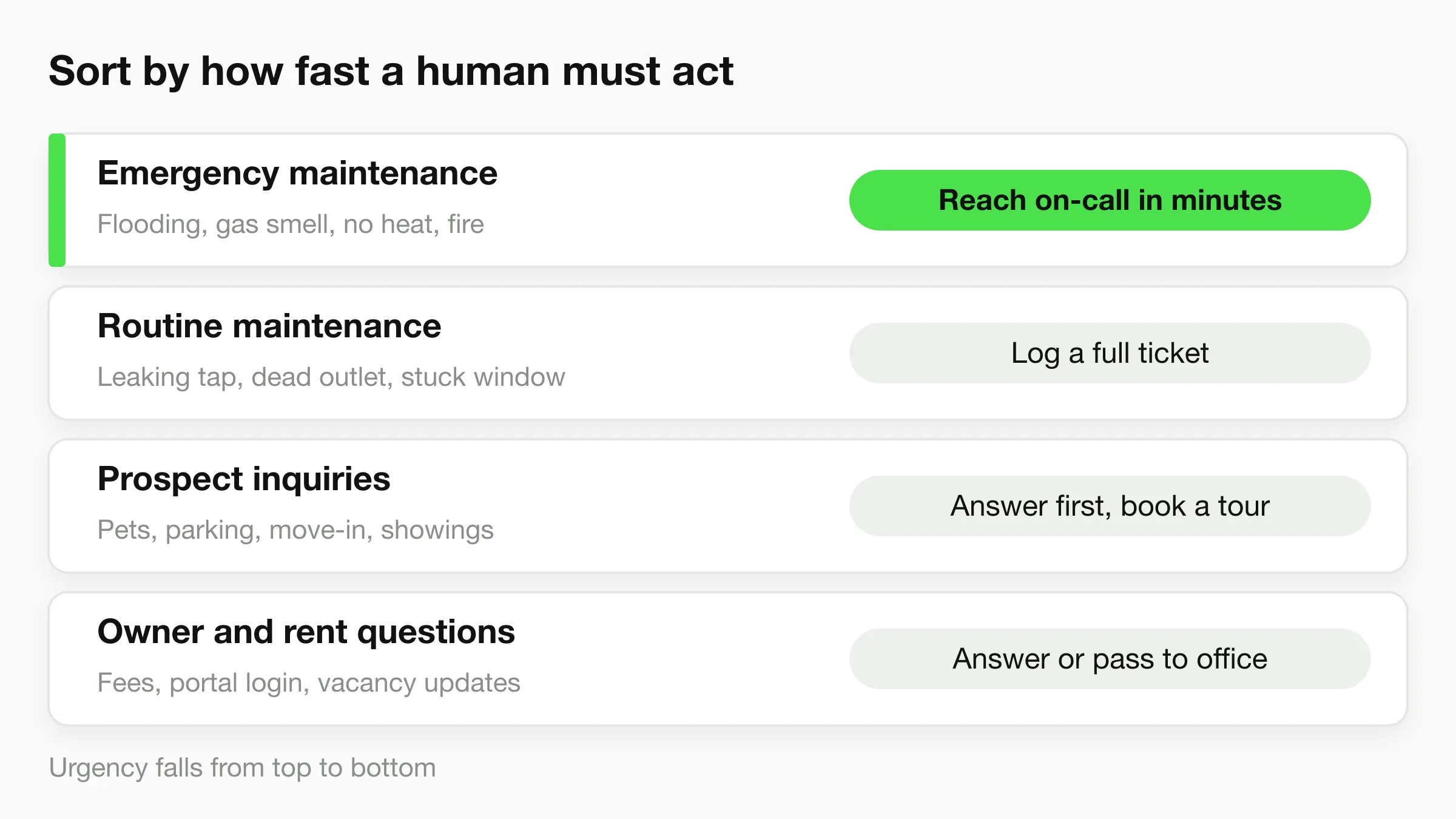
Sort every incoming contact by how fast a human must act. The sort decides whether you need a person, a script or a document.
1. Maintenance emergencies
These need a human fast. Examples most managers put on the emergency list: active flooding or a burst pipe, no heat in cold weather, a gas smell, fire or smoke, sewage backup, a loss of power to the whole unit, and a break-in or a door that won't lock. A gas smell or fire should always send the tenant to 911 and the utility first, before your line.
What makes something an emergency is a policy decision, and local housing rules may set some of it for you. Write the list down. Your answering service, your on-call technician and your tenants should all be working from the same one.
The answering service's job here is narrow: confirm it is on the list, collect the unit and a call-back number, and reach the on-call contact. It does not diagnose.
2. Routine maintenance requests
A leaking tap, a dead outlet in one room, a stuck window, a dishwasher that stopped. These do not need a person at 11 pm. They need a clean record: unit, location in the unit, what happened, how long, photos if possible, and when the tenant can give access. A good request saves a technician a first visit.
This is the category where a maintenance request answering service earns its keep, because the quality of the capture decides whether the work order can be dispatched without three follow-up calls.
3. Prospective tenant inquiries and showings
Someone sees your listing at 8 pm and wants to know about pets, parking, the move-in date and how to tour. The service that answers first usually gets the showing. These contacts rarely arrive as phone calls anymore. They arrive as website chat, WhatsApp messages and Instagram or Facebook DMs on listings. A phone-only service never sees them.
4. Owner, rent and portal questions
Owners ask about a vacancy or a repair estimate. Tenants ask where to pay rent, what the late fee is, or how to log into the portal. Most of these are answerable from documents you already have, and a few need a human with account access. The right service answers the first kind and passes the second to your office with the context attached.
Your Four Options, Compared
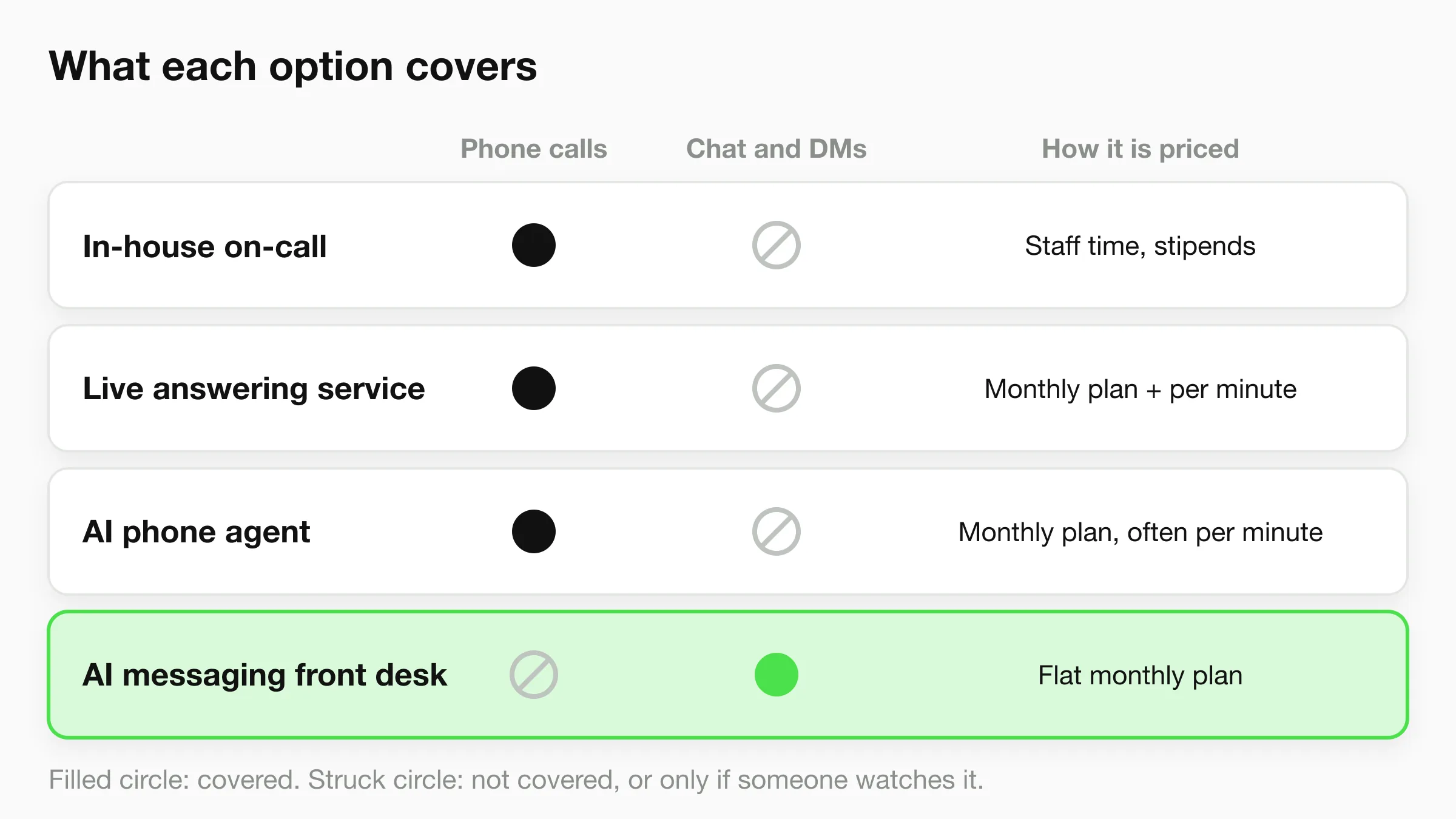
There are four ways to cover the gaps, and most portfolios end up mixing two of them. The one question that picks the mix is where your contacts arrive: phone, messages, or both.
In-house on-call rotation
A staff member or maintenance lead carries a phone after hours, usually on a rotation. You control everything and pay mostly in people: stipends, comp time, burnout and the risk that the one person on call is asleep, out of signal or sick. It works for small portfolios with a tight team. It gets fragile as soon as one person covers it alone.
Live phone answering service or call center
A human operator answers your forwarded line, follows your script and contacts your on-call person. This is the traditional property management call center model. Some providers specialize in maintenance, and screen each call to decide whether it is an emergency. Strengths: a human on the phone for a frightened tenant, and emergency screening by someone who can hear tone. Weaknesses: it covers phone only, per-minute pricing climbs with volume, and operators work from your script, not your documents.
AI phone agent
A voice AI answers the forwarded line, collects details and routes by rules. Costs are often lower than live operators, and it can scale to a busy night. It is a real option for phone-first portfolios. Check how it handles an upset caller, an accent it doesn't parse, and a handoff that fails. Ask for the emergency path in writing. Hyperleap does not offer this; voice is on our roadmap and we don't sell it today.
AI messaging front desk
An AI agent answers website chat, WhatsApp, Instagram DM and Facebook Messenger from your own documents: lease terms, pet policy, application steps, fees, showing windows. It collects maintenance details through a short conversation and shows the tenant your emergency line when a message looks urgent. This is what Hyperleap does. It covers the message-based contacts that a phone service cannot see, and it does not answer calls.
| In-house on-call | Live answering service | AI phone agent | AI messaging front desk | |
|---|---|---|---|---|
| Answers phone calls | Yes, if staffed | Yes | Yes | No |
| Answers website chat and social DMs | Only if someone watches them | Usually no | Usually no | Yes |
| Emergency routing | Direct, one person | Operator screens, then contacts on-call | Rule-based | Shows your emergency line; alerts team (see below) |
| Leasing and policy questions | Staff answer | From a script | From a script or knowledge base | From your documents |
| Pricing shape | Staff time and stipends | Monthly plan plus per-minute | Monthly plan, often per-minute | Flat monthly plan |
| Best for | Small teams with good coverage | Phone-first, human voice needed | Phone-first, high volume | Message-first leasing and tenant requests |
For a longer comparison of receptionists and answering services outside property management, see AI Receptionist vs Answering Service and Answering Service Alternatives for Small Business.
What an Answering Service Costs
Live answering services typically cost from about $100 to $1,000+ per month, with per-minute rates of roughly $0.75 to $1.50, and after-hours or 24/7 coverage commands a premium, according to Nextiva's 2026 answering service cost guide. The same guide lists AI answering services at about $50 to $300 per month. Treat these as market ranges. Real quotes depend on call volume, coverage hours and add-ons.
Property management is one of the few verticals with a published price from a software vendor. Propertyware lists a maintenance contact center with plans starting at a $140 monthly minimum, priced per unit: $1.10 per unit per month for all maintenance calls, or $0.70 per unit per month if the service answers only missed calls. Both include round-the-clock coverage and emergency screening, plus a one-time $300 setup fee, as of November 2026.
Here is what that per-unit model means in practice. These are illustrative calculations from the published rates, not a quote:
| Portfolio | All maintenance calls ($1.10/unit) | Missed calls only ($0.70/unit) |
|---|---|---|
| 100 units | $110 (the $140 minimum applies) | $70 (the $140 minimum applies) |
| 250 units | $275 | $175 |
| 500 units | $550 | $350 |
Ask any provider whether after-hours calls, transfers and overage minutes are billed on top. Per-minute billing makes a busy month, such as a cold snap with a spike of heating calls, the expensive one.
In-house on-call is cheaper on paper and dearer in practice. You pay stipends or overtime, and you carry the risk when the person on call can't answer. We can't give you a sourced cost for that, because it depends on your staffing. Count it honestly before you compare.
Hyperleap's own pricing is published: Plus is $40 per month, Pro is $100 and Max is $200, each with a 7-day free trial (card required). The plans are flat, not per-minute. They cover messages only, so they replace none of the above if your contacts arrive by phone. Full detail is on /pricing.
An After-Hours Emergency Routing Playbook
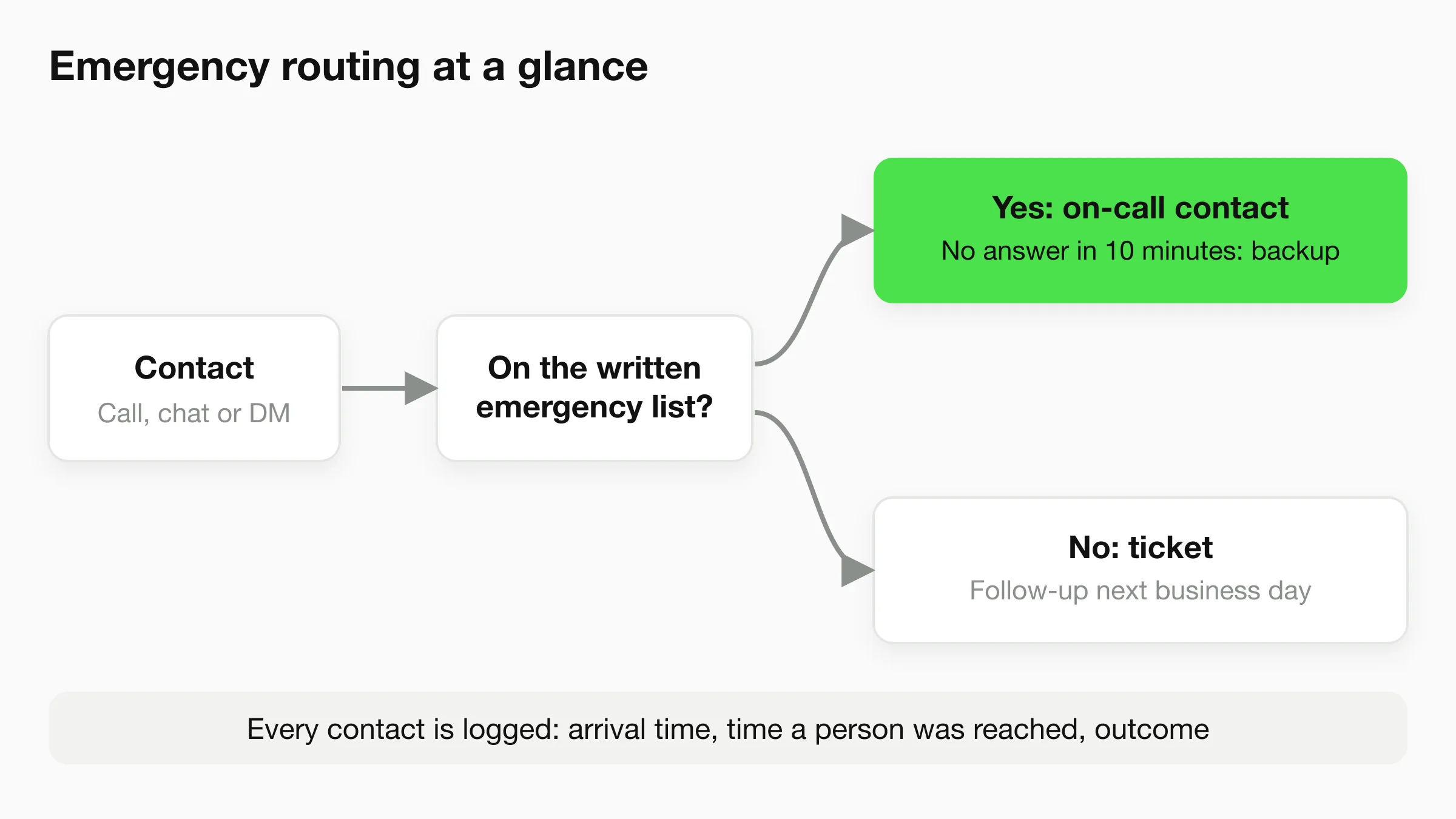
Emergency routing has four parts: a written definition, a single path to a human, a backup when that human doesn't answer, and a record afterwards. The playbook below works with a live service, an AI phone agent, an in-house rotation or a messaging agent.
Step 1: Write the emergency list
Keep it to one page, life-safety items first (gas smell, fire, smoke) and mark them "call 911 or the utility before calling us." Then list the property emergencies: flooding, no heat in cold weather, sewage backup, no power to the unit, a door that won't secure. Anything not on the list is routine, and the tenant is told when to expect a response.
Step 2: Name one on-call contact and one backup
Give the service two names and two numbers, with the order to try them in. State the wait: if the first contact doesn't answer in, say, ten minutes, move to the backup. Test the numbers, and update them when the rotation changes.
Step 3: Tell the tenant what happens next
Every emergency contact should end with a clear statement: who will call, how soon, and what to do while waiting (shut off the water at the valve, if they know where it is; leave the unit if there is a gas smell). Write these precautions once, in plain words, and have everyone use them. Don't ask a service or an AI to improvise safety advice.
Step 4: Record it
Log the time the contact arrived, the time the on-call person was reached, and what was done. A short record protects you if a tenant later says nobody responded, and it shows you where the process is slow.
Where an AI messaging agent fits in this playbook
Be precise about this part. A messaging agent does not assess whether something is dangerous. It follows routing language you give it: if a message mentions items on your emergency list, it tells the tenant to call your emergency number (and 911 where relevant), shows that number, and collects the unit and contact details. On Pro and Max, human handoff alerts your team in Studio so a person can take over the conversation. After a conversation ends, Agentic Workflow can email the right internal contacts with a summary, also on Pro and Max.
Hyperleap does not call or text your on-call technician. Email and Studio alerts are not a pager. If your emergencies need a page within minutes, keep a live service or an in-house rotation on the phone line, and use the messaging agent for the message channels. Pro and Max also support webhooks and Actions, which can call your own systems if you have a paging tool to connect. That is something you or a developer would build, not a ready-made integration.
Don't let a chat window be your only emergency path
Tenants in an emergency usually call. Put your emergency phone number in the lease, on the portal, on the door of the maintenance room, and in the chat agent's instructions. Messaging coverage adds channels. It does not replace a phone number that a human answers.
Scripts You Can Copy
Scripts keep a service consistent across shifts. Adapt the wording to your own policy.
Phone script for a live answering service
Give this to your provider as the after-hours script.
Greeting: "Thank you for calling [Company] maintenance. Is this an emergency?"

If yes: "I'll connect you with our on-call team right now. Please stay on the line.
First, if you smell gas or see fire or smoke, hang up and call 911."
  - Confirm the property address and unit number
  - Confirm a call-back number
  - One-line description: what is happening, and where in the unit
  - Contact on-call number 1. If no answer in 10 minutes, contact number 2.
  - Tell the caller: "[Name] will call you within [X] minutes."

If no: "We'll log this for our team and a technician will follow up on the next business day."
  - Collect unit, location in the unit, description, how long it's been happening,
    access permission and best time, call-back or message preference
  - Read the details back before ending the call
Chat script for a leasing and maintenance agent
Here is wording you could give a Hyperleap agent as instructions. Replace the bracketed items with your own policy.
You answer questions for [Company], a property management company.
Answer only from the documents provided. If you don't know, say so and offer to pass the question to the office.

If a message mentions gas smell, fire, smoke, flooding, sewage backup, no heat in cold weather,
or a door that won't lock, tell the person: "If anyone is in danger, call 911 now.
For gas or fire, leave the building first. For all emergencies, call our emergency line at [NUMBER]
right away." Then ask for their unit number and a call-back number. Do not give repair advice.

For other maintenance requests, ask for: unit number, which room, what happened, when it started,
whether the tenant can allow entry when not home, and the best way to reach them. Offer to
attach photos. Tell them the team will follow up on the next business day.

For prospective tenants, answer from the listing and policy documents (rent, deposit, pets,
parking, move-in dates, application steps) and share the showing booking link or offer open times.
For pet and maintenance wording specifically, see Chatbots for Property Management: Pets, Maintenance, Tenants.
Where Hyperleap Fits (and Where It Doesn't)
Hyperleap is an AI front desk for small businesses. For property managers, it covers the message channels: website chat, WhatsApp, Instagram DM and Facebook Messenger. Here is what it does in this context:
- Answers leasing, fee, pet policy and application questions from the documents you attach.
- Collects maintenance request details in a short conversation and gives your team the record, in a unified inbox.
- Shows your emergency number and collects contact details when a message matches your emergency list, using routing language you write.
- Books showings with Calendly or Cal.com on Pro and Max. On Plus, it shares your booking link. In-chat booking with Calendly needs Calendly Standard or higher.
- Passes the conversation to a person with human handoff on Pro and Max.
What it does not do:
- It does not answer phone calls. Voice is on our roadmap, not available.
- It does not page or text an on-call technician.
- It does not integrate with property management software such as AppFolio, Buildium or Yardi. It doesn't create work orders in those systems. On Pro and Max, Actions can call an API you own, if your software exposes one.
- It does not assess whether a situation is dangerous, give repair advice or decide who is responsible.
- It does not process rent payments.
Cover the messages your phone service never sees
Set up an AI front desk for your website, WhatsApp, Instagram and Messenger in minutes, and try it free for 7 days.
Start for freeOur property management agent page shows the setup for leasing offices and portfolios, and the AI front desk overview explains the product more broadly. If your portfolio is mostly sales and leasing, the real estate agent page is the closer fit.
How to Choose
Start by counting where contacts arrived over the last 30 days: phone calls, website chats, WhatsApp, Instagram and Facebook messages, emails and contact forms. Most managers find the phone is not the only channel, and often not the biggest one for leasing.
- Mostly phone, and emergencies matter most: keep a live answering service or in-house on-call on the line. Make sure the emergency path is written and tested.
- Mostly messages, leasing-heavy: an AI messaging front desk covers the volume at a flat price, with your emergency line shown to anyone who needs it.
- Both: pair a phone answering service for calls with a messaging agent for chat and DMs. This is the combination most small portfolios end up with, and the one that leaves no channel dark.
Then test it. Call your own after-hours number at 10 pm. Send an emergency message through every channel you advertise. Time how long until a human has the details. Any gap you find is a better guide than a sales page.
Frequently Asked Questions
What is a property management answering service?
It is a service that answers tenant, prospect and owner contacts when your office is closed or busy. A live service uses human operators on your phone line. Newer options use AI on phone or on message channels. The goal is the same: sort emergencies from routine requests, collect details and reach the right person.
How much does a property management answering service cost?
Live answering services run from about $100 to $1,000+ per month in the market ranges Nextiva publishes, with per-minute rates around $0.75 to $1.50. Propertyware lists a maintenance contact center from a $140 monthly minimum, priced per unit. Your cost depends on call volume and after-hours coverage. Ask for the all-in price at your own volume.
Can an AI chatbot replace an after-hours answering service for maintenance emergencies?
Not by itself. An AI messaging agent can show your emergency number and collect details when a message matches your emergency list, but it does not answer phone calls and does not page your on-call technician. Emergencies need a path to a human that works by phone. Use a messaging agent for the message channels and a phone path for emergencies.
Does Hyperleap integrate with AppFolio, Buildium or Yardi?
No. Hyperleap has no integration with property management software. It collects maintenance request details and gives your team the record. On Pro and Max, Actions can call an API that you own, which requires a developer or a software vendor that exposes one.
What should the answering service collect on a maintenance request?
At minimum: property and unit number, which room, what happened and when it started, whether anyone is at risk, permission to enter when the tenant is out, a call-back or message preference, and photos if possible. For emergencies, the first two items and a call-back number are enough to start the response.
How do I decide what counts as an emergency?
Write a one-page list with your attorney or local housing rules in mind, and share it with your service, your technicians and your tenants. Common entries are gas smell, fire, flooding, sewage backup, no heat in cold weather and an unsecured door. Anything off the list is routine. Review the list each season.
Can a messaging agent book property showings?
Yes, with Calendly or Cal.com on Pro and Max. The agent offers real open times and creates the booking in the conversation, and the prospect receives a calendar invite by email. On Plus, it shares your booking link. It creates new bookings only. It can't cancel or reschedule.
Match the Channel, Then Write the Playbook
Choose the answering service that covers the channels your tenants and prospects actually use, and write the emergency routing rules before you sign anything. The playbook above works with any option. The vendor you choose is the smaller decision.
For many small portfolios the answer is two layers: a phone path for emergencies, and an AI messaging front desk for leasing questions and routine requests. Hyperleap covers the second layer.
See how an AI front desk handles your tenant messages
Paste your website URL, attach your lease and policy documents, and test the agent before you publish it. 7-day free trial.
Start for freeIndustry Solutions
See how AI chatbots work for these industries:
Related Articles
View all
Guide17 min read
Tenant Maintenance Requests: A Clear Intake Template
Collect clearer non-emergency tenant maintenance requests with description prompts, contact boundaries and a practical property-team handoff.
Guide18 min read
Property Management Chatbot: A Buyer's Guide
What a property management chatbot actually automates — leasing FAQs, pet policy, maintenance intake — and what still needs your team, pricing included.
Guide17 min read
Multilingual Hotel Chat: A Guest-Question Test Kit
Test English and Spanish hotel enquiries against the same approved facts, with arrival, policy, access and staff-handoff cases your team can review.
Guide19 min read
Agentic AI vs Generative AI: What Changes for SMBs
Agentic AI vs generative AI explained: a comparison table, a small-business example of each, where the line blurs, and how to judge agentic claims.