AI chatbot for business
The AI front desk for small businesses
An AI chatbot answers your customers in writing, from your own documents, on your website and in the messaging apps they already use. This page covers what one is, how it works, what to check before you pick one, and what Hyperleap does.
Plans from $40/mo. 7-day free trial. Card required.
Quick answer
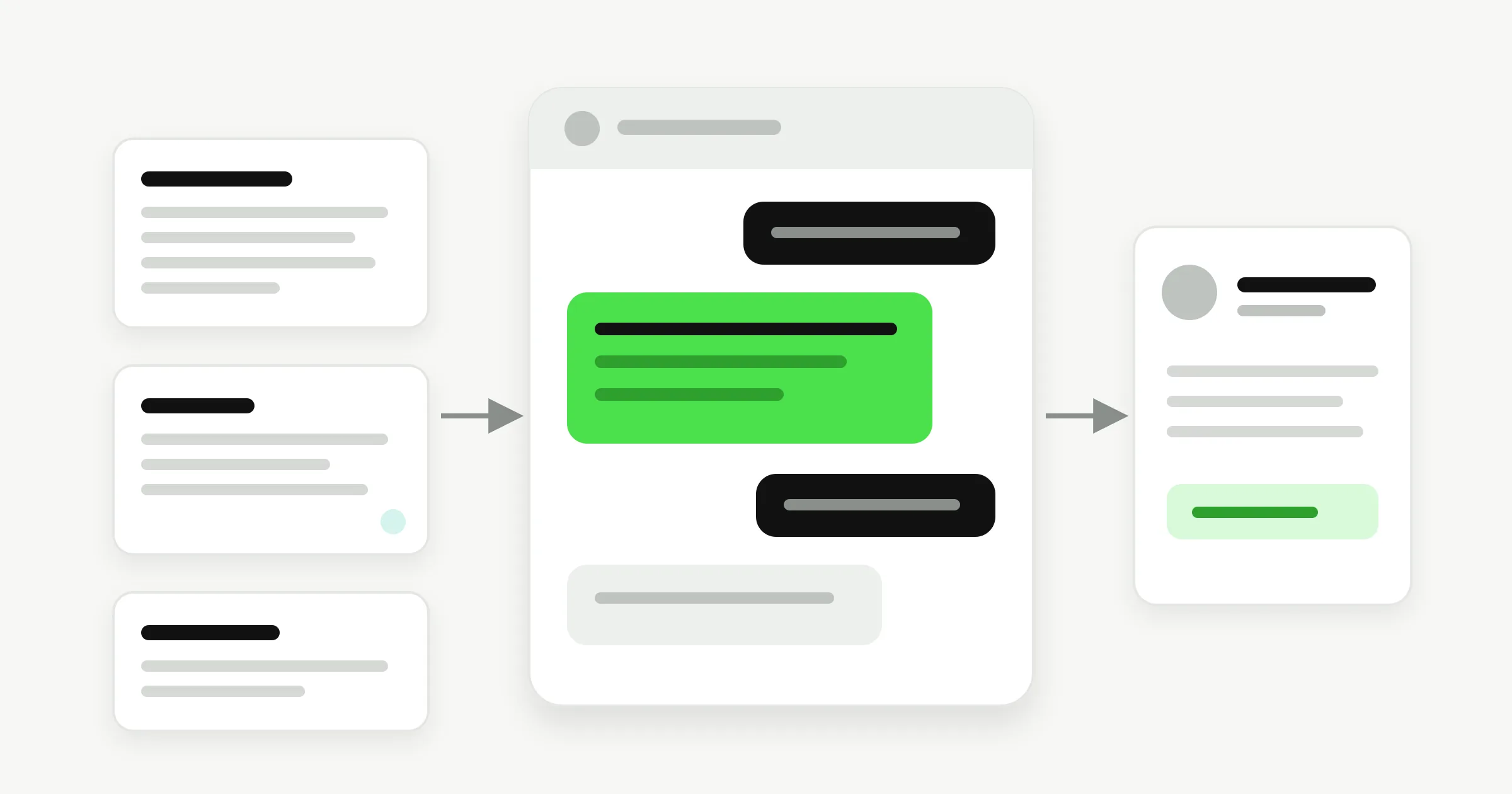
An AI chatbot is software that talks with a person in writing and writes its own replies with a language model. A business one reads your documents, answers customer questions from them, collects contact details, books appointments where you allow it, and hands anything it cannot answer to your team. Hyperleap AI does this on your website, WhatsApp, Instagram DM and Facebook Messenger from $40/month.
Definition
What is an AI chatbot?
An AI chatbot is a program that holds a conversation in text and writes each reply as it goes, using a large language model. Older chatbots followed a script: press 1 for hours, press 2 for pricing. An AI chatbot reads the question as the customer typed it, in any wording, and composes an answer.
The model alone does not know your business. What makes a chatbot useful for one is the material you give it: your service pages, price lists, policies and FAQs. The rest of this page is about that difference, because it decides whether a chatbot helps your customers or embarrasses you.
For a plain-language primer, read our guide to what an AI chatbot is. For the underlying idea of software that talks, see what conversational AI is. For the full range of bots, see the types of chatbots, and for real deployments, these chatbot examples.
How it works
How an AI chatbot answers a question
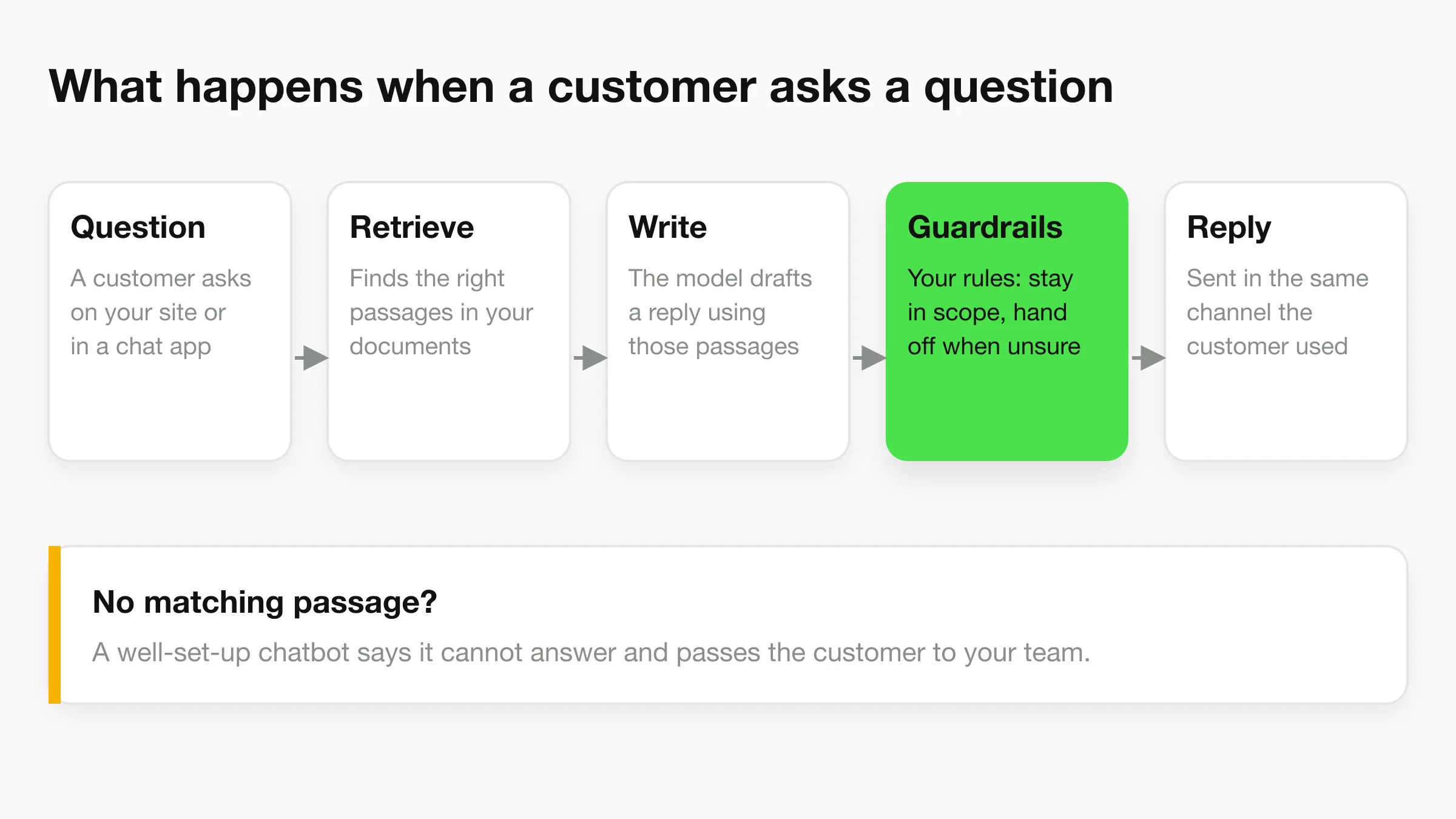
It finds the relevant passages in your documents, then asks the model to write an answer using only those passages, inside rules you set. Four parts do the work.
1. Your documents
Add your website pages, PDFs, Word files and FAQs. They become one knowledge base behind every channel. Update a page once and every channel answers from the new version.
2. Retrieval
For each question, the chatbot pulls the few passages most likely to hold the answer. This step is called retrieval-augmented generation, or RAG. It keeps replies tied to what you wrote.
3. The model
A language model writes the reply from those passages. GPT-6 Luna and Claude Haiku 5.5 are included on every Hyperleap plan, and you can add your own OpenAI or Anthropic key.
4. Guardrails and channels
You write the instructions: what it covers, its tone, and when to say it cannot help and hand over. The same agent then answers on your website, WhatsApp, Instagram DM and Messenger.
Retrieval lowers the chance of a made-up answer. It does not remove it. AI can still be wrong (see AI hallucinations), so test your top questions before you launch and read real transcripts afterwards. We explain the mechanics in how a RAG chatbot works and the limits in how accurate AI chatbots are. To see how the document side works in practice, read about the knowledge base chatbot.
Business vs consumer
How a business chatbot differs from a chat assistant like ChatGPT
A consumer chat assistant is built to talk with one person about anything. A business AI chatbot is built to talk with your customers about your business, and to do something with the conversation.
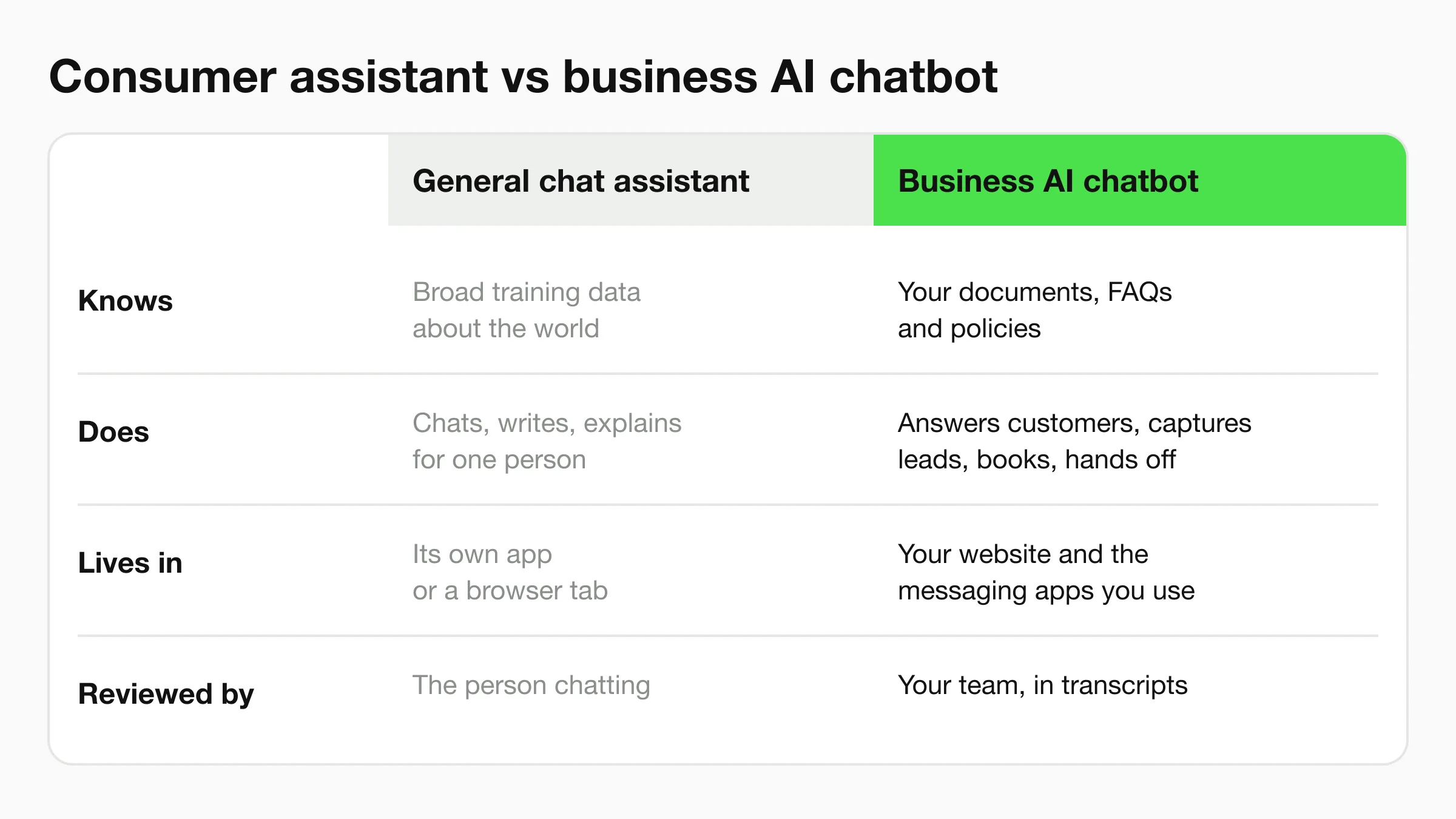
You can paste your price list into a general assistant and ask it questions. That works for you. It does not answer your customers at midnight, sit on your WhatsApp number, save the lead, or tell your team what was asked. A business chatbot does those jobs, and keeps a record you can review.
Types
Types of AI chatbot
Chatbots fall into four groups, and the name on the box often hides which one you are buying.
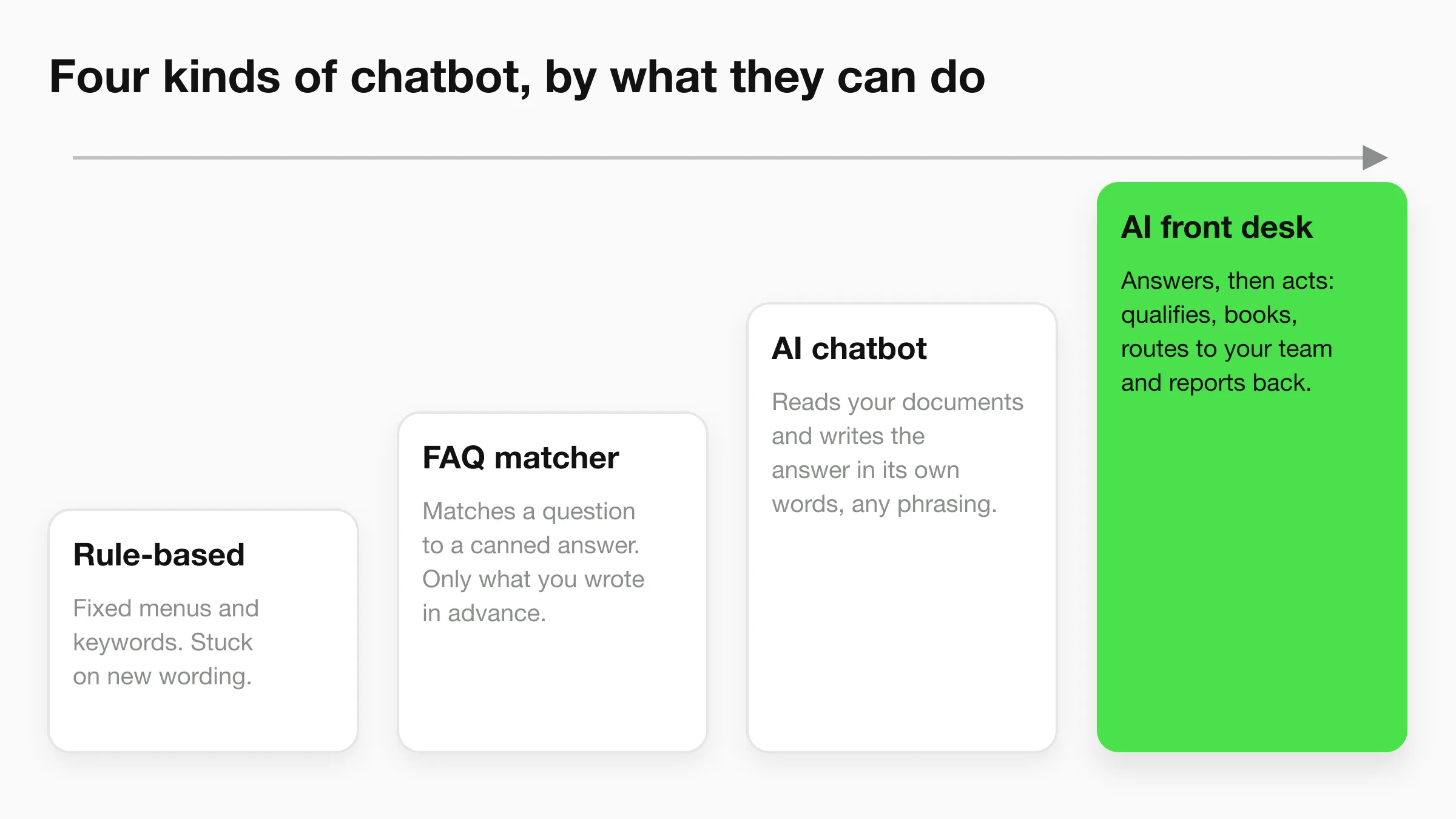
- Rule-based. Fixed menus and keywords. Cheap and predictable, and stuck the moment a customer words something differently.
- FAQ matcher. Matches a question to a canned answer you wrote in advance. It covers only what you anticipated.
- AI chatbot. Reads your documents and writes the answer in its own words, for any phrasing.
- AI front desk (an AI agent). Answers, then acts: asks qualifying questions, books, routes to your team, and reports back. This is the category Hyperleap sits in. The AI agent vs chatbot page explains the line, and the AI agent builder page shows how to build one.
Choosing
What to look for in the best AI chatbot for your business
The best AI chatbot for business is the one that answers correctly from your material, stops when it should, and fits the channels and budget you have. Check these nine things, in roughly this order. The right-hand column shows where Hyperleap stands on each.
| What to check | Why it matters | Hyperleap AI |
|---|---|---|
| Answers from your documents | Customers want your prices and policies, not general knowledge. | Website pages, PDFs and FAQs become one knowledge base behind every channel. |
| Knows when to stop | A confident wrong answer costs more than a handoff. | You write the rules for what it answers and when it passes to your team. |
| Your channels | Customers write where they already are. | Website, WhatsApp, Instagram DM and Facebook Messenger. |
| Capture and booking | An answer that ends the conversation wastes the visit. | Contact capture on every plan. Calendly and Cal.com booking on Pro and Max. |
| Human takeover | Some conversations need a person, fast. | Pro and Max: team alerts and live takeover, including on WhatsApp, Instagram and Messenger. |
| Review tools | You find wrong answers by reading real conversations. | Transcripts, a unified inbox, and logs that show which source an answer used. |
| Languages | Visitors write in their own language. | 100+ languages. |
| Pricing you can read | Usage-based surprises hurt small budgets. | Three plans from $40/mo with a fixed number of AI responses. |
| Security basics | Customer conversations are personal data. | Hosted on Microsoft Azure, GDPR compliant, encrypted in transit and at rest. |
Two more checks save grief. Ask how the vendor handles WhatsApp: Hyperleap AI is a Meta Technology Provider and Business Partner, and WhatsApp, Instagram and Messenger run on Meta's official Business APIs. And ask for the full price, including add-ons.
For a longer buying guide, read how to choose an AI chatbot platform, AI chatbot pricing models compared and our ranked list in best AI chatbots in 2026.
How Hyperleap does it
How Hyperleap's AI front desk works
Hyperleap AI runs your front desk in six jobs: answer, qualify, verify, book, route and report. Some jobs come with every plan and some need Pro or Max, so the figure marks each one.
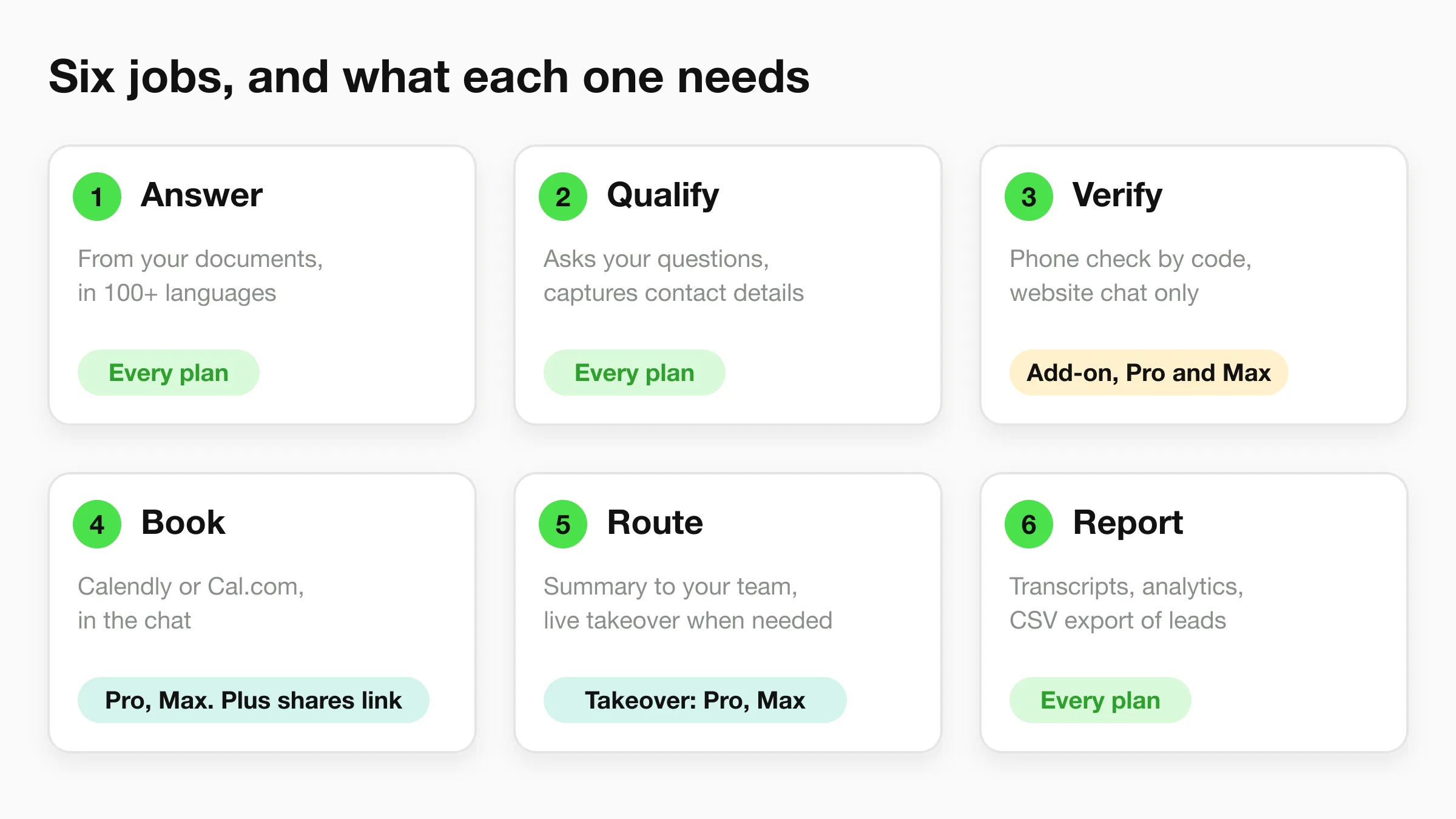
Answer and qualify work from the first day. The agent answers from your documents in 100+ languages and asks the questions you choose. On the website, the chat can collect contact details with a short form, and on WhatsApp, Instagram and Messenger the contact comes from the platform.
Verify is the phone-code check. It is a paid add-on for Pro and Max, and it works on website chat only.
Book uses Calendly or Cal.com. On Pro and Max the agent reads live availability, offers real open times and creates the booking in the conversation. On Plus it shares your booking link. Read more on the appointment scheduling chatbot page.
Route and report send your team a summary of each lead and keep every transcript in one inbox. On Pro and Max, visitors can ask for a person and any teammate can take over a live conversation (see human handoff). Leads export to CSV or Excel. See chatbot analytics, chatbot lead generation and the human handoff guide.
The full picture is on the AI front desk page. Owners who also want to ask Claude or ChatGPT about their leads can use the Hyperleap MCP connection, which is read-only and included on every paid plan. Developers can read the chatbot API page.
Customer service
An AI chatbot for customer service
Customer service is where most small businesses start, because the same ten questions arrive all day: opening hours, prices, delivery, cancellation, what is included. An AI chatbot answers those from your documents so your team handles the conversations that need a person.
A good setup has three parts. It answers from your documents. It admits when it does not know. It passes the customer to a person with the conversation attached. We cover the pattern in customer support chatbot and conversational AI for customer service. If you are comparing it with a person at the desk, see AI receptionist.
Website
Adding an AI chatbot to your website
You add an AI chatbot to a website by pasting one script tag, and you can do it without a developer. Paste your site address into Studio, check the starting prompt it writes, and add the tag. You can be live in under 5 minutes. Adding PDFs and tuning the guardrails comes after.
The widget works on any website platform, and there is an official WordPress plugin. Step-by-step guides: WordPress, Shopify, Wix, Squarespace, Webflow and plain HTML. These are widget embeds, not store-catalog integrations. If you have no developer, start with the no-code chatbot builder page, or the longer how to build an AI chatbot for your business guide.
Channels
Where your front desk answers
Hyperleap covers four channels from one agent and one inbox: your website chat widget, WhatsApp, Instagram DM and Facebook Messenger. Your own website stays the base. The messaging apps extend it to where customers already write.
Each channel has its own page: all channels, Instagram, Messenger. WhatsApp message fees are Meta's and are billed to you by Meta, separately from your Hyperleap plan. For several languages on one agent, see the multilingual chatbot page.
Pricing
What an AI chatbot costs
Hyperleap AI starts at $40 a month. There are three plans and every one has the 7-day free trial, a card is required to start it, and there is no free plan.
| Plan | Monthly | AI responses | Chatbots | Booking |
|---|---|---|---|---|
| Plus | $40 | 3,000 | 1 | Shares your link |
| Pro | $100 | 12,000 | 2 | In-chat booking |
| Max | $200 | 30,000 | 5 | In-chat booking |
Annual billing saves up to 40%. Human handoff, Actions, webhooks, link tracking, rich media and white-label are on Pro and Max. Add-ons such as OTP verification and extra chatbots cost extra and are listed on the pricing page.
Use cases
AI chatbot use cases by industry
The same chatbot fits different businesses once you change the documents and the rules. These are the industries we have built pages for, with what the chatbot does in each.
Dental practices
Answers service and policy questions, captures contact details, and shares your booking link or books through Calendly or Cal.com.
Real estate
Answers listing and viewing questions from the details you provide and asks buyers and renters your qualifying questions.
Home services
Captures job details and contact information while your crew is on site, and routes urgent requests to your team.
Salons and beauty
Answers service and price questions and books appointments on Pro and Max.
Hotels and hospitality
Answers guest questions in the guest’s language and passes booking enquiries to your team.
Law firms
Collects intake details and routes them to an attorney. It does not give legal advice.
Veterinary clinics
Answers hours and service questions, collects pet and owner details, and surfaces your emergency line.
Restaurants
Answers menu, hours and event questions and shares your reservation link.
Running a shop? See the AI chatbot for ecommerce. Several locations? See chatbots for multi-location businesses. Small team? Start with chatbot for small business.
Limits
What an AI chatbot cannot do
An AI chatbot cannot guarantee a right answer, and it works only as well as the documents behind it. Plan for these limits.
- It can be wrong. Old or contradictory documents produce old or contradictory answers, so keep sources current and test your common questions.
- It does not give medical or legal advice. In those fields it collects details and routes the customer to your team.
- It does not process payments, and it creates new bookings only. Customers cancel or reschedule from their confirmation email.
- It answers from the information you give it. It does not check live stock, insurance or availability in your other systems unless you connect your own API with an Action on Pro or Max.
- SMS, voice, email, Slack and Telegram are not available yet. Hyperleap covers the website, WhatsApp, Instagram DM and Messenger today.
Mistakes are a setup problem you can manage. Read why chatbot implementations fail, the implementation checklist and the security and privacy guide. For market numbers and sources, see AI chatbot statistics for 2026.
FAQ
AI chatbot questions, answered
What is an AI chatbot?
How is a business AI chatbot different from ChatGPT?
Can an AI chatbot make things up?
How much does an AI chatbot cost?
Which channels can an AI chatbot cover?
How long does it take to set up?
Will an AI chatbot replace my staff?
Can an AI chatbot book appointments or take payments?
Keep exploring
More on AI chatbots
AI chatbot for business
The business case, by function.
Customer support chatbot
Deflect repeat questions and route the rest.
Knowledge base chatbot
Answer from your own docs.
RAG chatbot
How retrieval keeps answers grounded.
Multilingual chatbot
One agent in 100+ languages.
Chatbot lead generation
Capture and qualify visitors.
Appointment scheduling chatbot
Calendly and Cal.com booking.
Chatbot analytics
What to measure and where to read it.
Chatbot design
Greeting, tone and handoff rules.
No-code chatbot builder
Build it without a developer.
Integrations
Embeds, API, webhooks and Actions.
AI agent vs chatbot
Where the line sits.
Put an AI front desk on your site today
Paste your website address and Hyperleap AI reads it, imports your branding and writes a starting prompt. Add one script tag and you are live in under 5 minutes.
7-day free trial on all plans. Card required. Cancel anytime.